2.8 KiB
sidebar_position, slug
| sidebar_position | slug |
|---|---|
| 30 | /http_request_component |
HTTP request component
A component that calls remote services.
An HTTP request component lets you access remote APIs or services by providing a URL and an HTTP method, and then receive the response. You can customize headers, parameters, proxies, and timeout settings, and use common methods like GET and POST. It’s useful for exchanging data with external systems in a workflow.
Prerequisites
- An accessible remote API or service.
- Add a Token or credentials to the request header, if the target service requires authentication.
Configurations
Url
Required. The complete request address, for example: http://api.example.com/data.
Method
The HTTP request method to select. Available options:
- GET
- POST
- PUT
Timeout
The maximum waiting time for the request, in seconds. Defaults to 60.
Headers
Custom HTTP headers can be set here, for example:
{
  "Accept": "application/json",
  "Cache-Control": "no-cache",
  "Connection": "keep-alive"
}
Proxy
Optional. The proxy server address to use for this request.
Clean HTML
Boolean: Whether to remove HTML tags from the returned results and keep plain text only.
Parameter
Optional. Parameters to send with the HTTP request. Supports key-value pairs:
- To assign a value using a dynamic system variable, set it as Variable.
- To override these dynamic values under certain conditions and use a fixed static value instead, Value is the appropriate choice.
:::tip NOTE
- For GET requests, these parameters are appended to the end of the URL.
- For POST/PUT requests, they are sent as the request body. :::
Example setting
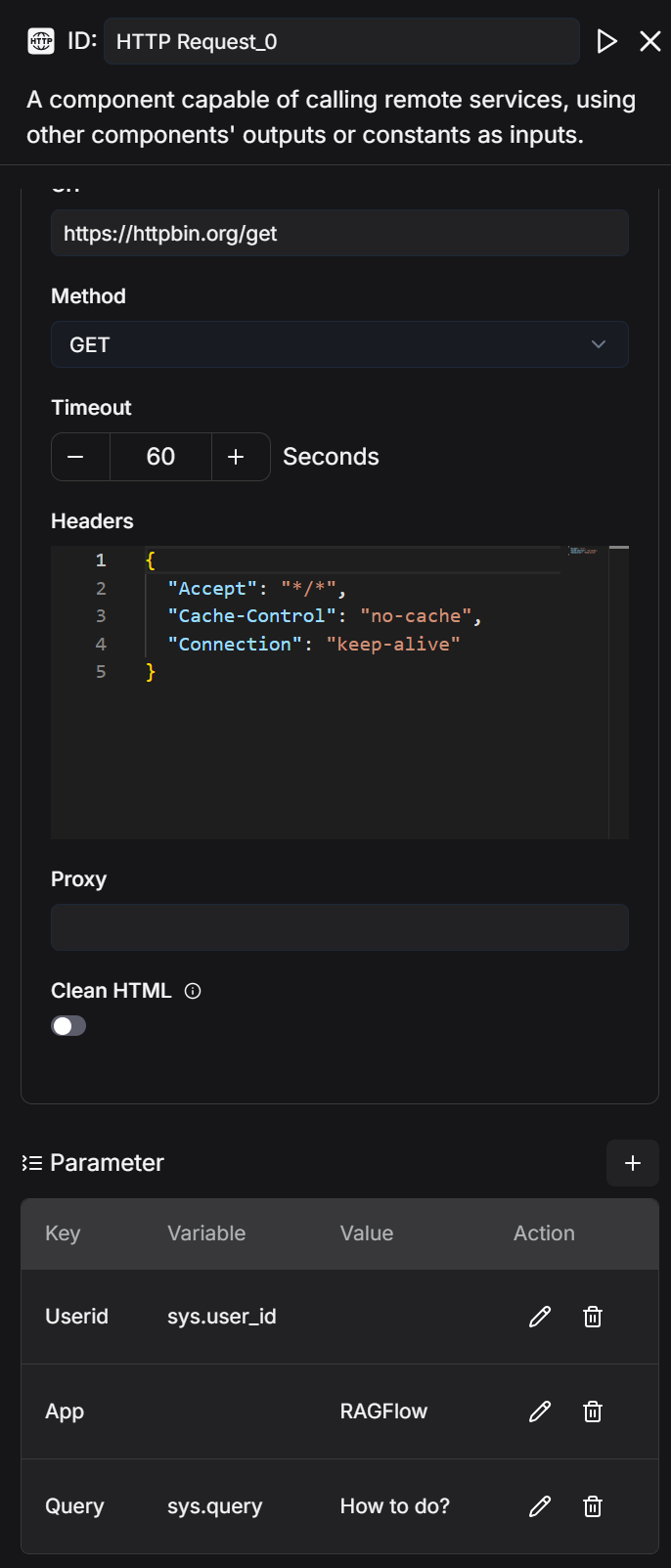
Example response
{ "args": { "App": "RAGFlow", "Query": "How to do?", "Userid": "241ed25a8e1011f0b979424ebc5b108b" }, "headers": { "Accept": "/", "Accept-Encoding": "gzip, deflate, br, zstd", "Cache-Control": "no-cache", "Host": "httpbin.org", "User-Agent": "python-requests/2.32.2", "X-Amzn-Trace-Id": "Root=1-68c9210c-5aab9088580c130a2f065523" }, "origin": "185.36.193.38", "url": "https://httpbin.org/get?Userid=241ed25a8e1011f0b979424ebc5b108b&App=RAGFlow&Query=How+to+do%3F" }
Output
The global variable name for the output of the HTTP request component, which can be referenced by other components in the workflow.
Result:stringThe response returned by the remote service.
Example
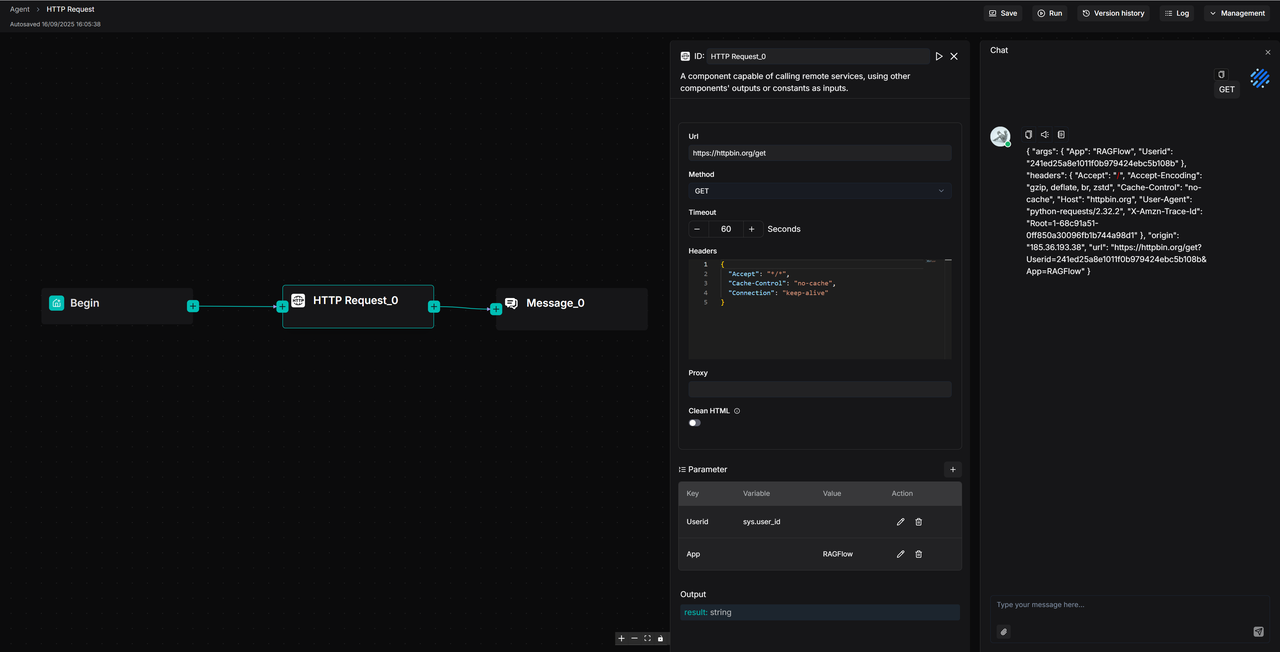
This is a usage example: a workflow sends a GET request from the Begin component to https://httpbin.org/get via the HTTP Request_0 component, passes parameters to the server, and finally outputs the result through the Message_0 component.