mirror of
https://github.com/infiniflow/ragflow.git
synced 2026-01-23 03:26:53 +08:00
Compare commits
7 Commits
v0.21.0
...
205a5eb9f5
| Author | SHA1 | Date | |
|---|---|---|---|
| 205a5eb9f5 | |||
| 8844826208 | |||
| 8fe4281d81 | |||
| fb1bedbd3c | |||
| 6e55b9146c | |||
| 071ea9c493 | |||
| 5037a28e4d |

@ -213,12 +213,8 @@ class AdminCLI(Cmd):
|
||||
|
||||
def onecmd(self, command: str) -> bool:
|
||||
try:
|
||||
# print(f"command: {command}")
|
||||
result = self.parse_command(command)
|
||||
|
||||
# if 'type' in result and result.get('type') == 'empty':
|
||||
# return False
|
||||
|
||||
if isinstance(result, dict):
|
||||
if 'type' in result and result.get('type') == 'empty':
|
||||
return False
|
||||
@ -341,9 +337,9 @@ class AdminCLI(Cmd):
|
||||
row = "|"
|
||||
for col in columns:
|
||||
value = str(item.get(col, ''))
|
||||
if len(value) > col_widths[col]:
|
||||
if get_string_width(value) > col_widths[col]:
|
||||
value = value[:col_widths[col] - 3] + "..."
|
||||
row += f" {value:<{col_widths[col]}} |"
|
||||
row += f" {value:<{col_widths[col] - (get_string_width(value) - len(value))}} |"
|
||||
print(row)
|
||||
|
||||
print(separator)
|
||||
@ -452,7 +448,7 @@ class AdminCLI(Cmd):
|
||||
if response.status_code == 200:
|
||||
self._print_table_simple(res_json['data'])
|
||||
else:
|
||||
print(f"Fail to get all users, code: {res_json['code']}, message: {res_json['message']}")
|
||||
print(f"Fail to get all services, code: {res_json['code']}, message: {res_json['message']}")
|
||||
|
||||
def _handle_show_service(self, command):
|
||||
service_id: int = command['number']
|
||||
@ -463,14 +459,14 @@ class AdminCLI(Cmd):
|
||||
res_json = response.json()
|
||||
if response.status_code == 200:
|
||||
res_data = res_json['data']
|
||||
if res_data['alive']:
|
||||
print(f"Service {res_data['service_name']} is alive. Detail:")
|
||||
if 'status' in res_data and res_data['status'] == 'alive':
|
||||
print(f"Service {res_data['service_name']} is alive, ")
|
||||
if isinstance(res_data['message'], str):
|
||||
print(res_data['message'])
|
||||
else:
|
||||
self._print_table_simple(res_data['message'])
|
||||
else:
|
||||
print(f"Service {res_data['service_name']} is down. Detail: {res_data['message']}")
|
||||
print(f"Service {res_data['service_name']} is down, {res_data['message']}")
|
||||
else:
|
||||
print(f"Fail to show service, code: {res_json['code']}, message: {res_json['message']}")
|
||||
|
||||
|
||||
@ -1,6 +1,6 @@
|
||||
[project]
|
||||
name = "ragflow-cli"
|
||||
version = "0.21.0.dev5"
|
||||
version = "0.21.0"
|
||||
description = "Admin Service's client of [RAGFlow](https://github.com/infiniflow/ragflow). The Admin Service provides user management and system monitoring. "
|
||||
authors = [{ name = "Lynn", email = "lynn_inf@hotmail.com" }]
|
||||
license = { text = "Apache License, Version 2.0" }
|
||||
|
||||
@ -26,6 +26,8 @@ from urllib.parse import urlparse
|
||||
|
||||
|
||||
class ServiceConfigs:
|
||||
configs = dict
|
||||
|
||||
def __init__(self):
|
||||
self.configs = []
|
||||
self.lock = threading.Lock()
|
||||
@ -229,7 +231,8 @@ def load_configurations(config_path: str) -> list[BaseConfig]:
|
||||
host: str = v['host']
|
||||
http_port: int = v['http_port']
|
||||
config = RAGFlowServerConfig(id=id_count, name=name, host=host, port=http_port,
|
||||
service_type="ragflow_server", detail_func_name="check_ragflow_server_alive")
|
||||
service_type="ragflow_server",
|
||||
detail_func_name="check_ragflow_server_alive")
|
||||
configurations.append(config)
|
||||
id_count += 1
|
||||
case "es":
|
||||
@ -254,7 +257,8 @@ def load_configurations(config_path: str) -> list[BaseConfig]:
|
||||
host = parts[0]
|
||||
port = int(parts[1])
|
||||
database: str = v.get('db_name', 'default_db')
|
||||
config = InfinityConfig(id=id_count, name=name, host=host, port=port, service_type="retrieval", retrieval_type="infinity",
|
||||
config = InfinityConfig(id=id_count, name=name, host=host, port=port, service_type="retrieval",
|
||||
retrieval_type="infinity",
|
||||
db_name=database, detail_func_name="get_infinity_status")
|
||||
configurations.append(config)
|
||||
id_count += 1
|
||||
@ -266,7 +270,8 @@ def load_configurations(config_path: str) -> list[BaseConfig]:
|
||||
port = int(parts[1])
|
||||
user = v.get('user')
|
||||
password = v.get('password')
|
||||
config = MinioConfig(id=id_count, name=name, host=host, port=port, user=user, password=password, service_type="file_store",
|
||||
config = MinioConfig(id=id_count, name=name, host=host, port=port, user=user, password=password,
|
||||
service_type="file_store",
|
||||
store_type="minio", detail_func_name="check_minio_alive")
|
||||
configurations.append(config)
|
||||
id_count += 1
|
||||
|
||||
@ -181,12 +181,12 @@ class ServiceMgr:
|
||||
config_dict = config.to_dict()
|
||||
try:
|
||||
service_detail = ServiceMgr.get_service_details(service_id)
|
||||
if service_detail['alive']:
|
||||
config_dict['status'] = 'Alive'
|
||||
if "status" in service_detail:
|
||||
config_dict['status'] = service_detail['status']
|
||||
else:
|
||||
config_dict['status'] = 'Timeout'
|
||||
config_dict['status'] = 'timeout'
|
||||
except Exception:
|
||||
config_dict['status'] = 'Timeout'
|
||||
config_dict['status'] = 'timeout'
|
||||
result.append(config_dict)
|
||||
return result
|
||||
|
||||
@ -206,7 +206,7 @@ class ServiceMgr:
|
||||
}
|
||||
service_info = service_config_mapping.get(service_id, {})
|
||||
if not service_info:
|
||||
raise AdminException(f"Invalid service_id: {service_id}")
|
||||
raise AdminException(f"invalid service_id: {service_id}")
|
||||
|
||||
detail_func = getattr(health_utils, service_info.get('detail_func_name'))
|
||||
res = detail_func()
|
||||
|
||||
@ -74,12 +74,12 @@ def get_es_cluster_stats() -> dict:
|
||||
raise Exception("Elasticsearch is not in use.")
|
||||
try:
|
||||
return {
|
||||
"alive": True,
|
||||
"status": "alive",
|
||||
"message": ESConnection().get_cluster_stats()
|
||||
}
|
||||
except Exception as e:
|
||||
return {
|
||||
"alive": False,
|
||||
"status": "timeout",
|
||||
"message": f"error: {str(e)}",
|
||||
}
|
||||
|
||||
@ -90,12 +90,12 @@ def get_infinity_status():
|
||||
raise Exception("Infinity is not in use.")
|
||||
try:
|
||||
return {
|
||||
"alive": True,
|
||||
"status": "alive",
|
||||
"message": InfinityConnection().health()
|
||||
}
|
||||
except Exception as e:
|
||||
return {
|
||||
"alive": False,
|
||||
"status": "timeout",
|
||||
"message": f"error: {str(e)}",
|
||||
}
|
||||
|
||||
@ -107,12 +107,12 @@ def get_mysql_status():
|
||||
headers = ['id', 'user', 'host', 'db', 'command', 'time', 'state', 'info']
|
||||
cursor.close()
|
||||
return {
|
||||
"alive": True,
|
||||
"status": "alive",
|
||||
"message": [dict(zip(headers, r)) for r in res_rows]
|
||||
}
|
||||
except Exception as e:
|
||||
return {
|
||||
"alive": False,
|
||||
"status": "timeout",
|
||||
"message": f"error: {str(e)}",
|
||||
}
|
||||
|
||||
@ -122,12 +122,12 @@ def check_minio_alive():
|
||||
try:
|
||||
response = requests.get(f'http://{rag_settings.MINIO["host"]}/minio/health/live')
|
||||
if response.status_code == 200:
|
||||
return {'alive': True, "message": f"Confirm elapsed: {(timer() - start_time) * 1000.0:.1f} ms."}
|
||||
return {"status": "alive", "message": f"Confirm elapsed: {(timer() - start_time) * 1000.0:.1f} ms."}
|
||||
else:
|
||||
return {'alive': False, "message": f"Confirm elapsed: {(timer() - start_time) * 1000.0:.1f} ms."}
|
||||
return {"status": "timeout", "message": f"Confirm elapsed: {(timer() - start_time) * 1000.0:.1f} ms."}
|
||||
except Exception as e:
|
||||
return {
|
||||
"alive": False,
|
||||
"status": "timeout",
|
||||
"message": f"error: {str(e)}",
|
||||
}
|
||||
|
||||
@ -135,12 +135,12 @@ def check_minio_alive():
|
||||
def get_redis_info():
|
||||
try:
|
||||
return {
|
||||
"alive": True,
|
||||
"status": "alive",
|
||||
"message": REDIS_CONN.info()
|
||||
}
|
||||
except Exception as e:
|
||||
return {
|
||||
"alive": False,
|
||||
"status": "timeout",
|
||||
"message": f"error: {str(e)}",
|
||||
}
|
||||
|
||||
@ -150,12 +150,12 @@ def check_ragflow_server_alive():
|
||||
try:
|
||||
response = requests.get(f'http://{settings.HOST_IP}:{settings.HOST_PORT}/v1/system/ping')
|
||||
if response.status_code == 200:
|
||||
return {'alive': True, "message": f"Confirm elapsed: {(timer() - start_time) * 1000.0:.1f} ms."}
|
||||
return {"status": "alive", "message": f"Confirm elapsed: {(timer() - start_time) * 1000.0:.1f} ms."}
|
||||
else:
|
||||
return {'alive': False, "message": f"Confirm elapsed: {(timer() - start_time) * 1000.0:.1f} ms."}
|
||||
return {"status": "timeout", "message": f"Confirm elapsed: {(timer() - start_time) * 1000.0:.1f} ms."}
|
||||
except Exception as e:
|
||||
return {
|
||||
"alive": False,
|
||||
"status": "timeout",
|
||||
"message": f"error: {str(e)}",
|
||||
}
|
||||
|
||||
@ -192,9 +192,7 @@ def run_health_checks() -> tuple[dict, bool]:
|
||||
except Exception:
|
||||
result["storage"] = "nok"
|
||||
|
||||
|
||||
all_ok = (result.get("db") == "ok") and (result.get("redis") == "ok") and (result.get("doc_engine") == "ok") and (result.get("storage") == "ok")
|
||||
all_ok = (result.get("db") == "ok") and (result.get("redis") == "ok") and (result.get("doc_engine") == "ok") and (
|
||||
result.get("storage") == "ok")
|
||||
result["status"] = "ok" if all_ok else "nok"
|
||||
return result, all_ok
|
||||
|
||||
|
||||
|
||||
@ -37,7 +37,7 @@ This section covers the following topics:
|
||||
|
||||
### Select chunking method
|
||||
|
||||
RAGFlow offers multiple chunking template to facilitate chunking files of different layouts and ensure semantic integrity. In **Chunking method**, you can choose the default template that suits the layouts and formats of your files. The following table shows the descriptions and the compatible file formats of each supported chunk template:
|
||||
RAGFlow offers multiple built-in chunking template to facilitate chunking files of different layouts and ensure semantic integrity. From the **Built-in** chunking method dropdown under **Parse type**, you can choose the default template that suits the layouts and formats of your files. The following table shows the descriptions and the compatible file formats of each supported chunk template:
|
||||
|
||||
| **Template** | Description | File format |
|
||||
|--------------|-----------------------------------------------------------------------|-----------------------------------------------------------------------------------------------|
|
||||
@ -54,9 +54,26 @@ RAGFlow offers multiple chunking template to facilitate chunking files of differ
|
||||
| One | Each document is chunked in its entirety (as one). | DOCX, XLSX, XLS (Excel 97-2003), PDF, TXT |
|
||||
| Tag | The dataset functions as a tag set for the others. | XLSX, CSV/TXT |
|
||||
|
||||
You can also change a file's chunking method on the **Datasets** page.
|
||||
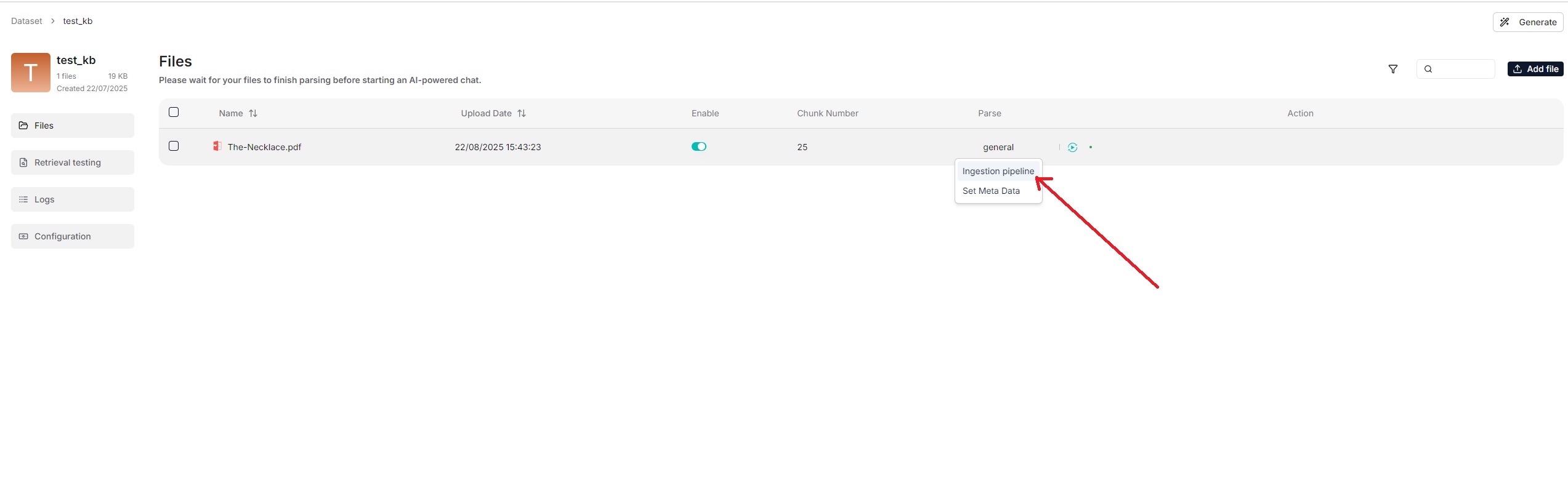
You can also change a file's chunking method on the **Files** page.
|
||||
|
||||
|
||||
|
||||
|
||||
:::tip NOTE
|
||||
From v0.21.0, RAGFlow supports ingestion pipeline to allow for customized
|
||||
|
||||
<details>
|
||||
<summary>From v0.21.0 onward, RAGFlow supports ingestion pipeline to allow for customized data ingestion and cleansing workflows.</summary>
|
||||
|
||||
To use a customized data pipeline:
|
||||
|
||||
1. On the **Agent** page, click **+ Create agent** > **Create from blank**.
|
||||
2. Select **Ingestion pipeline** and name your data pipeline in the popup, then click **Save** to show the data pipeline canvas.
|
||||
3. After updating your data pipeline, click **Save** on the top right of the canvas.
|
||||
4. Navigate to the **Configuration** page of your dataset, select **Choose pipeline** in **Ingestion pipeline**.
|
||||
|
||||
*Your saved data pipeline will appear in the dropdown menu below.*
|
||||
|
||||
</details>
|
||||
|
||||
### Select embedding model
|
||||
|
||||
|
||||
@ -53,25 +53,31 @@ Whether to enable entity resolution. You can think of this as an entity deduplic
|
||||
- (Default) Disable entity resolution.
|
||||
- Enable entity resolution. This option consumes more tokens.
|
||||
|
||||
### Community report generation
|
||||
### Community reports
|
||||
|
||||
In a knowledge graph, a community is a cluster of entities linked by relationships. You can have the LLM generate an abstract for each community, known as a community report. See [here](https://www.microsoft.com/en-us/research/blog/graphrag-improving-global-search-via-dynamic-community-selection/) for more information. This indicates whether to generate community reports:
|
||||
|
||||
- Generate community reports. This option consumes more tokens.
|
||||
- (Default) Do not generate community reports.
|
||||
|
||||
## Procedure
|
||||
## Quickstart
|
||||
|
||||
1. On the **Configuration** page of your dataset, switch on **Extract knowledge graph** or adjust its settings as needed, and click **Save** to confirm your changes.
|
||||
1. Navigate to the **Configuration** page of your dataset and update:
|
||||
|
||||
- Entity types: *Required* - Specifies the entity types in the knowledge graph to generate. You don't have to stick with the default, but you need to customize them for your documents.
|
||||
- Method: *Optional*
|
||||
- Entity resolution: *Optional*
|
||||
- Community reports: *Optional*
|
||||
*The default knowledge graph configurations for your dataset are now set.*
|
||||
|
||||
- *The default knowledge graph configurations for your dataset are now set and files uploaded from this point onward will automatically use these settings during parsing.*
|
||||
- *Files parsed before this update will retain their original knowledge graph settings.*
|
||||
2. Navigate to the **Files** page of your dataset, click the **Generate** button on the top right corner of the page, then select **Knowledge graph** from the dropdown to initiate the knowledge graph generation process.
|
||||
|
||||
2. The knowledge graph of your dataset does *not* automatically update *until* a newly uploaded file is parsed.
|
||||
*You can click the pause button in the dropdown to halt the build process when necessary.*
|
||||
|
||||
_A **Knowledge graph** entry appears under **Configuration** once a knowledge graph is created._
|
||||
3. Go back to the **Configuration** page:
|
||||
|
||||
*Once a knowledge graph is generated, the **Knowledge graph** field changes from `Not generated` to `Generated at a specific timestamp`. You can delete it by clicking the recycle bin button to the right of the field.*
|
||||
|
||||
3. Click **Knowledge graph** to view the details of the generated graph.
|
||||
4. To use the created knowledge graph, do either of the following:
|
||||
|
||||
- In the **Chat setting** panel of your chat app, switch on the **Use knowledge graph** toggle.
|
||||
@ -79,17 +85,13 @@ In a knowledge graph, a community is a cluster of entities linked by relationshi
|
||||
|
||||
## Frequently asked questions
|
||||
|
||||
### Can I have different knowledge graph settings for different files in my dataset?
|
||||
|
||||
Yes, you can. Just one graph is generated per dataset. The smaller graphs of your files will be *combined* into one big, unified graph at the end of the graph extraction process.
|
||||
|
||||
### Does the knowledge graph automatically update when I remove a related file?
|
||||
|
||||
Nope. The knowledge graph does *not* automatically update *until* a newly uploaded document is parsed.
|
||||
Nope. The knowledge graph does *not* update *until* you regenerate a knowledge graph for your dataset.
|
||||
|
||||
### How to remove a generated knowledge graph?
|
||||
|
||||
To remove the generated knowledge graph, delete all related files in your dataset. Although the **Knowledge graph** entry will still be visible, the graph has actually been deleted.
|
||||
On the **Configuration** page of your dataset, find the **Knoweledge graph** field and click the recycle bin button to the right of the field.
|
||||
|
||||
### Where is the created knowledge graph stored?
|
||||
|
||||
|
||||
@ -72,3 +72,22 @@ The maximum number of clusters to create. Defaults to 64, with a maximum limit o
|
||||
### Random seed
|
||||
|
||||
A random seed. Click **+** to change the seed value.
|
||||
|
||||
## Quickstart
|
||||
|
||||
1. Navigate to the **Configuration** page of your dataset and update:
|
||||
|
||||
- Prompt: *Optional* - We recommend that you keep it as-is until you understand the mechanism behind.
|
||||
- Max token: *Optional*
|
||||
- Threshold: *Optional*
|
||||
- Max cluster: *Optional*
|
||||
|
||||
2. Navigate to the **Files** page of your dataset, click the **Generate** button on the top right corner of the page, then select **RAPTOR** from the dropdown to initiate the RAPTOR build process.
|
||||
|
||||
*You can click the pause button in the dropdown to halt the build process when necessary.*
|
||||
|
||||
3. Go back to the **Configuration** page:
|
||||
|
||||
*The **RAPTOR** field changes from `Not generated` to `Generated at a specific timestamp` when a RAPTOR hierarchical tree structure is generated. You can delete it by clicking the recycle bin button to the right of the field.*
|
||||
|
||||
4. Once a RAPTOR hierarchical tree structure is generated, your chat assistant and **Retrieval** agent component will use it for retrieval as a default.
|
||||
|
||||
@ -343,19 +343,20 @@ You can add keywords or questions to a file chunk to improve its ranking for que
|
||||
|
||||
Conversations in RAGFlow are based on a particular dataset or multiple datasets. Once you have created your dataset and finished file parsing, you can go ahead and start an AI conversation.
|
||||
|
||||
1. Click the **Chat** tab in the middle top of the mage **>** **Create an assistant** to show the **Chat Configuration** dialogue *of your next dialogue*.
|
||||
1. Click the **Chat** tab in the middle top of the page **>** **Create chat** to create a chat assistant.
|
||||
2. Click the created chat app to enter its configuration page.
|
||||
> RAGFlow offer the flexibility of choosing a different chat model for each dialogue, while allowing you to set the default models in **System Model Settings**.
|
||||
|
||||
2. Update **Assistant settings**:
|
||||
2. Update **Chat setting** on the right of the configuration page:
|
||||
|
||||
- Name your assistant and specify your datasets.
|
||||
- **Empty response**:
|
||||
- If you wish to *confine* RAGFlow's answers to your datasets, leave a response here. Then when it doesn't retrieve an answer, it *uniformly* responds with what you set here.
|
||||
- If you wish RAGFlow to *improvise* when it doesn't retrieve an answer from your datasets, leave it blank, which may give rise to hallucinations.
|
||||
|
||||
3. Update **Prompt engine** or leave it as is for the beginning.
|
||||
3. Update **System prompt** or leave it as is for the beginning.
|
||||
|
||||
4. Update **Model settings**.
|
||||
4. Select a chat model in the **Model** dropdown list.
|
||||
|
||||
5. Now, let's start the show:
|
||||
|
||||
|
||||
@ -45,7 +45,7 @@ Released on October 15, 2025.
|
||||
- Claude Sonnet 4.5
|
||||
- Meituan LongCat-Flash-Thinking
|
||||
|
||||
## New agent templates
|
||||
### New agent templates
|
||||
|
||||
- Company Research Report Deep Dive Agent: Designed for financial institutions to help analysts quickly organize information, generate research reports, and make investment decisions.
|
||||
- Orchestratable Ingestion Pipeline Template: Allows users to apply this template on the canvas to rapidly establish standardized data ingestion and cleansing processes.
|
||||
|
||||
@ -227,7 +227,7 @@ class Extractor:
|
||||
async def _handle_entity_relation_summary(self, entity_or_relation_name: str, description: str) -> str:
|
||||
summary_max_tokens = 512
|
||||
use_description = truncate(description, summary_max_tokens)
|
||||
description_list = (use_description.split(GRAPH_FIELD_SEP),)
|
||||
description_list = use_description.split(GRAPH_FIELD_SEP)
|
||||
if len(description_list) <= 12:
|
||||
return use_description
|
||||
prompt_template = SUMMARIZE_DESCRIPTIONS_PROMPT
|
||||
|
||||
@ -44,7 +44,7 @@ dependencies = [
|
||||
"groq==0.9.0",
|
||||
"hanziconv==0.3.2",
|
||||
"html-text==0.6.2",
|
||||
"httpx[socks]==0.27.2",
|
||||
"httpx[socks]>=0.28.1,<0.29.0",
|
||||
"huggingface-hub>=0.25.0,<0.26.0",
|
||||
"infinity-sdk==0.6.0",
|
||||
"infinity-emb>=0.0.66,<0.0.67",
|
||||
@ -56,7 +56,7 @@ dependencies = [
|
||||
"mistralai==0.4.2",
|
||||
"nltk==3.9.1",
|
||||
"numpy>=1.26.0,<2.0.0",
|
||||
"ollama==0.2.1",
|
||||
"ollama>=0.5.0",
|
||||
"onnxruntime==1.19.2; sys_platform == 'darwin' or platform_machine != 'x86_64'",
|
||||
"onnxruntime-gpu==1.19.2; sys_platform != 'darwin' and platform_machine == 'x86_64'",
|
||||
"openai>=1.45.0",
|
||||
@ -102,7 +102,8 @@ dependencies = [
|
||||
"tika==2.6.0",
|
||||
"tiktoken==0.7.0",
|
||||
"umap_learn==0.5.6",
|
||||
"vertexai==1.64.0",
|
||||
"vertexai==1.70.0",
|
||||
"google-genai>=1.41.0,<2.0.0",
|
||||
"volcengine==1.0.194",
|
||||
"voyageai==0.2.3",
|
||||
"webdriver-manager==4.0.1",
|
||||
@ -113,7 +114,7 @@ dependencies = [
|
||||
"xpinyin==0.7.6",
|
||||
"yfinance==0.2.65",
|
||||
"zhipuai==2.0.1",
|
||||
"google-generativeai>=0.8.1,<0.9.0",
|
||||
"google-generativeai>=0.8.1,<0.9.0", # Needed for cv_model and embedding_model
|
||||
"python-docx>=1.1.2,<2.0.0",
|
||||
"pypdf2>=3.0.1,<4.0.0",
|
||||
"graspologic>=3.4.1,<4.0.0",
|
||||
|
||||
@ -1165,15 +1165,13 @@ class GoogleChat(Base):
|
||||
else:
|
||||
self.client = AnthropicVertex(region=region, project_id=project_id)
|
||||
else:
|
||||
import vertexai.generative_models as glm
|
||||
from google.cloud import aiplatform
|
||||
from google import genai
|
||||
|
||||
if access_token:
|
||||
credits = service_account.Credentials.from_service_account_info(access_token)
|
||||
aiplatform.init(credentials=credits, project=project_id, location=region)
|
||||
credits = service_account.Credentials.from_service_account_info(access_token, scopes=scopes)
|
||||
self.client = genai.Client(vertexai=True, project=project_id, location=region, credentials=credits)
|
||||
else:
|
||||
aiplatform.init(project=project_id, location=region)
|
||||
self.client = glm.GenerativeModel(model_name=self.model_name)
|
||||
self.client = genai.Client(vertexai=True, project=project_id, location=region)
|
||||
|
||||
def _clean_conf(self, gen_conf):
|
||||
if "claude" in self.model_name:
|
||||
@ -1188,38 +1186,11 @@ class GoogleChat(Base):
|
||||
del gen_conf[k]
|
||||
return gen_conf
|
||||
|
||||
def _get_thinking_config(self, gen_conf):
|
||||
"""Extract and create ThinkingConfig from gen_conf.
|
||||
|
||||
Default behavior for Vertex AI Generative Models: thinking_budget=0 (disabled)
|
||||
unless explicitly specified by the user. This does not apply to Claude models.
|
||||
|
||||
Users can override by setting thinking_budget in gen_conf/llm_setting:
|
||||
- 0: Disabled (default)
|
||||
- 1-24576: Manual budget
|
||||
- -1: Auto (model decides)
|
||||
"""
|
||||
# Claude models don't support ThinkingConfig
|
||||
if "claude" in self.model_name:
|
||||
gen_conf.pop("thinking_budget", None)
|
||||
return None
|
||||
|
||||
# For Vertex AI Generative Models, default to thinking disabled
|
||||
thinking_budget = gen_conf.pop("thinking_budget", 0)
|
||||
|
||||
if thinking_budget is not None:
|
||||
try:
|
||||
import vertexai.generative_models as glm # type: ignore
|
||||
return glm.ThinkingConfig(thinking_budget=thinking_budget)
|
||||
except Exception:
|
||||
pass
|
||||
return None
|
||||
|
||||
def _chat(self, history, gen_conf={}, **kwargs):
|
||||
system = history[0]["content"] if history and history[0]["role"] == "system" else ""
|
||||
thinking_config = self._get_thinking_config(gen_conf)
|
||||
gen_conf = self._clean_conf(gen_conf)
|
||||
|
||||
if "claude" in self.model_name:
|
||||
gen_conf = self._clean_conf(gen_conf)
|
||||
response = self.client.messages.create(
|
||||
model=self.model_name,
|
||||
messages=[h for h in history if h["role"] != "system"],
|
||||
@ -1235,28 +1206,63 @@ class GoogleChat(Base):
|
||||
response["usage"]["input_tokens"] + response["usage"]["output_tokens"],
|
||||
)
|
||||
|
||||
self.client._system_instruction = system
|
||||
hist = []
|
||||
# Gemini models with google-genai SDK
|
||||
# Set default thinking_budget=0 if not specified
|
||||
if "thinking_budget" not in gen_conf:
|
||||
gen_conf["thinking_budget"] = 0
|
||||
|
||||
thinking_budget = gen_conf.pop("thinking_budget", 0)
|
||||
gen_conf = self._clean_conf(gen_conf)
|
||||
|
||||
# Build GenerateContentConfig
|
||||
try:
|
||||
from google.genai.types import GenerateContentConfig, ThinkingConfig, Content, Part
|
||||
except ImportError as e:
|
||||
logging.error(f"[GoogleChat] Failed to import google-genai: {e}. Please install: pip install google-genai>=1.41.0")
|
||||
raise
|
||||
|
||||
config_dict = {}
|
||||
if system:
|
||||
config_dict["system_instruction"] = system
|
||||
if "temperature" in gen_conf:
|
||||
config_dict["temperature"] = gen_conf["temperature"]
|
||||
if "top_p" in gen_conf:
|
||||
config_dict["top_p"] = gen_conf["top_p"]
|
||||
if "max_output_tokens" in gen_conf:
|
||||
config_dict["max_output_tokens"] = gen_conf["max_output_tokens"]
|
||||
|
||||
# Add ThinkingConfig
|
||||
config_dict["thinking_config"] = ThinkingConfig(thinking_budget=thinking_budget)
|
||||
|
||||
config = GenerateContentConfig(**config_dict)
|
||||
|
||||
# Convert history to google-genai Content format
|
||||
contents = []
|
||||
for item in history:
|
||||
if item["role"] == "system":
|
||||
continue
|
||||
hist.append(deepcopy(item))
|
||||
item = hist[-1]
|
||||
if "role" in item and item["role"] == "assistant":
|
||||
item["role"] = "model"
|
||||
if "content" in item:
|
||||
item["parts"] = [
|
||||
{
|
||||
"text": item.pop("content"),
|
||||
}
|
||||
]
|
||||
# google-genai uses 'model' instead of 'assistant'
|
||||
role = "model" if item["role"] == "assistant" else item["role"]
|
||||
content = Content(
|
||||
role=role,
|
||||
parts=[Part(text=item["content"])]
|
||||
)
|
||||
contents.append(content)
|
||||
|
||||
response = self.client.models.generate_content(
|
||||
model=self.model_name,
|
||||
contents=contents,
|
||||
config=config
|
||||
)
|
||||
|
||||
if thinking_config:
|
||||
response = self.client.generate_content(hist, generation_config=gen_conf, thinking_config=thinking_config)
|
||||
else:
|
||||
response = self.client.generate_content(hist, generation_config=gen_conf)
|
||||
ans = response.text
|
||||
return ans, response.usage_metadata.total_token_count
|
||||
# Get token count from response
|
||||
try:
|
||||
total_tokens = response.usage_metadata.total_token_count
|
||||
except Exception:
|
||||
total_tokens = 0
|
||||
|
||||
return ans, total_tokens
|
||||
|
||||
def chat_streamly(self, system, history, gen_conf={}, **kwargs):
|
||||
if "claude" in self.model_name:
|
||||
@ -1283,34 +1289,59 @@ class GoogleChat(Base):
|
||||
|
||||
yield total_tokens
|
||||
else:
|
||||
response = None
|
||||
total_tokens = 0
|
||||
self.client._system_instruction = system
|
||||
thinking_config = self._get_thinking_config(gen_conf)
|
||||
if "max_tokens" in gen_conf:
|
||||
gen_conf["max_output_tokens"] = gen_conf["max_tokens"]
|
||||
del gen_conf["max_tokens"]
|
||||
for k in list(gen_conf.keys()):
|
||||
if k not in ["temperature", "top_p", "max_output_tokens"]:
|
||||
del gen_conf[k]
|
||||
for item in history:
|
||||
if "role" in item and item["role"] == "assistant":
|
||||
item["role"] = "model"
|
||||
if "content" in item:
|
||||
item["parts"] = [
|
||||
{
|
||||
"text": item.pop("content"),
|
||||
}
|
||||
]
|
||||
# Gemini models with google-genai SDK
|
||||
ans = ""
|
||||
total_tokens = 0
|
||||
|
||||
# Set default thinking_budget=0 if not specified
|
||||
if "thinking_budget" not in gen_conf:
|
||||
gen_conf["thinking_budget"] = 0
|
||||
|
||||
thinking_budget = gen_conf.pop("thinking_budget", 0)
|
||||
gen_conf = self._clean_conf(gen_conf)
|
||||
|
||||
# Build GenerateContentConfig
|
||||
try:
|
||||
if thinking_config:
|
||||
response = self.client.generate_content(history, generation_config=gen_conf, thinking_config=thinking_config, stream=True)
|
||||
else:
|
||||
response = self.client.generate_content(history, generation_config=gen_conf, stream=True)
|
||||
for resp in response:
|
||||
ans = resp.text
|
||||
total_tokens += num_tokens_from_string(ans)
|
||||
from google.genai.types import GenerateContentConfig, ThinkingConfig, Content, Part
|
||||
except ImportError as e:
|
||||
logging.error(f"[GoogleChat] Failed to import google-genai: {e}. Please install: pip install google-genai>=1.41.0")
|
||||
raise
|
||||
|
||||
config_dict = {}
|
||||
if system:
|
||||
config_dict["system_instruction"] = system
|
||||
if "temperature" in gen_conf:
|
||||
config_dict["temperature"] = gen_conf["temperature"]
|
||||
if "top_p" in gen_conf:
|
||||
config_dict["top_p"] = gen_conf["top_p"]
|
||||
if "max_output_tokens" in gen_conf:
|
||||
config_dict["max_output_tokens"] = gen_conf["max_output_tokens"]
|
||||
|
||||
# Add ThinkingConfig
|
||||
config_dict["thinking_config"] = ThinkingConfig(thinking_budget=thinking_budget)
|
||||
|
||||
config = GenerateContentConfig(**config_dict)
|
||||
|
||||
# Convert history to google-genai Content format
|
||||
contents = []
|
||||
for item in history:
|
||||
# google-genai uses 'model' instead of 'assistant'
|
||||
role = "model" if item["role"] == "assistant" else item["role"]
|
||||
content = Content(
|
||||
role=role,
|
||||
parts=[Part(text=item["content"])]
|
||||
)
|
||||
contents.append(content)
|
||||
|
||||
try:
|
||||
for chunk in self.client.models.generate_content_stream(
|
||||
model=self.model_name,
|
||||
contents=contents,
|
||||
config=config
|
||||
):
|
||||
text = chunk.text
|
||||
ans = text
|
||||
total_tokens += num_tokens_from_string(text)
|
||||
yield ans
|
||||
|
||||
except Exception as e:
|
||||
|
||||
53
uv.lock
generated
53
uv.lock
generated
@ -2017,7 +2017,7 @@ wheels = [
|
||||
|
||||
[[package]]
|
||||
name = "google-cloud-aiplatform"
|
||||
version = "1.64.0"
|
||||
version = "1.70.0"
|
||||
source = { registry = "https://pypi.tuna.tsinghua.edu.cn/simple" }
|
||||
dependencies = [
|
||||
{ name = "docstring-parser" },
|
||||
@ -2032,9 +2032,9 @@ dependencies = [
|
||||
{ name = "pydantic" },
|
||||
{ name = "shapely" },
|
||||
]
|
||||
sdist = { url = "https://pypi.tuna.tsinghua.edu.cn/packages/5e/e3/f86b429d000a9c25f25bcd122e4b6286aeef70a89acfd6ea088324af016c/google-cloud-aiplatform-1.64.0.tar.gz", hash = "sha256:475a612829b283eb8f783e773d37115c30db42e2e50065c8653db0c9bd18b0da", size = 6258492, upload-time = "2024-08-28T01:03:24.573Z" }
|
||||
sdist = { url = "https://pypi.tuna.tsinghua.edu.cn/packages/88/06/bc8028c03d4bedb85114c780a9f749b67ff06ce29d25dc7f1a99622f2692/google-cloud-aiplatform-1.70.0.tar.gz", hash = "sha256:e8edef6dbc7911380d0ea55c47544e799f62b891cb1a83b504ca1c09fff9884b", size = 6311624, upload-time = "2024-10-09T04:28:12.606Z" }
|
||||
wheels = [
|
||||
{ url = "https://pypi.tuna.tsinghua.edu.cn/packages/7a/c5/cdf0eaeded413d5f6221f9c4f466a7714c79a1938c2f7221467d4a9b9859/google_cloud_aiplatform-1.64.0-py2.py3-none-any.whl", hash = "sha256:3a79ce2ec047868c348336624a60993464ca977fd258bcf609cc79309a8101c4", size = 5228409, upload-time = "2024-08-28T01:03:21.275Z" },
|
||||
{ url = "https://pypi.tuna.tsinghua.edu.cn/packages/46/d9/280e5a9b5caf69322f64fa55f62bf447d76c5fe30e8df6e93373f22c4bd7/google_cloud_aiplatform-1.70.0-py2.py3-none-any.whl", hash = "sha256:690e6041f03d3aa85102ac3f316c958d6f43a99aefb7fb3f8938dee56d08abd9", size = 5267225, upload-time = "2024-10-09T04:28:09.271Z" },
|
||||
]
|
||||
|
||||
[[package]]
|
||||
@ -2129,6 +2129,25 @@ wheels = [
|
||||
{ url = "https://pypi.tuna.tsinghua.edu.cn/packages/fd/3c/2a19a60a473de48717b4efb19398c3f914795b64a96cf3fbe82588044f78/google_crc32c-1.7.1-pp311-pypy311_pp73-manylinux_2_17_x86_64.manylinux2014_x86_64.whl", hash = "sha256:6efb97eb4369d52593ad6f75e7e10d053cf00c48983f7a973105bc70b0ac4d82", size = 28048, upload-time = "2025-03-26T14:41:46.696Z" },
|
||||
]
|
||||
|
||||
[[package]]
|
||||
name = "google-genai"
|
||||
version = "1.43.0"
|
||||
source = { registry = "https://pypi.tuna.tsinghua.edu.cn/simple" }
|
||||
dependencies = [
|
||||
{ name = "anyio" },
|
||||
{ name = "google-auth" },
|
||||
{ name = "httpx" },
|
||||
{ name = "pydantic" },
|
||||
{ name = "requests" },
|
||||
{ name = "tenacity" },
|
||||
{ name = "typing-extensions" },
|
||||
{ name = "websockets" },
|
||||
]
|
||||
sdist = { url = "https://pypi.tuna.tsinghua.edu.cn/packages/c1/75/992ca4462682949750709678b8efbc865222c9a16cf34504b69c5459606c/google_genai-1.43.0.tar.gz", hash = "sha256:84eb219d320759c5882bc2cdb4e2ac84544d00f5d12c7892c79fb03d71bfc9a4", size = 236132, upload-time = "2025-10-10T23:16:40.131Z" }
|
||||
wheels = [
|
||||
{ url = "https://pypi.tuna.tsinghua.edu.cn/packages/61/85/e90dda488d5044e6e4cd1b49e7e7f0cc7f4a2a1c8004e88a5122d42ea024/google_genai-1.43.0-py3-none-any.whl", hash = "sha256:be1d4b1acab268125d536fd81b73c38694a70cb08266759089154718924434fd", size = 236733, upload-time = "2025-10-10T23:16:38.809Z" },
|
||||
]
|
||||
|
||||
[[package]]
|
||||
name = "google-generativeai"
|
||||
version = "0.8.5"
|
||||
@ -2472,18 +2491,17 @@ wheels = [
|
||||
|
||||
[[package]]
|
||||
name = "httpx"
|
||||
version = "0.27.2"
|
||||
version = "0.28.1"
|
||||
source = { registry = "https://pypi.tuna.tsinghua.edu.cn/simple" }
|
||||
dependencies = [
|
||||
{ name = "anyio" },
|
||||
{ name = "certifi" },
|
||||
{ name = "httpcore" },
|
||||
{ name = "idna" },
|
||||
{ name = "sniffio" },
|
||||
]
|
||||
sdist = { url = "https://pypi.tuna.tsinghua.edu.cn/packages/78/82/08f8c936781f67d9e6b9eeb8a0c8b4e406136ea4c3d1f89a5db71d42e0e6/httpx-0.27.2.tar.gz", hash = "sha256:f7c2be1d2f3c3c3160d441802406b206c2b76f5947b11115e6df10c6c65e66c2", size = 144189, upload-time = "2024-08-27T12:54:01.334Z" }
|
||||
sdist = { url = "https://pypi.tuna.tsinghua.edu.cn/packages/b1/df/48c586a5fe32a0f01324ee087459e112ebb7224f646c0b5023f5e79e9956/httpx-0.28.1.tar.gz", hash = "sha256:75e98c5f16b0f35b567856f597f06ff2270a374470a5c2392242528e3e3e42fc", size = 141406, upload-time = "2024-12-06T15:37:23.222Z" }
|
||||
wheels = [
|
||||
{ url = "https://pypi.tuna.tsinghua.edu.cn/packages/56/95/9377bcb415797e44274b51d46e3249eba641711cf3348050f76ee7b15ffc/httpx-0.27.2-py3-none-any.whl", hash = "sha256:7bb2708e112d8fdd7829cd4243970f0c223274051cb35ee80c03301ee29a3df0", size = 76395, upload-time = "2024-08-27T12:53:59.653Z" },
|
||||
{ url = "https://pypi.tuna.tsinghua.edu.cn/packages/2a/39/e50c7c3a983047577ee07d2a9e53faf5a69493943ec3f6a384bdc792deb2/httpx-0.28.1-py3-none-any.whl", hash = "sha256:d909fcccc110f8c7faf814ca82a9a4d816bc5a6dbfea25d6591d6985b8ba59ad", size = 73517, upload-time = "2024-12-06T15:37:21.509Z" },
|
||||
]
|
||||
|
||||
[package.optional-dependencies]
|
||||
@ -3883,14 +3901,15 @@ wheels = [
|
||||
|
||||
[[package]]
|
||||
name = "ollama"
|
||||
version = "0.2.1"
|
||||
version = "0.6.0"
|
||||
source = { registry = "https://pypi.tuna.tsinghua.edu.cn/simple" }
|
||||
dependencies = [
|
||||
{ name = "httpx" },
|
||||
{ name = "pydantic" },
|
||||
]
|
||||
sdist = { url = "https://pypi.tuna.tsinghua.edu.cn/packages/aa/2b/bda3e59080b136e90367bebb67d5072922a912f0e0b6f49be1b4eb79c109/ollama-0.2.1.tar.gz", hash = "sha256:fa316baa9a81eac3beb4affb0a17deb3008fdd6ed05b123c26306cfbe4c349b6", size = 9918, upload-time = "2024-06-05T19:00:52.447Z" }
|
||||
sdist = { url = "https://pypi.tuna.tsinghua.edu.cn/packages/d6/47/f9ee32467fe92744474a8c72e138113f3b529fc266eea76abfdec9a33f3b/ollama-0.6.0.tar.gz", hash = "sha256:da2b2d846b5944cfbcee1ca1e6ee0585f6c9d45a2fe9467cbcd096a37383da2f", size = 50811, upload-time = "2025-09-24T22:46:02.417Z" }
|
||||
wheels = [
|
||||
{ url = "https://pypi.tuna.tsinghua.edu.cn/packages/7d/b7/8cc05807bfbc5b92da7fb94c525e1e56572a08eea7cdf3656e6c5dc6f9b1/ollama-0.2.1-py3-none-any.whl", hash = "sha256:b6e2414921c94f573a903d1069d682ba2fb2607070ea9e19ca4a7872f2a460ec", size = 9738, upload-time = "2024-06-05T19:00:47.437Z" },
|
||||
{ url = "https://pypi.tuna.tsinghua.edu.cn/packages/b5/c1/edc9f41b425ca40b26b7c104c5f6841a4537bb2552bfa6ca66e81405bb95/ollama-0.6.0-py3-none-any.whl", hash = "sha256:534511b3ccea2dff419ae06c3b58d7f217c55be7897c8ce5868dfb6b219cf7a0", size = 14130, upload-time = "2025-09-24T22:46:01.19Z" },
|
||||
]
|
||||
|
||||
[[package]]
|
||||
@ -5476,6 +5495,7 @@ dependencies = [
|
||||
{ name = "flask-login" },
|
||||
{ name = "flask-mail" },
|
||||
{ name = "flask-session" },
|
||||
{ name = "google-genai" },
|
||||
{ name = "google-generativeai" },
|
||||
{ name = "google-search-results" },
|
||||
{ name = "graspologic" },
|
||||
@ -5635,13 +5655,14 @@ requires-dist = [
|
||||
{ name = "flask-login", specifier = "==0.6.3" },
|
||||
{ name = "flask-mail", specifier = ">=0.10.0" },
|
||||
{ name = "flask-session", specifier = "==0.8.0" },
|
||||
{ name = "google-genai", specifier = ">=1.41.0,<2.0.0" },
|
||||
{ name = "google-generativeai", specifier = ">=0.8.1,<0.9.0" },
|
||||
{ name = "google-search-results", specifier = "==2.4.2" },
|
||||
{ name = "graspologic", specifier = ">=3.4.1,<4.0.0" },
|
||||
{ name = "groq", specifier = "==0.9.0" },
|
||||
{ name = "hanziconv", specifier = "==0.3.2" },
|
||||
{ name = "html-text", specifier = "==0.6.2" },
|
||||
{ name = "httpx", extras = ["socks"], specifier = "==0.27.2" },
|
||||
{ name = "httpx", extras = ["socks"], specifier = ">=0.28.1,<0.29.0" },
|
||||
{ name = "huggingface-hub", specifier = ">=0.25.0,<0.26.0" },
|
||||
{ name = "infinity-emb", specifier = ">=0.0.66,<0.0.67" },
|
||||
{ name = "infinity-sdk", specifier = "==0.6.0" },
|
||||
@ -5660,7 +5681,7 @@ requires-dist = [
|
||||
{ name = "mistralai", specifier = "==0.4.2" },
|
||||
{ name = "nltk", specifier = "==3.9.1" },
|
||||
{ name = "numpy", specifier = ">=1.26.0,<2.0.0" },
|
||||
{ name = "ollama", specifier = "==0.2.1" },
|
||||
{ name = "ollama", specifier = ">=0.5.0" },
|
||||
{ name = "onnxruntime", marker = "platform_machine != 'x86_64' or sys_platform == 'darwin'", specifier = "==1.19.2" },
|
||||
{ name = "onnxruntime-gpu", marker = "platform_machine == 'x86_64' and sys_platform != 'darwin'", specifier = "==1.19.2" },
|
||||
{ name = "openai", specifier = ">=1.45.0" },
|
||||
@ -5716,7 +5737,7 @@ requires-dist = [
|
||||
{ name = "trio", specifier = ">=0.29.0" },
|
||||
{ name = "umap-learn", specifier = "==0.5.6" },
|
||||
{ name = "valkey", specifier = "==6.0.2" },
|
||||
{ name = "vertexai", specifier = "==1.64.0" },
|
||||
{ name = "vertexai", specifier = "==1.70.0" },
|
||||
{ name = "volcengine", specifier = "==1.0.194" },
|
||||
{ name = "voyageai", specifier = "==0.2.3" },
|
||||
{ name = "webdriver-manager", specifier = "==4.0.1" },
|
||||
@ -7217,14 +7238,14 @@ wheels = [
|
||||
|
||||
[[package]]
|
||||
name = "vertexai"
|
||||
version = "1.64.0"
|
||||
version = "1.70.0"
|
||||
source = { registry = "https://pypi.tuna.tsinghua.edu.cn/simple" }
|
||||
dependencies = [
|
||||
{ name = "google-cloud-aiplatform" },
|
||||
]
|
||||
sdist = { url = "https://pypi.tuna.tsinghua.edu.cn/packages/0a/36/2dcb9e212bc1ccaff83c897702e74d01cac65c2a664818e9cb5577a8418e/vertexai-1.64.0.tar.gz", hash = "sha256:d8bb42b64fe294180104e9210819dce694b50b27daf64b8b7725878eac65986c", size = 9289, upload-time = "2024-08-28T01:03:34.903Z" }
|
||||
sdist = { url = "https://pypi.tuna.tsinghua.edu.cn/packages/01/17/04958e273962f420cb89573c6423f231e34a684769ef49c6fed2b12cd7b1/vertexai-1.70.0.tar.gz", hash = "sha256:3af16f63c462dfc77600773fba366a99575b9fe4303fc080bd1cf823066c66fa", size = 9294, upload-time = "2024-10-09T04:28:23.814Z" }
|
||||
wheels = [
|
||||
{ url = "https://pypi.tuna.tsinghua.edu.cn/packages/f7/98/ce77d9111ffd3cd49154c44a9863b8507a0eb141058fb3fb6c04a65104c7/vertexai-1.64.0-py3-none-any.whl", hash = "sha256:967c17c09e28bc7d34ff6b2ef51a1953ded4750809bf174dd8b6c9c15017180e", size = 7274, upload-time = "2024-08-28T01:03:33.324Z" },
|
||||
{ url = "https://pypi.tuna.tsinghua.edu.cn/packages/4a/e4/ec11c62ba6e17457b68e089b740075c23b894e801545979c0f9d01208a81/vertexai-1.70.0-py3-none-any.whl", hash = "sha256:9e0c85013efa5cad41e37e23e9fcca7e959b409288ca22832a1b7b9ae6abc393", size = 7268, upload-time = "2024-10-09T04:28:21.864Z" },
|
||||
]
|
||||
|
||||
[[package]]
|
||||
|
||||
@ -115,7 +115,7 @@ export default {
|
||||
generateKnowledgeGraph:
|
||||
'This will extract entities and relationships from all your documents in this dataset. The process may take a while to complete.',
|
||||
generateRaptor:
|
||||
'This will extract entities and relationships from all your documents in this dataset. The process may take a while to complete.',
|
||||
'Performs recursive clustering and summarization of document chunks to build a hierarchical tree structure, enabling more context-aware retrieval across lengthy documents.',
|
||||
generate: 'Generate',
|
||||
raptor: 'RAPTOR',
|
||||
processingType: 'Processing Type',
|
||||
|
||||
@ -105,7 +105,7 @@ export default {
|
||||
generatedOn: '生成于',
|
||||
subbarFiles: '文件列表',
|
||||
generate: '生成',
|
||||
raptor: 'Raptor',
|
||||
raptor: 'RAPTOR',
|
||||
processingType: '处理类型',
|
||||
dataPipeline: '数据管道',
|
||||
operations: '操作',
|
||||
|
||||
Reference in New Issue
Block a user