mirror of
https://github.com/infiniflow/ragflow.git
synced 2025-12-08 20:42:30 +08:00
Compare commits
38 Commits
| Author | SHA1 | Date | |
|---|---|---|---|
| 834c4d81f3 | |||
| a3e0ac9c0b | |||
| 80af3cc2d4 | |||
| 966bcda6b9 | |||
| 112ef42a19 | |||
| 91f1814a87 | |||
| 4e8e4fe53f | |||
| cdae8d28fe | |||
| 964a6f4ec4 | |||
| 9fcad0500d | |||
| ec560cc99d | |||
| 7ae8828e61 | |||
| 43e367f2ea | |||
| e678819f70 | |||
| bc701d7b4c | |||
| 9f57534843 | |||
| 52b3492b18 | |||
| 2229431803 | |||
| 57208d8e53 | |||
| 535b15ace9 | |||
| 2249d5d413 | |||
| 6fb1a181aa | |||
| 90ffcb4ddb | |||
| 7f48acb3fd | |||
| d61bbe6750 | |||
| ee37ee3d28 | |||
| 8b35776916 | |||
| b6f3f15f0b | |||
| fa8e2c1678 | |||
| 7669fc8f52 | |||
| 98cf1c2a9d | |||
| 5337cad7e4 | |||
| 0891a393d7 | |||
| 5c59651bda | |||
| f6c3d7ccf6 | |||
| 3df1663e4f | |||
| 32cf566a08 | |||
| 769c67a470 |

@ -20,7 +20,7 @@
|
||||
<img alt="Static Badge" src="https://img.shields.io/badge/Online-Demo-4e6b99">
|
||||
</a>
|
||||
<a href="https://hub.docker.com/r/infiniflow/ragflow" target="_blank">
|
||||
<img src="https://img.shields.io/badge/docker_pull-ragflow:v0.14.0-brightgreen" alt="docker pull infiniflow/ragflow:v0.14.0">
|
||||
<img src="https://img.shields.io/badge/docker_pull-ragflow:v0.14.1-brightgreen" alt="docker pull infiniflow/ragflow:v0.14.1">
|
||||
</a>
|
||||
<a href="https://github.com/infiniflow/ragflow/releases/latest">
|
||||
<img src="https://img.shields.io/github/v/release/infiniflow/ragflow?color=blue&label=Latest%20Release" alt="Latest Release">
|
||||
@ -176,14 +176,14 @@ releases! 🌟
|
||||
```
|
||||
|
||||
> - To download a RAGFlow slim Docker image of a specific version, update the `RAGFLOW_IMAGE` variable in *
|
||||
*docker/.env** to your desired version. For example, `RAGFLOW_IMAGE=infiniflow/ragflow:v0.14.0-slim`. After
|
||||
*docker/.env** to your desired version. For example, `RAGFLOW_IMAGE=infiniflow/ragflow:v0.14.1-slim`. After
|
||||
making this change, rerun the command above to initiate the download.
|
||||
> - To download the dev version of RAGFlow Docker image *including* embedding models and Python libraries, update the
|
||||
`RAGFLOW_IMAGE` variable in **docker/.env** to `RAGFLOW_IMAGE=infiniflow/ragflow:dev`. After making this change,
|
||||
rerun the command above to initiate the download.
|
||||
> - To download a specific version of RAGFlow Docker image *including* embedding models and Python libraries, update
|
||||
the `RAGFLOW_IMAGE` variable in **docker/.env** to your desired version. For example,
|
||||
`RAGFLOW_IMAGE=infiniflow/ragflow:v0.14.0`. After making this change, rerun the command above to initiate the
|
||||
`RAGFLOW_IMAGE=infiniflow/ragflow:v0.14.1`. After making this change, rerun the command above to initiate the
|
||||
download.
|
||||
|
||||
> **NOTE:** A RAGFlow Docker image that includes embedding models and Python libraries is approximately 9GB in size
|
||||
@ -333,8 +333,7 @@ docker build -f Dockerfile -t infiniflow/ragflow:dev .
|
||||
cd web
|
||||
npm install --force
|
||||
```
|
||||
7. Configure frontend to update `proxy.target` in **.umirc.ts** to `http://127.0.0.1:9380`:
|
||||
8. Launch frontend service:
|
||||
7. Launch frontend service:
|
||||
```bash
|
||||
npm run dev
|
||||
```
|
||||
|
||||
11
README_id.md
11
README_id.md
@ -20,7 +20,7 @@
|
||||
<img alt="Lencana Daring" src="https://img.shields.io/badge/Online-Demo-4e6b99">
|
||||
</a>
|
||||
<a href="https://hub.docker.com/r/infiniflow/ragflow" target="_blank">
|
||||
<img src="https://img.shields.io/badge/docker_pull-ragflow:v0.14.0-brightgreen" alt="docker pull infiniflow/ragflow:v0.14.0">
|
||||
<img src="https://img.shields.io/badge/docker_pull-ragflow:v0.14.1-brightgreen" alt="docker pull infiniflow/ragflow:v0.14.1">
|
||||
</a>
|
||||
<a href="https://github.com/infiniflow/ragflow/releases/latest">
|
||||
<img src="https://img.shields.io/github/v/release/infiniflow/ragflow?color=blue&label=Rilis%20Terbaru" alt="Rilis Terbaru">
|
||||
@ -169,14 +169,14 @@ Coba demo kami di [https://demo.ragflow.io](https://demo.ragflow.io).
|
||||
```
|
||||
|
||||
> - Untuk mengunduh versi tertentu dari image Docker RAGFlow slim, perbarui variabel `RAGFlow_IMAGE` di *
|
||||
*docker/.env** sesuai dengan versi yang diinginkan. Misalnya, `RAGFLOW_IMAGE=infiniflow/ragflow:v0.14.0-slim`.
|
||||
*docker/.env** sesuai dengan versi yang diinginkan. Misalnya, `RAGFLOW_IMAGE=infiniflow/ragflow:v0.14.1-slim`.
|
||||
Setelah mengubah ini, jalankan ulang perintah di atas untuk memulai unduhan.
|
||||
> - Untuk mengunduh versi dev dari image Docker RAGFlow *termasuk* model embedding dan library Python, perbarui
|
||||
variabel `RAGFlow_IMAGE` di **docker/.env** menjadi `RAGFLOW_IMAGE=infiniflow/ragflow:dev`. Setelah mengubah ini,
|
||||
jalankan ulang perintah di atas untuk memulai unduhan.
|
||||
> - Untuk mengunduh versi tertentu dari image Docker RAGFlow *termasuk* model embedding dan library Python, perbarui
|
||||
variabel `RAGFlow_IMAGE` di **docker/.env** sesuai dengan versi yang diinginkan. Misalnya,
|
||||
`RAGFLOW_IMAGE=infiniflow/ragflow:v0.14.0`. Setelah mengubah ini, jalankan ulang perintah di atas untuk memulai unduhan.
|
||||
`RAGFLOW_IMAGE=infiniflow/ragflow:v0.14.1`. Setelah mengubah ini, jalankan ulang perintah di atas untuk memulai unduhan.
|
||||
|
||||
> **CATATAN:** Image Docker RAGFlow yang mencakup model embedding dan library Python berukuran sekitar 9GB
|
||||
dan mungkin memerlukan waktu lebih lama untuk dimuat.
|
||||
@ -307,9 +307,8 @@ docker build -f Dockerfile -t infiniflow/ragflow:dev .
|
||||
```bash
|
||||
cd web
|
||||
npm install --force
|
||||
```
|
||||
7. Konfigurasikan frontend untuk memperbarui `proxy.target` di **.umirc.ts** menjadi `http://127.0.0.1:9380`:
|
||||
8. Jalankan aplikasi frontend:
|
||||
```
|
||||
7. Jalankan aplikasi frontend:
|
||||
```bash
|
||||
npm run dev
|
||||
```
|
||||
|
||||
@ -20,7 +20,7 @@
|
||||
<img alt="Static Badge" src="https://img.shields.io/badge/Online-Demo-4e6b99">
|
||||
</a>
|
||||
<a href="https://hub.docker.com/r/infiniflow/ragflow" target="_blank">
|
||||
<img src="https://img.shields.io/badge/docker_pull-ragflow:v0.14.0-brightgreen" alt="docker pull infiniflow/ragflow:v0.14.0">
|
||||
<img src="https://img.shields.io/badge/docker_pull-ragflow:v0.14.1-brightgreen" alt="docker pull infiniflow/ragflow:v0.14.1">
|
||||
</a>
|
||||
<a href="https://github.com/infiniflow/ragflow/releases/latest">
|
||||
<img src="https://img.shields.io/github/v/release/infiniflow/ragflow?color=blue&label=Latest%20Release" alt="Latest Release">
|
||||
@ -148,9 +148,9 @@
|
||||
$ docker compose -f docker-compose.yml up -d
|
||||
```
|
||||
|
||||
> - 特定のバージョンのRAGFlow slim Dockerイメージをダウンロードするには、**docker/.env**内の`RAGFlow_IMAGE`変数を希望のバージョンに更新します。例えば、`RAGFLOW_IMAGE=infiniflow/ragflow:v0.14.0`とします。この変更を行った後、上記のコマンドを再実行してダウンロードを開始してください。
|
||||
> - 特定のバージョンのRAGFlow slim Dockerイメージをダウンロードするには、**docker/.env**内の`RAGFlow_IMAGE`変数を希望のバージョンに更新します。例えば、`RAGFLOW_IMAGE=infiniflow/ragflow:v0.14.1`とします。この変更を行った後、上記のコマンドを再実行してダウンロードを開始してください。
|
||||
> - RAGFlowの埋め込みモデルとPythonライブラリを含む開発版Dockerイメージをダウンロードするには、**docker/.env**内の`RAGFlow_IMAGE`変数を`RAGFLOW_IMAGE=infiniflow/ragflow:dev`に更新します。この変更を行った後、上記のコマンドを再実行してダウンロードを開始してください。
|
||||
> - 特定のバージョンのRAGFlow Dockerイメージ(埋め込みモデルとPythonライブラリを含む)をダウンロードするには、**docker/.env**内の`RAGFlow_IMAGE`変数を希望のバージョンに更新します。例えば、`RAGFLOW_IMAGE=infiniflow/ragflow:v0.14.0`とします。この変更を行った後、上記のコマンドを再実行してダウンロードを開始してください。
|
||||
> - 特定のバージョンのRAGFlow Dockerイメージ(埋め込みモデルとPythonライブラリを含む)をダウンロードするには、**docker/.env**内の`RAGFlow_IMAGE`変数を希望のバージョンに更新します。例えば、`RAGFLOW_IMAGE=infiniflow/ragflow:v0.14.1`とします。この変更を行った後、上記のコマンドを再実行してダウンロードを開始してください。
|
||||
|
||||
> **NOTE:** 埋め込みモデルとPythonライブラリを含むRAGFlow Dockerイメージのサイズは約9GBであり、読み込みにかなりの時間がかかる場合があります。
|
||||
|
||||
@ -289,8 +289,7 @@ docker build -f Dockerfile -t infiniflow/ragflow:dev .
|
||||
cd web
|
||||
npm install --force
|
||||
```
|
||||
7. フロントエンドを設定し、**.umirc.ts** の `proxy.target` を `http://127.0.0.1:9380` に更新します:
|
||||
8. フロントエンドサービスを起動する:
|
||||
7. フロントエンドサービスを起動する:
|
||||
```bash
|
||||
npm run dev
|
||||
```
|
||||
|
||||
@ -20,7 +20,7 @@
|
||||
<img alt="Static Badge" src="https://img.shields.io/badge/Online-Demo-4e6b99">
|
||||
</a>
|
||||
<a href="https://hub.docker.com/r/infiniflow/ragflow" target="_blank">
|
||||
<img src="https://img.shields.io/badge/docker_pull-ragflow:v0.14.0-brightgreen" alt="docker pull infiniflow/ragflow:v0.14.0">
|
||||
<img src="https://img.shields.io/badge/docker_pull-ragflow:v0.14.1-brightgreen" alt="docker pull infiniflow/ragflow:v0.14.1">
|
||||
</a>
|
||||
<a href="https://github.com/infiniflow/ragflow/releases/latest">
|
||||
<img src="https://img.shields.io/github/v/release/infiniflow/ragflow?color=blue&label=Latest%20Release" alt="Latest Release">
|
||||
@ -152,9 +152,9 @@
|
||||
$ docker compose -f docker-compose.yml up -d
|
||||
```
|
||||
|
||||
> - 특정 버전의 RAGFlow slim Docker 이미지를 다운로드하려면, **docker/.env**에서 `RAGFlow_IMAGE` 변수를 원하는 버전으로 업데이트하세요. 예를 들어, `RAGFLOW_IMAGE=infiniflow/ragflow:v0.14.0-slim`으로 설정합니다. 이 변경을 완료한 후, 위의 명령을 다시 실행하여 다운로드를 시작하세요.
|
||||
> - 특정 버전의 RAGFlow slim Docker 이미지를 다운로드하려면, **docker/.env**에서 `RAGFlow_IMAGE` 변수를 원하는 버전으로 업데이트하세요. 예를 들어, `RAGFLOW_IMAGE=infiniflow/ragflow:v0.14.1-slim`으로 설정합니다. 이 변경을 완료한 후, 위의 명령을 다시 실행하여 다운로드를 시작하세요.
|
||||
> - RAGFlow의 임베딩 모델과 Python 라이브러리를 포함한 개발 버전 Docker 이미지를 다운로드하려면, **docker/.env**에서 `RAGFlow_IMAGE` 변수를 `RAGFLOW_IMAGE=infiniflow/ragflow:dev`로 업데이트하세요. 이 변경을 완료한 후, 위의 명령을 다시 실행하여 다운로드를 시작하세요.
|
||||
> - 특정 버전의 RAGFlow Docker 이미지를 임베딩 모델과 Python 라이브러리를 포함하여 다운로드하려면, **docker/.env**에서 `RAGFlow_IMAGE` 변수를 원하는 버전으로 업데이트하세요. 예를 들어, `RAGFLOW_IMAGE=infiniflow/ragflow:v0.14.0` 로 설정합니다. 이 변경을 완료한 후, 위의 명령을 다시 실행하여 다운로드를 시작하세요.
|
||||
> - 특정 버전의 RAGFlow Docker 이미지를 임베딩 모델과 Python 라이브러리를 포함하여 다운로드하려면, **docker/.env**에서 `RAGFlow_IMAGE` 변수를 원하는 버전으로 업데이트하세요. 예를 들어, `RAGFLOW_IMAGE=infiniflow/ragflow:v0.14.1` 로 설정합니다. 이 변경을 완료한 후, 위의 명령을 다시 실행하여 다운로드를 시작하세요.
|
||||
|
||||
> **NOTE:** 임베딩 모델과 Python 라이브러리를 포함한 RAGFlow Docker 이미지의 크기는 약 9GB이며, 로드하는 데 상당히 오랜 시간이 걸릴 수 있습니다.
|
||||
|
||||
@ -291,8 +291,7 @@ docker build -f Dockerfile -t infiniflow/ragflow:dev .
|
||||
cd web
|
||||
npm install --force
|
||||
```
|
||||
7. **.umirc.ts** 에서 `proxy.target` 을 `http://127.0.0.1:9380` 으로 업데이트합니다:
|
||||
8. 프론트엔드 서비스를 시작합니다:
|
||||
7. 프론트엔드 서비스를 시작합니다:
|
||||
```bash
|
||||
npm run dev
|
||||
```
|
||||
|
||||
@ -20,7 +20,7 @@
|
||||
<img alt="Static Badge" src="https://img.shields.io/badge/Online-Demo-4e6b99">
|
||||
</a>
|
||||
<a href="https://hub.docker.com/r/infiniflow/ragflow" target="_blank">
|
||||
<img src="https://img.shields.io/badge/docker_pull-ragflow:v0.14.0-brightgreen" alt="docker pull infiniflow/ragflow:v0.14.0">
|
||||
<img src="https://img.shields.io/badge/docker_pull-ragflow:v0.14.1-brightgreen" alt="docker pull infiniflow/ragflow:v0.14.1">
|
||||
</a>
|
||||
<a href="https://github.com/infiniflow/ragflow/releases/latest">
|
||||
<img src="https://img.shields.io/github/v/release/infiniflow/ragflow?color=blue&label=Latest%20Release" alt="Latest Release">
|
||||
@ -149,9 +149,9 @@
|
||||
$ docker compose -f docker-compose.yml up -d
|
||||
```
|
||||
|
||||
> - 如果你想下载并运行特定版本的 RAGFlow slim Docker 镜像,请在 **docker/.env** 文件中找到 `RAGFLOW_IMAGE` 变量,将其改为对应版本。例如 `RAGFLOW_IMAGE=infiniflow/ragflow:v0.14.0-slim`,然后再运行上述命令。
|
||||
> - 如果你想下载并运行特定版本的 RAGFlow slim Docker 镜像,请在 **docker/.env** 文件中找到 `RAGFLOW_IMAGE` 变量,将其改为对应版本。例如 `RAGFLOW_IMAGE=infiniflow/ragflow:v0.14.1-slim`,然后再运行上述命令。
|
||||
> - 如果您想安装内置 embedding 模型和 Python 库的 dev 版本的 Docker 镜像,需要将 **docker/.env** 文件中的 `RAGFLOW_IMAGE` 变量修改为: `RAGFLOW_IMAGE=infiniflow/ragflow:dev`。
|
||||
> - 如果您想安装内置 embedding 模型和 Python 库的指定版本的 RAGFlow Docker 镜像,需要将 **docker/.env** 文件中的 `RAGFLOW_IMAGE` 变量修改为: `RAGFLOW_IMAGE=infiniflow/ragflow:v0.14.0`。修改后,再运行上面的命令。
|
||||
> - 如果您想安装内置 embedding 模型和 Python 库的指定版本的 RAGFlow Docker 镜像,需要将 **docker/.env** 文件中的 `RAGFLOW_IMAGE` 变量修改为: `RAGFLOW_IMAGE=infiniflow/ragflow:v0.14.1`。修改后,再运行上面的命令。
|
||||
> **注意:** 安装内置 embedding 模型和 Python 库的指定版本的 RAGFlow Docker 镜像大小约 9 GB,可能需要更长时间下载,请耐心等待。
|
||||
|
||||
4. 服务器启动成功后再次确认服务器状态:
|
||||
@ -296,8 +296,7 @@ docker build -f Dockerfile -t infiniflow/ragflow:dev .
|
||||
cd web
|
||||
npm install --force
|
||||
```
|
||||
7. 配置前端,将 **.umirc.ts** 的 `proxy.target` 更新为 `http://127.0.0.1:9380`:
|
||||
8. 启动前端服务:
|
||||
7. 启动前端服务:
|
||||
```bash
|
||||
npm run dev
|
||||
```
|
||||
|
||||
@ -17,6 +17,7 @@ from abc import ABC
|
||||
import asyncio
|
||||
from crawl4ai import AsyncWebCrawler
|
||||
from agent.component.base import ComponentBase, ComponentParamBase
|
||||
from api.utils.web_utils import is_valid_url
|
||||
|
||||
|
||||
class CrawlerParam(ComponentParamBase):
|
||||
@ -39,7 +40,7 @@ class Crawler(ComponentBase, ABC):
|
||||
def _run(self, history, **kwargs):
|
||||
ans = self.get_input()
|
||||
ans = " - ".join(ans["content"]) if "content" in ans else ""
|
||||
if not ans:
|
||||
if not is_valid_url(ans):
|
||||
return Crawler.be_output("")
|
||||
try:
|
||||
result = asyncio.run(self.get_web(ans))
|
||||
@ -64,7 +65,3 @@ class Crawler(ComponentBase, ABC):
|
||||
elif self._param.extract_type == 'content':
|
||||
result.extracted_content
|
||||
return result.markdown
|
||||
|
||||
|
||||
|
||||
|
||||
@ -1,7 +1,7 @@
|
||||
{
|
||||
"id": 4,
|
||||
"title": "Interpreter",
|
||||
"description": "Translation Agent: Agentic translation using reflection workflow.\n\nThis is inspired by Andrew NG's project: https://github.com/andrewyng/translation-agent\n\n",
|
||||
"description": "A translation agent based on a reflection agentic workflow, inspired by Andrew Ng's project: https://github.com/andrewyng/translation-agent\n\n1. Prompt an LLM to translate a text into the target language.\n2. Have the LLM reflect on the translation and provide constructive suggestions for improvement.\n3. Use these suggestions to improve the translation.",
|
||||
"canvas_type": "chatbot",
|
||||
"dsl": {
|
||||
"answer": [],
|
||||
@ -473,7 +473,7 @@
|
||||
{
|
||||
"data": {
|
||||
"form": {
|
||||
"text": "Translation Agent: Agentic translation using reflection workflow\n\nThis is inspired by Andrew NG's project: https://github.com/andrewyng/translation-agent\n\n1. Prompt an LLM to translate a text to target_language;\n2. Have the LLM reflect on the translation to come up with constructive suggestions for improving it;\n3. Use the suggestions to improve the translation."
|
||||
"text": "Translation Agent: Agentic translation using reflection workflow\n\nThis is inspired by Andrew NG's project: https://github.com/andrewyng/translation-agent\n\n1. Prompt an LLM to translate a text into the target language;\n2. Have the LLM reflect on the translation and provide constructive suggestions for improvement;\n3. Use these suggestions to improve the translation."
|
||||
},
|
||||
"label": "Note",
|
||||
"name": "Breif"
|
||||
|
||||
@ -1,7 +1,7 @@
|
||||
{
|
||||
"id": 9,
|
||||
"title": "SEO Blog Generator",
|
||||
"description": "A generator for Blogs with SEO just by giving title or keywords.",
|
||||
"description": "A blog generator that creates SEO-optimized content based on your chosen title or keywords.",
|
||||
"canvas_type": "chatbot",
|
||||
"dsl": {
|
||||
"answer": [],
|
||||
|
||||
@ -96,7 +96,7 @@ def get():
|
||||
kb_ids = KnowledgebaseService.get_kb_ids(tenant_id)
|
||||
chunk = settings.docStoreConn.get(chunk_id, search.index_name(tenant_id), kb_ids)
|
||||
if chunk is None:
|
||||
return server_error_response("Chunk not found")
|
||||
return server_error_response(Exception("Chunk not found"))
|
||||
k = []
|
||||
for n in chunk.keys():
|
||||
if re.search(r"(_vec$|_sm_|_tks|_ltks)", n):
|
||||
@ -155,7 +155,7 @@ def set():
|
||||
v, c = embd_mdl.encode([doc.name, req["content_with_weight"]])
|
||||
v = 0.1 * v[0] + 0.9 * v[1] if doc.parser_id != ParserType.QA else v[1]
|
||||
d["q_%d_vec" % len(v)] = v.tolist()
|
||||
settings.docStoreConn.insert([d], search.index_name(tenant_id), doc.kb_id)
|
||||
settings.docStoreConn.update({"id": req["chunk_id"]}, d, search.index_name(tenant_id), doc.kb_id)
|
||||
return get_json_result(data=True)
|
||||
except Exception as e:
|
||||
return server_error_response(e)
|
||||
|
||||
@ -74,11 +74,17 @@ def set_dialog():
|
||||
e, tenant = TenantService.get_by_id(current_user.id)
|
||||
if not e:
|
||||
return get_data_error_result(message="Tenant not found!")
|
||||
kbs = KnowledgebaseService.get_by_ids(req.get("kb_ids"))
|
||||
embd_count = len(set([kb.embd_id for kb in kbs]))
|
||||
if embd_count != 1:
|
||||
return get_data_error_result(message=f'Datasets use different embedding models: {[kb.embd_id for kb in kbs]}"')
|
||||
|
||||
llm_id = req.get("llm_id", tenant.llm_id)
|
||||
if not dialog_id:
|
||||
if not req.get("kb_ids"):
|
||||
return get_data_error_result(
|
||||
message="Fail! Please select knowledgebase!")
|
||||
|
||||
dia = {
|
||||
"id": get_uuid(),
|
||||
"tenant_id": current_user.id,
|
||||
|
||||
@ -29,6 +29,7 @@ from api.db.db_models import File
|
||||
from api.utils.api_utils import get_json_result
|
||||
from api import settings
|
||||
from rag.nlp import search
|
||||
from api.constants import DATASET_NAME_LIMIT
|
||||
|
||||
|
||||
@manager.route('/create', methods=['post'])
|
||||
@ -36,10 +37,19 @@ from rag.nlp import search
|
||||
@validate_request("name")
|
||||
def create():
|
||||
req = request.json
|
||||
req["name"] = req["name"].strip()
|
||||
req["name"] = duplicate_name(
|
||||
dataset_name = req["name"]
|
||||
if not isinstance(dataset_name, str):
|
||||
return get_data_error_result(message="Dataset name must be string.")
|
||||
if dataset_name == "":
|
||||
return get_data_error_result(message="Dataset name can't be empty.")
|
||||
if len(dataset_name) >= DATASET_NAME_LIMIT:
|
||||
return get_data_error_result(
|
||||
message=f"Dataset name length is {len(dataset_name)} which is large than {DATASET_NAME_LIMIT}")
|
||||
|
||||
dataset_name = dataset_name.strip()
|
||||
dataset_name = duplicate_name(
|
||||
KnowledgebaseService.query,
|
||||
name=req["name"],
|
||||
name=dataset_name,
|
||||
tenant_id=current_user.id,
|
||||
status=StatusEnum.VALID.value)
|
||||
try:
|
||||
@ -73,7 +83,8 @@ def update():
|
||||
if not KnowledgebaseService.query(
|
||||
created_by=current_user.id, id=req["kb_id"]):
|
||||
return get_json_result(
|
||||
data=False, message='Only owner of knowledgebase authorized for this operation.', code=settings.RetCode.OPERATING_ERROR)
|
||||
data=False, message='Only owner of knowledgebase authorized for this operation.',
|
||||
code=settings.RetCode.OPERATING_ERROR)
|
||||
|
||||
e, kb = KnowledgebaseService.get_by_id(req["kb_id"])
|
||||
if not e:
|
||||
@ -81,7 +92,8 @@ def update():
|
||||
message="Can't find this knowledgebase!")
|
||||
|
||||
if req["name"].lower() != kb.name.lower() \
|
||||
and len(KnowledgebaseService.query(name=req["name"], tenant_id=current_user.id, status=StatusEnum.VALID.value)) > 1:
|
||||
and len(
|
||||
KnowledgebaseService.query(name=req["name"], tenant_id=current_user.id, status=StatusEnum.VALID.value)) > 1:
|
||||
return get_data_error_result(
|
||||
message="Duplicated knowledgebase name.")
|
||||
|
||||
@ -125,15 +137,16 @@ def detail():
|
||||
@manager.route('/list', methods=['GET'])
|
||||
@login_required
|
||||
def list_kbs():
|
||||
page_number = request.args.get("page", 1)
|
||||
items_per_page = request.args.get("page_size", 150)
|
||||
keywords = request.args.get("keywords", "")
|
||||
page_number = int(request.args.get("page", 1))
|
||||
items_per_page = int(request.args.get("page_size", 150))
|
||||
orderby = request.args.get("orderby", "create_time")
|
||||
desc = request.args.get("desc", True)
|
||||
try:
|
||||
tenants = TenantService.get_joined_tenants_by_user_id(current_user.id)
|
||||
kbs = KnowledgebaseService.get_by_tenant_ids(
|
||||
[m["tenant_id"] for m in tenants], current_user.id, page_number, items_per_page, orderby, desc)
|
||||
return get_json_result(data=kbs)
|
||||
kbs, total = KnowledgebaseService.get_by_tenant_ids(
|
||||
[m["tenant_id"] for m in tenants], current_user.id, page_number, items_per_page, orderby, desc, keywords)
|
||||
return get_json_result(data={"kbs": kbs, "total": total})
|
||||
except Exception as e:
|
||||
return server_error_response(e)
|
||||
|
||||
@ -151,10 +164,11 @@ def rm():
|
||||
)
|
||||
try:
|
||||
kbs = KnowledgebaseService.query(
|
||||
created_by=current_user.id, id=req["kb_id"])
|
||||
created_by=current_user.id, id=req["kb_id"])
|
||||
if not kbs:
|
||||
return get_json_result(
|
||||
data=False, message='Only owner of knowledgebase authorized for this operation.', code=settings.RetCode.OPERATING_ERROR)
|
||||
data=False, message='Only owner of knowledgebase authorized for this operation.',
|
||||
code=settings.RetCode.OPERATING_ERROR)
|
||||
|
||||
for doc in DocumentService.query(kb_id=req["kb_id"]):
|
||||
if not DocumentService.remove_document(doc, kbs[0].tenant_id):
|
||||
@ -162,13 +176,15 @@ def rm():
|
||||
message="Database error (Document removal)!")
|
||||
f2d = File2DocumentService.get_by_document_id(doc.id)
|
||||
FileService.filter_delete([File.source_type == FileSource.KNOWLEDGEBASE, File.id == f2d[0].file_id])
|
||||
FileService.filter_delete([File.source_type == FileSource.KNOWLEDGEBASE, File.type == "folder", File.name == kbs[0].name])
|
||||
File2DocumentService.delete_by_document_id(doc.id)
|
||||
|
||||
FileService.filter_delete(
|
||||
[File.source_type == FileSource.KNOWLEDGEBASE, File.type == "folder", File.name == kbs[0].name])
|
||||
if not KnowledgebaseService.delete_by_id(req["kb_id"]):
|
||||
return get_data_error_result(
|
||||
message="Database error (Knowledgebase removal)!")
|
||||
settings.docStoreConn.delete({"kb_id": req["kb_id"]}, search.index_name(kbs[0].tenant_id), req["kb_id"])
|
||||
for kb in kbs:
|
||||
settings.docStoreConn.delete({"kb_id": kb.id}, search.index_name(kb.tenant_id), kb.id)
|
||||
settings.docStoreConn.deleteIdx(search.index_name(kb.tenant_id), kb.id)
|
||||
return get_json_result(data=True)
|
||||
except Exception as e:
|
||||
return server_error_response(e)
|
||||
|
||||
@ -252,9 +252,9 @@ def delete(tenant_id):
|
||||
File.id == f2d[0].file_id,
|
||||
]
|
||||
)
|
||||
FileService.filter_delete(
|
||||
[File.source_type == FileSource.KNOWLEDGEBASE, File.type == "folder", File.name == kbs[0].name])
|
||||
File2DocumentService.delete_by_document_id(doc.id)
|
||||
FileService.filter_delete(
|
||||
[File.source_type == FileSource.KNOWLEDGEBASE, File.type == "folder", File.name == kbs[0].name])
|
||||
if not KnowledgebaseService.delete_by_id(id):
|
||||
return get_error_data_result(message="Delete dataset error.(Database error)")
|
||||
return get_result(code=settings.RetCode.SUCCESS)
|
||||
|
||||
@ -252,7 +252,7 @@ def feishu_callback():
|
||||
if res["code"] != 0:
|
||||
return redirect("/?error=%s" % res["message"])
|
||||
|
||||
if "contact:user.email:readonly" not in res["data"]["scope"].split(" "):
|
||||
if "contact:user.email:readonly" not in res["data"]["scope"].split():
|
||||
return redirect("/?error=contact:user.email:readonly not in scope")
|
||||
session["access_token"] = res["data"]["access_token"]
|
||||
session["access_token_from"] = "feishu"
|
||||
|
||||
@ -23,3 +23,5 @@ API_VERSION = "v1"
|
||||
RAG_FLOW_SERVICE_NAME = "ragflow"
|
||||
REQUEST_WAIT_SEC = 2
|
||||
REQUEST_MAX_WAIT_SEC = 300
|
||||
|
||||
DATASET_NAME_LIMIT = 128
|
||||
|
||||
@ -16,6 +16,7 @@
|
||||
from api.db import StatusEnum, TenantPermission
|
||||
from api.db.db_models import Knowledgebase, DB, Tenant, User, UserTenant,Document
|
||||
from api.db.services.common_service import CommonService
|
||||
from peewee import fn
|
||||
|
||||
|
||||
class KnowledgebaseService(CommonService):
|
||||
@ -34,7 +35,7 @@ class KnowledgebaseService(CommonService):
|
||||
@classmethod
|
||||
@DB.connection_context()
|
||||
def get_by_tenant_ids(cls, joined_tenant_ids, user_id,
|
||||
page_number, items_per_page, orderby, desc):
|
||||
page_number, items_per_page, orderby, desc, keywords):
|
||||
fields = [
|
||||
cls.model.id,
|
||||
cls.model.avatar,
|
||||
@ -51,20 +52,31 @@ class KnowledgebaseService(CommonService):
|
||||
User.avatar.alias('tenant_avatar'),
|
||||
cls.model.update_time
|
||||
]
|
||||
kbs = cls.model.select(*fields).join(User, on=(cls.model.tenant_id == User.id)).where(
|
||||
((cls.model.tenant_id.in_(joined_tenant_ids) & (cls.model.permission ==
|
||||
TenantPermission.TEAM.value)) | (
|
||||
cls.model.tenant_id == user_id))
|
||||
& (cls.model.status == StatusEnum.VALID.value)
|
||||
)
|
||||
if keywords:
|
||||
kbs = cls.model.select(*fields).join(User, on=(cls.model.tenant_id == User.id)).where(
|
||||
((cls.model.tenant_id.in_(joined_tenant_ids) & (cls.model.permission ==
|
||||
TenantPermission.TEAM.value)) | (
|
||||
cls.model.tenant_id == user_id))
|
||||
& (cls.model.status == StatusEnum.VALID.value),
|
||||
(fn.LOWER(cls.model.name).contains(keywords.lower()))
|
||||
)
|
||||
else:
|
||||
kbs = cls.model.select(*fields).join(User, on=(cls.model.tenant_id == User.id)).where(
|
||||
((cls.model.tenant_id.in_(joined_tenant_ids) & (cls.model.permission ==
|
||||
TenantPermission.TEAM.value)) | (
|
||||
cls.model.tenant_id == user_id))
|
||||
& (cls.model.status == StatusEnum.VALID.value)
|
||||
)
|
||||
if desc:
|
||||
kbs = kbs.order_by(cls.model.getter_by(orderby).desc())
|
||||
else:
|
||||
kbs = kbs.order_by(cls.model.getter_by(orderby).asc())
|
||||
|
||||
count = kbs.count()
|
||||
|
||||
kbs = kbs.paginate(page_number, items_per_page)
|
||||
|
||||
return list(kbs.dicts())
|
||||
return list(kbs.dicts()), count
|
||||
|
||||
@classmethod
|
||||
@DB.connection_context()
|
||||
|
||||
@ -146,7 +146,7 @@ def rewrite_yaml_conf(conf_path, config):
|
||||
|
||||
|
||||
def rewrite_json_file(filepath, json_data):
|
||||
with open(filepath, "w") as f:
|
||||
with open(filepath, "w", encoding='utf-8') as f:
|
||||
json.dump(json_data, f, indent=4, separators=(",", ": "))
|
||||
f.close()
|
||||
|
||||
@ -170,29 +170,52 @@ def filename_type(filename):
|
||||
return FileType.OTHER.value
|
||||
|
||||
def thumbnail_img(filename, blob):
|
||||
"""
|
||||
MySQL LongText max length is 65535
|
||||
"""
|
||||
filename = filename.lower()
|
||||
if re.match(r".*\.pdf$", filename):
|
||||
pdf = pdfplumber.open(BytesIO(blob))
|
||||
buffered = BytesIO()
|
||||
pdf.pages[0].to_image(resolution=32).annotated.save(buffered, format="png")
|
||||
return buffered.getvalue()
|
||||
resolution = 32
|
||||
img = None
|
||||
for _ in range(10):
|
||||
# https://github.com/jsvine/pdfplumber?tab=readme-ov-file#creating-a-pageimage-with-to_image
|
||||
pdf.pages[0].to_image(resolution=resolution).annotated.save(buffered, format="png")
|
||||
img = buffered.getvalue()
|
||||
if len(img) >= 64000 and resolution >= 2:
|
||||
resolution = resolution / 2
|
||||
buffered = BytesIO()
|
||||
else:
|
||||
break
|
||||
return img
|
||||
|
||||
if re.match(r".*\.(jpg|jpeg|png|tif|gif|icon|ico|webp)$", filename):
|
||||
elif re.match(r".*\.(jpg|jpeg|png|tif|gif|icon|ico|webp)$", filename):
|
||||
image = Image.open(BytesIO(blob))
|
||||
image.thumbnail((30, 30))
|
||||
buffered = BytesIO()
|
||||
image.save(buffered, format="png")
|
||||
return buffered.getvalue()
|
||||
|
||||
if re.match(r".*\.(ppt|pptx)$", filename):
|
||||
elif re.match(r".*\.(ppt|pptx)$", filename):
|
||||
import aspose.slides as slides
|
||||
import aspose.pydrawing as drawing
|
||||
try:
|
||||
with slides.Presentation(BytesIO(blob)) as presentation:
|
||||
buffered = BytesIO()
|
||||
presentation.slides[0].get_thumbnail(0.03, 0.03).save(
|
||||
buffered, drawing.imaging.ImageFormat.png)
|
||||
return buffered.getvalue()
|
||||
scale = 0.03
|
||||
img = None
|
||||
for _ in range(10):
|
||||
# https://reference.aspose.com/slides/python-net/aspose.slides/slide/get_thumbnail/#float-float
|
||||
presentation.slides[0].get_thumbnail(scale, scale).save(
|
||||
buffered, drawing.imaging.ImageFormat.png)
|
||||
img = buffered.getvalue()
|
||||
if len(img) >= 64000:
|
||||
scale = scale / 2.0
|
||||
buffered = BytesIO()
|
||||
else:
|
||||
break
|
||||
return img
|
||||
except Exception:
|
||||
pass
|
||||
return None
|
||||
|
||||
@ -130,7 +130,8 @@
|
||||
},
|
||||
{
|
||||
"string": {
|
||||
"match": "*_(with_weight|list)$",
|
||||
"match_pattern": "regex",
|
||||
"match": "^.*_(with_weight|list)$",
|
||||
"mapping": {
|
||||
"type": "text",
|
||||
"index": "false",
|
||||
|
||||
@ -47,7 +47,7 @@ class RAGFlowDocxParser:
|
||||
for p, n in patt:
|
||||
if re.search(p, b):
|
||||
return n
|
||||
tks = [t for t in rag_tokenizer.tokenize(b).split(" ") if len(t) > 1]
|
||||
tks = [t for t in rag_tokenizer.tokenize(b).split() if len(t) > 1]
|
||||
if len(tks) > 3:
|
||||
if len(tks) < 12:
|
||||
return "Tx"
|
||||
|
||||
@ -108,13 +108,13 @@ class RAGFlowPdfParser:
|
||||
h = max(self.__height(up), self.__height(down))
|
||||
y_dis = self._y_dis(up, down)
|
||||
LEN = 6
|
||||
tks_down = rag_tokenizer.tokenize(down["text"][:LEN]).split(" ")
|
||||
tks_up = rag_tokenizer.tokenize(up["text"][-LEN:]).split(" ")
|
||||
tks_down = rag_tokenizer.tokenize(down["text"][:LEN]).split()
|
||||
tks_up = rag_tokenizer.tokenize(up["text"][-LEN:]).split()
|
||||
tks_all = up["text"][-LEN:].strip() \
|
||||
+ (" " if re.match(r"[a-zA-Z0-9]+",
|
||||
up["text"][-1] + down["text"][0]) else "") \
|
||||
+ down["text"][:LEN].strip()
|
||||
tks_all = rag_tokenizer.tokenize(tks_all).split(" ")
|
||||
tks_all = rag_tokenizer.tokenize(tks_all).split()
|
||||
fea = [
|
||||
up.get("R", -1) == down.get("R", -1),
|
||||
y_dis / h,
|
||||
@ -565,13 +565,13 @@ class RAGFlowPdfParser:
|
||||
if i >= len(self.boxes):
|
||||
break
|
||||
prefix = self.boxes[i]["text"].strip()[:3] if not eng else " ".join(
|
||||
self.boxes[i]["text"].strip().split(" ")[:2])
|
||||
self.boxes[i]["text"].strip().split()[:2])
|
||||
while not prefix:
|
||||
self.boxes.pop(i)
|
||||
if i >= len(self.boxes):
|
||||
break
|
||||
prefix = self.boxes[i]["text"].strip()[:3] if not eng else " ".join(
|
||||
self.boxes[i]["text"].strip().split(" ")[:2])
|
||||
self.boxes[i]["text"].strip().split()[:2])
|
||||
self.boxes.pop(i)
|
||||
if i >= len(self.boxes) or not prefix:
|
||||
break
|
||||
|
||||
@ -47,7 +47,7 @@ def corpNorm(nm, add_region=True):
|
||||
nm = re.sub(r"(计算机|技术|(技术|科技|网络)*有限公司|公司|有限|研发中心|中国|总部)$", "", nm, 10000, re.IGNORECASE)
|
||||
if not nm or (len(nm)<5 and not regions.isName(nm[0:2])):return nm
|
||||
|
||||
tks = rag_tokenizer.tokenize(nm).split(" ")
|
||||
tks = rag_tokenizer.tokenize(nm).split()
|
||||
reg = [t for i,t in enumerate(tks) if regions.isName(t) and (t != "中国" or i > 0)]
|
||||
nm = ""
|
||||
for t in tks:
|
||||
|
||||
@ -11,7 +11,10 @@
|
||||
# limitations under the License.
|
||||
#
|
||||
|
||||
import os, json,re,copy
|
||||
import os
|
||||
import json
|
||||
import re
|
||||
import copy
|
||||
import pandas as pd
|
||||
current_file_path = os.path.dirname(os.path.abspath(__file__))
|
||||
TBL = pd.read_csv(os.path.join(current_file_path, "res/schools.csv"), sep="\t", header=0).fillna("")
|
||||
@ -23,7 +26,7 @@ GOOD_SCH = set([re.sub(r"[,. &()()]+", "", c) for c in GOOD_SCH])
|
||||
def loadRank(fnm):
|
||||
global TBL
|
||||
TBL["rank"] = 1000000
|
||||
with open(fnm, "r",encoding='UTF-8') as f:
|
||||
with open(fnm, "r", encoding='utf-8') as f:
|
||||
while True:
|
||||
l = f.readline()
|
||||
if not l:break
|
||||
@ -32,7 +35,7 @@ def loadRank(fnm):
|
||||
nm,rk = l[0].strip(),int(l[1])
|
||||
#assert len(TBL[((TBL.name_cn == nm) | (TBL.name_en == nm))]),f"<{nm}>"
|
||||
TBL.loc[((TBL.name_cn == nm) | (TBL.name_en == nm)), "rank"] = rk
|
||||
except Exception as e:
|
||||
except Exception:
|
||||
pass
|
||||
|
||||
|
||||
@ -41,7 +44,7 @@ loadRank(os.path.join(current_file_path, "res/school.rank.csv"))
|
||||
|
||||
def split(txt):
|
||||
tks = []
|
||||
for t in re.sub(r"[ \t]+", " ",txt).split(" "):
|
||||
for t in re.sub(r"[ \t]+", " ",txt).split():
|
||||
if tks and re.match(r".*[a-zA-Z]$", tks[-1]) and \
|
||||
re.match(r"[a-zA-Z]", t) and tks:
|
||||
tks[-1] = tks[-1] + " " + t
|
||||
|
||||
@ -80,7 +80,7 @@ def refactor(df):
|
||||
def loadjson(line):
|
||||
try:
|
||||
return json.loads(line)
|
||||
except Exception as e:
|
||||
except Exception:
|
||||
pass
|
||||
return {}
|
||||
|
||||
@ -183,4 +183,4 @@ def refactor(df):
|
||||
"\r",
|
||||
"\\n"))
|
||||
# print(df.values.tolist())
|
||||
return dict(zip([n.split(" ")[0] for n in FIELDS], df.values.tolist()[0]))
|
||||
return dict(zip([n.split()[0] for n in FIELDS], df.values.tolist()[0]))
|
||||
|
||||
@ -100,7 +100,7 @@ def forEdu(cv):
|
||||
if n.get("school_name") and isinstance(n["school_name"], str):
|
||||
sch.append(re.sub(r"(211|985|重点大学|[,&;;-])", "", n["school_name"]))
|
||||
e["sch_nm_kwd"] = sch[-1]
|
||||
fea.append(rag_tokenizer.fine_grained_tokenize(rag_tokenizer.tokenize(n.get("school_name", ""))).split(" ")[-1])
|
||||
fea.append(rag_tokenizer.fine_grained_tokenize(rag_tokenizer.tokenize(n.get("school_name", ""))).split()[-1])
|
||||
|
||||
if n.get("discipline_name") and isinstance(n["discipline_name"], str):
|
||||
maj.append(n["discipline_name"])
|
||||
@ -485,7 +485,7 @@ def parse(cv):
|
||||
nm = re.sub(r"[\n——\-\((\+].*", "", cv["name"].strip())
|
||||
nm = re.sub(r"[ \t ]+", " ", nm)
|
||||
if re.match(r"[a-zA-Z ]+$", nm):
|
||||
if len(nm.split(" ")) > 1:
|
||||
if len(nm.split()) > 1:
|
||||
cv["name"] = nm
|
||||
else:
|
||||
nm = ""
|
||||
@ -503,7 +503,7 @@ def parse(cv):
|
||||
for py in PY.get_pinyins(nm[:20], ''):
|
||||
for i in range(2, len(py) + 1): cv["name_py_pref_tks"] += " " + py[:i]
|
||||
for py in PY.get_pinyins(nm[:20], ' '):
|
||||
py = py.split(" ")
|
||||
py = py.split()
|
||||
for i in range(1, len(py) + 1): cv["name_py_pref0_tks"] += " " + "".join(py[:i])
|
||||
|
||||
cv["name_kwd"] = name
|
||||
|
||||
@ -41,7 +41,7 @@ def main(args):
|
||||
"score": 1} for b, t in bxs if b[0][0] <= b[1][0] and b[0][1] <= b[-1][1]]
|
||||
img = draw_box(images[i], bxs, ["ocr"], 1.)
|
||||
img.save(outputs[i], quality=95)
|
||||
with open(outputs[i] + ".txt", "w+") as f:
|
||||
with open(outputs[i] + ".txt", "w+", encoding='utf-8') as f:
|
||||
f.write("\n".join([o["text"] for o in bxs]))
|
||||
|
||||
|
||||
|
||||
@ -50,7 +50,7 @@ def main(args):
|
||||
if args.mode.lower() == "tsr":
|
||||
#lyt = [t for t in lyt if t["type"] == "table column"]
|
||||
html = get_table_html(images[i], lyt, ocr)
|
||||
with open(outputs[i] + ".html", "w+") as f:
|
||||
with open(outputs[i] + ".html", "w+", encoding='utf-8') as f:
|
||||
f.write(html)
|
||||
lyt = [{
|
||||
"type": t["label"],
|
||||
|
||||
@ -117,7 +117,7 @@ class TableStructureRecognizer(Recognizer):
|
||||
for p, n in patt:
|
||||
if re.search(p, b["text"].strip()):
|
||||
return n
|
||||
tks = [t for t in rag_tokenizer.tokenize(b["text"]).split(" ") if len(t) > 1]
|
||||
tks = [t for t in rag_tokenizer.tokenize(b["text"]).split() if len(t) > 1]
|
||||
if len(tks) > 3:
|
||||
if len(tks) < 12:
|
||||
return "Tx"
|
||||
|
||||
@ -14,7 +14,7 @@
|
||||
- **docker-compose.yml**
|
||||
Sets up environment for RAGFlow and its dependencies.
|
||||
- **docker-compose-base.yml**
|
||||
Sets up environment for RAGFlow's base services: Elasticsearch, MySQL, MinIO, and Redis.
|
||||
Sets up environment for RAGFlow's dependencies: Elasticsearch/[Infinity](https://github.com/infiniflow/infinity), MySQL, MinIO, and Redis.
|
||||
|
||||
## 🐬 Docker environment variables
|
||||
|
||||
|
||||
@ -39,6 +39,8 @@ services:
|
||||
image: infiniflow/infinity:v0.5.0-dev5
|
||||
volumes:
|
||||
- infinity_data:/var/infinity
|
||||
- ./infinity_conf.toml:/infinity_conf.toml
|
||||
command: ["-f", "/infinity_conf.toml"]
|
||||
ports:
|
||||
- ${INFINITY_THRIFT_PORT}:23817
|
||||
- ${INFINITY_HTTP_PORT}:23820
|
||||
|
||||
66
docker/infinity_conf.toml
Normal file
66
docker/infinity_conf.toml
Normal file
@ -0,0 +1,66 @@
|
||||
[general]
|
||||
version = "0.5.0"
|
||||
time_zone = "utc-8"
|
||||
|
||||
[network]
|
||||
server_address = "0.0.0.0"
|
||||
postgres_port = 5432
|
||||
http_port = 23820
|
||||
client_port = 23817
|
||||
connection_pool_size = 128
|
||||
|
||||
[log]
|
||||
log_filename = "infinity.log"
|
||||
log_dir = "/var/infinity/log"
|
||||
log_to_stdout = true
|
||||
log_file_max_size = "100MB"
|
||||
log_file_rotate_count = 10
|
||||
|
||||
# trace/debug/info/warning/error/critical 6 log levels, default: info
|
||||
log_level = "info"
|
||||
|
||||
[storage]
|
||||
persistence_dir = "/var/infinity/persistence"
|
||||
data_dir = "/var/infinity/data"
|
||||
# periodically activates garbage collection:
|
||||
# 0 means real-time,
|
||||
# s means seconds, for example "60s", 60 seconds
|
||||
# m means minutes, for example "60m", 60 minutes
|
||||
# h means hours, for example "1h", 1 hour
|
||||
optimize_interval = "10s"
|
||||
cleanup_interval = "60s"
|
||||
compact_interval = "120s"
|
||||
storage_type = "local"
|
||||
|
||||
# dump memory index entry when it reachs the capacity
|
||||
mem_index_capacity = 65536
|
||||
|
||||
# S3 storage config example:
|
||||
# [storage.object_storage]
|
||||
# url = "127.0.0.1:9000"
|
||||
# bucket_name = "infinity"
|
||||
# access_key = "minioadmin"
|
||||
# secret_key = "minioadmin"
|
||||
# enable_https = false
|
||||
|
||||
[buffer]
|
||||
buffer_manager_size = "8GB"
|
||||
lru_num = 7
|
||||
temp_dir = "/var/infinity/tmp"
|
||||
result_cache = "off"
|
||||
memindex_memory_quota = "4GB"
|
||||
|
||||
[wal]
|
||||
wal_dir = "/var/infinity/wal"
|
||||
full_checkpoint_interval = "30s"
|
||||
delta_checkpoint_interval = "5s"
|
||||
# delta_checkpoint_threshold = 1000000000
|
||||
wal_compact_threshold = "1GB"
|
||||
|
||||
# flush_at_once: write and flush log each commit
|
||||
# only_write: write log, OS control when to flush the log, default
|
||||
# flush_per_second: logs are written after each commit and flushed to disk per second.
|
||||
wal_flush = "only_write"
|
||||
|
||||
[resource]
|
||||
resource_dir = "/var/infinity/resource"
|
||||
@ -5,7 +5,7 @@ slug: /configurations
|
||||
|
||||
# Configurations
|
||||
|
||||
Configurations for installing RAGFlow via Docker.
|
||||
Configurations for deploying RAGFlow via Docker.
|
||||
|
||||
## Guidelines
|
||||
|
||||
@ -32,7 +32,7 @@ docker compose -f docker/docker-compose.yml up -d
|
||||
- **docker-compose.yml**
|
||||
Sets up environment for RAGFlow and its dependencies.
|
||||
- **docker-compose-base.yml**
|
||||
Sets up environment for RAGFlow's base services: Elasticsearch, MySQL, MinIO, and Redis.
|
||||
Sets up environment for RAGFlow's dependencies: Elasticsearch/[Infinity](https://github.com/infiniflow/infinity), MySQL, MinIO, and Redis.
|
||||
|
||||
## Docker environment variables
|
||||
|
||||
|
||||
@ -1,6 +1,6 @@
|
||||
{
|
||||
"label": "Guides",
|
||||
"position": 2,
|
||||
"position": 3,
|
||||
"link": {
|
||||
"type": "generated-index",
|
||||
"description": "Guides for RAGFlow users and developers."
|
||||
|
||||
@ -103,7 +103,7 @@ RAGFlow features visibility and explainability, allowing you to view the chunkin
|
||||
|
||||
2. Hover over each snapshot for a quick view of each chunk.
|
||||
|
||||
3. Double click the chunked texts to add keywords or make *manual* changes where necessary:
|
||||
3. Double-click the chunked texts to add keywords or make *manual* changes where necessary:
|
||||
|
||||

|
||||
|
||||
@ -111,7 +111,7 @@ RAGFlow features visibility and explainability, allowing you to view the chunkin
|
||||
You can add keywords to a file chunk to increase its ranking for queries containing those keywords. This action increases its keyword weight and can improve its position in search list.
|
||||
:::
|
||||
|
||||
4. In Retrieval testing, ask a quick question in **Test text** to double check if your configurations work:
|
||||
4. In Retrieval testing, ask a quick question in **Test text** to double-check if your configurations work:
|
||||
|
||||
_As you can tell from the following, RAGFlow responds with truthful citations._
|
||||
|
||||
@ -128,7 +128,7 @@ RAGFlow uses multiple recall of both full-text search and vector search in its c
|
||||
|
||||
## Search for knowledge base
|
||||
|
||||
As of RAGFlow v0.14.0, the search feature is still in a rudimentary form, supporting only knowledge base search by name.
|
||||
As of RAGFlow v0.14.1, the search feature is still in a rudimentary form, supporting only knowledge base search by name.
|
||||
|
||||

|
||||
|
||||
|
||||
@ -7,6 +7,8 @@ slug: /deploy_local_llm
|
||||
import Tabs from '@theme/Tabs';
|
||||
import TabItem from '@theme/TabItem';
|
||||
|
||||
Run models locally using Ollama, Xinference, or other frameworks.
|
||||
|
||||
RAGFlow supports deploying models locally using Ollama, Xinference, IPEX-LLM, or jina. If you have locally deployed models to leverage or wish to enable GPU or CUDA for inference acceleration, you can bind Ollama or Xinference into RAGFlow and use either of them as a local "server" for interacting with your local models.
|
||||
|
||||
RAGFlow seamlessly integrates with Ollama and Xinference, without the need for further environment configurations. You can use them to deploy two types of local models in RAGFlow: chat models and embedding models.
|
||||
@ -106,7 +108,7 @@ Click on your logo **>** **Model Providers** **>** **System Model Settings** to
|
||||
|
||||
Update your chat model accordingly in **Chat Configuration**:
|
||||
|
||||
> If your local model is an embedding model, update it on the configruation page of your knowledge base.
|
||||
> If your local model is an embedding model, update it on the configuration page of your knowledge base.
|
||||
|
||||
## Deploy a local model using Xinference
|
||||
|
||||
@ -159,7 +161,7 @@ Click on your logo **>** **Model Providers** **>** **System Model Settings** to
|
||||
|
||||
Update your chat model accordingly in **Chat Configuration**:
|
||||
|
||||
> If your local model is an embedding model, update it on the configruation page of your knowledge base.
|
||||
> If your local model is an embedding model, update it on the configuration page of your knowledge base.
|
||||
|
||||
## Deploy a local model using IPEX-LLM
|
||||
|
||||
|
||||
@ -7,7 +7,7 @@ slug: /acquire_ragflow_api_key
|
||||
|
||||
A key is required for the RAGFlow server to authenticate your requests via HTTP or a Python API. This documents provides instructions on obtaining a RAGFlow API key.
|
||||
|
||||
1. Click your avatar on the top right corner of the RAGFlow UI to access the configuration page.
|
||||
1. Click your avatar in the top right corner of the RAGFlow UI to access the configuration page.
|
||||
2. Click **API** to switch to the **API** page.
|
||||
3. Obtain a RAGFlow API key:
|
||||
|
||||
|
||||
@ -81,4 +81,4 @@ RAGFlow's file management allows you to download an uploaded file:
|
||||
|
||||

|
||||
|
||||
> As of RAGFlow v0.14.0, bulk download is not supported, nor can you download an entire folder.
|
||||
> As of RAGFlow v0.14.1, bulk download is not supported, nor can you download an entire folder.
|
||||
|
||||
@ -17,7 +17,7 @@ By default, each RAGFlow user is assigned a single team named after their name.
|
||||
Team members are currently *not* allowed to invite users to your team, and only you, the team owner, is permitted to do so.
|
||||
:::
|
||||
|
||||
To enter the **Team** page, click on your avatar on the top right corner of the page **>** Team:
|
||||
To enter the **Team** page, click on your avatar in the top right corner of the page **>** Team:
|
||||
|
||||

|
||||
|
||||
@ -27,7 +27,7 @@ _On the **Team** page, you can view the information about members of your team a
|
||||
|
||||
You are, by default, the owner of your own team and the only person permitted to invite users to join your team or remove team members.
|
||||
|
||||

|
||||

|
||||
|
||||
## Remove team members
|
||||
|
||||
@ -36,4 +36,3 @@ You are, by default, the owner of your own team and the only person permitted to
|
||||
## Accept or decline team invite
|
||||
|
||||

|
||||
|
||||
|
||||
@ -5,7 +5,7 @@ slug: /run_health_check
|
||||
|
||||
# Run health check on RAGFlow's dependencies
|
||||
|
||||
Double check the health status of RAGFlow's dependencies.
|
||||
Double-check the health status of RAGFlow's dependencies.
|
||||
|
||||
The operation of RAGFlow depends on four services:
|
||||
|
||||
@ -16,7 +16,7 @@ The operation of RAGFlow depends on four services:
|
||||
|
||||
If an exception or error occurs related to any of the above services, such as `Exception: Can't connect to ES cluster`, refer to this document to check their health status.
|
||||
|
||||
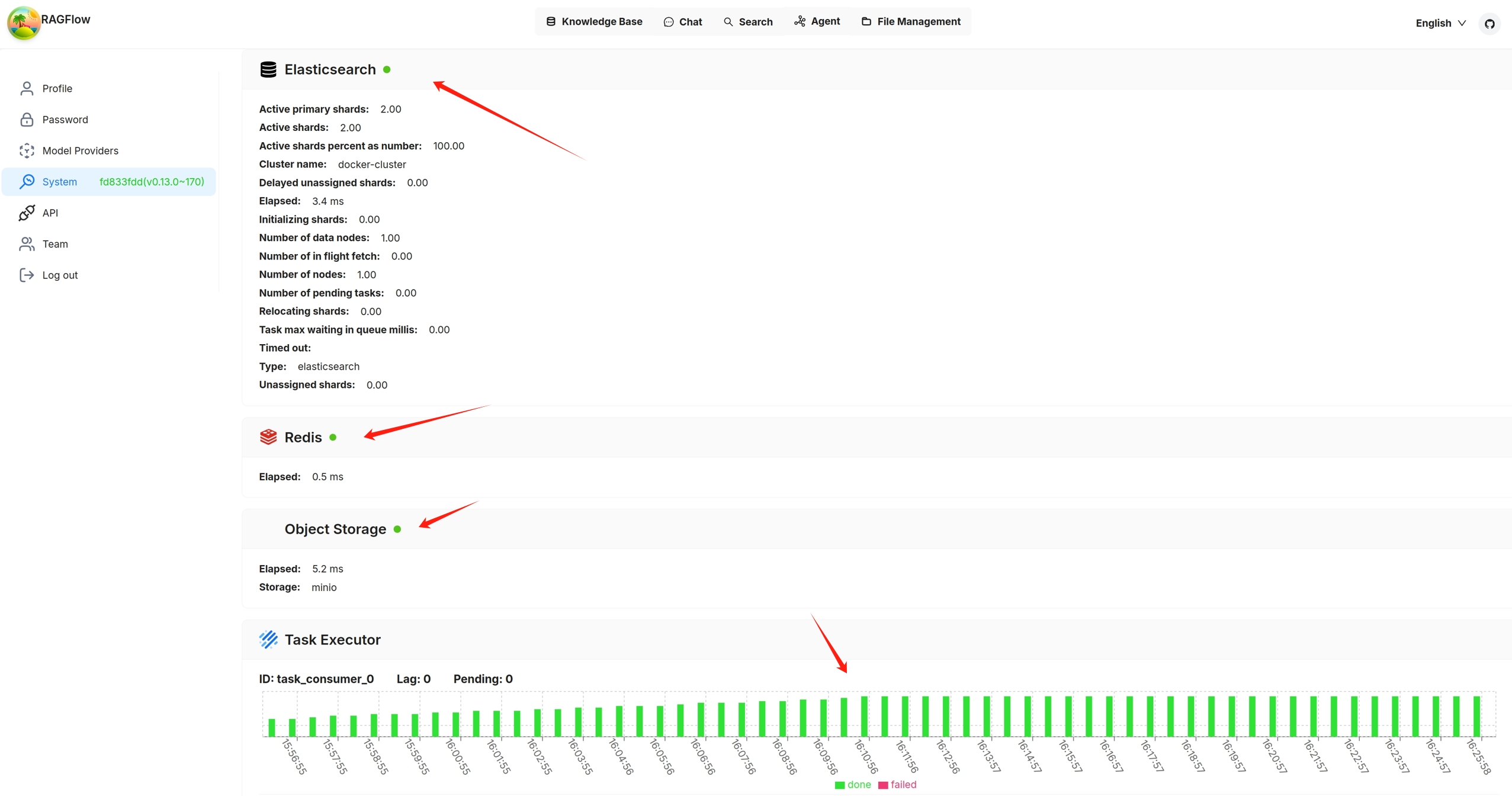
You can also click you avatar on the top right corner of the page **>** System to view the visualized health status of RAGFlow's core services. The following screenshot shows that all services are 'green' (running healthily). The task executor displays the *cumulative* number of completed and failed document parsing tasks from the past 30 minutes:
|
||||
You can also click you avatar in the top right corner of the page **>** System to view the visualized health status of RAGFlow's core services. The following screenshot shows that all services are 'green' (running healthily). The task executor displays the *cumulative* number of completed and failed document parsing tasks from the past 30 minutes:
|
||||
|
||||
|
||||
|
||||
|
||||
@ -19,7 +19,7 @@ You start an AI conversation by creating an assistant.
|
||||
|
||||
- **Assistant name** is the name of your chat assistant. Each assistant corresponds to a dialogue with a unique combination of knowledge bases, prompts, hybrid search configurations, and large model settings.
|
||||
- **Empty response**:
|
||||
- If you wish to *confine* RAGFlow's answers to your knowledge bases, leave a response here. Then when it doesn't retrieve an answer, it *uniformly* responds with what you set here.
|
||||
- If you wish to *confine* RAGFlow's answers to your knowledge bases, leave a response here. Then, when it doesn't retrieve an answer, it *uniformly* responds with what you set here.
|
||||
- If you wish RAGFlow to *improvise* when it doesn't retrieve an answer from your knowledge bases, leave it blank, which may give rise to hallucinations.
|
||||
- **Show Quote**: This is a key feature of RAGFlow and enabled by default. RAGFlow does not work like a black box. instead, it clearly shows the sources of information that its responses are based on.
|
||||
- Select the corresponding knowledge bases. You can select one or multiple knowledge bases, but ensure that they use the same embedding model, otherwise an error would occur.
|
||||
|
||||
@ -11,7 +11,9 @@ Upgrade RAGFlow to `dev-slim`/`dev` or the latest, published release.
|
||||
|
||||
## Upgrade RAGFlow to `dev-slim`/`dev`, the most recent, tested Docker image
|
||||
|
||||
`dev-slim` refers to the RAGFlow Docker image *without* embedding models, while `dev` refers to the RAGFlow Docker image with embedding models. For details on their differences, see **docker/.env**.
|
||||
`dev-slim` refers to the RAGFlow Docker image *without* embedding models, while `dev` refers to the RAGFlow Docker image with embedding models. For details on their differences, see [ragflow/docker/.env](https://github.com/infiniflow/ragflow/blob/main/docker/.env).
|
||||
|
||||
To upgrade RAGFlow, you must upgrade **both** your code **and** your Docker image:
|
||||
|
||||
1. Clone the repo
|
||||
|
||||
@ -52,22 +54,24 @@ RAGFLOW_IMAGE=infiniflow/ragflow:dev
|
||||
|
||||
## Upgrade RAGFlow to the most recent, officially published release
|
||||
|
||||
To upgrade RAGFlow, you must upgrade **both** your code **and** your Docker image:
|
||||
|
||||
1. Clone the repo
|
||||
|
||||
```bash
|
||||
git clone https://github.com/infiniflow/ragflow.git
|
||||
```
|
||||
|
||||
2. Switch to the latest, officially published release, e.g., `v0.14.0`:
|
||||
2. Switch to the latest, officially published release, e.g., `v0.14.1`:
|
||||
|
||||
```bash
|
||||
git checkout v0.14.0
|
||||
git checkout v0.14.1
|
||||
```
|
||||
|
||||
3. Update **ragflow/docker/.env** as follows:
|
||||
|
||||
```bash
|
||||
RAGFLOW_IMAGE=infiniflow/ragflow:v0.14.0
|
||||
RAGFLOW_IMAGE=infiniflow/ragflow:v0.14.1
|
||||
```
|
||||
|
||||
4. Update the RAGFlow image and restart RAGFlow:
|
||||
|
||||
@ -32,9 +32,9 @@ This section provides instructions on setting up the RAGFlow server on Linux. If
|
||||
<details>
|
||||
<summary>1. Ensure <code>vm.max_map_count</code> ≥ 262144:</summary>
|
||||
|
||||
`vm.max_map_count`. This value sets the maximum number of memory map areas a process may have. Its default value is 65530. While most applications require fewer than a thousand maps, reducing this value can result in abmornal behaviors, and the system will throw out-of-memory errors when a process reaches the limitation.
|
||||
`vm.max_map_count`. This value sets the maximum number of memory map areas a process may have. Its default value is 65530. While most applications require fewer than a thousand maps, reducing this value can result in abnormal behaviors, and the system will throw out-of-memory errors when a process reaches the limitation.
|
||||
|
||||
RAGFlow v0.14.0 uses Elasticsearch for multiple recall. Setting the value of `vm.max_map_count` correctly is crucial to the proper functioning of the Elasticsearch component.
|
||||
RAGFlow v0.14.1 uses Elasticsearch or [Infinity](https://github.com/infiniflow/infinity) for multiple recall. Setting the value of `vm.max_map_count` correctly is crucial to the proper functioning of the Elasticsearch component.
|
||||
|
||||
<Tabs
|
||||
defaultValue="linux"
|
||||
@ -184,9 +184,9 @@ This section provides instructions on setting up the RAGFlow server on Linux. If
|
||||
$ docker compose -f docker-compose.yml up -d
|
||||
```
|
||||
|
||||
> - To download a RAGFlow slim Docker image of a specific version, update the `RAGFlOW_IMAGE` variable in **docker/.env** to your desired version. For example, `RAGFLOW_IMAGE=infiniflow/ragflow:v0.14.0-slim`. After making this change, rerun the command above to initiate the download.
|
||||
> - To download a RAGFlow slim Docker image of a specific version, update the `RAGFlOW_IMAGE` variable in **docker/.env** to your desired version. For example, `RAGFLOW_IMAGE=infiniflow/ragflow:v0.14.1-slim`. After making this change, rerun the command above to initiate the download.
|
||||
> - To download the dev version of RAGFlow Docker image *including* embedding models and Python libraries, update the `RAGFlOW_IMAGE` variable in **docker/.env** to `RAGFLOW_IMAGE=infiniflow/ragflow:dev`. After making this change, rerun the command above to initiate the download.
|
||||
> - To download a specific version of RAGFlow Docker image *including* embedding models and Python libraries, update the `RAGFlOW_IMAGE` variable in **docker/.env** to your desired version. For example, `RAGFLOW_IMAGE=infiniflow/ragflow:v0.14.0`. After making this change, rerun the command above to initiate the download.
|
||||
> - To download a specific version of RAGFlow Docker image *including* embedding models and Python libraries, update the `RAGFlOW_IMAGE` variable in **docker/.env** to your desired version. For example, `RAGFLOW_IMAGE=infiniflow/ragflow:v0.14.1`. After making this change, rerun the command above to initiate the download.
|
||||
|
||||
:::tip NOTE
|
||||
A RAGFlow Docker image that includes embedding models and Python libraries is approximately 9GB in size and may take significantly longer time to load.
|
||||
|
||||
@ -1,6 +1,6 @@
|
||||
{
|
||||
"label": "References",
|
||||
"position": 4,
|
||||
"position": 6,
|
||||
"link": {
|
||||
"type": "generated-index",
|
||||
"description": "Miscellaneous References"
|
||||
|
||||
@ -2120,7 +2120,7 @@ Failure:
|
||||
|
||||
---
|
||||
|
||||
## Create session with an agent
|
||||
## Create session with agent
|
||||
|
||||
**POST** `/api/v1/agents/{agent_id}/sessions`
|
||||
|
||||
|
||||
@ -4,7 +4,7 @@ slug: /supported_models
|
||||
---
|
||||
|
||||
# Supported models
|
||||
import APITable from '../../src/components/APITable';
|
||||
import APITable from '@site/src/components/APITable';
|
||||
|
||||
A complete list of models supported by RAGFlow, which will continue to expand.
|
||||
|
||||
|
||||
118
docs/release_notes.md
Normal file
118
docs/release_notes.md
Normal file
@ -0,0 +1,118 @@
|
||||
---
|
||||
sidebar_position: 2
|
||||
slug: /release_notes
|
||||
---
|
||||
|
||||
# Release notes
|
||||
|
||||
Key features and improvements in the latest releases.
|
||||
|
||||
## v0.14.0
|
||||
|
||||
Released on November 26, 2024.
|
||||
|
||||
### New features
|
||||
|
||||
- Supports [Infinity](https://github.com/infiniflow/infinity) or Elasticsearch (default) as document engine for vector storage and full-text indexing. [#2894](https://github.com/infiniflow/ragflow/pull/2894)
|
||||
- Enhances user experience by adding more variables to the Agent and implementing auto-saving.
|
||||
- Adds a three-step translation agent template, inspired by [Andrew Ng's translation agent](https://github.com/andrewyng/translation-agent).
|
||||
- Adds an SEO-optimized blog writing agent template.
|
||||
- Provides HTTP and Python APIs for conversing with an agent.
|
||||
- Supports the use of English synonyms during retrieval processes.
|
||||
- Optimizes term weight calculations, reducing the retrieval time by 50%.
|
||||
- Improves task executor monitoring with additional performance indicators.
|
||||
- Replaces Redis with Valkey.
|
||||
- Adds three new UI languages (*contributed by the community*): Indonesian, Spanish, and Vietnamese.
|
||||
|
||||
### Compatibility changes
|
||||
|
||||
As of this release, **service_config.yaml.template** replaces **service_config.yaml** for configuring backend services. Upon Docker container startup, the environment variables defined in this template file are automatically populated and a **service_config.yaml** is auto-generated from it. [#3341](https://github.com/infiniflow/ragflow/pull/3341)
|
||||
|
||||
This approach eliminates the need to manually update **service_config.yaml** after making changes to **.env**, facilitating dynamic environment configurations.
|
||||
|
||||
:::danger IMPORTANT
|
||||
Ensure that you [upgrade **both** your code **and** Docker image to this release](https://ragflow.io/docs/dev/upgrade_ragflow#upgrade-ragflow-to-the-most-recent-officially-published-release) before trying this new approach.
|
||||
:::
|
||||
|
||||
### Related APIs
|
||||
|
||||
#### HTTP APIs
|
||||
|
||||
- [Create session with agent](https://ragflow.io/docs/dev/http_api_reference#create-session-with-agent)
|
||||
- [Converse with agent](https://ragflow.io/docs/dev/http_api_reference#converse-with-agent)
|
||||
|
||||
#### Python APIs
|
||||
|
||||
- [Create session with agent](https://ragflow.io/docs/dev/python_api_reference#create-session-with-agent)
|
||||
- [Converse with agent](https://ragflow.io/docs/dev/python_api_reference#create-session-with-agent)
|
||||
|
||||
### Documentation
|
||||
|
||||
#### Added documents
|
||||
|
||||
- [Configurations](https://ragflow.io/docs/dev/configurations)
|
||||
- [Manage team members](https://ragflow.io/docs/dev/manage_team_members)
|
||||
- [Run health check on RAGFlow's dependencies](https://ragflow.io/docs/dev/run_health_check)
|
||||
|
||||
## v0.13.0
|
||||
|
||||
Released on October 31, 2024.
|
||||
|
||||
### New features
|
||||
|
||||
- Adds the team management functionality for all users.
|
||||
- Updates the Agent UI to improve usability.
|
||||
- Adds support for Markdown chunking in the **General** chunk method.
|
||||
- Introduces an **invoke** tool within the Agent UI.
|
||||
- Integrates support for Dify's knowledge base API.
|
||||
- Adds support for GLM4-9B and Yi-Lightning models.
|
||||
- Introduces HTTP and Python APIs for dataset management, file management within dataset, and chat assistant management.
|
||||
|
||||
:::tip NOTE
|
||||
To download RAGFlow's Python SDK:
|
||||
|
||||
```bash
|
||||
pip install ragflow-sdk==0.13.0
|
||||
```
|
||||
:::
|
||||
|
||||
### Documentation
|
||||
|
||||
#### Added documents
|
||||
|
||||
- [Acquire a RAGFlow API key](https://ragflow.io/docs/dev/acquire_ragflow_api_key)
|
||||
- [HTTP API Reference](https://ragflow.io/docs/dev/http_api_reference)
|
||||
- [Python API Reference](https://ragflow.io/docs/dev/python_api_reference)
|
||||
|
||||
## v0.12.0
|
||||
|
||||
Released on September 30, 2024.
|
||||
|
||||
### New features
|
||||
|
||||
- Offers slim editions of RAGFlow's Docker images, which do not include built-in BGE/BCE embedding or reranking models.
|
||||
- Improves the results of multi-round dialogues.
|
||||
- Enables users to remove added LLM vendors.
|
||||
- Adds support for OpenTTS and SparkTTS models.
|
||||
- Implements an **Excel to HTML** toggle in the **General** chunk method, allowing users to parse a spreadsheet into either HTML tables or key-value pairs by row.
|
||||
- Adds agent tools **YahooFance** and **Jin10**.
|
||||
- Adds a template for an investment advisor agent.
|
||||
|
||||
### Compatibility changes
|
||||
|
||||
As of this release, RAGFlow offers slim editions of its Docker images to improve the experience for users with limited Internet access. A slim edition of RAGFlow's Docker image does not include built-in BGE/BCE embedding models and has a size of about 1GB; a full edition of RAGFlow is approximately 9GB and includes both built-in embedding models and embedding models that will be downloaded once you select them in the RAGFlow UI.
|
||||
|
||||
The default Docker image edition is `dev-slim`. The following list clarifies the differences between various editions:
|
||||
|
||||
- `dev-slim`: The slim edition of the most recent tested Docker image.
|
||||
- `v0.12.0-slim`: The slim edition of the most recent **officially released** Docker image.
|
||||
- `dev`: The full edition of the most recent tested Docker image.
|
||||
- `v0.12.0`: The full edition of the most recent **officially released** Docker image.
|
||||
|
||||
See [Upgrade RAGFlow](https://ragflow.io/docs/dev/upgrade_ragflow) for instructions on upgrading.
|
||||
|
||||
### Documentation
|
||||
|
||||
#### Added documents
|
||||
|
||||
- [Upgrade RAGFlow](https://ragflow.io/docs/dev/upgrade_ragflow)
|
||||
@ -64,27 +64,27 @@ def build_knowledge_graph_chunks(tenant_id: str, chunks: list[str], callback, en
|
||||
BATCH_SIZE=4
|
||||
texts, graphs = [], []
|
||||
cnt = 0
|
||||
threads = []
|
||||
max_workers = int(os.environ.get('GRAPH_EXTRACTOR_MAX_WORKERS', 50))
|
||||
exe = ThreadPoolExecutor(max_workers=max_workers)
|
||||
for i in range(len(chunks)):
|
||||
tkn_cnt = num_tokens_from_string(chunks[i])
|
||||
if cnt+tkn_cnt >= left_token_count and texts:
|
||||
with ThreadPoolExecutor(max_workers=max_workers) as exe:
|
||||
threads = []
|
||||
for i in range(len(chunks)):
|
||||
tkn_cnt = num_tokens_from_string(chunks[i])
|
||||
if cnt+tkn_cnt >= left_token_count and texts:
|
||||
for b in range(0, len(texts), BATCH_SIZE):
|
||||
threads.append(exe.submit(ext, ["\n".join(texts[b:b+BATCH_SIZE])], {"entity_types": entity_types}, callback))
|
||||
texts = []
|
||||
cnt = 0
|
||||
texts.append(chunks[i])
|
||||
cnt += tkn_cnt
|
||||
if texts:
|
||||
for b in range(0, len(texts), BATCH_SIZE):
|
||||
threads.append(exe.submit(ext, ["\n".join(texts[b:b+BATCH_SIZE])], {"entity_types": entity_types}, callback))
|
||||
texts = []
|
||||
cnt = 0
|
||||
texts.append(chunks[i])
|
||||
cnt += tkn_cnt
|
||||
if texts:
|
||||
for b in range(0, len(texts), BATCH_SIZE):
|
||||
threads.append(exe.submit(ext, ["\n".join(texts[b:b+BATCH_SIZE])], {"entity_types": entity_types}, callback))
|
||||
|
||||
callback(0.5, "Extracting entities.")
|
||||
graphs = []
|
||||
for i, _ in enumerate(threads):
|
||||
graphs.append(_.result().output)
|
||||
callback(0.5 + 0.1*i/len(threads), f"Entities extraction progress ... {i+1}/{len(threads)}")
|
||||
callback(0.5, "Extracting entities.")
|
||||
graphs = []
|
||||
for i, _ in enumerate(threads):
|
||||
graphs.append(_.result().output)
|
||||
callback(0.5 + 0.1*i/len(threads), f"Entities extraction progress ... {i+1}/{len(threads)}")
|
||||
|
||||
graph = reduce(graph_merge, graphs) if graphs else nx.Graph()
|
||||
er = EntityResolution(llm_bdl)
|
||||
|
||||
@ -88,26 +88,26 @@ class MindMapExtractor:
|
||||
prompt_variables = {}
|
||||
|
||||
try:
|
||||
max_workers = int(os.environ.get('MINDMAP_EXTRACTOR_MAX_WORKERS', 12))
|
||||
exe = ThreadPoolExecutor(max_workers=max_workers)
|
||||
threads = []
|
||||
token_count = max(self._llm.max_length * 0.8, self._llm.max_length - 512)
|
||||
texts = []
|
||||
res = []
|
||||
cnt = 0
|
||||
for i in range(len(sections)):
|
||||
section_cnt = num_tokens_from_string(sections[i])
|
||||
if cnt + section_cnt >= token_count and texts:
|
||||
max_workers = int(os.environ.get('MINDMAP_EXTRACTOR_MAX_WORKERS', 12))
|
||||
with ThreadPoolExecutor(max_workers=max_workers) as exe:
|
||||
threads = []
|
||||
token_count = max(self._llm.max_length * 0.8, self._llm.max_length - 512)
|
||||
texts = []
|
||||
cnt = 0
|
||||
for i in range(len(sections)):
|
||||
section_cnt = num_tokens_from_string(sections[i])
|
||||
if cnt + section_cnt >= token_count and texts:
|
||||
threads.append(exe.submit(self._process_document, "".join(texts), prompt_variables))
|
||||
texts = []
|
||||
cnt = 0
|
||||
texts.append(sections[i])
|
||||
cnt += section_cnt
|
||||
if texts:
|
||||
threads.append(exe.submit(self._process_document, "".join(texts), prompt_variables))
|
||||
texts = []
|
||||
cnt = 0
|
||||
texts.append(sections[i])
|
||||
cnt += section_cnt
|
||||
if texts:
|
||||
threads.append(exe.submit(self._process_document, "".join(texts), prompt_variables))
|
||||
|
||||
for i, _ in enumerate(threads):
|
||||
res.append(_.result())
|
||||
for i, _ in enumerate(threads):
|
||||
res.append(_.result())
|
||||
|
||||
if not res:
|
||||
return MindMapResult(output={"id": "root", "children": []})
|
||||
|
||||
@ -59,8 +59,8 @@ class KGSearch(Dealer):
|
||||
q_vec = matchDense.embedding_data
|
||||
src = req.get("fields", ["docnm_kwd", "content_ltks", "kb_id", "img_id", "title_tks", "important_kwd",
|
||||
"doc_id", f"q_{len(q_vec)}_vec", "position_list", "name_kwd",
|
||||
"q_1024_vec", "q_1536_vec", "available_int", "content_with_weight",
|
||||
"weight_int", "weight_flt", "rank_int"
|
||||
"available_int", "content_with_weight",
|
||||
"weight_int", "weight_flt"
|
||||
])
|
||||
|
||||
fusionExpr = FusionExpr("weighted_sum", 32, {"weights": "0.5, 0.5"})
|
||||
|
||||
199
poetry.lock
generated
199
poetry.lock
generated
@ -196,13 +196,13 @@ files = [
|
||||
|
||||
[[package]]
|
||||
name = "akshare"
|
||||
version = "1.15.32"
|
||||
version = "1.15.33"
|
||||
description = "AKShare is an elegant and simple financial data interface library for Python, built for human beings!"
|
||||
optional = false
|
||||
python-versions = ">=3.8"
|
||||
files = [
|
||||
{file = "akshare-1.15.32-py3-none-any.whl", hash = "sha256:4424f4adc4364f4f0a63fe3153772a3113578c6bc594a5b46ed065d8805f5084"},
|
||||
{file = "akshare-1.15.32.tar.gz", hash = "sha256:fb3129cbcd089cc949e15365ff664cba1739f121fd0b7710fddb4adf5b1fee53"},
|
||||
{file = "akshare-1.15.33-py3-none-any.whl", hash = "sha256:6f56682404cbff892b23ec896528199392f06a11a14c287cdc36f1f57c3ea612"},
|
||||
{file = "akshare-1.15.33.tar.gz", hash = "sha256:6bd46e9ab767237c57adce35a409b73a6607b12b8c36d3bf2d2fbe83121d6e3d"},
|
||||
]
|
||||
|
||||
[package.dependencies]
|
||||
@ -3808,84 +3808,86 @@ i18n = ["Babel (>=2.7)"]
|
||||
|
||||
[[package]]
|
||||
name = "jiter"
|
||||
version = "0.7.1"
|
||||
version = "0.8.0"
|
||||
description = "Fast iterable JSON parser."
|
||||
optional = false
|
||||
python-versions = ">=3.8"
|
||||
files = [
|
||||
{file = "jiter-0.7.1-cp310-cp310-macosx_10_12_x86_64.whl", hash = "sha256:262e96d06696b673fad6f257e6a0abb6e873dc22818ca0e0600f4a1189eb334f"},
|
||||
{file = "jiter-0.7.1-cp310-cp310-macosx_11_0_arm64.whl", hash = "sha256:be6de02939aac5be97eb437f45cfd279b1dc9de358b13ea6e040e63a3221c40d"},
|
||||
{file = "jiter-0.7.1-cp310-cp310-manylinux_2_17_aarch64.manylinux2014_aarch64.whl", hash = "sha256:935f10b802bc1ce2b2f61843e498c7720aa7f4e4bb7797aa8121eab017293c3d"},
|
||||
{file = "jiter-0.7.1-cp310-cp310-manylinux_2_17_armv7l.manylinux2014_armv7l.whl", hash = "sha256:9cd3cccccabf5064e4bb3099c87bf67db94f805c1e62d1aefd2b7476e90e0ee2"},
|
||||
{file = "jiter-0.7.1-cp310-cp310-manylinux_2_17_ppc64le.manylinux2014_ppc64le.whl", hash = "sha256:4aa919ebfc5f7b027cc368fe3964c0015e1963b92e1db382419dadb098a05192"},
|
||||
{file = "jiter-0.7.1-cp310-cp310-manylinux_2_17_s390x.manylinux2014_s390x.whl", hash = "sha256:5ae2d01e82c94491ce4d6f461a837f63b6c4e6dd5bb082553a70c509034ff3d4"},
|
||||
{file = "jiter-0.7.1-cp310-cp310-manylinux_2_17_x86_64.manylinux2014_x86_64.whl", hash = "sha256:9f9568cd66dbbdab67ae1b4c99f3f7da1228c5682d65913e3f5f95586b3cb9a9"},
|
||||
{file = "jiter-0.7.1-cp310-cp310-manylinux_2_5_i686.manylinux1_i686.whl", hash = "sha256:9ecbf4e20ec2c26512736284dc1a3f8ed79b6ca7188e3b99032757ad48db97dc"},
|
||||
{file = "jiter-0.7.1-cp310-cp310-musllinux_1_1_aarch64.whl", hash = "sha256:b1a0508fddc70ce00b872e463b387d49308ef02b0787992ca471c8d4ba1c0fa1"},
|
||||
{file = "jiter-0.7.1-cp310-cp310-musllinux_1_1_x86_64.whl", hash = "sha256:f84c9996664c460f24213ff1e5881530abd8fafd82058d39af3682d5fd2d6316"},
|
||||
{file = "jiter-0.7.1-cp310-none-win32.whl", hash = "sha256:c915e1a1960976ba4dfe06551ea87063b2d5b4d30759012210099e712a414d9f"},
|
||||
{file = "jiter-0.7.1-cp310-none-win_amd64.whl", hash = "sha256:75bf3b7fdc5c0faa6ffffcf8028a1f974d126bac86d96490d1b51b3210aa0f3f"},
|
||||
{file = "jiter-0.7.1-cp311-cp311-macosx_10_12_x86_64.whl", hash = "sha256:ad04a23a91f3d10d69d6c87a5f4471b61c2c5cd6e112e85136594a02043f462c"},
|
||||
{file = "jiter-0.7.1-cp311-cp311-macosx_11_0_arm64.whl", hash = "sha256:1e47a554de88dff701226bb5722b7f1b6bccd0b98f1748459b7e56acac2707a5"},
|
||||
{file = "jiter-0.7.1-cp311-cp311-manylinux_2_17_aarch64.manylinux2014_aarch64.whl", hash = "sha256:1e44fff69c814a2e96a20b4ecee3e2365e9b15cf5fe4e00869d18396daa91dab"},
|
||||
{file = "jiter-0.7.1-cp311-cp311-manylinux_2_17_armv7l.manylinux2014_armv7l.whl", hash = "sha256:df0a1d05081541b45743c965436f8b5a1048d6fd726e4a030113a2699a6046ea"},
|
||||
{file = "jiter-0.7.1-cp311-cp311-manylinux_2_17_ppc64le.manylinux2014_ppc64le.whl", hash = "sha256:f22cf8f236a645cb6d8ffe2a64edb5d2b66fb148bf7c75eea0cb36d17014a7bc"},
|
||||
{file = "jiter-0.7.1-cp311-cp311-manylinux_2_17_s390x.manylinux2014_s390x.whl", hash = "sha256:da8589f50b728ea4bf22e0632eefa125c8aa9c38ed202a5ee6ca371f05eeb3ff"},
|
||||
{file = "jiter-0.7.1-cp311-cp311-manylinux_2_17_x86_64.manylinux2014_x86_64.whl", hash = "sha256:f20de711224f2ca2dbb166a8d512f6ff48c9c38cc06b51f796520eb4722cc2ce"},
|
||||
{file = "jiter-0.7.1-cp311-cp311-manylinux_2_5_i686.manylinux1_i686.whl", hash = "sha256:8a9803396032117b85ec8cbf008a54590644a062fedd0425cbdb95e4b2b60479"},
|
||||
{file = "jiter-0.7.1-cp311-cp311-musllinux_1_1_aarch64.whl", hash = "sha256:3d8bae77c82741032e9d89a4026479061aba6e646de3bf5f2fc1ae2bbd9d06e0"},
|
||||
{file = "jiter-0.7.1-cp311-cp311-musllinux_1_1_x86_64.whl", hash = "sha256:3dc9939e576bbc68c813fc82f6620353ed68c194c7bcf3d58dc822591ec12490"},
|
||||
{file = "jiter-0.7.1-cp311-none-win32.whl", hash = "sha256:f7605d24cd6fab156ec89e7924578e21604feee9c4f1e9da34d8b67f63e54892"},
|
||||
{file = "jiter-0.7.1-cp311-none-win_amd64.whl", hash = "sha256:f3ea649e7751a1a29ea5ecc03c4ada0a833846c59c6da75d747899f9b48b7282"},
|
||||
{file = "jiter-0.7.1-cp312-cp312-macosx_10_12_x86_64.whl", hash = "sha256:ad36a1155cbd92e7a084a568f7dc6023497df781adf2390c345dd77a120905ca"},
|
||||
{file = "jiter-0.7.1-cp312-cp312-macosx_11_0_arm64.whl", hash = "sha256:7ba52e6aaed2dc5c81a3d9b5e4ab95b039c4592c66ac973879ba57c3506492bb"},
|
||||
{file = "jiter-0.7.1-cp312-cp312-manylinux_2_17_aarch64.manylinux2014_aarch64.whl", hash = "sha256:2b7de0b6f6728b678540c7927587e23f715284596724be203af952418acb8a2d"},
|
||||
{file = "jiter-0.7.1-cp312-cp312-manylinux_2_17_armv7l.manylinux2014_armv7l.whl", hash = "sha256:9463b62bd53c2fb85529c700c6a3beb2ee54fde8bef714b150601616dcb184a6"},
|
||||
{file = "jiter-0.7.1-cp312-cp312-manylinux_2_17_ppc64le.manylinux2014_ppc64le.whl", hash = "sha256:627164ec01d28af56e1f549da84caf0fe06da3880ebc7b7ee1ca15df106ae172"},
|
||||
{file = "jiter-0.7.1-cp312-cp312-manylinux_2_17_s390x.manylinux2014_s390x.whl", hash = "sha256:25d0e5bf64e368b0aa9e0a559c3ab2f9b67e35fe7269e8a0d81f48bbd10e8963"},
|
||||
{file = "jiter-0.7.1-cp312-cp312-manylinux_2_17_x86_64.manylinux2014_x86_64.whl", hash = "sha256:c244261306f08f8008b3087059601997016549cb8bb23cf4317a4827f07b7d74"},
|
||||
{file = "jiter-0.7.1-cp312-cp312-manylinux_2_5_i686.manylinux1_i686.whl", hash = "sha256:7ded4e4b75b68b843b7cea5cd7c55f738c20e1394c68c2cb10adb655526c5f1b"},
|
||||
{file = "jiter-0.7.1-cp312-cp312-musllinux_1_1_aarch64.whl", hash = "sha256:80dae4f1889b9d09e5f4de6b58c490d9c8ce7730e35e0b8643ab62b1538f095c"},
|
||||
{file = "jiter-0.7.1-cp312-cp312-musllinux_1_1_x86_64.whl", hash = "sha256:5970cf8ec943b51bce7f4b98d2e1ed3ada170c2a789e2db3cb484486591a176a"},
|
||||
{file = "jiter-0.7.1-cp312-none-win32.whl", hash = "sha256:701d90220d6ecb3125d46853c8ca8a5bc158de8c49af60fd706475a49fee157e"},
|
||||
{file = "jiter-0.7.1-cp312-none-win_amd64.whl", hash = "sha256:7824c3ecf9ecf3321c37f4e4d4411aad49c666ee5bc2a937071bdd80917e4533"},
|
||||
{file = "jiter-0.7.1-cp313-cp313-macosx_10_12_x86_64.whl", hash = "sha256:097676a37778ba3c80cb53f34abd6943ceb0848263c21bf423ae98b090f6c6ba"},
|
||||
{file = "jiter-0.7.1-cp313-cp313-macosx_11_0_arm64.whl", hash = "sha256:3298af506d4271257c0a8f48668b0f47048d69351675dd8500f22420d4eec378"},
|
||||
{file = "jiter-0.7.1-cp313-cp313-manylinux_2_17_aarch64.manylinux2014_aarch64.whl", hash = "sha256:12fd88cfe6067e2199964839c19bd2b422ca3fd792949b8f44bb8a4e7d21946a"},
|
||||
{file = "jiter-0.7.1-cp313-cp313-manylinux_2_17_armv7l.manylinux2014_armv7l.whl", hash = "sha256:dacca921efcd21939123c8ea8883a54b9fa7f6545c8019ffcf4f762985b6d0c8"},
|
||||
{file = "jiter-0.7.1-cp313-cp313-manylinux_2_17_ppc64le.manylinux2014_ppc64le.whl", hash = "sha256:de3674a5fe1f6713a746d25ad9c32cd32fadc824e64b9d6159b3b34fd9134143"},
|
||||
{file = "jiter-0.7.1-cp313-cp313-manylinux_2_17_s390x.manylinux2014_s390x.whl", hash = "sha256:65df9dbae6d67e0788a05b4bad5706ad40f6f911e0137eb416b9eead6ba6f044"},
|
||||
{file = "jiter-0.7.1-cp313-cp313-manylinux_2_17_x86_64.manylinux2014_x86_64.whl", hash = "sha256:7ba9a358d59a0a55cccaa4957e6ae10b1a25ffdabda863c0343c51817610501d"},
|
||||
{file = "jiter-0.7.1-cp313-cp313-manylinux_2_5_i686.manylinux1_i686.whl", hash = "sha256:576eb0f0c6207e9ede2b11ec01d9c2182973986514f9c60bc3b3b5d5798c8f50"},
|
||||
{file = "jiter-0.7.1-cp313-cp313-musllinux_1_1_aarch64.whl", hash = "sha256:e550e29cdf3577d2c970a18f3959e6b8646fd60ef1b0507e5947dc73703b5627"},
|
||||
{file = "jiter-0.7.1-cp313-cp313-musllinux_1_1_x86_64.whl", hash = "sha256:81d968dbf3ce0db2e0e4dec6b0a0d5d94f846ee84caf779b07cab49f5325ae43"},
|
||||
{file = "jiter-0.7.1-cp313-none-win32.whl", hash = "sha256:f892e547e6e79a1506eb571a676cf2f480a4533675f834e9ae98de84f9b941ac"},
|
||||
{file = "jiter-0.7.1-cp313-none-win_amd64.whl", hash = "sha256:0302f0940b1455b2a7fb0409b8d5b31183db70d2b07fd177906d83bf941385d1"},
|
||||
{file = "jiter-0.7.1-cp38-cp38-macosx_10_12_x86_64.whl", hash = "sha256:c65a3ce72b679958b79d556473f192a4dfc5895e8cc1030c9f4e434690906076"},
|
||||
{file = "jiter-0.7.1-cp38-cp38-macosx_11_0_arm64.whl", hash = "sha256:e80052d3db39f9bb8eb86d207a1be3d9ecee5e05fdec31380817f9609ad38e60"},
|
||||
{file = "jiter-0.7.1-cp38-cp38-manylinux_2_17_aarch64.manylinux2014_aarch64.whl", hash = "sha256:70a497859c4f3f7acd71c8bd89a6f9cf753ebacacf5e3e799138b8e1843084e3"},
|
||||
{file = "jiter-0.7.1-cp38-cp38-manylinux_2_17_armv7l.manylinux2014_armv7l.whl", hash = "sha256:c1288bc22b9e36854a0536ba83666c3b1fb066b811019d7b682c9cf0269cdf9f"},
|
||||
{file = "jiter-0.7.1-cp38-cp38-manylinux_2_17_ppc64le.manylinux2014_ppc64le.whl", hash = "sha256:b096ca72dd38ef35675e1d3b01785874315182243ef7aea9752cb62266ad516f"},
|
||||
{file = "jiter-0.7.1-cp38-cp38-manylinux_2_17_s390x.manylinux2014_s390x.whl", hash = "sha256:8dbbd52c50b605af13dbee1a08373c520e6fcc6b5d32f17738875847fea4e2cd"},
|
||||
{file = "jiter-0.7.1-cp38-cp38-manylinux_2_17_x86_64.manylinux2014_x86_64.whl", hash = "sha256:af29c5c6eb2517e71ffa15c7ae9509fa5e833ec2a99319ac88cc271eca865519"},
|
||||
{file = "jiter-0.7.1-cp38-cp38-manylinux_2_5_i686.manylinux1_i686.whl", hash = "sha256:f114a4df1e40c03c0efbf974b376ed57756a1141eb27d04baee0680c5af3d424"},
|
||||
{file = "jiter-0.7.1-cp38-cp38-musllinux_1_1_aarch64.whl", hash = "sha256:191fbaee7cf46a9dd9b817547bf556facde50f83199d07fc48ebeff4082f9df4"},
|
||||
{file = "jiter-0.7.1-cp38-cp38-musllinux_1_1_x86_64.whl", hash = "sha256:0e2b445e5ee627fb4ee6bbceeb486251e60a0c881a8e12398dfdff47c56f0723"},
|
||||
{file = "jiter-0.7.1-cp38-none-win32.whl", hash = "sha256:47ac4c3cf8135c83e64755b7276339b26cd3c7ddadf9e67306ace4832b283edf"},
|
||||
{file = "jiter-0.7.1-cp38-none-win_amd64.whl", hash = "sha256:60b49c245cd90cde4794f5c30f123ee06ccf42fb8730a019a2870cd005653ebd"},
|
||||
{file = "jiter-0.7.1-cp39-cp39-macosx_10_12_x86_64.whl", hash = "sha256:8f212eeacc7203256f526f550d105d8efa24605828382cd7d296b703181ff11d"},
|
||||
{file = "jiter-0.7.1-cp39-cp39-macosx_11_0_arm64.whl", hash = "sha256:d9e247079d88c00e75e297e6cb3a18a039ebcd79fefc43be9ba4eb7fb43eb726"},
|
||||
{file = "jiter-0.7.1-cp39-cp39-manylinux_2_17_aarch64.manylinux2014_aarch64.whl", hash = "sha256:f0aacaa56360139c53dcf352992b0331f4057a0373bbffd43f64ba0c32d2d155"},
|
||||
{file = "jiter-0.7.1-cp39-cp39-manylinux_2_17_armv7l.manylinux2014_armv7l.whl", hash = "sha256:bc1b55314ca97dbb6c48d9144323896e9c1a25d41c65bcb9550b3e0c270ca560"},
|
||||
{file = "jiter-0.7.1-cp39-cp39-manylinux_2_17_ppc64le.manylinux2014_ppc64le.whl", hash = "sha256:f281aae41b47e90deb70e7386558e877a8e62e1693e0086f37d015fa1c102289"},
|
||||
{file = "jiter-0.7.1-cp39-cp39-manylinux_2_17_s390x.manylinux2014_s390x.whl", hash = "sha256:93c20d2730a84d43f7c0b6fb2579dc54335db742a59cf9776d0b80e99d587382"},
|
||||
{file = "jiter-0.7.1-cp39-cp39-manylinux_2_17_x86_64.manylinux2014_x86_64.whl", hash = "sha256:e81ccccd8069110e150613496deafa10da2f6ff322a707cbec2b0d52a87b9671"},
|
||||
{file = "jiter-0.7.1-cp39-cp39-manylinux_2_5_i686.manylinux1_i686.whl", hash = "sha256:0a7d5e85766eff4c9be481d77e2226b4c259999cb6862ccac5ef6621d3c8dcce"},
|
||||
{file = "jiter-0.7.1-cp39-cp39-musllinux_1_1_aarch64.whl", hash = "sha256:f52ce5799df5b6975439ecb16b1e879d7655e1685b6e3758c9b1b97696313bfb"},
|
||||
{file = "jiter-0.7.1-cp39-cp39-musllinux_1_1_x86_64.whl", hash = "sha256:e0c91a0304373fdf97d56f88356a010bba442e6d995eb7773cbe32885b71cdd8"},
|
||||
{file = "jiter-0.7.1-cp39-none-win32.whl", hash = "sha256:5c08adf93e41ce2755970e8aa95262298afe2bf58897fb9653c47cd93c3c6cdc"},
|
||||
{file = "jiter-0.7.1-cp39-none-win_amd64.whl", hash = "sha256:6592f4067c74176e5f369228fb2995ed01400c9e8e1225fb73417183a5e635f0"},
|
||||
{file = "jiter-0.7.1.tar.gz", hash = "sha256:448cf4f74f7363c34cdef26214da527e8eeffd88ba06d0b80b485ad0667baf5d"},
|
||||
{file = "jiter-0.8.0-cp310-cp310-macosx_10_12_x86_64.whl", hash = "sha256:dee4eeb293ffcd2c3b31ebab684dbf7f7b71fe198f8eddcdf3a042cc6e10205a"},
|
||||
{file = "jiter-0.8.0-cp310-cp310-macosx_11_0_arm64.whl", hash = "sha256:aad1e6e9b01cf0304dcee14db03e92e0073287a6297caf5caf2e9dbfea16a924"},
|
||||
{file = "jiter-0.8.0-cp310-cp310-manylinux_2_17_aarch64.manylinux2014_aarch64.whl", hash = "sha256:504099fb7acdbe763e10690d560a25d4aee03d918d6a063f3a761d8a09fb833f"},
|
||||
{file = "jiter-0.8.0-cp310-cp310-manylinux_2_17_armv7l.manylinux2014_armv7l.whl", hash = "sha256:2373487caad7fe39581f588ab5c9262fc1ade078d448626fec93f4ffba528858"},
|
||||
{file = "jiter-0.8.0-cp310-cp310-manylinux_2_17_ppc64le.manylinux2014_ppc64le.whl", hash = "sha256:c341ecc3f9bccde952898b0c97c24f75b84b56a7e2f8bbc7c8e38cab0875a027"},
|
||||
{file = "jiter-0.8.0-cp310-cp310-manylinux_2_17_s390x.manylinux2014_s390x.whl", hash = "sha256:0e48e7a336529b9419d299b70c358d4ebf99b8f4b847ed3f1000ec9f320e8c0c"},
|
||||
{file = "jiter-0.8.0-cp310-cp310-manylinux_2_17_x86_64.manylinux2014_x86_64.whl", hash = "sha256:f5ee157a8afd2943be690db679f82fafb8d347a8342e8b9c34863de30c538d55"},
|
||||
{file = "jiter-0.8.0-cp310-cp310-manylinux_2_5_i686.manylinux1_i686.whl", hash = "sha256:d7dceae3549b80087f913aad4acc2a7c1e0ab7cb983effd78bdc9c41cabdcf18"},
|
||||
{file = "jiter-0.8.0-cp310-cp310-musllinux_1_1_aarch64.whl", hash = "sha256:e29e9ecce53d396772590438214cac4ab89776f5e60bd30601f1050b34464019"},
|
||||
{file = "jiter-0.8.0-cp310-cp310-musllinux_1_1_x86_64.whl", hash = "sha256:fa1782f22d5f92c620153133f35a9a395d3f3823374bceddd3e7032e2fdfa0b1"},
|
||||
{file = "jiter-0.8.0-cp310-none-win32.whl", hash = "sha256:f754ef13b4e4f67a3bf59fe974ef4342523801c48bf422f720bd37a02a360584"},
|
||||
{file = "jiter-0.8.0-cp310-none-win_amd64.whl", hash = "sha256:796f750b65f5d605f5e7acaccc6b051675e60c41d7ac3eab40dbd7b5b81a290f"},
|
||||
{file = "jiter-0.8.0-cp311-cp311-macosx_10_12_x86_64.whl", hash = "sha256:f6f4e645efd96b4690b9b6091dbd4e0fa2885ba5c57a0305c1916b75b4f30ff6"},
|
||||
{file = "jiter-0.8.0-cp311-cp311-macosx_11_0_arm64.whl", hash = "sha256:f61cf6d93c1ade9b8245c9f14b7900feadb0b7899dbe4aa8de268b705647df81"},
|
||||
{file = "jiter-0.8.0-cp311-cp311-manylinux_2_17_aarch64.manylinux2014_aarch64.whl", hash = "sha256:0396bc5cb1309c6dab085e70bb3913cdd92218315e47b44afe9eace68ee8adaa"},
|
||||
{file = "jiter-0.8.0-cp311-cp311-manylinux_2_17_armv7l.manylinux2014_armv7l.whl", hash = "sha256:62d0e42ec5dc772bd8554a304358220be5d97d721c4648b23f3a9c01ccc2cb26"},
|
||||
{file = "jiter-0.8.0-cp311-cp311-manylinux_2_17_ppc64le.manylinux2014_ppc64le.whl", hash = "sha256:ec4b711989860705733fc59fb8c41b2def97041cea656b37cf6c8ea8dee1c3f4"},
|
||||
{file = "jiter-0.8.0-cp311-cp311-manylinux_2_17_s390x.manylinux2014_s390x.whl", hash = "sha256:859cc35bf304ab066d88f10a44a3251a9cd057fb11ec23e00be22206db878f4f"},
|
||||
{file = "jiter-0.8.0-cp311-cp311-manylinux_2_17_x86_64.manylinux2014_x86_64.whl", hash = "sha256:5000195921aa293b39b9b5bc959d7fa658e7f18f938c0e52732da8e3cc70a278"},
|
||||
{file = "jiter-0.8.0-cp311-cp311-manylinux_2_5_i686.manylinux1_i686.whl", hash = "sha256:36050284c0abde57aba34964d3920f3d6228211b65df7187059bb7c7f143759a"},
|
||||
{file = "jiter-0.8.0-cp311-cp311-musllinux_1_1_aarch64.whl", hash = "sha256:a88f608e050cfe45c48d771e86ecdbf5258314c883c986d4217cc79e1fb5f689"},
|
||||
{file = "jiter-0.8.0-cp311-cp311-musllinux_1_1_x86_64.whl", hash = "sha256:646cf4237665b2e13b4159d8f26d53f59bc9f2e6e135e3a508a2e5dd26d978c6"},
|
||||
{file = "jiter-0.8.0-cp311-none-win32.whl", hash = "sha256:21fe5b8345db1b3023052b2ade9bb4d369417827242892051244af8fae8ba231"},
|
||||
{file = "jiter-0.8.0-cp311-none-win_amd64.whl", hash = "sha256:30c2161c5493acf6b6c3c909973fb64ae863747def01cc7574f3954e0a15042c"},
|
||||
{file = "jiter-0.8.0-cp312-cp312-macosx_10_12_x86_64.whl", hash = "sha256:d91a52d8f49ada2672a4b808a0c5c25d28f320a2c9ca690e30ebd561eb5a1002"},
|
||||
{file = "jiter-0.8.0-cp312-cp312-macosx_11_0_arm64.whl", hash = "sha256:c38cf25cf7862f61410b7a49684d34eb3b5bcbd7ddaf4773eea40e0bd43de706"},
|
||||
{file = "jiter-0.8.0-cp312-cp312-manylinux_2_17_aarch64.manylinux2014_aarch64.whl", hash = "sha256:c6189beb5c4b3117624be6b2e84545cff7611f5855d02de2d06ff68e316182be"},
|
||||
{file = "jiter-0.8.0-cp312-cp312-manylinux_2_17_armv7l.manylinux2014_armv7l.whl", hash = "sha256:e13fa849c0e30643554add089983caa82f027d69fad8f50acadcb21c462244ab"},
|
||||
{file = "jiter-0.8.0-cp312-cp312-manylinux_2_17_ppc64le.manylinux2014_ppc64le.whl", hash = "sha256:d7765ca159d0a58e8e0f8ca972cd6d26a33bc97b4480d0d2309856763807cd28"},
|
||||
{file = "jiter-0.8.0-cp312-cp312-manylinux_2_17_s390x.manylinux2014_s390x.whl", hash = "sha256:1b0befe7c6e9fc867d5bed21bab0131dfe27d1fa5cd52ba2bced67da33730b7d"},
|
||||
{file = "jiter-0.8.0-cp312-cp312-manylinux_2_17_x86_64.manylinux2014_x86_64.whl", hash = "sha256:e7d6363d4c6f1052b1d8b494eb9a72667c3ef5f80ebacfe18712728e85327000"},
|
||||
{file = "jiter-0.8.0-cp312-cp312-manylinux_2_5_i686.manylinux1_i686.whl", hash = "sha256:a873e57009863eeac3e3969e4653f07031d6270d037d6224415074ac17e5505c"},
|
||||
{file = "jiter-0.8.0-cp312-cp312-musllinux_1_1_aarch64.whl", hash = "sha256:2582912473c0d9940791479fe1bf2976a34f212eb8e0a82ee9e645ac275c5d16"},
|
||||
{file = "jiter-0.8.0-cp312-cp312-musllinux_1_1_x86_64.whl", hash = "sha256:646163201af42f55393ee6e8f6136b8df488253a6533f4230a64242ecbfe6048"},
|
||||
{file = "jiter-0.8.0-cp312-none-win32.whl", hash = "sha256:96e75c9abfbf7387cba89a324d2356d86d8897ac58c956017d062ad510832dae"},
|
||||
{file = "jiter-0.8.0-cp312-none-win_amd64.whl", hash = "sha256:ed6074552b4a32e047b52dad5ab497223721efbd0e9efe68c67749f094a092f7"},
|
||||
{file = "jiter-0.8.0-cp313-cp313-macosx_10_12_x86_64.whl", hash = "sha256:dd5e351cb9b3e676ec3360a85ea96def515ad2b83c8ae3a251ce84985a2c9a6f"},
|
||||
{file = "jiter-0.8.0-cp313-cp313-macosx_11_0_arm64.whl", hash = "sha256:ba9f12b0f801ecd5ed0cec29041dc425d1050922b434314c592fc30d51022467"},
|
||||
{file = "jiter-0.8.0-cp313-cp313-manylinux_2_17_aarch64.manylinux2014_aarch64.whl", hash = "sha256:a7ba461c3681728d556392e8ae56fb44a550155a24905f01982317b367c21dd4"},
|
||||
{file = "jiter-0.8.0-cp313-cp313-manylinux_2_17_armv7l.manylinux2014_armv7l.whl", hash = "sha256:3a15ed47ab09576db560dbc5c2c5a64477535beb056cd7d997d5dd0f2798770e"},
|
||||
{file = "jiter-0.8.0-cp313-cp313-manylinux_2_17_ppc64le.manylinux2014_ppc64le.whl", hash = "sha256:cef55042816d0737142b0ec056c0356a5f681fb8d6aa8499b158e87098f4c6f8"},
|
||||
{file = "jiter-0.8.0-cp313-cp313-manylinux_2_17_s390x.manylinux2014_s390x.whl", hash = "sha256:549f170215adeb5e866f10617c3d019d8eb4e6d4e3c6b724b3b8c056514a3487"},
|
||||
{file = "jiter-0.8.0-cp313-cp313-manylinux_2_17_x86_64.manylinux2014_x86_64.whl", hash = "sha256:f867edeb279d22020877640d2ea728de5817378c60a51be8af731a8a8f525306"},
|
||||
{file = "jiter-0.8.0-cp313-cp313-manylinux_2_5_i686.manylinux1_i686.whl", hash = "sha256:aef8845f463093799db4464cee2aa59d61aa8edcb3762aaa4aacbec3f478c929"},
|
||||
{file = "jiter-0.8.0-cp313-cp313-musllinux_1_1_aarch64.whl", hash = "sha256:d0d6e22e4062c3d3c1bf3594baa2f67fc9dcdda8275abad99e468e0c6540bc54"},
|
||||
{file = "jiter-0.8.0-cp313-cp313-musllinux_1_1_x86_64.whl", hash = "sha256:079e62e64696241ac3f408e337aaac09137ed760ccf2b72b1094b48745c13641"},
|
||||
{file = "jiter-0.8.0-cp313-cp313t-macosx_11_0_arm64.whl", hash = "sha256:74d2b56ed3da5760544df53b5f5c39782e68efb64dc3aa0bba4cc08815e6fae8"},
|
||||
{file = "jiter-0.8.0-cp313-cp313t-manylinux_2_17_x86_64.manylinux2014_x86_64.whl", hash = "sha256:798dafe108cba58a7bb0a50d4d5971f98bb7f3c974e1373e750de6eb21c1a329"},
|
||||
{file = "jiter-0.8.0-cp313-none-win32.whl", hash = "sha256:ca6d3064dfc743eb0d3d7539d89d4ba886957c717567adc72744341c1e3573c9"},
|
||||
{file = "jiter-0.8.0-cp313-none-win_amd64.whl", hash = "sha256:38caedda64fe1f04b06d7011fc15e86b3b837ed5088657bf778656551e3cd8f9"},
|
||||
{file = "jiter-0.8.0-cp38-cp38-macosx_10_12_x86_64.whl", hash = "sha256:bb5c8a0a8d081c338db22e5b8d53a89a121790569cbb85f7d3cfb1fe0fbe9836"},
|
||||
{file = "jiter-0.8.0-cp38-cp38-macosx_11_0_arm64.whl", hash = "sha256:202dbe8970bfb166fab950eaab8f829c505730a0b33cc5e1cfb0a1c9dd56b2f9"},
|
||||
{file = "jiter-0.8.0-cp38-cp38-manylinux_2_17_aarch64.manylinux2014_aarch64.whl", hash = "sha256:9046812e5671fdcfb9ae02881fff1f6a14d484b7e8b3316179a372cdfa1e8026"},
|
||||
{file = "jiter-0.8.0-cp38-cp38-manylinux_2_17_armv7l.manylinux2014_armv7l.whl", hash = "sha256:e6ac56425023e52d65150918ae25480d0a1ce2a6bf5ea2097f66a2cc50f6d692"},
|
||||
{file = "jiter-0.8.0-cp38-cp38-manylinux_2_17_ppc64le.manylinux2014_ppc64le.whl", hash = "sha256:7dfcf97210c6eab9d2a1c6af15dd39e1d5154b96a7145d0a97fa1df865b7b834"},
|
||||
{file = "jiter-0.8.0-cp38-cp38-manylinux_2_17_s390x.manylinux2014_s390x.whl", hash = "sha256:d4e3c8444d418686f78c9a547b9b90031faf72a0a1a46bfec7fb31edbd889c0d"},
|
||||
{file = "jiter-0.8.0-cp38-cp38-manylinux_2_17_x86_64.manylinux2014_x86_64.whl", hash = "sha256:6507011a299b7f578559084256405a8428875540d8d13530e00b688e41b09493"},
|
||||
{file = "jiter-0.8.0-cp38-cp38-manylinux_2_5_i686.manylinux1_i686.whl", hash = "sha256:0aae4738eafdd34f0f25c2d3668ce9e8fa0d7cb75a2efae543c9a69aebc37323"},
|
||||
{file = "jiter-0.8.0-cp38-cp38-musllinux_1_1_aarch64.whl", hash = "sha256:7f5d782e790396b13f2a7b36bdcaa3736a33293bdda80a4bf1a3ce0cd5ef9f15"},
|
||||
{file = "jiter-0.8.0-cp38-cp38-musllinux_1_1_x86_64.whl", hash = "sha256:cc7f993bc2c4e03015445adbb16790c303282fce2e8d9dc3a3905b1d40e50564"},
|
||||
{file = "jiter-0.8.0-cp38-none-win32.whl", hash = "sha256:d4a8a6eda018a991fa58ef707dd51524055d11f5acb2f516d70b1be1d15ab39c"},
|
||||
{file = "jiter-0.8.0-cp38-none-win_amd64.whl", hash = "sha256:4cca948a3eda8ea24ed98acb0ee19dc755b6ad2e570ec85e1527d5167f91ff67"},
|
||||
{file = "jiter-0.8.0-cp39-cp39-macosx_10_12_x86_64.whl", hash = "sha256:ef89663678d8257063ce7c00d94638e05bd72f662c5e1eb0e07a172e6c1a9a9f"},
|
||||
{file = "jiter-0.8.0-cp39-cp39-macosx_11_0_arm64.whl", hash = "sha256:c402ddcba90b4cc71db3216e8330f4db36e0da2c78cf1d8a9c3ed8f272602a94"},
|
||||
{file = "jiter-0.8.0-cp39-cp39-manylinux_2_17_aarch64.manylinux2014_aarch64.whl", hash = "sha256:1a6dfe795b7a173a9f8ba7421cdd92193d60c1c973bbc50dc3758a9ad0fa5eb6"},
|
||||
{file = "jiter-0.8.0-cp39-cp39-manylinux_2_17_armv7l.manylinux2014_armv7l.whl", hash = "sha256:8ec29a31b9abd6be39453a2c45da067138a3005d65d2c0507c530e0f1fdcd9a4"},
|
||||
{file = "jiter-0.8.0-cp39-cp39-manylinux_2_17_ppc64le.manylinux2014_ppc64le.whl", hash = "sha256:2a488f8c54bddc3ddefaf3bfd6de4a52c97fc265d77bc2dcc6ee540c17e8c342"},
|
||||
{file = "jiter-0.8.0-cp39-cp39-manylinux_2_17_s390x.manylinux2014_s390x.whl", hash = "sha256:aeb5561adf4d26ca0d01b5811b4d7b56a8986699a473d700757b4758ef787883"},
|
||||
{file = "jiter-0.8.0-cp39-cp39-manylinux_2_17_x86_64.manylinux2014_x86_64.whl", hash = "sha256:4ab961858d7ad13132328517d29f121ae1b2d94502191d6bcf96bddcc8bb5d1c"},
|
||||
{file = "jiter-0.8.0-cp39-cp39-manylinux_2_5_i686.manylinux1_i686.whl", hash = "sha256:a207e718d114d23acf0850a2174d290f42763d955030d9924ffa4227dbd0018f"},
|
||||
{file = "jiter-0.8.0-cp39-cp39-musllinux_1_1_aarch64.whl", hash = "sha256:733bc9dc8ff718a0ae4695239e9268eb93e88b73b367dfac3ec227d8ce2f1e77"},
|
||||
{file = "jiter-0.8.0-cp39-cp39-musllinux_1_1_x86_64.whl", hash = "sha256:d1ec27299e22d05e13a06e460bf7f75f26f9aaa0e0fb7d060f40e88df1d81faa"},
|
||||
{file = "jiter-0.8.0-cp39-none-win32.whl", hash = "sha256:e8dbfcb46553e6661d3fc1f33831598fcddf73d0f67834bce9fc3e9ebfe5c439"},
|
||||
{file = "jiter-0.8.0-cp39-none-win_amd64.whl", hash = "sha256:af2ce2487b3a93747e2cb5150081d4ae1e5874fce5924fc1a12e9e768e489ad8"},
|
||||
{file = "jiter-0.8.0.tar.gz", hash = "sha256:86fee98b569d4cc511ff2e3ec131354fafebd9348a487549c31ad371ae730310"},
|
||||
]
|
||||
|
||||
[[package]]
|
||||
@ -5968,6 +5970,47 @@ timezone = ["backports-zoneinfo", "tzdata"]
|
||||
xlsx2csv = ["xlsx2csv (>=0.8.0)"]
|
||||
xlsxwriter = ["xlsxwriter"]
|
||||
|
||||
[[package]]
|
||||
name = "polars-lts-cpu"
|
||||
version = "1.15.0"
|
||||
description = "Blazingly fast DataFrame library"
|
||||
optional = false
|
||||
python-versions = ">=3.9"
|
||||
files = [
|
||||
{file = "polars_lts_cpu-1.15.0-cp39-abi3-macosx_10_12_x86_64.whl", hash = "sha256:21dfba817d74b34b01e9f9c301d07a6308c84e84588f28854413046ea8cc2692"},
|
||||
{file = "polars_lts_cpu-1.15.0-cp39-abi3-macosx_11_0_arm64.whl", hash = "sha256:3ec8bb702555fe29eca975cb18612acc7eb62e29023de5487b3e2365c8fbfdf4"},
|
||||
{file = "polars_lts_cpu-1.15.0-cp39-abi3-manylinux_2_17_x86_64.manylinux2014_x86_64.whl", hash = "sha256:cf5414c234de781861f7a258eeb5a14f06280cc98d6d1d3fc08cdc506e764e21"},
|
||||
{file = "polars_lts_cpu-1.15.0-cp39-abi3-manylinux_2_24_aarch64.whl", hash = "sha256:930acac72f7143d9baee45c8314e2d1bf342347e37df9da7231403d810f13081"},
|
||||
{file = "polars_lts_cpu-1.15.0-cp39-abi3-win_amd64.whl", hash = "sha256:71be1e40f25ae4987d8279d8881e855fb7bd1957ed51a149c5191006bc430e72"},
|
||||
{file = "polars_lts_cpu-1.15.0.tar.gz", hash = "sha256:0a1108675521871e6d30e4c1941a0a9962a0af979da7d68fc41fdb1a07efd8d7"},
|
||||
]
|
||||
|
||||
[package.extras]
|
||||
adbc = ["adbc-driver-manager[dbapi]", "adbc-driver-sqlite[dbapi]"]
|
||||
all = ["polars-lts-cpu[async,cloudpickle,database,deltalake,excel,fsspec,graph,iceberg,numpy,pandas,plot,pyarrow,pydantic,style,timezone]"]
|
||||
async = ["gevent"]
|
||||
calamine = ["fastexcel (>=0.9)"]
|
||||
cloudpickle = ["cloudpickle"]
|
||||
connectorx = ["connectorx (>=0.3.2)"]
|
||||
database = ["nest-asyncio", "polars-lts-cpu[adbc,connectorx,sqlalchemy]"]
|
||||
deltalake = ["deltalake (>=0.15.0)"]
|
||||
excel = ["polars-lts-cpu[calamine,openpyxl,xlsx2csv,xlsxwriter]"]
|
||||
fsspec = ["fsspec"]
|
||||
gpu = ["cudf-polars-cu12"]
|
||||
graph = ["matplotlib"]
|
||||
iceberg = ["pyiceberg (>=0.5.0)"]
|
||||
numpy = ["numpy (>=1.16.0)"]
|
||||
openpyxl = ["openpyxl (>=3.0.0)"]
|
||||
pandas = ["pandas", "polars-lts-cpu[pyarrow]"]
|
||||
plot = ["altair (>=5.4.0)"]
|
||||
pyarrow = ["pyarrow (>=7.0.0)"]
|
||||
pydantic = ["pydantic"]
|
||||
sqlalchemy = ["polars-lts-cpu[pandas]", "sqlalchemy"]
|
||||
style = ["great-tables (>=0.8.0)"]
|
||||
timezone = ["backports-zoneinfo", "tzdata"]
|
||||
xlsx2csv = ["xlsx2csv (>=0.8.0)"]
|
||||
xlsxwriter = ["xlsxwriter"]
|
||||
|
||||
[[package]]
|
||||
name = "pooch"
|
||||
version = "1.8.2"
|
||||
@ -10036,4 +10079,4 @@ cffi = ["cffi (>=1.11)"]
|
||||
[metadata]
|
||||
lock-version = "2.0"
|
||||
python-versions = ">=3.10,<3.13"
|
||||
content-hash = "4d6643be9ffc45d46c9a706380c0c6796d3ddef1d0acb74cdf7d074aeab9dbfa"
|
||||
content-hash = "393f51d55da83dc829e387a5f08087a2e90a40ea63dd034586b7717143a115ca"
|
||||
|
||||
@ -16,7 +16,7 @@ azure-identity = "1.17.1"
|
||||
azure-storage-file-datalake = "12.16.0"
|
||||
anthropic = "=0.34.1"
|
||||
arxiv = "2.1.3"
|
||||
aspose-slides = { version = "^24.9.0", markers = "platform_machine == 'x86_64'" }
|
||||
aspose-slides = { version = "^24.9.0", markers = "platform_machine == 'x86_64' or (sys_platform == 'darwin' and platform_machine == 'arm64') " }
|
||||
beartype = "^0.18.5"
|
||||
bio = "1.7.1"
|
||||
boto3 = "1.34.140"
|
||||
@ -118,7 +118,8 @@ pymysql = "^1.1.1"
|
||||
mini-racer = "^0.12.4"
|
||||
pyicu = "^2.13.1"
|
||||
flasgger = "^0.9.7.1"
|
||||
polars = "^1.9.0"
|
||||
polars = { version = "^1.9.0", markers = "platform_machine == 'x86_64'" }
|
||||
polars-lts-cpu = { version = "^1.9.0", markers = "platform_machine == 'arm64'" }
|
||||
|
||||
|
||||
[tool.poetry.group.full]
|
||||
|
||||
@ -99,11 +99,11 @@ class Pdf(PdfParser):
|
||||
i += 1
|
||||
txt = b["text"].lower().strip()
|
||||
if re.match("(abstract|摘要)", txt):
|
||||
if len(txt.split(" ")) > 32 or len(txt) > 64:
|
||||
if len(txt.split()) > 32 or len(txt) > 64:
|
||||
abstr = txt + self._line_tag(b, zoomin)
|
||||
break
|
||||
txt = self.boxes[i]["text"].lower().strip()
|
||||
if len(txt.split(" ")) > 32 or len(txt) > 64:
|
||||
if len(txt.split()) > 32 or len(txt) > 64:
|
||||
abstr = txt + self._line_tag(self.boxes[i], zoomin)
|
||||
i += 1
|
||||
break
|
||||
|
||||
@ -33,7 +33,7 @@ def chunk(filename, binary, tenant_id, lang, callback=None, **kwargs):
|
||||
txt = "\n".join([t[0] for _, t in bxs if t[0]])
|
||||
eng = lang.lower() == "english"
|
||||
callback(0.4, "Finish OCR: (%s ...)" % txt[:12])
|
||||
if (eng and len(txt.split(" ")) > 32) or len(txt) > 32:
|
||||
if (eng and len(txt.split()) > 32) or len(txt) > 32:
|
||||
tokenize(doc, txt, eng)
|
||||
callback(0.8, "OCR results is too long to use CV LLM.")
|
||||
return [doc]
|
||||
@ -41,7 +41,10 @@ def chunk(filename, binary, tenant_id, lang, callback=None, **kwargs):
|
||||
try:
|
||||
callback(0.4, "Use CV LLM to describe the picture.")
|
||||
cv_mdl = LLMBundle(tenant_id, LLMType.IMAGE2TEXT, lang=lang)
|
||||
ans = cv_mdl.describe(binary)
|
||||
img_binary = io.BytesIO()
|
||||
img.save(img_binary, format='JPEG')
|
||||
img_binary.seek(0)
|
||||
ans = cv_mdl.describe(img_binary.read())
|
||||
callback(0.8, "CV LLM respond: %s ..." % ans[:32])
|
||||
txt += "\n" + ans
|
||||
tokenize(doc, txt, eng)
|
||||
|
||||
@ -237,8 +237,8 @@ class Benchmark:
|
||||
scores = sorted(scores, key=lambda kk: kk[1])
|
||||
for score in scores[:10]:
|
||||
f.write('- text: ' + str(texts[score[0]]) + '\t qrel: ' + str(score[1]) + '\n')
|
||||
json.dump(qrels, open(os.path.join(file_path, dataset + '.qrels.json'), "w+"), indent=2)
|
||||
json.dump(run, open(os.path.join(file_path, dataset + '.run.json'), "w+"), indent=2)
|
||||
json.dump(qrels, open(os.path.join(file_path, dataset + '.qrels.json'), "w+", encoding='utf-8'), indent=2)
|
||||
json.dump(run, open(os.path.join(file_path, dataset + '.run.json'), "w+", encoding='utf-8'), indent=2)
|
||||
print(os.path.join(file_path, dataset + '_result.md'), 'Saved!')
|
||||
|
||||
def __call__(self, dataset, file_path, miracl_corpus=''):
|
||||
|
||||
@ -48,6 +48,7 @@ EmbeddingModel = {
|
||||
"BaiduYiyan": BaiduYiyanEmbed,
|
||||
"Voyage AI": VoyageEmbed,
|
||||
"HuggingFace": HuggingFaceEmbed,
|
||||
"VolcEngine":VolcEngineEmbed,
|
||||
}
|
||||
|
||||
CvModel = {
|
||||
|
||||
@ -366,7 +366,7 @@ class OllamaChat(Base):
|
||||
keep_alive=-1
|
||||
)
|
||||
ans = response["message"]["content"].strip()
|
||||
return ans, response["eval_count"] + response.get("prompt_eval_count", 0)
|
||||
return ans, response.get("eval_count", 0) + response.get("prompt_eval_count", 0)
|
||||
except Exception as e:
|
||||
return "**ERROR**: " + str(e), 0
|
||||
|
||||
|
||||
@ -38,7 +38,7 @@ class Base(ABC):
|
||||
def __init__(self, key, model_name):
|
||||
pass
|
||||
|
||||
def encode(self, texts: list, batch_size=32):
|
||||
def encode(self, texts: list, batch_size=16):
|
||||
raise NotImplementedError("Please implement encode method!")
|
||||
|
||||
def encode_queries(self, text: str):
|
||||
@ -78,7 +78,7 @@ class DefaultEmbedding(Base):
|
||||
use_fp16=torch.cuda.is_available())
|
||||
self._model = DefaultEmbedding._model
|
||||
|
||||
def encode(self, texts: list, batch_size=32):
|
||||
def encode(self, texts: list, batch_size=16):
|
||||
texts = [truncate(t, 2048) for t in texts]
|
||||
token_count = 0
|
||||
for t in texts:
|
||||
@ -101,7 +101,7 @@ class OpenAIEmbed(Base):
|
||||
self.client = OpenAI(api_key=key, base_url=base_url)
|
||||
self.model_name = model_name
|
||||
|
||||
def encode(self, texts: list, batch_size=32):
|
||||
def encode(self, texts: list, batch_size=16):
|
||||
texts = [truncate(t, 8191) for t in texts]
|
||||
res = self.client.embeddings.create(input=texts,
|
||||
model=self.model_name)
|
||||
@ -123,7 +123,7 @@ class LocalAIEmbed(Base):
|
||||
self.client = OpenAI(api_key="empty", base_url=base_url)
|
||||
self.model_name = model_name.split("___")[0]
|
||||
|
||||
def encode(self, texts: list, batch_size=32):
|
||||
def encode(self, texts: list, batch_size=16):
|
||||
res = self.client.embeddings.create(input=texts, model=self.model_name)
|
||||
return (
|
||||
np.array([d.embedding for d in res.data]),
|
||||
@ -200,7 +200,7 @@ class ZhipuEmbed(Base):
|
||||
self.client = ZhipuAI(api_key=key)
|
||||
self.model_name = model_name
|
||||
|
||||
def encode(self, texts: list, batch_size=32):
|
||||
def encode(self, texts: list, batch_size=16):
|
||||
arr = []
|
||||
tks_num = 0
|
||||
for txt in texts:
|
||||
@ -221,7 +221,7 @@ class OllamaEmbed(Base):
|
||||
self.client = Client(host=kwargs["base_url"])
|
||||
self.model_name = model_name
|
||||
|
||||
def encode(self, texts: list, batch_size=32):
|
||||
def encode(self, texts: list, batch_size=16):
|
||||
arr = []
|
||||
tks_num = 0
|
||||
for txt in texts:
|
||||
@ -252,7 +252,7 @@ class FastEmbed(Base):
|
||||
from fastembed import TextEmbedding
|
||||
self._model = TextEmbedding(model_name, cache_dir, threads, **kwargs)
|
||||
|
||||
def encode(self, texts: list, batch_size=32):
|
||||
def encode(self, texts: list, batch_size=16):
|
||||
# Using the internal tokenizer to encode the texts and get the total
|
||||
# number of tokens
|
||||
encodings = self._model.model.tokenizer.encode_batch(texts)
|
||||
@ -278,7 +278,7 @@ class XinferenceEmbed(Base):
|
||||
self.client = OpenAI(api_key=key, base_url=base_url)
|
||||
self.model_name = model_name
|
||||
|
||||
def encode(self, texts: list, batch_size=32):
|
||||
def encode(self, texts: list, batch_size=16):
|
||||
res = self.client.embeddings.create(input=texts,
|
||||
model=self.model_name)
|
||||
return np.array([d.embedding for d in res.data]
|
||||
@ -394,7 +394,7 @@ class MistralEmbed(Base):
|
||||
self.client = MistralClient(api_key=key)
|
||||
self.model_name = model_name
|
||||
|
||||
def encode(self, texts: list, batch_size=32):
|
||||
def encode(self, texts: list, batch_size=16):
|
||||
texts = [truncate(t, 8196) for t in texts]
|
||||
res = self.client.embeddings(input=texts,
|
||||
model=self.model_name)
|
||||
@ -418,7 +418,7 @@ class BedrockEmbed(Base):
|
||||
self.client = boto3.client(service_name='bedrock-runtime', region_name=self.bedrock_region,
|
||||
aws_access_key_id=self.bedrock_ak, aws_secret_access_key=self.bedrock_sk)
|
||||
|
||||
def encode(self, texts: list, batch_size=32):
|
||||
def encode(self, texts: list, batch_size=16):
|
||||
texts = [truncate(t, 8196) for t in texts]
|
||||
embeddings = []
|
||||
token_count = 0
|
||||
@ -456,7 +456,7 @@ class GeminiEmbed(Base):
|
||||
genai.configure(api_key=key)
|
||||
self.model_name = 'models/' + model_name
|
||||
|
||||
def encode(self, texts: list, batch_size=32):
|
||||
def encode(self, texts: list, batch_size=16):
|
||||
texts = [truncate(t, 2048) for t in texts]
|
||||
token_count = sum(num_tokens_from_string(text) for text in texts)
|
||||
result = genai.embed_content(
|
||||
@ -541,7 +541,7 @@ class CoHereEmbed(Base):
|
||||
self.client = Client(api_key=key)
|
||||
self.model_name = model_name
|
||||
|
||||
def encode(self, texts: list, batch_size=32):
|
||||
def encode(self, texts: list, batch_size=16):
|
||||
res = self.client.embed(
|
||||
texts=texts,
|
||||
model=self.model_name,
|
||||
@ -599,7 +599,7 @@ class SILICONFLOWEmbed(Base):
|
||||
self.base_url = base_url
|
||||
self.model_name = model_name
|
||||
|
||||
def encode(self, texts: list, batch_size=32):
|
||||
def encode(self, texts: list, batch_size=16):
|
||||
payload = {
|
||||
"model": self.model_name,
|
||||
"input": texts,
|
||||
@ -628,7 +628,7 @@ class ReplicateEmbed(Base):
|
||||
self.model_name = model_name
|
||||
self.client = Client(api_token=key)
|
||||
|
||||
def encode(self, texts: list, batch_size=32):
|
||||
def encode(self, texts: list, batch_size=16):
|
||||
res = self.client.run(self.model_name, input={"texts": json.dumps(texts)})
|
||||
return np.array(res), sum([num_tokens_from_string(text) for text in texts])
|
||||
|
||||
@ -647,7 +647,7 @@ class BaiduYiyanEmbed(Base):
|
||||
self.client = qianfan.Embedding(ak=ak, sk=sk)
|
||||
self.model_name = model_name
|
||||
|
||||
def encode(self, texts: list, batch_size=32):
|
||||
def encode(self, texts: list, batch_size=16):
|
||||
res = self.client.do(model=self.model_name, texts=texts).body
|
||||
return (
|
||||
np.array([r["embedding"] for r in res["data"]]),
|
||||
@ -669,7 +669,7 @@ class VoyageEmbed(Base):
|
||||
self.client = voyageai.Client(api_key=key)
|
||||
self.model_name = model_name
|
||||
|
||||
def encode(self, texts: list, batch_size=32):
|
||||
def encode(self, texts: list, batch_size=16):
|
||||
res = self.client.embed(
|
||||
texts=texts, model=self.model_name, input_type="document"
|
||||
)
|
||||
@ -691,7 +691,7 @@ class HuggingFaceEmbed(Base):
|
||||
self.model_name = model_name
|
||||
self.base_url = base_url or "http://127.0.0.1:8080"
|
||||
|
||||
def encode(self, texts: list, batch_size=32):
|
||||
def encode(self, texts: list, batch_size=16):
|
||||
embeddings = []
|
||||
for text in texts:
|
||||
response = requests.post(
|
||||
@ -718,3 +718,10 @@ class HuggingFaceEmbed(Base):
|
||||
else:
|
||||
raise Exception(f"Error: {response.status_code} - {response.text}")
|
||||
|
||||
class VolcEngineEmbed(OpenAIEmbed):
|
||||
def __init__(self, key, model_name, base_url="https://ark.cn-beijing.volces.com/api/v3"):
|
||||
if not base_url:
|
||||
base_url = "https://ark.cn-beijing.volces.com/api/v3"
|
||||
ark_api_key = json.loads(key).get('ark_api_key', '')
|
||||
model_name = json.loads(key).get('ep_id', '') + json.loads(key).get('endpoint_id', '')
|
||||
super().__init__(ark_api_key,model_name,base_url)
|
||||
|
||||
@ -158,6 +158,8 @@ class XInferenceRerank(Base):
|
||||
def __init__(self, key="xxxxxxx", model_name="", base_url=""):
|
||||
if base_url.find("/v1") == -1:
|
||||
base_url = urljoin(base_url, "/v1/rerank")
|
||||
if base_url.find("/rerank") == -1:
|
||||
base_url = urljoin(base_url, "/v1/rerank")
|
||||
self.model_name = model_name
|
||||
self.base_url = base_url
|
||||
self.headers = {
|
||||
|
||||
@ -28,6 +28,8 @@ from cn2an import cn2an
|
||||
from PIL import Image
|
||||
import json
|
||||
|
||||
import chardet
|
||||
|
||||
all_codecs = [
|
||||
'utf-8', 'gb2312', 'gbk', 'utf_16', 'ascii', 'big5', 'big5hkscs',
|
||||
'cp037', 'cp273', 'cp424', 'cp437',
|
||||
@ -43,12 +45,17 @@ all_codecs = [
|
||||
'iso8859_14', 'iso8859_15', 'iso8859_16', 'johab', 'koi8_r', 'koi8_t', 'koi8_u',
|
||||
'kz1048', 'mac_cyrillic', 'mac_greek', 'mac_iceland', 'mac_latin2', 'mac_roman',
|
||||
'mac_turkish', 'ptcp154', 'shift_jis', 'shift_jis_2004', 'shift_jisx0213',
|
||||
'utf_32', 'utf_32_be', 'utf_32_le''utf_16_be', 'utf_16_le', 'utf_7'
|
||||
'utf_32', 'utf_32_be', 'utf_32_le', 'utf_16_be', 'utf_16_le', 'utf_7', 'windows-1250', 'windows-1251',
|
||||
'windows-1252', 'windows-1253', 'windows-1254', 'windows-1255', 'windows-1256',
|
||||
'windows-1257', 'windows-1258', 'latin-2'
|
||||
]
|
||||
|
||||
|
||||
def find_codec(blob):
|
||||
global all_codecs
|
||||
detected = chardet.detect(blob[:1024])
|
||||
if detected['confidence'] > 0.5:
|
||||
return detected['encoding']
|
||||
|
||||
for c in all_codecs:
|
||||
try:
|
||||
blob[:1024].decode(c)
|
||||
@ -318,12 +325,12 @@ def remove_contents_table(sections, eng=False):
|
||||
sections.pop(i)
|
||||
if i >= len(sections):
|
||||
break
|
||||
prefix = get(i)[:3] if not eng else " ".join(get(i).split(" ")[:2])
|
||||
prefix = get(i)[:3] if not eng else " ".join(get(i).split()[:2])
|
||||
while not prefix:
|
||||
sections.pop(i)
|
||||
if i >= len(sections):
|
||||
break
|
||||
prefix = get(i)[:3] if not eng else " ".join(get(i).split(" ")[:2])
|
||||
prefix = get(i)[:3] if not eng else " ".join(get(i).split()[:2])
|
||||
sections.pop(i)
|
||||
if i >= len(sections) or not prefix:
|
||||
break
|
||||
@ -382,7 +389,7 @@ def title_frequency(bull, sections):
|
||||
def not_title(txt):
|
||||
if re.match(r"第[零一二三四五六七八九十百0-9]+条", txt):
|
||||
return False
|
||||
if len(txt.split(" ")) > 12 or (txt.find(" ") < 0 and len(txt) >= 32):
|
||||
if len(txt.split()) > 12 or (txt.find(" ") < 0 and len(txt) >= 32):
|
||||
return True
|
||||
return re.search(r"[,;,。;!!]", txt)
|
||||
|
||||
|
||||
@ -54,7 +54,7 @@ class FulltextQueryer:
|
||||
def rmWWW(txt):
|
||||
patts = [
|
||||
(
|
||||
r"是*(什么样的|哪家|一下|那家|请问|啥样|咋样了|什么时候|何时|何地|何人|是否|是不是|多少|哪里|怎么|哪儿|怎么样|如何|哪些|是啥|啥是|啊|吗|呢|吧|咋|什么|有没有|呀)是*",
|
||||
r"是*(什么样的|哪家|一下|那家|请问|啥样|咋样了|什么时候|何时|何地|何人|是否|是不是|多少|哪里|怎么|哪儿|怎么样|如何|哪些|是啥|啥是|啊|吗|呢|吧|咋|什么|有没有|呀|谁|哪位|哪个)是*",
|
||||
"",
|
||||
),
|
||||
(r"(^| )(what|who|how|which|where|why)('re|'s)? ", " "),
|
||||
@ -74,7 +74,7 @@ class FulltextQueryer:
|
||||
|
||||
if not self.isChinese(txt):
|
||||
txt = FulltextQueryer.rmWWW(txt)
|
||||
tks = rag_tokenizer.tokenize(txt).split(" ")
|
||||
tks = rag_tokenizer.tokenize(txt).split()
|
||||
keywords = [t for t in tks if t]
|
||||
tks_w = self.tw.weights(tks, preprocess=False)
|
||||
tks_w = [(re.sub(r"[ \\\"'^]", "", tk), w) for tk, w in tks_w]
|
||||
@ -83,7 +83,7 @@ class FulltextQueryer:
|
||||
syns = []
|
||||
for tk, w in tks_w:
|
||||
syn = self.syn.lookup(tk)
|
||||
syn = rag_tokenizer.tokenize(" ".join(syn)).split(" ")
|
||||
syn = rag_tokenizer.tokenize(" ".join(syn)).split()
|
||||
keywords.extend(syn)
|
||||
syn = ["\"{}\"^{:.4f}".format(s, w / 4.) for s in syn]
|
||||
syns.append(" ".join(syn))
|
||||
@ -114,7 +114,7 @@ class FulltextQueryer:
|
||||
|
||||
txt = FulltextQueryer.rmWWW(txt)
|
||||
qs, keywords = [], []
|
||||
for tt in self.tw.split(txt)[:256]: # .split(" "):
|
||||
for tt in self.tw.split(txt)[:256]: # .split():
|
||||
if not tt:
|
||||
continue
|
||||
keywords.append(tt)
|
||||
@ -125,7 +125,7 @@ class FulltextQueryer:
|
||||
tms = []
|
||||
for tk, w in sorted(twts, key=lambda x: x[1] * -1):
|
||||
sm = (
|
||||
rag_tokenizer.fine_grained_tokenize(tk).split(" ")
|
||||
rag_tokenizer.fine_grained_tokenize(tk).split()
|
||||
if need_fine_grained_tokenize(tk)
|
||||
else []
|
||||
)
|
||||
@ -194,7 +194,7 @@ class FulltextQueryer:
|
||||
def toDict(tks):
|
||||
d = {}
|
||||
if isinstance(tks, str):
|
||||
tks = tks.split(" ")
|
||||
tks = tks.split()
|
||||
for t, c in self.tw.weights(tks, preprocess=False):
|
||||
if t not in d:
|
||||
d[t] = 0
|
||||
|
||||
@ -192,7 +192,7 @@ class RagTokenizer:
|
||||
|
||||
# if split chars is part of token
|
||||
res = []
|
||||
tks = re.sub(r"[ ]+", " ", tks).split(" ")
|
||||
tks = re.sub(r"[ ]+", " ", tks).split()
|
||||
s = 0
|
||||
while True:
|
||||
if s >= len(tks):
|
||||
@ -329,7 +329,7 @@ class RagTokenizer:
|
||||
return self.merge_(res)
|
||||
|
||||
def fine_grained_tokenize(self, tks):
|
||||
tks = tks.split(" ")
|
||||
tks = tks.split()
|
||||
zh_num = len([1 for c in tks if c and is_chinese(c[0])])
|
||||
if zh_num < len(tks) * 0.2:
|
||||
res = []
|
||||
@ -393,7 +393,7 @@ def is_alphabet(s):
|
||||
|
||||
def naiveQie(txt):
|
||||
tks = []
|
||||
for t in txt.split(" "):
|
||||
for t in txt.split():
|
||||
if tks and re.match(r".*[a-zA-Z]$", tks[-1]
|
||||
) and re.match(r".*[a-zA-Z]$", t):
|
||||
tks.append(" ")
|
||||
|
||||
@ -46,6 +46,9 @@ class Dealer:
|
||||
|
||||
def get_vector(self, txt, emb_mdl, topk=10, similarity=0.1):
|
||||
qv, _ = emb_mdl.encode_queries(txt)
|
||||
shape = np.array(qv).shape
|
||||
if len(shape) > 1:
|
||||
raise Exception(f"Dealer.get_vector returned array's shape {shape} doesn't match expectation(exact one dimension).")
|
||||
embedding_data = [float(v) for v in qv]
|
||||
vector_column_name = f"q_{len(embedding_data)}_vec"
|
||||
return MatchDenseExpr(vector_column_name, embedding_data, 'float', 'cosine', topk, {"similarity": similarity})
|
||||
@ -114,7 +117,7 @@ class Dealer:
|
||||
|
||||
for k in keywords:
|
||||
kwds.add(k)
|
||||
for kk in rag_tokenizer.fine_grained_tokenize(k).split(" "):
|
||||
for kk in rag_tokenizer.fine_grained_tokenize(k).split():
|
||||
if len(kk) < 2:
|
||||
continue
|
||||
if kk in kwds:
|
||||
@ -186,7 +189,7 @@ class Dealer:
|
||||
assert len(ans_v[0]) == len(chunk_v[0]), "The dimension of query and chunk do not match: {} vs. {}".format(
|
||||
len(ans_v[0]), len(chunk_v[0]))
|
||||
|
||||
chunks_tks = [rag_tokenizer.tokenize(self.qryr.rmWWW(ck)).split(" ")
|
||||
chunks_tks = [rag_tokenizer.tokenize(self.qryr.rmWWW(ck)).split()
|
||||
for ck in chunks]
|
||||
cites = {}
|
||||
thr = 0.63
|
||||
@ -195,7 +198,7 @@ class Dealer:
|
||||
sim, tksim, vtsim = self.qryr.hybrid_similarity(ans_v[i],
|
||||
chunk_v,
|
||||
rag_tokenizer.tokenize(
|
||||
self.qryr.rmWWW(pieces_[i])).split(" "),
|
||||
self.qryr.rmWWW(pieces_[i])).split(),
|
||||
chunks_tks,
|
||||
tkweight, vtweight)
|
||||
mx = np.max(sim) * 0.99
|
||||
@ -244,8 +247,8 @@ class Dealer:
|
||||
sres.field[i]["important_kwd"] = [sres.field[i]["important_kwd"]]
|
||||
ins_tw = []
|
||||
for i in sres.ids:
|
||||
content_ltks = sres.field[i][cfield].split(" ")
|
||||
title_tks = [t for t in sres.field[i].get("title_tks", "").split(" ") if t]
|
||||
content_ltks = sres.field[i][cfield].split()
|
||||
title_tks = [t for t in sres.field[i].get("title_tks", "").split() if t]
|
||||
important_kwd = sres.field[i].get("important_kwd", [])
|
||||
tks = content_ltks + title_tks + important_kwd
|
||||
ins_tw.append(tks)
|
||||
@ -265,8 +268,8 @@ class Dealer:
|
||||
sres.field[i]["important_kwd"] = [sres.field[i]["important_kwd"]]
|
||||
ins_tw = []
|
||||
for i in sres.ids:
|
||||
content_ltks = sres.field[i][cfield].split(" ")
|
||||
title_tks = [t for t in sres.field[i].get("title_tks", "").split(" ") if t]
|
||||
content_ltks = sres.field[i][cfield].split()
|
||||
title_tks = [t for t in sres.field[i].get("title_tks", "").split() if t]
|
||||
important_kwd = sres.field[i].get("important_kwd", [])
|
||||
tks = content_ltks + title_tks + important_kwd
|
||||
ins_tw.append(tks)
|
||||
@ -279,8 +282,8 @@ class Dealer:
|
||||
def hybrid_similarity(self, ans_embd, ins_embd, ans, inst):
|
||||
return self.qryr.hybrid_similarity(ans_embd,
|
||||
ins_embd,
|
||||
rag_tokenizer.tokenize(ans).split(" "),
|
||||
rag_tokenizer.tokenize(inst).split(" "))
|
||||
rag_tokenizer.tokenize(ans).split(),
|
||||
rag_tokenizer.tokenize(inst).split())
|
||||
|
||||
def retrieval(self, question, embd_mdl, tenant_ids, kb_ids, page, page_size, similarity_threshold=0.2,
|
||||
vector_similarity_weight=0.3, top=1024, doc_ids=None, aggs=True, rerank_mdl=None, highlight=False):
|
||||
|
||||
@ -99,7 +99,7 @@ class Dealer:
|
||||
txt = re.sub(p, r, txt)
|
||||
|
||||
res = []
|
||||
for t in rag_tokenizer.tokenize(txt).split(" "):
|
||||
for t in rag_tokenizer.tokenize(txt).split():
|
||||
tk = t
|
||||
if (stpwd and tk in self.stop_words) or (
|
||||
re.match(r"[0-9]$", tk) and not num):
|
||||
@ -150,7 +150,7 @@ class Dealer:
|
||||
|
||||
def split(self, txt):
|
||||
tks = []
|
||||
for t in re.sub(r"[ \t]+", " ", txt).split(" "):
|
||||
for t in re.sub(r"[ \t]+", " ", txt).split():
|
||||
if tks and re.match(r".*[a-zA-Z]$", tks[-1]) and \
|
||||
re.match(r".*[a-zA-Z]$", t) and tks and \
|
||||
self.ne.get(t, "") != "func" and self.ne.get(tks[-1], "") != "func":
|
||||
@ -198,7 +198,7 @@ class Dealer:
|
||||
s = 0
|
||||
|
||||
if not s and len(t) >= 4:
|
||||
s = [tt for tt in rag_tokenizer.fine_grained_tokenize(t).split(" ") if len(tt) > 1]
|
||||
s = [tt for tt in rag_tokenizer.fine_grained_tokenize(t).split() if len(tt) > 1]
|
||||
if len(s) > 1:
|
||||
s = np.min([freq(tt) for tt in s]) / 6.
|
||||
else:
|
||||
@ -214,7 +214,7 @@ class Dealer:
|
||||
elif re.match(r"[a-z. -]+$", t):
|
||||
return 300
|
||||
elif len(t) >= 4:
|
||||
s = [tt for tt in rag_tokenizer.fine_grained_tokenize(t).split(" ") if len(tt) > 1]
|
||||
s = [tt for tt in rag_tokenizer.fine_grained_tokenize(t).split() if len(tt) > 1]
|
||||
if len(s) > 1:
|
||||
return max(3, np.min([df(tt) for tt in s]) / 6.)
|
||||
|
||||
@ -228,7 +228,7 @@ class Dealer:
|
||||
idf2 = np.array([idf(df(t), 1000000000) for t in tks])
|
||||
wts = (0.3 * idf1 + 0.7 * idf2) * \
|
||||
np.array([ner(t) * postag(t) for t in tks])
|
||||
wts = [math.pow(s, 2) for s in wts]
|
||||
wts = [s for s in wts]
|
||||
tw = list(zip(tks, wts))
|
||||
else:
|
||||
for tk in tks:
|
||||
@ -237,7 +237,7 @@ class Dealer:
|
||||
idf2 = np.array([idf(df(t), 1000000000) for t in tt])
|
||||
wts = (0.3 * idf1 + 0.7 * idf2) * \
|
||||
np.array([ner(t) * postag(t) for t in tt])
|
||||
wts = [math.pow(s, 2) for s in wts]
|
||||
wts = [s for s in wts]
|
||||
tw.extend(zip(tt, wts))
|
||||
|
||||
S = np.sum([s for _, s in tw])
|
||||
|
||||
@ -114,6 +114,7 @@ def set_progress(task_id, from_page=0, to_page=-1, prog=None, msg="Processing...
|
||||
if prog is not None:
|
||||
d["progress"] = prog
|
||||
try:
|
||||
logging.info(f"set_progress({task_id}), progress: {prog}, progress_msg: {msg}")
|
||||
TaskService.update_progress(task_id, d)
|
||||
except Exception:
|
||||
logging.exception(f"set_progress({task_id}) got exception")
|
||||
@ -492,6 +493,7 @@ def report_status():
|
||||
logging.exception("report_status got exception")
|
||||
time.sleep(30)
|
||||
|
||||
|
||||
def analyze_heap(snapshot1: tracemalloc.Snapshot, snapshot2: tracemalloc.Snapshot, snapshot_id: int, dump_full: bool):
|
||||
msg = ""
|
||||
if dump_full:
|
||||
@ -508,6 +510,7 @@ def analyze_heap(snapshot1: tracemalloc.Snapshot, snapshot2: tracemalloc.Snapsho
|
||||
msg += '\n'.join(stat.traceback.format())
|
||||
logging.info(msg)
|
||||
|
||||
|
||||
def main():
|
||||
settings.init_settings()
|
||||
background_thread = threading.Thread(target=report_status)
|
||||
|
||||
@ -85,6 +85,9 @@ class ESConnection(DocStoreConnection):
|
||||
logging.exception("ESConnection.createIndex error %s" % (indexName))
|
||||
|
||||
def deleteIdx(self, indexName: str, knowledgebaseId: str):
|
||||
if len(knowledgebaseId) > 0:
|
||||
# The index need to be alive after any kb deletion since all kb under this tenant are in one index.
|
||||
return
|
||||
try:
|
||||
self.es.indices.delete(index=indexName, allow_no_indices=True)
|
||||
except NotFoundError:
|
||||
@ -148,9 +151,9 @@ class ESConnection(DocStoreConnection):
|
||||
vector_similarity_weight = float(weights.split(",")[1])
|
||||
for m in matchExprs:
|
||||
if isinstance(m, MatchTextExpr):
|
||||
minimum_should_match = "0%"
|
||||
if "minimum_should_match" in m.extra_options:
|
||||
minimum_should_match = str(int(m.extra_options["minimum_should_match"] * 100)) + "%"
|
||||
minimum_should_match = m.extra_options.get("minimum_should_match", 0.0)
|
||||
if isinstance(minimum_should_match, float):
|
||||
minimum_should_match = str(int(minimum_should_match * 100)) + "%"
|
||||
bqry.must.append(Q("query_string", fields=m.fields,
|
||||
type="best_fields", query=m.matching_text,
|
||||
minimum_should_match=minimum_should_match,
|
||||
@ -215,11 +218,11 @@ class ESConnection(DocStoreConnection):
|
||||
id=chunkId, source=True, )
|
||||
if str(res.get("timed_out", "")).lower() == "true":
|
||||
raise Exception("Es Timeout.")
|
||||
if not res.get("found"):
|
||||
return None
|
||||
chunk = res["_source"]
|
||||
chunk["id"] = chunkId
|
||||
return chunk
|
||||
except NotFoundError:
|
||||
return None
|
||||
except Exception as e:
|
||||
logging.exception(f"ESConnection.get({chunkId}) got exception")
|
||||
if str(e).find("Timeout") > 0:
|
||||
@ -294,7 +297,7 @@ class ESConnection(DocStoreConnection):
|
||||
f"Condition `{str(k)}={str(v)}` value type is {str(type(v))}, expected to be int, str or list.")
|
||||
scripts = []
|
||||
for k, v in newValue.items():
|
||||
if not isinstance(k, str) or not v:
|
||||
if (not isinstance(k, str) or not v) and k != "available_int":
|
||||
continue
|
||||
if isinstance(v, str):
|
||||
scripts.append(f"ctx._source.{k} = '{v}'")
|
||||
@ -400,7 +403,7 @@ class ESConnection(DocStoreConnection):
|
||||
if not hlts:
|
||||
continue
|
||||
txt = "...".join([a for a in list(hlts.items())[0][1]])
|
||||
if not is_english(txt.split(" ")):
|
||||
if not is_english(txt.split()):
|
||||
ans[d["_id"]] = txt
|
||||
continue
|
||||
|
||||
|
||||
@ -231,15 +231,10 @@ class InfinityConnection(DocStoreConnection):
|
||||
if len(filter_cond) != 0:
|
||||
filter_fulltext = f"({filter_cond}) AND {filter_fulltext}"
|
||||
logging.debug(f"filter_fulltext: {filter_fulltext}")
|
||||
minimum_should_match = "0%"
|
||||
if "minimum_should_match" in matchExpr.extra_options:
|
||||
minimum_should_match = (
|
||||
str(int(matchExpr.extra_options["minimum_should_match"] * 100))
|
||||
+ "%"
|
||||
)
|
||||
matchExpr.extra_options.update(
|
||||
{"minimum_should_match": minimum_should_match}
|
||||
)
|
||||
minimum_should_match = matchExpr.extra_options.get("minimum_should_match", 0.0)
|
||||
if isinstance(minimum_should_match, float):
|
||||
str_minimum_should_match = str(int(minimum_should_match * 100)) + "%"
|
||||
matchExpr.extra_options["minimum_should_match"] = str_minimum_should_match
|
||||
for k, v in matchExpr.extra_options.items():
|
||||
if not isinstance(v, str):
|
||||
matchExpr.extra_options[k] = str(v)
|
||||
@ -315,7 +310,9 @@ class InfinityConnection(DocStoreConnection):
|
||||
table_name = f"{indexName}_{knowledgebaseId}"
|
||||
table_instance = db_instance.get_table(table_name)
|
||||
kb_res = table_instance.output(["*"]).filter(f"id = '{chunkId}'").to_pl()
|
||||
df_list.append(kb_res)
|
||||
if len(kb_res) != 0 and kb_res.shape[0] > 0:
|
||||
df_list.append(kb_res)
|
||||
|
||||
self.connPool.release_conn(inf_conn)
|
||||
res = concat_dataframes(df_list, ["id"])
|
||||
res_fields = self.getFields(res, res.columns)
|
||||
@ -424,7 +421,7 @@ class InfinityConnection(DocStoreConnection):
|
||||
v = list(v)
|
||||
elif fieldnm == "important_kwd":
|
||||
assert isinstance(v, str)
|
||||
v = v.split(" ")
|
||||
v = v.split()
|
||||
else:
|
||||
if not isinstance(v, str):
|
||||
v = str(v)
|
||||
|
||||
@ -1,6 +1,7 @@
|
||||
import logging
|
||||
import time
|
||||
from minio import Minio
|
||||
from minio.error import S3Error
|
||||
from io import BytesIO
|
||||
from rag import settings
|
||||
from rag.utils import singleton
|
||||
@ -84,8 +85,11 @@ class RAGFlowMinio(object):
|
||||
return True
|
||||
else:
|
||||
return False
|
||||
except S3Error as e:
|
||||
if e.code in ["NoSuchKey", "NoSuchBucket", "ResourceNotFound"]:
|
||||
return False
|
||||
except Exception:
|
||||
logging.exception(f"Not found: {bucket}/{filename}")
|
||||
logging.exception(f"obj_exist {bucket}/{filename} got exception")
|
||||
return False
|
||||
|
||||
def get_presigned_url(self, bucket, fnm, expires):
|
||||
|
||||
@ -7,10 +7,13 @@ import requests
|
||||
|
||||
HOST_ADDRESS = os.getenv('HOST_ADDRESS', 'http://127.0.0.1:9380')
|
||||
|
||||
def generate_random_email():
|
||||
return 'user_' + ''.join(random.choices(string.ascii_lowercase + string.digits, k=8))+'@1.com'
|
||||
# def generate_random_email():
|
||||
# return 'user_' + ''.join(random.choices(string.ascii_lowercase + string.digits, k=8))+'@1.com'
|
||||
|
||||
EMAIL = generate_random_email()
|
||||
def generate_email():
|
||||
return 'user_123@1.com'
|
||||
|
||||
EMAIL = generate_email()
|
||||
# password is "123"
|
||||
PASSWORD='''ctAseGvejiaSWWZ88T/m4FQVOpQyUvP+x7sXtdv3feqZACiQleuewkUi35E16wSd5C5QcnkkcV9cYc8TKPTRZlxappDuirxghxoOvFcJxFU4ixLsD
|
||||
fN33jCHRoDUW81IH9zjij/vaw8IbVyb6vuwg6MX6inOEBRRzVbRYxXOu1wkWY6SsI8X70oF9aeLFp/PzQpjoe/YbSqpTq8qqrmHzn9vO+yvyYyvmDsphXe
|
||||
@ -37,7 +40,10 @@ def login():
|
||||
|
||||
@pytest.fixture(scope="session")
|
||||
def get_api_key_fixture():
|
||||
register()
|
||||
try:
|
||||
register()
|
||||
except Exception as e:
|
||||
print(e)
|
||||
auth = login()
|
||||
url = HOST_ADDRESS + "/v1/system/new_token"
|
||||
auth = {"Authorization": auth}
|
||||
@ -49,7 +55,10 @@ def get_api_key_fixture():
|
||||
|
||||
@pytest.fixture(scope="session")
|
||||
def get_auth():
|
||||
register()
|
||||
try:
|
||||
register()
|
||||
except Exception as e:
|
||||
print(e)
|
||||
auth = login()
|
||||
return auth
|
||||
|
||||
|
||||
@ -1,2 +1,34 @@
|
||||
import os
|
||||
HOST_ADDRESS=os.getenv('HOST_ADDRESS', 'http://127.0.0.1:9380')
|
||||
import requests
|
||||
|
||||
HOST_ADDRESS = os.getenv('HOST_ADDRESS', 'http://127.0.0.1:9380')
|
||||
|
||||
DATASET_NAME_LIMIT = 128
|
||||
|
||||
def create_dataset(auth, dataset_name):
|
||||
authorization = {"Authorization": auth}
|
||||
url = f"{HOST_ADDRESS}/v1/kb/create"
|
||||
json = {"name": dataset_name}
|
||||
res = requests.post(url=url, headers=authorization, json=json)
|
||||
return res.json()
|
||||
|
||||
|
||||
def list_dataset(auth, page_number):
|
||||
authorization = {"Authorization": auth}
|
||||
url = f"{HOST_ADDRESS}/v1/kb/list?page={page_number}"
|
||||
res = requests.get(url=url, headers=authorization)
|
||||
return res.json()
|
||||
|
||||
|
||||
def rm_dataset(auth, dataset_id):
|
||||
authorization = {"Authorization": auth}
|
||||
url = f"{HOST_ADDRESS}/v1/kb/rm"
|
||||
json = {"kb_id": dataset_id}
|
||||
res = requests.post(url=url, headers=authorization, json=json)
|
||||
return res.json()
|
||||
|
||||
def update_dataset(auth, json_req):
|
||||
authorization = {"Authorization": auth}
|
||||
url = f"{HOST_ADDRESS}/v1/kb/update"
|
||||
res = requests.post(url=url, headers=authorization, json=json_req)
|
||||
return res.json()
|
||||
|
||||
@ -1,10 +1,137 @@
|
||||
from common import HOST_ADDRESS
|
||||
import requests
|
||||
def test_create_dataset(get_auth):
|
||||
authorization={"Authorization": get_auth}
|
||||
url = f"{HOST_ADDRESS}/v1/kb/create"
|
||||
json = {"name":"test_create_dataset"}
|
||||
res = requests.post(url=url,headers=authorization,json=json)
|
||||
res = res.json()
|
||||
assert res.get("code") == 0,f"{res.get('message')}"
|
||||
from common import HOST_ADDRESS, create_dataset, list_dataset, rm_dataset, update_dataset, DATASET_NAME_LIMIT
|
||||
import re
|
||||
import pytest
|
||||
import random
|
||||
import string
|
||||
|
||||
|
||||
def test_dataset(get_auth):
|
||||
# create dataset
|
||||
res = create_dataset(get_auth, "test_create_dataset")
|
||||
assert res.get("code") == 0, f"{res.get('message')}"
|
||||
|
||||
# list dataset
|
||||
page_number = 1
|
||||
dataset_list = []
|
||||
while True:
|
||||
res = list_dataset(get_auth, page_number)
|
||||
data = res.get("data").get("kbs")
|
||||
for item in data:
|
||||
dataset_id = item.get("id")
|
||||
dataset_list.append(dataset_id)
|
||||
if len(dataset_list) < page_number * 150:
|
||||
break
|
||||
page_number += 1
|
||||
|
||||
print(f"found {len(dataset_list)} datasets")
|
||||
# delete dataset
|
||||
for dataset_id in dataset_list:
|
||||
res = rm_dataset(get_auth, dataset_id)
|
||||
assert res.get("code") == 0, f"{res.get('message')}"
|
||||
print(f"{len(dataset_list)} datasets are deleted")
|
||||
|
||||
|
||||
def test_dataset_1k_dataset(get_auth):
|
||||
# create dataset
|
||||
authorization = {"Authorization": get_auth}
|
||||
url = f"{HOST_ADDRESS}/v1/kb/create"
|
||||
for i in range(1000):
|
||||
res = create_dataset(get_auth, f"test_create_dataset_{i}")
|
||||
assert res.get("code") == 0, f"{res.get('message')}"
|
||||
|
||||
# list dataset
|
||||
page_number = 1
|
||||
dataset_list = []
|
||||
while True:
|
||||
res = list_dataset(get_auth, page_number)
|
||||
data = res.get("data").get("kbs")
|
||||
for item in data:
|
||||
dataset_id = item.get("id")
|
||||
dataset_list.append(dataset_id)
|
||||
if len(dataset_list) < page_number * 150:
|
||||
break
|
||||
page_number += 1
|
||||
|
||||
print(f"found {len(dataset_list)} datasets")
|
||||
# delete dataset
|
||||
for dataset_id in dataset_list:
|
||||
res = rm_dataset(get_auth, dataset_id)
|
||||
assert res.get("code") == 0, f"{res.get('message')}"
|
||||
print(f"{len(dataset_list)} datasets are deleted")
|
||||
|
||||
|
||||
def test_duplicated_name_dataset(get_auth):
|
||||
# create dataset
|
||||
for i in range(20):
|
||||
res = create_dataset(get_auth, "test_create_dataset")
|
||||
assert res.get("code") == 0, f"{res.get('message')}"
|
||||
|
||||
# list dataset
|
||||
res = list_dataset(get_auth, 1)
|
||||
data = res.get("data").get("kbs")
|
||||
dataset_list = []
|
||||
pattern = r'^test_create_dataset.*'
|
||||
for item in data:
|
||||
dataset_name = item.get("name")
|
||||
dataset_id = item.get("id")
|
||||
dataset_list.append(dataset_id)
|
||||
match = re.match(pattern, dataset_name)
|
||||
assert match != None
|
||||
|
||||
for dataset_id in dataset_list:
|
||||
res = rm_dataset(get_auth, dataset_id)
|
||||
assert res.get("code") == 0, f"{res.get('message')}"
|
||||
print(f"{len(dataset_list)} datasets are deleted")
|
||||
|
||||
|
||||
def test_invalid_name_dataset(get_auth):
|
||||
# create dataset
|
||||
# with pytest.raises(Exception) as e:
|
||||
res = create_dataset(get_auth, 0)
|
||||
assert res['code'] == 102
|
||||
|
||||
res = create_dataset(get_auth, "")
|
||||
assert res['code'] == 102
|
||||
|
||||
long_string = ""
|
||||
|
||||
while len(long_string) <= DATASET_NAME_LIMIT:
|
||||
long_string += random.choice(string.ascii_letters + string.digits)
|
||||
|
||||
res = create_dataset(get_auth, long_string)
|
||||
assert res['code'] == 102
|
||||
print(res)
|
||||
|
||||
|
||||
def test_update_different_params_dataset(get_auth):
|
||||
# create dataset
|
||||
res = create_dataset(get_auth, "test_create_dataset")
|
||||
assert res.get("code") == 0, f"{res.get('message')}"
|
||||
|
||||
# list dataset
|
||||
page_number = 1
|
||||
dataset_list = []
|
||||
while True:
|
||||
res = list_dataset(get_auth, page_number)
|
||||
data = res.get("data").get("kbs")
|
||||
for item in data:
|
||||
dataset_id = item.get("id")
|
||||
dataset_list.append(dataset_id)
|
||||
if len(dataset_list) < page_number * 150:
|
||||
break
|
||||
page_number += 1
|
||||
|
||||
print(f"found {len(dataset_list)} datasets")
|
||||
dataset_id = dataset_list[0]
|
||||
|
||||
json_req = {"kb_id": dataset_id, "name": "test_update_dataset", "description": "test", "permission": "me", "parser_id": "presentation"}
|
||||
res = update_dataset(get_auth, json_req)
|
||||
assert res.get("code") == 0, f"{res.get('message')}"
|
||||
|
||||
# delete dataset
|
||||
for dataset_id in dataset_list:
|
||||
res = rm_dataset(get_auth, dataset_id)
|
||||
assert res.get("code") == 0, f"{res.get('message')}"
|
||||
print(f"{len(dataset_list)} datasets are deleted")
|
||||
|
||||
# update dataset with different parameters
|
||||
|
||||
@ -190,4 +190,7 @@ def test_retrieve_chunks(get_api_key_fixture):
|
||||
docs = ds.upload_documents(documents)
|
||||
doc = docs[0]
|
||||
doc.add_chunk(content="This is a chunk addition test")
|
||||
rag.retrieve(dataset_ids=[ds.id],document_ids=[doc.id])
|
||||
rag.retrieve(dataset_ids=[ds.id],document_ids=[doc.id])
|
||||
rag.delete_datasets(ids=[ds.id])
|
||||
|
||||
# test different parameters for the retrieval
|
||||
|
||||
@ -15,7 +15,7 @@ get_distro_info() {
|
||||
echo "$distro_id $distro_version (Kernel version: $kernel_version)"
|
||||
}
|
||||
|
||||
# get Git repo name
|
||||
# get Git repository name
|
||||
git_repo_name=''
|
||||
if git rev-parse --is-inside-work-tree > /dev/null 2>&1; then
|
||||
git_repo_name=$(basename "$(git rev-parse --show-toplevel)")
|
||||
@ -48,8 +48,8 @@ else
|
||||
python_version="Python not installed"
|
||||
fi
|
||||
|
||||
# Print all infomation
|
||||
echo "Current Repo: $git_repo_name"
|
||||
# Print all information
|
||||
echo "Current Repository: $git_repo_name"
|
||||
|
||||
# get Commit ID
|
||||
git_version=$(git log -1 --pretty=format:'%h')
|
||||
@ -34,7 +34,7 @@ export default defineConfig({
|
||||
proxy: [
|
||||
{
|
||||
context: ['/api', '/v1'],
|
||||
target: 'http://127.0.0.1:9456/',
|
||||
target: 'http://127.0.0.1:9380/',
|
||||
changeOrigin: true,
|
||||
ws: true,
|
||||
logger: console,
|
||||
|
||||
61
web/package-lock.json
generated
61
web/package-lock.json
generated
@ -27,8 +27,10 @@
|
||||
"@radix-ui/react-switch": "^1.1.1",
|
||||
"@radix-ui/react-tabs": "^1.1.1",
|
||||
"@radix-ui/react-toast": "^1.2.2",
|
||||
"@tailwindcss/line-clamp": "^0.4.4",
|
||||
"@tanstack/react-query": "^5.40.0",
|
||||
"@tanstack/react-query-devtools": "^5.51.5",
|
||||
"@tanstack/react-table": "^8.20.5",
|
||||
"@uiw/react-markdown-preview": "^5.1.3",
|
||||
"ahooks": "^3.7.10",
|
||||
"antd": "^5.12.7",
|
||||
@ -56,6 +58,7 @@
|
||||
"react-force-graph": "^1.44.4",
|
||||
"react-hook-form": "^7.53.1",
|
||||
"react-i18next": "^14.0.0",
|
||||
"react-infinite-scroll-component": "^6.1.0",
|
||||
"react-markdown": "^9.0.1",
|
||||
"react-pdf-highlighter": "^6.1.0",
|
||||
"react-string-replace": "^1.1.1",
|
||||
@ -5532,6 +5535,14 @@
|
||||
"node": ">=6"
|
||||
}
|
||||
},
|
||||
"node_modules/@tailwindcss/line-clamp": {
|
||||
"version": "0.4.4",
|
||||
"resolved": "https://registry.npmmirror.com/@tailwindcss/line-clamp/-/line-clamp-0.4.4.tgz",
|
||||
"integrity": "sha512-5U6SY5z8N42VtrCrKlsTAA35gy2VSyYtHWCsg1H87NU1SXnEfekTVlrga9fzUDrrHcGi2Lb5KenUWb4lRQT5/g==",
|
||||
"peerDependencies": {
|
||||
"tailwindcss": ">=2.0.0 || >=3.0.0 || >=3.0.0-alpha.1"
|
||||
}
|
||||
},
|
||||
"node_modules/@tanstack/match-sorter-utils": {
|
||||
"version": "8.11.3",
|
||||
"resolved": "https://registry.npmmirror.com/@tanstack/match-sorter-utils/-/match-sorter-utils-8.11.3.tgz",
|
||||
@ -5599,6 +5610,37 @@
|
||||
"url": "https://github.com/sponsors/tannerlinsley"
|
||||
}
|
||||
},
|
||||
"node_modules/@tanstack/react-table": {
|
||||
"version": "8.20.5",
|
||||
"resolved": "https://registry.npmmirror.com/@tanstack/react-table/-/react-table-8.20.5.tgz",
|
||||
"integrity": "sha512-WEHopKw3znbUZ61s9i0+i9g8drmDo6asTWbrQh8Us63DAk/M0FkmIqERew6P71HI75ksZ2Pxyuf4vvKh9rAkiA==",
|
||||
"dependencies": {
|
||||
"@tanstack/table-core": "8.20.5"
|
||||
},
|
||||
"engines": {
|
||||
"node": ">=12"
|
||||
},
|
||||
"funding": {
|
||||
"type": "github",
|
||||
"url": "https://github.com/sponsors/tannerlinsley"
|
||||
},
|
||||
"peerDependencies": {
|
||||
"react": ">=16.8",
|
||||
"react-dom": ">=16.8"
|
||||
}
|
||||
},
|
||||
"node_modules/@tanstack/table-core": {
|
||||
"version": "8.20.5",
|
||||
"resolved": "https://registry.npmmirror.com/@tanstack/table-core/-/table-core-8.20.5.tgz",
|
||||
"integrity": "sha512-P9dF7XbibHph2PFRz8gfBKEXEY/HJPOhym8CHmjF8y3q5mWpKx9xtZapXQUWCgkqvsK0R46Azuz+VaxD4Xl+Tg==",
|
||||
"engines": {
|
||||
"node": ">=12"
|
||||
},
|
||||
"funding": {
|
||||
"type": "github",
|
||||
"url": "https://github.com/sponsors/tannerlinsley"
|
||||
}
|
||||
},
|
||||
"node_modules/@testing-library/dom": {
|
||||
"version": "10.1.0",
|
||||
"resolved": "https://registry.npmmirror.com/@testing-library/dom/-/dom-10.1.0.tgz",
|
||||
@ -24696,6 +24738,25 @@
|
||||
}
|
||||
}
|
||||
},
|
||||
"node_modules/react-infinite-scroll-component": {
|
||||
"version": "6.1.0",
|
||||
"resolved": "https://registry.npmmirror.com/react-infinite-scroll-component/-/react-infinite-scroll-component-6.1.0.tgz",
|
||||
"integrity": "sha512-SQu5nCqy8DxQWpnUVLx7V7b7LcA37aM7tvoWjTLZp1dk6EJibM5/4EJKzOnl07/BsM1Y40sKLuqjCwwH/xV0TQ==",
|
||||
"dependencies": {
|
||||
"throttle-debounce": "^2.1.0"
|
||||
},
|
||||
"peerDependencies": {
|
||||
"react": ">=16.0.0"
|
||||
}
|
||||
},
|
||||
"node_modules/react-infinite-scroll-component/node_modules/throttle-debounce": {
|
||||
"version": "2.3.0",
|
||||
"resolved": "https://registry.npmmirror.com/throttle-debounce/-/throttle-debounce-2.3.0.tgz",
|
||||
"integrity": "sha512-H7oLPV0P7+jgvrk+6mwwwBDmxTaxnu9HMXmloNLXwnNO0ZxZ31Orah2n8lU1eMPvsaowP2CX+USCgyovXfdOFQ==",
|
||||
"engines": {
|
||||
"node": ">=8"
|
||||
}
|
||||
},
|
||||
"node_modules/react-is": {
|
||||
"version": "18.2.0",
|
||||
"resolved": "https://registry.npmmirror.com/react-is/-/react-is-18.2.0.tgz",
|
||||
|
||||
@ -38,8 +38,10 @@
|
||||
"@radix-ui/react-switch": "^1.1.1",
|
||||
"@radix-ui/react-tabs": "^1.1.1",
|
||||
"@radix-ui/react-toast": "^1.2.2",
|
||||
"@tailwindcss/line-clamp": "^0.4.4",
|
||||
"@tanstack/react-query": "^5.40.0",
|
||||
"@tanstack/react-query-devtools": "^5.51.5",
|
||||
"@tanstack/react-table": "^8.20.5",
|
||||
"@uiw/react-markdown-preview": "^5.1.3",
|
||||
"ahooks": "^3.7.10",
|
||||
"antd": "^5.12.7",
|
||||
@ -67,6 +69,7 @@
|
||||
"react-force-graph": "^1.44.4",
|
||||
"react-hook-form": "^7.53.1",
|
||||
"react-i18next": "^14.0.0",
|
||||
"react-infinite-scroll-component": "^6.1.0",
|
||||
"react-markdown": "^9.0.1",
|
||||
"react-pdf-highlighter": "^6.1.0",
|
||||
"react-string-replace": "^1.1.1",
|
||||
|
||||
25
web/src/components/list-filter-bar.tsx
Normal file
25
web/src/components/list-filter-bar.tsx
Normal file
@ -0,0 +1,25 @@
|
||||
import { Filter, Search } from 'lucide-react';
|
||||
import { PropsWithChildren } from 'react';
|
||||
import { Button } from './ui/button';
|
||||
|
||||
interface IProps {
|
||||
title: string;
|
||||
}
|
||||
|
||||
export default function ListFilterBar({
|
||||
title,
|
||||
children,
|
||||
}: PropsWithChildren<IProps>) {
|
||||
return (
|
||||
<div className="flex justify-between mb-6">
|
||||
<span className="text-3xl font-bold ">{title}</span>
|
||||
<div className="flex gap-4 items-center">
|
||||
<Filter className="size-5" />
|
||||
<Search className="size-5" />
|
||||
<Button variant={'tertiary'} size={'sm'}>
|
||||
{children}
|
||||
</Button>
|
||||
</div>
|
||||
</div>
|
||||
);
|
||||
}
|
||||
@ -13,7 +13,7 @@ const buttonVariants = cva(
|
||||
destructive:
|
||||
'bg-destructive text-destructive-foreground hover:bg-destructive/90',
|
||||
outline:
|
||||
'border border-input bg-background hover:bg-accent hover:text-accent-foreground',
|
||||
'border border-colors-outline-sentiment-primary bg-background hover:bg-accent hover:text-accent-foreground',
|
||||
secondary:
|
||||
'bg-secondary text-secondary-foreground hover:bg-secondary/80',
|
||||
ghost: 'hover:bg-accent hover:text-accent-foreground',
|
||||
|
||||
@ -4,6 +4,8 @@ export enum KnowledgeRouteKey {
|
||||
Configuration = 'configuration',
|
||||
}
|
||||
|
||||
export const DatasetBaseKey = 'dataset';
|
||||
|
||||
export enum RunningStatus {
|
||||
UNSTART = '0', // need to run
|
||||
RUNNING = '1', // need to cancel
|
||||
|
||||
@ -3,14 +3,17 @@ import { IKnowledge, ITestingResult } from '@/interfaces/database/knowledge';
|
||||
import i18n from '@/locales/config';
|
||||
import kbService from '@/services/knowledge-service';
|
||||
import {
|
||||
useInfiniteQuery,
|
||||
useIsMutating,
|
||||
useMutation,
|
||||
useMutationState,
|
||||
useQuery,
|
||||
useQueryClient,
|
||||
} from '@tanstack/react-query';
|
||||
import { useDebounce } from 'ahooks';
|
||||
import { message } from 'antd';
|
||||
import { useSearchParams } from 'umi';
|
||||
import { useHandleSearchChange } from './logic-hooks';
|
||||
import { useSetPaginationParams } from './route-hook';
|
||||
|
||||
export const useKnowledgeBaseId = (): string => {
|
||||
@ -50,7 +53,7 @@ export const useNextFetchKnowledgeList = (
|
||||
gcTime: 0, // https://tanstack.com/query/latest/docs/framework/react/guides/caching?from=reactQueryV3
|
||||
queryFn: async () => {
|
||||
const { data } = await kbService.getList();
|
||||
const list = data?.data ?? [];
|
||||
const list = data?.data?.kbs ?? [];
|
||||
return shouldFilterListWithoutDocument
|
||||
? list.filter((x: IKnowledge) => x.chunk_num > 0)
|
||||
: list;
|
||||
@ -60,6 +63,52 @@ export const useNextFetchKnowledgeList = (
|
||||
return { list: data, loading };
|
||||
};
|
||||
|
||||
export const useInfiniteFetchKnowledgeList = () => {
|
||||
const { searchString, handleInputChange } = useHandleSearchChange();
|
||||
const debouncedSearchString = useDebounce(searchString, { wait: 500 });
|
||||
|
||||
const PageSize = 30;
|
||||
const {
|
||||
data,
|
||||
error,
|
||||
fetchNextPage,
|
||||
hasNextPage,
|
||||
isFetching,
|
||||
isFetchingNextPage,
|
||||
status,
|
||||
} = useInfiniteQuery({
|
||||
queryKey: ['infiniteFetchKnowledgeList', debouncedSearchString],
|
||||
queryFn: async ({ pageParam }) => {
|
||||
const { data } = await kbService.getList({
|
||||
page: pageParam,
|
||||
page_size: PageSize,
|
||||
keywords: debouncedSearchString,
|
||||
});
|
||||
const list = data?.data ?? [];
|
||||
return list;
|
||||
},
|
||||
initialPageParam: 1,
|
||||
getNextPageParam: (lastPage, pages, lastPageParam) => {
|
||||
if (lastPageParam * PageSize <= lastPage.total) {
|
||||
return lastPageParam + 1;
|
||||
}
|
||||
return undefined;
|
||||
},
|
||||
});
|
||||
return {
|
||||
data,
|
||||
loading: isFetching,
|
||||
error,
|
||||
fetchNextPage,
|
||||
hasNextPage,
|
||||
isFetching,
|
||||
isFetchingNextPage,
|
||||
status,
|
||||
handleInputChange,
|
||||
searchString,
|
||||
};
|
||||
};
|
||||
|
||||
export const useCreateKnowledge = () => {
|
||||
const queryClient = useQueryClient();
|
||||
const {
|
||||
@ -95,7 +144,9 @@ export const useDeleteKnowledge = () => {
|
||||
const { data } = await kbService.rmKb({ kb_id: id });
|
||||
if (data.code === 0) {
|
||||
message.success(i18n.t(`message.deleted`));
|
||||
queryClient.invalidateQueries({ queryKey: ['fetchKnowledgeList'] });
|
||||
queryClient.invalidateQueries({
|
||||
queryKey: ['infiniteFetchKnowledgeList'],
|
||||
});
|
||||
}
|
||||
return data?.data ?? [];
|
||||
},
|
||||
|
||||
@ -11,7 +11,7 @@ export interface IDocumentInfo {
|
||||
name: string;
|
||||
parser_config: IParserConfig;
|
||||
parser_id: string;
|
||||
process_begin_at: null;
|
||||
process_begin_at?: string;
|
||||
process_duation: number;
|
||||
progress: number;
|
||||
progress_msg: string;
|
||||
@ -27,11 +27,11 @@ export interface IDocumentInfo {
|
||||
}
|
||||
|
||||
export interface IParserConfig {
|
||||
delimiter: string;
|
||||
html4excel: boolean;
|
||||
layout_recognize: boolean;
|
||||
delimiter?: string;
|
||||
html4excel?: boolean;
|
||||
layout_recognize?: boolean;
|
||||
pages: any[];
|
||||
raptor: Raptor;
|
||||
raptor?: Raptor;
|
||||
}
|
||||
|
||||
interface Raptor {
|
||||
|
||||
113
web/src/layouts/next-header.tsx
Normal file
113
web/src/layouts/next-header.tsx
Normal file
@ -0,0 +1,113 @@
|
||||
import { Avatar, AvatarFallback, AvatarImage } from '@/components/ui/avatar';
|
||||
import { Button } from '@/components/ui/button';
|
||||
import { Container } from '@/components/ui/container';
|
||||
import { Segmented, SegmentedValue } from '@/components/ui/segmented ';
|
||||
import { useTranslate } from '@/hooks/common-hooks';
|
||||
import { useNavigateWithFromState } from '@/hooks/route-hook';
|
||||
import {
|
||||
ChevronDown,
|
||||
Cpu,
|
||||
Github,
|
||||
Library,
|
||||
MessageSquareText,
|
||||
Search,
|
||||
Star,
|
||||
Zap,
|
||||
} from 'lucide-react';
|
||||
import { useCallback, useMemo, useState } from 'react';
|
||||
import { useLocation } from 'umi';
|
||||
|
||||
export function Header() {
|
||||
const { t } = useTranslate('header');
|
||||
const { pathname } = useLocation();
|
||||
const navigate = useNavigateWithFromState();
|
||||
const [currentPath, setCurrentPath] = useState('/home');
|
||||
|
||||
const tagsData = useMemo(
|
||||
() => [
|
||||
{ path: '/home', name: t('knowledgeBase'), icon: Library },
|
||||
{ path: '/chat', name: t('chat'), icon: MessageSquareText },
|
||||
{ path: '/search', name: t('search'), icon: Search },
|
||||
{ path: '/flow', name: t('flow'), icon: Cpu },
|
||||
// { path: '/file', name: t('fileManager'), icon: FileIcon },
|
||||
],
|
||||
[t],
|
||||
);
|
||||
|
||||
const options = useMemo(() => {
|
||||
return tagsData.map((tag) => {
|
||||
const HeaderIcon = tag.icon;
|
||||
|
||||
return {
|
||||
label: (
|
||||
<div className="flex items-center gap-1">
|
||||
<HeaderIcon className="size-5"></HeaderIcon>
|
||||
<span>{tag.name}</span>
|
||||
</div>
|
||||
),
|
||||
value: tag.path,
|
||||
};
|
||||
});
|
||||
}, [tagsData]);
|
||||
|
||||
// const currentPath = useMemo(() => {
|
||||
// return tagsData.find((x) => pathname.startsWith(x.path))?.name || 'home';
|
||||
// }, [pathname, tagsData]);
|
||||
|
||||
const handleChange = (path: SegmentedValue) => {
|
||||
// navigate(path as string);
|
||||
setCurrentPath(path as string);
|
||||
};
|
||||
|
||||
const handleLogoClick = useCallback(() => {
|
||||
navigate('/');
|
||||
}, [navigate]);
|
||||
|
||||
return (
|
||||
<section className="py-6 px-10 flex justify-between items-center border-b">
|
||||
<div className="flex items-center gap-4">
|
||||
<img
|
||||
src={'/logo.svg'}
|
||||
alt="logo"
|
||||
className="w-[100] h-[100] mr-[12]"
|
||||
onClick={handleLogoClick}
|
||||
/>
|
||||
<Button variant="secondary">
|
||||
<Github />
|
||||
21.5k stars
|
||||
<Star />
|
||||
</Button>
|
||||
</div>
|
||||
<div>
|
||||
<Segmented
|
||||
options={options}
|
||||
value={currentPath}
|
||||
onChange={handleChange}
|
||||
className="bg-colors-background-inverse-standard text-backgroundInverseStandard-foreground"
|
||||
></Segmented>
|
||||
</div>
|
||||
<div className="flex items-center gap-4">
|
||||
<Container>
|
||||
V 0.13.0
|
||||
<Button variant="secondary" className="size-8">
|
||||
<ChevronDown />
|
||||
</Button>
|
||||
</Container>
|
||||
<Container className="px-3 py-2">
|
||||
<Avatar className="w-[30px] h-[30px]">
|
||||
<AvatarImage src="https://github.com/shadcn.png" />
|
||||
<AvatarFallback>CN</AvatarFallback>
|
||||
</Avatar>
|
||||
yifanwu92@gmail.com
|
||||
<Button
|
||||
variant="destructive"
|
||||
className="py-[2px] px-[8px] h-[23px] rounded-[4px]"
|
||||
>
|
||||
<Zap />
|
||||
Pro
|
||||
</Button>
|
||||
</Container>
|
||||
</div>
|
||||
</section>
|
||||
);
|
||||
}
|
||||
11
web/src/layouts/next.tsx
Normal file
11
web/src/layouts/next.tsx
Normal file
@ -0,0 +1,11 @@
|
||||
import { Outlet } from 'umi';
|
||||
import { Header } from './next-header';
|
||||
|
||||
export default function NextLayout() {
|
||||
return (
|
||||
<section>
|
||||
<Header></Header>
|
||||
<Outlet />
|
||||
</section>
|
||||
);
|
||||
}
|
||||
@ -75,6 +75,7 @@ export default {
|
||||
namePlaceholder: 'Please input name!',
|
||||
doc: 'Docs',
|
||||
searchKnowledgePlaceholder: 'Search',
|
||||
noMoreData: 'It is all, nothing more',
|
||||
},
|
||||
knowledgeDetails: {
|
||||
dataset: 'Dataset',
|
||||
@ -127,17 +128,17 @@ export default {
|
||||
runningStatus4: 'FAIL',
|
||||
pageRanges: 'Page Ranges',
|
||||
pageRangesTip:
|
||||
'page ranges: Define the page ranges that need to be parsed. The pages that not included in these ranges will be ignored.',
|
||||
'Range of pages to be parsed; pages outside this range will not be processed.',
|
||||
fromPlaceholder: 'from',
|
||||
fromMessage: 'Missing start page number',
|
||||
toPlaceholder: 'to',
|
||||
toMessage: 'Missing end page number(excluded)',
|
||||
toMessage: 'Missing end page number (excluded)',
|
||||
layoutRecognize: 'Layout recognition',
|
||||
layoutRecognizeTip:
|
||||
'Use visual models for layout analysis to better identify document structure, find where the titles, text blocks, images, and tables are. Without this feature, only the plain text of the PDF can be obtained.',
|
||||
'Use visual models for layout analysis to better understand the structure of the document and effectively locate document titles, text blocks, images, and tables. If disabled, only the plain text from the PDF will be retrieved.',
|
||||
taskPageSize: 'Task page size',
|
||||
taskPageSizeMessage: 'Please input your task page size!',
|
||||
taskPageSizeTip: `If using layout recognize, the PDF file will be split into groups of successive. Layout analysis will be performed parallelly between groups to increase the processing speed. The 'Task page size' determines the size of groups. The larger the page size is, the lower the chance of splitting continuous text between pages into different chunks.`,
|
||||
taskPageSizeTip: `During layout recognition, a PDF file is split into chunks and processed in parallel to increase processing speed. This parameter sets the size of each chunk. A larger chunk size reduces the likelihood of splitting continuous text between pages.`,
|
||||
addPage: 'Add page',
|
||||
greaterThan: 'The current value must be greater than to!',
|
||||
greaterThanPrevious:
|
||||
@ -157,7 +158,7 @@ export default {
|
||||
topKTip: `K chunks will be fed into rerank models.`,
|
||||
delimiter: `Delimiter`,
|
||||
html4excel: 'Excel to HTML',
|
||||
html4excelTip: `Excel will be parsed into HTML table or not. If it's FALSE, every row in Excel will be formed as a chunk.`,
|
||||
html4excelTip: `When enabled, the spreadsheet will be parsed into HTML tables; otherwise, it will be parsed into key-value pairs by row.`,
|
||||
autoKeywords: 'Auto-keyword',
|
||||
autoKeywordsTip: `Extract N keywords for each chunk to increase their ranking for queries containing those keywords. You can check or update the added keywords for a chunk from the chunk list. Be aware that extra tokens will be consumed by the LLM specified in 'System model settings'.`,
|
||||
autoQuestions: 'Auto-question',
|
||||
@ -693,7 +694,7 @@ The above is the content you need to summarize.`,
|
||||
"A component that sends out a static message. If multiple messages are supplied, it randomly selects one to send. Ensure its downstream is 'Answer', the interface component.",
|
||||
keywordDescription: `A component that retrieves top N search results from user's input. Ensure the TopN value is set properly before use.`,
|
||||
switchDescription: `A component that evaluates conditions based on the output of previous components and directs the flow of execution accordingly. It allows for complex branching logic by defining cases and specifying actions for each case or default action if no conditions are met.`,
|
||||
wikipediaDescription: `This component is used to get search result from wikipedia.org. Typically, it performs as a supplement to knowledgebases. Top N specifies the number of search results you need to adapt.`,
|
||||
wikipediaDescription: `A component that searches from wikipedia.org, using TopN to specify the number of search results. It supplements the existing knowledge bases.`,
|
||||
promptText: `Please summarize the following paragraphs. Be careful with the numbers, do not make things up. Paragraphs as following:
|
||||
{input}
|
||||
The above is the content you need to summarize.`,
|
||||
@ -717,10 +718,10 @@ The above is the content you need to summarize.`,
|
||||
keywordExtract: 'Keyword',
|
||||
keywordExtractDescription: `A component that extracts keywords from a user query, with Top N specifing the number of keywords to extract.`,
|
||||
baidu: 'Baidu',
|
||||
baiduDescription: `This component is used to get search result from www.baidu.com. Typically, it performs as a supplement to knowledgebases. Top N specifies the number of search results you need to adapt.`,
|
||||
baiduDescription: `A component that searches from baidu.com, using TopN to specify the number of search results. It supplements the existing knowledge bases.`,
|
||||
duckDuckGo: 'DuckDuckGo',
|
||||
duckDuckGoDescription:
|
||||
'A component that retrieves search results from duckduckgo.com, with TopN specifying the number of search results. It supplements existing knowledge bases.',
|
||||
'A component that searches from duckduckgo.com, allowing you to specify the number of search results using TopN. It supplements the existing knowledge bases.',
|
||||
channel: 'Channel',
|
||||
channelTip: `Perform text search or news search on the component's input`,
|
||||
text: 'Text',
|
||||
@ -731,23 +732,23 @@ The above is the content you need to summarize.`,
|
||||
wikipedia: 'Wikipedia',
|
||||
pubMed: 'PubMed',
|
||||
pubMedDescription:
|
||||
'This component is used to get search result from https://pubmed.ncbi.nlm.nih.gov/. Typically, it performs as a supplement to knowledgebases. Top N specifies the number of search results you need to adapt. E-mail is a required field.',
|
||||
'A component that searches from https://pubmed.ncbi.nlm.nih.gov/, allowing you to specify the number of search results using TopN. It supplements the existing knowledge bases.',
|
||||
email: 'Email',
|
||||
emailTip:
|
||||
'This component is used to get search result from https://pubmed.ncbi.nlm.nih.gov/. Typically, it performs as a supplement to knowledgebases. Top N specifies the number of search results you need to adapt. E-mail is a required field.',
|
||||
'E-mail is a required field. You must input an E-mail address here.',
|
||||
arXiv: 'ArXiv',
|
||||
arXivDescription:
|
||||
'This component is used to get search result from https://arxiv.org/. Typically, it performs as a supplement to knowledgebases. Top N specifies the number of search results you need to adapt.',
|
||||
'A component that searches from https://arxiv.org/, allowing you to specify the number of search results using TopN. It supplements the existing knowledge bases.',
|
||||
sortBy: 'Sort by',
|
||||
submittedDate: 'Submitted date',
|
||||
lastUpdatedDate: 'Last updated date',
|
||||
relevance: 'Relevance',
|
||||
google: 'Google',
|
||||
googleDescription:
|
||||
'This component is used to get search result fromhttps://www.google.com/ . Typically, it performs as a supplement to knowledgebases. Top N and SerpApi API key specifies the number of search results you need to adapt.',
|
||||
'A component that searches from https://www.google.com/, allowing you to specify the number of search results using TopN. It supplements the existing knowledge bases. Please note that this requires an API key from serpapi.com.',
|
||||
bing: 'Bing',
|
||||
bingDescription:
|
||||
'This component is used to get search result from https://www.bing.com/. Typically, it performs as a supplement to knowledgebases. Top N and Bing Subscription-Key specifies the number of search results you need to adapt.',
|
||||
'A component that searches from https://www.bing.com/, allowing you to specify the number of search results using TopN. It supplements the existing knowledge bases. Please note that this requires an API key from microsoft.com.',
|
||||
apiKey: 'API KEY',
|
||||
country: 'Country&Region',
|
||||
language: 'Language',
|
||||
|
||||
@ -75,6 +75,7 @@ export default {
|
||||
namePlaceholder: '請輸入名稱',
|
||||
doc: '文件',
|
||||
searchKnowledgePlaceholder: '搜索',
|
||||
noMoreData: 'It is all, nothing more',
|
||||
},
|
||||
knowledgeDetails: {
|
||||
dataset: '數據集',
|
||||
@ -295,7 +296,7 @@ export default {
|
||||
search: '搜尋',
|
||||
all: '所有',
|
||||
enabled: '啟用',
|
||||
disabled: '禁用的',
|
||||
disabled: '禁用',
|
||||
keyword: '關鍵詞',
|
||||
function: '函數',
|
||||
chunkMessage: '請輸入值!',
|
||||
|
||||
@ -75,6 +75,7 @@ export default {
|
||||
namePlaceholder: '请输入名称',
|
||||
doc: '文档',
|
||||
searchKnowledgePlaceholder: '搜索',
|
||||
noMoreData: '沒有更多的數據了',
|
||||
},
|
||||
knowledgeDetails: {
|
||||
dataset: '数据集',
|
||||
@ -312,7 +313,7 @@ export default {
|
||||
search: '搜索',
|
||||
all: '所有',
|
||||
enabled: '启用',
|
||||
disabled: '禁用的',
|
||||
disabled: '禁用',
|
||||
keyword: '关键词',
|
||||
function: '函数',
|
||||
chunkMessage: '请输入值!',
|
||||
|
||||
@ -2,7 +2,7 @@ import EditTag from '@/components/edit-tag';
|
||||
import { useFetchChunk } from '@/hooks/chunk-hooks';
|
||||
import { IModalProps } from '@/interfaces/common';
|
||||
import { DeleteOutlined } from '@ant-design/icons';
|
||||
import { Checkbox, Divider, Form, Input, Modal, Space } from 'antd';
|
||||
import { Divider, Form, Input, Modal, Space, Switch } from 'antd';
|
||||
import React, { useEffect, useState } from 'react';
|
||||
import { useTranslation } from 'react-i18next';
|
||||
import { useDeleteChunkByIds } from '../../hooks';
|
||||
@ -31,9 +31,14 @@ const ChunkCreatingModal: React.FC<IModalProps<any> & kFProps> = ({
|
||||
|
||||
useEffect(() => {
|
||||
if (data?.code === 0) {
|
||||
const { content_with_weight, important_kwd = [] } = data.data;
|
||||
const {
|
||||
content_with_weight,
|
||||
important_kwd = [],
|
||||
available_int,
|
||||
} = data.data;
|
||||
form.setFieldsValue({ content: content_with_weight });
|
||||
setKeywords(important_kwd);
|
||||
setChecked(available_int === 1);
|
||||
}
|
||||
|
||||
if (!chunkId) {
|
||||
@ -48,6 +53,7 @@ const ChunkCreatingModal: React.FC<IModalProps<any> & kFProps> = ({
|
||||
onOk?.({
|
||||
content: values.content,
|
||||
keywords, // keywords
|
||||
available_int: checked ? 1 : 0, // available_int
|
||||
});
|
||||
} catch (errorInfo) {
|
||||
console.log('Failed:', errorInfo);
|
||||
@ -82,16 +88,19 @@ const ChunkCreatingModal: React.FC<IModalProps<any> & kFProps> = ({
|
||||
</Form.Item>
|
||||
</Form>
|
||||
<section>
|
||||
<p>{t('chunk.keyword')} *</p>
|
||||
<p className="mb-2">{t('chunk.keyword')} *</p>
|
||||
<EditTag tags={keywords} setTags={setKeywords} />
|
||||
</section>
|
||||
{chunkId && (
|
||||
<section>
|
||||
<Divider></Divider>
|
||||
<Space size={'large'}>
|
||||
<Checkbox onChange={handleCheck} checked={checked}>
|
||||
{t('chunk.enabled')}
|
||||
</Checkbox>
|
||||
<Switch
|
||||
checkedChildren={t('chunk.enabled')}
|
||||
unCheckedChildren={t('chunk.disabled')}
|
||||
onChange={handleCheck}
|
||||
checked={checked}
|
||||
/>
|
||||
|
||||
<span onClick={handleRemove}>
|
||||
<DeleteOutlined /> {t('common.delete')}
|
||||
|
||||
@ -95,12 +95,21 @@ export const useUpdateChunk = () => {
|
||||
const { documentId } = useGetKnowledgeSearchParams();
|
||||
|
||||
const onChunkUpdatingOk = useCallback(
|
||||
async ({ content, keywords }: { content: string; keywords: string }) => {
|
||||
async ({
|
||||
content,
|
||||
keywords,
|
||||
available_int,
|
||||
}: {
|
||||
content: string;
|
||||
keywords: string;
|
||||
available_int: number;
|
||||
}) => {
|
||||
const code = await createChunk({
|
||||
content_with_weight: content,
|
||||
doc_id: documentId,
|
||||
chunk_id: chunkId,
|
||||
important_kwd: keywords, // keywords
|
||||
available_int,
|
||||
});
|
||||
|
||||
if (code === 0) {
|
||||
|
||||
268
web/src/pages/dataset/dataset/dataset-table.tsx
Normal file
268
web/src/pages/dataset/dataset/dataset-table.tsx
Normal file
@ -0,0 +1,268 @@
|
||||
'use client';
|
||||
|
||||
import {
|
||||
ColumnDef,
|
||||
ColumnFiltersState,
|
||||
SortingState,
|
||||
VisibilityState,
|
||||
flexRender,
|
||||
getCoreRowModel,
|
||||
getFilteredRowModel,
|
||||
getPaginationRowModel,
|
||||
getSortedRowModel,
|
||||
useReactTable,
|
||||
} from '@tanstack/react-table';
|
||||
import { ArrowUpDown, MoreHorizontal } from 'lucide-react';
|
||||
import * as React from 'react';
|
||||
|
||||
import { Button } from '@/components/ui/button';
|
||||
import { Checkbox } from '@/components/ui/checkbox';
|
||||
import {
|
||||
DropdownMenu,
|
||||
DropdownMenuContent,
|
||||
DropdownMenuItem,
|
||||
DropdownMenuLabel,
|
||||
DropdownMenuSeparator,
|
||||
DropdownMenuTrigger,
|
||||
} from '@/components/ui/dropdown-menu';
|
||||
import {
|
||||
Table,
|
||||
TableBody,
|
||||
TableCell,
|
||||
TableHead,
|
||||
TableHeader,
|
||||
TableRow,
|
||||
} from '@/components/ui/table';
|
||||
import { RunningStatus } from '@/constants/knowledge';
|
||||
import { IDocumentInfo } from '@/interfaces/database/document';
|
||||
|
||||
const data: IDocumentInfo[] = [
|
||||
{
|
||||
chunk_num: 1,
|
||||
create_date: 'Thu, 28 Nov 2024 17:10:22 GMT',
|
||||
create_time: 1732785022792,
|
||||
created_by: 'b0975cb4bc3111ee9b830aef05f5e94f',
|
||||
id: '990cb30ead6811efb9b9fa163e197198',
|
||||
kb_id: '25a8cfbe9cd411efbc12fa163e197198',
|
||||
location: 'mian.jpg',
|
||||
name: 'mian.jpg',
|
||||
parser_config: {
|
||||
pages: [[1, 1000000]],
|
||||
},
|
||||
parser_id: 'picture',
|
||||
process_begin_at: 'Thu, 28 Nov 2024 17:10:25 GMT',
|
||||
process_duation: 8.46185,
|
||||
progress: 1,
|
||||
progress_msg:
|
||||
'\nTask has been received.\nPage(1~100000001): Finish OCR: (用小麦粉\n金\nONGXI ...)\nPage(1~100000001): OCR results is too long to use CV LLM.\nPage(1~100000001): Finished slicing files (1 chunks in 0.34s). Start to embedding the content.\nPage(1~100000001): Finished embedding (in 0.35s)! Start to build index!\nPage(1~100000001): Indexing elapsed in 0.02s.\nPage(1~100000001): Done!',
|
||||
run: RunningStatus.RUNNING,
|
||||
size: 19692,
|
||||
source_type: 'local',
|
||||
status: '1',
|
||||
thumbnail:
|
||||
'/v1/document/image/25a8cfbe9cd411efbc12fa163e197198-thumbnail_990cb30ead6811efb9b9fa163e197198.png',
|
||||
token_num: 115,
|
||||
type: 'visual',
|
||||
update_date: 'Thu, 28 Nov 2024 17:10:33 GMT',
|
||||
update_time: 1732785033462,
|
||||
},
|
||||
];
|
||||
|
||||
export const columns: ColumnDef<IDocumentInfo>[] = [
|
||||
{
|
||||
id: 'select',
|
||||
header: ({ table }) => (
|
||||
<Checkbox
|
||||
checked={
|
||||
table.getIsAllPageRowsSelected() ||
|
||||
(table.getIsSomePageRowsSelected() && 'indeterminate')
|
||||
}
|
||||
onCheckedChange={(value) => table.toggleAllPageRowsSelected(!!value)}
|
||||
aria-label="Select all"
|
||||
/>
|
||||
),
|
||||
cell: ({ row }) => (
|
||||
<Checkbox
|
||||
checked={row.getIsSelected()}
|
||||
onCheckedChange={(value) => row.toggleSelected(!!value)}
|
||||
aria-label="Select row"
|
||||
/>
|
||||
),
|
||||
enableSorting: false,
|
||||
enableHiding: false,
|
||||
},
|
||||
{
|
||||
accessorKey: 'status',
|
||||
header: 'Status',
|
||||
cell: ({ row }) => (
|
||||
<div className="capitalize">{row.getValue('status')}</div>
|
||||
),
|
||||
},
|
||||
{
|
||||
accessorKey: 'email',
|
||||
header: ({ column }) => {
|
||||
return (
|
||||
<Button
|
||||
variant="ghost"
|
||||
onClick={() => column.toggleSorting(column.getIsSorted() === 'asc')}
|
||||
>
|
||||
Email
|
||||
<ArrowUpDown />
|
||||
</Button>
|
||||
);
|
||||
},
|
||||
cell: ({ row }) => <div className="lowercase">{row.getValue('email')}</div>,
|
||||
},
|
||||
{
|
||||
accessorKey: 'amount',
|
||||
header: () => <div className="text-right">Amount</div>,
|
||||
cell: ({ row }) => {
|
||||
const amount = parseFloat(row.getValue('amount'));
|
||||
|
||||
// Format the amount as a dollar amount
|
||||
const formatted = new Intl.NumberFormat('en-US', {
|
||||
style: 'currency',
|
||||
currency: 'USD',
|
||||
}).format(amount);
|
||||
|
||||
return <div className="text-right font-medium">{formatted}</div>;
|
||||
},
|
||||
},
|
||||
{
|
||||
id: 'actions',
|
||||
enableHiding: false,
|
||||
cell: ({ row }) => {
|
||||
const payment = row.original;
|
||||
|
||||
return (
|
||||
<DropdownMenu>
|
||||
<DropdownMenuTrigger asChild>
|
||||
<Button variant="ghost" className="h-8 w-8 p-0">
|
||||
<span className="sr-only">Open menu</span>
|
||||
<MoreHorizontal />
|
||||
</Button>
|
||||
</DropdownMenuTrigger>
|
||||
<DropdownMenuContent align="end">
|
||||
<DropdownMenuLabel>Actions</DropdownMenuLabel>
|
||||
<DropdownMenuItem
|
||||
onClick={() => navigator.clipboard.writeText(payment.id)}
|
||||
>
|
||||
Copy payment ID
|
||||
</DropdownMenuItem>
|
||||
<DropdownMenuSeparator />
|
||||
<DropdownMenuItem>View customer</DropdownMenuItem>
|
||||
<DropdownMenuItem>View payment details</DropdownMenuItem>
|
||||
</DropdownMenuContent>
|
||||
</DropdownMenu>
|
||||
);
|
||||
},
|
||||
},
|
||||
];
|
||||
|
||||
export function DatasetTable() {
|
||||
const [sorting, setSorting] = React.useState<SortingState>([]);
|
||||
const [columnFilters, setColumnFilters] = React.useState<ColumnFiltersState>(
|
||||
[],
|
||||
);
|
||||
const [columnVisibility, setColumnVisibility] =
|
||||
React.useState<VisibilityState>({});
|
||||
const [rowSelection, setRowSelection] = React.useState({});
|
||||
|
||||
const table = useReactTable({
|
||||
data,
|
||||
columns,
|
||||
onSortingChange: setSorting,
|
||||
onColumnFiltersChange: setColumnFilters,
|
||||
getCoreRowModel: getCoreRowModel(),
|
||||
getPaginationRowModel: getPaginationRowModel(),
|
||||
getSortedRowModel: getSortedRowModel(),
|
||||
getFilteredRowModel: getFilteredRowModel(),
|
||||
onColumnVisibilityChange: setColumnVisibility,
|
||||
onRowSelectionChange: setRowSelection,
|
||||
state: {
|
||||
sorting,
|
||||
columnFilters,
|
||||
columnVisibility,
|
||||
rowSelection,
|
||||
},
|
||||
});
|
||||
|
||||
return (
|
||||
<div className="w-full">
|
||||
<div className="rounded-md border">
|
||||
<Table>
|
||||
<TableHeader>
|
||||
{table.getHeaderGroups().map((headerGroup) => (
|
||||
<TableRow key={headerGroup.id}>
|
||||
{headerGroup.headers.map((header) => {
|
||||
return (
|
||||
<TableHead key={header.id}>
|
||||
{header.isPlaceholder
|
||||
? null
|
||||
: flexRender(
|
||||
header.column.columnDef.header,
|
||||
header.getContext(),
|
||||
)}
|
||||
</TableHead>
|
||||
);
|
||||
})}
|
||||
</TableRow>
|
||||
))}
|
||||
</TableHeader>
|
||||
<TableBody>
|
||||
{table.getRowModel().rows?.length ? (
|
||||
table.getRowModel().rows.map((row) => (
|
||||
<TableRow
|
||||
key={row.id}
|
||||
data-state={row.getIsSelected() && 'selected'}
|
||||
>
|
||||
{row.getVisibleCells().map((cell) => (
|
||||
<TableCell key={cell.id}>
|
||||
{flexRender(
|
||||
cell.column.columnDef.cell,
|
||||
cell.getContext(),
|
||||
)}
|
||||
</TableCell>
|
||||
))}
|
||||
</TableRow>
|
||||
))
|
||||
) : (
|
||||
<TableRow>
|
||||
<TableCell
|
||||
colSpan={columns.length}
|
||||
className="h-24 text-center"
|
||||
>
|
||||
No results.
|
||||
</TableCell>
|
||||
</TableRow>
|
||||
)}
|
||||
</TableBody>
|
||||
</Table>
|
||||
</div>
|
||||
<div className="flex items-center justify-end space-x-2 py-4">
|
||||
<div className="flex-1 text-sm text-muted-foreground">
|
||||
{table.getFilteredSelectedRowModel().rows.length} of{' '}
|
||||
{table.getFilteredRowModel().rows.length} row(s) selected.
|
||||
</div>
|
||||
<div className="space-x-2">
|
||||
<Button
|
||||
variant="outline"
|
||||
size="sm"
|
||||
onClick={() => table.previousPage()}
|
||||
disabled={!table.getCanPreviousPage()}
|
||||
>
|
||||
Previous
|
||||
</Button>
|
||||
<Button
|
||||
variant="outline"
|
||||
size="sm"
|
||||
onClick={() => table.nextPage()}
|
||||
disabled={!table.getCanNextPage()}
|
||||
>
|
||||
Next
|
||||
</Button>
|
||||
</div>
|
||||
</div>
|
||||
</div>
|
||||
);
|
||||
}
|
||||
15
web/src/pages/dataset/dataset/index.tsx
Normal file
15
web/src/pages/dataset/dataset/index.tsx
Normal file
@ -0,0 +1,15 @@
|
||||
import ListFilterBar from '@/components/list-filter-bar';
|
||||
import { Upload } from 'lucide-react';
|
||||
import { DatasetTable } from './dataset-table';
|
||||
|
||||
export default function Dataset() {
|
||||
return (
|
||||
<section className="p-8 text-foreground">
|
||||
<ListFilterBar title="Files">
|
||||
<Upload />
|
||||
Upload file
|
||||
</ListFilterBar>
|
||||
<DatasetTable></DatasetTable>
|
||||
</section>
|
||||
);
|
||||
}
|
||||
13
web/src/pages/dataset/index.tsx
Normal file
13
web/src/pages/dataset/index.tsx
Normal file
@ -0,0 +1,13 @@
|
||||
import { Outlet } from 'umi';
|
||||
import { SideBar } from './sidebar';
|
||||
|
||||
export default function DatasetWrapper() {
|
||||
return (
|
||||
<div className="text-foreground flex">
|
||||
<SideBar></SideBar>
|
||||
<div className="flex-1">
|
||||
<Outlet />
|
||||
</div>
|
||||
</div>
|
||||
);
|
||||
}
|
||||
3
web/src/pages/dataset/settings/index.tsx
Normal file
3
web/src/pages/dataset/settings/index.tsx
Normal file
@ -0,0 +1,3 @@
|
||||
export default function DatasetSettings() {
|
||||
return <div>DatasetSettings</div>;
|
||||
}
|
||||
16
web/src/pages/dataset/sidebar/hooks.tsx
Normal file
16
web/src/pages/dataset/sidebar/hooks.tsx
Normal file
@ -0,0 +1,16 @@
|
||||
import { DatasetBaseKey, KnowledgeRouteKey } from '@/constants/knowledge';
|
||||
import { useCallback } from 'react';
|
||||
import { useNavigate } from 'umi';
|
||||
|
||||
export const useHandleMenuClick = () => {
|
||||
const navigate = useNavigate();
|
||||
|
||||
const handleMenuClick = useCallback(
|
||||
(key: KnowledgeRouteKey) => () => {
|
||||
navigate(`/${DatasetBaseKey}/${key}`);
|
||||
},
|
||||
[navigate],
|
||||
);
|
||||
|
||||
return { handleMenuClick };
|
||||
};
|
||||
66
web/src/pages/dataset/sidebar/index.tsx
Normal file
66
web/src/pages/dataset/sidebar/index.tsx
Normal file
@ -0,0 +1,66 @@
|
||||
import { Button } from '@/components/ui/button';
|
||||
import { KnowledgeRouteKey } from '@/constants/knowledge';
|
||||
import { useSecondPathName } from '@/hooks/route-hook';
|
||||
import { cn } from '@/lib/utils';
|
||||
import { Banknote, LayoutGrid, User } from 'lucide-react';
|
||||
import { useHandleMenuClick } from './hooks';
|
||||
|
||||
const items = [
|
||||
{ icon: User, label: 'Dataset', key: KnowledgeRouteKey.Dataset },
|
||||
{
|
||||
icon: LayoutGrid,
|
||||
label: 'Retrieval testing',
|
||||
key: KnowledgeRouteKey.Testing,
|
||||
},
|
||||
{ icon: Banknote, label: 'Settings', key: KnowledgeRouteKey.Configuration },
|
||||
];
|
||||
|
||||
const dataset = {
|
||||
id: 1,
|
||||
title: 'Legal knowledge base',
|
||||
files: '1,242 files',
|
||||
size: '152 MB',
|
||||
created: '12.02.2024',
|
||||
image: 'https://github.com/shadcn.png',
|
||||
};
|
||||
|
||||
export function SideBar() {
|
||||
const pathName = useSecondPathName();
|
||||
const { handleMenuClick } = useHandleMenuClick();
|
||||
|
||||
return (
|
||||
<aside className="w-[303px]">
|
||||
<div className="p-6 space-y-2 border-b">
|
||||
<div
|
||||
className="w-[70px] h-[70px] rounded-xl bg-cover"
|
||||
style={{ backgroundImage: `url(${dataset.image})` }}
|
||||
/>
|
||||
|
||||
<h3 className="text-lg font-semibold mb-2">{dataset.title}</h3>
|
||||
<div className="text-sm opacity-80">
|
||||
{dataset.files} | {dataset.size}
|
||||
</div>
|
||||
<div className="text-sm opacity-80">Created {dataset.created}</div>
|
||||
</div>
|
||||
<div className="mt-4">
|
||||
{items.map((item, itemIdx) => {
|
||||
const active = pathName === item.key;
|
||||
return (
|
||||
<Button
|
||||
key={itemIdx}
|
||||
variant={active ? 'secondary' : 'ghost'}
|
||||
className={cn('w-full justify-start gap-2.5 p-6 relative')}
|
||||
onClick={handleMenuClick(item.key)}
|
||||
>
|
||||
<item.icon className="w-6 h-6" />
|
||||
<span>{item.label}</span>
|
||||
{active && (
|
||||
<div className="absolute right-0 w-[5px] h-[66px] bg-primary rounded-l-xl shadow-[0_0_5.94px_#7561ff,0_0_11.88px_#7561ff,0_0_41.58px_#7561ff,0_0_83.16px_#7561ff,0_0_142.56px_#7561ff,0_0_249.48px_#7561ff]" />
|
||||
)}
|
||||
</Button>
|
||||
);
|
||||
})}
|
||||
</div>
|
||||
</aside>
|
||||
);
|
||||
}
|
||||
3
web/src/pages/dataset/testing/index.tsx
Normal file
3
web/src/pages/dataset/testing/index.tsx
Normal file
@ -0,0 +1,3 @@
|
||||
export default function RetrievalTesting() {
|
||||
return <div>Retrieval testing</div>;
|
||||
}
|
||||
126
web/src/pages/datasets/index.tsx
Normal file
126
web/src/pages/datasets/index.tsx
Normal file
@ -0,0 +1,126 @@
|
||||
import ListFilterBar from '@/components/list-filter-bar';
|
||||
import { Button } from '@/components/ui/button';
|
||||
import { Card, CardContent } from '@/components/ui/card';
|
||||
import { ChevronRight, MoreHorizontal, Plus } from 'lucide-react';
|
||||
|
||||
const datasets = [
|
||||
{
|
||||
id: 1,
|
||||
title: 'Legal knowledge base',
|
||||
files: '1,242 files',
|
||||
size: '152 MB',
|
||||
created: '12.02.2024',
|
||||
image: 'https://github.com/shadcn.png',
|
||||
},
|
||||
{
|
||||
id: 2,
|
||||
title: 'HR knowledge base',
|
||||
files: '1,242 files',
|
||||
size: '152 MB',
|
||||
created: '12.02.2024',
|
||||
image: 'https://github.com/shadcn.png',
|
||||
},
|
||||
{
|
||||
id: 3,
|
||||
title: 'IT knowledge base',
|
||||
files: '1,242 files',
|
||||
size: '152 MB',
|
||||
created: '12.02.2024',
|
||||
image: 'https://github.com/shadcn.png',
|
||||
},
|
||||
{
|
||||
id: 4,
|
||||
title: 'Legal knowledge base',
|
||||
files: '1,242 files',
|
||||
size: '152 MB',
|
||||
created: '12.02.2024',
|
||||
image: 'https://github.com/shadcn.png',
|
||||
},
|
||||
{
|
||||
id: 5,
|
||||
title: 'Legal knowledge base',
|
||||
files: '1,242 files',
|
||||
size: '152 MB',
|
||||
created: '12.02.2024',
|
||||
image: 'https://github.com/shadcn.png',
|
||||
},
|
||||
{
|
||||
id: 6,
|
||||
title: 'Legal knowledge base',
|
||||
files: '1,242 files',
|
||||
size: '152 MB',
|
||||
created: '12.02.2024',
|
||||
image: 'https://github.com/shadcn.png',
|
||||
},
|
||||
{
|
||||
id: 7,
|
||||
title: 'Legal knowledge base',
|
||||
files: '1,242 files',
|
||||
size: '152 MB',
|
||||
created: '12.02.2024',
|
||||
image: 'https://github.com/shadcn.png',
|
||||
},
|
||||
{
|
||||
id: 8,
|
||||
title: 'Legal knowledge base',
|
||||
files: '1,242 files',
|
||||
size: '152 MB',
|
||||
created: '12.02.2024',
|
||||
image: 'https://github.com/shadcn.png',
|
||||
},
|
||||
{
|
||||
id: 9,
|
||||
title: 'Legal knowledge base',
|
||||
files: '1,242 files',
|
||||
size: '152 MB',
|
||||
created: '12.02.2024',
|
||||
image: 'https://github.com/shadcn.png',
|
||||
},
|
||||
];
|
||||
|
||||
export default function Datasets() {
|
||||
return (
|
||||
<section className="p-8 text-foreground">
|
||||
<ListFilterBar title="Datasets">
|
||||
<Plus className="mr-2 h-4 w-4" />
|
||||
Create dataset
|
||||
</ListFilterBar>
|
||||
<div className="grid gap-6 sm:grid-cols-1 md:grid-cols-2 lg:grid-cols-4 xl:grid-cols-6 2xl:grid-cols-8">
|
||||
{datasets.map((dataset) => (
|
||||
<Card
|
||||
key={dataset.id}
|
||||
className="bg-colors-background-inverse-weak flex-1"
|
||||
>
|
||||
<CardContent className="p-4">
|
||||
<div className="flex justify-between mb-4">
|
||||
<div
|
||||
className="w-[70px] h-[70px] rounded-xl bg-cover"
|
||||
style={{ backgroundImage: `url(${dataset.image})` }}
|
||||
/>
|
||||
<Button variant="ghost" size="icon">
|
||||
<MoreHorizontal className="h-6 w-6" />
|
||||
</Button>
|
||||
</div>
|
||||
<div className="flex justify-between items-end">
|
||||
<div>
|
||||
<h3 className="text-lg font-semibold mb-2">
|
||||
{dataset.title}
|
||||
</h3>
|
||||
<p className="text-sm opacity-80">
|
||||
{dataset.files} | {dataset.size}
|
||||
</p>
|
||||
<p className="text-sm opacity-80">
|
||||
Created {dataset.created}
|
||||
</p>
|
||||
</div>
|
||||
<Button variant="secondary" size="icon">
|
||||
<ChevronRight className="h-6 w-6" />
|
||||
</Button>
|
||||
</div>
|
||||
</CardContent>
|
||||
</Card>
|
||||
))}
|
||||
</div>
|
||||
</section>
|
||||
);
|
||||
}
|
||||
@ -455,7 +455,7 @@ export const initialArXivValues = {
|
||||
|
||||
export const initialGoogleValues = {
|
||||
top_n: 10,
|
||||
api_key: 'Xxx(get from https://serpapi.com/manage-api-key)',
|
||||
api_key: 'YOUR_API_KEY (obtained from https://serpapi.com/manage-api-key)',
|
||||
country: 'cn',
|
||||
language: 'en',
|
||||
...initialQueryBaseValues,
|
||||
@ -465,7 +465,7 @@ export const initialBingValues = {
|
||||
top_n: 10,
|
||||
channel: 'Webpages',
|
||||
api_key:
|
||||
'"YOUR_ACCESS_KEY"(get from https://www.microsoft.com/en-us/bing/apis/bing-web-search-api)',
|
||||
'YOUR_API_KEY (obtained from https://www.microsoft.com/en-us/bing/apis/bing-web-search-api)',
|
||||
country: 'CH',
|
||||
language: 'en',
|
||||
...initialQueryBaseValues,
|
||||
|
||||
@ -2,6 +2,7 @@
|
||||
|
||||
.knowledge {
|
||||
padding: 48px 0;
|
||||
overflow: auto;
|
||||
}
|
||||
|
||||
.topWrapper {
|
||||
|
||||
@ -1,18 +1,26 @@
|
||||
import { useNextFetchKnowledgeList } from '@/hooks/knowledge-hooks';
|
||||
import { useInfiniteFetchKnowledgeList } from '@/hooks/knowledge-hooks';
|
||||
import { useFetchUserInfo } from '@/hooks/user-setting-hooks';
|
||||
import { PlusOutlined, SearchOutlined } from '@ant-design/icons';
|
||||
import { Button, Empty, Flex, Input, Space, Spin } from 'antd';
|
||||
import {
|
||||
Button,
|
||||
Divider,
|
||||
Empty,
|
||||
Flex,
|
||||
Input,
|
||||
Skeleton,
|
||||
Space,
|
||||
Spin,
|
||||
} from 'antd';
|
||||
import { useTranslation } from 'react-i18next';
|
||||
import InfiniteScroll from 'react-infinite-scroll-component';
|
||||
import { useSaveKnowledge } from './hooks';
|
||||
import KnowledgeCard from './knowledge-card';
|
||||
import KnowledgeCreatingModal from './knowledge-creating-modal';
|
||||
|
||||
import { useTranslation } from 'react-i18next';
|
||||
import { useSaveKnowledge, useSearchKnowledge } from './hooks';
|
||||
import { useMemo } from 'react';
|
||||
import styles from './index.less';
|
||||
|
||||
const KnowledgeList = () => {
|
||||
const { searchString, handleInputChange } = useSearchKnowledge();
|
||||
const { loading, list: data } = useNextFetchKnowledgeList();
|
||||
const list = data.filter((x) => x.name.includes(searchString));
|
||||
const { data: userInfo } = useFetchUserInfo();
|
||||
const { t } = useTranslation('translation', { keyPrefix: 'knowledgeList' });
|
||||
const {
|
||||
@ -22,9 +30,23 @@ const KnowledgeList = () => {
|
||||
onCreateOk,
|
||||
loading: creatingLoading,
|
||||
} = useSaveKnowledge();
|
||||
const {
|
||||
fetchNextPage,
|
||||
data,
|
||||
hasNextPage,
|
||||
searchString,
|
||||
handleInputChange,
|
||||
loading,
|
||||
} = useInfiniteFetchKnowledgeList();
|
||||
console.log('🚀 ~ KnowledgeList ~ data:', data);
|
||||
const nextList = data?.pages?.flatMap((x) => x.kbs) ?? [];
|
||||
|
||||
const total = useMemo(() => {
|
||||
return data?.pages.at(-1).total ?? 0;
|
||||
}, [data?.pages]);
|
||||
|
||||
return (
|
||||
<Flex className={styles.knowledge} vertical flex={1}>
|
||||
<Flex className={styles.knowledge} vertical flex={1} id="scrollableDiv">
|
||||
<div className={styles.topWrapper}>
|
||||
<div>
|
||||
<span className={styles.title}>
|
||||
@ -53,21 +75,30 @@ const KnowledgeList = () => {
|
||||
</Space>
|
||||
</div>
|
||||
<Spin spinning={loading}>
|
||||
<Flex
|
||||
gap={'large'}
|
||||
wrap="wrap"
|
||||
className={styles.knowledgeCardContainer}
|
||||
<InfiniteScroll
|
||||
dataLength={nextList?.length ?? 0}
|
||||
next={fetchNextPage}
|
||||
hasMore={hasNextPage}
|
||||
loader={<Skeleton avatar paragraph={{ rows: 1 }} active />}
|
||||
endMessage={total && <Divider plain>{t('noMoreData')} 🤐</Divider>}
|
||||
scrollableTarget="scrollableDiv"
|
||||
>
|
||||
{list.length > 0 ? (
|
||||
list.map((item: any) => {
|
||||
return (
|
||||
<KnowledgeCard item={item} key={item.name}></KnowledgeCard>
|
||||
);
|
||||
})
|
||||
) : (
|
||||
<Empty className={styles.knowledgeEmpty}></Empty>
|
||||
)}
|
||||
</Flex>
|
||||
<Flex
|
||||
gap={'large'}
|
||||
wrap="wrap"
|
||||
className={styles.knowledgeCardContainer}
|
||||
>
|
||||
{nextList?.length > 0 ? (
|
||||
nextList.map((item: any) => {
|
||||
return (
|
||||
<KnowledgeCard item={item} key={item.name}></KnowledgeCard>
|
||||
);
|
||||
})
|
||||
) : (
|
||||
<Empty className={styles.knowledgeEmpty}></Empty>
|
||||
)}
|
||||
</Flex>
|
||||
</InfiniteScroll>
|
||||
</Spin>
|
||||
<KnowledgeCreatingModal
|
||||
loading={creatingLoading}
|
||||
|
||||
5
web/src/pages/profile-setting/components.tsx
Normal file
5
web/src/pages/profile-setting/components.tsx
Normal file
@ -0,0 +1,5 @@
|
||||
import { PropsWithChildren } from 'react';
|
||||
|
||||
export function Title({ children }: PropsWithChildren) {
|
||||
return <span className="font-bold text-xl">{children}</span>;
|
||||
}
|
||||
47
web/src/pages/profile-setting/model/index.tsx
Normal file
47
web/src/pages/profile-setting/model/index.tsx
Normal file
@ -0,0 +1,47 @@
|
||||
import { Button } from '@/components/ui/button';
|
||||
import { Input } from '@/components/ui/input';
|
||||
import {
|
||||
AddModelCard,
|
||||
ModelLibraryCard,
|
||||
SystemModelSetting,
|
||||
} from './model-card';
|
||||
|
||||
const addedModelList = new Array(4).fill(1);
|
||||
|
||||
const modelLibraryList = new Array(4).fill(1);
|
||||
|
||||
export default function ModelManagement() {
|
||||
return (
|
||||
<section className="p-8 space-y-8">
|
||||
<div className="flex justify-between items-center ">
|
||||
<h1 className="text-4xl font-bold">Team management</h1>
|
||||
<Button className="hover:bg-[#6B4FD8] text-white bg-colors-background-core-standard">
|
||||
Unfinished
|
||||
</Button>
|
||||
</div>
|
||||
<SystemModelSetting></SystemModelSetting>
|
||||
<section>
|
||||
<h2 className="text-2xl font-semibold mb-3">Added model</h2>
|
||||
<div className="grid grid-cols-1 lg:grid-cols-2 xl:grid-cols-4 2xl:grid-cols-4 gap-4">
|
||||
{addedModelList.map((x, idx) => (
|
||||
<AddModelCard key={idx}></AddModelCard>
|
||||
))}
|
||||
</div>
|
||||
</section>
|
||||
<section>
|
||||
<div className="flex justify-between items-center mb-3">
|
||||
<h2 className="text-2xl font-semibold ">Model library</h2>
|
||||
<Input
|
||||
placeholder="search"
|
||||
className="bg-colors-background-inverse-weak w-1/5"
|
||||
></Input>
|
||||
</div>
|
||||
<div className="grid grid-cols-2 lg:grid-cols-4 xl:grid-cols-6 2xl:grid-cols-8 gap-4">
|
||||
{modelLibraryList.map((x, idx) => (
|
||||
<ModelLibraryCard key={idx}></ModelLibraryCard>
|
||||
))}
|
||||
</div>
|
||||
</section>
|
||||
</section>
|
||||
);
|
||||
}
|
||||
136
web/src/pages/profile-setting/model/model-card.tsx
Normal file
136
web/src/pages/profile-setting/model/model-card.tsx
Normal file
@ -0,0 +1,136 @@
|
||||
import { Avatar, AvatarFallback, AvatarImage } from '@/components/ui/avatar';
|
||||
import { Button } from '@/components/ui/button';
|
||||
import { Card, CardContent } from '@/components/ui/card';
|
||||
import {
|
||||
Select,
|
||||
SelectContent,
|
||||
SelectItem,
|
||||
SelectTrigger,
|
||||
SelectValue,
|
||||
} from '@/components/ui/select';
|
||||
import { Key, MoreVertical, Plus, Trash2 } from 'lucide-react';
|
||||
import { PropsWithChildren } from 'react';
|
||||
|
||||
const settings = [
|
||||
{
|
||||
title: 'GPT Model',
|
||||
description:
|
||||
'The default chat LLM all the newly created knowledgebase will use.',
|
||||
model: 'DeepseekChat',
|
||||
},
|
||||
{
|
||||
title: 'Embedding Model',
|
||||
description:
|
||||
'The default embedding model all the newly created knowledgebase will use.',
|
||||
model: 'DeepseekChat',
|
||||
},
|
||||
{
|
||||
title: 'Image Model',
|
||||
description:
|
||||
'The default multi-capable model all the newly created knowledgebase will use. It can generate a picture or video.',
|
||||
model: 'DeepseekChat',
|
||||
},
|
||||
{
|
||||
title: 'Speech2TXT Model',
|
||||
description:
|
||||
'The default ASR model all the newly created knowledgebase will use. Use this model to translate voices to text something text.',
|
||||
model: 'DeepseekChat',
|
||||
},
|
||||
{
|
||||
title: 'TTS Model',
|
||||
description:
|
||||
'The default text to speech model all the newly created knowledgebase will use.',
|
||||
model: 'DeepseekChat',
|
||||
},
|
||||
];
|
||||
|
||||
function Title({ children }: PropsWithChildren) {
|
||||
return <span className="font-bold text-xl">{children}</span>;
|
||||
}
|
||||
|
||||
export function SystemModelSetting() {
|
||||
return (
|
||||
<Card>
|
||||
<CardContent className="p-4 space-y-6">
|
||||
{settings.map((x, idx) => (
|
||||
<div key={idx} className="flex items-center">
|
||||
<div className="flex-1 flex flex-col">
|
||||
<span className="font-semibold text-base">{x.title}</span>
|
||||
<span className="text-colors-text-neutral-standard">
|
||||
{x.description}
|
||||
</span>
|
||||
</div>
|
||||
<div className="flex-1">
|
||||
<Select defaultValue="english">
|
||||
<SelectTrigger className="bg-colors-background-inverse-weak">
|
||||
<SelectValue />
|
||||
</SelectTrigger>
|
||||
<SelectContent>
|
||||
<SelectItem value="english">English</SelectItem>
|
||||
</SelectContent>
|
||||
</Select>
|
||||
</div>
|
||||
</div>
|
||||
))}
|
||||
</CardContent>
|
||||
</Card>
|
||||
);
|
||||
}
|
||||
|
||||
export function AddModelCard() {
|
||||
return (
|
||||
<Card className="pt-4">
|
||||
<CardContent className="space-y-4">
|
||||
<div className="flex justify-between space-y-4">
|
||||
<Avatar>
|
||||
<AvatarImage src="https://github.com/shadcn.png" alt="@shadcn" />
|
||||
<AvatarFallback>CN</AvatarFallback>
|
||||
</Avatar>
|
||||
<Button variant={'outline'}>Sub models</Button>
|
||||
</div>
|
||||
<Title>Deep seek</Title>
|
||||
<p>LLM,TEXT EMBEDDING, SPEECH2TEXT, MODERATION</p>
|
||||
<Card>
|
||||
<CardContent className="p-3 flex gap-2">
|
||||
<Button variant={'secondary'}>
|
||||
deepseek-chat <Trash2 />
|
||||
</Button>
|
||||
<Button variant={'secondary'}>
|
||||
deepseek-code <Trash2 />
|
||||
</Button>
|
||||
</CardContent>
|
||||
</Card>
|
||||
<div className="flex justify-end gap-2">
|
||||
<Button variant="secondary" size="icon">
|
||||
<MoreVertical className="h-4 w-4" />
|
||||
</Button>
|
||||
<Button variant={'tertiary'}>
|
||||
<Key /> API
|
||||
</Button>
|
||||
</div>
|
||||
</CardContent>
|
||||
</Card>
|
||||
);
|
||||
}
|
||||
|
||||
export function ModelLibraryCard() {
|
||||
return (
|
||||
<Card className="pt-4">
|
||||
<CardContent className="space-y-4">
|
||||
<Avatar className="mb-4">
|
||||
<AvatarImage src="https://github.com/shadcn.png" alt="@shadcn" />
|
||||
<AvatarFallback>CN</AvatarFallback>
|
||||
</Avatar>
|
||||
|
||||
<Title>Deep seek</Title>
|
||||
<p>LLM,TEXT EMBEDDING, SPEECH2TEXT, MODERATION</p>
|
||||
|
||||
<div className="text-right">
|
||||
<Button variant={'tertiary'}>
|
||||
<Plus /> Add
|
||||
</Button>
|
||||
</div>
|
||||
</CardContent>
|
||||
</Card>
|
||||
);
|
||||
}
|
||||
48
web/src/pages/profile-setting/prompt/index.tsx
Normal file
48
web/src/pages/profile-setting/prompt/index.tsx
Normal file
@ -0,0 +1,48 @@
|
||||
import { Button } from '@/components/ui/button';
|
||||
import { Card, CardContent } from '@/components/ui/card';
|
||||
import { Plus, Trash2 } from 'lucide-react';
|
||||
import { Title } from '../components';
|
||||
|
||||
const text = `You are an intelligent assistant. Please summarize the content of the knowledge base to answer the question. Please list the data in the knowledge base and answer in detail. When all knowledge base content is irrelevant to the question, your answer must include the sentence "The answer you are looking for is not found in the knowledge base!" Answers need to consider chat history.
|
||||
Here is the knowledge base:
|
||||
{knowledge}
|
||||
The above is the knowledge base.`;
|
||||
|
||||
const PromptManagement = () => {
|
||||
const modelLibraryList = new Array(8).fill(1);
|
||||
|
||||
return (
|
||||
<div className="p-8 ">
|
||||
<div className="mx-auto">
|
||||
<div className="flex justify-between items-center mb-8">
|
||||
<h1 className="text-4xl font-bold">Prompt templates</h1>
|
||||
<Button variant={'tertiary'} size={'sm'}>
|
||||
<Plus className="mr-2 h-4 w-4" />
|
||||
Create template
|
||||
</Button>
|
||||
</div>
|
||||
</div>
|
||||
<div className="grid grid-cols-2 lg:grid-cols-3 xl:grid-cols-4 2xl:grid-cols-6 gap-4">
|
||||
{modelLibraryList.map((x, idx) => (
|
||||
<Card className="p-0" key={idx}>
|
||||
<CardContent className="space-y-4 p-4">
|
||||
<Title>Prompt name</Title>
|
||||
<p className="line-clamp-3">{text}</p>
|
||||
|
||||
<div className="flex justify-end gap-2">
|
||||
<Button size={'sm'} variant={'secondary'}>
|
||||
<Trash2 />
|
||||
</Button>
|
||||
<Button variant={'outline'} size={'sm'}>
|
||||
Edit
|
||||
</Button>
|
||||
</div>
|
||||
</CardContent>
|
||||
</Card>
|
||||
))}
|
||||
</div>
|
||||
</div>
|
||||
);
|
||||
};
|
||||
|
||||
export default PromptManagement;
|
||||
Some files were not shown because too many files have changed in this diff Show More
Reference in New Issue
Block a user