mirror of
https://github.com/infiniflow/ragflow.git
synced 2026-01-04 03:25:30 +08:00
Compare commits
36 Commits
cc167ae619
...
v0.20.4
| Author | SHA1 | Date | |
|---|---|---|---|
| 2d89863fdd | |||
| 6cb3e08381 | |||
| 986b9cbb1a | |||
| 9c456adffd | |||
| c15b138839 | |||
| ff11348f7c | |||
| cbdabbb58f | |||
| cf0011be67 | |||
| 1f47001c82 | |||
| a914535344 | |||
| ba1063c2b9 | |||
| 2b4bca4447 | |||
| 11cf6ae313 | |||
| 88db5d90d1 | |||
| 209ef09dc3 | |||
| 370c8bc25b | |||
| e90a959b4d | |||
| ca320a8c30 | |||
| ae505e6165 | |||
| 63b5c2292d | |||
| 8d8a5f73b6 | |||
| d0fa66f4d5 | |||
| 9dd22e141b | |||
| b6c1ca828e | |||
| d367c7e226 | |||
| a3aa3f0d36 | |||
| 7b8752fe24 | |||
| 5e2c33e5b0 | |||
| e40be8e541 | |||
| 23d0b564d3 | |||
| ecaa9de843 | |||
| 2f74727bb9 | |||
| adbb038a87 | |||
| 3947da10ae | |||
| 4862be28ad | |||
| 035e8ed0f7 |

@ -22,7 +22,7 @@
|
||||
<img alt="Static Badge" src="https://img.shields.io/badge/Online-Demo-4e6b99">
|
||||
</a>
|
||||
<a href="https://hub.docker.com/r/infiniflow/ragflow" target="_blank">
|
||||
<img src="https://img.shields.io/docker/pulls/infiniflow/ragflow?label=Docker%20Pulls&color=0db7ed&logo=docker&logoColor=white&style=flat-square" alt="docker pull infiniflow/ragflow:v0.20.3">
|
||||
<img src="https://img.shields.io/docker/pulls/infiniflow/ragflow?label=Docker%20Pulls&color=0db7ed&logo=docker&logoColor=white&style=flat-square" alt="docker pull infiniflow/ragflow:v0.20.4">
|
||||
</a>
|
||||
<a href="https://github.com/infiniflow/ragflow/releases/latest">
|
||||
<img src="https://img.shields.io/github/v/release/infiniflow/ragflow?color=blue&label=Latest%20Release" alt="Latest Release">
|
||||
@ -190,7 +190,7 @@ releases! 🌟
|
||||
> All Docker images are built for x86 platforms. We don't currently offer Docker images for ARM64.
|
||||
> If you are on an ARM64 platform, follow [this guide](https://ragflow.io/docs/dev/build_docker_image) to build a Docker image compatible with your system.
|
||||
|
||||
> The command below downloads the `v0.20.3-slim` edition of the RAGFlow Docker image. See the following table for descriptions of different RAGFlow editions. To download a RAGFlow edition different from `v0.20.3-slim`, update the `RAGFLOW_IMAGE` variable accordingly in **docker/.env** before using `docker compose` to start the server. For example: set `RAGFLOW_IMAGE=infiniflow/ragflow:v0.20.3` for the full edition `v0.20.3`.
|
||||
> The command below downloads the `v0.20.4-slim` edition of the RAGFlow Docker image. See the following table for descriptions of different RAGFlow editions. To download a RAGFlow edition different from `v0.20.4-slim`, update the `RAGFLOW_IMAGE` variable accordingly in **docker/.env** before using `docker compose` to start the server. For example: set `RAGFLOW_IMAGE=infiniflow/ragflow:v0.20.4` for the full edition `v0.20.4`.
|
||||
|
||||
```bash
|
||||
$ cd ragflow/docker
|
||||
@ -203,8 +203,8 @@ releases! 🌟
|
||||
|
||||
| RAGFlow image tag | Image size (GB) | Has embedding models? | Stable? |
|
||||
|-------------------|-----------------|-----------------------|--------------------------|
|
||||
| v0.20.3 | ≈9 | :heavy_check_mark: | Stable release |
|
||||
| v0.20.3-slim | ≈2 | ❌ | Stable release |
|
||||
| v0.20.4 | ≈9 | :heavy_check_mark: | Stable release |
|
||||
| v0.20.4-slim | ≈2 | ❌ | Stable release |
|
||||
| nightly | ≈9 | :heavy_check_mark: | _Unstable_ nightly build |
|
||||
| nightly-slim | ≈2 | ❌ | _Unstable_ nightly build |
|
||||
|
||||
|
||||
@ -22,7 +22,7 @@
|
||||
<img alt="Lencana Daring" src="https://img.shields.io/badge/Online-Demo-4e6b99">
|
||||
</a>
|
||||
<a href="https://hub.docker.com/r/infiniflow/ragflow" target="_blank">
|
||||
<img src="https://img.shields.io/docker/pulls/infiniflow/ragflow?label=Docker%20Pulls&color=0db7ed&logo=docker&logoColor=white&style=flat-square" alt="docker pull infiniflow/ragflow:v0.20.3">
|
||||
<img src="https://img.shields.io/docker/pulls/infiniflow/ragflow?label=Docker%20Pulls&color=0db7ed&logo=docker&logoColor=white&style=flat-square" alt="docker pull infiniflow/ragflow:v0.20.4">
|
||||
</a>
|
||||
<a href="https://github.com/infiniflow/ragflow/releases/latest">
|
||||
<img src="https://img.shields.io/github/v/release/infiniflow/ragflow?color=blue&label=Rilis%20Terbaru" alt="Rilis Terbaru">
|
||||
@ -181,7 +181,7 @@ Coba demo kami di [https://demo.ragflow.io](https://demo.ragflow.io).
|
||||
> Semua gambar Docker dibangun untuk platform x86. Saat ini, kami tidak menawarkan gambar Docker untuk ARM64.
|
||||
> Jika Anda menggunakan platform ARM64, [silakan gunakan panduan ini untuk membangun gambar Docker yang kompatibel dengan sistem Anda](https://ragflow.io/docs/dev/build_docker_image).
|
||||
|
||||
> Perintah di bawah ini mengunduh edisi v0.20.3-slim dari gambar Docker RAGFlow. Silakan merujuk ke tabel berikut untuk deskripsi berbagai edisi RAGFlow. Untuk mengunduh edisi RAGFlow yang berbeda dari v0.20.3-slim, perbarui variabel RAGFLOW_IMAGE di docker/.env sebelum menggunakan docker compose untuk memulai server. Misalnya, atur RAGFLOW_IMAGE=infiniflow/ragflow:v0.20.3 untuk edisi lengkap v0.20.3.
|
||||
> Perintah di bawah ini mengunduh edisi v0.20.4-slim dari gambar Docker RAGFlow. Silakan merujuk ke tabel berikut untuk deskripsi berbagai edisi RAGFlow. Untuk mengunduh edisi RAGFlow yang berbeda dari v0.20.4-slim, perbarui variabel RAGFLOW_IMAGE di docker/.env sebelum menggunakan docker compose untuk memulai server. Misalnya, atur RAGFLOW_IMAGE=infiniflow/ragflow:v0.20.4 untuk edisi lengkap v0.20.4.
|
||||
|
||||
```bash
|
||||
$ cd ragflow/docker
|
||||
@ -194,8 +194,8 @@ $ docker compose -f docker-compose.yml up -d
|
||||
|
||||
| RAGFlow image tag | Image size (GB) | Has embedding models? | Stable? |
|
||||
| ----------------- | --------------- | --------------------- | ------------------------ |
|
||||
| v0.20.3 | ≈9 | :heavy_check_mark: | Stable release |
|
||||
| v0.20.3-slim | ≈2 | ❌ | Stable release |
|
||||
| v0.20.4 | ≈9 | :heavy_check_mark: | Stable release |
|
||||
| v0.20.4-slim | ≈2 | ❌ | Stable release |
|
||||
| nightly | ≈9 | :heavy_check_mark: | _Unstable_ nightly build |
|
||||
| nightly-slim | ≈2 | ❌ | _Unstable_ nightly build |
|
||||
|
||||
|
||||
@ -22,7 +22,7 @@
|
||||
<img alt="Static Badge" src="https://img.shields.io/badge/Online-Demo-4e6b99">
|
||||
</a>
|
||||
<a href="https://hub.docker.com/r/infiniflow/ragflow" target="_blank">
|
||||
<img src="https://img.shields.io/docker/pulls/infiniflow/ragflow?label=Docker%20Pulls&color=0db7ed&logo=docker&logoColor=white&style=flat-square" alt="docker pull infiniflow/ragflow:v0.20.3">
|
||||
<img src="https://img.shields.io/docker/pulls/infiniflow/ragflow?label=Docker%20Pulls&color=0db7ed&logo=docker&logoColor=white&style=flat-square" alt="docker pull infiniflow/ragflow:v0.20.4">
|
||||
</a>
|
||||
<a href="https://github.com/infiniflow/ragflow/releases/latest">
|
||||
<img src="https://img.shields.io/github/v/release/infiniflow/ragflow?color=blue&label=Latest%20Release" alt="Latest Release">
|
||||
@ -160,7 +160,7 @@
|
||||
> 現在、公式に提供されているすべての Docker イメージは x86 アーキテクチャ向けにビルドされており、ARM64 用の Docker イメージは提供されていません。
|
||||
> ARM64 アーキテクチャのオペレーティングシステムを使用している場合は、[このドキュメント](https://ragflow.io/docs/dev/build_docker_image)を参照して Docker イメージを自分でビルドしてください。
|
||||
|
||||
> 以下のコマンドは、RAGFlow Docker イメージの v0.20.3-slim エディションをダウンロードします。異なる RAGFlow エディションの説明については、以下の表を参照してください。v0.20.3-slim とは異なるエディションをダウンロードするには、docker/.env ファイルの RAGFLOW_IMAGE 変数を適宜更新し、docker compose を使用してサーバーを起動してください。例えば、完全版 v0.20.3 をダウンロードするには、RAGFLOW_IMAGE=infiniflow/ragflow:v0.20.3 と設定します。
|
||||
> 以下のコマンドは、RAGFlow Docker イメージの v0.20.4-slim エディションをダウンロードします。異なる RAGFlow エディションの説明については、以下の表を参照してください。v0.20.4-slim とは異なるエディションをダウンロードするには、docker/.env ファイルの RAGFLOW_IMAGE 変数を適宜更新し、docker compose を使用してサーバーを起動してください。例えば、完全版 v0.20.4 をダウンロードするには、RAGFLOW_IMAGE=infiniflow/ragflow:v0.20.4 と設定します。
|
||||
|
||||
```bash
|
||||
$ cd ragflow/docker
|
||||
@ -173,8 +173,8 @@
|
||||
|
||||
| RAGFlow image tag | Image size (GB) | Has embedding models? | Stable? |
|
||||
| ----------------- | --------------- | --------------------- | ------------------------ |
|
||||
| v0.20.3 | ≈9 | :heavy_check_mark: | Stable release |
|
||||
| v0.20.3-slim | ≈2 | ❌ | Stable release |
|
||||
| v0.20.4 | ≈9 | :heavy_check_mark: | Stable release |
|
||||
| v0.20.4-slim | ≈2 | ❌ | Stable release |
|
||||
| nightly | ≈9 | :heavy_check_mark: | _Unstable_ nightly build |
|
||||
| nightly-slim | ≈2 | ❌ | _Unstable_ nightly build |
|
||||
|
||||
|
||||
@ -22,7 +22,7 @@
|
||||
<img alt="Static Badge" src="https://img.shields.io/badge/Online-Demo-4e6b99">
|
||||
</a>
|
||||
<a href="https://hub.docker.com/r/infiniflow/ragflow" target="_blank">
|
||||
<img src="https://img.shields.io/docker/pulls/infiniflow/ragflow?label=Docker%20Pulls&color=0db7ed&logo=docker&logoColor=white&style=flat-square" alt="docker pull infiniflow/ragflow:v0.20.3">
|
||||
<img src="https://img.shields.io/docker/pulls/infiniflow/ragflow?label=Docker%20Pulls&color=0db7ed&logo=docker&logoColor=white&style=flat-square" alt="docker pull infiniflow/ragflow:v0.20.4">
|
||||
</a>
|
||||
<a href="https://github.com/infiniflow/ragflow/releases/latest">
|
||||
<img src="https://img.shields.io/github/v/release/infiniflow/ragflow?color=blue&label=Latest%20Release" alt="Latest Release">
|
||||
@ -160,7 +160,7 @@
|
||||
> 모든 Docker 이미지는 x86 플랫폼을 위해 빌드되었습니다. 우리는 현재 ARM64 플랫폼을 위한 Docker 이미지를 제공하지 않습니다.
|
||||
> ARM64 플랫폼을 사용 중이라면, [시스템과 호환되는 Docker 이미지를 빌드하려면 이 가이드를 사용해 주세요](https://ragflow.io/docs/dev/build_docker_image).
|
||||
|
||||
> 아래 명령어는 RAGFlow Docker 이미지의 v0.20.3-slim 버전을 다운로드합니다. 다양한 RAGFlow 버전에 대한 설명은 다음 표를 참조하십시오. v0.20.3-slim과 다른 RAGFlow 버전을 다운로드하려면, docker/.env 파일에서 RAGFLOW_IMAGE 변수를 적절히 업데이트한 후 docker compose를 사용하여 서버를 시작하십시오. 예를 들어, 전체 버전인 v0.20.3을 다운로드하려면 RAGFLOW_IMAGE=infiniflow/ragflow:v0.20.3로 설정합니다.
|
||||
> 아래 명령어는 RAGFlow Docker 이미지의 v0.20.4-slim 버전을 다운로드합니다. 다양한 RAGFlow 버전에 대한 설명은 다음 표를 참조하십시오. v0.20.4-slim과 다른 RAGFlow 버전을 다운로드하려면, docker/.env 파일에서 RAGFLOW_IMAGE 변수를 적절히 업데이트한 후 docker compose를 사용하여 서버를 시작하십시오. 예를 들어, 전체 버전인 v0.20.4을 다운로드하려면 RAGFLOW_IMAGE=infiniflow/ragflow:v0.20.4로 설정합니다.
|
||||
|
||||
```bash
|
||||
$ cd ragflow/docker
|
||||
@ -173,8 +173,8 @@
|
||||
|
||||
| RAGFlow image tag | Image size (GB) | Has embedding models? | Stable? |
|
||||
| ----------------- | --------------- | --------------------- | ------------------------ |
|
||||
| v0.20.3 | ≈9 | :heavy_check_mark: | Stable release |
|
||||
| v0.20.3-slim | ≈2 | ❌ | Stable release |
|
||||
| v0.20.4 | ≈9 | :heavy_check_mark: | Stable release |
|
||||
| v0.20.4-slim | ≈2 | ❌ | Stable release |
|
||||
| nightly | ≈9 | :heavy_check_mark: | _Unstable_ nightly build |
|
||||
| nightly-slim | ≈2 | ❌ | _Unstable_ nightly build |
|
||||
|
||||
|
||||
@ -22,7 +22,7 @@
|
||||
<img alt="Badge Estático" src="https://img.shields.io/badge/Online-Demo-4e6b99">
|
||||
</a>
|
||||
<a href="https://hub.docker.com/r/infiniflow/ragflow" target="_blank">
|
||||
<img src="https://img.shields.io/docker/pulls/infiniflow/ragflow?label=Docker%20Pulls&color=0db7ed&logo=docker&logoColor=white&style=flat-square" alt="docker pull infiniflow/ragflow:v0.20.3">
|
||||
<img src="https://img.shields.io/docker/pulls/infiniflow/ragflow?label=Docker%20Pulls&color=0db7ed&logo=docker&logoColor=white&style=flat-square" alt="docker pull infiniflow/ragflow:v0.20.4">
|
||||
</a>
|
||||
<a href="https://github.com/infiniflow/ragflow/releases/latest">
|
||||
<img src="https://img.shields.io/github/v/release/infiniflow/ragflow?color=blue&label=Última%20Relese" alt="Última Versão">
|
||||
@ -180,7 +180,7 @@ Experimente nossa demo em [https://demo.ragflow.io](https://demo.ragflow.io).
|
||||
> Todas as imagens Docker são construídas para plataformas x86. Atualmente, não oferecemos imagens Docker para ARM64.
|
||||
> Se você estiver usando uma plataforma ARM64, por favor, utilize [este guia](https://ragflow.io/docs/dev/build_docker_image) para construir uma imagem Docker compatível com o seu sistema.
|
||||
|
||||
> O comando abaixo baixa a edição `v0.20.3-slim` da imagem Docker do RAGFlow. Consulte a tabela a seguir para descrições de diferentes edições do RAGFlow. Para baixar uma edição do RAGFlow diferente da `v0.20.3-slim`, atualize a variável `RAGFLOW_IMAGE` conforme necessário no **docker/.env** antes de usar `docker compose` para iniciar o servidor. Por exemplo: defina `RAGFLOW_IMAGE=infiniflow/ragflow:v0.20.3` para a edição completa `v0.20.3`.
|
||||
> O comando abaixo baixa a edição `v0.20.4-slim` da imagem Docker do RAGFlow. Consulte a tabela a seguir para descrições de diferentes edições do RAGFlow. Para baixar uma edição do RAGFlow diferente da `v0.20.4-slim`, atualize a variável `RAGFLOW_IMAGE` conforme necessário no **docker/.env** antes de usar `docker compose` para iniciar o servidor. Por exemplo: defina `RAGFLOW_IMAGE=infiniflow/ragflow:v0.20.4` para a edição completa `v0.20.4`.
|
||||
|
||||
```bash
|
||||
$ cd ragflow/docker
|
||||
@ -193,8 +193,8 @@ Experimente nossa demo em [https://demo.ragflow.io](https://demo.ragflow.io).
|
||||
|
||||
| Tag da imagem RAGFlow | Tamanho da imagem (GB) | Possui modelos de incorporação? | Estável? |
|
||||
| --------------------- | ---------------------- | ------------------------------- | ------------------------ |
|
||||
| v0.20.3 | ~9 | :heavy_check_mark: | Lançamento estável |
|
||||
| v0.20.3-slim | ~2 | ❌ | Lançamento estável |
|
||||
| v0.20.4 | ~9 | :heavy_check_mark: | Lançamento estável |
|
||||
| v0.20.4-slim | ~2 | ❌ | Lançamento estável |
|
||||
| nightly | ~9 | :heavy_check_mark: | _Instável_ build noturno |
|
||||
| nightly-slim | ~2 | ❌ | _Instável_ build noturno |
|
||||
|
||||
|
||||
@ -22,7 +22,7 @@
|
||||
<img alt="Static Badge" src="https://img.shields.io/badge/Online-Demo-4e6b99">
|
||||
</a>
|
||||
<a href="https://hub.docker.com/r/infiniflow/ragflow" target="_blank">
|
||||
<img src="https://img.shields.io/docker/pulls/infiniflow/ragflow?label=Docker%20Pulls&color=0db7ed&logo=docker&logoColor=white&style=flat-square" alt="docker pull infiniflow/ragflow:v0.20.3">
|
||||
<img src="https://img.shields.io/docker/pulls/infiniflow/ragflow?label=Docker%20Pulls&color=0db7ed&logo=docker&logoColor=white&style=flat-square" alt="docker pull infiniflow/ragflow:v0.20.4">
|
||||
</a>
|
||||
<a href="https://github.com/infiniflow/ragflow/releases/latest">
|
||||
<img src="https://img.shields.io/github/v/release/infiniflow/ragflow?color=blue&label=Latest%20Release" alt="Latest Release">
|
||||
@ -183,7 +183,7 @@
|
||||
> 所有 Docker 映像檔都是為 x86 平台建置的。目前,我們不提供 ARM64 平台的 Docker 映像檔。
|
||||
> 如果您使用的是 ARM64 平台,請使用 [這份指南](https://ragflow.io/docs/dev/build_docker_image) 來建置適合您系統的 Docker 映像檔。
|
||||
|
||||
> 執行以下指令會自動下載 RAGFlow slim Docker 映像 `v0.20.3-slim`。請參考下表查看不同 Docker 發行版的說明。如需下載不同於 `v0.20.3-slim` 的 Docker 映像,請在執行 `docker compose` 啟動服務之前先更新 **docker/.env** 檔案內的 `RAGFLOW_IMAGE` 變數。例如,你可以透過設定 `RAGFLOW_IMAGE=infiniflow/ragflow:v0.20.3` 來下載 RAGFlow 鏡像的 `v0.20.3` 完整發行版。
|
||||
> 執行以下指令會自動下載 RAGFlow slim Docker 映像 `v0.20.4-slim`。請參考下表查看不同 Docker 發行版的說明。如需下載不同於 `v0.20.4-slim` 的 Docker 映像,請在執行 `docker compose` 啟動服務之前先更新 **docker/.env** 檔案內的 `RAGFLOW_IMAGE` 變數。例如,你可以透過設定 `RAGFLOW_IMAGE=infiniflow/ragflow:v0.20.4` 來下載 RAGFlow 鏡像的 `v0.20.4` 完整發行版。
|
||||
|
||||
```bash
|
||||
$ cd ragflow/docker
|
||||
@ -196,8 +196,8 @@
|
||||
|
||||
| RAGFlow image tag | Image size (GB) | Has embedding models? | Stable? |
|
||||
| ----------------- | --------------- | --------------------- | ------------------------ |
|
||||
| v0.20.3 | ≈9 | :heavy_check_mark: | Stable release |
|
||||
| v0.20.3-slim | ≈2 | ❌ | Stable release |
|
||||
| v0.20.4 | ≈9 | :heavy_check_mark: | Stable release |
|
||||
| v0.20.4-slim | ≈2 | ❌ | Stable release |
|
||||
| nightly | ≈9 | :heavy_check_mark: | _Unstable_ nightly build |
|
||||
| nightly-slim | ≈2 | ❌ | _Unstable_ nightly build |
|
||||
|
||||
|
||||
@ -22,7 +22,7 @@
|
||||
<img alt="Static Badge" src="https://img.shields.io/badge/Online-Demo-4e6b99">
|
||||
</a>
|
||||
<a href="https://hub.docker.com/r/infiniflow/ragflow" target="_blank">
|
||||
<img src="https://img.shields.io/docker/pulls/infiniflow/ragflow?label=Docker%20Pulls&color=0db7ed&logo=docker&logoColor=white&style=flat-square" alt="docker pull infiniflow/ragflow:v0.20.3">
|
||||
<img src="https://img.shields.io/docker/pulls/infiniflow/ragflow?label=Docker%20Pulls&color=0db7ed&logo=docker&logoColor=white&style=flat-square" alt="docker pull infiniflow/ragflow:v0.20.4">
|
||||
</a>
|
||||
<a href="https://github.com/infiniflow/ragflow/releases/latest">
|
||||
<img src="https://img.shields.io/github/v/release/infiniflow/ragflow?color=blue&label=Latest%20Release" alt="Latest Release">
|
||||
@ -183,7 +183,7 @@
|
||||
> 请注意,目前官方提供的所有 Docker 镜像均基于 x86 架构构建,并不提供基于 ARM64 的 Docker 镜像。
|
||||
> 如果你的操作系统是 ARM64 架构,请参考[这篇文档](https://ragflow.io/docs/dev/build_docker_image)自行构建 Docker 镜像。
|
||||
|
||||
> 运行以下命令会自动下载 RAGFlow slim Docker 镜像 `v0.20.3-slim`。请参考下表查看不同 Docker 发行版的描述。如需下载不同于 `v0.20.3-slim` 的 Docker 镜像,请在运行 `docker compose` 启动服务之前先更新 **docker/.env** 文件内的 `RAGFLOW_IMAGE` 变量。比如,你可以通过设置 `RAGFLOW_IMAGE=infiniflow/ragflow:v0.20.3` 来下载 RAGFlow 镜像的 `v0.20.3` 完整发行版。
|
||||
> 运行以下命令会自动下载 RAGFlow slim Docker 镜像 `v0.20.4-slim`。请参考下表查看不同 Docker 发行版的描述。如需下载不同于 `v0.20.4-slim` 的 Docker 镜像,请在运行 `docker compose` 启动服务之前先更新 **docker/.env** 文件内的 `RAGFLOW_IMAGE` 变量。比如,你可以通过设置 `RAGFLOW_IMAGE=infiniflow/ragflow:v0.20.4` 来下载 RAGFlow 镜像的 `v0.20.4` 完整发行版。
|
||||
|
||||
```bash
|
||||
$ cd ragflow/docker
|
||||
@ -196,8 +196,8 @@
|
||||
|
||||
| RAGFlow image tag | Image size (GB) | Has embedding models? | Stable? |
|
||||
| ----------------- | --------------- | --------------------- | ------------------------ |
|
||||
| v0.20.3 | ≈9 | :heavy_check_mark: | Stable release |
|
||||
| v0.20.3-slim | ≈2 | ❌ | Stable release |
|
||||
| v0.20.4 | ≈9 | :heavy_check_mark: | Stable release |
|
||||
| v0.20.4-slim | ≈2 | ❌ | Stable release |
|
||||
| nightly | ≈9 | :heavy_check_mark: | _Unstable_ nightly build |
|
||||
| nightly-slim | ≈2 | ❌ | _Unstable_ nightly build |
|
||||
|
||||
|
||||
@ -469,6 +469,9 @@ class Canvas:
|
||||
def get_prologue(self):
|
||||
return self.components["begin"]["obj"]._param.prologue
|
||||
|
||||
def get_mode(self):
|
||||
return self.components["begin"]["obj"]._param.mode
|
||||
|
||||
def set_global_param(self, **kwargs):
|
||||
self.globals.update(kwargs)
|
||||
|
||||
|
||||
1048
agent/templates/ecommerce_customer_service_workflow.json
Normal file
1048
agent/templates/ecommerce_customer_service_workflow.json
Normal file
File diff suppressed because one or more lines are too long
@ -79,7 +79,7 @@ def main() -> dict:
|
||||
return {
|
||||
"result": fibonacci_recursive(100),
|
||||
}
|
||||
|
||||
|
||||
Here's a code example for Javascript(`main` function MUST be included and exported):
|
||||
const axios = require('axios');
|
||||
async function main(args) {
|
||||
@ -156,7 +156,7 @@ class CodeExec(ToolBase, ABC):
|
||||
self.set_output("_ERROR", "construct code request error: " + str(e))
|
||||
|
||||
try:
|
||||
resp = requests.post(url=f"http://{settings.SANDBOX_HOST}:9385/run", json=code_req, timeout=10)
|
||||
resp = requests.post(url=f"http://{settings.SANDBOX_HOST}:9385/run", json=code_req, timeout=os.environ.get("COMPONENT_EXEC_TIMEOUT", 10*60))
|
||||
logging.info(f"http://{settings.SANDBOX_HOST}:9385/run", code_req, resp.status_code)
|
||||
if resp.status_code != 200:
|
||||
resp.raise_for_status()
|
||||
|
||||
@ -16,8 +16,10 @@
|
||||
import json
|
||||
import re
|
||||
import time
|
||||
|
||||
import tiktoken
|
||||
from flask import Response, jsonify, request
|
||||
|
||||
from agent.canvas import Canvas
|
||||
from api import settings
|
||||
from api.db import LLMType, StatusEnum
|
||||
@ -27,7 +29,8 @@ from api.db.services.canvas_service import UserCanvasService, completionOpenAI
|
||||
from api.db.services.canvas_service import completion as agent_completion
|
||||
from api.db.services.conversation_service import ConversationService, iframe_completion
|
||||
from api.db.services.conversation_service import completion as rag_completion
|
||||
from api.db.services.dialog_service import DialogService, ask, chat, gen_mindmap
|
||||
from api.db.services.dialog_service import DialogService, ask, chat, gen_mindmap, meta_filter
|
||||
from api.db.services.document_service import DocumentService
|
||||
from api.db.services.knowledgebase_service import KnowledgebaseService
|
||||
from api.db.services.llm_service import LLMBundle
|
||||
from api.db.services.search_service import SearchService
|
||||
@ -37,7 +40,7 @@ from api.utils.api_utils import check_duplicate_ids, get_data_openai, get_error_
|
||||
from rag.app.tag import label_question
|
||||
from rag.prompts import chunks_format
|
||||
from rag.prompts.prompt_template import load_prompt
|
||||
from rag.prompts.prompts import cross_languages, keyword_extraction
|
||||
from rag.prompts.prompts import cross_languages, gen_meta_filter, keyword_extraction
|
||||
|
||||
|
||||
@manager.route("/chats/<chat_id>/sessions", methods=["POST"]) # noqa: F821
|
||||
@ -81,21 +84,13 @@ def create_agent_session(tenant_id, agent_id):
|
||||
if not isinstance(cvs.dsl, str):
|
||||
cvs.dsl = json.dumps(cvs.dsl, ensure_ascii=False)
|
||||
|
||||
session_id=get_uuid()
|
||||
session_id = get_uuid()
|
||||
canvas = Canvas(cvs.dsl, tenant_id, agent_id)
|
||||
canvas.reset()
|
||||
conv = {
|
||||
"id": session_id,
|
||||
"dialog_id": cvs.id,
|
||||
"user_id": user_id,
|
||||
"message": [],
|
||||
"source": "agent",
|
||||
"dsl": cvs.dsl
|
||||
}
|
||||
API4ConversationService.save(**conv)
|
||||
|
||||
cvs.dsl = json.loads(str(canvas))
|
||||
conv = {"id": session_id, "dialog_id": cvs.id, "user_id": user_id, "message": [{"role": "assistant", "content": canvas.get_prologue()}], "source": "agent", "dsl": cvs.dsl}
|
||||
API4ConversationService.save(**conv)
|
||||
conv["agent_id"] = conv.pop("dialog_id")
|
||||
return get_result(data=conv)
|
||||
|
||||
@ -450,26 +445,46 @@ def agents_completion_openai_compatibility(tenant_id, agent_id):
|
||||
def agent_completions(tenant_id, agent_id):
|
||||
req = request.json
|
||||
|
||||
ans = {}
|
||||
if req.get("stream", True):
|
||||
|
||||
def generate():
|
||||
for answer in agent_completion(tenant_id=tenant_id, agent_id=agent_id, **req):
|
||||
if isinstance(answer, str):
|
||||
try:
|
||||
ans = json.loads(answer[5:]) # remove "data:"
|
||||
except Exception:
|
||||
continue
|
||||
|
||||
if ans.get("event") != "message" or not ans.get("data", {}).get("reference", None):
|
||||
continue
|
||||
|
||||
yield answer
|
||||
|
||||
yield "data:[DONE]\n\n"
|
||||
|
||||
if req.get("stream", True):
|
||||
resp = Response(agent_completion(tenant_id=tenant_id, agent_id=agent_id, **req), mimetype="text/event-stream")
|
||||
resp = Response(generate(), mimetype="text/event-stream")
|
||||
resp.headers.add_header("Cache-control", "no-cache")
|
||||
resp.headers.add_header("Connection", "keep-alive")
|
||||
resp.headers.add_header("X-Accel-Buffering", "no")
|
||||
resp.headers.add_header("Content-Type", "text/event-stream; charset=utf-8")
|
||||
return resp
|
||||
result = {}
|
||||
|
||||
full_content = ""
|
||||
for answer in agent_completion(tenant_id=tenant_id, agent_id=agent_id, **req):
|
||||
try:
|
||||
ans = json.loads(answer[5:]) # remove "data:"
|
||||
if not result:
|
||||
result = ans.copy()
|
||||
else:
|
||||
result["data"]["answer"] += ans["data"]["answer"]
|
||||
result["data"]["reference"] = ans["data"].get("reference", [])
|
||||
ans = json.loads(answer[5:])
|
||||
|
||||
if ans["event"] == "message":
|
||||
full_content += ans["data"]["content"]
|
||||
|
||||
if ans.get("data", {}).get("reference", None):
|
||||
ans["data"]["content"] = full_content
|
||||
return get_result(data=ans)
|
||||
except Exception as e:
|
||||
return get_error_data_result(str(e))
|
||||
return result
|
||||
return get_result(data=f"**ERROR**: {str(e)}")
|
||||
return get_result(data=ans)
|
||||
|
||||
|
||||
@manager.route("/chats/<chat_id>/sessions", methods=["GET"]) # noqa: F821
|
||||
@ -564,12 +579,12 @@ def list_agent_session(tenant_id, agent_id):
|
||||
if message_num != 0 and messages[message_num]["role"] != "user":
|
||||
chunk_list = []
|
||||
# Add boundary and type checks to prevent KeyError
|
||||
if (chunk_num < len(conv["reference"]) and
|
||||
conv["reference"][chunk_num] is not None and
|
||||
isinstance(conv["reference"][chunk_num], dict) and
|
||||
"chunks" in conv["reference"][chunk_num]):
|
||||
if chunk_num < len(conv["reference"]) and conv["reference"][chunk_num] is not None and isinstance(conv["reference"][chunk_num], dict) and "chunks" in conv["reference"][chunk_num]:
|
||||
chunks = conv["reference"][chunk_num]["chunks"]
|
||||
for chunk in chunks:
|
||||
# Ensure chunk is a dictionary before calling get method
|
||||
if not isinstance(chunk, dict):
|
||||
continue
|
||||
new_chunk = {
|
||||
"id": chunk.get("chunk_id", chunk.get("id")),
|
||||
"content": chunk.get("content_with_weight", chunk.get("content")),
|
||||
@ -865,14 +880,7 @@ def begin_inputs(agent_id):
|
||||
return get_error_data_result(f"Can't find agent by ID: {agent_id}")
|
||||
|
||||
canvas = Canvas(json.dumps(cvs.dsl), objs[0].tenant_id)
|
||||
return get_result(
|
||||
data={
|
||||
"title": cvs.title,
|
||||
"avatar": cvs.avatar,
|
||||
"inputs": canvas.get_component_input_form("begin"),
|
||||
"prologue": canvas.get_prologue()
|
||||
}
|
||||
)
|
||||
return get_result(data={"title": cvs.title, "avatar": cvs.avatar, "inputs": canvas.get_component_input_form("begin"), "prologue": canvas.get_prologue(), "mode": canvas.get_mode()})
|
||||
|
||||
|
||||
@manager.route("/searchbots/ask", methods=["POST"]) # noqa: F821
|
||||
@ -912,7 +920,7 @@ def ask_about_embedded():
|
||||
return resp
|
||||
|
||||
|
||||
@manager.route("/searchbots/retrieval_test", methods=['POST']) # noqa: F821
|
||||
@manager.route("/searchbots/retrieval_test", methods=["POST"]) # noqa: F821
|
||||
@validate_request("kb_id", "question")
|
||||
def retrieval_test_embedded():
|
||||
token = request.headers.get("Authorization").split()
|
||||
@ -942,18 +950,30 @@ def retrieval_test_embedded():
|
||||
if not tenant_id:
|
||||
return get_error_data_result(message="permission denined.")
|
||||
|
||||
if req.get("search_id", ""):
|
||||
search_config = SearchService.get_detail(req.get("search_id", "")).get("search_config", {})
|
||||
meta_data_filter = search_config.get("meta_data_filter", {})
|
||||
metas = DocumentService.get_meta_by_kbs(kb_ids)
|
||||
if meta_data_filter.get("method") == "auto":
|
||||
chat_mdl = LLMBundle(tenant_id, LLMType.CHAT, llm_name=search_config.get("chat_id", ""))
|
||||
filters = gen_meta_filter(chat_mdl, metas, question)
|
||||
doc_ids.extend(meta_filter(metas, filters))
|
||||
if not doc_ids:
|
||||
doc_ids = None
|
||||
elif meta_data_filter.get("method") == "manual":
|
||||
doc_ids.extend(meta_filter(metas, meta_data_filter["manual"]))
|
||||
if not doc_ids:
|
||||
doc_ids = None
|
||||
|
||||
try:
|
||||
tenants = UserTenantService.query(user_id=tenant_id)
|
||||
for kb_id in kb_ids:
|
||||
for tenant in tenants:
|
||||
if KnowledgebaseService.query(
|
||||
tenant_id=tenant.tenant_id, id=kb_id):
|
||||
if KnowledgebaseService.query(tenant_id=tenant.tenant_id, id=kb_id):
|
||||
tenant_ids.append(tenant.tenant_id)
|
||||
break
|
||||
else:
|
||||
return get_json_result(
|
||||
data=False, message='Only owner of knowledgebase authorized for this operation.',
|
||||
code=settings.RetCode.OPERATING_ERROR)
|
||||
return get_json_result(data=False, message="Only owner of knowledgebase authorized for this operation.", code=settings.RetCode.OPERATING_ERROR)
|
||||
|
||||
e, kb = KnowledgebaseService.get_by_id(kb_ids[0])
|
||||
if not e:
|
||||
@ -973,17 +993,11 @@ def retrieval_test_embedded():
|
||||
question += keyword_extraction(chat_mdl, question)
|
||||
|
||||
labels = label_question(question, [kb])
|
||||
ranks = settings.retrievaler.retrieval(question, embd_mdl, tenant_ids, kb_ids, page, size,
|
||||
similarity_threshold, vector_similarity_weight, top,
|
||||
doc_ids, rerank_mdl=rerank_mdl, highlight=req.get("highlight"),
|
||||
rank_feature=labels
|
||||
)
|
||||
ranks = settings.retrievaler.retrieval(
|
||||
question, embd_mdl, tenant_ids, kb_ids, page, size, similarity_threshold, vector_similarity_weight, top, doc_ids, rerank_mdl=rerank_mdl, highlight=req.get("highlight"), rank_feature=labels
|
||||
)
|
||||
if use_kg:
|
||||
ck = settings.kg_retrievaler.retrieval(question,
|
||||
tenant_ids,
|
||||
kb_ids,
|
||||
embd_mdl,
|
||||
LLMBundle(kb.tenant_id, LLMType.CHAT))
|
||||
ck = settings.kg_retrievaler.retrieval(question, tenant_ids, kb_ids, embd_mdl, LLMBundle(kb.tenant_id, LLMType.CHAT))
|
||||
if ck["content_with_weight"]:
|
||||
ranks["chunks"].insert(0, ck)
|
||||
|
||||
@ -994,8 +1008,7 @@ def retrieval_test_embedded():
|
||||
return get_json_result(data=ranks)
|
||||
except Exception as e:
|
||||
if str(e).find("not_found") > 0:
|
||||
return get_json_result(data=False, message='No chunk found! Check the chunk status please!',
|
||||
code=settings.RetCode.DATA_ERROR)
|
||||
return get_json_result(data=False, message="No chunk found! Check the chunk status please!", code=settings.RetCode.DATA_ERROR)
|
||||
return server_error_response(e)
|
||||
|
||||
|
||||
|
||||
@ -155,8 +155,9 @@ def list_search_app():
|
||||
owner_ids = req.get("owner_ids", [])
|
||||
try:
|
||||
if not owner_ids:
|
||||
tenants = TenantService.get_joined_tenants_by_user_id(current_user.id)
|
||||
tenants = [m["tenant_id"] for m in tenants]
|
||||
# tenants = TenantService.get_joined_tenants_by_user_id(current_user.id)
|
||||
# tenants = [m["tenant_id"] for m in tenants]
|
||||
tenants = []
|
||||
search_apps, total = SearchService.get_by_tenant_ids(tenants, current_user.id, page_number, items_per_page, orderby, desc, keywords)
|
||||
else:
|
||||
tenants = owner_ids
|
||||
|
||||
@ -135,24 +135,6 @@ class UserCanvasService(CommonService):
|
||||
return True
|
||||
|
||||
|
||||
def structure_answer(conv, ans, message_id, session_id):
|
||||
if not conv:
|
||||
return ans
|
||||
content = ""
|
||||
if ans["event"] == "message":
|
||||
if ans["data"].get("start_to_think") is True:
|
||||
content = "<think>"
|
||||
elif ans["data"].get("end_to_think") is True:
|
||||
content = "</think>"
|
||||
else:
|
||||
content = ans["data"]["content"]
|
||||
|
||||
reference = ans["data"].get("reference")
|
||||
result = {"id": message_id, "session_id": session_id, "answer": content}
|
||||
if reference:
|
||||
result["reference"] = [reference]
|
||||
return result
|
||||
|
||||
def completion(tenant_id, agent_id, session_id=None, **kwargs):
|
||||
query = kwargs.get("query", "") or kwargs.get("question", "")
|
||||
files = kwargs.get("files", [])
|
||||
@ -182,7 +164,8 @@ def completion(tenant_id, agent_id, session_id=None, **kwargs):
|
||||
"user_id": user_id,
|
||||
"message": [],
|
||||
"source": "agent",
|
||||
"dsl": cvs.dsl
|
||||
"dsl": cvs.dsl,
|
||||
"reference": []
|
||||
}
|
||||
API4ConversationService.save(**conv)
|
||||
conv = API4Conversation(**conv)
|
||||
@ -195,14 +178,13 @@ def completion(tenant_id, agent_id, session_id=None, **kwargs):
|
||||
})
|
||||
txt = ""
|
||||
for ans in canvas.run(query=query, files=files, user_id=user_id, inputs=inputs):
|
||||
ans = structure_answer(conv, ans, message_id, session_id)
|
||||
txt += ans["answer"]
|
||||
if ans.get("answer") or ans.get("reference"):
|
||||
yield "data:" + json.dumps({"code": 0, "data": ans},
|
||||
ensure_ascii=False) + "\n\n"
|
||||
ans["session_id"] = session_id
|
||||
if ans["event"] == "message":
|
||||
txt += ans["data"]["content"]
|
||||
yield "data:" + json.dumps(ans, ensure_ascii=False) + "\n\n"
|
||||
|
||||
conv.message.append({"role": "assistant", "content": txt, "created_at": time.time(), "id": message_id})
|
||||
conv.reference.append(canvas.get_reference())
|
||||
conv.reference = canvas.get_reference()
|
||||
conv.errors = canvas.error
|
||||
conv.dsl = str(canvas)
|
||||
conv = conv.to_dict()
|
||||
@ -231,9 +213,9 @@ def completionOpenAI(tenant_id, agent_id, question, session_id=None, stream=True
|
||||
except Exception as e:
|
||||
logging.exception(f"Agent OpenAI-Compatible completionOpenAI parse answer failed: {e}")
|
||||
continue
|
||||
if not ans["data"]["answer"]:
|
||||
if ans.get("event") != "message" or not ans.get("data", {}).get("reference", None):
|
||||
continue
|
||||
content_piece = ans["data"]["answer"]
|
||||
content_piece = ans["data"]["content"]
|
||||
completion_tokens += len(tiktokenenc.encode(content_piece))
|
||||
|
||||
yield "data: " + json.dumps(
|
||||
@ -278,9 +260,9 @@ def completionOpenAI(tenant_id, agent_id, question, session_id=None, stream=True
|
||||
):
|
||||
if isinstance(ans, str):
|
||||
ans = json.loads(ans[5:])
|
||||
if not ans["data"]["answer"]:
|
||||
if ans.get("event") != "message" or not ans.get("data", {}).get("reference", None):
|
||||
continue
|
||||
all_content += ans["data"]["answer"]
|
||||
all_content += ans["data"]["content"]
|
||||
|
||||
completion_tokens = len(tiktokenenc.encode(all_content))
|
||||
|
||||
|
||||
@ -256,10 +256,10 @@ def repair_bad_citation_formats(answer: str, kbinfos: dict, idx: set):
|
||||
|
||||
|
||||
def meta_filter(metas: dict, filters: list[dict]):
|
||||
doc_ids = []
|
||||
doc_ids = set([])
|
||||
|
||||
def filter_out(v2docs, operator, value):
|
||||
nonlocal doc_ids
|
||||
ids = []
|
||||
for input, docids in v2docs.items():
|
||||
try:
|
||||
input = float(input)
|
||||
@ -284,16 +284,24 @@ def meta_filter(metas: dict, filters: list[dict]):
|
||||
]:
|
||||
try:
|
||||
if all(conds):
|
||||
doc_ids.extend(docids)
|
||||
ids.extend(docids)
|
||||
break
|
||||
except Exception:
|
||||
pass
|
||||
return ids
|
||||
|
||||
for k, v2docs in metas.items():
|
||||
for f in filters:
|
||||
if k != f["key"]:
|
||||
continue
|
||||
filter_out(v2docs, f["op"], f["value"])
|
||||
return doc_ids
|
||||
ids = filter_out(v2docs, f["op"], f["value"])
|
||||
if not doc_ids:
|
||||
doc_ids = set(ids)
|
||||
else:
|
||||
doc_ids = doc_ids & set(ids)
|
||||
if not doc_ids:
|
||||
return []
|
||||
return list(doc_ids)
|
||||
|
||||
|
||||
def chat(dialog, messages, stream=True, **kwargs):
|
||||
|
||||
@ -152,7 +152,7 @@ class LLMBundle(LLM4Tenant):
|
||||
|
||||
def describe_with_prompt(self, image, prompt):
|
||||
if self.langfuse:
|
||||
generation = self.language.start_generation(trace_context=self.trace_context, name="describe_with_prompt", metadata={"model": self.llm_name, "prompt": prompt})
|
||||
generation = self.langfuse.start_generation(trace_context=self.trace_context, name="describe_with_prompt", metadata={"model": self.llm_name, "prompt": prompt})
|
||||
|
||||
txt, used_tokens = self.mdl.describe_with_prompt(image, prompt)
|
||||
if not TenantLLMService.increase_usage(self.tenant_id, self.llm_type, used_tokens):
|
||||
|
||||
@ -17,6 +17,7 @@ import asyncio
|
||||
import functools
|
||||
import json
|
||||
import logging
|
||||
import os
|
||||
import queue
|
||||
import random
|
||||
import threading
|
||||
@ -353,7 +354,7 @@ def get_parser_config(chunk_method, parser_config):
|
||||
if not chunk_method:
|
||||
chunk_method = "naive"
|
||||
|
||||
# Define default configurations for each chunk method
|
||||
# Define default configurations for each chunking method
|
||||
key_mapping = {
|
||||
"naive": {"chunk_token_num": 512, "delimiter": r"\n", "html4excel": False, "layout_recognize": "DeepDOC", "raptor": {"use_raptor": False}, "graphrag": {"use_graphrag": False}},
|
||||
"qa": {"raptor": {"use_raptor": False}, "graphrag": {"use_graphrag": False}},
|
||||
@ -667,7 +668,10 @@ def timeout(seconds: float | int = None, attempts: int = 2, *, exception: Option
|
||||
|
||||
for a in range(attempts):
|
||||
try:
|
||||
result = result_queue.get(timeout=seconds)
|
||||
if os.environ.get("ENABLE_TIMEOUT_ASSERTION"):
|
||||
result = result_queue.get(timeout=seconds)
|
||||
else:
|
||||
result = result_queue.get()
|
||||
if isinstance(result, Exception):
|
||||
raise result
|
||||
return result
|
||||
@ -682,7 +686,10 @@ def timeout(seconds: float | int = None, attempts: int = 2, *, exception: Option
|
||||
|
||||
for a in range(attempts):
|
||||
try:
|
||||
with trio.fail_after(seconds):
|
||||
if os.environ.get("ENABLE_TIMEOUT_ASSERTION"):
|
||||
with trio.fail_after(seconds):
|
||||
return await func(*args, **kwargs)
|
||||
else:
|
||||
return await func(*args, **kwargs)
|
||||
except trio.TooSlowError:
|
||||
if a < attempts - 1:
|
||||
|
||||
@ -532,23 +532,65 @@
|
||||
"tags": "LLM,TEXT EMBEDDING,SPEECH2TEXT,MODERATION",
|
||||
"status": "1",
|
||||
"llm": [
|
||||
{
|
||||
"llm_name": "glm-4.5",
|
||||
"tags": "LLM,CHAT,128K",
|
||||
"max_tokens": 128000,
|
||||
"model_type": "chat",
|
||||
"is_tools": true
|
||||
},
|
||||
{
|
||||
"llm_name": "glm-4.5-x",
|
||||
"tags": "LLM,CHAT,128k",
|
||||
"max_tokens": 128000,
|
||||
"model_type": "chat",
|
||||
"is_tools": true
|
||||
},
|
||||
{
|
||||
"llm_name": "glm-4.5-air",
|
||||
"tags": "LLM,CHAT,128K",
|
||||
"max_tokens": 128000,
|
||||
"model_type": "chat",
|
||||
"is_tools": true
|
||||
},
|
||||
{
|
||||
"llm_name": "glm-4.5-airx",
|
||||
"tags": "LLM,CHAT,128k",
|
||||
"max_tokens": 128000,
|
||||
"model_type": "chat",
|
||||
"is_tools": true
|
||||
},
|
||||
{
|
||||
"llm_name": "glm-4.5-flash",
|
||||
"tags": "LLM,CHAT,128k",
|
||||
"max_tokens": 128000,
|
||||
"model_type": "chat",
|
||||
"is_tools": true
|
||||
},
|
||||
{
|
||||
"llm_name": "glm-4.5v",
|
||||
"tags": "LLM,IMAGE2TEXT,64,",
|
||||
"max_tokens": 64000,
|
||||
"model_type": "image2text",
|
||||
"is_tools": false
|
||||
},
|
||||
{
|
||||
"llm_name": "glm-4-plus",
|
||||
"tags": "LLM,CHAT,",
|
||||
"tags": "LLM,CHAT,128K",
|
||||
"max_tokens": 128000,
|
||||
"model_type": "chat",
|
||||
"is_tools": true
|
||||
},
|
||||
{
|
||||
"llm_name": "glm-4-0520",
|
||||
"tags": "LLM,CHAT,",
|
||||
"tags": "LLM,CHAT,128K",
|
||||
"max_tokens": 128000,
|
||||
"model_type": "chat",
|
||||
"is_tools": true
|
||||
},
|
||||
{
|
||||
"llm_name": "glm-4",
|
||||
"tags": "LLM,CHAT,",
|
||||
"tags":"LLM,CHAT,128K",
|
||||
"max_tokens": 128000,
|
||||
"model_type": "chat",
|
||||
"is_tools": true
|
||||
|
||||
@ -15,35 +15,200 @@
|
||||
# limitations under the License.
|
||||
#
|
||||
|
||||
from rag.nlp import find_codec
|
||||
import readability
|
||||
import html_text
|
||||
from rag.nlp import find_codec, rag_tokenizer
|
||||
import uuid
|
||||
import chardet
|
||||
|
||||
from bs4 import BeautifulSoup, NavigableString, Tag, Comment
|
||||
import html
|
||||
|
||||
def get_encoding(file):
|
||||
with open(file,'rb') as f:
|
||||
tmp = chardet.detect(f.read())
|
||||
return tmp['encoding']
|
||||
|
||||
BLOCK_TAGS = [
|
||||
"h1", "h2", "h3", "h4", "h5", "h6",
|
||||
"p", "div", "article", "section", "aside",
|
||||
"ul", "ol", "li",
|
||||
"table", "pre", "code", "blockquote",
|
||||
"figure", "figcaption"
|
||||
]
|
||||
TITLE_TAGS = {"h1": "#", "h2": "##", "h3": "###", "h4": "#####", "h5": "#####", "h6": "######"}
|
||||
|
||||
|
||||
class RAGFlowHtmlParser:
|
||||
def __call__(self, fnm, binary=None):
|
||||
def __call__(self, fnm, binary=None, chunk_token_num=None):
|
||||
if binary:
|
||||
encoding = find_codec(binary)
|
||||
txt = binary.decode(encoding, errors="ignore")
|
||||
else:
|
||||
with open(fnm, "r",encoding=get_encoding(fnm)) as f:
|
||||
txt = f.read()
|
||||
return self.parser_txt(txt)
|
||||
return self.parser_txt(txt, chunk_token_num)
|
||||
|
||||
@classmethod
|
||||
def parser_txt(cls, txt):
|
||||
def parser_txt(cls, txt, chunk_token_num):
|
||||
if not isinstance(txt, str):
|
||||
raise TypeError("txt type should be string!")
|
||||
html_doc = readability.Document(txt)
|
||||
title = html_doc.title()
|
||||
content = html_text.extract_text(html_doc.summary(html_partial=True))
|
||||
txt = f"{title}\n{content}"
|
||||
sections = txt.split("\n")
|
||||
|
||||
temp_sections = []
|
||||
soup = BeautifulSoup(txt, "html5lib")
|
||||
# delete <style> tag
|
||||
for style_tag in soup.find_all(["style", "script"]):
|
||||
style_tag.decompose()
|
||||
# delete <script> tag in <div>
|
||||
for div_tag in soup.find_all("div"):
|
||||
for script_tag in div_tag.find_all("script"):
|
||||
script_tag.decompose()
|
||||
# delete inline style
|
||||
for tag in soup.find_all(True):
|
||||
if 'style' in tag.attrs:
|
||||
del tag.attrs['style']
|
||||
# delete HTML comment
|
||||
for comment in soup.find_all(string=lambda text: isinstance(text, Comment)):
|
||||
comment.extract()
|
||||
|
||||
cls.read_text_recursively(soup.body, temp_sections, chunk_token_num=chunk_token_num)
|
||||
block_txt_list, table_list = cls.merge_block_text(temp_sections)
|
||||
sections = cls.chunk_block(block_txt_list, chunk_token_num=chunk_token_num)
|
||||
for table in table_list:
|
||||
sections.append(table.get("content", ""))
|
||||
return sections
|
||||
|
||||
@classmethod
|
||||
def split_table(cls, html_table, chunk_token_num=512):
|
||||
soup = BeautifulSoup(html_table, "html.parser")
|
||||
rows = soup.find_all("tr")
|
||||
tables = []
|
||||
current_table = []
|
||||
current_count = 0
|
||||
table_str_list = []
|
||||
for row in rows:
|
||||
tks_str = rag_tokenizer.tokenize(str(row))
|
||||
token_count = len(tks_str.split(" ")) if tks_str else 0
|
||||
if current_count + token_count > chunk_token_num:
|
||||
tables.append(current_table)
|
||||
current_table = []
|
||||
current_count = 0
|
||||
current_table.append(row)
|
||||
current_count += token_count
|
||||
if current_table:
|
||||
tables.append(current_table)
|
||||
|
||||
for table_rows in tables:
|
||||
new_table = soup.new_tag("table")
|
||||
for row in table_rows:
|
||||
new_table.append(row)
|
||||
table_str_list.append(str(new_table))
|
||||
|
||||
return table_str_list
|
||||
|
||||
@classmethod
|
||||
def read_text_recursively(cls, element, parser_result, chunk_token_num=512, parent_name=None, block_id=None):
|
||||
if isinstance(element, NavigableString):
|
||||
content = element.strip()
|
||||
|
||||
def is_valid_html(content):
|
||||
try:
|
||||
soup = BeautifulSoup(content, "html.parser")
|
||||
return bool(soup.find())
|
||||
except Exception:
|
||||
return False
|
||||
|
||||
return_info = []
|
||||
if content:
|
||||
if is_valid_html(content):
|
||||
soup = BeautifulSoup(content, "html.parser")
|
||||
child_info = cls.read_text_recursively(soup, parser_result, chunk_token_num, element.name, block_id)
|
||||
parser_result.extend(child_info)
|
||||
else:
|
||||
info = {"content": element.strip(), "tag_name": "inner_text", "metadata": {"block_id": block_id}}
|
||||
if parent_name:
|
||||
info["tag_name"] = parent_name
|
||||
return_info.append(info)
|
||||
return return_info
|
||||
elif isinstance(element, Tag):
|
||||
|
||||
if str.lower(element.name) == "table":
|
||||
table_info_list = []
|
||||
table_id = str(uuid.uuid1())
|
||||
table_list = [html.unescape(str(element))]
|
||||
for t in table_list:
|
||||
table_info_list.append({"content": t, "tag_name": "table",
|
||||
"metadata": {"table_id": table_id, "index": table_list.index(t)}})
|
||||
return table_info_list
|
||||
else:
|
||||
block_id = None
|
||||
if str.lower(element.name) in BLOCK_TAGS:
|
||||
block_id = str(uuid.uuid1())
|
||||
for child in element.children:
|
||||
child_info = cls.read_text_recursively(child, parser_result, chunk_token_num, element.name,
|
||||
block_id)
|
||||
parser_result.extend(child_info)
|
||||
return []
|
||||
|
||||
@classmethod
|
||||
def merge_block_text(cls, parser_result):
|
||||
block_content = []
|
||||
current_content = ""
|
||||
table_info_list = []
|
||||
lask_block_id = None
|
||||
for item in parser_result:
|
||||
content = item.get("content")
|
||||
tag_name = item.get("tag_name")
|
||||
title_flag = tag_name in TITLE_TAGS
|
||||
block_id = item.get("metadata", {}).get("block_id")
|
||||
if block_id:
|
||||
if title_flag:
|
||||
content = f"{TITLE_TAGS[tag_name]} {content}"
|
||||
if lask_block_id != block_id:
|
||||
if lask_block_id is not None:
|
||||
block_content.append(current_content)
|
||||
current_content = content
|
||||
lask_block_id = block_id
|
||||
else:
|
||||
current_content += (" " if current_content else "") + content
|
||||
else:
|
||||
if tag_name == "table":
|
||||
table_info_list.append(item)
|
||||
else:
|
||||
current_content += (" " if current_content else "" + content)
|
||||
if current_content:
|
||||
block_content.append(current_content)
|
||||
return block_content, table_info_list
|
||||
|
||||
@classmethod
|
||||
def chunk_block(cls, block_txt_list, chunk_token_num=512):
|
||||
chunks = []
|
||||
current_block = ""
|
||||
current_token_count = 0
|
||||
|
||||
for block in block_txt_list:
|
||||
tks_str = rag_tokenizer.tokenize(block)
|
||||
block_token_count = len(tks_str.split(" ")) if tks_str else 0
|
||||
if block_token_count > chunk_token_num:
|
||||
if current_block:
|
||||
chunks.append(current_block)
|
||||
start = 0
|
||||
tokens = tks_str.split(" ")
|
||||
while start < len(tokens):
|
||||
end = start + chunk_token_num
|
||||
split_tokens = tokens[start:end]
|
||||
chunks.append(" ".join(split_tokens))
|
||||
start = end
|
||||
current_block = ""
|
||||
current_token_count = 0
|
||||
else:
|
||||
if current_token_count + block_token_count <= chunk_token_num:
|
||||
current_block += ("\n" if current_block else "") + block
|
||||
current_token_count += block_token_count
|
||||
else:
|
||||
chunks.append(current_block)
|
||||
current_block = block
|
||||
current_token_count = block_token_count
|
||||
|
||||
if current_block:
|
||||
chunks.append(current_block)
|
||||
|
||||
return chunks
|
||||
|
||||
|
||||
@ -93,13 +93,13 @@ REDIS_PASSWORD=infini_rag_flow
|
||||
SVR_HTTP_PORT=9380
|
||||
|
||||
# The RAGFlow Docker image to download.
|
||||
# Defaults to the v0.20.1-slim edition, which is the RAGFlow Docker image without embedding models.
|
||||
RAGFLOW_IMAGE=infiniflow/ragflow:v0.20.3-slim
|
||||
# Defaults to the v0.20.4-slim edition, which is the RAGFlow Docker image without embedding models.
|
||||
RAGFLOW_IMAGE=infiniflow/ragflow:v0.20.4-slim
|
||||
#
|
||||
# To download the RAGFlow Docker image with embedding models, uncomment the following line instead:
|
||||
# RAGFLOW_IMAGE=infiniflow/ragflow:v0.20.1
|
||||
# RAGFLOW_IMAGE=infiniflow/ragflow:v0.20.4
|
||||
#
|
||||
# The Docker image of the v0.20.1 edition includes built-in embedding models:
|
||||
# The Docker image of the v0.20.4 edition includes built-in embedding models:
|
||||
# - BAAI/bge-large-zh-v1.5
|
||||
# - maidalun1020/bce-embedding-base_v1
|
||||
#
|
||||
|
||||
@ -79,8 +79,8 @@ The [.env](./.env) file contains important environment variables for Docker.
|
||||
- `RAGFLOW-IMAGE`
|
||||
The Docker image edition. Available editions:
|
||||
|
||||
- `infiniflow/ragflow:v0.20.3-slim` (default): The RAGFlow Docker image without embedding models.
|
||||
- `infiniflow/ragflow:v0.20.3`: The RAGFlow Docker image with embedding models including:
|
||||
- `infiniflow/ragflow:v0.20.4-slim` (default): The RAGFlow Docker image without embedding models.
|
||||
- `infiniflow/ragflow:v0.20.4`: The RAGFlow Docker image with embedding models including:
|
||||
- Built-in embedding models:
|
||||
- `BAAI/bge-large-zh-v1.5`
|
||||
- `maidalun1020/bce-embedding-base_v1`
|
||||
|
||||
@ -99,8 +99,8 @@ RAGFlow utilizes MinIO as its object storage solution, leveraging its scalabilit
|
||||
- `RAGFLOW-IMAGE`
|
||||
The Docker image edition. Available editions:
|
||||
|
||||
- `infiniflow/ragflow:v0.20.3-slim` (default): The RAGFlow Docker image without embedding models.
|
||||
- `infiniflow/ragflow:v0.20.3`: The RAGFlow Docker image with embedding models including:
|
||||
- `infiniflow/ragflow:v0.20.4-slim` (default): The RAGFlow Docker image without embedding models.
|
||||
- `infiniflow/ragflow:v0.20.4`: The RAGFlow Docker image with embedding models including:
|
||||
- Built-in embedding models:
|
||||
- `BAAI/bge-large-zh-v1.5`
|
||||
- `maidalun1020/bce-embedding-base_v1`
|
||||
|
||||
@ -11,7 +11,7 @@ An API key is required for the RAGFlow server to authenticate your HTTP/Python o
|
||||
2. Click **API** to switch to the **API** page.
|
||||
3. Obtain a RAGFlow API key:
|
||||
|
||||

|
||||
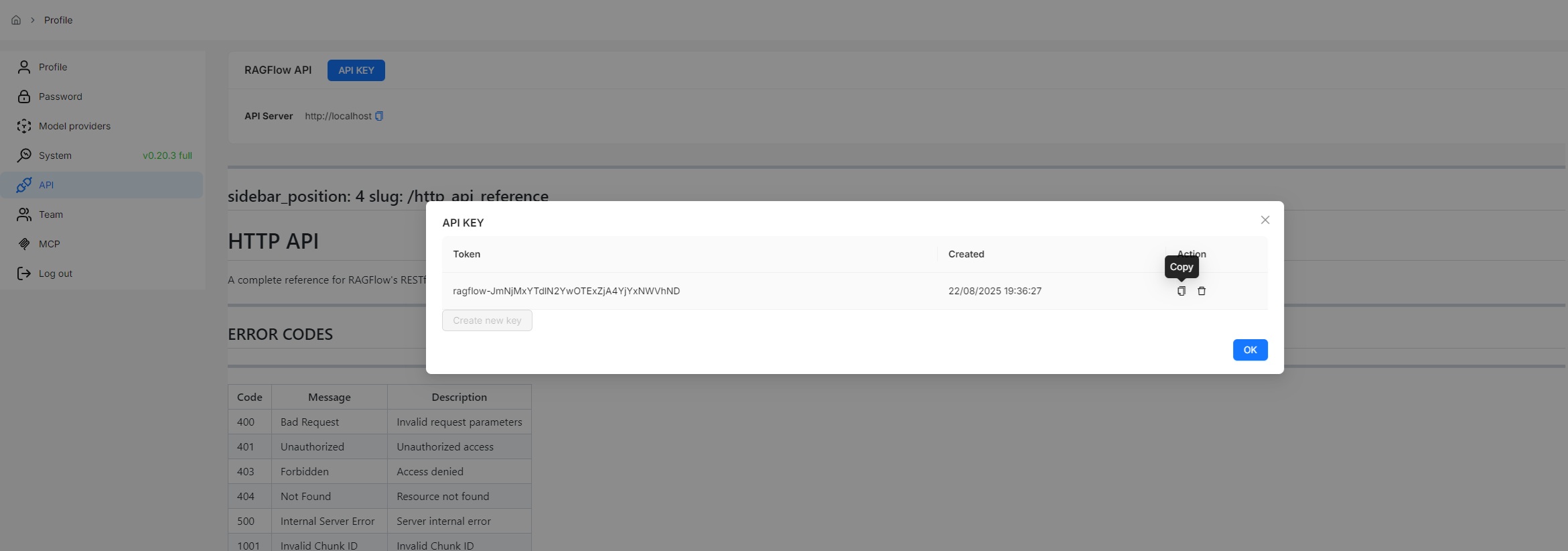
|
||||
|
||||
:::tip NOTE
|
||||
See the [RAGFlow HTTP API reference](../references/http_api_reference.md) or the [RAGFlow Python API reference](../references/python_api_reference.md) for a complete reference of RAGFlow's HTTP or Python APIs.
|
||||
|
||||
@ -77,7 +77,7 @@ After building the infiniflow/ragflow:nightly-slim image, you are ready to launc
|
||||
|
||||
1. Edit Docker Compose Configuration
|
||||
|
||||
Open the `docker/.env` file. Find the `RAGFLOW_IMAGE` setting and change the image reference from `infiniflow/ragflow:v0.20.3-slim` to `infiniflow/ragflow:nightly-slim` to use the pre-built image.
|
||||
Open the `docker/.env` file. Find the `RAGFLOW_IMAGE` setting and change the image reference from `infiniflow/ragflow:v0.20.4-slim` to `infiniflow/ragflow:nightly-slim` to use the pre-built image.
|
||||
|
||||
|
||||
2. Launch the Service
|
||||
|
||||
10
docs/faq.mdx
10
docs/faq.mdx
@ -30,17 +30,17 @@ The "garbage in garbage out" status quo remains unchanged despite the fact that
|
||||
|
||||
Each RAGFlow release is available in two editions:
|
||||
|
||||
- **Slim edition**: excludes built-in embedding models and is identified by a **-slim** suffix added to the version name. Example: `infiniflow/ragflow:v0.20.3-slim`
|
||||
- **Full edition**: includes built-in embedding models and has no suffix added to the version name. Example: `infiniflow/ragflow:v0.20.3`
|
||||
- **Slim edition**: excludes built-in embedding models and is identified by a **-slim** suffix added to the version name. Example: `infiniflow/ragflow:v0.20.4-slim`
|
||||
- **Full edition**: includes built-in embedding models and has no suffix added to the version name. Example: `infiniflow/ragflow:v0.20.4`
|
||||
|
||||
---
|
||||
|
||||
### Which embedding models can be deployed locally?
|
||||
|
||||
RAGFlow offers two Docker image editions, `v0.20.3-slim` and `v0.20.3`:
|
||||
RAGFlow offers two Docker image editions, `v0.20.4-slim` and `v0.20.4`:
|
||||
|
||||
- `infiniflow/ragflow:v0.20.3-slim` (default): The RAGFlow Docker image without embedding models.
|
||||
- `infiniflow/ragflow:v0.20.3`: The RAGFlow Docker image with embedding models including:
|
||||
- `infiniflow/ragflow:v0.20.4-slim` (default): The RAGFlow Docker image without embedding models.
|
||||
- `infiniflow/ragflow:v0.20.4`: The RAGFlow Docker image with embedding models including:
|
||||
- Built-in embedding models:
|
||||
- `BAAI/bge-large-zh-v1.5`
|
||||
- `maidalun1020/bce-embedding-base_v1`
|
||||
|
||||
@ -9,7 +9,7 @@ The component equipped with reasoning, tool usage, and multi-agent collaboration
|
||||
|
||||
---
|
||||
|
||||
An **Agent** component fine-tunes the LLM and sets its prompt. From v0.20.3 onwards, an **Agent** component is able to work independently and with the following capabilities:
|
||||
An **Agent** component fine-tunes the LLM and sets its prompt. From v0.20.4 onwards, an **Agent** component is able to work independently and with the following capabilities:
|
||||
|
||||
- Autonomous reasoning with reflection and adjustment based on environmental feedback.
|
||||
- Use of tools or subagents to complete tasks.
|
||||
|
||||
@ -9,7 +9,7 @@ A component that retrieves information from specified datasets.
|
||||
|
||||
## Scenarios
|
||||
|
||||
A **Retrieval** component is essential in most RAG scenarios, where information is extracted from designated knowledge bases before being sent to the LLM for content generation. As of v0.20.3, a **Retrieval** component can operate either as a workflow component or as a tool of an **Agent**, enabling the Agent to control its invocation and search queries.
|
||||
A **Retrieval** component is essential in most RAG scenarios, where information is extracted from designated knowledge bases before being sent to the LLM for content generation. As of v0.20.4, a **Retrieval** component can operate either as a workflow component or as a tool of an **Agent**, enabling the Agent to control its invocation and search queries.
|
||||
|
||||
## Configurations
|
||||
|
||||
|
||||
@ -48,7 +48,7 @@ You start an AI conversation by creating an assistant.
|
||||
- If no target language is selected, the system will search only in the language of your query, which may cause relevant information in other languages to be missed.
|
||||
- **Variable** refers to the variables (keys) to be used in the system prompt. `{knowledge}` is a reserved variable. Click **Add** to add more variables for the system prompt.
|
||||
- If you are uncertain about the logic behind **Variable**, leave it *as-is*.
|
||||
- As of v0.20.3, if you add custom variables here, the only way you can pass in their values is to call:
|
||||
- As of v0.20.4, if you add custom variables here, the only way you can pass in their values is to call:
|
||||
- HTTP method [Converse with chat assistant](../../references/http_api_reference.md#converse-with-chat-assistant), or
|
||||
- Python method [Converse with chat assistant](../../references/python_api_reference.md#converse-with-chat-assistant).
|
||||
|
||||
|
||||
@ -128,7 +128,7 @@ See [Run retrieval test](./run_retrieval_test.md) for details.
|
||||
|
||||
## Search for knowledge base
|
||||
|
||||
As of RAGFlow v0.20.3, the search feature is still in a rudimentary form, supporting only knowledge base search by name.
|
||||
As of RAGFlow v0.20.4, the search feature is still in a rudimentary form, supporting only knowledge base search by name.
|
||||
|
||||

|
||||
|
||||
|
||||
@ -87,4 +87,4 @@ RAGFlow's file management allows you to download an uploaded file:
|
||||
|
||||

|
||||
|
||||
> As of RAGFlow v0.20.3, bulk download is not supported, nor can you download an entire folder.
|
||||
> As of RAGFlow v0.20.4, bulk download is not supported, nor can you download an entire folder.
|
||||
|
||||
@ -18,7 +18,7 @@ RAGFlow ships with a built-in [Langfuse](https://langfuse.com) integration so th
|
||||
Langfuse stores traces, spans and prompt payloads in a purpose-built observability backend and offers filtering and visualisations on top.
|
||||
|
||||
:::info NOTE
|
||||
• RAGFlow **≥ 0.20.3** (contains the Langfuse connector)
|
||||
• RAGFlow **≥ 0.20.4** (contains the Langfuse connector)
|
||||
• A Langfuse workspace (cloud or self-hosted) with a _Project Public Key_ and _Secret Key_
|
||||
:::
|
||||
|
||||
|
||||
@ -66,10 +66,10 @@ To upgrade RAGFlow, you must upgrade **both** your code **and** your Docker imag
|
||||
git clone https://github.com/infiniflow/ragflow.git
|
||||
```
|
||||
|
||||
2. Switch to the latest, officially published release, e.g., `v0.20.3`:
|
||||
2. Switch to the latest, officially published release, e.g., `v0.20.4`:
|
||||
|
||||
```bash
|
||||
git checkout -f v0.20.3
|
||||
git checkout -f v0.20.4
|
||||
```
|
||||
|
||||
3. Update **ragflow/docker/.env**:
|
||||
@ -83,14 +83,14 @@ To upgrade RAGFlow, you must upgrade **both** your code **and** your Docker imag
|
||||
<TabItem value="slim">
|
||||
|
||||
```bash
|
||||
RAGFLOW_IMAGE=infiniflow/ragflow:v0.20.3-slim
|
||||
RAGFLOW_IMAGE=infiniflow/ragflow:v0.20.4-slim
|
||||
```
|
||||
|
||||
</TabItem>
|
||||
<TabItem value="full">
|
||||
|
||||
```bash
|
||||
RAGFLOW_IMAGE=infiniflow/ragflow:v0.20.3
|
||||
RAGFLOW_IMAGE=infiniflow/ragflow:v0.20.4
|
||||
```
|
||||
|
||||
</TabItem>
|
||||
@ -114,10 +114,10 @@ No, you do not need to. Upgrading RAGFlow in itself will *not* remove your uploa
|
||||
1. From an environment with Internet access, pull the required Docker image.
|
||||
2. Save the Docker image to a **.tar** file.
|
||||
```bash
|
||||
docker save -o ragflow.v0.20.3.tar infiniflow/ragflow:v0.20.3
|
||||
docker save -o ragflow.v0.20.4.tar infiniflow/ragflow:v0.20.4
|
||||
```
|
||||
3. Copy the **.tar** file to the target server.
|
||||
4. Load the **.tar** file into Docker:
|
||||
```bash
|
||||
docker load -i ragflow.v0.20.3.tar
|
||||
docker load -i ragflow.v0.20.4.tar
|
||||
```
|
||||
|
||||
@ -44,7 +44,7 @@ This section provides instructions on setting up the RAGFlow server on Linux. If
|
||||
|
||||
`vm.max_map_count`. This value sets the maximum number of memory map areas a process may have. Its default value is 65530. While most applications require fewer than a thousand maps, reducing this value can result in abnormal behaviors, and the system will throw out-of-memory errors when a process reaches the limitation.
|
||||
|
||||
RAGFlow v0.20.3 uses Elasticsearch or [Infinity](https://github.com/infiniflow/infinity) for multiple recall. Setting the value of `vm.max_map_count` correctly is crucial to the proper functioning of the Elasticsearch component.
|
||||
RAGFlow v0.20.4 uses Elasticsearch or [Infinity](https://github.com/infiniflow/infinity) for multiple recall. Setting the value of `vm.max_map_count` correctly is crucial to the proper functioning of the Elasticsearch component.
|
||||
|
||||
<Tabs
|
||||
defaultValue="linux"
|
||||
@ -184,13 +184,13 @@ This section provides instructions on setting up the RAGFlow server on Linux. If
|
||||
```bash
|
||||
$ git clone https://github.com/infiniflow/ragflow.git
|
||||
$ cd ragflow/docker
|
||||
$ git checkout -f v0.20.3
|
||||
$ git checkout -f v0.20.4
|
||||
```
|
||||
|
||||
3. Use the pre-built Docker images and start up the server:
|
||||
|
||||
:::tip NOTE
|
||||
The command below downloads the `v0.20.3-slim` edition of the RAGFlow Docker image. Refer to the following table for descriptions of different RAGFlow editions. To download a RAGFlow edition different from `v0.20.3-slim`, update the `RAGFLOW_IMAGE` variable accordingly in **docker/.env** before using `docker compose` to start the server. For example: set `RAGFLOW_IMAGE=infiniflow/ragflow:v0.20.3` for the full edition `v0.20.3`.
|
||||
The command below downloads the `v0.20.4-slim` edition of the RAGFlow Docker image. Refer to the following table for descriptions of different RAGFlow editions. To download a RAGFlow edition different from `v0.20.4-slim`, update the `RAGFLOW_IMAGE` variable accordingly in **docker/.env** before using `docker compose` to start the server. For example: set `RAGFLOW_IMAGE=infiniflow/ragflow:v0.20.4` for the full edition `v0.20.4`.
|
||||
:::
|
||||
|
||||
```bash
|
||||
@ -207,8 +207,8 @@ This section provides instructions on setting up the RAGFlow server on Linux. If
|
||||
|
||||
| RAGFlow image tag | Image size (GB) | Has embedding models and Python packages? | Stable? |
|
||||
| ------------------- | --------------- | ----------------------------------------- | ------------------------ |
|
||||
| `v0.20.3` | ≈9 | :heavy_check_mark: | Stable release |
|
||||
| `v0.20.3-slim` | ≈2 | ❌ | Stable release |
|
||||
| `v0.20.4` | ≈9 | :heavy_check_mark: | Stable release |
|
||||
| `v0.20.4-slim` | ≈2 | ❌ | Stable release |
|
||||
| `nightly` | ≈9 | :heavy_check_mark: | *Unstable* nightly build |
|
||||
| `nightly-slim` | ≈2 | ❌ | *Unstable* nightly build |
|
||||
|
||||
@ -217,7 +217,7 @@ This section provides instructions on setting up the RAGFlow server on Linux. If
|
||||
```
|
||||
|
||||
:::danger IMPORTANT
|
||||
The embedding models included in `v0.20.3` and `nightly` are:
|
||||
The embedding models included in `v0.20.4` and `nightly` are:
|
||||
|
||||
- BAAI/bge-large-zh-v1.5
|
||||
- maidalun1020/bce-embedding-base_v1
|
||||
|
||||
@ -19,7 +19,7 @@ import TOCInline from '@theme/TOCInline';
|
||||
|
||||
### Cross-language search
|
||||
|
||||
Cross-language search (also known as cross-lingual retrieval) is a feature introduced in version 0.20.3. It enables users to submit queries in one language (for example, English) and retrieve relevant documents written in other languages such as Chinese or Spanish. This feature is enabled by the system’s default chat model, which translates queries to ensure accurate matching of semantic meaning across languages.
|
||||
Cross-language search (also known as cross-lingual retrieval) is a feature introduced in version 0.20.4. It enables users to submit queries in one language (for example, English) and retrieve relevant documents written in other languages such as Chinese or Spanish. This feature is enabled by the system’s default chat model, which translates queries to ensure accurate matching of semantic meaning across languages.
|
||||
|
||||
By enabling cross-language search, users can effortlessly access a broader range of information regardless of language barriers, significantly enhancing the system’s usability and inclusiveness.
|
||||
|
||||
|
||||
@ -5,7 +5,7 @@ slug: /http_api_reference
|
||||
|
||||
# HTTP API
|
||||
|
||||
A complete reference for RAGFlow's RESTful API. Before proceeding, please ensure you [have your RAGFlow API key ready for authentication](../develop/acquire_ragflow_api_key.md).
|
||||
A complete reference for RAGFlow's RESTful API. Before proceeding, please ensure you [have your RAGFlow API key ready for authentication](https://ragflow.io/docs/dev/acquire_ragflow_api_key).
|
||||
|
||||
---
|
||||
|
||||
@ -383,7 +383,7 @@ curl --request POST \
|
||||
- `"layout_recognize"`: `string`
|
||||
- Defaults to `DeepDOC`
|
||||
- `"tag_kb_ids"`: `array<string>` refer to [Use tag set](https://ragflow.io/docs/dev/use_tag_sets)
|
||||
- Must include a list of dataset IDs, where each dataset is parsed using the Tag Chunk Method
|
||||
- Must include a list of dataset IDs, where each dataset is parsed using the Tag Chunking Method
|
||||
- `"task_page_size"`: `int` For PDF only.
|
||||
- Defaults to `12`
|
||||
- Minimum: `1`
|
||||
@ -604,7 +604,7 @@ curl --request PUT \
|
||||
- `"layout_recognize"`: `string`
|
||||
- Defaults to `DeepDOC`
|
||||
- `"tag_kb_ids"`: `array<string>` refer to [Use tag set](https://ragflow.io/docs/dev/use_tag_sets)
|
||||
- Must include a list of dataset IDs, where each dataset is parsed using the Tag Chunk Method
|
||||
- Must include a list of dataset IDs, where each dataset is parsed using the Tag Chunking Method
|
||||
- `"task_page_size"`: `int` For PDF only.
|
||||
- Defaults to `12`
|
||||
- Minimum: `1`
|
||||
@ -731,7 +731,7 @@ Failure:
|
||||
```
|
||||
---
|
||||
|
||||
## Get dataset's knowledge graph
|
||||
### Get knowledge graph
|
||||
|
||||
**GET** `/api/v1/datasets/{dataset_id}/knowledge_graph`
|
||||
|
||||
@ -810,7 +810,7 @@ Failure:
|
||||
```
|
||||
---
|
||||
|
||||
## Delete dataset's knowledge graph
|
||||
### Delete knowledge graph
|
||||
|
||||
**DELETE** `/api/v1/datasets/{dataset_id}/knowledge_graph`
|
||||
|
||||
@ -3501,7 +3501,7 @@ Failure:
|
||||
|
||||
### Generate related questions
|
||||
|
||||
**POST** `/v1/sessions/related_questions`
|
||||
**POST** `/api/v1/sessions/related_questions`
|
||||
|
||||
Generates five to ten alternative question strings from the user's original query to retrieve more relevant search results.
|
||||
|
||||
@ -3516,7 +3516,7 @@ The chat model autonomously determines the number of questions to generate based
|
||||
#### Request
|
||||
|
||||
- Method: POST
|
||||
- URL: `/v1/sessions/related_questions`
|
||||
- URL: `/api/v1/sessions/related_questions`
|
||||
- Headers:
|
||||
- `'content-Type: application/json'`
|
||||
- `'Authorization: Bearer <YOUR_LOGIN_TOKEN>'`
|
||||
@ -3528,7 +3528,7 @@ The chat model autonomously determines the number of questions to generate based
|
||||
|
||||
```bash
|
||||
curl --request POST \
|
||||
--url http://{address}/v1/sessions/related_questions \
|
||||
--url http://{address}/api/v1/sessions/related_questions \
|
||||
--header 'Content-Type: application/json' \
|
||||
--header 'Authorization: Bearer <YOUR_LOGIN_TOKEN>' \
|
||||
--data '
|
||||
|
||||
@ -5,7 +5,7 @@ slug: /python_api_reference
|
||||
|
||||
# Python API
|
||||
|
||||
A complete reference for RAGFlow's Python APIs. Before proceeding, please ensure you [have your RAGFlow API key ready for authentication](../develop/acquire_ragflow_api_key.md).
|
||||
A complete reference for RAGFlow's Python APIs. Before proceeding, please ensure you [have your RAGFlow API key ready for authentication](https://ragflow.io/docs/dev/acquire_ragflow_api_key).
|
||||
|
||||
:::tip NOTE
|
||||
Run the following command to download the Python SDK:
|
||||
|
||||
@ -9,8 +9,8 @@ Key features, improvements and bug fixes in the latest releases.
|
||||
|
||||
:::info
|
||||
Each RAGFlow release is available in two editions:
|
||||
- **Slim edition**: excludes built-in embedding models and is identified by a **-slim** suffix added to the version name. Example: `infiniflow/ragflow:v0.20.1-slim`
|
||||
- **Full edition**: includes built-in embedding models and has no suffix added to the version name. Example: `infiniflow/ragflow:v0.20.1`
|
||||
- **Slim edition**: excludes built-in embedding models and is identified by a **-slim** suffix added to the version name. Example: `infiniflow/ragflow:v0.20.4-slim`
|
||||
- **Full edition**: includes built-in embedding models and has no suffix added to the version name. Example: `infiniflow/ragflow:v0.20.4`
|
||||
:::
|
||||
|
||||
:::danger IMPORTANT
|
||||
@ -22,6 +22,38 @@ The embedding models included in a full edition are:
|
||||
These two embedding models are optimized specifically for English and Chinese, so performance may be compromised if you use them to embed documents in other languages.
|
||||
:::
|
||||
|
||||
## v0.20.4
|
||||
|
||||
Released on August 27, 2025.
|
||||
|
||||
### Improvements
|
||||
|
||||
- Agent component: Completes Chinese localization for the Agent component.
|
||||
- Introduces the `ENABLE_TIMEOUT_ASSERTION` environment variable to enable or disable timeout assertions for file parsing tasks.
|
||||
- Dataset:
|
||||
- Improves Markdown file parsing, with AST support to avoid unintended chunking.
|
||||
- Enhances HTML parsing, supporting bs4-based HTML tag traversal.
|
||||
|
||||
### Added models
|
||||
|
||||
ZHIPU GLM-4.5
|
||||
|
||||
### New Agent templates
|
||||
|
||||
Ecommerce Customer Service Workflow: A template designed to handle enquiries about product features and multi-product comparisons using the internal knowledge base, as well as to manage installation appointment bookings.
|
||||
|
||||
### Fixed issues
|
||||
|
||||
- Dataset:
|
||||
- Unable to share resources with the team.
|
||||
- Inappropriate restrictions on the number and size of uploaded files.
|
||||
- Chat:
|
||||
- Unable to preview referenced files in responses.
|
||||
- Unable to send out messages after file uploads.
|
||||
- An OAuth2 authentication failure.
|
||||
- A logical error in multi-conditioned metadata searches within a dataset.
|
||||
- Citations infinitely increased in multi-turn conversations.
|
||||
|
||||
## v0.20.3
|
||||
|
||||
Released on August 20, 2025.
|
||||
|
||||
@ -15,6 +15,7 @@
|
||||
#
|
||||
import logging
|
||||
import itertools
|
||||
import os
|
||||
import re
|
||||
from dataclasses import dataclass
|
||||
from typing import Any, Callable
|
||||
@ -106,7 +107,8 @@ class EntityResolution(Extractor):
|
||||
nonlocal remain_candidates_to_resolve, callback
|
||||
async with semaphore:
|
||||
try:
|
||||
with trio.move_on_after(280) as cancel_scope:
|
||||
enable_timeout_assertion = os.environ.get("ENABLE_TIMEOUT_ASSERTION")
|
||||
with trio.move_on_after(280 if enable_timeout_assertion else 1000000000) as cancel_scope:
|
||||
await self._resolve_candidate(candidate_batch, result_set, result_lock)
|
||||
remain_candidates_to_resolve = remain_candidates_to_resolve - len(candidate_batch[1])
|
||||
callback(msg=f"Resolved {len(candidate_batch[1])} pairs, {remain_candidates_to_resolve} are remained to resolve. ")
|
||||
@ -169,7 +171,8 @@ class EntityResolution(Extractor):
|
||||
logging.info(f"Created resolution prompt {len(text)} bytes for {len(candidate_resolution_i[1])} entity pairs of type {candidate_resolution_i[0]}")
|
||||
async with chat_limiter:
|
||||
try:
|
||||
with trio.move_on_after(280) as cancel_scope:
|
||||
enable_timeout_assertion = os.environ.get("ENABLE_TIMEOUT_ASSERTION")
|
||||
with trio.move_on_after(280 if enable_timeout_assertion else 1000000000) as cancel_scope:
|
||||
response = await trio.to_thread.run_sync(self._chat, text, [{"role": "user", "content": "Output:"}], {})
|
||||
if cancel_scope.cancelled_caught:
|
||||
logging.warning("_resolve_candidate._chat timeout, skipping...")
|
||||
|
||||
@ -7,6 +7,7 @@ Reference:
|
||||
|
||||
import logging
|
||||
import json
|
||||
import os
|
||||
import re
|
||||
from typing import Callable
|
||||
from dataclasses import dataclass
|
||||
@ -51,6 +52,7 @@ class CommunityReportsExtractor(Extractor):
|
||||
self._max_report_length = max_report_length or 1500
|
||||
|
||||
async def __call__(self, graph: nx.Graph, callback: Callable | None = None):
|
||||
enable_timeout_assertion = os.environ.get("ENABLE_TIMEOUT_ASSERTION")
|
||||
for node_degree in graph.degree:
|
||||
graph.nodes[str(node_degree[0])]["rank"] = int(node_degree[1])
|
||||
|
||||
@ -92,7 +94,7 @@ class CommunityReportsExtractor(Extractor):
|
||||
text = perform_variable_replacements(self._extraction_prompt, variables=prompt_variables)
|
||||
async with chat_limiter:
|
||||
try:
|
||||
with trio.move_on_after(180) as cancel_scope:
|
||||
with trio.move_on_after(180 if enable_timeout_assertion else 1000000000) as cancel_scope:
|
||||
response = await trio.to_thread.run_sync( self._chat, text, [{"role": "user", "content": "Output:"}], {})
|
||||
if cancel_scope.cancelled_caught:
|
||||
logging.warning("extract_community_report._chat timeout, skipping...")
|
||||
|
||||
@ -15,6 +15,8 @@
|
||||
#
|
||||
import json
|
||||
import logging
|
||||
import os
|
||||
|
||||
import networkx as nx
|
||||
import trio
|
||||
|
||||
@ -49,6 +51,7 @@ async def run_graphrag(
|
||||
embedding_model,
|
||||
callback,
|
||||
):
|
||||
enable_timeout_assertion=os.environ.get("ENABLE_TIMEOUT_ASSERTION")
|
||||
start = trio.current_time()
|
||||
tenant_id, kb_id, doc_id = row["tenant_id"], str(row["kb_id"]), row["doc_id"]
|
||||
chunks = []
|
||||
@ -57,7 +60,7 @@ async def run_graphrag(
|
||||
):
|
||||
chunks.append(d["content_with_weight"])
|
||||
|
||||
with trio.fail_after(max(120, len(chunks)*120)):
|
||||
with trio.fail_after(max(120, len(chunks)*60*10) if enable_timeout_assertion else 10000000000):
|
||||
subgraph = await generate_subgraph(
|
||||
LightKGExt
|
||||
if "method" not in row["kb_parser_config"].get("graphrag", {}) or row["kb_parser_config"]["graphrag"]["method"] != "general"
|
||||
|
||||
@ -130,7 +130,36 @@ Output:
|
||||
|
||||
PROMPTS[
|
||||
"entiti_continue_extraction"
|
||||
] = """MANY entities were missed in the last extraction. Add them below using the same format:
|
||||
] = """
|
||||
MANY entities and relationships were missed in the last extraction. Please find only the missing entities and relationships from previous text.
|
||||
|
||||
---Remember Steps---
|
||||
|
||||
1. Identify all entities. For each identified entity, extract the following information:
|
||||
- entity_name: Name of the entity, use same language as input text. If English, capitalized the name
|
||||
- entity_type: One of the following types: [{entity_types}]
|
||||
- entity_description: Provide a comprehensive description of the entity's attributes and activities *based solely on the information present in the input text*. **Do not infer or hallucinate information not explicitly stated.** If the text provides insufficient information to create a comprehensive description, state "Description not available in text."
|
||||
Format each entity as ("entity"{tuple_delimiter}<entity_name>{tuple_delimiter}<entity_type>{tuple_delimiter}<entity_description>)
|
||||
|
||||
2. From the entities identified in step 1, identify all pairs of (source_entity, target_entity) that are *clearly related* to each other.
|
||||
For each pair of related entities, extract the following information:
|
||||
- source_entity: name of the source entity, as identified in step 1
|
||||
- target_entity: name of the target entity, as identified in step 1
|
||||
- relationship_description: explanation as to why you think the source entity and the target entity are related to each other
|
||||
- relationship_strength: a numeric score indicating strength of the relationship between the source entity and target entity
|
||||
- relationship_keywords: one or more high-level key words that summarize the overarching nature of the relationship, focusing on concepts or themes rather than specific details
|
||||
Format each relationship as ("relationship"{tuple_delimiter}<source_entity>{tuple_delimiter}<target_entity>{tuple_delimiter}<relationship_description>{tuple_delimiter}<relationship_keywords>{tuple_delimiter}<relationship_strength>)
|
||||
|
||||
3. Identify high-level key words that summarize the main concepts, themes, or topics of the entire text. These should capture the overarching ideas present in the document.
|
||||
Format the content-level key words as ("content_keywords"{tuple_delimiter}<high_level_keywords>)
|
||||
|
||||
4. Return output in {language} as a single list of all the entities and relationships identified in steps 1 and 2. Use **{record_delimiter}** as the list delimiter.
|
||||
|
||||
5. When finished, output {completion_delimiter}
|
||||
|
||||
---Output---
|
||||
|
||||
Add new entities and relations below using the same format, and do not include entities and relations that have been previously extracted. :
|
||||
"""
|
||||
|
||||
PROMPTS[
|
||||
@ -252,4 +281,4 @@ When handling information with timestamps:
|
||||
- List up to 5 most important reference sources at the end under "References", clearly indicating whether each source is from Knowledge Graph (KG) or Vector Data (VD)
|
||||
Format: [KG/VD] Source content
|
||||
|
||||
Add sections and commentary to the response as appropriate for the length and format. If the provided information is insufficient to answer the question, clearly state that you don't know or cannot provide an answer in the same language as the user's question."""
|
||||
Add sections and commentary to the response as appropriate for the length and format. If the provided information is insufficient to answer the question, clearly state that you don't know or cannot provide an answer in the same language as the user's question."""
|
||||
|
||||
@ -307,6 +307,7 @@ def chunk_id(chunk):
|
||||
|
||||
async def graph_node_to_chunk(kb_id, embd_mdl, ent_name, meta, chunks):
|
||||
global chat_limiter
|
||||
enable_timeout_assertion=os.environ.get("ENABLE_TIMEOUT_ASSERTION")
|
||||
chunk = {
|
||||
"id": get_uuid(),
|
||||
"important_kwd": [ent_name],
|
||||
@ -324,7 +325,7 @@ async def graph_node_to_chunk(kb_id, embd_mdl, ent_name, meta, chunks):
|
||||
ebd = get_embed_cache(embd_mdl.llm_name, ent_name)
|
||||
if ebd is None:
|
||||
async with chat_limiter:
|
||||
with trio.fail_after(3):
|
||||
with trio.fail_after(3 if enable_timeout_assertion else 30000000):
|
||||
ebd, _ = await trio.to_thread.run_sync(lambda: embd_mdl.encode([ent_name]))
|
||||
ebd = ebd[0]
|
||||
set_embed_cache(embd_mdl.llm_name, ent_name, ebd)
|
||||
@ -362,6 +363,7 @@ def get_relation(tenant_id, kb_id, from_ent_name, to_ent_name, size=1):
|
||||
|
||||
|
||||
async def graph_edge_to_chunk(kb_id, embd_mdl, from_ent_name, to_ent_name, meta, chunks):
|
||||
enable_timeout_assertion=os.environ.get("ENABLE_TIMEOUT_ASSERTION")
|
||||
chunk = {
|
||||
"id": get_uuid(),
|
||||
"from_entity_kwd": from_ent_name,
|
||||
@ -380,7 +382,7 @@ async def graph_edge_to_chunk(kb_id, embd_mdl, from_ent_name, to_ent_name, meta,
|
||||
ebd = get_embed_cache(embd_mdl.llm_name, txt)
|
||||
if ebd is None:
|
||||
async with chat_limiter:
|
||||
with trio.fail_after(3):
|
||||
with trio.fail_after(3 if enable_timeout_assertion else 300000000):
|
||||
ebd, _ = await trio.to_thread.run_sync(lambda: embd_mdl.encode([txt+f": {meta['description']}"]))
|
||||
ebd = ebd[0]
|
||||
set_embed_cache(embd_mdl.llm_name, txt, ebd)
|
||||
@ -514,9 +516,10 @@ async def set_graph(tenant_id: str, kb_id: str, embd_mdl, graph: nx.Graph, chang
|
||||
callback(msg=f"set_graph converted graph change to {len(chunks)} chunks in {now - start:.2f}s.")
|
||||
start = now
|
||||
|
||||
enable_timeout_assertion=os.environ.get("ENABLE_TIMEOUT_ASSERTION")
|
||||
es_bulk_size = 4
|
||||
for b in range(0, len(chunks), es_bulk_size):
|
||||
with trio.fail_after(3):
|
||||
with trio.fail_after(3 if enable_timeout_assertion else 30000000):
|
||||
doc_store_result = await trio.to_thread.run_sync(lambda: settings.docStoreConn.insert(chunks[b:b + es_bulk_size], search.index_name(tenant_id), kb_id))
|
||||
if b % 100 == es_bulk_size and callback:
|
||||
callback(msg=f"Insert chunks: {b}/{len(chunks)}")
|
||||
|
||||
@ -56,7 +56,7 @@ env:
|
||||
ragflow:
|
||||
image:
|
||||
repository: infiniflow/ragflow
|
||||
tag: v0.20.3-slim
|
||||
tag: v0.20.4-slim
|
||||
pullPolicy: IfNotPresent
|
||||
pullSecrets: []
|
||||
# Optional service configuration overrides
|
||||
|
||||
@ -1,6 +1,6 @@
|
||||
[project]
|
||||
name = "ragflow"
|
||||
version = "0.20.3"
|
||||
version = "0.20.4"
|
||||
description = "[RAGFlow](https://ragflow.io/) is an open-source RAG (Retrieval-Augmented Generation) engine based on deep document understanding. It offers a streamlined RAG workflow for businesses of any scale, combining LLM (Large Language Models) to provide truthful question-answering capabilities, backed by well-founded citations from various complex formatted data."
|
||||
authors = [{ name = "Zhichang Yu", email = "yuzhichang@gmail.com" }]
|
||||
license-files = ["LICENSE"]
|
||||
|
||||
@ -517,7 +517,8 @@ def chunk(filename, binary=None, from_page=0, to_page=100000,
|
||||
|
||||
elif re.search(r"\.(htm|html)$", filename, re.IGNORECASE):
|
||||
callback(0.1, "Start to parse.")
|
||||
sections = HtmlParser()(filename, binary)
|
||||
chunk_token_num = int(parser_config.get("chunk_token_num", 128))
|
||||
sections = HtmlParser()(filename, binary, chunk_token_num)
|
||||
sections = [(_, "") for _ in sections if _]
|
||||
callback(0.8, "Finish parsing.")
|
||||
|
||||
|
||||
@ -36,6 +36,7 @@ class SupportedLiteLLMProvider(StrEnum):
|
||||
Nvidia = "NVIDIA"
|
||||
TogetherAI = "TogetherAI"
|
||||
Anthropic = "Anthropic"
|
||||
Ollama = "Ollama"
|
||||
|
||||
|
||||
FACTORY_DEFAULT_BASE_URL = {
|
||||
@ -59,6 +60,7 @@ LITELLM_PROVIDER_PREFIX = {
|
||||
SupportedLiteLLMProvider.Nvidia: "nvidia_nim/",
|
||||
SupportedLiteLLMProvider.TogetherAI: "together_ai/",
|
||||
SupportedLiteLLMProvider.Anthropic: "", # don't need a prefix
|
||||
SupportedLiteLLMProvider.Ollama: "ollama_chat/",
|
||||
}
|
||||
|
||||
ChatModel = globals().get("ChatModel", {})
|
||||
|
||||
@ -29,7 +29,6 @@ import json_repair
|
||||
import litellm
|
||||
import openai
|
||||
import requests
|
||||
from ollama import Client
|
||||
from openai import OpenAI
|
||||
from openai.lib.azure import AzureOpenAI
|
||||
from strenum import StrEnum
|
||||
@ -112,6 +111,32 @@ class Base(ABC):
|
||||
def _clean_conf(self, gen_conf):
|
||||
if "max_tokens" in gen_conf:
|
||||
del gen_conf["max_tokens"]
|
||||
|
||||
allowed_conf = {
|
||||
"temperature",
|
||||
"max_completion_tokens",
|
||||
"top_p",
|
||||
"stream",
|
||||
"stream_options",
|
||||
"stop",
|
||||
"n",
|
||||
"presence_penalty",
|
||||
"frequency_penalty",
|
||||
"functions",
|
||||
"function_call",
|
||||
"logit_bias",
|
||||
"user",
|
||||
"response_format",
|
||||
"seed",
|
||||
"tools",
|
||||
"tool_choice",
|
||||
"logprobs",
|
||||
"top_logprobs",
|
||||
"extra_headers",
|
||||
}
|
||||
|
||||
gen_conf = {k: v for k, v in gen_conf.items() if k in allowed_conf}
|
||||
|
||||
return gen_conf
|
||||
|
||||
def _chat(self, history, gen_conf, **kwargs):
|
||||
@ -657,73 +682,6 @@ class ZhipuChat(Base):
|
||||
return super().chat_streamly_with_tools(system, history, gen_conf)
|
||||
|
||||
|
||||
class OllamaChat(Base):
|
||||
_FACTORY_NAME = "Ollama"
|
||||
|
||||
def __init__(self, key, model_name, base_url=None, **kwargs):
|
||||
super().__init__(key, model_name, base_url=base_url, **kwargs)
|
||||
|
||||
self.client = Client(host=base_url) if not key or key == "x" else Client(host=base_url, headers={"Authorization": f"Bearer {key}"})
|
||||
self.model_name = model_name
|
||||
self.keep_alive = kwargs.get("ollama_keep_alive", int(os.environ.get("OLLAMA_KEEP_ALIVE", -1)))
|
||||
|
||||
def _clean_conf(self, gen_conf):
|
||||
options = {}
|
||||
if "max_tokens" in gen_conf:
|
||||
options["num_predict"] = gen_conf["max_tokens"]
|
||||
for k in ["temperature", "top_p", "presence_penalty", "frequency_penalty"]:
|
||||
if k not in gen_conf:
|
||||
continue
|
||||
options[k] = gen_conf[k]
|
||||
return options
|
||||
|
||||
def _chat(self, history, gen_conf={}, **kwargs):
|
||||
# Calculate context size
|
||||
ctx_size = self._calculate_dynamic_ctx(history)
|
||||
|
||||
gen_conf["num_ctx"] = ctx_size
|
||||
response = self.client.chat(model=self.model_name, messages=history, options=gen_conf, keep_alive=self.keep_alive)
|
||||
ans = response["message"]["content"].strip()
|
||||
token_count = response.get("eval_count", 0) + response.get("prompt_eval_count", 0)
|
||||
return ans, token_count
|
||||
|
||||
def chat_streamly(self, system, history, gen_conf={}, **kwargs):
|
||||
if system:
|
||||
history.insert(0, {"role": "system", "content": system})
|
||||
if "max_tokens" in gen_conf:
|
||||
del gen_conf["max_tokens"]
|
||||
try:
|
||||
# Calculate context size
|
||||
ctx_size = self._calculate_dynamic_ctx(history)
|
||||
options = {"num_ctx": ctx_size}
|
||||
if "temperature" in gen_conf:
|
||||
options["temperature"] = gen_conf["temperature"]
|
||||
if "max_tokens" in gen_conf:
|
||||
options["num_predict"] = gen_conf["max_tokens"]
|
||||
if "top_p" in gen_conf:
|
||||
options["top_p"] = gen_conf["top_p"]
|
||||
if "presence_penalty" in gen_conf:
|
||||
options["presence_penalty"] = gen_conf["presence_penalty"]
|
||||
if "frequency_penalty" in gen_conf:
|
||||
options["frequency_penalty"] = gen_conf["frequency_penalty"]
|
||||
|
||||
ans = ""
|
||||
try:
|
||||
response = self.client.chat(model=self.model_name, messages=history, stream=True, options=options, keep_alive=self.keep_alive)
|
||||
for resp in response:
|
||||
if resp["done"]:
|
||||
token_count = resp.get("prompt_eval_count", 0) + resp.get("eval_count", 0)
|
||||
yield token_count
|
||||
ans = resp["message"]["content"]
|
||||
yield ans
|
||||
except Exception as e:
|
||||
yield ans + "\n**ERROR**: " + str(e)
|
||||
yield 0
|
||||
except Exception as e:
|
||||
yield "**ERROR**: " + str(e)
|
||||
yield 0
|
||||
|
||||
|
||||
class LocalAIChat(Base):
|
||||
_FACTORY_NAME = "LocalAI"
|
||||
|
||||
@ -1396,7 +1354,7 @@ class Ai302Chat(Base):
|
||||
|
||||
|
||||
class LiteLLMBase(ABC):
|
||||
_FACTORY_NAME = ["Tongyi-Qianwen", "Bedrock", "Moonshot", "xAI", "DeepInfra", "Groq", "Cohere", "Gemini", "DeepSeek", "NVIDIA", "TogetherAI", "Anthropic"]
|
||||
_FACTORY_NAME = ["Tongyi-Qianwen", "Bedrock", "Moonshot", "xAI", "DeepInfra", "Groq", "Cohere", "Gemini", "DeepSeek", "NVIDIA", "TogetherAI", "Anthropic", "Ollama"]
|
||||
|
||||
def __init__(self, key, model_name, base_url=None, **kwargs):
|
||||
self.timeout = int(os.environ.get("LM_TIMEOUT_SECONDS", 600))
|
||||
|
||||
@ -44,14 +44,17 @@ class Base(ABC):
|
||||
raise NotImplementedError("Please implement encode method!")
|
||||
|
||||
def total_token_count(self, resp):
|
||||
try:
|
||||
return resp.usage.total_tokens
|
||||
except Exception:
|
||||
pass
|
||||
try:
|
||||
return resp["usage"]["total_tokens"]
|
||||
except Exception:
|
||||
pass
|
||||
if hasattr(resp, "usage") and hasattr(resp.usage, "total_tokens"):
|
||||
try:
|
||||
return resp.usage.total_tokens
|
||||
except Exception:
|
||||
pass
|
||||
|
||||
if 'usage' in resp and 'total_tokens' in resp['usage']:
|
||||
try:
|
||||
return resp["usage"]["total_tokens"]
|
||||
except Exception:
|
||||
pass
|
||||
return 0
|
||||
|
||||
|
||||
|
||||
@ -114,6 +114,8 @@ def kb_prompt(kbinfos, max_tokens, hash_id=False):
|
||||
docs = {d.id: d.meta_fields for d in docs}
|
||||
|
||||
def draw_node(k, line):
|
||||
if line is not None and not isinstance(line, str):
|
||||
line = str(line)
|
||||
if not line:
|
||||
return ""
|
||||
return f"\n├── {k}: " + re.sub(r"\n+", " ", line, flags=re.DOTALL)
|
||||
|
||||
@ -21,7 +21,7 @@ import sys
|
||||
import threading
|
||||
import time
|
||||
|
||||
from api.utils.api_utils import timeout, is_strong_enough
|
||||
from api.utils.api_utils import timeout
|
||||
from api.utils.log_utils import init_root_logger, get_project_base_directory
|
||||
from graphrag.general.index import run_graphrag
|
||||
from graphrag.utils import get_llm_cache, set_llm_cache, get_tags_from_cache, set_tags_to_cache
|
||||
@ -478,8 +478,6 @@ async def embedding(docs, mdl, parser_config=None, callback=None):
|
||||
|
||||
@timeout(3600)
|
||||
async def run_raptor(row, chat_mdl, embd_mdl, vector_size, callback=None):
|
||||
# Pressure test for GraphRAG task
|
||||
await is_strong_enough(chat_mdl, embd_mdl)
|
||||
chunks = []
|
||||
vctr_nm = "q_%d_vec"%vector_size
|
||||
for d in settings.retrievaler.chunk_list(row["doc_id"], row["tenant_id"], [str(row["kb_id"])],
|
||||
@ -553,7 +551,6 @@ async def do_handle_task(task):
|
||||
try:
|
||||
# bind embedding model
|
||||
embedding_model = LLMBundle(task_tenant_id, LLMType.EMBEDDING, llm_name=task_embedding_id, lang=task_language)
|
||||
await is_strong_enough(None, embedding_model)
|
||||
vts, _ = embedding_model.encode(["ok"])
|
||||
vector_size = len(vts[0])
|
||||
except Exception as e:
|
||||
@ -568,7 +565,6 @@ async def do_handle_task(task):
|
||||
if task.get("task_type", "") == "raptor":
|
||||
# bind LLM for raptor
|
||||
chat_model = LLMBundle(task_tenant_id, LLMType.CHAT, llm_name=task_llm_id, lang=task_language)
|
||||
await is_strong_enough(chat_model, None)
|
||||
# run RAPTOR
|
||||
async with kg_limiter:
|
||||
chunks, token_count = await run_raptor(task, chat_model, embedding_model, vector_size, progress_callback)
|
||||
@ -580,7 +576,6 @@ async def do_handle_task(task):
|
||||
graphrag_conf = task["kb_parser_config"].get("graphrag", {})
|
||||
start_ts = timer()
|
||||
chat_model = LLMBundle(task_tenant_id, LLMType.CHAT, llm_name=task_llm_id, lang=task_language)
|
||||
await is_strong_enough(chat_model, None)
|
||||
with_resolution = graphrag_conf.get("resolution", False)
|
||||
with_community = graphrag_conf.get("community", False)
|
||||
async with kg_limiter:
|
||||
|
||||
@ -22,7 +22,7 @@ from util import format_timeout_duration, parse_timeout_duration
|
||||
from core.container import init_containers, teardown_containers
|
||||
from core.logger import logger
|
||||
|
||||
TIMEOUT = 10
|
||||
TIMEOUT = parse_timeout_duration(os.getenv("SANDBOX_TIMEOUT", "10s"))
|
||||
|
||||
|
||||
@asynccontextmanager
|
||||
@ -39,6 +39,5 @@ async def _lifespan(app: FastAPI):
|
||||
|
||||
|
||||
def init():
|
||||
TIMEOUT = parse_timeout_duration(os.getenv("SANDBOX_TIMEOUT"))
|
||||
logger.info(f"Global timeout: {format_timeout_duration(TIMEOUT)}")
|
||||
return _lifespan
|
||||
|
||||
@ -1,6 +1,6 @@
|
||||
[project]
|
||||
name = "ragflow-sdk"
|
||||
version = "0.20.3"
|
||||
version = "0.20.4"
|
||||
description = "Python client sdk of [RAGFlow](https://github.com/infiniflow/ragflow). RAGFlow is an open-source RAG (Retrieval-Augmented Generation) engine based on deep document understanding."
|
||||
authors = [{ name = "Zhichang Yu", email = "yuzhichang@gmail.com" }]
|
||||
license = { text = "Apache License, Version 2.0" }
|
||||
|
||||
2
sdk/python/uv.lock
generated
2
sdk/python/uv.lock
generated
@ -342,7 +342,7 @@ wheels = [
|
||||
|
||||
[[package]]
|
||||
name = "ragflow-sdk"
|
||||
version = "0.20.3"
|
||||
version = "0.20.4"
|
||||
source = { virtual = "." }
|
||||
dependencies = [
|
||||
{ name = "beartype" },
|
||||
|
||||
2
uv.lock
generated
2
uv.lock
generated
@ -5268,7 +5268,7 @@ wheels = [
|
||||
|
||||
[[package]]
|
||||
name = "ragflow"
|
||||
version = "0.20.3"
|
||||
version = "0.20.4"
|
||||
source = { virtual = "." }
|
||||
dependencies = [
|
||||
{ name = "akshare" },
|
||||
|
||||
@ -2,7 +2,6 @@ import { Toaster as Sonner } from '@/components/ui/sonner';
|
||||
import { Toaster } from '@/components/ui/toaster';
|
||||
import i18n from '@/locales/config';
|
||||
import { QueryClient, QueryClientProvider } from '@tanstack/react-query';
|
||||
import { ReactQueryDevtools } from '@tanstack/react-query-devtools';
|
||||
import { App, ConfigProvider, ConfigProviderProps, theme } from 'antd';
|
||||
import pt_BR from 'antd/lib/locale/pt_BR';
|
||||
import deDE from 'antd/locale/de_DE';
|
||||
@ -85,7 +84,7 @@ function Root({ children }: React.PropsWithChildren) {
|
||||
<Sonner position={'top-right'} expand richColors closeButton></Sonner>
|
||||
<Toaster />
|
||||
</ConfigProvider>
|
||||
<ReactQueryDevtools buttonPosition={'top-left'} initialIsOpen={false} />
|
||||
{/* <ReactQueryDevtools buttonPosition={'top-left'} initialIsOpen={false} /> */}
|
||||
</>
|
||||
);
|
||||
}
|
||||
|
||||
@ -158,6 +158,8 @@ interface FileUploaderProps extends React.HTMLAttributes<HTMLDivElement> {
|
||||
* @example disabled
|
||||
*/
|
||||
disabled?: boolean;
|
||||
|
||||
description?: string;
|
||||
}
|
||||
|
||||
export function FileUploader(props: FileUploaderProps) {
|
||||
@ -174,6 +176,7 @@ export function FileUploader(props: FileUploaderProps) {
|
||||
multiple = false,
|
||||
disabled = false,
|
||||
className,
|
||||
description,
|
||||
...dropzoneProps
|
||||
} = props;
|
||||
const { t } = useTranslation();
|
||||
@ -302,7 +305,7 @@ export function FileUploader(props: FileUploaderProps) {
|
||||
{t('knowledgeDetails.uploadTitle')}
|
||||
</p>
|
||||
<p className="text-sm text-muted-foreground/70">
|
||||
{t('knowledgeDetails.uploadDescription')}
|
||||
{description || t('knowledgeDetails.uploadDescription')}
|
||||
{/* You can upload
|
||||
{maxFileCount > 1
|
||||
? ` ${maxFileCount === Infinity ? 'multiple' : maxFileCount}
|
||||
|
||||
@ -12,6 +12,7 @@ import {
|
||||
FormMessage,
|
||||
} from '@/components/ui/form';
|
||||
import { LlmModelType } from '@/constants/knowledge';
|
||||
import { t } from 'i18next';
|
||||
import { Funnel } from 'lucide-react';
|
||||
import { useFormContext, useWatch } from 'react-hook-form';
|
||||
import { useTranslation } from 'react-i18next';
|
||||
@ -21,15 +22,15 @@ import { Button } from './ui/button';
|
||||
|
||||
const ModelTypes = [
|
||||
{
|
||||
title: 'All Models',
|
||||
title: t('flow.allModels'),
|
||||
value: 'all',
|
||||
},
|
||||
{
|
||||
title: 'Text-only Models',
|
||||
title: t('flow.textOnlyModels'),
|
||||
value: LlmModelType.Chat,
|
||||
},
|
||||
{
|
||||
title: 'Multimodal Models',
|
||||
title: t('flow.multimodalModels'),
|
||||
value: LlmModelType.Image2text,
|
||||
},
|
||||
];
|
||||
|
||||
@ -68,7 +68,7 @@ export function LayoutRecognizeFormField() {
|
||||
<div className="flex items-center">
|
||||
<FormLabel
|
||||
tooltip={t('layoutRecognizeTip')}
|
||||
className="text-sm text-muted-foreground whitespace-nowrap w-1/4"
|
||||
className="text-sm text-muted-foreground whitespace-wrap w-1/4"
|
||||
>
|
||||
{t('layoutRecognize')}
|
||||
</FormLabel>
|
||||
|
||||
@ -19,6 +19,7 @@ type SliderInputSwitchFormFieldProps = {
|
||||
name: string;
|
||||
label: string;
|
||||
defaultValue?: number;
|
||||
onChange?: (value: number) => void;
|
||||
className?: string;
|
||||
checkName: string;
|
||||
};
|
||||
@ -30,6 +31,7 @@ export function SliderInputSwitchFormField({
|
||||
label,
|
||||
name,
|
||||
defaultValue,
|
||||
onChange,
|
||||
className,
|
||||
checkName,
|
||||
}: SliderInputSwitchFormFieldProps) {
|
||||
@ -66,6 +68,10 @@ export function SliderInputSwitchFormField({
|
||||
<FormControl>
|
||||
<SingleFormSlider
|
||||
{...field}
|
||||
onChange={(value: number) => {
|
||||
onChange?.(value);
|
||||
field.onChange(value);
|
||||
}}
|
||||
max={max}
|
||||
min={min}
|
||||
step={step}
|
||||
@ -80,6 +86,10 @@ export function SliderInputSwitchFormField({
|
||||
min={min}
|
||||
step={step}
|
||||
{...field}
|
||||
onChange={(value: number) => {
|
||||
onChange?.(value);
|
||||
field.onChange(value);
|
||||
}}
|
||||
></NumberInput>
|
||||
</FormControl>
|
||||
</div>
|
||||
|
||||
@ -34,6 +34,7 @@ interface IProps {
|
||||
createConversationBeforeUploadDocument?(message: string): Promise<any>;
|
||||
stopOutputMessage?(): void;
|
||||
onUpload?: NonNullable<FileUploadProps['onUpload']>;
|
||||
removeFile?(file: File): void;
|
||||
}
|
||||
|
||||
export function NextMessageInput({
|
||||
@ -47,6 +48,7 @@ export function NextMessageInput({
|
||||
onInputChange,
|
||||
stopOutputMessage,
|
||||
onPressEnter,
|
||||
removeFile,
|
||||
}: IProps) {
|
||||
const [files, setFiles] = React.useState<File[]>([]);
|
||||
|
||||
@ -77,6 +79,13 @@ export function NextMessageInput({
|
||||
[submit],
|
||||
);
|
||||
|
||||
const handleRemoveFile = React.useCallback(
|
||||
(file: File) => () => {
|
||||
removeFile?.(file);
|
||||
},
|
||||
[removeFile],
|
||||
);
|
||||
|
||||
return (
|
||||
<FileUpload
|
||||
value={files}
|
||||
@ -121,6 +130,7 @@ export function NextMessageInput({
|
||||
variant="secondary"
|
||||
size="icon"
|
||||
className="-top-1 -right-1 absolute size-4 shrink-0 cursor-pointer rounded-full"
|
||||
onClick={handleRemoveFile(file)}
|
||||
>
|
||||
<X className="size-2.5" />
|
||||
</Button>
|
||||
|
||||
@ -28,6 +28,7 @@ import {
|
||||
PopoverTrigger,
|
||||
} from '@/components/ui/popover';
|
||||
import { cn } from '@/lib/utils';
|
||||
import { t } from 'i18next';
|
||||
import { RAGFlowSelectOptionType } from '../ui/select';
|
||||
import { Separator } from '../ui/separator';
|
||||
|
||||
@ -114,7 +115,9 @@ export const SelectWithSearch = forwardRef<
|
||||
<span className="leading-none truncate">{selectLabel}</span>
|
||||
</span>
|
||||
) : (
|
||||
<span className="text-muted-foreground">Select value</span>
|
||||
<span className="text-muted-foreground">
|
||||
{t('common.selectPlaceholder')}
|
||||
</span>
|
||||
)}
|
||||
<div className="flex items-center justify-between">
|
||||
{value && allowClear && (
|
||||
@ -142,9 +145,9 @@ export const SelectWithSearch = forwardRef<
|
||||
align="start"
|
||||
>
|
||||
<Command>
|
||||
<CommandInput placeholder="Search ..." />
|
||||
<CommandInput placeholder={t('common.search') + '...'} />
|
||||
<CommandList>
|
||||
<CommandEmpty>No data found.</CommandEmpty>
|
||||
<CommandEmpty>{t('common.noDataFound')}</CommandEmpty>
|
||||
{options.map((group, idx) => {
|
||||
if (group.options) {
|
||||
return (
|
||||
|
||||
@ -3,7 +3,7 @@ import { DocumentParserType } from '@/constants/knowledge';
|
||||
import { useTranslate } from '@/hooks/common-hooks';
|
||||
import random from 'lodash/random';
|
||||
import { Plus } from 'lucide-react';
|
||||
import { useCallback, useEffect } from 'react';
|
||||
import { useCallback } from 'react';
|
||||
import { useFormContext, useWatch } from 'react-hook-form';
|
||||
import { SliderInputFormField } from '../slider-input-form-field';
|
||||
import { Button } from '../ui/button';
|
||||
@ -57,15 +57,19 @@ const RaptorFormFields = () => {
|
||||
const form = useFormContext();
|
||||
const { t } = useTranslate('knowledgeConfiguration');
|
||||
const useRaptor = useWatch({ name: UseRaptorField });
|
||||
useEffect(() => {
|
||||
if (useRaptor) {
|
||||
form.setValue(MaxTokenField, 256);
|
||||
form.setValue(ThresholdField, 0.1);
|
||||
form.setValue(MaxCluster, 64);
|
||||
form.setValue(RandomSeedField, 0);
|
||||
form.setValue(Prompt, t('promptText'));
|
||||
}
|
||||
}, [form, useRaptor, t]);
|
||||
|
||||
const changeRaptor = useCallback(
|
||||
(isUseRaptor: boolean) => {
|
||||
if (isUseRaptor) {
|
||||
form.setValue(MaxTokenField, 256);
|
||||
form.setValue(ThresholdField, 0.1);
|
||||
form.setValue(MaxCluster, 64);
|
||||
form.setValue(RandomSeedField, 0);
|
||||
form.setValue(Prompt, t('promptText'));
|
||||
}
|
||||
},
|
||||
[form],
|
||||
);
|
||||
|
||||
const handleGenerate = useCallback(() => {
|
||||
form.setValue(RandomSeedField, random(10000));
|
||||
@ -97,7 +101,10 @@ const RaptorFormFields = () => {
|
||||
<FormControl>
|
||||
<Switch
|
||||
checked={field.value}
|
||||
onCheckedChange={field.onChange}
|
||||
onCheckedChange={(e) => {
|
||||
changeRaptor(e);
|
||||
field.onChange(e);
|
||||
}}
|
||||
></Switch>
|
||||
</FormControl>
|
||||
</div>
|
||||
@ -127,7 +134,13 @@ const RaptorFormFields = () => {
|
||||
</FormLabel>
|
||||
<div className="w-3/4">
|
||||
<FormControl>
|
||||
<Textarea {...field} rows={8} />
|
||||
<Textarea
|
||||
{...field}
|
||||
rows={8}
|
||||
onChange={(e) => {
|
||||
field.onChange(e?.target?.value);
|
||||
}}
|
||||
/>
|
||||
</FormControl>
|
||||
</div>
|
||||
</div>
|
||||
|
||||
@ -1,3 +1,4 @@
|
||||
import { t } from 'i18next';
|
||||
import { Loader2 } from 'lucide-react';
|
||||
import { PropsWithChildren } from 'react';
|
||||
import { TableCell, TableRow } from './ui/table';
|
||||
@ -28,5 +29,5 @@ export function TableSkeleton({
|
||||
}
|
||||
|
||||
export function TableEmpty({ columnsLength }: { columnsLength: number }) {
|
||||
return <Row columnsLength={columnsLength}>No results.</Row>;
|
||||
return <Row columnsLength={columnsLength}>{t('common.noResults')}</Row>;
|
||||
}
|
||||
|
||||
@ -209,8 +209,16 @@ export const MultiSelect = React.forwardRef<
|
||||
const [isAnimating, setIsAnimating] = React.useState(false);
|
||||
|
||||
React.useEffect(() => {
|
||||
setSelectedValues(defaultValue);
|
||||
}, [defaultValue]);
|
||||
if (!selectedValues?.length && props.value) {
|
||||
setSelectedValues(props.value as string[]);
|
||||
}
|
||||
}, [props.value, selectedValues]);
|
||||
|
||||
React.useEffect(() => {
|
||||
if (!selectedValues?.length && !props.value && defaultValue) {
|
||||
setSelectedValues(defaultValue);
|
||||
}
|
||||
}, [defaultValue, props.value, selectedValues]);
|
||||
|
||||
const flatOptions = React.useMemo(() => {
|
||||
return options.flatMap((option) =>
|
||||
@ -291,15 +299,18 @@ export const MultiSelect = React.forwardRef<
|
||||
variant="secondary"
|
||||
className={cn(
|
||||
isAnimating ? 'animate-bounce' : '',
|
||||
'px-1',
|
||||
multiSelectVariants({ variant }),
|
||||
)}
|
||||
style={{ animationDuration: `${animation}s` }}
|
||||
>
|
||||
<div className="flex items-center gap-1">
|
||||
<div className="flex justify-between items-center gap-1">
|
||||
{IconComponent && (
|
||||
<IconComponent className="h-4 w-4" />
|
||||
)}
|
||||
<div>{option?.label}</div>
|
||||
<div className="max-w-28 text-ellipsis overflow-hidden">
|
||||
{option?.label}
|
||||
</div>
|
||||
<XCircle
|
||||
className="h-4 w-4 cursor-pointer"
|
||||
onClick={(event) => {
|
||||
|
||||
@ -8,7 +8,7 @@ const Table = React.forwardRef<
|
||||
>(({ className, rootClassName, ...props }, ref) => (
|
||||
<div
|
||||
className={cn(
|
||||
'relative w-full overflow-auto rounded-2xl bg-bg-card',
|
||||
'relative w-full overflow-auto rounded-2xl bg-bg-card scrollbar-none',
|
||||
rootClassName,
|
||||
)}
|
||||
>
|
||||
@ -27,7 +27,7 @@ const TableHeader = React.forwardRef<
|
||||
>(({ className, ...props }, ref) => (
|
||||
<thead
|
||||
ref={ref}
|
||||
className={cn('[&_tr]:border-b top-0 sticky', className)}
|
||||
className={cn('[&_tr]:border-b top-0 sticky bg-bg-title z-10', className)}
|
||||
{...props}
|
||||
/>
|
||||
));
|
||||
@ -67,7 +67,7 @@ const TableRow = React.forwardRef<
|
||||
<tr
|
||||
ref={ref}
|
||||
className={cn(
|
||||
'border-b transition-colors hover:bg-muted/50 data-[state=selected]:bg-muted',
|
||||
'border-b border-border-button transition-colors hover:bg-bg-card data-[state=selected]:bg-bg-card',
|
||||
className,
|
||||
)}
|
||||
{...props}
|
||||
@ -82,7 +82,7 @@ const TableHead = React.forwardRef<
|
||||
<th
|
||||
ref={ref}
|
||||
className={cn(
|
||||
'h-12 px-4 text-left align-middle font-normal text-text-secondary [&:has([role=checkbox])]:pr-0',
|
||||
'h-12 px-4 text-left align-middle font-normal text-text-secondary [&:has([role=checkbox])]:pr-0 ',
|
||||
className,
|
||||
)}
|
||||
{...props}
|
||||
|
||||
@ -33,7 +33,7 @@ export { Tooltip, TooltipContent, TooltipProvider, TooltipTrigger };
|
||||
export const FormTooltip = ({ tooltip }: { tooltip: React.ReactNode }) => {
|
||||
return (
|
||||
<Tooltip>
|
||||
<TooltipTrigger>
|
||||
<TooltipTrigger tabIndex={-1}>
|
||||
<Info className="size-3 ml-2" />
|
||||
</TooltipTrigger>
|
||||
<TooltipContent>
|
||||
|
||||
@ -1,5 +1,5 @@
|
||||
import message from '@/components/ui/message';
|
||||
import authorizationUtil from '@/utils/authorization-util';
|
||||
import { message } from 'antd';
|
||||
import { useEffect, useMemo, useState } from 'react';
|
||||
import { useNavigate, useSearchParams } from 'umi';
|
||||
|
||||
@ -28,7 +28,7 @@ export const useOAuthCallback = () => {
|
||||
authorizationUtil.setAuthorization(auth);
|
||||
newQueryParameters.delete('auth');
|
||||
setSearchParams(newQueryParameters);
|
||||
navigate('/knowledge');
|
||||
navigate('/');
|
||||
}
|
||||
}, [
|
||||
error,
|
||||
|
||||
@ -390,7 +390,7 @@ export const useUploadCanvasFileWithProgress = (
|
||||
files.forEach((file) => {
|
||||
onError(file, error as Error);
|
||||
});
|
||||
message.error('error', error?.message);
|
||||
message.error(error?.message);
|
||||
}
|
||||
},
|
||||
});
|
||||
|
||||
@ -1,3 +1,4 @@
|
||||
import { FileUploadProps } from '@/components/file-upload';
|
||||
import message from '@/components/ui/message';
|
||||
import { ChatSearchParams } from '@/constants/chat';
|
||||
import {
|
||||
@ -14,7 +15,7 @@ import { buildMessageListWithUuid, getConversationId } from '@/utils/chat';
|
||||
import { useMutation, useQuery, useQueryClient } from '@tanstack/react-query';
|
||||
import { useDebounce } from 'ahooks';
|
||||
import { has } from 'lodash';
|
||||
import { useCallback, useMemo } from 'react';
|
||||
import { useCallback, useMemo, useRef } from 'react';
|
||||
import { useTranslation } from 'react-i18next';
|
||||
import { useParams, useSearchParams } from 'umi';
|
||||
import {
|
||||
@ -395,9 +396,14 @@ export const useDeleteMessage = () => {
|
||||
return { data, loading, deleteMessage: mutateAsync };
|
||||
};
|
||||
|
||||
type UploadParameters = Parameters<NonNullable<FileUploadProps['onUpload']>>;
|
||||
|
||||
type X = { file: UploadParameters[0][0]; options: UploadParameters[1] };
|
||||
|
||||
export function useUploadAndParseFile() {
|
||||
const { conversationId } = useGetChatSearchParams();
|
||||
const { t } = useTranslation();
|
||||
const controller = useRef(new AbortController());
|
||||
|
||||
const {
|
||||
data,
|
||||
@ -405,22 +411,48 @@ export function useUploadAndParseFile() {
|
||||
mutateAsync,
|
||||
} = useMutation({
|
||||
mutationKey: [ChatApiAction.UploadAndParse],
|
||||
mutationFn: async (file: File) => {
|
||||
const formData = new FormData();
|
||||
formData.append('file', file);
|
||||
formData.append('conversation_id', conversationId);
|
||||
mutationFn: async ({
|
||||
file,
|
||||
options: { onProgress, onSuccess, onError },
|
||||
}: X) => {
|
||||
try {
|
||||
const formData = new FormData();
|
||||
formData.append('file', file);
|
||||
formData.append('conversation_id', conversationId);
|
||||
|
||||
const { data } = await chatService.uploadAndParse(formData);
|
||||
const { data } = await chatService.uploadAndParse(
|
||||
{
|
||||
signal: controller.current.signal,
|
||||
data: formData,
|
||||
onUploadProgress: ({ progress }) => {
|
||||
onProgress(file, (progress || 0) * 100 - 1);
|
||||
},
|
||||
},
|
||||
true,
|
||||
);
|
||||
|
||||
if (data.code === 0) {
|
||||
message.success(t(`message.uploaded`));
|
||||
onProgress(file, 100);
|
||||
|
||||
if (data.code === 0) {
|
||||
onSuccess(file);
|
||||
message.success(t(`message.uploaded`));
|
||||
} else {
|
||||
onError(file, new Error(data.message));
|
||||
}
|
||||
|
||||
return data;
|
||||
} catch (error) {
|
||||
onError(file, error as Error);
|
||||
}
|
||||
|
||||
return data;
|
||||
},
|
||||
});
|
||||
|
||||
return { data, loading, uploadAndParseFile: mutateAsync };
|
||||
const cancel = useCallback(() => {
|
||||
controller.current.abort();
|
||||
controller.current = new AbortController();
|
||||
}, [controller]);
|
||||
|
||||
return { data, loading, uploadAndParseFile: mutateAsync, cancel };
|
||||
}
|
||||
|
||||
export const useFetchExternalChatInfo = () => {
|
||||
|
||||
28
web/src/layouts/bell-button.tsx
Normal file
28
web/src/layouts/bell-button.tsx
Normal file
@ -0,0 +1,28 @@
|
||||
import { Button } from '@/components/ui/button';
|
||||
import { useNavigateWithFromState } from '@/hooks/route-hook';
|
||||
import { useListTenant } from '@/hooks/use-user-setting-request';
|
||||
import { TenantRole } from '@/pages/user-setting/constants';
|
||||
import { BellRing } from 'lucide-react';
|
||||
import { useCallback, useMemo } from 'react';
|
||||
|
||||
export function BellButton() {
|
||||
const { data } = useListTenant();
|
||||
const navigate = useNavigateWithFromState();
|
||||
|
||||
const showBell = useMemo(() => {
|
||||
return data.some((x) => x.role === TenantRole.Invite);
|
||||
}, [data]);
|
||||
|
||||
const handleBellClick = useCallback(() => {
|
||||
navigate('/user-setting/team');
|
||||
}, [navigate]);
|
||||
|
||||
return showBell ? (
|
||||
<Button variant={'ghost'} onClick={handleBellClick}>
|
||||
<div className="relative">
|
||||
<BellRing className="size-4 " />
|
||||
<span className="absolute size-1 rounded -right-1 -top-1 bg-red-600"></span>
|
||||
</div>
|
||||
</Button>
|
||||
) : null;
|
||||
}
|
||||
@ -12,13 +12,10 @@ import { LanguageList, LanguageMap, ThemeEnum } from '@/constants/common';
|
||||
import { useChangeLanguage } from '@/hooks/logic-hooks';
|
||||
import { useNavigatePage } from '@/hooks/logic-hooks/navigate-hooks';
|
||||
import { useNavigateWithFromState } from '@/hooks/route-hook';
|
||||
import { useListTenant } from '@/hooks/use-user-setting-request';
|
||||
import { useFetchUserInfo } from '@/hooks/user-setting-hooks';
|
||||
import { TenantRole } from '@/pages/user-setting/constants';
|
||||
import { Routes } from '@/routes';
|
||||
import { camelCase } from 'lodash';
|
||||
import {
|
||||
BellRing,
|
||||
ChevronDown,
|
||||
CircleHelp,
|
||||
Cpu,
|
||||
@ -34,6 +31,7 @@ import {
|
||||
import React, { useCallback, useMemo } from 'react';
|
||||
import { useTranslation } from 'react-i18next';
|
||||
import { useLocation } from 'umi';
|
||||
import { BellButton } from './bell-button';
|
||||
|
||||
const handleDocHelpCLick = () => {
|
||||
window.open('https://ragflow.io/docs/dev/category/guides', 'target');
|
||||
@ -56,12 +54,6 @@ export function Header() {
|
||||
changeLanguage(key);
|
||||
};
|
||||
|
||||
const { data } = useListTenant();
|
||||
|
||||
const showBell = useMemo(() => {
|
||||
return data.some((x) => x.role === TenantRole.Invite);
|
||||
}, [data]);
|
||||
|
||||
const items = LanguageList.map((x) => ({
|
||||
key: x,
|
||||
label: <span>{LanguageMap[x as keyof typeof LanguageMap]}</span>,
|
||||
@ -71,10 +63,6 @@ export function Header() {
|
||||
setTheme(theme === ThemeEnum.Dark ? ThemeEnum.Light : ThemeEnum.Dark);
|
||||
}, [setTheme, theme]);
|
||||
|
||||
const handleBellClick = useCallback(() => {
|
||||
navigate('/user-setting/team');
|
||||
}, [navigate]);
|
||||
|
||||
const tagsData = useMemo(
|
||||
() => [
|
||||
{ path: Routes.Root, name: t('header.Root'), icon: House },
|
||||
@ -163,14 +151,7 @@ export function Header() {
|
||||
<Button variant={'ghost'} onClick={onThemeClick}>
|
||||
{theme === 'light' ? <Sun /> : <Moon />}
|
||||
</Button>
|
||||
{showBell && (
|
||||
<Button variant={'ghost'} onClick={handleBellClick}>
|
||||
<div className="relative">
|
||||
<BellRing className="size-4 " />
|
||||
<span className="absolute size-1 rounded -right-1 -top-1 bg-red-600"></span>
|
||||
</div>
|
||||
</Button>
|
||||
)}
|
||||
<BellButton></BellButton>
|
||||
<div className="relative">
|
||||
<RAGFlowAvatar
|
||||
name={nickname}
|
||||
|
||||
@ -1,6 +1,8 @@
|
||||
export default {
|
||||
translation: {
|
||||
common: {
|
||||
noResults: 'No results.',
|
||||
selectPlaceholder: 'select value',
|
||||
delete: 'Delete',
|
||||
deleteModalTitle: 'Are you sure to delete this item?',
|
||||
ok: 'Yes',
|
||||
@ -39,6 +41,9 @@ export default {
|
||||
previousPage: 'Previous',
|
||||
nextPage: 'Next',
|
||||
add: 'Add',
|
||||
remove: 'Remove',
|
||||
search: 'Search',
|
||||
noDataFound: 'No data found.',
|
||||
promptPlaceholder: `Please input or use / to quickly insert variables.`,
|
||||
mcp: {
|
||||
namePlaceholder: 'My MCP Server',
|
||||
@ -94,6 +99,16 @@ export default {
|
||||
noMoreData: `That's all. Nothing more.`,
|
||||
},
|
||||
knowledgeDetails: {
|
||||
created: 'Created',
|
||||
learnMore: 'Learn More',
|
||||
general: 'General',
|
||||
chunkMethodTab: 'Chunk Method',
|
||||
testResults: 'Test Results',
|
||||
testSetting: 'Test Setting',
|
||||
retrievalTesting: 'Retrieval Testing',
|
||||
retrievalTestingDescription:
|
||||
'Conduct a retrieval test to check if RAGFlow can recover the intended content for the LLM.',
|
||||
Parse: 'Parse',
|
||||
dataset: 'Dataset',
|
||||
testing: 'Retrieval testing',
|
||||
files: 'files',
|
||||
@ -181,7 +196,7 @@ export default {
|
||||
delimiterTip:
|
||||
'A delimiter or separator can consist of one or multiple special characters. If it is multiple characters, ensure they are enclosed in backticks( ``). For example, if you configure your delimiters like this: \\n`##`;, then your texts will be separated at line breaks, double hash symbols (##), and semicolons.',
|
||||
html4excel: 'Excel to HTML',
|
||||
html4excelTip: `Use with the General chunking method. When disabled, spreadsheets (XLSX or XLS(Excel 97-2003)) in the knowledge base will be parsed into key-value pairs. When enabled, they will be parsed into HTML tables, splitting every 12 rows if the original table has more than 12 rows.`,
|
||||
html4excelTip: `Use with the General chunking method. When disabled, spreadsheets (XLSX or XLS(Excel 97-2003)) in the knowledge base will be parsed into key-value pairs. When enabled, they will be parsed into HTML tables, splitting every 12 rows if the original table has more than 12 rows. See https://ragflow.io/docs/dev/enable_excel2html for details.`,
|
||||
autoKeywords: 'Auto-keyword',
|
||||
autoKeywordsTip: `Automatically extract N keywords for each chunk to increase their ranking for queries containing those keywords. Be aware that extra tokens will be consumed by the chat model specified in 'System model settings'. You can check or update the added keywords for a chunk from the chunk list. For details, see https://ragflow.io/docs/dev/autokeyword_autoquestion.`,
|
||||
autoQuestions: 'Auto-question',
|
||||
@ -479,6 +494,7 @@ This auto-tagging feature enhances retrieval by adding another layer of domain-s
|
||||
improvise: 'Improvise',
|
||||
precise: 'Precise',
|
||||
balance: 'Balance',
|
||||
custom: 'Custom',
|
||||
freedomTip: `A shortcut to 'Temperature', 'Top P', 'Presence penalty', and 'Frequency penalty' settings, indicating the freedom level of the model. This parameter has three options: Select 'Improvise' to produce more creative responses; select 'Precise' (default) to produce more conservative responses; 'Balance' is a middle ground between 'Improvise' and 'Precise'.`,
|
||||
temperature: 'Temperature',
|
||||
temperatureMessage: 'Temperature is required',
|
||||
@ -825,7 +841,7 @@ This auto-tagging feature enhances retrieval by adding another layer of domain-s
|
||||
fileManager: {
|
||||
name: 'Name',
|
||||
uploadDate: 'Upload Date',
|
||||
knowledgeBase: 'Knowledge Base',
|
||||
knowledgeBase: 'Dataset',
|
||||
size: 'Size',
|
||||
action: 'Action',
|
||||
addToKnowledge: 'Link to Knowledge Base',
|
||||
@ -848,11 +864,87 @@ This auto-tagging feature enhances retrieval by adding another layer of domain-s
|
||||
pleaseUploadAtLeastOneFile: 'Please upload at least one file',
|
||||
},
|
||||
flow: {
|
||||
days: 'Days',
|
||||
beginInput: 'Begin Input',
|
||||
ref: 'Variable',
|
||||
stockCode: 'Stock Code',
|
||||
apiKeyPlaceholder:
|
||||
'YOUR_API_KEY (obtained from https://serpapi.com/manage-api-key)',
|
||||
flowStart: 'Start',
|
||||
flowNum: 'Num',
|
||||
test: 'Test',
|
||||
extractDepth: 'Extract Depth',
|
||||
format: 'Format',
|
||||
basic: 'basic',
|
||||
advanced: 'advanced',
|
||||
general: 'general',
|
||||
searchDepth: 'Search Depth',
|
||||
tavilyTopic: 'Tavily Topic',
|
||||
maxResults: 'Max Results',
|
||||
includeAnswer: 'Include Answer',
|
||||
includeRawContent: 'Include Raw Content',
|
||||
includeImages: 'Include Images',
|
||||
includeImageDescriptions: 'Include Image Descriptions',
|
||||
includeDomains: 'Include Domains',
|
||||
ExcludeDomains: 'Exclude Domains',
|
||||
Days: 'Days',
|
||||
comma: 'Comma',
|
||||
semicolon: 'Semicolon',
|
||||
period: 'Period',
|
||||
lineBreak: 'Line Break',
|
||||
tab: 'Tab',
|
||||
space: 'Space',
|
||||
delimiters: 'Delimiters',
|
||||
merge: 'Merge',
|
||||
split: 'Split',
|
||||
script: 'Script',
|
||||
iterationItemDescription:
|
||||
'It represents the current element in the iteration, which can be referenced and manipulated in subsequent steps.',
|
||||
guidingQuestion: 'Guidance Question',
|
||||
onFailure: 'On Failure',
|
||||
userPromptDefaultValue:
|
||||
'This is the order you need to send to the agent.',
|
||||
search: 'Search',
|
||||
communication: 'Communication',
|
||||
developer: 'Developer',
|
||||
typeCommandOrsearch: 'Type a command or search...',
|
||||
builtIn: 'Built-in',
|
||||
ExceptionDefaultValue: 'Exception default value',
|
||||
exceptionMethod: 'Exception method',
|
||||
maxRounds: 'Max rounds',
|
||||
delayEfterError: 'Delay after error',
|
||||
maxRetries: 'Max retries',
|
||||
advancedSettings: 'Advanced Settings',
|
||||
addTools: 'Add Tools',
|
||||
sysPromptDefultValue: `
|
||||
<role>
|
||||
You are {{agent_name}}, an AI assistant specialized in {{domain_or_task}}.
|
||||
</role>
|
||||
<instructions>
|
||||
1. Understand the user’s request.
|
||||
2. Decompose it into logical subtasks.
|
||||
3. Execute each subtask step by step, reasoning transparently.
|
||||
4. Validate accuracy and consistency.
|
||||
5. Summarize the final result clearly.
|
||||
</instructions>`,
|
||||
singleLineText: 'Single-line text',
|
||||
multimodalModels: 'Multimodal Models',
|
||||
textOnlyModels: 'Text-only Models',
|
||||
allModels: 'All Models',
|
||||
codeExecDescription: 'Write your custom Python or Javascript logic.',
|
||||
stringTransformDescription:
|
||||
'Modifies text content. Currently supports: Splitting or concatenating text.',
|
||||
foundation: 'Foundation',
|
||||
tools: 'Tools',
|
||||
dataManipulation: 'Data Manipulation',
|
||||
flow: 'Flow',
|
||||
dialog: 'Dialogue',
|
||||
cite: 'Cite',
|
||||
citeTip: 'citeTip',
|
||||
name: 'Name',
|
||||
nameMessage: 'Please input name',
|
||||
description: 'Description',
|
||||
descriptionMessage: 'This is an agent for a specific task.',
|
||||
examples: 'Examples',
|
||||
to: 'To',
|
||||
msg: 'Messages',
|
||||
@ -1277,6 +1369,7 @@ This delimiter is used to split the input text into several text pieces echo of
|
||||
variableSettings: 'Variable settings',
|
||||
globalVariables: 'Global variables',
|
||||
systemPrompt: 'System prompt',
|
||||
userPrompt: 'User prompt',
|
||||
addCategory: 'Add category',
|
||||
categoryName: 'Category name',
|
||||
nextStep: 'Next step',
|
||||
@ -1340,10 +1433,15 @@ This delimiter is used to split the input text into several text pieces echo of
|
||||
openingSwitchTip:
|
||||
'Your users will see this welcome message at the beginning.',
|
||||
modeTip: 'The mode defines how the workflow is initiated.',
|
||||
mode: 'Mode',
|
||||
conversational: 'conversational',
|
||||
task: 'task',
|
||||
beginInputTip:
|
||||
'By defining input parameters, this content can be accessed by other components in subsequent processes.',
|
||||
query: 'Query variables',
|
||||
queryTip: 'Select the variable you want to use',
|
||||
agent: 'Agent',
|
||||
addAgent: 'Add Agent',
|
||||
agentDescription:
|
||||
'Builds agent components equipped with reasoning, tool usage, and multi-agent collaboration. ',
|
||||
maxRecords: 'Max records',
|
||||
|
||||
@ -69,7 +69,7 @@ export default {
|
||||
setting: '用戶設置',
|
||||
logout: '登出',
|
||||
fileManager: '文件管理',
|
||||
flow: 'Agent',
|
||||
flow: '智能體',
|
||||
search: '搜尋',
|
||||
welcome: '歡迎來到',
|
||||
},
|
||||
@ -454,6 +454,7 @@ export default {
|
||||
improvise: '即興創作',
|
||||
precise: '精確',
|
||||
balance: '平衡',
|
||||
custom: '自定義',
|
||||
freedomTip: `“精確”意味著法學碩士會保守並謹慎地回答你的問題。“即興發揮”意味著你希望法學碩士能夠自由地暢所欲言。“平衡”是謹慎與自由之間的平衡。`,
|
||||
temperature: '溫度',
|
||||
temperatureMessage: '溫度是必填項',
|
||||
@ -763,6 +764,23 @@ export default {
|
||||
destinationFolder: '目標資料夾',
|
||||
},
|
||||
flow: {
|
||||
line: '單行文本',
|
||||
paragraph: '段落文字',
|
||||
options: '選項',
|
||||
file: '文件',
|
||||
integer: '數字',
|
||||
boolean: '布爾值',
|
||||
multimodalModels: '多模態模型',
|
||||
textOnlyModels: '進文本模型',
|
||||
allModels: '所有模型',
|
||||
codeExecDescription: '用 Python 或者 Javascript 編寫自定義邏輯',
|
||||
stringTransformDescription:
|
||||
'修改文本内容,目前支持文本分割、文本拼接操作',
|
||||
foundation: '基礎',
|
||||
tools: '工具',
|
||||
dataManipulation: '數據操控',
|
||||
flow: '流程',
|
||||
dialog: '對話',
|
||||
cite: '引用',
|
||||
citeTip: 'citeTip',
|
||||
name: '名稱',
|
||||
@ -804,7 +822,7 @@ export default {
|
||||
promptText: `請總結以下段落。注意數字,不要胡編亂造。段落如下:
|
||||
{input}
|
||||
以上就是你需要總結的內容。`,
|
||||
createGraph: '建立 Agent',
|
||||
createGraph: '創建智能體',
|
||||
createFromTemplates: '從模板創建',
|
||||
retrieval: '知識檢索',
|
||||
generate: '生成回答',
|
||||
|
||||
@ -1,6 +1,8 @@
|
||||
export default {
|
||||
translation: {
|
||||
common: {
|
||||
noResults: '无结果。',
|
||||
selectPlaceholder: '请选择',
|
||||
delete: '删除',
|
||||
deleteModalTitle: '确定删除吗?',
|
||||
ok: '是',
|
||||
@ -38,6 +40,9 @@ export default {
|
||||
previousPage: '上一页',
|
||||
nextPage: '下一页',
|
||||
add: '添加',
|
||||
remove: '移除',
|
||||
search: '搜索',
|
||||
noDataFound: '没有找到数据。',
|
||||
promptPlaceholder: '请输入或使用 / 快速插入变量。',
|
||||
},
|
||||
login: {
|
||||
@ -70,7 +75,7 @@ export default {
|
||||
setting: '用户设置',
|
||||
logout: '登出',
|
||||
fileManager: '文件管理',
|
||||
flow: 'Agent',
|
||||
flow: '智能体',
|
||||
search: '搜索',
|
||||
welcome: '欢迎来到',
|
||||
dataset: '数据集',
|
||||
@ -86,6 +91,16 @@ export default {
|
||||
noMoreData: '没有更多数据了',
|
||||
},
|
||||
knowledgeDetails: {
|
||||
created: '创建于',
|
||||
learnMore: '了解更多',
|
||||
general: '通用',
|
||||
chunkMethodTab: '切片方法',
|
||||
testResults: '测试结果',
|
||||
testSetting: '测试设置',
|
||||
retrievalTesting: '知识检索测试',
|
||||
retrievalTestingDescription:
|
||||
'进行检索测试,检查 RAGFlow 是否能够为大语言模型(LLM)恢复预期的内容。',
|
||||
Parse: '解析',
|
||||
dataset: '数据集',
|
||||
testing: '检索测试',
|
||||
configuration: '配置',
|
||||
@ -477,6 +492,7 @@ General:实体和关系提取提示来自 GitHub - microsoft/graphrag:基于
|
||||
improvise: '即兴创作',
|
||||
precise: '精确',
|
||||
balance: '平衡',
|
||||
custom: '自定义',
|
||||
freedomTip: `“精确”意味着大语言模型会保守并谨慎地回答你的问题。 “即兴发挥”意味着你希望大语言模型能够自由地畅所欲言。 “平衡”是谨慎与自由之间的平衡。`,
|
||||
temperature: '温度',
|
||||
temperatureMessage: '温度是必填项',
|
||||
@ -802,6 +818,90 @@ General:实体和关系提取提示来自 GitHub - microsoft/graphrag:基于
|
||||
pleaseUploadAtLeastOneFile: '请上传至少一个文件',
|
||||
},
|
||||
flow: {
|
||||
beginInput: '开始输入',
|
||||
seconds: '秒',
|
||||
ref: '引用变量',
|
||||
stockCode: '股票代码',
|
||||
apiKeyPlaceholder: '您的API密钥(从https://serpapi.com获取)',
|
||||
flowStart: '开始',
|
||||
flowNum: '编号',
|
||||
test: '测试',
|
||||
extractDepth: '深度提取',
|
||||
format: '格式',
|
||||
basic: '基本',
|
||||
advanced: '高级',
|
||||
general: '通用',
|
||||
searchDepth: '深度搜索',
|
||||
tavilyTopic: 'Tavily话题',
|
||||
maxResults: '最大结果数',
|
||||
includeAnswer: '包含答案',
|
||||
includeRawContent: '包含原始内容',
|
||||
includeImages: '包含图片',
|
||||
includeImageDescriptions: '包含图片描述',
|
||||
includeDomains: '包含域名',
|
||||
ExcludeDomains: '排除域名',
|
||||
days: '天数',
|
||||
comma: '逗号',
|
||||
semicolon: '分号',
|
||||
period: '句点',
|
||||
linebreak: '换行符',
|
||||
tab: '制表符',
|
||||
space: '空格',
|
||||
delimiters: '分隔符',
|
||||
merge: '合并',
|
||||
split: '拆分',
|
||||
script: '脚本',
|
||||
iterationItemDescription:
|
||||
'它是迭代过程中的当前元素,可以被后续流程引用和操作。',
|
||||
guidingQuestion: '引导问题',
|
||||
onFailure: '异常时',
|
||||
userPromptDefaultValue:
|
||||
'This is the order you need to send to the agent.',
|
||||
descriptionMessage: '这是一个用于特定任务的代理。',
|
||||
search: '搜索',
|
||||
communication: '通信',
|
||||
developer: '开发者',
|
||||
typeCommandOrsearch: '输入命令或或搜索...',
|
||||
builtIn: '内置',
|
||||
goto: '异常分支',
|
||||
comment: '默认值',
|
||||
ExceptionDefaultValue: '异常处理默认值',
|
||||
exceptionMethod: '异常处理方法',
|
||||
maxRounds: '最大轮数',
|
||||
delayEfterError: '错误后延迟',
|
||||
maxRetries: '最大重试次数',
|
||||
advancedSettings: '高级设置',
|
||||
addTools: '添加工具',
|
||||
sysPromptDefultValue: `
|
||||
<role>
|
||||
你是{{agent_name}},一位专注于{{领域_or_任务}}的AI助手。
|
||||
</role>
|
||||
<instructions>
|
||||
1. 理解用户请求。
|
||||
2. 将其分解为逻辑子任务。
|
||||
3. 逐步执行每个子任务,并清晰地进行推理。
|
||||
4. 验证准确性和一致性。
|
||||
5. 清晰地总结最终结果。
|
||||
</instructions>`,
|
||||
line: '单行文本',
|
||||
paragraph: '段落文字',
|
||||
options: '选项',
|
||||
file: '文件',
|
||||
integer: '数字',
|
||||
boolean: '布尔值',
|
||||
name: '名称',
|
||||
singleLineText: '单行文本',
|
||||
variableSettings: '变量设置',
|
||||
multimodalModels: '多模态模型',
|
||||
textOnlyModels: '仅文本模型',
|
||||
allModels: '所有模型',
|
||||
codeExecDescription: '用 Python 或者 Javascript 编写自定义逻辑',
|
||||
stringTransformDescription:
|
||||
'修改文本内容,目前支持文本分割、文本拼接操作',
|
||||
foundation: '基础',
|
||||
tools: '工具',
|
||||
dataManipulation: '数据操控',
|
||||
dialog: '对话',
|
||||
flow: '工作流',
|
||||
noMoreData: '没有更多数据了',
|
||||
historyversion: '历史版本',
|
||||
@ -811,7 +911,6 @@ General:实体和关系提取提示来自 GitHub - microsoft/graphrag:基于
|
||||
},
|
||||
cite: '引用',
|
||||
citeTip: '引用',
|
||||
name: '名称',
|
||||
nameMessage: '请输入名称',
|
||||
description: '描述',
|
||||
examples: '示例',
|
||||
@ -827,7 +926,7 @@ General:实体和关系提取提示来自 GitHub - microsoft/graphrag:基于
|
||||
'loop为当前组件循环次数上限,当循环次数超过loop的值时,说明组件不能完成当前任务,请重新优化agent',
|
||||
yes: '是',
|
||||
no: '否',
|
||||
key: 'key',
|
||||
key: '键',
|
||||
componentId: '组件ID',
|
||||
add: '新增',
|
||||
operation: '操作',
|
||||
@ -849,7 +948,7 @@ General:实体和关系提取提示来自 GitHub - microsoft/graphrag:基于
|
||||
promptText: `请总结以下段落。注意数字,不要胡编乱造。段落如下:
|
||||
{input}
|
||||
以上就是你需要总结的内容。`,
|
||||
createGraph: '创建 Agent',
|
||||
createGraph: '创建智能体',
|
||||
createFromTemplates: '从模板创建',
|
||||
retrieval: '知识检索',
|
||||
generate: '生成回答',
|
||||
@ -899,7 +998,7 @@ General:实体和关系提取提示来自 GitHub - microsoft/graphrag:基于
|
||||
bing: 'Bing',
|
||||
bingDescription:
|
||||
'此组件用于从 https://www.bing.com/ 获取搜索结果。通常,它作为知识库的补充。Top N 和 Bing Subscription-Key 指定您需要调整的搜索结果数量。',
|
||||
apiKey: 'API KEY',
|
||||
apiKey: 'API密钥',
|
||||
country: '国家和地区',
|
||||
language: '语言',
|
||||
googleScholar: '谷歌学术',
|
||||
@ -1031,7 +1130,7 @@ General:实体和关系提取提示来自 GitHub - microsoft/graphrag:基于
|
||||
'30d': '30天',
|
||||
},
|
||||
publish: 'API',
|
||||
exeSQL: 'ExeSQL',
|
||||
exeSQL: '执行 SQL',
|
||||
exeSQLDescription:
|
||||
'该组件通过SQL语句从相应的关系数据库中查询结果。支持MySQL,PostgreSQL,MariaDB。',
|
||||
dbType: '数据库类型',
|
||||
@ -1243,6 +1342,7 @@ General:实体和关系提取提示来自 GitHub - microsoft/graphrag:基于
|
||||
team: '团队',
|
||||
},
|
||||
systemPrompt: '系统提示词',
|
||||
userPrompt: '用户提示词',
|
||||
prompt: '提示词',
|
||||
promptMessage: '提示词是必填项',
|
||||
promptTip:
|
||||
@ -1258,21 +1358,26 @@ General:实体和关系提取提示来自 GitHub - microsoft/graphrag:基于
|
||||
openingCopy: '开场白文案',
|
||||
openingSwitchTip: '您的用户将在开始时看到此欢迎消息。',
|
||||
modeTip: '模式定义了工作流的启动方式。',
|
||||
mode: '模式',
|
||||
conversational: '对话式',
|
||||
task: '任务',
|
||||
beginInputTip: '通过定义输入参数,此内容可以被后续流程中的其他组件访问。',
|
||||
query: '查询变量',
|
||||
queryTip: '选择您想要使用的变量',
|
||||
agent: '智能体',
|
||||
addAgent: '添加智能体',
|
||||
agentDescription: '构建具备推理、工具调用和多智能体协同的智能体组件。',
|
||||
maxRecords: '最大记录数',
|
||||
createAgent: 'Create Agent',
|
||||
createAgent: '创建智能体',
|
||||
stringTransform: '文本处理',
|
||||
userFillUp: '等待输入',
|
||||
userFillUpDescription: `此组件会暂停当前的流程并等待用户发送消息,接收到消息之后再进行之后的流程。`,
|
||||
|
||||
codeExec: '代码',
|
||||
tavilySearch: 'Tavily Search',
|
||||
tavilySearch: 'Tavily 搜索',
|
||||
tavilySearchDescription: '通过 Tavily 服务搜索结果',
|
||||
tavilyExtract: 'Tavily Extract',
|
||||
tavilyExtractDescription: 'Tavily Extract',
|
||||
tavilyExtract: 'Tavily 提取',
|
||||
tavilyExtractDescription: 'Tavily 提取',
|
||||
log: '日志',
|
||||
management: '管理',
|
||||
import: '导入',
|
||||
|
||||
@ -89,7 +89,7 @@ function InnerAgentNode({
|
||||
{(isGotoMethod ||
|
||||
exceptionMethod === AgentExceptionMethod.Comment) && (
|
||||
<div className="bg-bg-card rounded-sm p-1 flex justify-between gap-2">
|
||||
<span className="text-text-secondary">On Failure</span>
|
||||
<span className="text-text-secondary">{t('flow.onFailure')}</span>
|
||||
<span className="truncate flex-1 text-right">
|
||||
{t(`flow.${exceptionMethod}`)}
|
||||
</span>
|
||||
|
||||
@ -21,6 +21,7 @@ import { Operator } from '@/pages/agent/constant';
|
||||
import { AgentInstanceContext, HandleContext } from '@/pages/agent/context';
|
||||
import OperatorIcon from '@/pages/agent/operator-icon';
|
||||
import { Position } from '@xyflow/react';
|
||||
import { t } from 'i18next';
|
||||
import { lowerFirst } from 'lodash';
|
||||
import {
|
||||
PropsWithChildren,
|
||||
@ -128,7 +129,9 @@ function AccordionOperators({
|
||||
defaultValue={['item-1', 'item-2', 'item-3', 'item-4', 'item-5']}
|
||||
>
|
||||
<AccordionItem value="item-1">
|
||||
<AccordionTrigger className="text-xl">Foundation</AccordionTrigger>
|
||||
<AccordionTrigger className="text-xl">
|
||||
{t('flow.foundation')}
|
||||
</AccordionTrigger>
|
||||
<AccordionContent className="flex flex-col gap-4 text-balance">
|
||||
<OperatorItemList
|
||||
operators={[Operator.Agent, Operator.Retrieval]}
|
||||
@ -138,7 +141,9 @@ function AccordionOperators({
|
||||
</AccordionContent>
|
||||
</AccordionItem>
|
||||
<AccordionItem value="item-2">
|
||||
<AccordionTrigger className="text-xl">Dialogue </AccordionTrigger>
|
||||
<AccordionTrigger className="text-xl">
|
||||
{t('flow.dialog')}
|
||||
</AccordionTrigger>
|
||||
<AccordionContent className="flex flex-col gap-4 text-balance">
|
||||
<OperatorItemList
|
||||
operators={[Operator.Message, Operator.UserFillUp]}
|
||||
@ -148,7 +153,9 @@ function AccordionOperators({
|
||||
</AccordionContent>
|
||||
</AccordionItem>
|
||||
<AccordionItem value="item-3">
|
||||
<AccordionTrigger className="text-xl">Flow</AccordionTrigger>
|
||||
<AccordionTrigger className="text-xl">
|
||||
{t('flow.flow')}
|
||||
</AccordionTrigger>
|
||||
<AccordionContent className="flex flex-col gap-4 text-balance">
|
||||
<OperatorItemList
|
||||
operators={[
|
||||
@ -163,7 +170,7 @@ function AccordionOperators({
|
||||
</AccordionItem>
|
||||
<AccordionItem value="item-4">
|
||||
<AccordionTrigger className="text-xl">
|
||||
Data Manipulation
|
||||
{t('flow.dataManipulation')}
|
||||
</AccordionTrigger>
|
||||
<AccordionContent className="flex flex-col gap-4 text-balance">
|
||||
<OperatorItemList
|
||||
@ -174,7 +181,9 @@ function AccordionOperators({
|
||||
</AccordionContent>
|
||||
</AccordionItem>
|
||||
<AccordionItem value="item-5">
|
||||
<AccordionTrigger className="text-xl">Tools</AccordionTrigger>
|
||||
<AccordionTrigger className="text-xl">
|
||||
{t('flow.tools')}
|
||||
</AccordionTrigger>
|
||||
<AccordionContent className="flex flex-col gap-4 text-balance">
|
||||
<OperatorItemList
|
||||
operators={[
|
||||
@ -244,7 +253,7 @@ export function InnerNextStepDropdown({
|
||||
>
|
||||
<div className="w-[300px] font-semibold bg-bg-base border border-border rounded-md shadow-lg">
|
||||
<div className="px-3 py-2 border-b border-border">
|
||||
<div className="text-sm font-medium">Next Step</div>
|
||||
<div className="text-sm font-medium">{t('flow.nextStep')}</div>
|
||||
</div>
|
||||
<HideModalContext.Provider value={hideModal}>
|
||||
<OnNodeCreatedContext.Provider value={onNodeCreated}>
|
||||
@ -273,7 +282,7 @@ export function InnerNextStepDropdown({
|
||||
onClick={(e) => e.stopPropagation()}
|
||||
className="w-[300px] font-semibold"
|
||||
>
|
||||
<DropdownMenuLabel>Next Step</DropdownMenuLabel>
|
||||
<DropdownMenuLabel>{t('flow.nextStep')}</DropdownMenuLabel>
|
||||
<HideModalContext.Provider value={hideModal}>
|
||||
<AccordionOperators></AccordionOperators>
|
||||
</HideModalContext.Provider>
|
||||
|
||||
@ -188,11 +188,7 @@ export const useSendAgentMessage = (
|
||||
return answerList[0]?.message_id;
|
||||
}, [answerList]);
|
||||
|
||||
useEffect(() => {
|
||||
if (answerList[0]?.session_id) {
|
||||
setSessionId(answerList[0]?.session_id);
|
||||
}
|
||||
}, [answerList]);
|
||||
// const { refetch } = useFetchAgent();
|
||||
|
||||
const { findReferenceByMessageId } = useFindMessageReference(answerList);
|
||||
const prologue = useGetBeginNodePrologue();
|
||||
@ -258,26 +254,27 @@ export const useSendAgentMessage = (
|
||||
},
|
||||
[
|
||||
agentId,
|
||||
sessionId,
|
||||
send,
|
||||
clearUploadResponseList,
|
||||
inputs,
|
||||
beginParams,
|
||||
uploadResponseList,
|
||||
sessionId,
|
||||
send,
|
||||
clearUploadResponseList,
|
||||
setValue,
|
||||
removeLatestMessage,
|
||||
],
|
||||
);
|
||||
|
||||
const sendFormMessage = useCallback(
|
||||
(body: { id?: string; inputs: Record<string, BeginQuery> }) => {
|
||||
send({ ...body, session_id: sessionId });
|
||||
async (body: { id?: string; inputs: Record<string, BeginQuery> }) => {
|
||||
addNewestOneQuestion({
|
||||
content: Object.entries(body.inputs)
|
||||
.map(([key, val]) => `${key}: ${val.value}`)
|
||||
.join('<br/>'),
|
||||
role: MessageType.User,
|
||||
});
|
||||
await send({ ...body, session_id: sessionId });
|
||||
// refetch();
|
||||
},
|
||||
[addNewestOneQuestion, send, sessionId],
|
||||
);
|
||||
@ -346,6 +343,12 @@ export const useSendAgentMessage = (
|
||||
}
|
||||
}, [addEventList, answerList, addEventListFun, messageId]);
|
||||
|
||||
useEffect(() => {
|
||||
if (answerList[0]?.session_id) {
|
||||
setSessionId(answerList[0]?.session_id);
|
||||
}
|
||||
}, [answerList]);
|
||||
|
||||
return {
|
||||
value,
|
||||
sendLoading: !done,
|
||||
|
||||
@ -20,6 +20,7 @@ import {
|
||||
import { ModelVariableType } from '@/constants/knowledge';
|
||||
import i18n from '@/locales/config';
|
||||
import { setInitialChatVariableEnabledFieldValue } from '@/utils/chat';
|
||||
import { t } from 'i18next';
|
||||
|
||||
// DuckDuckGo's channel options
|
||||
export enum Channel {
|
||||
@ -630,16 +631,7 @@ export const initialAgentValues = {
|
||||
...initialLlmBaseValues,
|
||||
description: '',
|
||||
user_prompt: '',
|
||||
sys_prompt: `<role>
|
||||
You are {{agent_name}}, an AI assistant specialized in {{domain_or_task}}.
|
||||
</role>
|
||||
<instructions>
|
||||
1. Understand the user’s request.
|
||||
2. Decompose it into logical subtasks.
|
||||
3. Execute each subtask step by step, reasoning transparently.
|
||||
4. Validate accuracy and consistency.
|
||||
5. Summarize the final result clearly.
|
||||
</instructions>`,
|
||||
sys_prompt: t('flow.sysPromptDefultValue'),
|
||||
prompts: [{ role: PromptRole.User, content: `{${AgentGlobals.SysQuery}}` }],
|
||||
message_history_window_size: 12,
|
||||
max_retries: 3,
|
||||
|
||||
@ -6,6 +6,7 @@ import {
|
||||
} from '@/components/ui/tooltip';
|
||||
import { cn } from '@/lib/utils';
|
||||
import { Position } from '@xyflow/react';
|
||||
import { t } from 'i18next';
|
||||
import { PencilLine, X } from 'lucide-react';
|
||||
import {
|
||||
MouseEventHandler,
|
||||
@ -106,7 +107,7 @@ export function AgentTools() {
|
||||
|
||||
return (
|
||||
<section className="space-y-2.5">
|
||||
<span className="text-text-secondary">Tools</span>
|
||||
<span className="text-text-secondary">{t('flow.tools')}</span>
|
||||
<ul className="space-y-2">
|
||||
{toolNames.map((x) => (
|
||||
<ToolCard key={x}>
|
||||
@ -133,7 +134,7 @@ export function AgentTools() {
|
||||
))}
|
||||
</ul>
|
||||
<ToolPopover>
|
||||
<BlockButton>Add Tool</BlockButton>
|
||||
<BlockButton>{t('flow.addTools')}</BlockButton>
|
||||
</ToolPopover>
|
||||
</section>
|
||||
);
|
||||
@ -160,7 +161,7 @@ export function Agents({ node }: INextOperatorForm) {
|
||||
|
||||
return (
|
||||
<section className="space-y-2.5">
|
||||
<span className="text-text-secondary">Agents</span>
|
||||
<span className="text-text-secondary">{t('flow.agent')}</span>
|
||||
<ul className="space-y-2">
|
||||
{subBottomAgentNodeIds.map((id) => {
|
||||
const currentNode = getNode(id);
|
||||
@ -183,7 +184,7 @@ export function Agents({ node }: INextOperatorForm) {
|
||||
position: Position.Bottom,
|
||||
})}
|
||||
>
|
||||
Add Agent
|
||||
{t('flow.addAgent')}
|
||||
</BlockButton>
|
||||
</section>
|
||||
);
|
||||
|
||||
@ -144,7 +144,7 @@ function AgentForm({ node }: INextOperatorForm) {
|
||||
name={`sys_prompt`}
|
||||
render={({ field }) => (
|
||||
<FormItem className="flex-1">
|
||||
<FormLabel>System Prompt</FormLabel>
|
||||
<FormLabel>{t('flow.systemPrompt')}</FormLabel>
|
||||
<FormControl>
|
||||
<PromptEditor
|
||||
{...field}
|
||||
@ -164,7 +164,7 @@ function AgentForm({ node }: INextOperatorForm) {
|
||||
name={`prompts`}
|
||||
render={({ field }) => (
|
||||
<FormItem className="flex-1">
|
||||
<FormLabel>User Prompt</FormLabel>
|
||||
<FormLabel>{t('flow.userPrompt')}</FormLabel>
|
||||
<FormControl>
|
||||
<section>
|
||||
<PromptEditor
|
||||
@ -183,7 +183,7 @@ function AgentForm({ node }: INextOperatorForm) {
|
||||
<AgentTools></AgentTools>
|
||||
<Agents node={node}></Agents>
|
||||
</FormContainer>
|
||||
<Collapse title={<div>Advanced Settings</div>}>
|
||||
<Collapse title={<div>{t('flow.advancedSettings')}</div>}>
|
||||
<FormContainer>
|
||||
<MessageHistoryWindowSizeFormField></MessageHistoryWindowSizeFormField>
|
||||
<FormField
|
||||
@ -208,7 +208,7 @@ function AgentForm({ node }: INextOperatorForm) {
|
||||
name={`max_retries`}
|
||||
render={({ field }) => (
|
||||
<FormItem className="flex-1">
|
||||
<FormLabel>Max retries</FormLabel>
|
||||
<FormLabel>{t('flow.maxRetries')}</FormLabel>
|
||||
<FormControl>
|
||||
<NumberInput {...field} max={8}></NumberInput>
|
||||
</FormControl>
|
||||
@ -220,7 +220,7 @@ function AgentForm({ node }: INextOperatorForm) {
|
||||
name={`delay_after_error`}
|
||||
render={({ field }) => (
|
||||
<FormItem className="flex-1">
|
||||
<FormLabel>Delay after error</FormLabel>
|
||||
<FormLabel>{t('flow.delayEfterError')}</FormLabel>
|
||||
<FormControl>
|
||||
<NumberInput {...field} max={5} step={0.1}></NumberInput>
|
||||
</FormControl>
|
||||
@ -232,7 +232,7 @@ function AgentForm({ node }: INextOperatorForm) {
|
||||
name={`max_rounds`}
|
||||
render={({ field }) => (
|
||||
<FormItem className="flex-1">
|
||||
<FormLabel>Max rounds</FormLabel>
|
||||
<FormLabel>{t('flow.maxRounds')}</FormLabel>
|
||||
<FormControl>
|
||||
<NumberInput {...field}></NumberInput>
|
||||
</FormControl>
|
||||
@ -244,7 +244,7 @@ function AgentForm({ node }: INextOperatorForm) {
|
||||
name={`exception_method`}
|
||||
render={({ field }) => (
|
||||
<FormItem className="flex-1">
|
||||
<FormLabel>Exception method</FormLabel>
|
||||
<FormLabel>{t('flow.exceptionMethod')}</FormLabel>
|
||||
<FormControl>
|
||||
<SelectWithSearch
|
||||
{...field}
|
||||
@ -261,7 +261,7 @@ function AgentForm({ node }: INextOperatorForm) {
|
||||
name={`exception_default_value`}
|
||||
render={({ field }) => (
|
||||
<FormItem className="flex-1">
|
||||
<FormLabel>Exception default value</FormLabel>
|
||||
<FormLabel>{t('flow.ExceptionDefaultValue')}</FormLabel>
|
||||
<FormControl>
|
||||
<Input {...field} />
|
||||
</FormControl>
|
||||
|
||||
@ -8,6 +8,7 @@ import { Operator } from '@/pages/agent/constant';
|
||||
import { AgentFormContext, AgentInstanceContext } from '@/pages/agent/context';
|
||||
import useGraphStore from '@/pages/agent/store';
|
||||
import { Position } from '@xyflow/react';
|
||||
import { t } from 'i18next';
|
||||
import { PropsWithChildren, useCallback, useContext, useEffect } from 'react';
|
||||
import { useGetAgentMCPIds, useGetAgentToolNames } from '../use-get-tools';
|
||||
import { MCPCommand, ToolCommand } from './tool-command';
|
||||
@ -65,8 +66,12 @@ export function ToolPopover({ children }: PropsWithChildren) {
|
||||
<PopoverContent className="w-80 p-4">
|
||||
<Tabs defaultValue={ToolType.Common}>
|
||||
<TabsList>
|
||||
<TabsTrigger value={ToolType.Common}>Built-in</TabsTrigger>
|
||||
<TabsTrigger value={ToolType.MCP}>MCP</TabsTrigger>
|
||||
<TabsTrigger value={ToolType.Common} className="bg-bg-card">
|
||||
{t('flow.builtIn')}
|
||||
</TabsTrigger>
|
||||
<TabsTrigger value={ToolType.MCP} className="bg-bg-card">
|
||||
MCP
|
||||
</TabsTrigger>
|
||||
</TabsList>
|
||||
<TabsContent value={ToolType.Common}>
|
||||
<ToolCommand
|
||||
|
||||
@ -12,13 +12,14 @@ import { useListMcpServer } from '@/hooks/use-mcp-request';
|
||||
import { cn } from '@/lib/utils';
|
||||
import { Operator } from '@/pages/agent/constant';
|
||||
import OperatorIcon from '@/pages/agent/operator-icon';
|
||||
import { t } from 'i18next';
|
||||
import { lowerFirst } from 'lodash';
|
||||
import { PropsWithChildren, useCallback, useEffect, useState } from 'react';
|
||||
import { useTranslation } from 'react-i18next';
|
||||
|
||||
const Menus = [
|
||||
{
|
||||
label: 'Search',
|
||||
label: t('flow.search'),
|
||||
list: [
|
||||
Operator.TavilySearch,
|
||||
Operator.TavilyExtract,
|
||||
@ -34,7 +35,7 @@ const Menus = [
|
||||
],
|
||||
},
|
||||
{
|
||||
label: 'Communication',
|
||||
label: t('flow.communication'),
|
||||
list: [Operator.Email],
|
||||
},
|
||||
// {
|
||||
@ -42,7 +43,7 @@ const Menus = [
|
||||
// list: [],
|
||||
// },
|
||||
{
|
||||
label: 'Developer',
|
||||
label: t('flow.developer'),
|
||||
list: [Operator.GitHub, Operator.ExeSQL, Operator.Code, Operator.Retrieval],
|
||||
},
|
||||
];
|
||||
@ -116,7 +117,7 @@ export function ToolCommand({ value, onChange }: ToolCommandProps) {
|
||||
|
||||
return (
|
||||
<Command>
|
||||
<CommandInput placeholder="Type a command or search..." />
|
||||
<CommandInput placeholder={t('flow.typeCommandOrsearch')} />
|
||||
<CommandList>
|
||||
<CommandEmpty>No results found.</CommandEmpty>
|
||||
{Menus.map((x) => (
|
||||
|
||||
@ -12,8 +12,8 @@ import { RAGFlowSelect } from '@/components/ui/select';
|
||||
import { Switch } from '@/components/ui/switch';
|
||||
import { Textarea } from '@/components/ui/textarea';
|
||||
import { FormTooltip } from '@/components/ui/tooltip';
|
||||
import { buildSelectOptions } from '@/utils/component-util';
|
||||
import { zodResolver } from '@hookform/resolvers/zod';
|
||||
import { t } from 'i18next';
|
||||
import { Plus } from 'lucide-react';
|
||||
import { memo, useEffect, useRef } from 'react';
|
||||
import { useForm, useWatch } from 'react-hook-form';
|
||||
@ -27,10 +27,10 @@ import { useEditQueryRecord } from './use-edit-query';
|
||||
import { useValues } from './use-values';
|
||||
import { useWatchFormChange } from './use-watch-change';
|
||||
|
||||
const ModeOptions = buildSelectOptions([
|
||||
AgentDialogueMode.Conversational,
|
||||
AgentDialogueMode.Task,
|
||||
]);
|
||||
const ModeOptions = [
|
||||
{ value: AgentDialogueMode.Conversational, label: t('flow.conversational') },
|
||||
{ value: AgentDialogueMode.Task, label: t('flow.task') },
|
||||
];
|
||||
|
||||
function BeginForm({ node }: INextOperatorForm) {
|
||||
const { t } = useTranslation();
|
||||
@ -103,7 +103,9 @@ function BeginForm({ node }: INextOperatorForm) {
|
||||
name={'mode'}
|
||||
render={({ field }) => (
|
||||
<FormItem>
|
||||
<FormLabel tooltip={t('flow.modeTip')}>Mode</FormLabel>
|
||||
<FormLabel tooltip={t('flow.modeTip')}>
|
||||
{t('flow.mode')}
|
||||
</FormLabel>
|
||||
<FormControl>
|
||||
<RAGFlowSelect
|
||||
placeholder={t('common.pleaseSelect')}
|
||||
|
||||
@ -138,7 +138,7 @@ function ParameterForm({
|
||||
control={form.control}
|
||||
render={({ field }) => (
|
||||
<FormItem>
|
||||
<FormLabel>Type</FormLabel>
|
||||
<FormLabel>{t('type')}</FormLabel>
|
||||
<FormControl>
|
||||
<RAGFlowSelect {...field} options={options} />
|
||||
</FormControl>
|
||||
@ -151,7 +151,7 @@ function ParameterForm({
|
||||
control={form.control}
|
||||
render={({ field }) => (
|
||||
<FormItem>
|
||||
<FormLabel>Key</FormLabel>
|
||||
<FormLabel>{t('key')}</FormLabel>
|
||||
<FormControl>
|
||||
<Input {...field} autoComplete="off" onBlur={handleKeyChange} />
|
||||
</FormControl>
|
||||
@ -164,7 +164,7 @@ function ParameterForm({
|
||||
control={form.control}
|
||||
render={({ field }) => (
|
||||
<FormItem>
|
||||
<FormLabel>Name</FormLabel>
|
||||
<FormLabel>{t('name')}</FormLabel>
|
||||
<FormControl>
|
||||
<Input {...field} />
|
||||
</FormControl>
|
||||
@ -177,7 +177,7 @@ function ParameterForm({
|
||||
control={form.control}
|
||||
render={({ field }) => (
|
||||
<FormItem>
|
||||
<FormLabel>Optional</FormLabel>
|
||||
<FormLabel>{t('optional')}</FormLabel>
|
||||
<FormControl>
|
||||
<Switch
|
||||
checked={field.value}
|
||||
@ -217,7 +217,7 @@ export function ParameterDialog({
|
||||
></ParameterForm>
|
||||
<DialogFooter>
|
||||
<Button type="submit" form={FormId}>
|
||||
Confirm
|
||||
{t('modal.okText')}
|
||||
</Button>
|
||||
</DialogFooter>
|
||||
</DialogContent>
|
||||
|
||||
@ -53,7 +53,7 @@ export function QueryTable({ data = [], deleteRecord, showModal }: IProps) {
|
||||
const columns: ColumnDef<BeginQuery>[] = [
|
||||
{
|
||||
accessorKey: 'key',
|
||||
header: 'Key',
|
||||
header: t('flow.key'),
|
||||
meta: { cellClassName: 'max-w-30' },
|
||||
cell: ({ row }) => {
|
||||
const key: string = row.getValue('key');
|
||||
|
||||
@ -6,6 +6,7 @@ import {
|
||||
FormMessage,
|
||||
} from '@/components/ui/form';
|
||||
import { Input } from '@/components/ui/input';
|
||||
import { t } from 'i18next';
|
||||
import { useFormContext } from 'react-hook-form';
|
||||
|
||||
interface IApiKeyFieldProps {
|
||||
@ -19,7 +20,7 @@ export function ApiKeyField({ placeholder }: IApiKeyFieldProps) {
|
||||
name="api_key"
|
||||
render={({ field }) => (
|
||||
<FormItem>
|
||||
<FormLabel>Api Key</FormLabel>
|
||||
<FormLabel>{t('flow.apiKey')}</FormLabel>
|
||||
<FormControl>
|
||||
<Input type="password" {...field} placeholder={placeholder}></Input>
|
||||
</FormControl>
|
||||
|
||||
@ -5,6 +5,7 @@ import {
|
||||
FormLabel,
|
||||
} from '@/components/ui/form';
|
||||
import { Textarea } from '@/components/ui/textarea';
|
||||
import { t } from 'i18next';
|
||||
import { useFormContext } from 'react-hook-form';
|
||||
|
||||
export function DescriptionField() {
|
||||
@ -15,7 +16,7 @@ export function DescriptionField() {
|
||||
name={`description`}
|
||||
render={({ field }) => (
|
||||
<FormItem className="flex-1">
|
||||
<FormLabel>Description</FormLabel>
|
||||
<FormLabel>{t('flow.description')}</FormLabel>
|
||||
<FormControl>
|
||||
<Textarea {...field}></Textarea>
|
||||
</FormControl>
|
||||
|
||||
@ -1,3 +1,5 @@
|
||||
import { t } from 'i18next';
|
||||
|
||||
export type OutputType = {
|
||||
title: string;
|
||||
type?: string;
|
||||
@ -17,7 +19,7 @@ export function transferOutputs(outputs: Record<string, any>) {
|
||||
export function Output({ list }: OutputProps) {
|
||||
return (
|
||||
<section className="space-y-2">
|
||||
<div>Output</div>
|
||||
<div>{t('flow.output')}</div>
|
||||
<ul>
|
||||
{list.map((x, idx) => (
|
||||
<li
|
||||
|
||||
@ -47,7 +47,7 @@ export function QueryVariable({
|
||||
render={({ field }) => (
|
||||
<FormItem>
|
||||
{label || (
|
||||
<FormLabel tooltip={t('chat.modelTip')}>
|
||||
<FormLabel tooltip={t('flow.queryTip')}>
|
||||
{t('flow.query')}
|
||||
</FormLabel>
|
||||
)}
|
||||
|
||||
@ -132,7 +132,7 @@ export function ExeSQLFormWidgets({ loading }: { loading: boolean }) {
|
||||
|
||||
<div className="flex justify-end">
|
||||
<ButtonLoading loading={loading} type="submit">
|
||||
Test
|
||||
{t('test')}
|
||||
</ButtonLoading>
|
||||
</div>
|
||||
</>
|
||||
|
||||
@ -99,13 +99,13 @@ const GoogleForm = ({ node }: INextOperatorForm) => {
|
||||
<QueryVariable name="q"></QueryVariable>
|
||||
</FormContainer>
|
||||
<FormContainer>
|
||||
<ApiKeyField placeholder="YOUR_API_KEY (obtained from https://serpapi.com/manage-api-key)"></ApiKeyField>
|
||||
<ApiKeyField placeholder={t('apiKeyPlaceholder')}></ApiKeyField>
|
||||
<FormField
|
||||
control={form.control}
|
||||
name={`start`}
|
||||
render={({ field }) => (
|
||||
<FormItem>
|
||||
<FormLabel>{t('start')}</FormLabel>
|
||||
<FormLabel>{t('flowStart')}</FormLabel>
|
||||
<FormControl>
|
||||
<NumberInput {...field} className="w-full"></NumberInput>
|
||||
</FormControl>
|
||||
@ -118,7 +118,7 @@ const GoogleForm = ({ node }: INextOperatorForm) => {
|
||||
name={`num`}
|
||||
render={({ field }) => (
|
||||
<FormItem>
|
||||
<FormLabel>{t('num')}</FormLabel>
|
||||
<FormLabel>{t('flowNum')}</FormLabel>
|
||||
<FormControl>
|
||||
<NumberInput {...field} className="w-full"></NumberInput>
|
||||
</FormControl>
|
||||
|
||||
@ -134,7 +134,7 @@ export function VariableDialog({
|
||||
></VariableForm>
|
||||
<DialogFooter>
|
||||
<Button type="submit" form={FormId}>
|
||||
Confirm
|
||||
{t('modal.okText')}
|
||||
</Button>
|
||||
</DialogFooter>
|
||||
</DialogContent>
|
||||
|
||||
@ -61,7 +61,7 @@ export function VariableTable({
|
||||
const columns: ColumnDef<VariableFormSchemaType>[] = [
|
||||
{
|
||||
accessorKey: 'key',
|
||||
header: 'key',
|
||||
header: t('flow.key'),
|
||||
meta: { cellClassName: 'max-w-30' },
|
||||
cell: ({ row }) => {
|
||||
const key: string = row.getValue('key');
|
||||
|
||||
@ -12,6 +12,7 @@ import {
|
||||
import { Input } from '@/components/ui/input';
|
||||
import { Separator } from '@/components/ui/separator';
|
||||
import { RAGFlowNodeType } from '@/interfaces/database/flow';
|
||||
import { t } from 'i18next';
|
||||
import { X } from 'lucide-react';
|
||||
import { ReactNode, useCallback, useMemo } from 'react';
|
||||
import { useFieldArray, useFormContext } from 'react-hook-form';
|
||||
@ -107,7 +108,7 @@ export function DynamicOutputForm({ node }: IProps) {
|
||||
);
|
||||
})}
|
||||
<BlockButton onClick={() => append({ name: '', ref: undefined })}>
|
||||
Add
|
||||
{t('common.add')}
|
||||
</BlockButton>
|
||||
</div>
|
||||
);
|
||||
@ -120,7 +121,7 @@ export function VariableTitle({ title }: { title: ReactNode }) {
|
||||
export function DynamicOutput({ node }: IProps) {
|
||||
return (
|
||||
<FormContainer>
|
||||
<VariableTitle title={'Output'}></VariableTitle>
|
||||
<VariableTitle title={t('flow.output')}></VariableTitle>
|
||||
<DynamicOutputForm node={node}></DynamicOutputForm>
|
||||
</FormContainer>
|
||||
);
|
||||
|
||||
@ -104,7 +104,7 @@ function RetrievalForm({ node }: INextOperatorForm) {
|
||||
</RAGFlowFormItem>
|
||||
<KnowledgeBaseFormField showVariable></KnowledgeBaseFormField>
|
||||
</FormContainer>
|
||||
<Collapse title={<div>Advanced Settings</div>}>
|
||||
<Collapse title={<div>{t('flow.advancedSettings')}</div>}>
|
||||
<FormContainer>
|
||||
<SimilaritySliderFormField
|
||||
vectorSimilarityWeightName="keywords_similarity_weight"
|
||||
|
||||
@ -9,8 +9,9 @@ import {
|
||||
} from '@/components/ui/form';
|
||||
import { MultiSelect } from '@/components/ui/multi-select';
|
||||
import { RAGFlowSelect } from '@/components/ui/select';
|
||||
import { buildOptions } from '@/utils/form';
|
||||
import { zodResolver } from '@hookform/resolvers/zod';
|
||||
import { t } from 'i18next';
|
||||
import { toLower } from 'lodash';
|
||||
import { memo, useCallback, useMemo } from 'react';
|
||||
import { useForm, useWatch } from 'react-hook-form';
|
||||
import { z } from 'zod';
|
||||
@ -28,7 +29,7 @@ import { useValues } from './use-values';
|
||||
import { useWatchFormChange } from './use-watch-form-change';
|
||||
|
||||
const DelimiterOptions = Object.entries(StringTransformDelimiter).map(
|
||||
([key, val]) => ({ label: key, value: val }),
|
||||
([key, val]) => ({ label: t('flow.' + toLower(key)), value: val }),
|
||||
);
|
||||
|
||||
function StringTransformForm({ node }: INextOperatorForm) {
|
||||
@ -84,11 +85,13 @@ function StringTransformForm({ node }: INextOperatorForm) {
|
||||
name="method"
|
||||
render={({ field }) => (
|
||||
<FormItem>
|
||||
<FormLabel>method</FormLabel>
|
||||
<FormLabel>{t('flow.method')}</FormLabel>
|
||||
<FormControl>
|
||||
<RAGFlowSelect
|
||||
{...field}
|
||||
options={buildOptions(StringTransformMethod)}
|
||||
options={Object.values(StringTransformMethod).map(
|
||||
(val) => ({ label: t('flow.' + val), value: val }),
|
||||
)}
|
||||
onChange={(value) => {
|
||||
handleMethodChange(value);
|
||||
field.onChange(value);
|
||||
@ -111,7 +114,7 @@ function StringTransformForm({ node }: INextOperatorForm) {
|
||||
name="script"
|
||||
render={({ field }) => (
|
||||
<FormItem>
|
||||
<FormLabel>script</FormLabel>
|
||||
<FormLabel>{t('flow.script')}</FormLabel>
|
||||
<FormControl>
|
||||
<PromptEditor {...field} showToolbar={false}></PromptEditor>
|
||||
</FormControl>
|
||||
@ -125,7 +128,7 @@ function StringTransformForm({ node }: INextOperatorForm) {
|
||||
name="delimiters"
|
||||
render={({ field }) => (
|
||||
<FormItem>
|
||||
<FormLabel>delimiters</FormLabel>
|
||||
<FormLabel>{t('flow.delimiters')}</FormLabel>
|
||||
<FormControl>
|
||||
{isSplit ? (
|
||||
<MultiSelect
|
||||
|
||||
@ -15,6 +15,7 @@ import { Separator } from '@/components/ui/separator';
|
||||
import { Textarea } from '@/components/ui/textarea';
|
||||
import { cn } from '@/lib/utils';
|
||||
import { zodResolver } from '@hookform/resolvers/zod';
|
||||
import { t } from 'i18next';
|
||||
import { toLower } from 'lodash';
|
||||
import { X } from 'lucide-react';
|
||||
import { memo, useCallback, useMemo } from 'react';
|
||||
@ -197,7 +198,7 @@ function ConditionCards({
|
||||
className="mt-6"
|
||||
onClick={() => append({ operator: switchOperatorOptions[0].value })}
|
||||
>
|
||||
Add
|
||||
{t('common.add')}
|
||||
</BlockButton>
|
||||
</div>
|
||||
</section>
|
||||
@ -268,7 +269,7 @@ function SwitchForm({ node }: IOperatorForm) {
|
||||
className="-translate-y-1"
|
||||
onClick={() => remove(index)}
|
||||
>
|
||||
Remove <X />
|
||||
{t('common.remove')} <X />
|
||||
</Button>
|
||||
)}
|
||||
</div>
|
||||
@ -317,7 +318,7 @@ function SwitchForm({ node }: IOperatorForm) {
|
||||
})
|
||||
}
|
||||
>
|
||||
Add
|
||||
{t('common.add')}
|
||||
</BlockButton>
|
||||
</FormWrapper>
|
||||
</Form>
|
||||
|
||||
@ -10,6 +10,7 @@ import {
|
||||
import { RAGFlowSelect } from '@/components/ui/select';
|
||||
import { buildOptions } from '@/utils/form';
|
||||
import { zodResolver } from '@hookform/resolvers/zod';
|
||||
import { t } from 'i18next';
|
||||
import { memo } from 'react';
|
||||
import { useForm } from 'react-hook-form';
|
||||
import { z } from 'zod';
|
||||
@ -79,12 +80,12 @@ function TavilyExtractForm({ node }: INextOperatorForm) {
|
||||
name="extract_depth"
|
||||
render={({ field }) => (
|
||||
<FormItem>
|
||||
<FormLabel>Extract Depth</FormLabel>
|
||||
<FormLabel>{t('flow.extractDepth')}</FormLabel>
|
||||
<FormControl>
|
||||
<RAGFlowSelect
|
||||
placeholder="shadcn"
|
||||
{...field}
|
||||
options={buildOptions(TavilyExtractDepth)}
|
||||
options={buildOptions(TavilyExtractDepth, t, 'flow')}
|
||||
/>
|
||||
</FormControl>
|
||||
<FormMessage />
|
||||
@ -96,7 +97,7 @@ function TavilyExtractForm({ node }: INextOperatorForm) {
|
||||
name="format"
|
||||
render={({ field }) => (
|
||||
<FormItem>
|
||||
<FormLabel>Format</FormLabel>
|
||||
<FormLabel>{t('flow.format')}</FormLabel>
|
||||
<FormControl>
|
||||
<RAGFlowSelect
|
||||
placeholder="shadcn"
|
||||
|
||||
@ -7,6 +7,7 @@ import {
|
||||
FormMessage,
|
||||
} from '@/components/ui/form';
|
||||
import { Input } from '@/components/ui/input';
|
||||
import { t } from 'i18next';
|
||||
import { X } from 'lucide-react';
|
||||
import { ReactNode } from 'react';
|
||||
import { useFieldArray, useFormContext } from 'react-hook-form';
|
||||
@ -51,7 +52,9 @@ export const DynamicDomain = ({ name, label }: DynamicDomainProps) => {
|
||||
))}
|
||||
</div>
|
||||
<FormMessage />
|
||||
<BlockButton onClick={() => append({ value: '' })}>Add</BlockButton>
|
||||
<BlockButton onClick={() => append({ value: '' })}>
|
||||
{t('common.add')}
|
||||
</BlockButton>
|
||||
</FormItem>
|
||||
);
|
||||
};
|
||||
|
||||
@ -12,6 +12,7 @@ import { RAGFlowSelect } from '@/components/ui/select';
|
||||
import { Switch } from '@/components/ui/switch';
|
||||
import { buildOptions } from '@/utils/form';
|
||||
import { zodResolver } from '@hookform/resolvers/zod';
|
||||
import { t } from 'i18next';
|
||||
import { memo } from 'react';
|
||||
import { useForm } from 'react-hook-form';
|
||||
import { z } from 'zod';
|
||||
@ -74,12 +75,12 @@ function TavilyForm({ node }: INextOperatorForm) {
|
||||
name="search_depth"
|
||||
render={({ field }) => (
|
||||
<FormItem>
|
||||
<FormLabel>Search Depth</FormLabel>
|
||||
<FormLabel>{t('flow.searchDepth')}</FormLabel>
|
||||
<FormControl>
|
||||
<RAGFlowSelect
|
||||
placeholder="shadcn"
|
||||
{...field}
|
||||
options={buildOptions(TavilySearchDepth)}
|
||||
options={buildOptions(TavilySearchDepth, t, 'flow')}
|
||||
/>
|
||||
</FormControl>
|
||||
<FormMessage />
|
||||
@ -91,12 +92,12 @@ function TavilyForm({ node }: INextOperatorForm) {
|
||||
name="topic"
|
||||
render={({ field }) => (
|
||||
<FormItem>
|
||||
<FormLabel>TavilyTopic</FormLabel>
|
||||
<FormLabel>{t('flow.tavilyTopic')}</FormLabel>
|
||||
<FormControl>
|
||||
<RAGFlowSelect
|
||||
placeholder="shadcn"
|
||||
{...field}
|
||||
options={buildOptions(TavilyTopic)}
|
||||
options={buildOptions(TavilyTopic, t, 'flow')}
|
||||
/>
|
||||
</FormControl>
|
||||
<FormMessage />
|
||||
@ -108,7 +109,7 @@ function TavilyForm({ node }: INextOperatorForm) {
|
||||
name="max_results"
|
||||
render={({ field }) => (
|
||||
<FormItem>
|
||||
<FormLabel>Max Results</FormLabel>
|
||||
<FormLabel>{t('flow.maxResults')}</FormLabel>
|
||||
<FormControl>
|
||||
<Input type={'number'} {...field}></Input>
|
||||
</FormControl>
|
||||
@ -121,7 +122,7 @@ function TavilyForm({ node }: INextOperatorForm) {
|
||||
name="days"
|
||||
render={({ field }) => (
|
||||
<FormItem>
|
||||
<FormLabel>Days</FormLabel>
|
||||
<FormLabel>{t('flow.days')}</FormLabel>
|
||||
<FormControl>
|
||||
<Input type={'number'} {...field}></Input>
|
||||
</FormControl>
|
||||
@ -134,7 +135,7 @@ function TavilyForm({ node }: INextOperatorForm) {
|
||||
name="include_answer"
|
||||
render={({ field }) => (
|
||||
<FormItem>
|
||||
<FormLabel>Include Answer</FormLabel>
|
||||
<FormLabel>{t('flow.includeAnswer')}</FormLabel>
|
||||
<FormControl>
|
||||
<Switch
|
||||
checked={field.value}
|
||||
@ -150,7 +151,7 @@ function TavilyForm({ node }: INextOperatorForm) {
|
||||
name="include_raw_content"
|
||||
render={({ field }) => (
|
||||
<FormItem>
|
||||
<FormLabel>Include Raw Content</FormLabel>
|
||||
<FormLabel>{t('flow.includeRawContent')}</FormLabel>
|
||||
<FormControl>
|
||||
<Switch
|
||||
checked={field.value}
|
||||
@ -166,7 +167,7 @@ function TavilyForm({ node }: INextOperatorForm) {
|
||||
name="include_images"
|
||||
render={({ field }) => (
|
||||
<FormItem>
|
||||
<FormLabel>Include Images</FormLabel>
|
||||
<FormLabel>{t('flow.includeImages')}</FormLabel>
|
||||
<FormControl>
|
||||
<Switch
|
||||
checked={field.value}
|
||||
@ -182,7 +183,7 @@ function TavilyForm({ node }: INextOperatorForm) {
|
||||
name="include_image_descriptions"
|
||||
render={({ field }) => (
|
||||
<FormItem>
|
||||
<FormLabel>Include Image Descriptions</FormLabel>
|
||||
<FormLabel>{t('flow.includeImageDescriptions')}</FormLabel>
|
||||
<FormControl>
|
||||
<Switch
|
||||
checked={field.value}
|
||||
@ -195,11 +196,11 @@ function TavilyForm({ node }: INextOperatorForm) {
|
||||
/>
|
||||
<DynamicDomain
|
||||
name="include_domains"
|
||||
label={'Include Domains'}
|
||||
label={t('flow.includeDomains')}
|
||||
></DynamicDomain>
|
||||
<DynamicDomain
|
||||
name="exclude_domains"
|
||||
label={'Exclude Domains'}
|
||||
label={t('flow.ExcludeDomains')}
|
||||
></DynamicDomain>
|
||||
</FormContainer>
|
||||
</FormWrapper>
|
||||
|
||||
@ -8,6 +8,7 @@ import { TopNFormField } from '@/components/top-n-item';
|
||||
import { Form } from '@/components/ui/form';
|
||||
import { UseKnowledgeGraphFormField } from '@/components/use-knowledge-graph-item';
|
||||
import { zodResolver } from '@hookform/resolvers/zod';
|
||||
import { t } from 'i18next';
|
||||
import { useForm } from 'react-hook-form';
|
||||
import { z } from 'zod';
|
||||
import { DescriptionField } from '../../components/description-field';
|
||||
@ -41,7 +42,7 @@ const RetrievalForm = () => {
|
||||
<DescriptionField></DescriptionField>
|
||||
<KnowledgeBaseFormField showVariable></KnowledgeBaseFormField>
|
||||
</FormContainer>
|
||||
<Collapse title={<div>Advanced Settings</div>}>
|
||||
<Collapse title={<div>{t('flow.advancedSettings')}</div>}>
|
||||
<FormContainer>
|
||||
<SimilaritySliderFormField
|
||||
vectorSimilarityWeightName="keywords_similarity_weight"
|
||||
|
||||
Some files were not shown because too many files have changed in this diff Show More
Reference in New Issue
Block a user