mirror of
https://github.com/infiniflow/ragflow.git
synced 2026-01-04 03:25:30 +08:00
Compare commits
13 Commits
6fee60e110
...
v0.23.1
| Author | SHA1 | Date | |
|---|---|---|---|
| 675d18d359 | |||
| 750335978c | |||
| ae7c623a35 | |||
| f24bdc0f83 | |||
| 07ef35b7e6 | |||
| 7c9823a1ff | |||
| a0c3bcf798 | |||
| 1a4a7d1705 | |||
| f141947085 | |||
| a07e947644 | |||
| ae4692a845 | |||
| 7dac269429 | |||
| ec5575dce2 |

10
README.md
10
README.md
@ -22,7 +22,7 @@
|
||||
<img alt="Static Badge" src="https://img.shields.io/badge/Online-Demo-4e6b99">
|
||||
</a>
|
||||
<a href="https://hub.docker.com/r/infiniflow/ragflow" target="_blank">
|
||||
<img src="https://img.shields.io/docker/pulls/infiniflow/ragflow?label=Docker%20Pulls&color=0db7ed&logo=docker&logoColor=white&style=flat-square" alt="docker pull infiniflow/ragflow:v0.23.0">
|
||||
<img src="https://img.shields.io/docker/pulls/infiniflow/ragflow?label=Docker%20Pulls&color=0db7ed&logo=docker&logoColor=white&style=flat-square" alt="docker pull infiniflow/ragflow:v0.23.1">
|
||||
</a>
|
||||
<a href="https://github.com/infiniflow/ragflow/releases/latest">
|
||||
<img src="https://img.shields.io/github/v/release/infiniflow/ragflow?color=blue&label=Latest%20Release" alt="Latest Release">
|
||||
@ -37,7 +37,7 @@
|
||||
|
||||
<h4 align="center">
|
||||
<a href="https://ragflow.io/docs/dev/">Document</a> |
|
||||
<a href="https://github.com/infiniflow/ragflow/issues/4214">Roadmap</a> |
|
||||
<a href="https://github.com/infiniflow/ragflow/issues/12241">Roadmap</a> |
|
||||
<a href="https://twitter.com/infiniflowai">Twitter</a> |
|
||||
<a href="https://discord.gg/NjYzJD3GM3">Discord</a> |
|
||||
<a href="https://demo.ragflow.io">Demo</a>
|
||||
@ -188,12 +188,12 @@ releases! 🌟
|
||||
> All Docker images are built for x86 platforms. We don't currently offer Docker images for ARM64.
|
||||
> If you are on an ARM64 platform, follow [this guide](https://ragflow.io/docs/dev/build_docker_image) to build a Docker image compatible with your system.
|
||||
|
||||
> The command below downloads the `v0.23.0` edition of the RAGFlow Docker image. See the following table for descriptions of different RAGFlow editions. To download a RAGFlow edition different from `v0.23.0`, update the `RAGFLOW_IMAGE` variable accordingly in **docker/.env** before using `docker compose` to start the server.
|
||||
> The command below downloads the `v0.23.1` edition of the RAGFlow Docker image. See the following table for descriptions of different RAGFlow editions. To download a RAGFlow edition different from `v0.23.1`, update the `RAGFLOW_IMAGE` variable accordingly in **docker/.env** before using `docker compose` to start the server.
|
||||
|
||||
```bash
|
||||
$ cd ragflow/docker
|
||||
|
||||
# git checkout v0.23.0
|
||||
# git checkout v0.23.1
|
||||
# Optional: use a stable tag (see releases: https://github.com/infiniflow/ragflow/releases)
|
||||
# This step ensures the **entrypoint.sh** file in the code matches the Docker image version.
|
||||
|
||||
@ -396,7 +396,7 @@ docker build --platform linux/amd64 \
|
||||
|
||||
## 📜 Roadmap
|
||||
|
||||
See the [RAGFlow Roadmap 2025](https://github.com/infiniflow/ragflow/issues/4214)
|
||||
See the [RAGFlow Roadmap 2026](https://github.com/infiniflow/ragflow/issues/12241)
|
||||
|
||||
## 🏄 Community
|
||||
|
||||
|
||||
10
README_id.md
10
README_id.md
@ -22,7 +22,7 @@
|
||||
<img alt="Lencana Daring" src="https://img.shields.io/badge/Online-Demo-4e6b99">
|
||||
</a>
|
||||
<a href="https://hub.docker.com/r/infiniflow/ragflow" target="_blank">
|
||||
<img src="https://img.shields.io/docker/pulls/infiniflow/ragflow?label=Docker%20Pulls&color=0db7ed&logo=docker&logoColor=white&style=flat-square" alt="docker pull infiniflow/ragflow:v0.23.0">
|
||||
<img src="https://img.shields.io/docker/pulls/infiniflow/ragflow?label=Docker%20Pulls&color=0db7ed&logo=docker&logoColor=white&style=flat-square" alt="docker pull infiniflow/ragflow:v0.23.1">
|
||||
</a>
|
||||
<a href="https://github.com/infiniflow/ragflow/releases/latest">
|
||||
<img src="https://img.shields.io/github/v/release/infiniflow/ragflow?color=blue&label=Rilis%20Terbaru" alt="Rilis Terbaru">
|
||||
@ -37,7 +37,7 @@
|
||||
|
||||
<h4 align="center">
|
||||
<a href="https://ragflow.io/docs/dev/">Dokumentasi</a> |
|
||||
<a href="https://github.com/infiniflow/ragflow/issues/4214">Peta Jalan</a> |
|
||||
<a href="https://github.com/infiniflow/ragflow/issues/12241">Peta Jalan</a> |
|
||||
<a href="https://twitter.com/infiniflowai">Twitter</a> |
|
||||
<a href="https://discord.gg/NjYzJD3GM3">Discord</a> |
|
||||
<a href="https://demo.ragflow.io">Demo</a>
|
||||
@ -188,12 +188,12 @@ Coba demo kami di [https://demo.ragflow.io](https://demo.ragflow.io).
|
||||
> Semua gambar Docker dibangun untuk platform x86. Saat ini, kami tidak menawarkan gambar Docker untuk ARM64.
|
||||
> Jika Anda menggunakan platform ARM64, [silakan gunakan panduan ini untuk membangun gambar Docker yang kompatibel dengan sistem Anda](https://ragflow.io/docs/dev/build_docker_image).
|
||||
|
||||
> Perintah di bawah ini mengunduh edisi v0.23.0 dari gambar Docker RAGFlow. Silakan merujuk ke tabel berikut untuk deskripsi berbagai edisi RAGFlow. Untuk mengunduh edisi RAGFlow yang berbeda dari v0.23.0, perbarui variabel RAGFLOW_IMAGE di docker/.env sebelum menggunakan docker compose untuk memulai server.
|
||||
> Perintah di bawah ini mengunduh edisi v0.23.1 dari gambar Docker RAGFlow. Silakan merujuk ke tabel berikut untuk deskripsi berbagai edisi RAGFlow. Untuk mengunduh edisi RAGFlow yang berbeda dari v0.23.1, perbarui variabel RAGFLOW_IMAGE di docker/.env sebelum menggunakan docker compose untuk memulai server.
|
||||
|
||||
```bash
|
||||
$ cd ragflow/docker
|
||||
|
||||
# git checkout v0.23.0
|
||||
# git checkout v0.23.1
|
||||
# Opsional: gunakan tag stabil (lihat releases: https://github.com/infiniflow/ragflow/releases)
|
||||
# This steps ensures the **entrypoint.sh** file in the code matches the Docker image version.
|
||||
|
||||
@ -368,7 +368,7 @@ docker build --platform linux/amd64 \
|
||||
|
||||
## 📜 Roadmap
|
||||
|
||||
Lihat [Roadmap RAGFlow 2025](https://github.com/infiniflow/ragflow/issues/4214)
|
||||
Lihat [Roadmap RAGFlow 2026](https://github.com/infiniflow/ragflow/issues/12241)
|
||||
|
||||
## 🏄 Komunitas
|
||||
|
||||
|
||||
10
README_ja.md
10
README_ja.md
@ -22,7 +22,7 @@
|
||||
<img alt="Static Badge" src="https://img.shields.io/badge/Online-Demo-4e6b99">
|
||||
</a>
|
||||
<a href="https://hub.docker.com/r/infiniflow/ragflow" target="_blank">
|
||||
<img src="https://img.shields.io/docker/pulls/infiniflow/ragflow?label=Docker%20Pulls&color=0db7ed&logo=docker&logoColor=white&style=flat-square" alt="docker pull infiniflow/ragflow:v0.23.0">
|
||||
<img src="https://img.shields.io/docker/pulls/infiniflow/ragflow?label=Docker%20Pulls&color=0db7ed&logo=docker&logoColor=white&style=flat-square" alt="docker pull infiniflow/ragflow:v0.23.1">
|
||||
</a>
|
||||
<a href="https://github.com/infiniflow/ragflow/releases/latest">
|
||||
<img src="https://img.shields.io/github/v/release/infiniflow/ragflow?color=blue&label=Latest%20Release" alt="Latest Release">
|
||||
@ -37,7 +37,7 @@
|
||||
|
||||
<h4 align="center">
|
||||
<a href="https://ragflow.io/docs/dev/">Document</a> |
|
||||
<a href="https://github.com/infiniflow/ragflow/issues/4214">Roadmap</a> |
|
||||
<a href="https://github.com/infiniflow/ragflow/issues/12241">Roadmap</a> |
|
||||
<a href="https://twitter.com/infiniflowai">Twitter</a> |
|
||||
<a href="https://discord.gg/NjYzJD3GM3">Discord</a> |
|
||||
<a href="https://demo.ragflow.io">Demo</a>
|
||||
@ -168,12 +168,12 @@
|
||||
> 現在、公式に提供されているすべての Docker イメージは x86 アーキテクチャ向けにビルドされており、ARM64 用の Docker イメージは提供されていません。
|
||||
> ARM64 アーキテクチャのオペレーティングシステムを使用している場合は、[このドキュメント](https://ragflow.io/docs/dev/build_docker_image)を参照して Docker イメージを自分でビルドしてください。
|
||||
|
||||
> 以下のコマンドは、RAGFlow Docker イメージの v0.23.0 エディションをダウンロードします。異なる RAGFlow エディションの説明については、以下の表を参照してください。v0.23.0 とは異なるエディションをダウンロードするには、docker/.env ファイルの RAGFLOW_IMAGE 変数を適宜更新し、docker compose を使用してサーバーを起動してください。
|
||||
> 以下のコマンドは、RAGFlow Docker イメージの v0.23.1 エディションをダウンロードします。異なる RAGFlow エディションの説明については、以下の表を参照してください。v0.23.1 とは異なるエディションをダウンロードするには、docker/.env ファイルの RAGFLOW_IMAGE 変数を適宜更新し、docker compose を使用してサーバーを起動してください。
|
||||
|
||||
```bash
|
||||
$ cd ragflow/docker
|
||||
|
||||
# git checkout v0.23.0
|
||||
# git checkout v0.23.1
|
||||
# 任意: 安定版タグを利用 (一覧: https://github.com/infiniflow/ragflow/releases)
|
||||
# この手順は、コード内の entrypoint.sh ファイルが Docker イメージのバージョンと一致していることを確認します。
|
||||
|
||||
@ -368,7 +368,7 @@ docker build --platform linux/amd64 \
|
||||
|
||||
## 📜 ロードマップ
|
||||
|
||||
[RAGFlow ロードマップ 2025](https://github.com/infiniflow/ragflow/issues/4214) を参照
|
||||
[RAGFlow ロードマップ 2026](https://github.com/infiniflow/ragflow/issues/12241) を参照
|
||||
|
||||
## 🏄 コミュニティ
|
||||
|
||||
|
||||
10
README_ko.md
10
README_ko.md
@ -22,7 +22,7 @@
|
||||
<img alt="Static Badge" src="https://img.shields.io/badge/Online-Demo-4e6b99">
|
||||
</a>
|
||||
<a href="https://hub.docker.com/r/infiniflow/ragflow" target="_blank">
|
||||
<img src="https://img.shields.io/docker/pulls/infiniflow/ragflow?label=Docker%20Pulls&color=0db7ed&logo=docker&logoColor=white&style=flat-square" alt="docker pull infiniflow/ragflow:v0.23.0">
|
||||
<img src="https://img.shields.io/docker/pulls/infiniflow/ragflow?label=Docker%20Pulls&color=0db7ed&logo=docker&logoColor=white&style=flat-square" alt="docker pull infiniflow/ragflow:v0.23.1">
|
||||
</a>
|
||||
<a href="https://github.com/infiniflow/ragflow/releases/latest">
|
||||
<img src="https://img.shields.io/github/v/release/infiniflow/ragflow?color=blue&label=Latest%20Release" alt="Latest Release">
|
||||
@ -37,7 +37,7 @@
|
||||
|
||||
<h4 align="center">
|
||||
<a href="https://ragflow.io/docs/dev/">Document</a> |
|
||||
<a href="https://github.com/infiniflow/ragflow/issues/4214">Roadmap</a> |
|
||||
<a href="https://github.com/infiniflow/ragflow/issues/12241">Roadmap</a> |
|
||||
<a href="https://twitter.com/infiniflowai">Twitter</a> |
|
||||
<a href="https://discord.gg/NjYzJD3GM3">Discord</a> |
|
||||
<a href="https://demo.ragflow.io">Demo</a>
|
||||
@ -170,12 +170,12 @@
|
||||
> 모든 Docker 이미지는 x86 플랫폼을 위해 빌드되었습니다. 우리는 현재 ARM64 플랫폼을 위한 Docker 이미지를 제공하지 않습니다.
|
||||
> ARM64 플랫폼을 사용 중이라면, [시스템과 호환되는 Docker 이미지를 빌드하려면 이 가이드를 사용해 주세요](https://ragflow.io/docs/dev/build_docker_image).
|
||||
|
||||
> 아래 명령어는 RAGFlow Docker 이미지의 v0.23.0 버전을 다운로드합니다. 다양한 RAGFlow 버전에 대한 설명은 다음 표를 참조하십시오. v0.23.0과 다른 RAGFlow 버전을 다운로드하려면, docker/.env 파일에서 RAGFLOW_IMAGE 변수를 적절히 업데이트한 후 docker compose를 사용하여 서버를 시작하십시오.
|
||||
> 아래 명령어는 RAGFlow Docker 이미지의 v0.23.1 버전을 다운로드합니다. 다양한 RAGFlow 버전에 대한 설명은 다음 표를 참조하십시오. v0.23.1과 다른 RAGFlow 버전을 다운로드하려면, docker/.env 파일에서 RAGFLOW_IMAGE 변수를 적절히 업데이트한 후 docker compose를 사용하여 서버를 시작하십시오.
|
||||
|
||||
```bash
|
||||
$ cd ragflow/docker
|
||||
|
||||
# git checkout v0.23.0
|
||||
# git checkout v0.23.1
|
||||
# Optional: use a stable tag (see releases: https://github.com/infiniflow/ragflow/releases)
|
||||
# 이 단계는 코드의 entrypoint.sh 파일이 Docker 이미지 버전과 일치하도록 보장합니다.
|
||||
|
||||
@ -372,7 +372,7 @@ docker build --platform linux/amd64 \
|
||||
|
||||
## 📜 로드맵
|
||||
|
||||
[RAGFlow 로드맵 2025](https://github.com/infiniflow/ragflow/issues/4214)을 확인하세요.
|
||||
[RAGFlow 로드맵 2026](https://github.com/infiniflow/ragflow/issues/12241)을 확인하세요.
|
||||
|
||||
## 🏄 커뮤니티
|
||||
|
||||
|
||||
@ -22,7 +22,7 @@
|
||||
<img alt="Badge Estático" src="https://img.shields.io/badge/Online-Demo-4e6b99">
|
||||
</a>
|
||||
<a href="https://hub.docker.com/r/infiniflow/ragflow" target="_blank">
|
||||
<img src="https://img.shields.io/docker/pulls/infiniflow/ragflow?label=Docker%20Pulls&color=0db7ed&logo=docker&logoColor=white&style=flat-square" alt="docker pull infiniflow/ragflow:v0.23.0">
|
||||
<img src="https://img.shields.io/docker/pulls/infiniflow/ragflow?label=Docker%20Pulls&color=0db7ed&logo=docker&logoColor=white&style=flat-square" alt="docker pull infiniflow/ragflow:v0.23.1">
|
||||
</a>
|
||||
<a href="https://github.com/infiniflow/ragflow/releases/latest">
|
||||
<img src="https://img.shields.io/github/v/release/infiniflow/ragflow?color=blue&label=Última%20Relese" alt="Última Versão">
|
||||
@ -37,7 +37,7 @@
|
||||
|
||||
<h4 align="center">
|
||||
<a href="https://ragflow.io/docs/dev/">Documentação</a> |
|
||||
<a href="https://github.com/infiniflow/ragflow/issues/4214">Roadmap</a> |
|
||||
<a href="https://github.com/infiniflow/ragflow/issues/12241">Roadmap</a> |
|
||||
<a href="https://twitter.com/infiniflowai">Twitter</a> |
|
||||
<a href="https://discord.gg/NjYzJD3GM3">Discord</a> |
|
||||
<a href="https://demo.ragflow.io">Demo</a>
|
||||
@ -188,12 +188,12 @@ Experimente nossa demo em [https://demo.ragflow.io](https://demo.ragflow.io).
|
||||
> Todas as imagens Docker são construídas para plataformas x86. Atualmente, não oferecemos imagens Docker para ARM64.
|
||||
> Se você estiver usando uma plataforma ARM64, por favor, utilize [este guia](https://ragflow.io/docs/dev/build_docker_image) para construir uma imagem Docker compatível com o seu sistema.
|
||||
|
||||
> O comando abaixo baixa a edição`v0.23.0` da imagem Docker do RAGFlow. Consulte a tabela a seguir para descrições de diferentes edições do RAGFlow. Para baixar uma edição do RAGFlow diferente da `v0.23.0`, atualize a variável `RAGFLOW_IMAGE` conforme necessário no **docker/.env** antes de usar `docker compose` para iniciar o servidor.
|
||||
> O comando abaixo baixa a edição`v0.23.1` da imagem Docker do RAGFlow. Consulte a tabela a seguir para descrições de diferentes edições do RAGFlow. Para baixar uma edição do RAGFlow diferente da `v0.23.1`, atualize a variável `RAGFLOW_IMAGE` conforme necessário no **docker/.env** antes de usar `docker compose` para iniciar o servidor.
|
||||
|
||||
```bash
|
||||
$ cd ragflow/docker
|
||||
|
||||
# git checkout v0.23.0
|
||||
# git checkout v0.23.1
|
||||
# Opcional: use uma tag estável (veja releases: https://github.com/infiniflow/ragflow/releases)
|
||||
# Esta etapa garante que o arquivo entrypoint.sh no código corresponda à versão da imagem do Docker.
|
||||
|
||||
@ -385,7 +385,7 @@ docker build --platform linux/amd64 \
|
||||
|
||||
## 📜 Roadmap
|
||||
|
||||
Veja o [RAGFlow Roadmap 2025](https://github.com/infiniflow/ragflow/issues/4214)
|
||||
Veja o [RAGFlow Roadmap 2026](https://github.com/infiniflow/ragflow/issues/12241)
|
||||
|
||||
## 🏄 Comunidade
|
||||
|
||||
|
||||
@ -22,7 +22,7 @@
|
||||
<img alt="Static Badge" src="https://img.shields.io/badge/Online-Demo-4e6b99">
|
||||
</a>
|
||||
<a href="https://hub.docker.com/r/infiniflow/ragflow" target="_blank">
|
||||
<img src="https://img.shields.io/docker/pulls/infiniflow/ragflow?label=Docker%20Pulls&color=0db7ed&logo=docker&logoColor=white&style=flat-square" alt="docker pull infiniflow/ragflow:v0.23.0">
|
||||
<img src="https://img.shields.io/docker/pulls/infiniflow/ragflow?label=Docker%20Pulls&color=0db7ed&logo=docker&logoColor=white&style=flat-square" alt="docker pull infiniflow/ragflow:v0.23.1">
|
||||
</a>
|
||||
<a href="https://github.com/infiniflow/ragflow/releases/latest">
|
||||
<img src="https://img.shields.io/github/v/release/infiniflow/ragflow?color=blue&label=Latest%20Release" alt="Latest Release">
|
||||
@ -37,7 +37,7 @@
|
||||
|
||||
<h4 align="center">
|
||||
<a href="https://ragflow.io/docs/dev/">Document</a> |
|
||||
<a href="https://github.com/infiniflow/ragflow/issues/4214">Roadmap</a> |
|
||||
<a href="https://github.com/infiniflow/ragflow/issues/12241">Roadmap</a> |
|
||||
<a href="https://twitter.com/infiniflowai">Twitter</a> |
|
||||
<a href="https://discord.gg/NjYzJD3GM3">Discord</a> |
|
||||
<a href="https://demo.ragflow.io">Demo</a>
|
||||
@ -187,12 +187,12 @@
|
||||
> 所有 Docker 映像檔都是為 x86 平台建置的。目前,我們不提供 ARM64 平台的 Docker 映像檔。
|
||||
> 如果您使用的是 ARM64 平台,請使用 [這份指南](https://ragflow.io/docs/dev/build_docker_image) 來建置適合您系統的 Docker 映像檔。
|
||||
|
||||
> 執行以下指令會自動下載 RAGFlow Docker 映像 `v0.23.0`。請參考下表查看不同 Docker 發行版的說明。如需下載不同於 `v0.23.0` 的 Docker 映像,請在執行 `docker compose` 啟動服務之前先更新 **docker/.env** 檔案內的 `RAGFLOW_IMAGE` 變數。
|
||||
> 執行以下指令會自動下載 RAGFlow Docker 映像 `v0.23.1`。請參考下表查看不同 Docker 發行版的說明。如需下載不同於 `v0.23.1` 的 Docker 映像,請在執行 `docker compose` 啟動服務之前先更新 **docker/.env** 檔案內的 `RAGFLOW_IMAGE` 變數。
|
||||
|
||||
```bash
|
||||
$ cd ragflow/docker
|
||||
|
||||
# git checkout v0.23.0
|
||||
# git checkout v0.23.1
|
||||
# 可選:使用穩定版標籤(查看發佈:https://github.com/infiniflow/ragflow/releases)
|
||||
# 此步驟確保程式碼中的 entrypoint.sh 檔案與 Docker 映像版本一致。
|
||||
|
||||
@ -399,7 +399,7 @@ docker build --platform linux/amd64 \
|
||||
|
||||
## 📜 路線圖
|
||||
|
||||
詳見 [RAGFlow Roadmap 2025](https://github.com/infiniflow/ragflow/issues/4214) 。
|
||||
詳見 [RAGFlow Roadmap 2026](https://github.com/infiniflow/ragflow/issues/12241) 。
|
||||
|
||||
## 🏄 開源社群
|
||||
|
||||
|
||||
10
README_zh.md
10
README_zh.md
@ -22,7 +22,7 @@
|
||||
<img alt="Static Badge" src="https://img.shields.io/badge/Online-Demo-4e6b99">
|
||||
</a>
|
||||
<a href="https://hub.docker.com/r/infiniflow/ragflow" target="_blank">
|
||||
<img src="https://img.shields.io/docker/pulls/infiniflow/ragflow?label=Docker%20Pulls&color=0db7ed&logo=docker&logoColor=white&style=flat-square" alt="docker pull infiniflow/ragflow:v0.23.0">
|
||||
<img src="https://img.shields.io/docker/pulls/infiniflow/ragflow?label=Docker%20Pulls&color=0db7ed&logo=docker&logoColor=white&style=flat-square" alt="docker pull infiniflow/ragflow:v0.23.1">
|
||||
</a>
|
||||
<a href="https://github.com/infiniflow/ragflow/releases/latest">
|
||||
<img src="https://img.shields.io/github/v/release/infiniflow/ragflow?color=blue&label=Latest%20Release" alt="Latest Release">
|
||||
@ -37,7 +37,7 @@
|
||||
|
||||
<h4 align="center">
|
||||
<a href="https://ragflow.io/docs/dev/">Document</a> |
|
||||
<a href="https://github.com/infiniflow/ragflow/issues/4214">Roadmap</a> |
|
||||
<a href="https://github.com/infiniflow/ragflow/issues/12241">Roadmap</a> |
|
||||
<a href="https://twitter.com/infiniflowai">Twitter</a> |
|
||||
<a href="https://discord.gg/NjYzJD3GM3">Discord</a> |
|
||||
<a href="https://demo.ragflow.io">Demo</a>
|
||||
@ -188,12 +188,12 @@
|
||||
> 请注意,目前官方提供的所有 Docker 镜像均基于 x86 架构构建,并不提供基于 ARM64 的 Docker 镜像。
|
||||
> 如果你的操作系统是 ARM64 架构,请参考[这篇文档](https://ragflow.io/docs/dev/build_docker_image)自行构建 Docker 镜像。
|
||||
|
||||
> 运行以下命令会自动下载 RAGFlow Docker 镜像 `v0.23.0`。请参考下表查看不同 Docker 发行版的描述。如需下载不同于 `v0.23.0` 的 Docker 镜像,请在运行 `docker compose` 启动服务之前先更新 **docker/.env** 文件内的 `RAGFLOW_IMAGE` 变量。
|
||||
> 运行以下命令会自动下载 RAGFlow Docker 镜像 `v0.23.1`。请参考下表查看不同 Docker 发行版的描述。如需下载不同于 `v0.23.1` 的 Docker 镜像,请在运行 `docker compose` 启动服务之前先更新 **docker/.env** 文件内的 `RAGFLOW_IMAGE` 变量。
|
||||
|
||||
```bash
|
||||
$ cd ragflow/docker
|
||||
|
||||
# git checkout v0.23.0
|
||||
# git checkout v0.23.1
|
||||
# 可选:使用稳定版本标签(查看发布:https://github.com/infiniflow/ragflow/releases)
|
||||
# 这一步确保代码中的 entrypoint.sh 文件与 Docker 镜像的版本保持一致。
|
||||
|
||||
@ -402,7 +402,7 @@ docker build --platform linux/amd64 \
|
||||
|
||||
## 📜 路线图
|
||||
|
||||
详见 [RAGFlow Roadmap 2025](https://github.com/infiniflow/ragflow/issues/4214) 。
|
||||
详见 [RAGFlow Roadmap 2026](https://github.com/infiniflow/ragflow/issues/12241) 。
|
||||
|
||||
## 🏄 开源社区
|
||||
|
||||
|
||||
@ -48,7 +48,7 @@ It consists of a server-side Service and a command-line client (CLI), both imple
|
||||
1. Ensure the Admin Service is running.
|
||||
2. Install ragflow-cli.
|
||||
```bash
|
||||
pip install ragflow-cli==0.23.0
|
||||
pip install ragflow-cli==0.23.1
|
||||
```
|
||||
3. Launch the CLI client:
|
||||
```bash
|
||||
|
||||
@ -370,7 +370,7 @@ class AdminCLI(Cmd):
|
||||
res_json = response.json()
|
||||
error_code = res_json.get("code", -1)
|
||||
if error_code == 0:
|
||||
self.session.headers.update({"Content-Type": "application/json", "Authorization": response.headers["Authorization"], "User-Agent": "RAGFlow-CLI/0.23.0"})
|
||||
self.session.headers.update({"Content-Type": "application/json", "Authorization": response.headers["Authorization"], "User-Agent": "RAGFlow-CLI/0.23.1"})
|
||||
print("Authentication successful.")
|
||||
return True
|
||||
else:
|
||||
|
||||
@ -1,6 +1,6 @@
|
||||
[project]
|
||||
name = "ragflow-cli"
|
||||
version = "0.23.0"
|
||||
version = "0.23.1"
|
||||
description = "Admin Service's client of [RAGFlow](https://github.com/infiniflow/ragflow). The Admin Service provides user management and system monitoring. "
|
||||
authors = [{ name = "Lynn", email = "lynn_inf@hotmail.com" }]
|
||||
license = { text = "Apache License, Version 2.0" }
|
||||
|
||||
2
admin/client/uv.lock
generated
2
admin/client/uv.lock
generated
@ -196,7 +196,7 @@ wheels = [
|
||||
|
||||
[[package]]
|
||||
name = "ragflow-cli"
|
||||
version = "0.23.0"
|
||||
version = "0.23.1"
|
||||
source = { virtual = "." }
|
||||
dependencies = [
|
||||
{ name = "beartype" },
|
||||
|
||||
@ -13,6 +13,8 @@
|
||||
# See the License for the specific language governing permissions and
|
||||
# limitations under the License.
|
||||
#
|
||||
|
||||
import os
|
||||
import logging
|
||||
import re
|
||||
from werkzeug.security import check_password_hash
|
||||
@ -179,10 +181,14 @@ class ServiceMgr:
|
||||
|
||||
@staticmethod
|
||||
def get_all_services():
|
||||
doc_engine = os.getenv('DOC_ENGINE', 'elasticsearch')
|
||||
result = []
|
||||
configs = SERVICE_CONFIGS.configs
|
||||
for service_id, config in enumerate(configs):
|
||||
config_dict = config.to_dict()
|
||||
if config_dict['service_type'] == 'retrieval':
|
||||
if config_dict['extra']['retrieval_type'] != doc_engine:
|
||||
continue
|
||||
try:
|
||||
service_detail = ServiceMgr.get_service_details(service_id)
|
||||
if "status" in service_detail:
|
||||
|
||||
@ -60,7 +60,7 @@ async def create(tenant_id, chat_id):
|
||||
"name": req.get("name", "New session"),
|
||||
"message": [{"role": "assistant", "content": dia[0].prompt_config.get("prologue")}],
|
||||
"user_id": req.get("user_id", ""),
|
||||
"reference": [{}],
|
||||
"reference": [],
|
||||
}
|
||||
if not conv.get("name"):
|
||||
return get_error_data_result(message="`name` can not be empty.")
|
||||
|
||||
@ -164,7 +164,7 @@ class UserService(CommonService):
|
||||
@classmethod
|
||||
@DB.connection_context()
|
||||
def get_all_users(cls):
|
||||
users = cls.model.select()
|
||||
users = cls.model.select().order_by(cls.model.email)
|
||||
return list(users)
|
||||
|
||||
|
||||
|
||||
@ -137,11 +137,11 @@ ADMIN_SVR_HTTP_PORT=9381
|
||||
SVR_MCP_PORT=9382
|
||||
|
||||
# The RAGFlow Docker image to download. v0.22+ doesn't include embedding models.
|
||||
RAGFLOW_IMAGE=infiniflow/ragflow:v0.23.0
|
||||
RAGFLOW_IMAGE=infiniflow/ragflow:v0.23.1
|
||||
|
||||
# If you cannot download the RAGFlow Docker image:
|
||||
# RAGFLOW_IMAGE=swr.cn-north-4.myhuaweicloud.com/infiniflow/ragflow:v0.23.0
|
||||
# RAGFLOW_IMAGE=registry.cn-hangzhou.aliyuncs.com/infiniflow/ragflow:v0.23.0
|
||||
# RAGFLOW_IMAGE=swr.cn-north-4.myhuaweicloud.com/infiniflow/ragflow:v0.23.1
|
||||
# RAGFLOW_IMAGE=registry.cn-hangzhou.aliyuncs.com/infiniflow/ragflow:v0.23.1
|
||||
#
|
||||
# - For the `nightly` edition, uncomment either of the following:
|
||||
# RAGFLOW_IMAGE=swr.cn-north-4.myhuaweicloud.com/infiniflow/ragflow:nightly
|
||||
|
||||
@ -77,7 +77,7 @@ The [.env](./.env) file contains important environment variables for Docker.
|
||||
- `SVR_HTTP_PORT`
|
||||
The port used to expose RAGFlow's HTTP API service to the host machine, allowing **external** access to the service running inside the Docker container. Defaults to `9380`.
|
||||
- `RAGFLOW-IMAGE`
|
||||
The Docker image edition. Defaults to `infiniflow/ragflow:v0.23.0`. The RAGFlow Docker image does not include embedding models.
|
||||
The Docker image edition. Defaults to `infiniflow/ragflow:v0.23.1`. The RAGFlow Docker image does not include embedding models.
|
||||
|
||||
|
||||
> [!TIP]
|
||||
|
||||
@ -99,7 +99,7 @@ RAGFlow utilizes MinIO as its object storage solution, leveraging its scalabilit
|
||||
- `SVR_HTTP_PORT`
|
||||
The port used to expose RAGFlow's HTTP API service to the host machine, allowing **external** access to the service running inside the Docker container. Defaults to `9380`.
|
||||
- `RAGFLOW-IMAGE`
|
||||
The Docker image edition. Defaults to `infiniflow/ragflow:v0.23.0` (the RAGFlow Docker image without embedding models).
|
||||
The Docker image edition. Defaults to `infiniflow/ragflow:v0.23.1` (the RAGFlow Docker image without embedding models).
|
||||
|
||||
:::tip NOTE
|
||||
If you cannot download the RAGFlow Docker image, try the following mirrors.
|
||||
|
||||
@ -47,7 +47,7 @@ After building the infiniflow/ragflow:nightly image, you are ready to launch a f
|
||||
|
||||
1. Edit Docker Compose Configuration
|
||||
|
||||
Open the `docker/.env` file. Find the `RAGFLOW_IMAGE` setting and change the image reference from `infiniflow/ragflow:v0.23.0` to `infiniflow/ragflow:nightly` to use the pre-built image.
|
||||
Open the `docker/.env` file. Find the `RAGFLOW_IMAGE` setting and change the image reference from `infiniflow/ragflow:v0.23.1` to `infiniflow/ragflow:nightly` to use the pre-built image.
|
||||
|
||||
|
||||
2. Launch the Service
|
||||
|
||||
@ -133,7 +133,7 @@ See [Run retrieval test](./run_retrieval_test.md) for details.
|
||||
|
||||
## Search for dataset
|
||||
|
||||
As of RAGFlow v0.23.0, the search feature is still in a rudimentary form, supporting only dataset search by name.
|
||||
As of RAGFlow v0.23.1, the search feature is still in a rudimentary form, supporting only dataset search by name.
|
||||
|
||||

|
||||
|
||||
|
||||
@ -87,4 +87,4 @@ RAGFlow's file management allows you to download an uploaded file:
|
||||
|
||||

|
||||
|
||||
> As of RAGFlow v0.23.0, bulk download is not supported, nor can you download an entire folder.
|
||||
> As of RAGFlow v0.23.1, bulk download is not supported, nor can you download an entire folder.
|
||||
|
||||
@ -46,7 +46,7 @@ The Admin CLI and Admin Service form a client-server architectural suite for RAG
|
||||
2. Install ragflow-cli.
|
||||
|
||||
```bash
|
||||
pip install ragflow-cli==0.23.0
|
||||
pip install ragflow-cli==0.23.1
|
||||
```
|
||||
|
||||
3. Launch the CLI client:
|
||||
|
||||
8
docs/guides/migration/_category_.json
Normal file
8
docs/guides/migration/_category_.json
Normal file
@ -0,0 +1,8 @@
|
||||
{
|
||||
"label": "Migration",
|
||||
"position": 5,
|
||||
"link": {
|
||||
"type": "generated-index",
|
||||
"description": "RAGFlow migration guide"
|
||||
}
|
||||
}
|
||||
@ -1,109 +0,0 @@
|
||||
---
|
||||
sidebar_position: 8
|
||||
slug: /run_health_check
|
||||
---
|
||||
|
||||
# Monitoring
|
||||
|
||||
Double-check the health status of RAGFlow's dependencies.
|
||||
|
||||
---
|
||||
|
||||
The operation of RAGFlow depends on four services:
|
||||
|
||||
- **Elasticsearch** (default) or [Infinity](https://github.com/infiniflow/infinity) as the document engine
|
||||
- **MySQL**
|
||||
- **Redis**
|
||||
- **MinIO** for object storage
|
||||
|
||||
If an exception or error occurs related to any of the above services, such as `Exception: Can't connect to ES cluster`, refer to this document to check their health status.
|
||||
|
||||
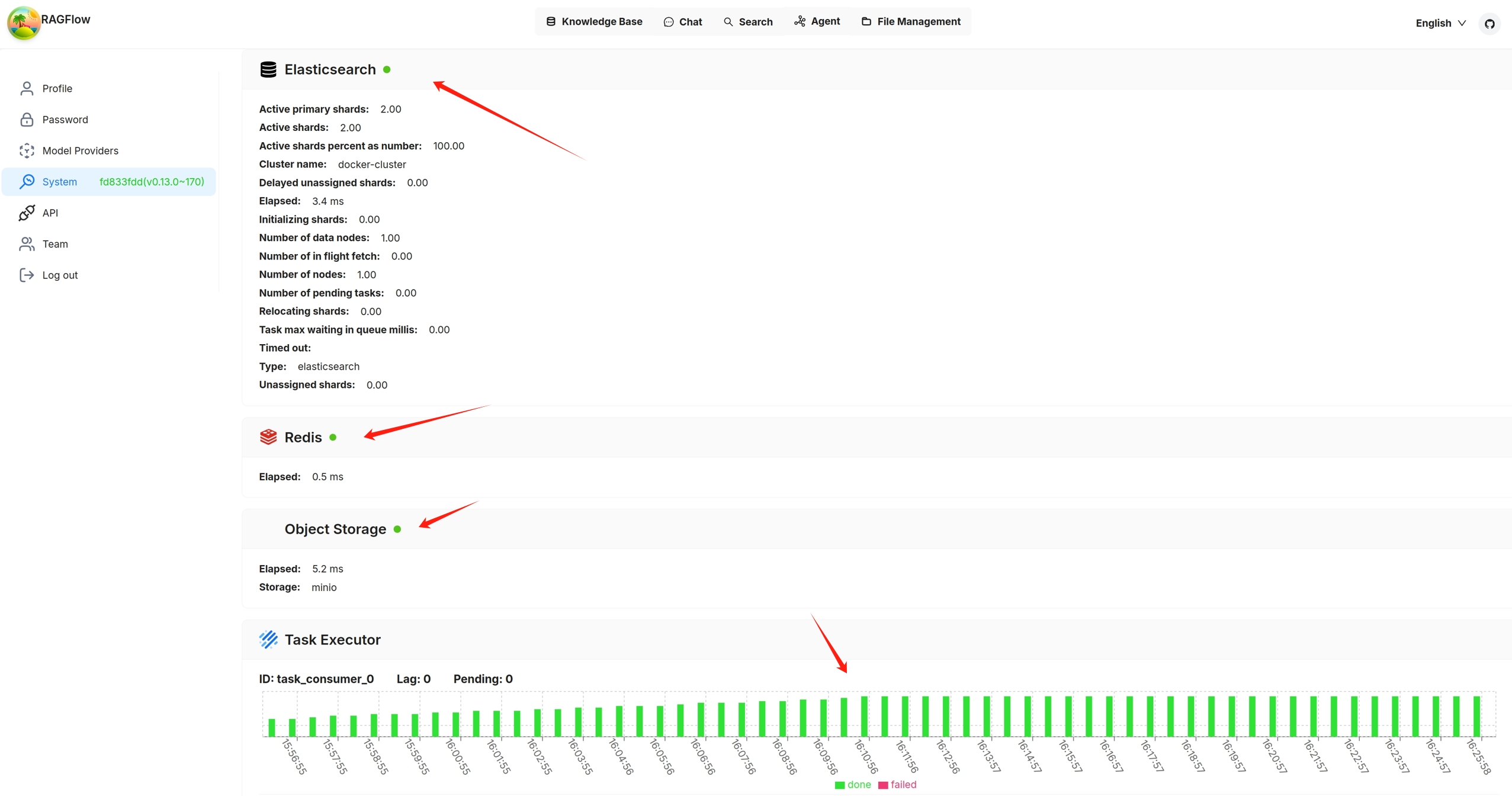
You can also click you avatar in the top right corner of the page **>** System to view the visualized health status of RAGFlow's core services. The following screenshot shows that all services are 'green' (running healthily). The task executor displays the *cumulative* number of completed and failed document parsing tasks from the past 30 minutes:
|
||||
|
||||
|
||||
|
||||
Services with a yellow or red light are not running properly. The following is a screenshot of the system page after running `docker stop ragflow-es-10`:
|
||||
|
||||

|
||||
|
||||
You can click on a specific 30-second time interval to view the details of completed and failed tasks:
|
||||
|
||||

|
||||
|
||||

|
||||
|
||||
## API Health Check
|
||||
|
||||
In addition to checking the system dependencies from the **avatar > System** page in the UI, you can directly query the backend health check endpoint:
|
||||
|
||||
```bash
|
||||
http://IP_OF_YOUR_MACHINE/v1/system/healthz
|
||||
```
|
||||
|
||||
Here `<port>` refers to the actual port of your backend service (e.g., `7897`, `9222`, etc.).
|
||||
|
||||
Key points:
|
||||
- **No login required** (no `@login_required` decorator)
|
||||
- Returns results in JSON format
|
||||
- If all dependencies are healthy → HTTP **200 OK**
|
||||
- If any dependency fails → HTTP **500 Internal Server Error**
|
||||
|
||||
### Example 1: All services healthy (HTTP 200)
|
||||
|
||||
```bash
|
||||
http://127.0.0.1/v1/system/healthz
|
||||
```
|
||||
|
||||
Response:
|
||||
|
||||
```http
|
||||
HTTP/1.1 200 OK
|
||||
Content-Type: application/json
|
||||
Content-Length: 120
|
||||
|
||||
```
|
||||
|
||||
Explanation:
|
||||
- Database (MySQL/Postgres), Redis, document engine (Elasticsearch/Infinity), and object storage (MinIO) are all healthy.
|
||||
- The `status` field returns `"ok"`.
|
||||
|
||||
### Example 2: One service unhealthy (HTTP 500)
|
||||
|
||||
For example, if Redis is down:
|
||||
|
||||
Response:
|
||||
|
||||
```http
|
||||
HTTP/1.1 500 INTERNAL SERVER ERROR
|
||||
Content-Type: application/json
|
||||
Content-Length: 300
|
||||
|
||||
```
|
||||
|
||||
Explanation:
|
||||
- `redis` is marked as `"nok"`, with detailed error info under `_meta.redis.error`.
|
||||
- The overall `status` is `"nok"`, so the endpoint returns 500.
|
||||
|
||||
---
|
||||
|
||||
This endpoint allows you to monitor RAGFlow’s core dependencies programmatically in scripts or external monitoring systems, without relying on the frontend UI.
|
||||
"redis": "nok",
|
||||
"doc_engine": "ok",
|
||||
"storage": "ok",
|
||||
"status": "nok",
|
||||
"_meta": {
|
||||
"redis": {
|
||||
"elapsed": "5.2",
|
||||
"error": "Lost connection!"
|
||||
}
|
||||
}
|
||||
}
|
||||
```
|
||||
|
||||
Explanation:
|
||||
- `redis` is marked as `"nok"`, with detailed error info under `_meta.redis.error`.
|
||||
- The overall `status` is `"nok"`, so the endpoint returns 500.
|
||||
|
||||
---
|
||||
|
||||
This endpoint allows you to monitor RAGFlow’s core dependencies programmatically in scripts or external monitoring systems, without relying on the frontend UI.
|
||||
@ -60,16 +60,16 @@ To upgrade RAGFlow, you must upgrade **both** your code **and** your Docker imag
|
||||
git pull
|
||||
```
|
||||
|
||||
3. Switch to the latest, officially published release, e.g., `v0.23.0`:
|
||||
3. Switch to the latest, officially published release, e.g., `v0.23.1`:
|
||||
|
||||
```bash
|
||||
git checkout -f v0.23.0
|
||||
git checkout -f v0.23.1
|
||||
```
|
||||
|
||||
4. Update **ragflow/docker/.env**:
|
||||
|
||||
```bash
|
||||
RAGFLOW_IMAGE=infiniflow/ragflow:v0.23.0
|
||||
RAGFLOW_IMAGE=infiniflow/ragflow:v0.23.1
|
||||
```
|
||||
|
||||
5. Update the RAGFlow image and restart RAGFlow:
|
||||
@ -90,10 +90,10 @@ No, you do not need to. Upgrading RAGFlow in itself will *not* remove your uploa
|
||||
1. From an environment with Internet access, pull the required Docker image.
|
||||
2. Save the Docker image to a **.tar** file.
|
||||
```bash
|
||||
docker save -o ragflow.v0.23.0.tar infiniflow/ragflow:v0.23.0
|
||||
docker save -o ragflow.v0.23.1.tar infiniflow/ragflow:v0.23.1
|
||||
```
|
||||
3. Copy the **.tar** file to the target server.
|
||||
4. Load the **.tar** file into Docker:
|
||||
```bash
|
||||
docker load -i ragflow.v0.23.0.tar
|
||||
docker load -i ragflow.v0.23.1.tar
|
||||
```
|
||||
|
||||
@ -46,7 +46,7 @@ This section provides instructions on setting up the RAGFlow server on Linux. If
|
||||
|
||||
`vm.max_map_count`. This value sets the maximum number of memory map areas a process may have. Its default value is 65530. While most applications require fewer than a thousand maps, reducing this value can result in abnormal behaviors, and the system will throw out-of-memory errors when a process reaches the limitation.
|
||||
|
||||
RAGFlow v0.23.0 uses Elasticsearch or [Infinity](https://github.com/infiniflow/infinity) for multiple recall. Setting the value of `vm.max_map_count` correctly is crucial to the proper functioning of the Elasticsearch component.
|
||||
RAGFlow v0.23.1 uses Elasticsearch or [Infinity](https://github.com/infiniflow/infinity) for multiple recall. Setting the value of `vm.max_map_count` correctly is crucial to the proper functioning of the Elasticsearch component.
|
||||
|
||||
<Tabs
|
||||
defaultValue="linux"
|
||||
@ -186,7 +186,7 @@ This section provides instructions on setting up the RAGFlow server on Linux. If
|
||||
```bash
|
||||
$ git clone https://github.com/infiniflow/ragflow.git
|
||||
$ cd ragflow/docker
|
||||
$ git checkout -f v0.23.0
|
||||
$ git checkout -f v0.23.1
|
||||
```
|
||||
|
||||
3. Use the pre-built Docker images and start up the server:
|
||||
@ -202,7 +202,7 @@ This section provides instructions on setting up the RAGFlow server on Linux. If
|
||||
|
||||
| RAGFlow image tag | Image size (GB) | Stable? |
|
||||
| ------------------- | --------------- | ------------------------ |
|
||||
| v0.23.0 | ≈2 | Stable release |
|
||||
| v0.23.1 | ≈2 | Stable release |
|
||||
| nightly | ≈2 | _Unstable_ nightly build |
|
||||
|
||||
```mdx-code-block
|
||||
|
||||
@ -7,6 +7,24 @@ slug: /release_notes
|
||||
|
||||
Key features, improvements and bug fixes in the latest releases.
|
||||
|
||||
|
||||
## v0.23.1
|
||||
|
||||
Released on December 31, 2025.
|
||||
|
||||
### Fixed issues
|
||||
|
||||
- Resolved an issue where the RAGFlow Server would fail to start if an empty memory object existed, and corrected the inability to delete a newly created empty Memory.
|
||||
- Improved the stability of memory extraction across all memory types after selection.
|
||||
- Fixed MDX file parsing support.
|
||||
|
||||
### Data sources
|
||||
|
||||
- GitHub
|
||||
- Gitlab
|
||||
- Asana
|
||||
- IMAP
|
||||
|
||||
## v0.23.0
|
||||
|
||||
Released on December 27, 2025.
|
||||
|
||||
@ -77,7 +77,7 @@ env:
|
||||
ragflow:
|
||||
image:
|
||||
repository: infiniflow/ragflow
|
||||
tag: v0.23.0
|
||||
tag: v0.23.1
|
||||
pullPolicy: IfNotPresent
|
||||
pullSecrets: []
|
||||
# Optional service configuration overrides
|
||||
|
||||
@ -1,6 +1,6 @@
|
||||
[project]
|
||||
name = "ragflow"
|
||||
version = "0.23.0"
|
||||
version = "0.23.1"
|
||||
description = "[RAGFlow](https://ragflow.io/) is an open-source RAG (Retrieval-Augmented Generation) engine based on deep document understanding. It offers a streamlined RAG workflow for businesses of any scale, combining LLM (Large Language Models) to provide truthful question-answering capabilities, backed by well-founded citations from various complex formatted data."
|
||||
authors = [{ name = "Zhichang Yu", email = "yuzhichang@gmail.com" }]
|
||||
license-files = ["LICENSE"]
|
||||
|
||||
@ -1,14 +1,11 @@
|
||||
## Role: Metadata extraction expert
|
||||
## Constraints:
|
||||
- Core Directive: Extract important structured information from the given content. Output ONLY a valid JSON string. No Markdown (e.g., ```json), no explanations, and no notes.
|
||||
- Schema Parsing: In the `properties` object provided in Schema, the attribute name (e.g., 'author') is the target Key. Extract values based on the `description`; if no `description` is provided, refer to the key's literal meaning.
|
||||
- Extraction Rules: Extract only when there is an explicit semantic correlation. If multiple values or data points match a field's definition, extract and include all of them. Strictly follow the Schema below and only output matched key-value pairs. If the content is irrelevant or no matching information is identified, you **MUST** output {}.
|
||||
- Data Source: Extraction must be based solely on content below. Semantic mapping (synonyms) is allowed, but strictly prohibit hallucinations or fabricated facts.
|
||||
|
||||
## Enum Rules (Triggered ONLY if an enum list is present):
|
||||
- Value Lock: All extracted values MUST strictly match the provided enum list.
|
||||
- Normalization: Map synonyms or variants in the text back to the standard enum value (e.g., "Dec" to "December").
|
||||
- Fallback: Output {} if no explicit match or synonym is identified.
|
||||
## Role: Metadata extraction expert.
|
||||
## Rules:
|
||||
- Strict Evidence Only: Extract a value ONLY if it is explicitly mentioned in the Content.
|
||||
- Enum Filter: For any field with an 'enum' list, the list acts as a strict filter. If no element from the list (or its direct synonym) is found in the Content, you MUST NOT extract that field.
|
||||
- No Meta-Inference: Do not infer values based on the document's nature, format, or category. If the text does not literally state the information, treat it as missing.
|
||||
- Zero-Hallucination: Never invent information or pick a "likely" value from the enum to fill a field.
|
||||
- Empty Result: If no matches are found for any field, or if the content is irrelevant, output ONLY {}.
|
||||
- Output: ONLY a valid JSON string. No Markdown, no notes.
|
||||
|
||||
## Schema for extraction:
|
||||
{{ schema }}
|
||||
|
||||
@ -902,6 +902,7 @@ async def do_handle_task(task):
|
||||
task_embedding_id = task["embd_id"]
|
||||
task_language = task["language"]
|
||||
task_llm_id = task["parser_config"].get("llm_id") or task["llm_id"]
|
||||
task["llm_id"] = task_llm_id
|
||||
task_dataset_id = task["kb_id"]
|
||||
task_doc_id = task["doc_id"]
|
||||
task_document_name = task["name"]
|
||||
|
||||
@ -1,6 +1,6 @@
|
||||
[project]
|
||||
name = "ragflow-sdk"
|
||||
version = "0.23.0"
|
||||
version = "0.23.1"
|
||||
description = "Python client sdk of [RAGFlow](https://github.com/infiniflow/ragflow). RAGFlow is an open-source RAG (Retrieval-Augmented Generation) engine based on deep document understanding."
|
||||
authors = [{ name = "Zhichang Yu", email = "yuzhichang@gmail.com" }]
|
||||
license = { text = "Apache License, Version 2.0" }
|
||||
|
||||
2
sdk/python/uv.lock
generated
2
sdk/python/uv.lock
generated
@ -353,7 +353,7 @@ wheels = [
|
||||
|
||||
[[package]]
|
||||
name = "ragflow-sdk"
|
||||
version = "0.23.0"
|
||||
version = "0.23.1"
|
||||
source = { virtual = "." }
|
||||
dependencies = [
|
||||
{ name = "beartype" },
|
||||
|
||||
2
uv.lock
generated
2
uv.lock
generated
@ -6163,7 +6163,7 @@ wheels = [
|
||||
|
||||
[[package]]
|
||||
name = "ragflow"
|
||||
version = "0.23.0"
|
||||
version = "0.23.1"
|
||||
source = { virtual = "." }
|
||||
dependencies = [
|
||||
{ name = "aiosmtplib" },
|
||||
|
||||
@ -211,3 +211,14 @@ export const WebhookJWTAlgorithmList = [
|
||||
'ps512',
|
||||
'none',
|
||||
] as const;
|
||||
|
||||
export enum AgentDialogueMode {
|
||||
Conversational = 'conversational',
|
||||
Task = 'task',
|
||||
Webhook = 'Webhook',
|
||||
}
|
||||
|
||||
export const initialBeginValues = {
|
||||
mode: AgentDialogueMode.Conversational,
|
||||
prologue: `Hi! I'm your assistant. What can I do for you?`,
|
||||
};
|
||||
|
||||
@ -1,7 +1,7 @@
|
||||
import { FileUploadProps } from '@/components/file-upload';
|
||||
import { useHandleFilterSubmit } from '@/components/list-filter-bar/use-handle-filter-submit';
|
||||
import message from '@/components/ui/message';
|
||||
import { AgentGlobals } from '@/constants/agent';
|
||||
import { AgentGlobals, initialBeginValues } from '@/constants/agent';
|
||||
import {
|
||||
IAgentLogsRequest,
|
||||
IAgentLogsResponse,
|
||||
@ -76,6 +76,7 @@ export const EmptyDsl = {
|
||||
data: {
|
||||
label: 'Begin',
|
||||
name: 'begin',
|
||||
form: initialBeginValues,
|
||||
},
|
||||
sourcePosition: 'left',
|
||||
targetPosition: 'right',
|
||||
|
||||
@ -183,6 +183,8 @@ Example: A 1 KB message with 1024-dim embedding uses ~9 KB. The 5 MB default lim
|
||||
},
|
||||
knowledgeDetails: {
|
||||
metadata: {
|
||||
toMetadataSetting: 'Generation settings',
|
||||
toMetadataSettingTip: 'Set auto-metadata in Configuration.',
|
||||
descriptionTip:
|
||||
'Provide descriptions or examples to guide LLM extract values for this field. If left empty, it will rely on the field name.',
|
||||
restrictTDefinedValuesTip:
|
||||
|
||||
@ -128,7 +128,7 @@ export default {
|
||||
delMessageWarn: `遗忘后,代理将无法检索此消息。`,
|
||||
forgetMessage: '遗忘消息',
|
||||
sessionId: '会话ID',
|
||||
agent: '代理',
|
||||
agent: '智能体',
|
||||
type: '类型',
|
||||
validDate: '有效日期',
|
||||
forgetAt: '遗忘于',
|
||||
@ -173,6 +173,8 @@ export default {
|
||||
},
|
||||
knowledgeDetails: {
|
||||
metadata: {
|
||||
toMetadataSettingTip: '在配置中设置自动元数据',
|
||||
toMetadataSetting: '生成设置',
|
||||
descriptionTip:
|
||||
'提供描述或示例来指导大语言模型为此字段提取值。如果留空,将依赖字段名称。',
|
||||
restrictTDefinedValuesTip:
|
||||
|
||||
@ -1,4 +1,4 @@
|
||||
import { useMemo, useState } from 'react';
|
||||
import { useLayoutEffect, useMemo, useState } from 'react';
|
||||
import { useTranslation } from 'react-i18next';
|
||||
import { useNavigate } from 'umi';
|
||||
|
||||
@ -12,7 +12,12 @@ import {
|
||||
useReactTable,
|
||||
} from '@tanstack/react-table';
|
||||
|
||||
import { useMutation, useQuery, useQueryClient } from '@tanstack/react-query';
|
||||
import {
|
||||
keepPreviousData,
|
||||
useMutation,
|
||||
useQuery,
|
||||
useQueryClient,
|
||||
} from '@tanstack/react-query';
|
||||
|
||||
import {
|
||||
LucideClipboardList,
|
||||
@ -125,12 +130,14 @@ function AdminUserManagement() {
|
||||
queryFn: async () => (await listRoles()).data.data.roles,
|
||||
enabled: IS_ENTERPRISE,
|
||||
retry: false,
|
||||
placeholderData: keepPreviousData,
|
||||
});
|
||||
|
||||
const { data: usersList } = useQuery({
|
||||
queryKey: ['admin/listUsers'],
|
||||
queryFn: async () => (await listUsers()).data.data,
|
||||
retry: false,
|
||||
placeholderData: keepPreviousData,
|
||||
});
|
||||
|
||||
// Delete user mutation
|
||||
@ -354,8 +361,16 @@ function AdminUserManagement() {
|
||||
getFilteredRowModel: getFilteredRowModel(),
|
||||
getSortedRowModel: getSortedRowModel(),
|
||||
getPaginationRowModel: getPaginationRowModel(),
|
||||
|
||||
autoResetPageIndex: false,
|
||||
});
|
||||
|
||||
useLayoutEffect(() => {
|
||||
if (table.getState().pagination.pageIndex > table.getPageCount()) {
|
||||
table.setPageIndex(Math.max(0, table.getPageCount() - 1));
|
||||
}
|
||||
}, [usersList, table]);
|
||||
|
||||
return (
|
||||
<>
|
||||
<Card className="!shadow-none relative h-full bg-transparent overflow-hidden">
|
||||
@ -538,7 +553,7 @@ function AdminUserManagement() {
|
||||
|
||||
<CardFooter className="flex items-center justify-end">
|
||||
<RAGFlowPagination
|
||||
total={usersList?.length ?? 0}
|
||||
total={table.getFilteredRowModel().rows.length}
|
||||
current={table.getState().pagination.pageIndex + 1}
|
||||
pageSize={table.getState().pagination.pageSize}
|
||||
onChange={(page, pageSize) => {
|
||||
|
||||
@ -13,6 +13,7 @@ import {
|
||||
} from '../../constant';
|
||||
import { BeginFormSchemaType } from '../../form/begin-form/schema';
|
||||
import { useBuildWebhookUrl } from '../../hooks/use-build-webhook-url';
|
||||
import { useIsPipeline } from '../../hooks/use-is-pipeline';
|
||||
import OperatorIcon from '../../operator-icon';
|
||||
import { LabelCard } from './card';
|
||||
import { CommonHandle } from './handle';
|
||||
@ -34,6 +35,8 @@ function InnerBeginNode({
|
||||
|
||||
const url = useBuildWebhookUrl();
|
||||
|
||||
const isPipeline = useIsPipeline();
|
||||
|
||||
return (
|
||||
<NodeWrapper selected={selected} id={id}>
|
||||
<CommonHandle
|
||||
@ -45,15 +48,17 @@ function InnerBeginNode({
|
||||
id={NodeHandleId.Start}
|
||||
></CommonHandle>
|
||||
|
||||
<section className="flex items-center gap-2">
|
||||
<section className="flex items-center gap-2">
|
||||
<OperatorIcon name={data.label as Operator}></OperatorIcon>
|
||||
<div className="truncate text-center font-semibold text-sm">
|
||||
{t(`flow.begin`)}
|
||||
</div>
|
||||
</section>
|
||||
<div className="text-accent-primary mt-2 p-1 bg-bg-accent w-fit rounded-sm text-xs">
|
||||
{t(`flow.${isWebhookMode ? 'webhook.name' : mode}`)}
|
||||
</div>
|
||||
{isPipeline || (
|
||||
<div className="text-accent-primary mt-2 p-1 bg-bg-accent w-fit rounded-sm text-xs">
|
||||
{t(`flow.${isWebhookMode ? 'webhook.name' : mode}`)}
|
||||
</div>
|
||||
)}
|
||||
{isWebhookMode ? (
|
||||
<LabelCard className="mt-2 flex gap-1 items-center">
|
||||
<span className="font-bold">URL</span>
|
||||
|
||||
@ -15,19 +15,15 @@ import {
|
||||
initialLlmBaseValues,
|
||||
} from '@/constants/agent';
|
||||
export {
|
||||
AgentDialogueMode,
|
||||
AgentStructuredOutputField,
|
||||
JsonSchemaDataType,
|
||||
Operator,
|
||||
initialBeginValues,
|
||||
} from '@/constants/agent';
|
||||
|
||||
export * from './pipeline';
|
||||
|
||||
export enum AgentDialogueMode {
|
||||
Conversational = 'conversational',
|
||||
Task = 'task',
|
||||
Webhook = 'Webhook',
|
||||
}
|
||||
|
||||
import { ModelVariableType } from '@/constants/knowledge';
|
||||
import { t } from 'i18next';
|
||||
|
||||
@ -109,11 +105,6 @@ export const initialRetrievalValues = {
|
||||
},
|
||||
};
|
||||
|
||||
export const initialBeginValues = {
|
||||
mode: AgentDialogueMode.Conversational,
|
||||
prologue: `Hi! I'm your assistant. What can I do for you?`,
|
||||
};
|
||||
|
||||
export const initialRewriteQuestionValues = {
|
||||
...initialLlmBaseValues,
|
||||
language: '',
|
||||
@ -750,6 +741,8 @@ export const NodeMap = {
|
||||
[Operator.Loop]: 'loopNode',
|
||||
[Operator.LoopStart]: 'loopStartNode',
|
||||
[Operator.ExitLoop]: 'exitLoopNode',
|
||||
[Operator.ExcelProcessor]: 'ragNode',
|
||||
[Operator.PDFGenerator]: 'ragNode',
|
||||
};
|
||||
|
||||
export enum BeginQueryType {
|
||||
|
||||
@ -179,6 +179,8 @@ export const useInitializeOperatorParams = () => {
|
||||
[Operator.Loop]: initialLoopValues,
|
||||
[Operator.LoopStart]: {},
|
||||
[Operator.ExitLoop]: {},
|
||||
[Operator.PDFGenerator]: {},
|
||||
[Operator.ExcelProcessor]: {},
|
||||
};
|
||||
}, [llmId]);
|
||||
|
||||
|
||||
@ -15,6 +15,7 @@ import {
|
||||
TableRow,
|
||||
} from '@/components/ui/table';
|
||||
import { useSetModalState } from '@/hooks/common-hooks';
|
||||
import { Routes } from '@/routes';
|
||||
import {
|
||||
ColumnDef,
|
||||
flexRender,
|
||||
@ -27,6 +28,7 @@ import {
|
||||
import { Plus, Settings, Trash2 } from 'lucide-react';
|
||||
import { useCallback, useEffect, useMemo, useState } from 'react';
|
||||
import { useTranslation } from 'react-i18next';
|
||||
import { useHandleMenuClick } from '../../sidebar/hooks';
|
||||
import {
|
||||
MetadataDeleteMap,
|
||||
MetadataType,
|
||||
@ -78,7 +80,7 @@ export const ManageMetadataModal = (props: IManageModalProps) => {
|
||||
addUpdateValue,
|
||||
addDeleteValue,
|
||||
} = useManageMetaDataModal(originalTableData, metadataType, otherData);
|
||||
|
||||
const { handleMenuClick } = useHandleMenuClick();
|
||||
const {
|
||||
visible: manageValuesVisible,
|
||||
showModal: showManageValuesModal,
|
||||
@ -335,67 +337,87 @@ export const ManageMetadataModal = (props: IManageModalProps) => {
|
||||
success?.(res);
|
||||
}}
|
||||
>
|
||||
<div className="flex flex-col gap-2">
|
||||
<div className="flex items-center justify-between">
|
||||
<div>{t('knowledgeDetails.metadata.metadata')}</div>
|
||||
{isCanAdd && (
|
||||
<Button
|
||||
variant={'ghost'}
|
||||
className="border border-border-button"
|
||||
onClick={handAddValueRow}
|
||||
>
|
||||
<Plus />
|
||||
</Button>
|
||||
)}
|
||||
</div>
|
||||
<Table rootClassName="max-h-[800px]">
|
||||
<TableHeader>
|
||||
{table.getHeaderGroups().map((headerGroup) => (
|
||||
<TableRow key={headerGroup.id}>
|
||||
{headerGroup.headers.map((header) => (
|
||||
<TableHead key={header.id}>
|
||||
{header.isPlaceholder
|
||||
? null
|
||||
: flexRender(
|
||||
header.column.columnDef.header,
|
||||
header.getContext(),
|
||||
)}
|
||||
</TableHead>
|
||||
))}
|
||||
</TableRow>
|
||||
))}
|
||||
</TableHeader>
|
||||
<TableBody className="relative">
|
||||
{table.getRowModel().rows?.length ? (
|
||||
table.getRowModel().rows.map((row) => (
|
||||
<TableRow
|
||||
key={row.id}
|
||||
data-state={row.getIsSelected() && 'selected'}
|
||||
className="group"
|
||||
>
|
||||
{row.getVisibleCells().map((cell) => (
|
||||
<TableCell key={cell.id}>
|
||||
{flexRender(
|
||||
cell.column.columnDef.cell,
|
||||
cell.getContext(),
|
||||
)}
|
||||
</TableCell>
|
||||
<>
|
||||
<div className="flex flex-col gap-2">
|
||||
<div className="flex items-center justify-between">
|
||||
<div>{t('knowledgeDetails.metadata.metadata')}</div>
|
||||
{metadataType === MetadataType.Manage && false && (
|
||||
<Button
|
||||
variant={'ghost'}
|
||||
className="border border-border-button"
|
||||
type="button"
|
||||
onClick={handleMenuClick(Routes.DataSetSetting, {
|
||||
openMetadata: true,
|
||||
})}
|
||||
>
|
||||
{t('knowledgeDetails.metadata.toMetadataSetting')}
|
||||
</Button>
|
||||
)}
|
||||
{isCanAdd && (
|
||||
<Button
|
||||
variant={'ghost'}
|
||||
className="border border-border-button"
|
||||
type="button"
|
||||
onClick={handAddValueRow}
|
||||
>
|
||||
<Plus />
|
||||
</Button>
|
||||
)}
|
||||
</div>
|
||||
<Table rootClassName="max-h-[800px]">
|
||||
<TableHeader>
|
||||
{table.getHeaderGroups().map((headerGroup) => (
|
||||
<TableRow key={headerGroup.id}>
|
||||
{headerGroup.headers.map((header) => (
|
||||
<TableHead key={header.id}>
|
||||
{header.isPlaceholder
|
||||
? null
|
||||
: flexRender(
|
||||
header.column.columnDef.header,
|
||||
header.getContext(),
|
||||
)}
|
||||
</TableHead>
|
||||
))}
|
||||
</TableRow>
|
||||
))
|
||||
) : (
|
||||
<TableRow>
|
||||
<TableCell
|
||||
colSpan={columns.length}
|
||||
className="h-24 text-center"
|
||||
>
|
||||
<Empty type={EmptyType.Data} />
|
||||
</TableCell>
|
||||
</TableRow>
|
||||
)}
|
||||
</TableBody>
|
||||
</Table>
|
||||
</div>
|
||||
))}
|
||||
</TableHeader>
|
||||
<TableBody className="relative">
|
||||
{table.getRowModel().rows?.length ? (
|
||||
table.getRowModel().rows.map((row) => (
|
||||
<TableRow
|
||||
key={row.id}
|
||||
data-state={row.getIsSelected() && 'selected'}
|
||||
className="group"
|
||||
>
|
||||
{row.getVisibleCells().map((cell) => (
|
||||
<TableCell key={cell.id}>
|
||||
{flexRender(
|
||||
cell.column.columnDef.cell,
|
||||
cell.getContext(),
|
||||
)}
|
||||
</TableCell>
|
||||
))}
|
||||
</TableRow>
|
||||
))
|
||||
) : (
|
||||
<TableRow>
|
||||
<TableCell
|
||||
colSpan={columns.length}
|
||||
className="h-24 text-center"
|
||||
>
|
||||
<Empty type={EmptyType.Data} />
|
||||
</TableCell>
|
||||
</TableRow>
|
||||
)}
|
||||
</TableBody>
|
||||
</Table>
|
||||
</div>
|
||||
{metadataType === MetadataType.Manage && (
|
||||
<div className=" absolute bottom-6 left-5 text-text-secondary text-sm">
|
||||
{t('knowledgeDetails.metadata.toMetadataSettingTip')}
|
||||
</div>
|
||||
)}
|
||||
</>
|
||||
</Modal>
|
||||
{manageValuesVisible && (
|
||||
<ManageValuesModal
|
||||
|
||||
@ -25,12 +25,13 @@ import { useComposeLlmOptionsByModelTypes } from '@/hooks/use-llm-request';
|
||||
import { cn } from '@/lib/utils';
|
||||
import { t } from 'i18next';
|
||||
import { Settings } from 'lucide-react';
|
||||
import { useMemo, useState } from 'react';
|
||||
import { useCallback, useEffect, useMemo, useState } from 'react';
|
||||
import {
|
||||
ControllerRenderProps,
|
||||
FieldValues,
|
||||
useFormContext,
|
||||
} from 'react-hook-form';
|
||||
import { useLocation } from 'umi';
|
||||
import {
|
||||
MetadataType,
|
||||
useManageMetadata,
|
||||
@ -368,6 +369,7 @@ export function AutoMetadata({
|
||||
otherData?: Record<string, any>;
|
||||
}) {
|
||||
// get metadata field
|
||||
const location = useLocation();
|
||||
const form = useFormContext();
|
||||
const {
|
||||
manageMetadataVisible,
|
||||
@ -377,6 +379,29 @@ export function AutoMetadata({
|
||||
config: metadataConfig,
|
||||
} = useManageMetadata();
|
||||
|
||||
const handleClickOpenMetadata = useCallback(() => {
|
||||
const metadata = form.getValues('parser_config.metadata');
|
||||
const tableMetaData = util.metaDataSettingJSONToMetaDataTableData(metadata);
|
||||
showManageMetadataModal({
|
||||
metadata: tableMetaData,
|
||||
isCanAdd: true,
|
||||
type: type,
|
||||
record: otherData,
|
||||
});
|
||||
}, [form, otherData, showManageMetadataModal, type]);
|
||||
|
||||
useEffect(() => {
|
||||
const locationState = location.state as
|
||||
| { openMetadata?: boolean }
|
||||
| undefined;
|
||||
if (locationState?.openMetadata) {
|
||||
setTimeout(() => {
|
||||
handleClickOpenMetadata();
|
||||
}, 100);
|
||||
locationState.openMetadata = false;
|
||||
}
|
||||
}, [location, handleClickOpenMetadata]);
|
||||
|
||||
const autoMetadataField: FormFieldConfig = {
|
||||
name: 'parser_config.enable_metadata',
|
||||
label: t('knowledgeConfiguration.autoMetadata'),
|
||||
@ -386,21 +411,7 @@ export function AutoMetadata({
|
||||
tooltip: t('knowledgeConfiguration.autoMetadataTip'),
|
||||
render: (fieldProps: ControllerRenderProps) => (
|
||||
<div className="flex items-center justify-between">
|
||||
<Button
|
||||
type="button"
|
||||
variant="ghost"
|
||||
onClick={() => {
|
||||
const metadata = form.getValues('parser_config.metadata');
|
||||
const tableMetaData =
|
||||
util.metaDataSettingJSONToMetaDataTableData(metadata);
|
||||
showManageMetadataModal({
|
||||
metadata: tableMetaData,
|
||||
isCanAdd: true,
|
||||
type: type,
|
||||
record: otherData,
|
||||
});
|
||||
}}
|
||||
>
|
||||
<Button type="button" variant="ghost" onClick={handleClickOpenMetadata}>
|
||||
<div className="flex items-center gap-2">
|
||||
<Settings />
|
||||
{t('knowledgeConfiguration.settings')}
|
||||
|
||||
@ -217,7 +217,7 @@ export default function Dataset() {
|
||||
{reparseDialogVisible && (
|
||||
<ReparseDialog
|
||||
// hidden={isZeroChunk || isRunning}
|
||||
hidden={true}
|
||||
hidden={false}
|
||||
handleOperationIconClick={handleOperationIconClick}
|
||||
chunk_num={chunkNum}
|
||||
visible={reparseDialogVisible}
|
||||
|
||||
@ -7,8 +7,8 @@ export const useHandleMenuClick = () => {
|
||||
const { id } = useParams();
|
||||
|
||||
const handleMenuClick = useCallback(
|
||||
(key: Routes) => () => {
|
||||
navigate(`${Routes.DatasetBase}${key}/${id}`);
|
||||
(key: Routes, data?: any) => () => {
|
||||
navigate(`${Routes.DatasetBase}${key}/${id}`, { state: data });
|
||||
},
|
||||
[id, navigate],
|
||||
);
|
||||
|
||||
@ -18,6 +18,7 @@ import {
|
||||
} from '@/components/ui/table';
|
||||
import { Pagination } from '@/interfaces/common';
|
||||
import { replaceText } from '@/pages/dataset/process-log-modal';
|
||||
import { MemoryOptions } from '@/pages/memories/constants';
|
||||
import {
|
||||
ColumnDef,
|
||||
ColumnFiltersState,
|
||||
@ -99,7 +100,12 @@ export function MemoryTable({
|
||||
header: () => <span>{t('memory.messages.type')}</span>,
|
||||
cell: ({ row }) => (
|
||||
<div className="text-sm font-medium capitalize">
|
||||
{row.getValue('message_type')}
|
||||
{row.getValue('message_type')
|
||||
? MemoryOptions(t).find(
|
||||
(item) =>
|
||||
item.value === (row.getValue('message_type') as string),
|
||||
)?.label
|
||||
: row.getValue('message_type')}
|
||||
</div>
|
||||
),
|
||||
},
|
||||
@ -117,13 +123,13 @@ export function MemoryTable({
|
||||
<div className="text-sm ">{row.getValue('forget_at')}</div>
|
||||
),
|
||||
},
|
||||
{
|
||||
accessorKey: 'source_id',
|
||||
header: () => <span>{t('memory.messages.source')}</span>,
|
||||
cell: ({ row }) => (
|
||||
<div className="text-sm ">{row.getValue('source_id')}</div>
|
||||
),
|
||||
},
|
||||
// {
|
||||
// accessorKey: 'source_id',
|
||||
// header: () => <span>{t('memory.messages.source')}</span>,
|
||||
// cell: ({ row }) => (
|
||||
// <div className="text-sm ">{row.getValue('source_id')}</div>
|
||||
// ),
|
||||
// },
|
||||
{
|
||||
accessorKey: 'status',
|
||||
header: () => <span>{t('memory.messages.enable')}</span>,
|
||||
|
||||
@ -127,9 +127,21 @@ const SourceDetailPage = () => {
|
||||
}, []);
|
||||
|
||||
useEffect(() => {
|
||||
const baseFields = DataSourceFormBaseFields.map((field) => {
|
||||
if (field.name === 'name') {
|
||||
return {
|
||||
...field,
|
||||
disabled: true,
|
||||
};
|
||||
} else {
|
||||
return {
|
||||
...field,
|
||||
};
|
||||
}
|
||||
});
|
||||
if (detail) {
|
||||
const fields = [
|
||||
...DataSourceFormBaseFields,
|
||||
...baseFields,
|
||||
...DataSourceFormFields[
|
||||
detail.source as keyof typeof DataSourceFormFields
|
||||
],
|
||||
|
||||
@ -14,6 +14,7 @@ import { ChevronsDown, ChevronsUp, Trash2 } from 'lucide-react';
|
||||
import { FC } from 'react';
|
||||
import { isLocalLlmFactory } from '../../utils';
|
||||
import { useHandleDeleteFactory, useHandleEnableLlm } from '../hooks';
|
||||
import { mapModelKey } from './un-add-model';
|
||||
|
||||
interface IModelCardProps {
|
||||
item: LlmItem;
|
||||
@ -145,7 +146,8 @@ export const ModelProviderCard: FC<IModelCardProps> = ({
|
||||
key={index}
|
||||
className="px-2 py-1 text-xs bg-bg-card text-text-secondary rounded-md"
|
||||
>
|
||||
{tag}
|
||||
{mapModelKey[tag.trim() as keyof typeof mapModelKey] ||
|
||||
tag.trim()}
|
||||
</span>
|
||||
))}
|
||||
</div>
|
||||
|
||||
@ -7,7 +7,21 @@ import { useTranslate } from '@/hooks/common-hooks';
|
||||
import { useSelectLlmList } from '@/hooks/use-llm-request';
|
||||
import { ArrowUpRight, Plus } from 'lucide-react';
|
||||
import { FC, useMemo, useState } from 'react';
|
||||
|
||||
export const mapModelKey = {
|
||||
IMAGE2TEXT: 'VLM',
|
||||
'TEXT EMBEDDING': 'Embedding',
|
||||
SPEECH2TEXT: 'ASR',
|
||||
'TEXT RE-RANK': 'Rerank',
|
||||
};
|
||||
const orderMap: Record<TagType, number> = {
|
||||
LLM: 1,
|
||||
'TEXT EMBEDDING': 2,
|
||||
'TEXT RE-RANK': 3,
|
||||
TTS: 4,
|
||||
SPEECH2TEXT: 5,
|
||||
IMAGE2TEXT: 6,
|
||||
MODERATION: 7,
|
||||
};
|
||||
type TagType =
|
||||
| 'LLM'
|
||||
| 'TEXT EMBEDDING'
|
||||
@ -18,16 +32,6 @@ type TagType =
|
||||
| 'MODERATION';
|
||||
|
||||
const sortTags = (tags: string) => {
|
||||
const orderMap: Record<TagType, number> = {
|
||||
LLM: 1,
|
||||
'TEXT EMBEDDING': 2,
|
||||
'TEXT RE-RANK': 3,
|
||||
TTS: 4,
|
||||
SPEECH2TEXT: 5,
|
||||
IMAGE2TEXT: 6,
|
||||
MODERATION: 7,
|
||||
};
|
||||
|
||||
return tags
|
||||
.split(',')
|
||||
.map((tag) => tag.trim())
|
||||
@ -64,7 +68,10 @@ export const AvailableModels: FC<{
|
||||
factoryList.forEach((model) => {
|
||||
model.tags.split(',').forEach((tag) => tagsSet.add(tag.trim()));
|
||||
});
|
||||
return Array.from(tagsSet).sort();
|
||||
return Array.from(tagsSet).sort(
|
||||
(a, b) =>
|
||||
(orderMap[a as TagType] || 999) - (orderMap[b as TagType] || 999),
|
||||
);
|
||||
}, [factoryList]);
|
||||
|
||||
const handleTagClick = (tag: string) => {
|
||||
@ -114,7 +121,7 @@ export const AvailableModels: FC<{
|
||||
: 'text-text-secondary border-none bg-bg-card'
|
||||
}`}
|
||||
>
|
||||
{tag}
|
||||
{mapModelKey[tag.trim() as keyof typeof mapModelKey] || tag.trim()}
|
||||
</Button>
|
||||
))}
|
||||
</div>
|
||||
@ -162,7 +169,9 @@ export const AvailableModels: FC<{
|
||||
key={index}
|
||||
className="px-1 flex items-center h-5 text-xs bg-bg-card text-text-secondary rounded-md"
|
||||
>
|
||||
{tag}
|
||||
{/* {tag} */}
|
||||
{mapModelKey[tag.trim() as keyof typeof mapModelKey] ||
|
||||
tag.trim()}
|
||||
</span>
|
||||
))}
|
||||
</div>
|
||||
|
||||
Reference in New Issue
Block a user