mirror of
https://github.com/junjiem/dify-plugin-repackaging.git
synced 2025-12-08 08:12:59 +08:00

139 lines
4.0 KiB
Markdown
139 lines
4.0 KiB
Markdown
## Dify 1.0 Plugin Downloading and Repackaging
|
||
### How To Use With Docker
|
||
|
||
1.change param in dockerfile
|
||
|
||
```dockerfile
|
||
CMD ["./plugin_repackaging.sh", "-p", "manylinux_2_17_x86_64", "market", "antv", "visualization", "0.1.7"]
|
||
```
|
||
|
||
2.build
|
||
```bash
|
||
docker build -t dify-plugin-repackaging .
|
||
```
|
||
|
||
|
||
3.run
|
||
|
||
linux
|
||
```bash
|
||
docker run -v $(pwd):/app dify-plugin-repackaging
|
||
```
|
||
windows
|
||
```cmd
|
||
docker run -v %cd%:/app dify-plugin-repackaging
|
||
```
|
||
4.override CMD(opt)
|
||
|
||
linux
|
||
```bash
|
||
docker run -v $(pwd):/app dify-plugin-repackaging ./plugin_repackaging.sh -p manylinux_2_17_x86_64 market antv visualization 0.1.7
|
||
```
|
||
|
||
### Prerequisites
|
||
|
||
Operating System: Linux amd64/aarch64, MacOS x86_64/arm64
|
||
|
||
**Notes**: The script uses `yum` to install `unzip` which is only avialable on RPM-based Linux systems(such as `Red Hat Enterprise Linux`, `CentOS`, `Fedora`, and `Oracle Linux`), and is now replaced by `dnf` in latest version. To use the script on other distributions, please install `unzip` command in advance.
|
||
|
||
**注意:**本脚本使用`yum`安装`unzip`命令,这只适用于基于RPM的Linux系统(如`Red Hat Enterprise Linux`, `CentOS`, `Fedora`, and `Oracle Linux`)。并且在较新的分发版中,它已被`dnf`所替代。
|
||
因此,当使用其他Linux分发版或者无法使用`yum`时,请事先安装`unzip`命令。
|
||
|
||
Python version: Should be as the same as the version in `dify-plugin-daemon` which is currently 3.12.x
|
||
|
||
|
||
#### Clone
|
||
```shell
|
||
git clone https://github.com/junjiem/dify-plugin-repackaging.git
|
||
```
|
||
|
||
|
||
|
||
### Description
|
||
|
||
#### From the Dify Marketplace downloading and repackaging
|
||
|
||

|
||
|
||
##### Example
|
||
|
||

|
||
|
||
```shell
|
||
./plugin_repackaging.sh market langgenius agent 0.0.9
|
||
```
|
||
|
||

|
||
|
||
|
||
|
||
#### From the Github downloading and repackaging
|
||
|
||

|
||
|
||
##### Example
|
||
|
||

|
||
|
||
```shell
|
||
./plugin_repackaging.sh github junjiem/dify-plugin-agent-mcp_sse 0.0.1 agent-mcp_see.difypkg
|
||
```
|
||
|
||

|
||
|
||
|
||
|
||
#### Local Dify package repackaging
|
||
|
||

|
||
|
||
##### Example
|
||
|
||
```shell
|
||
./plugin_repackaging.sh local ./db_query.difypkg
|
||
```
|
||
|
||

|
||
|
||
#### Platform Crossing Repacking
|
||
|
||
For repacking the plugins in different platforms between operating and running environment,
|
||
please using `-p` option with a pip platform string.
|
||
|
||
Typically, uses `manylinux2014_x86_64` for plugins running on an `x86_64/amd64` OS,
|
||
and `manylinux2014_aarch64` for `aarch64/arm64`.
|
||
|
||
### Update Dify platform env Dify平台放开限制
|
||
|
||
- your .env configuration file: Change `FORCE_VERIFYING_SIGNATURE` to `false` , the Dify platform will allow the installation of all plugins that are not listed in the Dify Marketplace.
|
||
|
||
- your .env configuration file: Change `PLUGIN_MAX_PACKAGE_SIZE` to `524288000` , and the Dify platform will allow the installation of plug-ins within 500M.
|
||
|
||
- your .env configuration file: Change `NGINX_CLIENT_MAX_BODY_SIZE` to `500M` , and the Nginx client will allow uploading content up to 500M in size.
|
||
|
||
|
||
|
||
- 在 .env 配置文件将 `FORCE_VERIFYING_SIGNATURE` 改为 `false` ,Dify 平台将允许安装所有未在 Dify Marketplace 上架(审核)的插件。
|
||
|
||
- 在 .env 配置文件将 `PLUGIN_MAX_PACKAGE_SIZE` 增大为 `524288000`,Dify 平台将允许安装 500M 大小以内的插件。
|
||
|
||
- 在 .env 配置文件将 `NGINX_CLIENT_MAX_BODY_SIZE` 增大为 `500M`,Nginx客户端将允许上传 500M 大小以内的内容。
|
||
|
||
|
||
|
||
|
||
### Installing Plugins via Local 通过本地安装插件
|
||
|
||
Visit the Dify platform's plugin management page, choose Local Package File to complete installation.
|
||
|
||
访问 Dify 平台的插件管理页,选择通过本地插件完成安装。
|
||
|
||

|
||
|
||
|
||
|
||
### Star history
|
||
|
||
[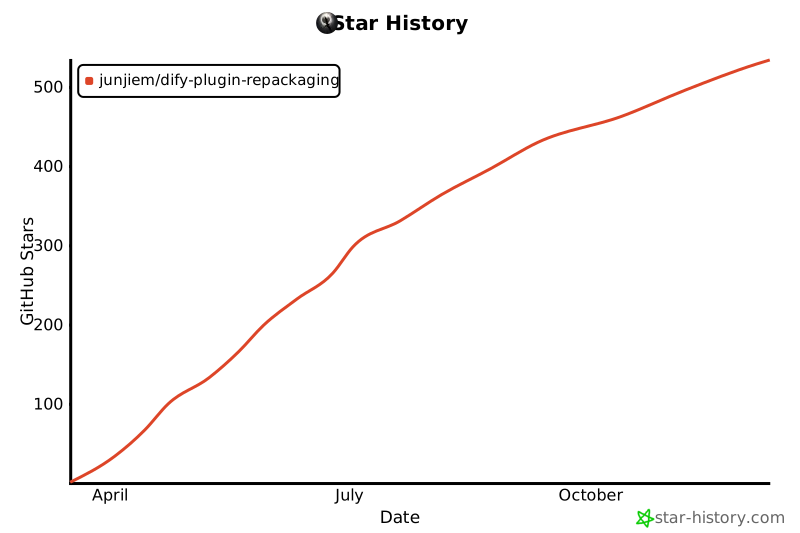](https://star-history.com/#junjiem/dify-plugin-repackaging&Date)
|
||
|