mirror of
https://github.com/jeecgboot/JeecgBoot.git
synced 2025-12-08 17:12:28 +08:00
Compare commits
193 Commits
| Author | SHA1 | Date | |
|---|---|---|---|
| ef762ff21f | |||
| 02abd5c803 | |||
| 5e7342b27d | |||
| ca95d7090c | |||
| cdec71999a | |||
| 7990eff7a4 | |||
| 280f8c26ac | |||
| 4e05eaa4c5 | |||
| c6645ed800 | |||
| a674340c5e | |||
| cbd8890cb3 | |||
| b25fb55d10 | |||
| 88646bea1b | |||
| 9915b84808 | |||
| 35c1214de3 | |||
| 434b1a7e63 | |||
| 5c7d84117c | |||
| 4b9890205e | |||
| d5898139b5 | |||
| bf438069e2 | |||
| c5965b10d8 | |||
| da5ace3397 | |||
| 4674097078 | |||
| fea1607f1b | |||
| d2336bc5e1 | |||
| cf0d29557a | |||
| bb4c3c86b0 | |||
| 84a6e28677 | |||
| 5b70c1d8b8 | |||
| f942abe09b | |||
| ad4eb300f0 | |||
| 064a5c4a0e | |||
| 6d688a157b | |||
| d612af5e3b | |||
| e1c0b0fa38 | |||
| ac0979c824 | |||
| 78ba7ccba8 | |||
| b8ff5ebd43 | |||
| 5eb2541834 | |||
| 462b0d17b1 | |||
| 7cc54084dc | |||
| 32297110d9 | |||
| b7717d0461 | |||
| 97c078c46a | |||
| 17019e6261 | |||
| 4a49479985 | |||
| e49d76bc80 | |||
| d6cf2b502b | |||
| c741d779f2 | |||
| 7f847c9721 | |||
| fa2c5ecb73 | |||
| eb1578ada3 | |||
| 90758f3b2a | |||
| 766c48bdbf | |||
| d16520cc59 | |||
| 0252213b6e | |||
| ce44147e6e | |||
| 0ea4ac910a | |||
| 4f61f0ad48 | |||
| 4a5ff61ef7 | |||
| 88a0bb2d2d | |||
| b153669b69 | |||
| 449a7759be | |||
| 337920964d | |||
| 2a7946ae42 | |||
| c233f95f5f | |||
| f87cc2d97f | |||
| 02bb521b8f | |||
| 53e84ae34b | |||
| d6feeef7b5 | |||
| 18fc7b146a | |||
| 3792f46388 | |||
| f35236609c | |||
| e46b653bc4 | |||
| 4437c749ca | |||
| 74ebac4967 | |||
| a9f21795cb | |||
| a5ca8183cd | |||
| e7970e52bc | |||
| 74a9e10ce6 | |||
| df5c106d94 | |||
| ae0f9edb27 | |||
| 3d4bb704f1 | |||
| 85efec3730 | |||
| 8b0ee2d0a2 | |||
| 41c1572ad8 | |||
| 5d555158fe | |||
| 1fd0b5d4db | |||
| 693d86cf00 | |||
| 9a3f872d63 | |||
| 5b82a1aa06 | |||
| 3cb88452dc | |||
| 2fa1c7c17b | |||
| b6a3085083 | |||
| 8a7fc033cd | |||
| e0cf946d18 | |||
| c5b33b6bd1 | |||
| aec00d9ba2 | |||
| 341830c5a0 | |||
| ff45fe4858 | |||
| c13ed675a7 | |||
| 6917e91398 | |||
| 18a5c247d8 | |||
| 51bf9a7c14 | |||
| 8278041aeb | |||
| 39bb7a46fd | |||
| 1c234fbaff | |||
| ca1f5872be | |||
| 2ae3844d5e | |||
| c2db7691d1 | |||
| 543a49fcb6 | |||
| df6cf7137c | |||
| d7450cab04 | |||
| 496d85265b | |||
| b4b1162ea0 | |||
| 33e39941fb | |||
| 1b5ba9f56b | |||
| 0aadc70e74 | |||
| 94aed3ade4 | |||
| 9657eac673 | |||
| 680a8b3c42 | |||
| 6e6f88620a | |||
| 14f4f92d84 | |||
| 2c4597c0a9 | |||
| 757f1cd5a8 | |||
| 3c62a58d64 | |||
| bec39867a9 | |||
| dca8713a2e | |||
| a004acee4b | |||
| 35ef0eff90 | |||
| c70fd3383e | |||
| 3e2f640b68 | |||
| bf6c5f4623 | |||
| df259385ec | |||
| c5f51a17da | |||
| 94c0610496 | |||
| ccf4946b70 | |||
| 3b4a65ba04 | |||
| 3a8ae4c089 | |||
| 88eb98c0e6 | |||
| 63048d8c64 | |||
| e8a18fc642 | |||
| fa0c930886 | |||
| 708aa54f3a | |||
| 57337f7980 | |||
| 89f4d122dd | |||
| b92bec3eed | |||
| 72f32e47a0 | |||
| 43908013e3 | |||
| 80bd1a3f23 | |||
| de60ea050c | |||
| 7cb3dce262 | |||
| 416c8df729 | |||
| b13a4b01df | |||
| 075c3532dc | |||
| fa40b08049 | |||
| 55c0a4e051 | |||
| 0795808075 | |||
| 0fa6316f52 | |||
| 9cd111ca58 | |||
| 2c18182dd0 | |||
| 36cad9373e | |||
| fcbed695b0 | |||
| 5a01d8587b | |||
| 4570a21a63 | |||
| 8775472470 | |||
| bb72341519 | |||
| 78afc86411 | |||
| 91ff6a7aa2 | |||
| b3ec97ffcc | |||
| 24fe9e425c | |||
| 09d9e79f40 | |||
| 7f30a186df | |||
| 65d1e6a879 | |||
| e963603d22 | |||
| 3b68f4d4d9 | |||
| 4fd30c495f | |||
| 37158397be | |||
| b4bdb0b3f7 | |||
| cd6cbf8c26 | |||
| bb5fe95d30 | |||
| 1c63f74a6d | |||
| 0094b17ec2 | |||
| 80f377ecd6 | |||
| 55ce5ce919 | |||
| a09fa134f8 | |||
| f2854b29aa | |||
| 1ff06c2bc3 | |||
| 604ca8b312 | |||
| e6bb5eb0a1 | |||
| 109a95a96b | |||
| 96cfb8a2b2 | |||
| 32ee9f040c |

1
.gitattributes
vendored
1
.gitattributes
vendored
@ -2,3 +2,4 @@
|
||||
*.css linguist-language=Java
|
||||
*.html linguist-language=Java
|
||||
*.vue linguist-language=Java
|
||||
*.sql linguist-language=Java
|
||||
|
||||
197
README.md
197
README.md
@ -7,12 +7,12 @@
|
||||
JEECG BOOT 低代码开发平台(前后端分离版本)
|
||||
===============
|
||||
|
||||
当前最新版本: 2.2.0(发布日期:2020-05-06)
|
||||
当前最新版本: 2.4.3(发布日期:2021-03-22)
|
||||
|
||||
|
||||
[](https://github.com/zhangdaiscott/jeecg-boot/blob/master/LICENSE)
|
||||
[](http://www.jeecg.com)
|
||||
[](https://github.com/zhangdaiscott/jeecg-boot)
|
||||
[](http://www.jeecg.com)
|
||||
[](https://github.com/zhangdaiscott/jeecg-boot)
|
||||
[](https://github.com/zhangdaiscott/jeecg-boot)
|
||||
[](https://github.com/zhangdaiscott/jeecg-boot)
|
||||
|
||||
@ -23,11 +23,14 @@ JEECG BOOT 低代码开发平台(前后端分离版本)
|
||||
|
||||
<h3 align="center">Java Low Code Platform for Enterprise web applications</h3>
|
||||
|
||||
JeecgBoot 是一款基于代码生成器的`低代码`开发平台,零代码开发!采用前后端分离架构:SpringBoot2.x,Ant Design&Vue,Mybatis-plus,Shiro,JWT。强大的代码生成器让前后端代码一键生成,无需写任何代码! JeecgBoot引领新的开发模式(Online Coding模式-> 代码生成器模式-> 手工MERGE智能开发), 帮助解决Java项目70%的重复工作,让开发更多关注业务逻辑。既能快速提高开发效率,帮助公司节省成本,同时又不失灵活性!JeecgBoot还独创在线开发模式(No代码概念):在线表单配置(表单设计器)、移动配置能力、工作流配置(在线设计流程)、报表配置能力、在线图表配置、插件能力(可插拔)等等!
|
||||
JeecgBoot 是一款基于代码生成器的`低代码`开发平台!前后端分离架构 SpringBoot2.x,SpringCloud,Ant Design&Vue,Mybatis-plus,Shiro,JWT,支持微服务。强大的代码生成器让前后端代码一键生成,实现低代码开发! JeecgBoot 引领新的低代码开发模式(OnlineCoding-> 代码生成器-> 手工MERGE), 帮助解决Java项目70%的重复工作,让开发更多关注业务。既能快速提高效率,节省研发成本,同时又不失灵活性!
|
||||
|
||||
JeecgBoot 提供了一系列`低代码模块`,实现在线开发`真正的零代码`:Online表单开发、Online报表、报表配置能力、在线图表设计、大屏设计、移动配置能力、表单设计器、在线设计流程、流程自动化配置、插件能力(可插拔)等等!
|
||||
|
||||
|
||||
`JEECG宗旨是:` 简单功能由Online Coding配置实现既`零代码开发`(在线配置表单、在线配置报表、在线图表设计、在线设计流程、在线设计表单),复杂功能由代码生成器生成进行手工Merge,既保证了`智能`又兼顾了`灵活`;
|
||||
业务流程采用工作流来实现、扩展出任务接口,供开发编写业务逻辑,表单提供多种解决方案: 表单设计器、online配置表单、编码表单。同时实现了流程与表单的分离设计(松耦合)、并支持任务节点灵活配置,既保证了公司流程的保密性,又减少了开发人员的工作量。
|
||||
`JEECG宗旨是:` 简单功能由OnlineCoding配置实现,做到`零代码开发`;复杂功能由代码生成器生成进行手工Merge 实现`低代码开发`,既保证了`智能`又兼顾`灵活`;实现了低代码开发的同时又支持灵活编码,解决了当前低代码产品普遍不灵活的弊端!
|
||||
|
||||
`JEECG业务流程:` 采用工作流来实现、扩展出任务接口,供开发编写业务逻辑,表单提供多种解决方案: 表单设计器、online配置表单、编码表单。同时实现了流程与表单的分离设计(松耦合)、并支持任务节点灵活配置,既保证了公司流程的保密性,又减少了开发人员的工作量。
|
||||
|
||||
|
||||
适用项目
|
||||
@ -39,15 +42,17 @@ Jeecg-Boot低代码开发平台,可以应用在任何J2EE项目的开发中,
|
||||
技术文档
|
||||
-----------------------------------
|
||||
|
||||
- 在线演示 : [http://boot.jeecg.com](http://boot.jeecg.com)
|
||||
|
||||
- 技术官网: [http://www.jeecg.com](http://www.jeecg.com)
|
||||
|
||||
- 开发文档: [http://doc.jeecg.com](http://doc.jeecg.com/1273753)
|
||||
- 开发文档: [http://doc.jeecg.com](http://doc.jeecg.com)
|
||||
|
||||
- 视频教程 :[JeecgBoot入门视频教程](http://www.jeecg.com/doc/video)
|
||||
- 微服务启动: [单体升级为微服务启动文档2.4+](http://doc.jeecg.com/2043906)
|
||||
|
||||
- 常见问题: [入门常见问题大全](http://bbs.jeecg.com/forum.php?mod=viewthread&tid=7816&extra=page%3D1)
|
||||
- 在线演示 : [http://boot.jeecg.com](http://boot.jeecg.com)
|
||||
|
||||
- 视频教程 :[JeecgBoot入门视频](http://www.jeecg.com/doc/video)
|
||||
|
||||
- 常见问题: [入门常见问题Q&A](http://jeecg.com/doc/qa)
|
||||
|
||||
- 更新日志: [版本日志](http://www.jeecg.com/doc/log)
|
||||
|
||||
@ -56,56 +61,58 @@ Jeecg-Boot低代码开发平台,可以应用在任何J2EE项目的开发中,
|
||||
交流互动
|
||||
-----------------------------------
|
||||
|
||||
- QQ交流群 : ②769925425、①284271917(满)
|
||||
- QQ交流群 : ③816531124、②769925425(满)、①284271917(满)
|
||||
|
||||
- 反馈问题: [反馈问题,请按格式发Issues](https://github.com/zhangdaiscott/jeecg-boot/issues/new)
|
||||
|
||||
- 参与开源: [欢迎加入JEECG开源团队,共同进步!!](http://www.jeecg.com/doc/join)
|
||||
|
||||
- Online一分钟: [1分钟快速学习](https://my.oschina.net/jeecg/blog/3083313)
|
||||
- Online一分钟: [1分钟快速学习](https://jeecg.blog.csdn.net/article/details/106078912)
|
||||
|
||||
|
||||
为什么选择JEECG-BOOT?
|
||||
-----------------------------------
|
||||
* 1.采用最新主流前后分离框架(Springboot+Mybatis+antd),容易上手; 代码生成器依赖性低,灵活的扩展能力,可快速实现二次开发;
|
||||
* 2.开发效率高,采用代码生成器,单表、树列表、一对多、一对一等数据模型,增删改查功能一键生成,菜单配置直接使用;
|
||||
* 3.代码生成器提供强大模板机制,支持自定义模板,目前提供四套风格模板(单表两套、树模型一套、一对多三套)
|
||||
* 4.代码生成器非常智能,在线业务建模、在线配置、所见即所得支持23种类控件,一键生成前后端代码,大幅度提升开发效率,不再为重复工作发愁。
|
||||
* 5.低代码能力:Online在线表单(无需编码,通过在线配置表单,实现表单的增删改查,支持单表、树、一对多、一对一等模型,实现人人皆可编码)
|
||||
* 5-1.低代码能力:Online在线报表(无需编码,通过在线配置方式,实现数据报表,可以快速抽取数据,减轻开发压力,实现人人皆可编码)
|
||||
* 5-2.低代码能力:Online在线图表(无需编码,通过在线配置方式,实现曲线图,柱状图,数据报表等,支持自定义排版布局,实现人人皆可编码)
|
||||
* 6.封装完善的用户、角色、菜单、组织机构、数据字典、在线定时任务等基础功能,支持访问授权、按钮权限、数据权限等功能
|
||||
* 7.常用共通封装,各种工具类(定时任务,短信接口,邮件发送,Excel导入导出等),基本满足80%项目需求
|
||||
* 8.简易Excel导入导出,支持单表导出和一对多表模式导出,生成的代码自带导入导出功能
|
||||
* 9.集成简易报表工具,图像报表和数据导出非常方便,可极其方便的生成图形报表、pdf、excel、word等报表;
|
||||
* 10.采用前后分离技术,页面UI风格精美,针对常用组件做了封装:时间、行表格控件、截取显示控件、报表组件,编辑器等等
|
||||
* 11.查询过滤器:查询功能自动生成,后台动态拼SQL追加查询条件;支持多种匹配方式(全匹配/模糊查询/包含查询/不匹配查询);
|
||||
* 12.数据权限(精细化数据权限控制,控制到行级,列表级,表单字段级,实现不同人看不同数据,不同人对同一个页面操作不同字段
|
||||
* 13.页面校验自动生成(必须输入、数字校验、金额校验、时间空间等);
|
||||
* 14.支持SAAS服务模式,提供SaaS多租户架构方案。
|
||||
* 15.分布式文件服务,集成minio、阿里OSS等优秀的第三方,提供便捷的文件上传与管理,同时也支持本地存储。
|
||||
* 16.主流数据库兼容,一套代码完全兼容Mysql、Postgresql、Oracle三大主流数据库。
|
||||
* 17.集成工作流activiti,并实现了只需在页面配置流程转向,可极大的简化bpm工作流的开发;用bpm的流程设计器画出了流程走向,一个工作流基本就完成了,只需写很少量的java代码;
|
||||
* 18.低代码能力:在线流程设计,采用开源Activiti流程引擎,实现在线画流程,自定义表单,表单挂靠,业务流转
|
||||
* 19.多数据源:及其简易的使用方式,在线配置数据源配置,便捷的从其他数据抓取数据;
|
||||
* 20.提供单点登录CAS集成方案,项目中已经提供完善的对接代码
|
||||
* 21.低代码能力:表单设计器,支持用户自定义表单布局,支持单表,一对多表单、支持select、radio、checkbox、textarea、date、popup、列表、宏等控件
|
||||
* 22.专业接口对接机制,统一采用restful接口方式,集成swagger-ui在线接口文档,Jwt token安全验证,方便客户端对接
|
||||
* 23.接口安全机制,可细化控制接口授权,非常简便实现不同客户端只看自己数据等控制
|
||||
* 24.高级组合查询功能,在线配置支持主子表关联查询,可保存查询历史
|
||||
* 25.提供各种系统监控,实时跟踪系统运行情况(监控 Redis、Tomcat、jvm、服务器信息、请求追踪、SQL监控)
|
||||
* 26.消息中心(支持短信、邮件、微信推送等等)
|
||||
* 27.集成Websocket消息通知机制
|
||||
* 28.移动自适应效果优秀,提供APP发布方案:
|
||||
* 29.支持多语言,提供国际化方案;
|
||||
* 30.数据变更记录日志,可记录数据每次变更内容,通过版本对比功能查看历史变化
|
||||
* 31.平台UI强大,实现了移动自适应
|
||||
* 32.平台首页风格,提供多种组合模式,支持自定义风格
|
||||
* 33.提供简单易用的打印插件,支持谷歌、火狐、IE11+ 等各种浏览器
|
||||
* 34.示例代码丰富,提供很多学习案例参考
|
||||
* 35.采用maven分模块开发方式
|
||||
* 36.支持菜单动态路由
|
||||
* 37.权限控制采用 RBAC(Role-Based Access Control,基于角色的访问控制)
|
||||
* 2.支持微服务SpringCloud Alibaba(Nacos、Gateway、Sentinel、Skywalking),提供切换机制支持单体和微服务自由切换
|
||||
* 3.开发效率高,采用代码生成器,单表、树列表、一对多、一对一等数据模型,增删改查功能一键生成,菜单配置直接使用;
|
||||
* 4.代码生成器提供强大模板机制,支持自定义模板,目前提供四套风格模板(单表两套、树模型一套、一对多三套)
|
||||
* 5.代码生成器非常智能,在线业务建模、在线配置、所见即所得支持23种类控件,一键生成前后端代码,大幅度提升开发效率,不再为重复工作发愁。
|
||||
* 6.低代码能力:Online在线表单(无需编码,通过在线配置表单,实现表单的增删改查,支持单表、树、一对多、一对一等模型,实现人人皆可编码)
|
||||
* 7.低代码能力:Online在线报表(无需编码,通过在线配置方式,实现数据报表,可以快速抽取数据,减轻开发压力,实现人人皆可编码)
|
||||
* 8.低代码能力:Online在线图表(无需编码,通过在线配置方式,实现曲线图,柱状图,数据报表等,支持自定义排版布局,实现人人皆可编码)
|
||||
* 9.封装完善的用户、角色、菜单、组织机构、数据字典、在线定时任务等基础功能,支持访问授权、按钮权限、数据权限等功能
|
||||
* 10.常用共通封装,各种工具类(定时任务,短信接口,邮件发送,Excel导入导出等),基本满足80%项目需求
|
||||
* 11.简易Excel导入导出,支持单表导出和一对多表模式导出,生成的代码自带导入导出功能
|
||||
* 12.集成简易报表工具,图像报表和数据导出非常方便,可极其方便的生成图形报表、pdf、excel、word等报表;
|
||||
* 13.采用前后分离技术,页面UI风格精美,针对常用组件做了封装:时间、行表格控件、截取显示控件、报表组件,编辑器等等
|
||||
* 14.查询过滤器:查询功能自动生成,后台动态拼SQL追加查询条件;支持多种匹配方式(全匹配/模糊查询/包含查询/不匹配查询);
|
||||
* 15.数据权限(精细化数据权限控制,控制到行级,列表级,表单字段级,实现不同人看不同数据,不同人对同一个页面操作不同字段
|
||||
* 16.页面校验自动生成(必须输入、数字校验、金额校验、时间空间等);
|
||||
* 17.支持SAAS服务模式,提供SaaS多租户架构方案。
|
||||
* 18.分布式文件服务,集成minio、阿里OSS等优秀的第三方,提供便捷的文件上传与管理,同时也支持本地存储。
|
||||
* 19.主流数据库兼容,一套代码完全兼容Mysql、Postgresql、Oracle三大主流数据库。
|
||||
* 20.集成工作流activiti,并实现了只需在页面配置流程转向,可极大的简化bpm工作流的开发;用bpm的流程设计器画出了流程走向,一个工作流基本就完成了,只需写很少量的java代码;
|
||||
* 21.低代码能力:在线流程设计,采用开源Activiti流程引擎,实现在线画流程,自定义表单,表单挂靠,业务流转
|
||||
* 22.多数据源:及其简易的使用方式,在线配置数据源配置,便捷的从其他数据抓取数据;
|
||||
* 23.提供单点登录CAS集成方案,项目中已经提供完善的对接代码
|
||||
* 24.低代码能力:表单设计器,支持用户自定义表单布局,支持单表,一对多表单、支持select、radio、checkbox、textarea、date、popup、列表、宏等控件
|
||||
* 25.专业接口对接机制,统一采用restful接口方式,集成swagger-ui在线接口文档,Jwt token安全验证,方便客户端对接
|
||||
* 26.接口安全机制,可细化控制接口授权,非常简便实现不同客户端只看自己数据等控制
|
||||
* 27.高级组合查询功能,在线配置支持主子表关联查询,可保存查询历史
|
||||
* 28.提供各种系统监控,实时跟踪系统运行情况(监控 Redis、Tomcat、jvm、服务器信息、请求追踪、SQL监控)
|
||||
* 29.消息中心(支持短信、邮件、微信推送等等)
|
||||
* 30.集成Websocket消息通知机制
|
||||
* 31.移动自适应效果优秀,提供APP发布方案:
|
||||
* 32.支持多语言,提供国际化方案;
|
||||
* 33.数据变更记录日志,可记录数据每次变更内容,通过版本对比功能查看历史变化
|
||||
* 34.平台UI强大,实现了移动自适应
|
||||
* 35.平台首页风格,提供多种组合模式,支持自定义风格
|
||||
* 36.提供简单易用的打印插件,支持谷歌、火狐、IE11+ 等各种浏览器
|
||||
* 37.示例代码丰富,提供很多学习案例参考
|
||||
* 38.采用maven分模块开发方式
|
||||
* 39.支持菜单动态路由
|
||||
* 40.权限控制采用 RBAC(Role-Based Access Control,基于角色的访问控制)
|
||||
* 41.提供新行编辑表格JVXETable,轻松满足各种复杂ERP布局,拥有更高的性能、更灵活的扩展、更强大的功能
|
||||
|
||||
|
||||
|
||||
@ -128,13 +135,17 @@ Jeecg-Boot低代码开发平台,可以应用在任何J2EE项目的开发中,
|
||||
|
||||
|
||||
#### 后端
|
||||
- 基础框架:Spring Boot 2.1.3.RELEASE
|
||||
- 基础框架:Spring Boot 2.3.5.RELEASE
|
||||
|
||||
- 持久层框架:Mybatis-plus_3.1.2
|
||||
- 微服务框架: Spring Cloud Alibaba 2.2.3.RELEASE
|
||||
|
||||
- 安全框架:Apache Shiro 1.4.0,Jwt_3.7.0
|
||||
- 持久层框架:Mybatis-plus 3.4.1
|
||||
|
||||
- 数据库连接池:阿里巴巴Druid 1.1.10
|
||||
- 安全框架:Apache Shiro 1.7.0,Jwt 3.11.0
|
||||
|
||||
- 微服务技术栈:Spring Cloud Alibaba、Nacos、Gateway、Sentinel、Skywalking
|
||||
|
||||
- 数据库连接池:阿里巴巴Druid 1.1.22
|
||||
|
||||
- 缓存框架:redis
|
||||
|
||||
@ -158,6 +169,7 @@ Jeecg-Boot低代码开发平台,可以应用在任何J2EE项目的开发中,
|
||||
|
||||
|
||||
|
||||
|
||||
### 功能模块
|
||||
```
|
||||
├─系统管理
|
||||
@ -167,16 +179,17 @@ Jeecg-Boot低代码开发平台,可以应用在任何J2EE项目的开发中,
|
||||
│ ├─权限设置(支持按钮权限、数据权限)
|
||||
│ ├─表单权限(控制字段禁用、隐藏)
|
||||
│ ├─部门管理
|
||||
│ ├─我的部门(二级管理员)
|
||||
│ └─字典管理
|
||||
│ └─树分类字典
|
||||
│ └─分类字典
|
||||
│ └─系统公告
|
||||
│ └─我的组织机构
|
||||
│ └─职务管理
|
||||
│ └─通讯录
|
||||
│ └─多租户管理
|
||||
├─消息中心
|
||||
│ ├─消息管理
|
||||
│ ├─模板管理
|
||||
├─智能化功能
|
||||
├─代码生成器(低代码)
|
||||
│ ├─代码生成器功能(一键生成前后端代码,生成后无需修改直接用,绝对是后端开发福音)
|
||||
│ ├─代码生成器模板(提供4套模板,分别支持单表和一对多模型,不同风格选择)
|
||||
│ ├─代码生成器模板(生成代码,自带excel导入导出)
|
||||
@ -185,6 +198,7 @@ Jeecg-Boot低代码开发平台,可以应用在任何J2EE项目的开发中,
|
||||
│ ├─Excel导入导出工具集成(支持单表,一对多 导入导出)
|
||||
│ ├─平台移动自适应支持
|
||||
├─系统监控
|
||||
│ ├─Gateway路由网关
|
||||
│ ├─性能扫描监控
|
||||
│ │ ├─监控 Redis
|
||||
│ │ ├─Tomcat
|
||||
@ -216,6 +230,7 @@ Jeecg-Boot低代码开发平台,可以应用在任何J2EE项目的开发中,
|
||||
│─常用示例
|
||||
│ ├─自定义组件
|
||||
│ ├─对象存储(对接阿里云)
|
||||
│ ├─JVXETable示例(各种复杂ERP布局示例)
|
||||
│ ├─单表模型例子
|
||||
│ └─一对多模型例子
|
||||
│ └─打印例子
|
||||
@ -263,13 +278,19 @@ Jeecg-Boot低代码开发平台,可以应用在任何J2EE项目的开发中,
|
||||
│ ├─提供单点登录CAS集成方案
|
||||
│ ├─提供APP发布方案
|
||||
│ ├─集成Websocket消息通知机制
|
||||
├─Online在线低代码开发(暂未开源)
|
||||
├─Online在线开发(低代码)
|
||||
│ ├─Online在线表单 - 功能已开放
|
||||
│ ├─在线代码生成器 - 功能已开放
|
||||
│ ├─Online代码生成器 - 功能已开放
|
||||
│ ├─Online在线报表 - 功能已开放
|
||||
│ ├─Online在线图表
|
||||
│ ├─Online图表模板配置
|
||||
│ ├─高级表单设计器
|
||||
│ ├─Online在线图表(暂不开源)
|
||||
│ ├─Online图表模板配置(暂不开源)
|
||||
│ ├─Online布局设计(暂不开源)
|
||||
│ ├─多数据源管理 - 功能已开放
|
||||
├─积木报表设计器(低代码)
|
||||
│ ├─打印设计器
|
||||
│ ├─数据报表设计
|
||||
│ ├─图形报表设计(支持echart)
|
||||
│ ├─大屏设计器(暂不开源)
|
||||
│─流程模块功能 (暂不开源)
|
||||
│ ├─流程设计器
|
||||
│ ├─在线表单设计
|
||||
@ -287,10 +308,48 @@ Jeecg-Boot低代码开发平台,可以应用在任何J2EE项目的开发中,
|
||||
└─更多功能开发中。。
|
||||
|
||||
```
|
||||
|
||||
## 微服务整体解决方案(2.4+版本)
|
||||
|
||||
|
||||
1、服务注册和发现 Nacos √
|
||||
|
||||
2、统一配置中心 Nacos √
|
||||
|
||||
3、路由网关 gateway(三种加载方式) √
|
||||
|
||||
4、分布式 http feign √
|
||||
|
||||
5、熔断和降级 Sentinel √
|
||||
|
||||
6、分布式文件 Minio、阿里OSS √
|
||||
|
||||
7、统一权限控制 JWT + Shiro √
|
||||
|
||||
8、服务监控 SpringBootAdmin√
|
||||
|
||||
9、链路跟踪 Skywalking [参考文档](https://www.kancloud.cn/zhangdaiscott/jeecgcloud/1771670)
|
||||
|
||||
10、消息中间件 RabbitMQ √
|
||||
|
||||
11、分布式任务 xxl-job √
|
||||
|
||||
12、分布式事务 Seata
|
||||
|
||||
13、分布式日志 elk + kafka
|
||||
|
||||
14、支持 docker-compose、k8s、jenkins
|
||||
|
||||
15、CAS 单点登录 √
|
||||
|
||||
16、路由限流 √
|
||||
|
||||
|
||||
#### 微服务架构图
|
||||
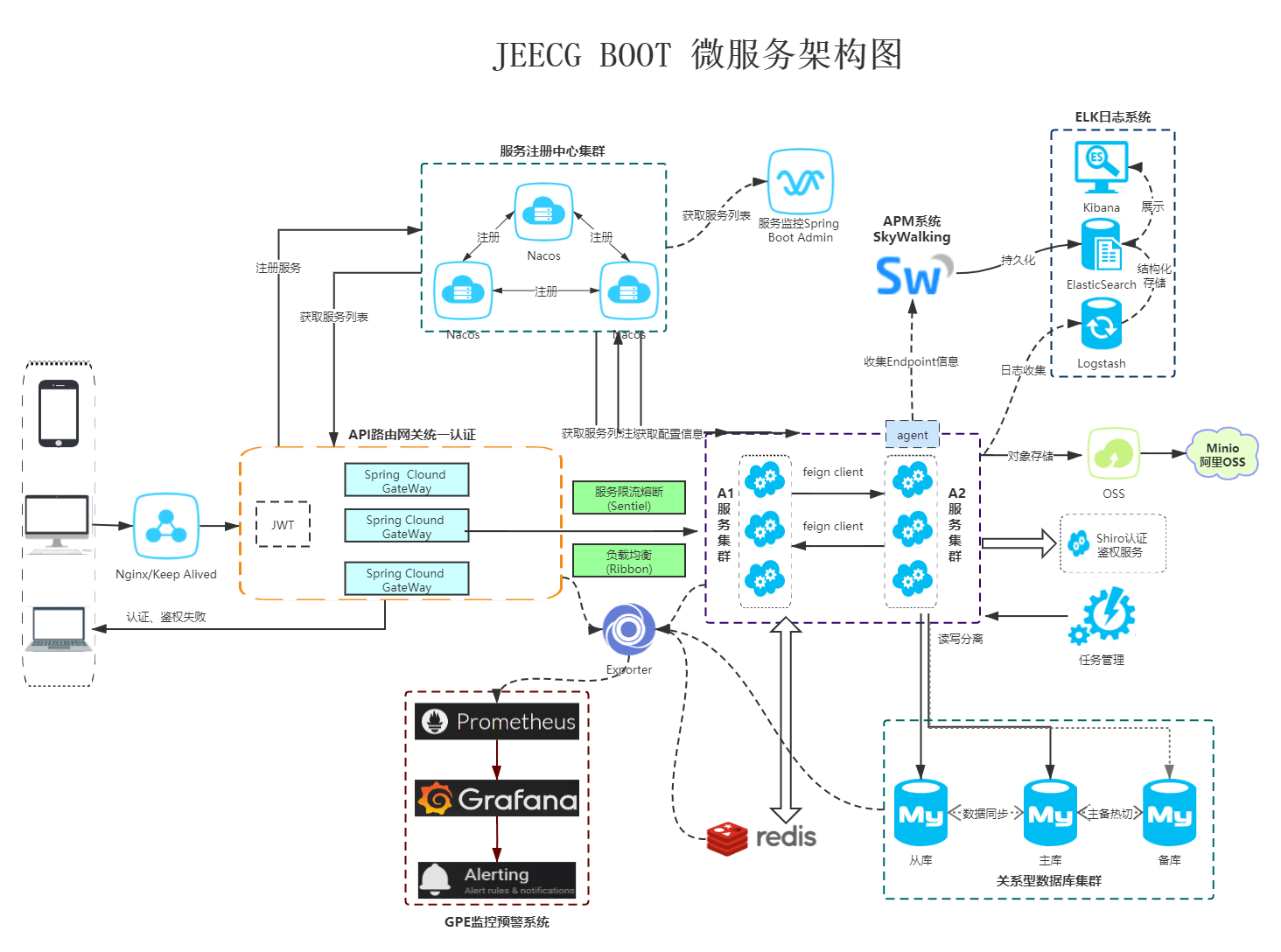
|
||||
|
||||
### Jeecg Boot 产品功能蓝图
|
||||
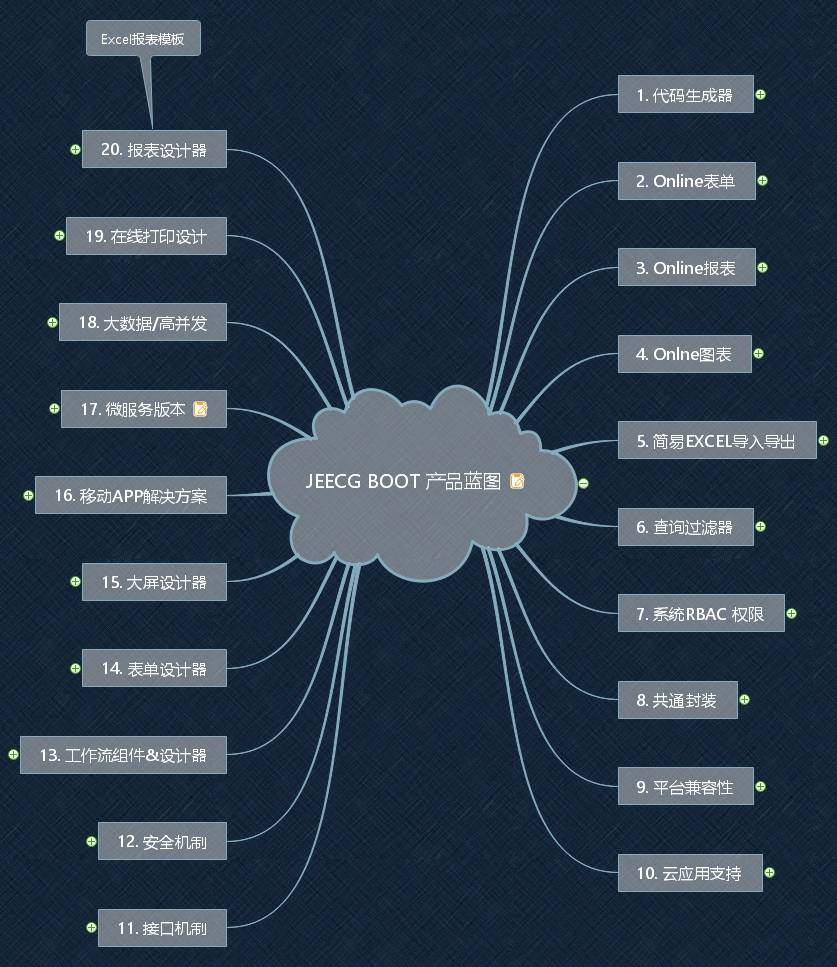
|
||||
|
||||
|
||||
|
||||
后台开发环境和依赖
|
||||
@ -300,7 +359,7 @@ Jeecg-Boot低代码开发平台,可以应用在任何J2EE项目的开发中,
|
||||
- jdk8
|
||||
- mysql
|
||||
- redis
|
||||
- 数据库脚本:jeecg-boot\docs\jeecg-boot-mysql.sql
|
||||
- 数据库脚本:jeecg-boot/db/jeecgboot-mysql-5.7.sql
|
||||
- 默认登录账号: admin/123456
|
||||
|
||||
|
||||
@ -422,15 +481,15 @@ yarn run lint
|
||||
|
||||
附属文档
|
||||
----
|
||||
- [Ant Design Vue](https://vuecomponent.github.io/ant-design-vue/docs/vue/introduce-cn)
|
||||
- [Ant Design Vue](https://www.antdv.com/docs/vue/introduce-cn)
|
||||
|
||||
- [报表 viser-vue](https://viserjs.github.io/demo.html#/viser/bar/basic-bar)
|
||||
- [报表 viser-vue](https://viserjs.github.io/demo.html#/viser/line/basic-line)
|
||||
|
||||
- [Vue](https://cn.vuejs.org/v2/guide)
|
||||
|
||||
- [路由/菜单说明](https://github.com/zhangdaiscott/jeecg-boot/tree/master/ant-design-jeecg-vue/src/router/README.md)
|
||||
- [路由/菜单说明](https://gitee.com/jeecg/jeecg-boot/tree/v1.1/ant-design-jeecg-vue/src/router/README.md)
|
||||
|
||||
- [ANTD 默认配置项](https://github.com/zhangdaiscott/jeecg-boot/tree/master/ant-design-jeecg-vue/src/defaultSettings.js)
|
||||
- [ANTD 默认配置项](https://gitee.com/jeecg/jeecg-boot/blob/v1.1/ant-design-jeecg-vue/src/defaultSettings.js)
|
||||
|
||||
- 其他待补充...
|
||||
|
||||
|
||||
23
ant-design-vue-jeecg/.dockerignore
Normal file
23
ant-design-vue-jeecg/.dockerignore
Normal file
@ -0,0 +1,23 @@
|
||||
docs
|
||||
public
|
||||
src
|
||||
.dockerignore
|
||||
.editorconfig
|
||||
.eslintignore
|
||||
.gitattributes
|
||||
.gitignore
|
||||
.prettierrc
|
||||
babel.config.js
|
||||
Dockerfile
|
||||
idea.config.js
|
||||
LICENSE
|
||||
package.json
|
||||
package-lock.json
|
||||
README.md
|
||||
vue.config.js
|
||||
yarn
|
||||
yarn.lock
|
||||
yarn-error.log
|
||||
.idea
|
||||
.svn
|
||||
node_modules
|
||||
3
ant-design-vue-jeecg/.env
Normal file
3
ant-design-vue-jeecg/.env
Normal file
@ -0,0 +1,3 @@
|
||||
NODE_ENV=production
|
||||
VUE_APP_PLATFORM_NAME=JeecgBoot 企业级低代码平台
|
||||
VUE_APP_SSO=false
|
||||
4
ant-design-vue-jeecg/.env.development
Normal file
4
ant-design-vue-jeecg/.env.development
Normal file
@ -0,0 +1,4 @@
|
||||
NODE_ENV=development
|
||||
VUE_APP_API_BASE_URL=http://localhost:8080/jeecg-boot
|
||||
VUE_APP_CAS_BASE_URL=http://cas.example.org:8443/cas
|
||||
VUE_APP_ONLINE_BASE_URL=http://fileview.jeecg.com/onlinePreview
|
||||
4
ant-design-vue-jeecg/.env.production
Normal file
4
ant-design-vue-jeecg/.env.production
Normal file
@ -0,0 +1,4 @@
|
||||
NODE_ENV=production
|
||||
VUE_APP_API_BASE_URL=http://localhost:8080/jeecg-boot
|
||||
VUE_APP_CAS_BASE_URL=http://localhost:8888/cas
|
||||
VUE_APP_ONLINE_BASE_URL=http://fileview.jeecg.com/onlinePreview
|
||||
4
ant-design-vue-jeecg/.env.test
Normal file
4
ant-design-vue-jeecg/.env.test
Normal file
@ -0,0 +1,4 @@
|
||||
NODE_ENV=production
|
||||
VUE_APP_API_BASE_URL=http://boot.jeecg.com:8080/jeecg-boot
|
||||
VUE_APP_CAS_BASE_URL=http://cas.example.org:8443/cas
|
||||
VUE_APP_ONLINE_BASE_URL=http://fileview.jeecg.com/onlinePreview
|
||||
29
ant-design-vue-jeecg/Dockerfile
Normal file
29
ant-design-vue-jeecg/Dockerfile
Normal file
@ -0,0 +1,29 @@
|
||||
FROM nginx
|
||||
MAINTAINER jeecgos@163.com
|
||||
VOLUME /tmp
|
||||
ENV LANG en_US.UTF-8
|
||||
RUN echo "server { \
|
||||
listen 80; \
|
||||
location ^~ /jeecg-boot { \
|
||||
proxy_pass http://jeecg-boot-system:8080/jeecg-boot/; \
|
||||
proxy_set_header Host jeecg-boot-system; \
|
||||
proxy_set_header X-Real-IP \$remote_addr; \
|
||||
proxy_set_header X-Forwarded-For \$proxy_add_x_forwarded_for; \
|
||||
} \
|
||||
#解决Router(mode: 'history')模式下,刷新路由地址不能找到页面的问题 \
|
||||
location / { \
|
||||
root /var/www/html/; \
|
||||
index index.html index.htm; \
|
||||
if (!-e \$request_filename) { \
|
||||
rewrite ^(.*)\$ /index.html?s=\$1 last; \
|
||||
break; \
|
||||
} \
|
||||
} \
|
||||
access_log /var/log/nginx/access.log ; \
|
||||
} " > /etc/nginx/conf.d/default.conf \
|
||||
&& mkdir -p /var/www \
|
||||
&& mkdir -p /var/www/html
|
||||
|
||||
ADD dist/ /var/www/html/
|
||||
EXPOSE 80
|
||||
EXPOSE 443
|
||||
@ -1,13 +1,13 @@
|
||||
Ant Design Jeecg Vue
|
||||
====
|
||||
|
||||
当前最新版本: 2.2.0(发布日期:2020-05-06)
|
||||
当前最新版本: 2.4.3(发布日期:20210322)
|
||||
|
||||
Overview
|
||||
----
|
||||
|
||||
基于 [Ant Design of Vue](https://vuecomponent.github.io/ant-design-vue/docs/vue/introduce-cn/) 实现的 Ant Design Pro Vue 版
|
||||
Jeecg-boot 的前段UI框架,采用前后端分离方案,提供强大代码生成器的快速开发平台。
|
||||
Jeecg-boot 的前段UI框架,采用前后端分离方案,提供强大代码生成器的低代码平台。
|
||||
前端页面代码和后端功能代码一键生成,不需要写任何代码,保持jeecg一贯的强大!!
|
||||
|
||||
|
||||
@ -103,4 +103,33 @@ yarn run lint
|
||||
备注
|
||||
----
|
||||
|
||||
> @vue/cli 升级后,eslint 规则更新了。由于影响到全部 .vue 文件,需要逐个验证。既暂时关闭部分原本不验证的规则,后期维护时,在逐步修正这些 rules
|
||||
> @vue/cli 升级后,eslint 规则更新了。由于影响到全部 .vue 文件,需要逐个验证。既暂时关闭部分原本不验证的规则,后期维护时,在逐步修正这些 rules
|
||||
|
||||
|
||||
Docker 镜像使用
|
||||
----
|
||||
|
||||
```
|
||||
# 1.修改前端项目的后台域名
|
||||
.env.development
|
||||
域名改成: http://jeecg-boot-system:8080/jeecg-boot
|
||||
|
||||
# 2.先进入打包前端项目
|
||||
yarn run build
|
||||
|
||||
# 3.构建镜像
|
||||
docker build -t nginx:jeecgboot .
|
||||
|
||||
# 4.启动镜像
|
||||
docker run --name jeecg-boot-nginx -p 80:80 -d nginx:jeecgboot
|
||||
|
||||
# 5.配置host
|
||||
|
||||
# jeecgboot
|
||||
127.0.0.1 jeecg-boot-redis
|
||||
127.0.0.1 jeecg-boot-mysql
|
||||
127.0.0.1 jeecg-boot-system
|
||||
|
||||
# 6.访问前台项目
|
||||
http://localhost:80
|
||||
```
|
||||
@ -1,6 +1,6 @@
|
||||
module.exports = {
|
||||
presets: [
|
||||
['@vue/app',
|
||||
{ useBuiltIns: 'entry' }]
|
||||
{ useBuiltIns: 'entry' }]
|
||||
]
|
||||
}
|
||||
|
||||
18239
ant-design-vue-jeecg/package-lock.json
generated
Normal file
18239
ant-design-vue-jeecg/package-lock.json
generated
Normal file
File diff suppressed because it is too large
Load Diff
@ -1,22 +1,20 @@
|
||||
{
|
||||
"name": "vue-antd-jeecg",
|
||||
"version": "2.2.0",
|
||||
"version": "2.4.3",
|
||||
"private": true,
|
||||
"scripts": {
|
||||
"pre": "yarn --registry https://registry.npm.taobao.org || cnpm install || npm install --registry https://registry.npm.taobao.org ",
|
||||
"pre": "cnpm install || yarn --registry https://registry.npm.taobao.org || npm install --registry https://registry.npm.taobao.org ",
|
||||
"serve": "vue-cli-service serve",
|
||||
"build:test": "vue-cli-service build --mode test",
|
||||
"build": "vue-cli-service build",
|
||||
"lint": "vue-cli-service lint"
|
||||
},
|
||||
"dependencies": {
|
||||
"@antv/data-set": "^0.11.2",
|
||||
"@jeecg/antd-online-beta220": "^1.0.1",
|
||||
"@tinymce/tinymce-vue": "^2.0.0",
|
||||
"ant-design-vue": "1.5.2",
|
||||
"area-data": "^5.0.6",
|
||||
"ant-design-vue": "^1.7.2",
|
||||
"@jeecg/antd-online-mini": "2.4.3-RC",
|
||||
"@antv/data-set": "^0.11.4",
|
||||
"viser-vue": "^2.4.8",
|
||||
"axios": "^0.18.0",
|
||||
"clipboard": "^2.0.4",
|
||||
"codemirror": "^5.46.0",
|
||||
"dayjs": "^1.8.0",
|
||||
"enquire.js": "^2.1.6",
|
||||
"js-cookie": "^2.2.0",
|
||||
@ -24,20 +22,28 @@
|
||||
"lodash.pick": "^4.4.0",
|
||||
"md5": "^2.2.1",
|
||||
"nprogress": "^0.2.0",
|
||||
"tinymce": "^5.1.4",
|
||||
"viser-vue": "^2.4.4",
|
||||
"vue": "^2.6.10",
|
||||
"vue-area-linkage": "^5.1.0",
|
||||
"vue-cropper": "^0.4.8",
|
||||
"vue-cropper": "^0.5.4",
|
||||
"vue-i18n": "^8.7.0",
|
||||
"vue-loader": "^15.7.0",
|
||||
"vue-ls": "^3.2.0",
|
||||
"vue-photo-preview": "^1.1.3",
|
||||
"vue-print-nb-jeecg": "^1.0.9",
|
||||
"vue-router": "^3.0.1",
|
||||
"vuex": "^3.1.0",
|
||||
"vue-print-nb-jeecg": "^1.0.9",
|
||||
"clipboard": "^2.0.4",
|
||||
"vue-photo-preview": "^1.1.3",
|
||||
"vue-splitpane": "^1.0.4",
|
||||
"vuedraggable": "^2.20.0",
|
||||
"vuex": "^3.1.0"
|
||||
"codemirror": "^5.46.0",
|
||||
"@tinymce/tinymce-vue": "^2.1.0",
|
||||
"tinymce": "^5.3.2",
|
||||
"@toast-ui/editor": "^2.1.2",
|
||||
"vue-area-linkage": "^5.1.0",
|
||||
"area-data": "^5.0.6",
|
||||
"dom-align": "1.12.0",
|
||||
"xe-utils": "2.4.8",
|
||||
"vxe-table": "2.9.13",
|
||||
"vxe-table-plugin-antd": "1.8.10"
|
||||
},
|
||||
"devDependencies": {
|
||||
"@babel/polyfill": "^7.2.5",
|
||||
@ -45,14 +51,14 @@
|
||||
"@vue/cli-plugin-eslint": "^3.3.0",
|
||||
"@vue/cli-service": "^3.3.0",
|
||||
"@vue/eslint-config-standard": "^4.0.0",
|
||||
"babel-eslint": "^10.0.1",
|
||||
"compression-webpack-plugin": "^3.1.0",
|
||||
"babel-eslint": "7.2.3",
|
||||
"eslint": "^5.16.0",
|
||||
"eslint-plugin-vue": "^5.1.0",
|
||||
"html-webpack-plugin": "^4.2.0",
|
||||
"less": "^3.9.0",
|
||||
"less-loader": "^4.1.0",
|
||||
"vue-template-compiler": "^2.6.10"
|
||||
"vue-template-compiler": "^2.6.10",
|
||||
"html-webpack-plugin": "^4.2.0",
|
||||
"compression-webpack-plugin": "^3.1.0"
|
||||
},
|
||||
"eslintConfig": {
|
||||
"root": true,
|
||||
@ -89,9 +95,13 @@
|
||||
"vue/no-use-v-if-with-v-for": 0,
|
||||
"vue/html-closing-bracket-newline": 0,
|
||||
"vue/no-parsing-error": 0,
|
||||
"no-console": 0,
|
||||
"no-tabs": 0,
|
||||
"indent": [1, 4]
|
||||
"indent": [
|
||||
"off",
|
||||
2
|
||||
],
|
||||
"no-console": 0,
|
||||
"space-before-function-paren": 0
|
||||
}
|
||||
},
|
||||
"postcss": {
|
||||
|
||||
File diff suppressed because one or more lines are too long
23
ant-design-vue-jeecg/public/color.less
vendored
23
ant-design-vue-jeecg/public/color.less
vendored
@ -2421,7 +2421,9 @@ a.listItemMetaTitle {
|
||||
color: rgba(0, 0, 0, 0.85);
|
||||
}
|
||||
.main {
|
||||
background-color: #fff;
|
||||
//update-begin---author:liusq Date:20210108 for:[JT-409]编译主题色,然后退出登录后的首页是这样子------------
|
||||
//background-color: #fff;
|
||||
//update-end---author:liusq Date:20210108 for:[JT-409]编译主题色,然后退出登录后的首页是这样子------------
|
||||
}
|
||||
.main .leftmenu {
|
||||
border-right: 1px solid #e8e8e8;
|
||||
@ -7680,6 +7682,13 @@ font.weak {
|
||||
color: #f5222d;
|
||||
}
|
||||
|
||||
// 侧边导航栏首页颜色跟随主题变化
|
||||
.ant-menu.ant-menu-root > .ant-menu-item:first-child.ant-menu-item-selected {
|
||||
& > a,
|
||||
& > a:hover {
|
||||
color: @primary-color;
|
||||
}
|
||||
}
|
||||
|
||||
// begin -------- JAreaLinkage 三级联动样式 --------------
|
||||
.cascader-menu-list .cascader-menu-option.hover,
|
||||
@ -7698,4 +7707,14 @@ font.weak {
|
||||
.area-select:active {
|
||||
box-shadow: 0 0 0 2px color(~`colorPalette("@{primary-color}", 1)`);
|
||||
}
|
||||
// end -------- JAreaLinkage 三级联动样式 --------------
|
||||
// end -------- JAreaLinkage 三级联动样式 --------------
|
||||
|
||||
// TESTA-521
|
||||
.ant-menu-submenu-selected {
|
||||
color: @primary-color;
|
||||
}
|
||||
|
||||
// TESTA-521
|
||||
.tab-layout-tabs.ant-tabs.ant-tabs-card > .ant-tabs-bar .ant-tabs-tab-active {
|
||||
border-color: @primary-color !important;
|
||||
}
|
||||
12
ant-design-vue-jeecg/public/index.html
vendored
12
ant-design-vue-jeecg/public/index.html
vendored
@ -5,9 +5,9 @@
|
||||
<meta charset="utf-8">
|
||||
<meta http-equiv="X-UA-Compatible" content="IE=edge">
|
||||
<meta name="viewport" content="width=device-width,initial-scale=1.0">
|
||||
<title>Jeecg-Boot 企业级快速开发平台</title>
|
||||
<title>JeecgBoot 企业级低代码平台</title>
|
||||
<link rel="icon" href="<%= BASE_URL %>logo.png">
|
||||
<script src="/cdn/babel-polyfill/polyfill_7_2_5.js"></script>
|
||||
<script src="<%= BASE_URL %>cdn/babel-polyfill/polyfill_7_2_5.js"></script>
|
||||
<style>
|
||||
html,
|
||||
body,
|
||||
@ -242,22 +242,16 @@
|
||||
<!-- 全局配置 -->
|
||||
<script>
|
||||
window._CONFIG = {};
|
||||
window._CONFIG['domianURL'] = 'http://127.0.0.1:8080/jeecg-boot';
|
||||
window._CONFIG['casPrefixUrl'] = 'http://cas.example.org:8443/cas';
|
||||
window._CONFIG['onlinePreviewDomainURL'] = 'http://fileview.jeecg.com/onlinePreview'
|
||||
window._CONFIG['staticDomainURL'] = window._CONFIG['domianURL'] + '/sys/common/static';
|
||||
window._CONFIG['pdfDomainURL'] = window._CONFIG['domianURL'] + '/sys/common/pdf/pdfPreviewIframe';
|
||||
</script>
|
||||
</head>
|
||||
|
||||
<body>
|
||||
<!-- built files will be auto injected -->
|
||||
<div id="app">
|
||||
<div id="loader-wrapper">
|
||||
<div id="loader"></div>
|
||||
<div class="loader-section section-left"></div>
|
||||
<div class="loader-section section-right"></div>
|
||||
<div class="load_title">正在加载 Jeecg-Boot 快速开发平台,请耐心等待
|
||||
<div class="load_title">正在加载 JeecgBoot 低代码平台,请耐心等待
|
||||
|
||||
</div>
|
||||
</div>
|
||||
|
||||
@ -2,7 +2,6 @@ import { getAction, deleteAction, putAction, postAction, httpAction } from '@/ap
|
||||
import Vue from 'vue'
|
||||
import {UI_CACHE_DB_DICT_DATA } from "@/store/mutation-types"
|
||||
|
||||
|
||||
//角色管理
|
||||
const addRole = (params)=>postAction("/sys/role/add",params);
|
||||
const editRole = (params)=>putAction("/sys/role/edit",params);
|
||||
@ -27,19 +26,19 @@ const getPermissionList = (params)=>getAction("/sys/permission/list",params);
|
||||
const getSystemMenuList = (params)=>getAction("/sys/permission/getSystemMenuList",params);
|
||||
const getSystemSubmenu = (params)=>getAction("/sys/permission/getSystemSubmenu",params);
|
||||
const getSystemSubmenuBatch = (params) => getAction('/sys/permission/getSystemSubmenuBatch', params)
|
||||
|
||||
const queryTreeList = (params)=>getAction("/sys/permission/queryTreeList",params);
|
||||
const queryTreeListForRole = (params)=>getAction("/sys/role/queryTreeList",params);
|
||||
const queryListAsync = (params)=>getAction("/sys/permission/queryListAsync",params);
|
||||
const queryRolePermission = (params)=>getAction("/sys/permission/queryRolePermission",params);
|
||||
const saveRolePermission = (params)=>postAction("/sys/permission/saveRolePermission",params);
|
||||
const queryPermissionsByUser = (params)=>getAction("/sys/permission/getUserPermissionByToken",params);
|
||||
const queryPermissionsByUser = ()=>getAction("/sys/permission/getUserPermissionByToken");
|
||||
const loadAllRoleIds = (params)=>getAction("/sys/permission/loadAllRoleIds",params);
|
||||
const getPermissionRuleList = (params)=>getAction("/sys/permission/getPermRuleListByPermId",params);
|
||||
const queryPermissionRule = (params)=>getAction("/sys/permission/queryPermissionRule",params);
|
||||
|
||||
// 部门管理
|
||||
const queryDepartTreeList = (params)=>getAction("/sys/sysDepart/queryTreeList",params);
|
||||
const queryDepartTreeSync = (params)=>getAction("/sys/sysDepart/queryDepartTreeSync",params);
|
||||
const queryIdTree = (params)=>getAction("/sys/sysDepart/queryIdTree",params);
|
||||
const queryParentName = (params)=>getAction("/sys/sysDepart/queryParentName",params);
|
||||
const searchByKeywords = (params)=>getAction("/sys/sysDepart/searchBy",params);
|
||||
@ -70,7 +69,7 @@ export const ajaxGetDictItems = (code, params)=>getAction(`/sys/dict/getDictItem
|
||||
function getDictItemsFromCache(dictCode) {
|
||||
if (Vue.ls.get(UI_CACHE_DB_DICT_DATA) && Vue.ls.get(UI_CACHE_DB_DICT_DATA)[dictCode]) {
|
||||
let dictItems = Vue.ls.get(UI_CACHE_DB_DICT_DATA)[dictCode];
|
||||
console.log("-----------getDictItemsFromCache----------dictCode="+dictCode+"---- dictItems=",dictItems)
|
||||
//console.log("-----------getDictItemsFromCache----------dictCode="+dictCode+"---- dictItems=",dictItems)
|
||||
return dictItems;
|
||||
}
|
||||
}
|
||||
@ -84,15 +83,26 @@ const getVisitInfo = (params)=>getAction("/sys/visitInfo",params);
|
||||
|
||||
// 根据部门主键查询用户信息
|
||||
const queryUserByDepId = (params)=>getAction("/sys/user/queryUserByDepId",params);
|
||||
|
||||
// 重复校验
|
||||
const duplicateCheck = (params)=>getAction("/sys/duplicate/check",params);
|
||||
// 加载分类字典
|
||||
const loadCategoryData = (params)=>getAction("/sys/category/loadAllData",params);
|
||||
const checkRuleByCode = (params) => getAction('/sys/checkRule/checkByCode', params)
|
||||
//我的通告
|
||||
//加载我的通告信息
|
||||
const getUserNoticeInfo= (params)=>getAction("/sys/sysAnnouncementSend/getMyAnnouncementSend",params);
|
||||
const getTransitURL = url => `/sys/common/transitRESTful?url=${encodeURIComponent(url)}`
|
||||
// 中转HTTP请求
|
||||
export const transitRESTful = {
|
||||
get: (url, parameter) => getAction(getTransitURL(url), parameter),
|
||||
post: (url, parameter) => postAction(getTransitURL(url), parameter),
|
||||
put: (url, parameter) => putAction(getTransitURL(url), parameter),
|
||||
http: (url, parameter) => httpAction(getTransitURL(url), parameter),
|
||||
}
|
||||
|
||||
export {
|
||||
// imgView,
|
||||
// doMian,
|
||||
addRole,
|
||||
editRole,
|
||||
checkRoleCode,
|
||||
@ -116,6 +126,7 @@ export {
|
||||
getPermissionRuleList,
|
||||
queryPermissionRule,
|
||||
queryDepartTreeList,
|
||||
queryDepartTreeSync,
|
||||
queryIdTree,
|
||||
queryParentName,
|
||||
searchByKeywords,
|
||||
|
||||
@ -36,15 +36,15 @@ export function getSmsCaptcha(parameter) {
|
||||
})
|
||||
}
|
||||
|
||||
export function getInfo() {
|
||||
return axios({
|
||||
url: '/api/user/info',
|
||||
method: 'get',
|
||||
headers: {
|
||||
'Content-Type': 'application/json;charset=UTF-8'
|
||||
}
|
||||
})
|
||||
}
|
||||
// export function getInfo() {
|
||||
// return axios({
|
||||
// url: '/api/user/info',
|
||||
// method: 'get',
|
||||
// headers: {
|
||||
// 'Content-Type': 'application/json;charset=UTF-8'
|
||||
// }
|
||||
// })
|
||||
// }
|
||||
|
||||
export function logout(logoutToken) {
|
||||
return axios({
|
||||
@ -60,11 +60,12 @@ export function logout(logoutToken) {
|
||||
/**
|
||||
* 第三方登录
|
||||
* @param token
|
||||
* @param thirdType
|
||||
* @returns {*}
|
||||
*/
|
||||
export function thirdLogin(token) {
|
||||
export function thirdLogin(token,thirdType) {
|
||||
return axios({
|
||||
url: `/thirdLogin/getLoginUser/${token}`,
|
||||
url: `/sys/thirdLogin/getLoginUser/${token}/${thirdType}`,
|
||||
method: 'get',
|
||||
headers: {
|
||||
'Content-Type': 'application/json;charset=UTF-8'
|
||||
|
||||
@ -2,11 +2,11 @@ import Vue from 'vue'
|
||||
import { axios } from '@/utils/request'
|
||||
|
||||
const api = {
|
||||
user: '/api/user',
|
||||
role: '/api/role',
|
||||
service: '/api/service',
|
||||
permission: '/api/permission',
|
||||
permissionNoPager: '/api/permission/no-pager'
|
||||
user: '/mock/api/user',
|
||||
role: '/mock/api/role',
|
||||
service: '/mock/api/service',
|
||||
permission: '/mock/api/permission',
|
||||
permissionNoPager: '/mock/api/permission/no-pager'
|
||||
}
|
||||
|
||||
export default api
|
||||
@ -167,11 +167,15 @@ export function uploadAction(url,parameter){
|
||||
*/
|
||||
export function getFileAccessHttpUrl(avatar,subStr) {
|
||||
if(!subStr) subStr = 'http'
|
||||
if(avatar && avatar.startsWith(subStr)){
|
||||
return avatar;
|
||||
}else{
|
||||
if(avatar && avatar.length>0 && avatar.indexOf('[')==-1){
|
||||
return window._CONFIG['staticDomainURL'] + "/" + avatar;
|
||||
try {
|
||||
if(avatar && avatar.startsWith(subStr)){
|
||||
return avatar;
|
||||
}else{
|
||||
if(avatar && avatar.length>0 && avatar.indexOf('[')==-1){
|
||||
return window._CONFIG['staticDomainURL'] + "/" + avatar;
|
||||
}
|
||||
}
|
||||
}catch(err){
|
||||
return;
|
||||
}
|
||||
}
|
||||
|
||||
1
ant-design-vue-jeecg/src/assets/less/codemirror_idea.css
Normal file
1
ant-design-vue-jeecg/src/assets/less/codemirror_idea.css
Normal file
@ -0,0 +1 @@
|
||||
.cm-s-idea span.cm-meta{color:olive}.cm-s-idea span.cm-number{color:#00f}.cm-s-idea span.cm-keyword{line-height:1em;font-weight:700;color:navy}.cm-s-idea span.cm-atom{font-weight:700;color:navy}.cm-s-idea span.cm-def{color:#000}.cm-s-idea span.cm-variable{color:#000}.cm-s-idea span.cm-variable-2{color:#000}.cm-s-idea span.cm-type,.cm-s-idea span.cm-variable-3{color:#000}.cm-s-idea span.cm-property{color:#000}.cm-s-idea span.cm-operator{color:#000}.cm-s-idea span.cm-comment{color:grey}.cm-s-idea span.cm-string{color:green}.cm-s-idea span.cm-string-2{color:green}.cm-s-idea span.cm-qualifier{color:#555}.cm-s-idea span.cm-error{color:red}.cm-s-idea span.cm-attribute{color:#00f}.cm-s-idea span.cm-tag{color:navy}.cm-s-idea span.cm-link{color:#00f}.cm-s-idea .CodeMirror-activeline-background{background:#fffae3}.cm-s-idea span.cm-builtin{color:#30a}.cm-s-idea span.cm-bracket{color:#cc7}.cm-s-idea{font-family:Consolas,Menlo,Monaco,Lucida Console,Liberation Mono,DejaVu Sans Mono,Bitstream Vera Sans Mono,Courier New,monospace,serif}.cm-s-idea .CodeMirror-matchingbracket{outline:1px solid grey;color:#000!important}.CodeMirror-hints.idea{font-family:Menlo,Monaco,Consolas,'Courier New',monospace;color:#616569;background-color:#ebf3fd!important}.CodeMirror-hints.idea .CodeMirror-hint-active{background-color:#a2b8c9!important;color:#5c6065!important}
|
||||
@ -55,4 +55,7 @@
|
||||
/* 内嵌子表背景颜色 */
|
||||
.j-inner-table-wrapper /deep/ .ant-table-expanded-row .ant-table-wrapper .ant-table-tbody .ant-table-row {
|
||||
background-color: #FFFFFF;
|
||||
}
|
||||
}
|
||||
|
||||
/**隐藏样式-modal确定按钮 */
|
||||
.jee-hidden{display: none}
|
||||
@ -5,21 +5,25 @@ import store from '@/store'
|
||||
* 单点登录
|
||||
*/
|
||||
const init = (callback) => {
|
||||
console.log("-------单点登录开始-------");
|
||||
let token = Vue.ls.get(ACCESS_TOKEN);
|
||||
let st = getUrlParam("ticket");
|
||||
let sevice = "http://"+window.location.host+"/";
|
||||
if(token){
|
||||
loginSuccess(callback);
|
||||
}else{
|
||||
if(st){
|
||||
validateSt(st,sevice,callback);
|
||||
}else{
|
||||
let serviceUrl = encodeURIComponent(sevice);
|
||||
window.location.href = window._CONFIG['casPrefixUrl']+"/login?service="+serviceUrl;
|
||||
if (process.env.VUE_APP_SSO == 'true') {
|
||||
console.log("-------单点登录开始-------");
|
||||
let token = Vue.ls.get(ACCESS_TOKEN);
|
||||
let st = getUrlParam("ticket");
|
||||
let sevice = "http://" + window.location.host + "/";
|
||||
if (token) {
|
||||
loginSuccess(callback);
|
||||
} else {
|
||||
if (st) {
|
||||
validateSt(st, sevice, callback);
|
||||
} else {
|
||||
let serviceUrl = encodeURIComponent(sevice);
|
||||
window.location.href = window._CONFIG['casPrefixUrl'] + "/login?service=" + serviceUrl;
|
||||
}
|
||||
}
|
||||
console.log("-------单点登录结束-------");
|
||||
}else{
|
||||
callback && callback()
|
||||
}
|
||||
console.log("-------单点登录结束-------");
|
||||
};
|
||||
const SSO = {
|
||||
init: init
|
||||
|
||||
217
ant-design-vue-jeecg/src/components/JVxeCells/JVxeFileCell.vue
Normal file
217
ant-design-vue-jeecg/src/components/JVxeCells/JVxeFileCell.vue
Normal file
@ -0,0 +1,217 @@
|
||||
<template>
|
||||
<div>
|
||||
<template v-if="hasFile" v-for="(file, fileKey) of [innerFile || {}]">
|
||||
<div :key="fileKey" style="position: relative;">
|
||||
<a-tooltip v-if="file.status==='uploading'" :title="`上传中(${Math.floor(file.percent)}%)`">
|
||||
<a-icon type="loading"/>
|
||||
<span style="margin-left:5px">上传中…</span>
|
||||
</a-tooltip>
|
||||
|
||||
<a-tooltip v-else-if="file.status==='done'" :title="file.name">
|
||||
<a-icon type="paper-clip"/>
|
||||
<span style="margin-left:5px">{{ ellipsisFileName }}</span>
|
||||
</a-tooltip>
|
||||
|
||||
<a-tooltip v-else :title="file.name">
|
||||
<a-icon type="paper-clip" style="color:red;"/>
|
||||
<span style="color:red;margin-left:5px">{{ ellipsisFileName }}</span>
|
||||
</a-tooltip>
|
||||
|
||||
<template style="width: 30px">
|
||||
<a-dropdown :trigger="['click']" placement="bottomRight" style="margin-left: 10px;">
|
||||
<a-tooltip title="操作">
|
||||
<a-icon
|
||||
v-if="file.status!=='uploading'"
|
||||
type="setting"
|
||||
style="cursor: pointer;"/>
|
||||
</a-tooltip>
|
||||
|
||||
<a-menu slot="overlay">
|
||||
<a-menu-item v-if="originColumn.allowDownload !== false" @click="handleClickDownloadFile">
|
||||
<span><a-icon type="download"/> 下载</span>
|
||||
</a-menu-item>
|
||||
<a-menu-item v-if="originColumn.allowRemove !== false" @click="handleClickDeleteFile">
|
||||
<span><a-icon type="delete"/> 删除</span>
|
||||
</a-menu-item>
|
||||
<a-menu-item @click="handleMoreOperation(originColumn)">
|
||||
<span><a-icon type="bars"/> 更多</span>
|
||||
</a-menu-item>
|
||||
</a-menu>
|
||||
</a-dropdown>
|
||||
</template>
|
||||
</div>
|
||||
</template>
|
||||
|
||||
<a-upload
|
||||
v-show="!hasFile"
|
||||
name="file"
|
||||
:data="{'isup': 1}"
|
||||
:multiple="false"
|
||||
:action="uploadAction"
|
||||
:headers="uploadHeaders"
|
||||
:showUploadList="false"
|
||||
v-bind="cellProps"
|
||||
@change="handleChangeUpload"
|
||||
>
|
||||
<a-button icon="upload">{{originColumn.btnText || '上传文件'}}</a-button>
|
||||
</a-upload>
|
||||
<j-file-pop ref="filePop" @ok="handleFileSuccess" :number="number"/>
|
||||
</div>
|
||||
</template>
|
||||
|
||||
<script>
|
||||
import { getFileAccessHttpUrl } from '@api/manage'
|
||||
import JVxeCellMixins from '@/components/jeecg/JVxeTable/mixins/JVxeCellMixins'
|
||||
import { ACCESS_TOKEN } from '@/store/mutation-types'
|
||||
import JFilePop from '@/components/jeecg/minipop/JFilePop'
|
||||
|
||||
import JVxeUploadCell from '@/components/jeecg/JVxeTable/components/cells/JVxeUploadCell'
|
||||
|
||||
export default {
|
||||
name: 'JVxeFileCell',
|
||||
mixins: [JVxeCellMixins],
|
||||
components: {JFilePop},
|
||||
props: {},
|
||||
data() {
|
||||
return {
|
||||
innerFile: null,
|
||||
number:0,
|
||||
}
|
||||
},
|
||||
computed: {
|
||||
/** upload headers */
|
||||
uploadHeaders() {
|
||||
let {originColumn: col} = this
|
||||
let headers = {}
|
||||
if (col.token === true) {
|
||||
headers['X-Access-Token'] = this.$ls.get(ACCESS_TOKEN)
|
||||
}
|
||||
return headers
|
||||
},
|
||||
|
||||
/** 上传请求地址 */
|
||||
uploadAction() {
|
||||
if (!this.originColumn.action) {
|
||||
return window._CONFIG['domianURL'] + '/sys/common/upload'
|
||||
} else {
|
||||
return this.originColumn.action
|
||||
}
|
||||
},
|
||||
|
||||
hasFile() {
|
||||
return this.innerFile != null
|
||||
},
|
||||
|
||||
ellipsisFileName() {
|
||||
let length = 5
|
||||
let file = this.innerFile
|
||||
if (!file || !file.name) {
|
||||
return ''
|
||||
}
|
||||
if (file.name.length > length) {
|
||||
return file.name.substr(0, length) + '…'
|
||||
}
|
||||
return file.name
|
||||
},
|
||||
|
||||
responseName() {
|
||||
if (this.originColumn.responseName) {
|
||||
return this.originColumn.responseName
|
||||
} else {
|
||||
return 'message'
|
||||
}
|
||||
},
|
||||
|
||||
},
|
||||
watch: {
|
||||
innerValue: {
|
||||
immediate: true,
|
||||
handler() {
|
||||
if (this.innerValue) {
|
||||
this.innerFile = this.innerValue
|
||||
} else {
|
||||
this.innerFile = null
|
||||
}
|
||||
},
|
||||
},
|
||||
},
|
||||
methods: {
|
||||
|
||||
// 点击更多按钮
|
||||
handleMoreOperation(originColumn) {
|
||||
//update-begin-author:wangshuai date:20201021 for:LOWCOD-969 判断传过来的字段是否存在number,用于控制上传文件
|
||||
if (originColumn.number) {
|
||||
this.number = originColumn.number
|
||||
} else {
|
||||
this.number = 0
|
||||
}
|
||||
//update-end-author:wangshuai date:20201021 for:LOWCOD-969 判断传过来的字段是否存在number,用于控制上传文件
|
||||
if(originColumn && originColumn.fieldExtendJson){
|
||||
let json = JSON.parse(originColumn.fieldExtendJson);
|
||||
this.number = json.uploadnum?json.uploadnum:0;
|
||||
}
|
||||
let path = ''
|
||||
if (this.innerFile) {
|
||||
path = this.innerFile.path
|
||||
}
|
||||
this.$refs.filePop.show('', path)
|
||||
},
|
||||
|
||||
// 更多上传回调
|
||||
handleFileSuccess(file) {
|
||||
if (file) {
|
||||
this.innerFile.path = file.path
|
||||
this.handleChangeCommon(this.innerFile)
|
||||
}
|
||||
},
|
||||
|
||||
handleChangeUpload(info) {
|
||||
let {originColumn: col} = this
|
||||
let {file} = info
|
||||
let value = {
|
||||
name: file.name,
|
||||
type: file.type,
|
||||
size: file.size,
|
||||
status: file.status,
|
||||
percent: file.percent
|
||||
}
|
||||
if (file.response) {
|
||||
value['responseName'] = file.response[this.responseName]
|
||||
}
|
||||
if (file.status === 'done') {
|
||||
value['path'] = file.response[this.responseName]
|
||||
this.handleChangeCommon(value)
|
||||
} else if (file.status === 'error') {
|
||||
value['message'] = file.response.message || '未知错误'
|
||||
}
|
||||
this.innerFile = value
|
||||
},
|
||||
|
||||
handleClickDownloadFile() {
|
||||
let {url, path} = this.innerFile || {}
|
||||
if (!url || url.length === 0) {
|
||||
if (path && path.length > 0) {
|
||||
url = getFileAccessHttpUrl(path.split(',')[0])
|
||||
}
|
||||
}
|
||||
if (url) {
|
||||
window.open(url)
|
||||
}
|
||||
},
|
||||
|
||||
handleClickDeleteFile() {
|
||||
this.handleChangeCommon(null)
|
||||
},
|
||||
|
||||
},
|
||||
// 【组件增强】注释详见:JVxeCellMixins.js
|
||||
enhanced: {
|
||||
switches: {visible: true},
|
||||
getValue: value => JVxeUploadCell.enhanced.getValue(value),
|
||||
setValue: value => JVxeUploadCell.enhanced.setValue(value),
|
||||
}
|
||||
}
|
||||
</script>
|
||||
|
||||
<style scoped lang="less">
|
||||
</style>
|
||||
242
ant-design-vue-jeecg/src/components/JVxeCells/JVxeImageCell.vue
Normal file
242
ant-design-vue-jeecg/src/components/JVxeCells/JVxeImageCell.vue
Normal file
@ -0,0 +1,242 @@
|
||||
<template>
|
||||
<div>
|
||||
<template v-if="hasFile" v-for="(file, fileKey) of [innerFile || {}]">
|
||||
<div :key="fileKey" style="position: relative;">
|
||||
<template v-if="!file || !(file['url'] || file['path'] || file['message'])">
|
||||
<a-tooltip :title="'请稍后: ' + JSON.stringify (file) + ((file['url'] || file['path'] || file['message']))">
|
||||
<a-icon type="loading"/>
|
||||
</a-tooltip>
|
||||
</template>
|
||||
<template v-else-if="file['path']">
|
||||
<img class="j-editable-image" :src="imgSrc" alt="无图片" @click="handleMoreOperation"/>
|
||||
</template>
|
||||
<template v-else>
|
||||
<a-icon type="exclamation-circle" style="color: red;" @click="handleClickShowImageError"/>
|
||||
</template>
|
||||
<template slot="addonBefore" style="width: 30px">
|
||||
<a-tooltip v-if="file.status==='uploading'" :title="`上传中(${Math.floor(file.percent)}%)`">
|
||||
<a-icon type="loading"/>
|
||||
</a-tooltip>
|
||||
<a-tooltip v-else-if="file.status==='done'" title="上传完成">
|
||||
<a-icon type="check-circle" style="color:#00DB00;"/>
|
||||
</a-tooltip>
|
||||
<a-tooltip v-else title="上传失败">
|
||||
<a-icon type="exclamation-circle" style="color:red;"/>
|
||||
</a-tooltip>
|
||||
</template>
|
||||
|
||||
<template style="width: 30px">
|
||||
<a-dropdown :trigger="['click']" placement="bottomRight" style="margin-left: 10px;">
|
||||
<a-tooltip title="操作">
|
||||
<a-icon
|
||||
v-if="file.status!=='uploading'"
|
||||
type="setting"
|
||||
style="cursor: pointer;"/>
|
||||
</a-tooltip>
|
||||
|
||||
<a-menu slot="overlay">
|
||||
<a-menu-item v-if="originColumn.allowDownload !== false" @click="handleClickDownloadFile">
|
||||
<span><a-icon type="download"/> 下载</span>
|
||||
</a-menu-item>
|
||||
<a-menu-item v-if="originColumn.allowRemove !== false" @click="handleClickDeleteFile">
|
||||
<span><a-icon type="delete"/> 删除</span>
|
||||
</a-menu-item>
|
||||
<a-menu-item @click="handleMoreOperation(originColumn)">
|
||||
<span><a-icon type="bars"/> 更多</span>
|
||||
</a-menu-item>
|
||||
</a-menu>
|
||||
</a-dropdown>
|
||||
</template>
|
||||
|
||||
</div>
|
||||
</template>
|
||||
<a-upload
|
||||
v-show="!hasFile"
|
||||
name="file"
|
||||
:data="{'isup': 1}"
|
||||
:multiple="false"
|
||||
:action="uploadAction"
|
||||
:headers="uploadHeaders"
|
||||
:showUploadList="false"
|
||||
v-bind="cellProps"
|
||||
@change="handleChangeUpload"
|
||||
>
|
||||
<a-button icon="upload">{{originColumn.btnText || '上传图片'}}</a-button>
|
||||
</a-upload>
|
||||
<j-file-pop ref="filePop" @ok="handleFileSuccess" :number="number"/>
|
||||
</div>
|
||||
</template>
|
||||
|
||||
<script>
|
||||
import { getFileAccessHttpUrl } from '@api/manage'
|
||||
import JVxeCellMixins from '@/components/jeecg/JVxeTable/mixins/JVxeCellMixins'
|
||||
import { ACCESS_TOKEN } from '@/store/mutation-types'
|
||||
import JFilePop from '@/components/jeecg/minipop/JFilePop'
|
||||
|
||||
import JVxeUploadCell from '@/components/jeecg/JVxeTable/components/cells/JVxeUploadCell'
|
||||
|
||||
export default {
|
||||
name: 'JVxeImageCell',
|
||||
mixins: [JVxeCellMixins],
|
||||
components: {JFilePop},
|
||||
props: {},
|
||||
data() {
|
||||
return {
|
||||
innerFile: null,
|
||||
number:0
|
||||
}
|
||||
},
|
||||
computed: {
|
||||
/** upload headers */
|
||||
uploadHeaders() {
|
||||
let {originColumn: col} = this
|
||||
let headers = {}
|
||||
if (col.token === true) {
|
||||
headers['X-Access-Token'] = this.$ls.get(ACCESS_TOKEN)
|
||||
}
|
||||
return headers
|
||||
},
|
||||
|
||||
/** 上传请求地址 */
|
||||
uploadAction() {
|
||||
if (!this.originColumn.action) {
|
||||
return window._CONFIG['domianURL'] + '/sys/common/upload'
|
||||
} else {
|
||||
return this.originColumn.action
|
||||
}
|
||||
},
|
||||
|
||||
hasFile() {
|
||||
return this.innerFile != null
|
||||
},
|
||||
|
||||
/** 预览图片地址 */
|
||||
imgSrc() {
|
||||
if (this.innerFile) {
|
||||
if (this.innerFile['url']) {
|
||||
return this.innerFile['url']
|
||||
} else if (this.innerFile['path']) {
|
||||
let path = this.innerFile['path'].split(',')[0]
|
||||
return getFileAccessHttpUrl(path)
|
||||
}
|
||||
}
|
||||
return ''
|
||||
},
|
||||
|
||||
responseName() {
|
||||
if (this.originColumn.responseName) {
|
||||
return this.originColumn.responseName
|
||||
} else {
|
||||
return 'message'
|
||||
}
|
||||
},
|
||||
|
||||
},
|
||||
watch: {
|
||||
innerValue: {
|
||||
immediate: true,
|
||||
handler() {
|
||||
if (this.innerValue) {
|
||||
this.innerFile = this.innerValue
|
||||
} else {
|
||||
this.innerFile = null
|
||||
}
|
||||
},
|
||||
},
|
||||
},
|
||||
methods: {
|
||||
|
||||
// 点击更多按钮
|
||||
handleMoreOperation(originColumn) {
|
||||
//update-begin-author:wangshuai date:20201021 for:LOWCOD-969 判断传过来的字段是否存在number,用于控制上传文件
|
||||
if (originColumn.number) {
|
||||
this.number = originColumn.number
|
||||
} else {
|
||||
this.number = 0
|
||||
}
|
||||
//update-end-author:wangshuai date:20201021 for:LOWCOD-969 判断传过来的字段是否存在number,用于控制上传文件
|
||||
if(originColumn && originColumn.fieldExtendJson){
|
||||
let json = JSON.parse(originColumn.fieldExtendJson);
|
||||
this.number = json.uploadnum?json.uploadnum:0;
|
||||
}
|
||||
let path = ''
|
||||
if (this.innerFile) {
|
||||
path = this.innerFile.path
|
||||
}
|
||||
this.$refs.filePop.show('', path, 'img')
|
||||
},
|
||||
|
||||
// 更多上传回调
|
||||
handleFileSuccess(file) {
|
||||
if (file) {
|
||||
this.innerFile.path = file.path
|
||||
this.handleChangeCommon(this.innerFile)
|
||||
}
|
||||
},
|
||||
|
||||
// 弹出上传出错详细信息
|
||||
handleClickShowImageError() {
|
||||
let file = this.innerFile || null
|
||||
if (file && file['message']) {
|
||||
this.$error({title: '上传出错', content: '错误信息:' + file['message'], maskClosable: true})
|
||||
}
|
||||
},
|
||||
|
||||
handleChangeUpload(info) {
|
||||
let {originColumn: col} = this
|
||||
let {file} = info
|
||||
let value = {
|
||||
name: file.name,
|
||||
type: file.type,
|
||||
size: file.size,
|
||||
status: file.status,
|
||||
percent: file.percent
|
||||
}
|
||||
if (file.response) {
|
||||
value['responseName'] = file.response[this.responseName]
|
||||
}
|
||||
if (file.status === 'done') {
|
||||
value['path'] = file.response[this.responseName]
|
||||
this.handleChangeCommon(value)
|
||||
} else if (file.status === 'error') {
|
||||
value['message'] = file.response.message || '未知错误'
|
||||
}
|
||||
this.innerFile = value
|
||||
},
|
||||
|
||||
handleClickDownloadFile() {
|
||||
if (this.imgSrc) {
|
||||
window.open(this.imgSrc)
|
||||
}
|
||||
},
|
||||
|
||||
handleClickDeleteFile() {
|
||||
this.handleChangeCommon(null)
|
||||
},
|
||||
|
||||
},
|
||||
// 【组件增强】注释详见:JVxeCellMixins.js
|
||||
enhanced: {
|
||||
switches: {visible: true},
|
||||
getValue: value => JVxeUploadCell.enhanced.getValue(value),
|
||||
setValue: value => JVxeUploadCell.enhanced.setValue(value),
|
||||
}
|
||||
}
|
||||
</script>
|
||||
|
||||
<style scoped lang="less">
|
||||
.j-editable-image {
|
||||
height: 32px;
|
||||
max-width: 100px !important;
|
||||
cursor: pointer;
|
||||
|
||||
&:hover {
|
||||
opacity: 0.8;
|
||||
}
|
||||
|
||||
&:active {
|
||||
opacity: 0.6;
|
||||
}
|
||||
|
||||
}
|
||||
</style>
|
||||
@ -0,0 +1,59 @@
|
||||
<template>
|
||||
<j-popup
|
||||
v-bind="popupProps"
|
||||
@input="handlePopupInput"
|
||||
/>
|
||||
</template>
|
||||
|
||||
<script>
|
||||
import JVxeCellMixins, { vModel, dispatchEvent } from '@/components/jeecg/JVxeTable/mixins/JVxeCellMixins'
|
||||
|
||||
export default {
|
||||
name: 'JVxePopupCell',
|
||||
mixins: [JVxeCellMixins],
|
||||
computed: {
|
||||
popupProps() {
|
||||
const {innerValue, originColumn: col, caseId, cellProps} = this
|
||||
return {
|
||||
...cellProps,
|
||||
value: innerValue,
|
||||
field: col.field || col.key,
|
||||
code: col.popupCode,
|
||||
orgFields: col.orgFields,
|
||||
destFields: col.destFields,
|
||||
groupId: caseId,
|
||||
}
|
||||
},
|
||||
},
|
||||
methods: {
|
||||
/** popup回调 */
|
||||
handlePopupInput(value, others) {
|
||||
const {row, originColumn: col} = this
|
||||
// 存储输入的值
|
||||
let popupValue = value
|
||||
if (others && Object.keys(others).length > 0) {
|
||||
Object.keys(others).forEach(key => {
|
||||
let currentValue = others[key]
|
||||
// 当前列直接赋值,其他列通过vModel赋值
|
||||
if (key === col.key) {
|
||||
popupValue = currentValue
|
||||
} else {
|
||||
vModel.call(this, currentValue, row, key)
|
||||
}
|
||||
})
|
||||
}
|
||||
this.handleChangeCommon(popupValue)
|
||||
},
|
||||
},
|
||||
// 【组件增强】注释详见:JVxeCellMixins.js
|
||||
enhanced: {
|
||||
aopEvents: {
|
||||
editActived: event => dispatchEvent(event, 'ant-input'),
|
||||
},
|
||||
},
|
||||
}
|
||||
</script>
|
||||
|
||||
<style scoped>
|
||||
|
||||
</style>
|
||||
@ -0,0 +1,60 @@
|
||||
<template>
|
||||
<a-radio-group
|
||||
:class="clazz"
|
||||
:value="innerValue"
|
||||
v-bind="cellProps"
|
||||
@change="(e)=>handleChangeCommon(e.target.value)"
|
||||
>
|
||||
<a-radio
|
||||
v-for="item of originColumn.options"
|
||||
:key="item.value"
|
||||
:value="item.value"
|
||||
@click="$event=>handleRadioClick(item,$event)"
|
||||
>{{ item.text }}
|
||||
</a-radio>
|
||||
</a-radio-group>
|
||||
</template>
|
||||
|
||||
<script>
|
||||
import JVxeCellMixins from '@/components/jeecg/JVxeTable/mixins/JVxeCellMixins'
|
||||
|
||||
export default {
|
||||
name: 'JVxeRadioCell',
|
||||
mixins: [JVxeCellMixins],
|
||||
computed: {
|
||||
scrolling() {
|
||||
return !!this.renderOptions.scrolling
|
||||
},
|
||||
clazz() {
|
||||
return {
|
||||
'j-vxe-radio': true,
|
||||
'no-animation': this.scrolling
|
||||
}
|
||||
},
|
||||
},
|
||||
methods: {
|
||||
handleRadioClick(item) {
|
||||
if (this.originColumn.allowClear === true) {
|
||||
// 取消选择
|
||||
if (item.value === this.innerValue) {
|
||||
this.handleChangeCommon(null)
|
||||
}
|
||||
}
|
||||
},
|
||||
},
|
||||
// 【组件增强】注释详见:JVxeCellMixins.js
|
||||
enhanced: {
|
||||
switches: {visible: true},
|
||||
}
|
||||
}
|
||||
</script>
|
||||
|
||||
<style lang="less">
|
||||
// 关闭动画,防止滚动时动态赋值出现问题
|
||||
.j-vxe-radio.no-animation {
|
||||
.ant-radio-inner,
|
||||
.ant-radio-inner::after {
|
||||
transition: none !important;
|
||||
}
|
||||
}
|
||||
</style>
|
||||
@ -0,0 +1,260 @@
|
||||
import debounce from 'lodash/debounce'
|
||||
import { getAction } from '@/api/manage'
|
||||
import { cloneObject } from '@/utils/util'
|
||||
import { filterDictText } from '@/components/dict/JDictSelectUtil'
|
||||
import { ajaxGetDictItems, getDictItemsFromCache } from '@/api/api'
|
||||
import JVxeCellMixins, { dispatchEvent } from '@/components/jeecg/JVxeTable/mixins/JVxeCellMixins'
|
||||
|
||||
/** 公共资源 */
|
||||
const common = {
|
||||
/** value - label map,防止重复查询(刷新清空缓存) */
|
||||
labelMap: new Map(),
|
||||
|
||||
/** 公共data */
|
||||
data() {
|
||||
return {
|
||||
loading: false,
|
||||
innerSelectValue: null,
|
||||
innerOptions: [],
|
||||
}
|
||||
},
|
||||
/** 公共计算属性 */
|
||||
computed: {
|
||||
dict() {
|
||||
return this.originColumn.dict
|
||||
},
|
||||
options() {
|
||||
if (this.isAsync) {
|
||||
return this.innerOptions
|
||||
} else {
|
||||
return this.originColumn.options || []
|
||||
}
|
||||
},
|
||||
// 是否是异步模式
|
||||
isAsync() {
|
||||
let isAsync = this.originColumn.async
|
||||
return (isAsync != null && isAsync !== '') ? !!isAsync : true
|
||||
},
|
||||
},
|
||||
/** 公共属性监听 */
|
||||
watch: {
|
||||
innerValue: {
|
||||
immediate: true,
|
||||
handler(value) {
|
||||
if (value == null || value === '') {
|
||||
this.innerSelectValue = null
|
||||
} else {
|
||||
this.loadDataByValue(value)
|
||||
}
|
||||
}
|
||||
},
|
||||
dict() {
|
||||
this.loadDataByDict()
|
||||
}
|
||||
},
|
||||
/** 公共方法 */
|
||||
methods: {
|
||||
|
||||
// 根据 value 查询数据,用于回显
|
||||
async loadDataByValue(value) {
|
||||
if (this.isAsync) {
|
||||
if (this.innerSelectValue !== value) {
|
||||
if (common.labelMap.has(value)) {
|
||||
this.innerOptions = cloneObject(common.labelMap.get(value))
|
||||
} else {
|
||||
let {success, result} = await getAction(`/sys/dict/loadDictItem/${this.dict}`, {key: value})
|
||||
if (success && result && result.length > 0) {
|
||||
this.innerOptions = [{value: value, text: result[0]}]
|
||||
common.labelMap.set(value, cloneObject(this.innerOptions))
|
||||
}
|
||||
}
|
||||
}
|
||||
}
|
||||
this.innerSelectValue = (value || '').toString()
|
||||
},
|
||||
|
||||
// 初始化字典
|
||||
async loadDataByDict() {
|
||||
if (!this.isAsync) {
|
||||
// 如果字典项集合有数据
|
||||
if (!this.originColumn.options || this.originColumn.options.length === 0) {
|
||||
// 根据字典Code, 初始化字典数组
|
||||
let dictStr = ''
|
||||
if (this.dict) {
|
||||
let arr = this.dict.split(',')
|
||||
if (arr[0].indexOf('where') > 0) {
|
||||
let tbInfo = arr[0].split('where')
|
||||
dictStr = tbInfo[0].trim() + ',' + arr[1] + ',' + arr[2] + ',' + encodeURIComponent(tbInfo[1])
|
||||
} else {
|
||||
dictStr = this.dict
|
||||
}
|
||||
if (this.dict.indexOf(',') === -1) {
|
||||
//优先从缓存中读取字典配置
|
||||
let cache = getDictItemsFromCache(this.dict)
|
||||
if (cache) {
|
||||
this.innerOptions = cache
|
||||
return
|
||||
}
|
||||
}
|
||||
let {success, result} = await ajaxGetDictItems(dictStr, null)
|
||||
if (success) {
|
||||
this.innerOptions = result
|
||||
}
|
||||
}
|
||||
}
|
||||
}
|
||||
},
|
||||
|
||||
},
|
||||
|
||||
}
|
||||
|
||||
// 显示组件,自带翻译
|
||||
export const DictSearchSpanCell = {
|
||||
name: 'JVxeSelectSearchSpanCell',
|
||||
mixins: [JVxeCellMixins],
|
||||
data() {
|
||||
return {
|
||||
...common.data.apply(this),
|
||||
}
|
||||
},
|
||||
computed: {
|
||||
...common.computed,
|
||||
},
|
||||
watch: {
|
||||
...common.watch,
|
||||
},
|
||||
methods: {
|
||||
...common.methods,
|
||||
},
|
||||
render(h) {
|
||||
return h('span', {}, [
|
||||
filterDictText(this.innerOptions, this.innerSelectValue || this.innerValue)
|
||||
])
|
||||
},
|
||||
}
|
||||
|
||||
// 请求id
|
||||
let requestId = 0
|
||||
|
||||
// 输入选择组件
|
||||
export const DictSearchInputCell = {
|
||||
name: 'JVxeSelectSearchInputCell',
|
||||
mixins: [JVxeCellMixins],
|
||||
data() {
|
||||
return {
|
||||
...common.data.apply(this),
|
||||
|
||||
hasRequest: false,
|
||||
scopedSlots: {
|
||||
notFoundContent: () => {
|
||||
if (this.loading) {
|
||||
return <a-spin size="small"/>
|
||||
} else if (this.hasRequest) {
|
||||
return <div>没有查询到任何数据</div>
|
||||
} else {
|
||||
return <div>{this.tipsContent}</div>
|
||||
}
|
||||
}
|
||||
}
|
||||
}
|
||||
},
|
||||
computed: {
|
||||
...common.computed,
|
||||
tipsContent() {
|
||||
return this.originColumn.tipsContent || '请输入搜索内容'
|
||||
},
|
||||
filterOption() {
|
||||
if (this.isAsync) {
|
||||
return null
|
||||
}
|
||||
return (input, option) => option.componentOptions.children[0].text.toLowerCase().indexOf(input.toLowerCase()) >= 0
|
||||
},
|
||||
},
|
||||
watch: {
|
||||
...common.watch,
|
||||
},
|
||||
created() {
|
||||
this.loadData = debounce(this.loadData, 300)//消抖
|
||||
},
|
||||
methods: {
|
||||
...common.methods,
|
||||
|
||||
loadData(value) {
|
||||
const currentRequestId = ++requestId
|
||||
this.loading = true
|
||||
this.innerOptions = []
|
||||
if (value == null || value.trim() === '') {
|
||||
this.loading = false
|
||||
this.hasRequest = false
|
||||
return
|
||||
}
|
||||
// 字典code格式:table,text,code
|
||||
this.hasRequest = true
|
||||
getAction(`/sys/dict/loadDict/${this.dict}`, {keyword: value}).then(res => {
|
||||
if (currentRequestId !== requestId) {
|
||||
return
|
||||
}
|
||||
let {success, result, message} = res
|
||||
if (success) {
|
||||
this.innerOptions = result
|
||||
result.forEach((item) => {
|
||||
common.labelMap.set(item.value, [item])
|
||||
})
|
||||
} else {
|
||||
this.$message.warning(message)
|
||||
}
|
||||
}).finally(() => {
|
||||
this.loading = false
|
||||
})
|
||||
},
|
||||
|
||||
handleChange(selectedValue) {
|
||||
this.innerSelectValue = selectedValue
|
||||
this.handleChangeCommon(this.innerSelectValue)
|
||||
},
|
||||
handleSearch(value) {
|
||||
if (this.isAsync) {
|
||||
// 在输入时也应该开启加载,因为loadData加了消抖,所以会有800ms的用户主观上认为的卡顿时间
|
||||
this.loading = true
|
||||
if (this.innerOptions.length > 0) {
|
||||
this.innerOptions = []
|
||||
}
|
||||
this.loadData(value)
|
||||
}
|
||||
},
|
||||
|
||||
renderOptionItem() {
|
||||
let options = []
|
||||
this.options.forEach(({value, text, label, title, disabled}) => {
|
||||
options.push(
|
||||
<a-select-option key={value} value={value} disabled={disabled}>{text || label || title}</a-select-option>
|
||||
)
|
||||
})
|
||||
return options
|
||||
},
|
||||
},
|
||||
render() {
|
||||
return (
|
||||
<a-select
|
||||
showSearch
|
||||
allowClear
|
||||
value={this.innerSelectValue}
|
||||
filterOption={this.filterOption}
|
||||
style="width: 100%"
|
||||
{...this.cellProps}
|
||||
onSearch={this.handleSearch}
|
||||
onChange={this.handleChange}
|
||||
scopedSlots={this.scopedSlots}
|
||||
>
|
||||
{this.renderOptionItem()}
|
||||
</a-select>
|
||||
)
|
||||
},
|
||||
// 【组件增强】注释详见:JVxeCellMixins.js
|
||||
enhanced: {
|
||||
aopEvents: {
|
||||
editActived: event => dispatchEvent(event, 'ant-select'),
|
||||
},
|
||||
}
|
||||
}
|
||||
36
ant-design-vue-jeecg/src/components/JVxeCells/install.js
Normal file
36
ant-design-vue-jeecg/src/components/JVxeCells/install.js
Normal file
@ -0,0 +1,36 @@
|
||||
import { installCell, JVXETypes } from '@/components/jeecg/JVxeTable'
|
||||
import JVxePopupCell from './JVxePopupCell'
|
||||
import { DictSearchInputCell, DictSearchSpanCell } from './JVxeSelectDictSearchCell'
|
||||
import JVxeFileCell from './JVxeFileCell'
|
||||
import JVxeImageCell from './JVxeImageCell'
|
||||
import JVxeRadioCell from './JVxeRadioCell'
|
||||
import JVxeSelectCell from '@comp/jeecg/JVxeTable/components/cells/JVxeSelectCell'
|
||||
import JVxeTextareaCell from '@comp/jeecg/JVxeTable/components/cells/JVxeTextareaCell'
|
||||
|
||||
// 注册online组件
|
||||
JVXETypes.input_pop = 'input_pop'
|
||||
JVXETypes.list_multi = 'list_multi'
|
||||
JVXETypes.sel_search = 'sel_search'
|
||||
installCell(JVXETypes.input_pop, JVxeTextareaCell)
|
||||
installCell(JVXETypes.list_multi, JVxeSelectCell)
|
||||
installCell(JVXETypes.sel_search, JVxeSelectCell)
|
||||
|
||||
// 注册【popup】组件(普通封装方式)
|
||||
JVXETypes.popup = 'popup'
|
||||
installCell(JVXETypes.popup, JVxePopupCell)
|
||||
|
||||
// 注册【字典搜索下拉】组件(高级封装方式)
|
||||
JVXETypes.selectDictSearch = 'select-dict-search'
|
||||
installCell(JVXETypes.selectDictSearch, DictSearchInputCell, DictSearchSpanCell)
|
||||
|
||||
// 注册【文件上传】组件
|
||||
JVXETypes.file = 'file'
|
||||
installCell(JVXETypes.file, JVxeFileCell)
|
||||
|
||||
// 注册【图片上传】组件
|
||||
JVXETypes.image = 'image'
|
||||
installCell(JVXETypes.image, JVxeImageCell)
|
||||
|
||||
// 注册【单选框】组件
|
||||
JVXETypes.radio = 'radio'
|
||||
installCell(JVXETypes.radio, JVxeRadioCell)
|
||||
@ -12,13 +12,13 @@ export default class Area {
|
||||
let arr = []
|
||||
const province = pcaa['86']
|
||||
Object.keys(province).map(key=>{
|
||||
arr.push({id:key, text:province[key], pid:'86'});
|
||||
arr.push({id:key, text:province[key], pid:'86', index:1});
|
||||
const city = pcaa[key];
|
||||
Object.keys(city).map(key2=>{
|
||||
arr.push({id:key2, text:city[key2], pid:key});
|
||||
arr.push({id:key2, text:city[key2], pid:key, index:2});
|
||||
const qu = pcaa[key2];
|
||||
Object.keys(qu).map(key3=>{
|
||||
arr.push({id:key3, text:qu[key3], pid:key2});
|
||||
arr.push({id:key3, text:qu[key3], pid:key2, index:3});
|
||||
})
|
||||
})
|
||||
})
|
||||
@ -45,33 +45,35 @@ export default class Area {
|
||||
return ''
|
||||
}
|
||||
let arr = []
|
||||
this.getAreaBycode(code,arr);
|
||||
this.getAreaBycode(code, arr, 3);
|
||||
return arr.join('/')
|
||||
}
|
||||
|
||||
getRealCode(code){
|
||||
let arr = []
|
||||
this.getPcode(code, arr)
|
||||
this.getPcode(code, arr, 3)
|
||||
return arr;
|
||||
}
|
||||
|
||||
getPcode(id, arr){
|
||||
getPcode(id, arr, index){
|
||||
for(let item of this.all){
|
||||
if(item.id === id){
|
||||
if(item.id === id && item.index == index){
|
||||
arr.unshift(id)
|
||||
if(item.pid != '86'){
|
||||
this.getPcode(item.pid,arr)
|
||||
this.getPcode(item.pid, arr, --index)
|
||||
}
|
||||
}
|
||||
}
|
||||
}
|
||||
|
||||
getAreaBycode(code,arr){
|
||||
//console.log("this.all.length",this.all)
|
||||
getAreaBycode(code, arr, index){
|
||||
for(let item of this.all){
|
||||
if(item.id === code){
|
||||
if(item.id === code && item.index == index){
|
||||
arr.unshift(item.text);
|
||||
this.getAreaBycode(item.pid,arr)
|
||||
if(item.pid != '86'){
|
||||
this.getAreaBycode(item.pid, arr, --index)
|
||||
}
|
||||
|
||||
}
|
||||
}
|
||||
}
|
||||
|
||||
@ -1,7 +1,7 @@
|
||||
<template>
|
||||
<div :style="{ padding: '0 0 32px 32px' }">
|
||||
<h4 :style="{ marginBottom: '20px' }">{{ title }}</h4>
|
||||
<v-chart :data="data" :height="height" :force-fit="true" :onClick="handleClick">
|
||||
<v-chart :data="data" :height="height" :force-fit="true" :scale="scale" :onClick="handleClick">
|
||||
<v-tooltip/>
|
||||
<v-axis/>
|
||||
<v-legend/>
|
||||
@ -78,6 +78,14 @@
|
||||
}
|
||||
})
|
||||
return rows
|
||||
},
|
||||
scale() {
|
||||
return [
|
||||
{
|
||||
type: 'cat',
|
||||
dataKey: 'x'
|
||||
}
|
||||
]
|
||||
}
|
||||
}
|
||||
}
|
||||
|
||||
@ -57,6 +57,7 @@
|
||||
data() {
|
||||
return {
|
||||
scale: [{
|
||||
type: 'cat',
|
||||
dataKey: 'x',
|
||||
min: 0,
|
||||
max: 1
|
||||
|
||||
@ -7,7 +7,7 @@
|
||||
<a-radio-button v-for="(item, key) in dictOptions" :key="key" :value="item.value">{{ item.text }}</a-radio-button>
|
||||
</a-radio-group>
|
||||
|
||||
<a-select v-else-if="tagType=='select'" :getPopupContainer = "(target) => target.parentNode" :placeholder="placeholder" :disabled="disabled" :value="getValueSting" @change="handleInput">
|
||||
<a-select v-else-if="tagType=='select'" :getPopupContainer = "getPopupContainer" :placeholder="placeholder" :disabled="disabled" :value="getValueSting" @change="handleInput">
|
||||
<a-select-option :value="undefined">请选择</a-select-option>
|
||||
<a-select-option v-for="(item, key) in dictOptions" :key="key" :value="item.value">
|
||||
<span style="display: inline-block;width: 100%" :title=" item.text || item.label ">
|
||||
@ -28,7 +28,11 @@
|
||||
triggerChange: Boolean,
|
||||
disabled: Boolean,
|
||||
value: [String, Number],
|
||||
type: String
|
||||
type: String,
|
||||
getPopupContainer:{
|
||||
type: Function,
|
||||
default: (node) => node.parentNode
|
||||
}
|
||||
},
|
||||
data() {
|
||||
return {
|
||||
@ -56,7 +60,10 @@
|
||||
},
|
||||
computed: {
|
||||
getValueSting(){
|
||||
return this.value != null ? this.value.toString() : null;
|
||||
// update-begin author:wangshuai date:20200601 for: 不显示placeholder的文字 ------
|
||||
// 当有null或“” placeholder不显示
|
||||
return this.value != null ? this.value.toString() : undefined;
|
||||
// update-end author:wangshuai date:20200601 for: 不显示placeholder的文字 ------
|
||||
},
|
||||
},
|
||||
methods: {
|
||||
|
||||
@ -36,15 +36,20 @@ export async function initDictOptions(dictCode) {
|
||||
*/
|
||||
export function filterDictText(dictOptions, text) {
|
||||
// --update-begin----author:sunjianlei---date:20200323------for: 字典翻译 text 允许逗号分隔 ---
|
||||
if (text != null && dictOptions instanceof Array) {
|
||||
if (text != null && Array.isArray(dictOptions)) {
|
||||
let result = []
|
||||
// 允许多个逗号分隔
|
||||
let splitText = text.toString().trim().split(',')
|
||||
// 允许多个逗号分隔,允许传数组对象
|
||||
let splitText
|
||||
if (Array.isArray(text)) {
|
||||
splitText = text
|
||||
} else {
|
||||
splitText = text.toString().trim().split(',')
|
||||
}
|
||||
for (let txt of splitText) {
|
||||
let dictText = txt
|
||||
for (let dictItem of dictOptions) {
|
||||
if (txt === dictItem.value.toString()) {
|
||||
dictText = dictItem.text
|
||||
if (txt.toString() === dictItem.value.toString()) {
|
||||
dictText = (dictItem.text || dictItem.title || dictItem.label)
|
||||
break
|
||||
}
|
||||
}
|
||||
|
||||
@ -10,7 +10,9 @@
|
||||
:disabled="disabled"
|
||||
mode="multiple"
|
||||
:placeholder="placeholder"
|
||||
:getPopupContainer="(node) => node.parentNode"
|
||||
:getPopupContainer="getParentContainer"
|
||||
optionFilterProp="children"
|
||||
:filterOption="filterOption"
|
||||
allowClear>
|
||||
<a-select-option
|
||||
v-for="(item,index) in dictOptions"
|
||||
@ -34,13 +36,23 @@
|
||||
disabled: Boolean,
|
||||
value: String,
|
||||
type: String,
|
||||
options:Array
|
||||
options:Array,
|
||||
spliter:{
|
||||
type: String,
|
||||
required: false,
|
||||
default: ','
|
||||
},
|
||||
popContainer:{
|
||||
type:String,
|
||||
default:'',
|
||||
required:false
|
||||
},
|
||||
},
|
||||
data() {
|
||||
return {
|
||||
dictOptions: [],
|
||||
tagType:"",
|
||||
arrayValue:!this.value?[]:this.value.split(",")
|
||||
arrayValue:!this.value?[]:this.value.split(this.spliter)
|
||||
}
|
||||
},
|
||||
created() {
|
||||
@ -66,7 +78,7 @@
|
||||
if(!val){
|
||||
this.arrayValue = []
|
||||
}else{
|
||||
this.arrayValue = this.value.split(",")
|
||||
this.arrayValue = this.value.split(this.spliter)
|
||||
}
|
||||
}
|
||||
},
|
||||
@ -76,8 +88,9 @@
|
||||
this.dictOptions = [...this.options]
|
||||
}else{
|
||||
//优先从缓存中读取字典配置
|
||||
if(getDictItemsFromCache(this.dictCode)){
|
||||
this.dictOptions = getDictItemsFromCache(this.dictCode);
|
||||
let cacheOption = getDictItemsFromCache(this.dictCode)
|
||||
if(cacheOption && cacheOption.length>0){
|
||||
this.dictOptions = cacheOption
|
||||
return
|
||||
}
|
||||
//根据字典Code, 初始化字典数组
|
||||
@ -90,14 +103,26 @@
|
||||
|
||||
},
|
||||
onChange (selectedValue) {
|
||||
this.$emit('change', selectedValue.join(","));
|
||||
this.$emit('change', selectedValue.join(this.spliter));
|
||||
},
|
||||
setCurrentDictOptions(dictOptions){
|
||||
this.dictOptions = dictOptions
|
||||
},
|
||||
getCurrentDictOptions(){
|
||||
return this.dictOptions
|
||||
},
|
||||
getParentContainer(node){
|
||||
if(!this.popContainer){
|
||||
return node.parentNode
|
||||
}else{
|
||||
return document.querySelector(this.popContainer)
|
||||
}
|
||||
},
|
||||
// update--begin--autor:lvdandan-----date:20201120------for:LOWCOD-1086 下拉多选框,搜索时只字典code进行搜索不能通过字典text搜索
|
||||
filterOption(input, option) {
|
||||
return option.componentOptions.children[0].children[0].text.toLowerCase().indexOf(input.toLowerCase()) >= 0
|
||||
}
|
||||
// update--end--autor:lvdandan-----date:20201120------for:LOWCOD-1086 下拉多选框,搜索时只字典code进行搜索不能通过字典text搜索
|
||||
},
|
||||
model: {
|
||||
prop: 'value',
|
||||
|
||||
@ -5,7 +5,7 @@
|
||||
showSearch
|
||||
labelInValue
|
||||
:disabled="disabled"
|
||||
:getPopupContainer="(node) => node.parentNode"
|
||||
:getPopupContainer="getParentContainer"
|
||||
@search="loadData"
|
||||
:placeholder="placeholder"
|
||||
v-model="selectedAsyncValue"
|
||||
@ -21,7 +21,7 @@
|
||||
|
||||
<a-select
|
||||
v-else
|
||||
:getPopupContainer="(node) => node.parentNode"
|
||||
:getPopupContainer="getParentContainer"
|
||||
showSearch
|
||||
:disabled="disabled"
|
||||
:placeholder="placeholder"
|
||||
@ -55,6 +55,16 @@
|
||||
type:String,
|
||||
default:"请选择",
|
||||
required:false
|
||||
},
|
||||
popContainer:{
|
||||
type:String,
|
||||
default:'',
|
||||
required:false
|
||||
},
|
||||
pageSize:{
|
||||
type: Number,
|
||||
default: 10,
|
||||
required: false
|
||||
}
|
||||
},
|
||||
data(){
|
||||
@ -90,6 +100,14 @@
|
||||
handler(){
|
||||
this.initDictData()
|
||||
}
|
||||
},
|
||||
'dictOptions':{
|
||||
deep: true,
|
||||
handler(val){
|
||||
if(val && val.length>0){
|
||||
this.options = [...val]
|
||||
}
|
||||
}
|
||||
}
|
||||
},
|
||||
methods:{
|
||||
@ -118,7 +136,7 @@
|
||||
this.options = []
|
||||
this.loading=true
|
||||
// 字典code格式:table,text,code
|
||||
getAction(`/sys/dict/loadDict/${this.dict}`,{keyword:value}).then(res=>{
|
||||
getAction(`/sys/dict/loadDict/${this.dict}`,{keyword:value, pageSize: this.pageSize}).then(res=>{
|
||||
this.loading=false
|
||||
if(res.success){
|
||||
if(currentLoad!=this.lastLoad){
|
||||
@ -163,6 +181,17 @@
|
||||
})
|
||||
}
|
||||
}
|
||||
}else{
|
||||
//异步一开始也加载一点数据
|
||||
this.loading=true
|
||||
getAction(`/sys/dict/loadDict/${this.dict}`,{pageSize: this.pageSize, keyword:''}).then(res=>{
|
||||
this.loading=false
|
||||
if(res.success){
|
||||
this.options = res.result
|
||||
}else{
|
||||
this.$message.warning(res.message)
|
||||
}
|
||||
})
|
||||
}
|
||||
},
|
||||
filterOption(input, option) {
|
||||
@ -174,9 +203,18 @@
|
||||
this.callback()
|
||||
},
|
||||
handleAsyncChange(selectedObj){
|
||||
this.selectedAsyncValue = selectedObj
|
||||
this.selectedValue = selectedObj.key
|
||||
//update-begin-author:scott date:20201222 for:【搜索】搜索查询组件,删除条件,默认下拉还是上次的缓存数据,不好 JT-191
|
||||
if(selectedObj){
|
||||
this.selectedAsyncValue = selectedObj
|
||||
this.selectedValue = selectedObj.key
|
||||
}else{
|
||||
this.selectedAsyncValue = null
|
||||
this.selectedValue = null
|
||||
this.options = null
|
||||
this.loadData("")
|
||||
}
|
||||
this.callback()
|
||||
//update-end-author:scott date:20201222 for:【搜索】搜索查询组件,删除条件,默认下拉还是上次的缓存数据,不好 JT-191
|
||||
},
|
||||
callback(){
|
||||
this.$emit('change', this.selectedValue);
|
||||
@ -186,7 +224,14 @@
|
||||
},
|
||||
getCurrentDictOptions(){
|
||||
return this.options
|
||||
}
|
||||
},
|
||||
getParentContainer(node){
|
||||
if(!this.popContainer){
|
||||
return node.parentNode
|
||||
}else{
|
||||
return document.querySelector(this.popContainer)
|
||||
}
|
||||
},
|
||||
|
||||
},
|
||||
model: {
|
||||
|
||||
@ -1,7 +1,16 @@
|
||||
import T from './JDictSelectTag.vue'
|
||||
const JDictSelectTag = {
|
||||
import JDictSelectTag from './JDictSelectTag.vue'
|
||||
import JMultiSelectTag from './JMultiSelectTag.vue'
|
||||
import JSearchSelectTag from './JSearchSelectTag.vue'
|
||||
import { filterMultiDictText,filterDictText,initDictOptions,filterDictTextByCache } from './JDictSelectUtil'
|
||||
|
||||
export default {
|
||||
install: function (Vue) {
|
||||
Vue.component('JDictSelectTag',T);
|
||||
Vue.component('JDictSelectTag',JDictSelectTag);
|
||||
Vue.component('JMultiSelectTag',JMultiSelectTag);
|
||||
Vue.component('JSearchSelectTag',JSearchSelectTag);
|
||||
Vue.prototype.$initDictOptions = (dictCode) => initDictOptions(dictCode)
|
||||
Vue.prototype.$filterMultiDictText = (dictOptions, text) => filterMultiDictText(dictOptions, text)
|
||||
Vue.prototype.$filterDictText = (dictOptions, text) => filterDictText(dictOptions, text)
|
||||
Vue.prototype.$filterDictTextByCache = (...param) => filterDictTextByCache(...param)
|
||||
}
|
||||
}
|
||||
export default JDictSelectTag;
|
||||
}
|
||||
@ -1,7 +1,10 @@
|
||||
<template>
|
||||
<div v-if="!reloading" class="j-area-linkage">
|
||||
<div class="j-area-linkage">
|
||||
<div v-if="reloading">
|
||||
<span> Reloading... </span>
|
||||
</div>
|
||||
<area-cascader
|
||||
v-if="_type === enums.type[0]"
|
||||
v-else-if="_type === enums.type[0]"
|
||||
:value="innerValue"
|
||||
:data="pcaa"
|
||||
:level="1"
|
||||
@ -90,19 +93,23 @@
|
||||
this.initAreaData();
|
||||
},
|
||||
methods: {
|
||||
|
||||
/** 重新加载组件 */
|
||||
reload() {
|
||||
this.reloading = true
|
||||
this.$nextTick(() => this.reloading = false)
|
||||
},
|
||||
|
||||
/** 通过 value 反推 options */
|
||||
loadDataByValue(value) {
|
||||
if(!value || value.length==0){
|
||||
if (!value || value.length === 0) {
|
||||
this.innerValue = []
|
||||
this.reloading = true;
|
||||
setTimeout(()=>{
|
||||
this.reloading = false
|
||||
},100)
|
||||
}else{
|
||||
this.initAreaData();
|
||||
let arr = this.areaData.getRealCode(value);
|
||||
} else {
|
||||
this.initAreaData()
|
||||
let arr = this.areaData.getRealCode(value)
|
||||
this.innerValue = arr
|
||||
}
|
||||
this.reload()
|
||||
},
|
||||
/** 通过地区code获取子级 */
|
||||
loadDataByCode(value) {
|
||||
|
||||
@ -196,9 +196,14 @@
|
||||
if(!value){
|
||||
this.$emit('change', '');
|
||||
this.treeValue = ''
|
||||
} else if (value instanceof Array) {
|
||||
//this.$emit('change', value.map(item => item.value).join(','))
|
||||
//this.treeValue = value
|
||||
} else if (Array.isArray(value)) {
|
||||
let labels = []
|
||||
let values = value.map(item => {
|
||||
labels.push(item.label)
|
||||
return item.value
|
||||
})
|
||||
this.backValue(values.join(','), labels.join(','))
|
||||
this.treeValue = value
|
||||
} else {
|
||||
this.backValue(value.value,value.label)
|
||||
this.treeValue = value
|
||||
|
||||
@ -46,6 +46,8 @@
|
||||
import 'codemirror/mode/swift/swift.js'
|
||||
import 'codemirror/mode/vue/vue.js'
|
||||
|
||||
import { isIE11, isIE } from '@/utils/browser'
|
||||
|
||||
// 尝试获取全局实例
|
||||
const CodeMirror = window.CodeMirror || _CodeMirror
|
||||
|
||||
@ -85,7 +87,21 @@
|
||||
zIndex: {
|
||||
type: [Number, String],
|
||||
default: 999
|
||||
}
|
||||
},
|
||||
// 是否自适应高度,可以传String或Boolean
|
||||
// 传 String 类型只能写"!ie" ,
|
||||
// 填写这个字符串,代表其他浏览器自适应高度
|
||||
// 唯独IE下不自适应高度,因为IE下不支持min、max-height样式
|
||||
// 如果填写的不是"!ie"就视为true
|
||||
autoHeight: {
|
||||
type: [String, Boolean],
|
||||
default: true
|
||||
},
|
||||
// 不自适应高度的情况下生效的固定高度
|
||||
height: {
|
||||
type: [String, Number],
|
||||
default: '240px'
|
||||
},
|
||||
},
|
||||
data () {
|
||||
return {
|
||||
@ -217,14 +233,33 @@
|
||||
hintOptions: this.options.hintOptions
|
||||
}
|
||||
},
|
||||
fullScreenParentProps(){
|
||||
isAutoHeight() {
|
||||
let {autoHeight} = this
|
||||
if (typeof autoHeight === 'string' && autoHeight.toLowerCase().trim() === '!ie') {
|
||||
autoHeight = !(isIE() || isIE11())
|
||||
} else {
|
||||
autoHeight = true
|
||||
}
|
||||
return autoHeight
|
||||
},
|
||||
fullScreenParentProps() {
|
||||
let props = {
|
||||
class: ['full-screen-parent', this.fullCoder ? 'full-screen' : ''],
|
||||
class: {
|
||||
'full-screen-parent': true,
|
||||
'full-screen': this.fullCoder,
|
||||
'auto-height': this.isAutoHeight
|
||||
},
|
||||
style: {}
|
||||
}
|
||||
if(isIE() || isIE11()){
|
||||
props.style['height'] = '240px'
|
||||
}
|
||||
if (this.fullCoder) {
|
||||
props.style['z-index'] = this.zIndex
|
||||
}
|
||||
if (!this.isAutoHeight) {
|
||||
props.style['height'] = (typeof this.height === 'number' ? this.height + 'px' : this.height)
|
||||
}
|
||||
return props
|
||||
}
|
||||
},
|
||||
@ -240,7 +275,8 @@
|
||||
// 编辑器赋值
|
||||
if(this.value||this.code){
|
||||
this.hasCode=true
|
||||
this.coder.setValue(this.value || this.code)
|
||||
//this.coder.setValue(this.value || this.code)
|
||||
this.setCodeContent(this.value || this.code)
|
||||
}else{
|
||||
this.coder.setValue('')
|
||||
this.hasCode=false
|
||||
@ -408,6 +444,7 @@
|
||||
top: 12px;
|
||||
right: 12px;
|
||||
}
|
||||
|
||||
.full-screen-child {
|
||||
height: 100%;
|
||||
max-height: 100%;
|
||||
@ -416,9 +453,22 @@
|
||||
}
|
||||
|
||||
.full-screen-child {
|
||||
min-height: 120px;
|
||||
max-height: 320px;
|
||||
overflow:hidden;
|
||||
height: 100%;
|
||||
}
|
||||
|
||||
&.auto-height {
|
||||
.full-screen-child {
|
||||
min-height: 120px;
|
||||
max-height: 320px;
|
||||
height: unset;
|
||||
overflow: hidden;
|
||||
}
|
||||
|
||||
&.full-screen .full-screen-child {
|
||||
height: 100%;
|
||||
max-height: 100%;
|
||||
min-height: 100%;
|
||||
}
|
||||
}
|
||||
|
||||
}
|
||||
|
||||
@ -1,5 +1,6 @@
|
||||
<template>
|
||||
<a-date-picker
|
||||
dropdownClassName="j-date-picker"
|
||||
:disabled="disabled || readOnly"
|
||||
:placeholder="placeholder"
|
||||
@change="handleDateChange"
|
||||
|
||||
File diff suppressed because it is too large
Load Diff
@ -1,6 +1,7 @@
|
||||
<template>
|
||||
<div class="tinymce-editor">
|
||||
<editor
|
||||
v-if="!reloading"
|
||||
v-model="myValue"
|
||||
:init="init"
|
||||
:disabled="disabled"
|
||||
@ -23,7 +24,9 @@
|
||||
import 'tinymce/plugins/colorpicker'
|
||||
import 'tinymce/plugins/textcolor'
|
||||
import 'tinymce/plugins/fullscreen'
|
||||
import 'tinymce/icons/default'
|
||||
import { uploadAction,getFileAccessHttpUrl } from '@/api/manage'
|
||||
import { getVmParentByName } from '@/utils/util'
|
||||
export default {
|
||||
components: {
|
||||
Editor
|
||||
@ -83,21 +86,61 @@
|
||||
})
|
||||
}
|
||||
},
|
||||
myValue: this.value
|
||||
myValue: this.value,
|
||||
reloading: false,
|
||||
}
|
||||
},
|
||||
mounted() {
|
||||
tinymce.init({})
|
||||
this.initATabsChangeAutoReload()
|
||||
},
|
||||
methods: {
|
||||
|
||||
reload() {
|
||||
this.reloading = true
|
||||
this.$nextTick(() => this.reloading = false)
|
||||
},
|
||||
|
||||
onClick(e) {
|
||||
this.$emit('onClick', e, tinymce)
|
||||
},
|
||||
//可以添加一些自己的自定义事件,如清空内容
|
||||
clear() {
|
||||
this.myValue = ''
|
||||
}
|
||||
},
|
||||
|
||||
/**
|
||||
* 自动判断父级是否是 <a-tabs/> 组件,然后添加事件监听,自动触发reload()
|
||||
*
|
||||
* 由于 tabs 组件切换会导致 tinymce 无法输入,
|
||||
* 只有重新加载才能使用(无论是vue版的还是jQuery版tinymce都有这个通病)
|
||||
*/
|
||||
initATabsChangeAutoReload() {
|
||||
// 获取父级
|
||||
let tabs = getVmParentByName(this, 'ATabs')
|
||||
let tabPane = getVmParentByName(this, 'ATabPane')
|
||||
if (tabs && tabPane) {
|
||||
// 用户自定义的 key
|
||||
let currentKey = tabPane.$vnode.key
|
||||
// 添加事件监听
|
||||
tabs.$on('change', (key) => {
|
||||
// 切换到自己时执行reload
|
||||
if (currentKey === key) {
|
||||
this.reload()
|
||||
}
|
||||
})
|
||||
//update--begin--autor:liusq-----date:20210316------for:富文本编辑器tab父组件可能导致的赋值问题------
|
||||
this.reload()
|
||||
//update--end--autor:liusq-----date:20210316------for:富文本编辑器tab父组件可能导致的赋值问题------
|
||||
}else{
|
||||
//update--begin--autor:wangshuai-----date:20200724------for:富文本编辑器切换tab无法修改------
|
||||
let tabLayout = getVmParentByName(this, 'TabLayout')
|
||||
tabLayout.excuteCallback(()=>{
|
||||
this.reload()
|
||||
})
|
||||
//update--begin--autor:wangshuai-----date:20200724------for:文本编辑器切换tab无法修改------
|
||||
}
|
||||
},
|
||||
|
||||
},
|
||||
watch: {
|
||||
value(newValue) {
|
||||
|
||||
@ -1,27 +1,32 @@
|
||||
<template>
|
||||
<a-upload
|
||||
name="file"
|
||||
listType="picture-card"
|
||||
:multiple="isMultiple"
|
||||
:action="uploadAction"
|
||||
:headers="headers"
|
||||
:data="{biz:bizPath}"
|
||||
:fileList="fileList"
|
||||
:beforeUpload="beforeUpload"
|
||||
:disabled="disabled"
|
||||
:isMultiple="isMultiple"
|
||||
:showUploadList="isMultiple"
|
||||
@change="handleChange"
|
||||
@preview="handlePreview">
|
||||
<img v-if="!isMultiple && picUrl" :src="getAvatarView()" style="height:104px;max-width:300px"/>
|
||||
<div v-else >
|
||||
<a-icon :type="uploadLoading ? 'loading' : 'plus'" />
|
||||
<div class="ant-upload-text">{{ text }}</div>
|
||||
</div>
|
||||
<a-modal :visible="previewVisible" :footer="null" @cancel="handleCancel()">
|
||||
<img alt="example" style="width: 100%" :src="previewImage"/>
|
||||
</a-modal>
|
||||
</a-upload>
|
||||
<div class="img">
|
||||
<a-upload
|
||||
name="file"
|
||||
listType="picture-card"
|
||||
:multiple="isMultiple"
|
||||
:action="uploadAction"
|
||||
:headers="headers"
|
||||
:data="{biz:bizPath}"
|
||||
:fileList="fileList"
|
||||
:beforeUpload="beforeUpload"
|
||||
:disabled="disabled"
|
||||
:isMultiple="isMultiple"
|
||||
|
||||
@change="handleChange"
|
||||
@preview="handlePreview"
|
||||
:class="[!isMultiple?'imgupload':'', (!isMultiple && picUrl)?'image-upload-single-over':'' ]">
|
||||
<div>
|
||||
<!--<img v-if="!isMultiple && picUrl" :src="getAvatarView()" style="width:100%;height:100%"/>-->
|
||||
<div class="iconp">
|
||||
<a-icon :type="uploadLoading ? 'loading' : 'plus'" />
|
||||
<div class="ant-upload-text">{{ text }}</div>
|
||||
</div>
|
||||
</div>
|
||||
<a-modal :visible="previewVisible" :footer="null" @cancel="handleCancel()">
|
||||
<img alt="example" style="width: 100%" :src="previewImage"/>
|
||||
</a-modal>
|
||||
</a-upload>
|
||||
</div>
|
||||
</template>
|
||||
|
||||
<script>
|
||||
@ -77,15 +82,29 @@
|
||||
type:Boolean,
|
||||
required:false,
|
||||
default: false
|
||||
},
|
||||
//update-begin-author:wangshuai date:20201021 for:LOWCOD-969 新增number属性,用于判断上传数量
|
||||
number:{
|
||||
type:Number,
|
||||
required:false,
|
||||
default:0
|
||||
}
|
||||
//update-end-author:wangshuai date:20201021 for:LOWCOD-969 新增number属性,用于判断上传数量
|
||||
},
|
||||
watch:{
|
||||
value(val){
|
||||
if (val instanceof Array) {
|
||||
this.initFileList(val.join(','))
|
||||
} else {
|
||||
this.initFileList(val)
|
||||
}
|
||||
value: {
|
||||
handler(val,oldValue) {
|
||||
if (val instanceof Array) {
|
||||
this.initFileList(val.join(','))
|
||||
} else {
|
||||
this.initFileList(val)
|
||||
}
|
||||
if(!val || val.length==0){
|
||||
this.picUrl = false;
|
||||
}
|
||||
},
|
||||
//立刻执行handler
|
||||
immediate: true
|
||||
}
|
||||
},
|
||||
created(){
|
||||
@ -126,6 +145,11 @@
|
||||
handleChange(info) {
|
||||
this.picUrl = false;
|
||||
let fileList = info.fileList
|
||||
//update-begin-author:wangshuai date:20201022 for:LOWCOD-969 判断number是否大于0和是否多选,返回选定的元素。
|
||||
if(this.number>0 && this.isMultiple){
|
||||
fileList = fileList.slice(-this.number);
|
||||
}
|
||||
//update-end-author:wangshuai date:20201022 for:LOWCOD-969 判断number是否大于0和是否多选,返回选定的元素。
|
||||
if(info.file.status==='done'){
|
||||
if(info.file.response.success){
|
||||
this.picUrl = true;
|
||||
@ -165,11 +189,17 @@
|
||||
path = ''
|
||||
}
|
||||
let arr = [];
|
||||
if(!this.isMultiple){
|
||||
if(!this.isMultiple && uploadFiles.length>0){
|
||||
arr.push(uploadFiles[uploadFiles.length-1].response.message)
|
||||
}else{
|
||||
for(var a=0;a<uploadFiles.length;a++){
|
||||
arr.push(uploadFiles[a].response.message)
|
||||
for(let a=0;a<uploadFiles.length;a++){
|
||||
// update-begin-author:taoyan date:20200819 for:【开源问题z】上传图片组件 LOWCOD-783
|
||||
if(uploadFiles[a].status === 'done' ) {
|
||||
arr.push(uploadFiles[a].response.message)
|
||||
}else{
|
||||
return;
|
||||
}
|
||||
// update-end-author:taoyan date:20200819 for:【开源问题z】上传图片组件 LOWCOD-783
|
||||
}
|
||||
}
|
||||
if(arr.length>0){
|
||||
@ -197,5 +227,13 @@
|
||||
</script>
|
||||
|
||||
<style scoped>
|
||||
/* update--begin--autor:lvdandan-----date:20201016------for:j-image-upload图片组件单张图片详情回显空白
|
||||
* https://github.com/zhangdaiscott/jeecg-boot/issues/1810
|
||||
* https://github.com/zhangdaiscott/jeecg-boot/issues/1779
|
||||
*/
|
||||
|
||||
</style>
|
||||
/deep/ .imgupload .iconp{padding:20px;}
|
||||
/* update--end--autor:lvdandan-----date:20201016------for:j-image-upload图片组件单张图片详情回显空白*/
|
||||
|
||||
/deep/ .image-upload-single-over .ant-upload-select{display: none}
|
||||
</style>
|
||||
|
||||
@ -24,6 +24,11 @@
|
||||
type:String,
|
||||
required:false,
|
||||
default:''
|
||||
},
|
||||
trim:{
|
||||
type: Boolean,
|
||||
required: false,
|
||||
default:false
|
||||
}
|
||||
},
|
||||
watch:{
|
||||
@ -56,7 +61,10 @@
|
||||
let text = this.value
|
||||
switch (this.type) {
|
||||
case JINPUT_QUERY_LIKE:
|
||||
text = text.substring(1,text.length-1);
|
||||
//修复路由传参的值传送到jinput框被前后各截取了一位 #1336
|
||||
if(text.indexOf("*") != -1){
|
||||
text = text.substring(1,text.length-1);
|
||||
}
|
||||
break;
|
||||
case JINPUT_QUERY_NE:
|
||||
text = text.substring(1);
|
||||
@ -74,6 +82,9 @@
|
||||
},
|
||||
backValue(e){
|
||||
let text = e.target.value
|
||||
if(text && this.trim===true){
|
||||
text = text.trim()
|
||||
}
|
||||
switch (this.type) {
|
||||
case JINPUT_QUERY_LIKE:
|
||||
text = "*"+text+"*";
|
||||
|
||||
@ -0,0 +1,29 @@
|
||||
export default {
|
||||
minHeight: '200px',
|
||||
previewStyle: 'vertical',
|
||||
useCommandShortcut: true,
|
||||
useDefaultHTMLSanitizer: true,
|
||||
usageStatistics: false,
|
||||
hideModeSwitch: false,
|
||||
toolbarItems: [
|
||||
'heading',
|
||||
'bold',
|
||||
'italic',
|
||||
'strike',
|
||||
'divider',
|
||||
'hr',
|
||||
'quote',
|
||||
'divider',
|
||||
'ul',
|
||||
'ol',
|
||||
'task',
|
||||
'indent',
|
||||
'outdent',
|
||||
'divider',
|
||||
'table',
|
||||
'link',
|
||||
'divider',
|
||||
'code',
|
||||
'codeblock'
|
||||
]
|
||||
}
|
||||
@ -0,0 +1,255 @@
|
||||
<template>
|
||||
<div>
|
||||
<div class="j-markdown-editor" :id="id"/>
|
||||
<div v-if="isShow">
|
||||
<j-modal
|
||||
title="图片上传"
|
||||
:visible.sync="dialogVisible"
|
||||
width="30%"
|
||||
:before-close="handleClose"
|
||||
@ok="handleOk">
|
||||
<a-tabs default-active-key="1" @change="handleChange">
|
||||
<a-tab-pane tab="本地图片上传" key="1" :forceRender="true">
|
||||
<j-upload v-model="fileList" :number="1"></j-upload>
|
||||
<div style="margin-top: 20px">
|
||||
<a-input v-model="remark" placeholder="请填写备注"></a-input>
|
||||
</div>
|
||||
</a-tab-pane>
|
||||
<a-tab-pane tab="网络图片地址" key="2" :forceRender="true">
|
||||
<a-input v-model="networkPic" placeholder="请填写网络图片地址"></a-input>
|
||||
<a-input style="margin-top: 20px" v-model="remark" placeholder="请填写备注"></a-input>
|
||||
</a-tab-pane>
|
||||
</a-tabs>
|
||||
</j-modal>
|
||||
</div>
|
||||
</div>
|
||||
</template>
|
||||
|
||||
<script>
|
||||
import 'codemirror/lib/codemirror.css'
|
||||
import '@toast-ui/editor/dist/toastui-editor.css';
|
||||
import '@toast-ui/editor/dist/i18n/zh-cn';
|
||||
|
||||
import Editor from '@toast-ui/editor';
|
||||
import defaultOptions from './default-options'
|
||||
import JUpload from '@/components/jeecg/JUpload'
|
||||
import { getFileAccessHttpUrl } from '@/api/manage'
|
||||
|
||||
export default {
|
||||
name: 'JMarkdownEditor',
|
||||
components: {
|
||||
JUpload,
|
||||
},
|
||||
props: {
|
||||
value: {
|
||||
type: String,
|
||||
default: ''
|
||||
},
|
||||
id: {
|
||||
type: String,
|
||||
required: false,
|
||||
default() {
|
||||
return 'markdown-editor-' + +new Date() + ((Math.random() * 1000).toFixed(0) + '')
|
||||
}
|
||||
},
|
||||
options: {
|
||||
type: Object,
|
||||
default() {
|
||||
return defaultOptions
|
||||
}
|
||||
},
|
||||
mode: {
|
||||
type: String,
|
||||
default: 'markdown'
|
||||
},
|
||||
height: {
|
||||
type: String,
|
||||
required: false,
|
||||
default: '300px'
|
||||
},
|
||||
language: {
|
||||
type: String,
|
||||
required: false,
|
||||
default: 'zh-CN'
|
||||
}
|
||||
},
|
||||
data() {
|
||||
return {
|
||||
editor: null,
|
||||
isShow:false,
|
||||
activeIndex:"1",
|
||||
dialogVisible:false,
|
||||
index:"1",
|
||||
fileList:[],
|
||||
remark:"",
|
||||
imageName:"",
|
||||
imageUrl:"",
|
||||
networkPic:""
|
||||
}
|
||||
},
|
||||
computed: {
|
||||
editorOptions() {
|
||||
const options = Object.assign({}, defaultOptions, this.options)
|
||||
options.initialEditType = this.mode
|
||||
options.height = this.height
|
||||
options.language = this.language
|
||||
return options
|
||||
}
|
||||
},
|
||||
watch: {
|
||||
value(newValue, preValue) {
|
||||
if (newValue !== preValue && newValue !== this.editor.getMarkdown()) {
|
||||
this.editor.setMarkdown(newValue)
|
||||
}
|
||||
},
|
||||
language(val) {
|
||||
this.destroyEditor()
|
||||
this.initEditor()
|
||||
},
|
||||
height(newValue) {
|
||||
this.editor.height(newValue)
|
||||
},
|
||||
mode(newValue) {
|
||||
this.editor.changeMode(newValue)
|
||||
}
|
||||
},
|
||||
mounted() {
|
||||
this.initEditor()
|
||||
},
|
||||
destroyed() {
|
||||
this.destroyEditor()
|
||||
},
|
||||
methods: {
|
||||
initEditor() {
|
||||
this.editor = new Editor({
|
||||
el: document.getElementById(this.id),
|
||||
...this.editorOptions
|
||||
})
|
||||
if (this.value) {
|
||||
this.editor.setMarkdown(this.value)
|
||||
}
|
||||
this.editor.on('change', () => {
|
||||
this.$emit('change', this.editor.getMarkdown())
|
||||
})
|
||||
//--begin 添加自定义上传按钮
|
||||
/*
|
||||
* 添加自定义按钮
|
||||
*/
|
||||
//获取编辑器上的功能条
|
||||
let toolbar = this.editor.getUI().getToolbar();
|
||||
let fileDom = this.$refs.files;
|
||||
//添加图片点击事件
|
||||
this.editor.eventManager.addEventType('isShowClickEvent');
|
||||
this.editor.eventManager.listen('isShowClickEvent', () => {
|
||||
this.isShow = true
|
||||
this.dialogVisible = true
|
||||
});
|
||||
//addImageBlobHook图片上传、剪切、拖拽都会走此方法
|
||||
// 删除默认监听事件
|
||||
this.editor.eventManager.removeEventHandler('addImageBlobHook')
|
||||
// 添加自定义监听事件
|
||||
this.editor.eventManager.listen('addImageBlobHook', (blob, callback) => {
|
||||
this.upload(blob, url => {
|
||||
callback(url)
|
||||
})
|
||||
})
|
||||
// 添加自定义按钮 第二个参数代表位置,不传默认放在最后
|
||||
toolbar.insertItem(15,{
|
||||
type: 'button',
|
||||
options:{
|
||||
name: 'customize',
|
||||
className: 'tui-image tui-toolbar-icons',
|
||||
event: 'isShowClickEvent',
|
||||
tooltip: '上传图片',
|
||||
}
|
||||
//
|
||||
});
|
||||
//--end 添加自定义上传按钮
|
||||
},
|
||||
destroyEditor() {
|
||||
if (!this.editor) return
|
||||
this.editor.off('change')
|
||||
this.editor.remove()
|
||||
},
|
||||
setMarkdown(value) {
|
||||
this.editor.setMarkdown(value)
|
||||
},
|
||||
getMarkdown() {
|
||||
return this.editor.getMarkdown()
|
||||
},
|
||||
setHtml(value) {
|
||||
this.editor.setHtml(value)
|
||||
},
|
||||
getHtml() {
|
||||
return this.editor.getHtml()
|
||||
},
|
||||
handleOk(){
|
||||
if(this.index=='1'){
|
||||
this.imageUrl = getFileAccessHttpUrl(this.fileList)
|
||||
if(this.remark){
|
||||
this.addImgToMd(this.imageUrl,this.remark)
|
||||
}else{
|
||||
this.addImgToMd(this.imageUrl,"")
|
||||
}
|
||||
}else{
|
||||
if(this.remark){
|
||||
this.addImgToMd(this.networkPic,this.remark)
|
||||
}else{
|
||||
this.addImgToMd(this.networkPic,"")
|
||||
}
|
||||
}
|
||||
this.index="1"
|
||||
this.fileList=[]
|
||||
this.imageName="";
|
||||
this.imageUrl="";
|
||||
this.remark=""
|
||||
this.networkPic=""
|
||||
this.dialogVisible=false
|
||||
this.isShow=false;
|
||||
},
|
||||
handleClose(done) {
|
||||
done();
|
||||
},
|
||||
handleChange(val){
|
||||
this.fileList=[]
|
||||
this.remark=""
|
||||
this.imageName=""
|
||||
this.imageUrl=""
|
||||
this.networkPic=""
|
||||
this.index=val
|
||||
},
|
||||
//添加图片到markdown
|
||||
addImgToMd(data,name) {
|
||||
let editor = this.editor.getCodeMirror();
|
||||
let editorHtml = this.editor.getCurrentModeEditor();
|
||||
let isMarkdownMode = this.editor.isMarkdownMode();
|
||||
if (isMarkdownMode) {
|
||||
editor.replaceSelection(``);
|
||||
} else {
|
||||
let range = editorHtml.getRange();
|
||||
let img = document.createElement('img');
|
||||
img.src = `${data}`;
|
||||
img.alt = name;
|
||||
range.insertNode(img);
|
||||
}
|
||||
},
|
||||
},
|
||||
model: {
|
||||
prop: 'value',
|
||||
event: 'change'
|
||||
}
|
||||
}
|
||||
</script>
|
||||
<style scoped lang="less">
|
||||
|
||||
.j-markdown-editor {
|
||||
/deep/ .tui-editor-defaultUI {
|
||||
.te-mode-switch,
|
||||
.tui-scrollsync
|
||||
{
|
||||
line-height: 1.5;
|
||||
}
|
||||
}
|
||||
}
|
||||
|
||||
</style>
|
||||
@ -8,10 +8,11 @@
|
||||
v-on="$listeners"
|
||||
@ok="handleOk"
|
||||
@cancel="handleCancel"
|
||||
destroyOnClose
|
||||
>
|
||||
|
||||
<slot></slot>
|
||||
|
||||
<!--有设置标题-->
|
||||
<template v-if="!isNoTitle" slot="title">
|
||||
<a-row class="j-modal-title-row" type="flex">
|
||||
<a-col class="left">
|
||||
@ -22,6 +23,14 @@
|
||||
</a-col>
|
||||
</a-row>
|
||||
</template>
|
||||
<!--没有设置标题-->
|
||||
<template v-else slot="title">
|
||||
<a-row class="j-modal-title-row" type="flex">
|
||||
<a-col v-if="switchFullscreen" class="right" @click="toggleFullscreen">
|
||||
<a-button class="ant-modal-close ant-modal-close-x" ghost type="link" :icon="fullscreenButtonIcon"/>
|
||||
</a-col>
|
||||
</a-row>
|
||||
</template>
|
||||
|
||||
<!-- 处理 scopedSlots -->
|
||||
<template v-for="slotName of scopedSlotsKeys" :slot="slotName">
|
||||
@ -39,6 +48,7 @@
|
||||
<script>
|
||||
|
||||
import { getClass, getStyle } from '@/utils/props-util'
|
||||
import { triggerWindowResizeEvent } from '@/utils/util'
|
||||
|
||||
export default {
|
||||
name: 'JModal',
|
||||
@ -109,7 +119,7 @@
|
||||
return Object.keys(this.$scopedSlots).filter(key => !this.usedSlots.includes(key))
|
||||
},
|
||||
allSlotsKeys() {
|
||||
return this.slotsKeys.concat(this.scopedSlotsKeys)
|
||||
return Object.keys(this.$slots).concat(Object.keys(this.$scopedSlots))
|
||||
},
|
||||
// 切换全屏的按钮图标
|
||||
fullscreenButtonIcon() {
|
||||
@ -151,6 +161,7 @@
|
||||
/** 切换全屏 */
|
||||
toggleFullscreen() {
|
||||
this.innerFullscreen = !this.innerFullscreen
|
||||
triggerWindowResizeEvent()
|
||||
},
|
||||
|
||||
}
|
||||
@ -159,13 +170,17 @@
|
||||
|
||||
<style lang="less">
|
||||
.j-modal-box {
|
||||
|
||||
&.fullscreen {
|
||||
top: 0;
|
||||
left: 0;
|
||||
padding: 0;
|
||||
|
||||
height: 100vh;
|
||||
// 兼容1.6.2版本的antdv
|
||||
& .ant-modal {
|
||||
top: 0;
|
||||
padding: 0;
|
||||
height: 100vh;
|
||||
}
|
||||
|
||||
& .ant-modal-content {
|
||||
height: 100vh;
|
||||
@ -183,13 +198,11 @@
|
||||
height: calc(100% - 55px);
|
||||
}
|
||||
}
|
||||
|
||||
&.no-title.no-footer {
|
||||
.ant-modal-body {
|
||||
height: 100%;
|
||||
}
|
||||
}
|
||||
|
||||
}
|
||||
|
||||
.j-modal-title-row {
|
||||
@ -208,12 +221,15 @@
|
||||
&:hover {
|
||||
color: rgba(0, 0, 0, 0.75);
|
||||
}
|
||||
|
||||
}
|
||||
}
|
||||
}
|
||||
|
||||
|
||||
&.no-title{
|
||||
.ant-modal-header {
|
||||
padding: 0px 24px;
|
||||
border-bottom: 0px !important;
|
||||
}
|
||||
}
|
||||
}
|
||||
|
||||
@media (max-width: 767px) {
|
||||
|
||||
221
ant-design-vue-jeecg/src/components/jeecg/JPopup.vue
Normal file
221
ant-design-vue-jeecg/src/components/jeecg/JPopup.vue
Normal file
@ -0,0 +1,221 @@
|
||||
<template>
|
||||
<div class="components-input-demo-presuffix" v-if="avalid">
|
||||
<!---->
|
||||
<a-input @click="openModal" :placeholder="placeholder" v-model="showText" readOnly :disabled="disabled">
|
||||
<a-icon slot="prefix" type="cluster" :title="title"/>
|
||||
<a-icon v-if="showText" slot="suffix" type="close-circle" @click="handleEmpty" title="清空"/>
|
||||
</a-input>
|
||||
|
||||
<j-popup-onl-report
|
||||
ref="jPopupOnlReport"
|
||||
:code="code"
|
||||
:multi="multi"
|
||||
:groupId="uniqGroupId"
|
||||
:param="param"
|
||||
@ok="callBack"
|
||||
/>
|
||||
|
||||
</div>
|
||||
</template>
|
||||
|
||||
<script>
|
||||
import JPopupOnlReport from './modal/JPopupOnlReport'
|
||||
|
||||
export default {
|
||||
name: 'JPopup',
|
||||
components: {
|
||||
JPopupOnlReport
|
||||
},
|
||||
props: {
|
||||
code: {
|
||||
type: String,
|
||||
default: '',
|
||||
required: false
|
||||
},
|
||||
field: {
|
||||
type: String,
|
||||
default: '',
|
||||
required: false
|
||||
},
|
||||
orgFields: {
|
||||
type: String,
|
||||
default: '',
|
||||
required: false
|
||||
},
|
||||
destFields: {
|
||||
type: String,
|
||||
default: '',
|
||||
required: false
|
||||
},
|
||||
width: {
|
||||
type: Number,
|
||||
default: 1200,
|
||||
required: false
|
||||
},
|
||||
placeholder: {
|
||||
type: String,
|
||||
default: '请选择',
|
||||
required: false
|
||||
},
|
||||
value: {
|
||||
type: String,
|
||||
required: false
|
||||
},
|
||||
triggerChange: {
|
||||
type: Boolean,
|
||||
required: false,
|
||||
default: false
|
||||
},
|
||||
disabled: {
|
||||
type: Boolean,
|
||||
required: false,
|
||||
default: false
|
||||
},
|
||||
multi: {
|
||||
type: Boolean,
|
||||
required: false,
|
||||
default: false
|
||||
},
|
||||
//popup动态参数 支持系统变量语法
|
||||
param:{
|
||||
type: Object,
|
||||
required: false,
|
||||
default: ()=>{}
|
||||
},
|
||||
spliter:{
|
||||
type: String,
|
||||
required: false,
|
||||
default: ','
|
||||
},
|
||||
/** 分组ID,用于将多个popup的请求合并到一起,不传不分组 */
|
||||
groupId: String
|
||||
|
||||
},
|
||||
data() {
|
||||
return {
|
||||
showText: '',
|
||||
title: '',
|
||||
avalid: true
|
||||
}
|
||||
},
|
||||
computed: {
|
||||
uniqGroupId() {
|
||||
if (this.groupId) {
|
||||
let { groupId, code, field, orgFields, destFields } = this
|
||||
return `${groupId}_${code}_${field}_${orgFields}_${destFields}`
|
||||
}
|
||||
}
|
||||
},
|
||||
watch: {
|
||||
value: {
|
||||
immediate: true,
|
||||
handler: function(val) {
|
||||
if (!val) {
|
||||
this.showText = ''
|
||||
} else {
|
||||
this.showText = val.split(this.spliter).join(',')
|
||||
}
|
||||
}
|
||||
}
|
||||
},
|
||||
created() {
|
||||
},
|
||||
mounted() {
|
||||
if (!this.orgFields || !this.destFields || !this.code) {
|
||||
this.$message.error('popup参数未正确配置!')
|
||||
this.avalid = false
|
||||
}
|
||||
if (this.destFields.split(',').length != this.orgFields.split(',').length) {
|
||||
this.$message.error('popup参数未正确配置,原始值和目标值数量不一致!')
|
||||
this.avalid = false
|
||||
}
|
||||
},
|
||||
methods: {
|
||||
openModal() {
|
||||
if (this.disabled === false) {
|
||||
this.$refs.jPopupOnlReport.show()
|
||||
}
|
||||
},
|
||||
handleEmpty() {
|
||||
this.showText = ''
|
||||
let destFieldsArr = this.destFields.split(',')
|
||||
if (destFieldsArr.length === 0) {
|
||||
return
|
||||
}
|
||||
let res = {}
|
||||
for (let i = 0; i < destFieldsArr.length; i++) {
|
||||
res[destFieldsArr[i]] = ''
|
||||
}
|
||||
if (this.triggerChange) {
|
||||
this.$emit('callback', res)
|
||||
} else {
|
||||
this.$emit('input', '', res)
|
||||
}
|
||||
},
|
||||
callBack(rows) {
|
||||
// update--begin--autor:lvdandan-----date:20200630------for:多选时未带回多个值------
|
||||
let orgFieldsArr = this.orgFields.split(',')
|
||||
let destFieldsArr = this.destFields.split(',')
|
||||
let resetText = false
|
||||
if (this.field && this.field.length > 0) {
|
||||
this.showText = ''
|
||||
resetText = true
|
||||
}
|
||||
let res = {}
|
||||
if (orgFieldsArr.length > 0) {
|
||||
for (let i = 0; i < orgFieldsArr.length; i++) {
|
||||
let tempDestArr = []
|
||||
for(let rw of rows){
|
||||
let val = rw[orgFieldsArr[i]]
|
||||
if(!val){
|
||||
val = ""
|
||||
}
|
||||
tempDestArr.push(val)
|
||||
}
|
||||
res[destFieldsArr[i]] = tempDestArr.join(",")
|
||||
}
|
||||
if (resetText === true) {
|
||||
let tempText = []
|
||||
for(let rw of rows){
|
||||
let val = rw[orgFieldsArr[destFieldsArr.indexOf(this.field)]]
|
||||
if(!val){
|
||||
val = ""
|
||||
}
|
||||
tempText.push(val)
|
||||
}
|
||||
this.showText = tempText.join(",")
|
||||
}
|
||||
// update--end--autor:lvdandan-----date:20200630------for:多选时未带回多个值------
|
||||
}
|
||||
if (this.triggerChange) {
|
||||
//v-dec时即triggerChange为true时 将整个对象给form页面 让他自己setFieldsValue
|
||||
this.$emit('callback', res)
|
||||
} else {
|
||||
//v-model时 需要传一个参数field 表示当前这个字段 从而根据这个字段的顺序找到原始值
|
||||
// this.$emit("input",row[orgFieldsArr[destFieldsArr.indexOf(this.field)]])
|
||||
let str = ''
|
||||
if(this.showText){
|
||||
str = this.showText.split(',').join(this.spliter)
|
||||
}
|
||||
this.$emit('input', str, res)
|
||||
}
|
||||
}
|
||||
}
|
||||
}
|
||||
</script>
|
||||
<style scoped>
|
||||
.components-input-demo-presuffix .anticon-close-circle {
|
||||
cursor: pointer;
|
||||
color: #ccc;
|
||||
transition: color 0.3s;
|
||||
font-size: 12px;
|
||||
}
|
||||
|
||||
.components-input-demo-presuffix .anticon-close-circle:hover {
|
||||
color: #f5222d;
|
||||
}
|
||||
|
||||
.components-input-demo-presuffix .anticon-close-circle:active {
|
||||
color: #666;
|
||||
}
|
||||
</style>
|
||||
@ -3,6 +3,7 @@
|
||||
<a-select-option
|
||||
v-for="(item,index) in options"
|
||||
:key="index"
|
||||
:getPopupContainer="getParentContainer"
|
||||
:value="item.value">
|
||||
{{ item.text || item.label }}
|
||||
</a-select-option>
|
||||
@ -36,11 +37,21 @@
|
||||
type: Boolean,
|
||||
required: false,
|
||||
default: false
|
||||
}
|
||||
},
|
||||
spliter:{
|
||||
type: String,
|
||||
required: false,
|
||||
default: ','
|
||||
},
|
||||
popContainer:{
|
||||
type:String,
|
||||
default:'',
|
||||
required:false
|
||||
},
|
||||
},
|
||||
data(){
|
||||
return {
|
||||
arrayValue:!this.value?[]:this.value.split(",")
|
||||
arrayValue:!this.value?[]:this.value.split(this.spliter)
|
||||
}
|
||||
},
|
||||
watch:{
|
||||
@ -48,18 +59,25 @@
|
||||
if(!val){
|
||||
this.arrayValue = []
|
||||
}else{
|
||||
this.arrayValue = this.value.split(",")
|
||||
this.arrayValue = this.value.split(this.spliter)
|
||||
}
|
||||
}
|
||||
},
|
||||
methods:{
|
||||
onChange (selectedValue) {
|
||||
if(this.triggerChange){
|
||||
this.$emit('change', selectedValue.join(","));
|
||||
this.$emit('change', selectedValue.join(this.spliter));
|
||||
}else{
|
||||
this.$emit('input', selectedValue.join(","));
|
||||
this.$emit('input', selectedValue.join(this.spliter));
|
||||
}
|
||||
},
|
||||
getParentContainer(node){
|
||||
if(!this.popContainer){
|
||||
return node.parentNode
|
||||
}else{
|
||||
return document.querySelector(this.popContainer)
|
||||
}
|
||||
}
|
||||
},
|
||||
|
||||
}
|
||||
|
||||
@ -101,7 +101,15 @@
|
||||
</a-col>
|
||||
|
||||
<a-col :md="8" :xs="24" style="margin-bottom: 12px;">
|
||||
<template v-if="item.dictCode">
|
||||
<!-- 下拉搜索 -->
|
||||
<j-search-select-tag v-if="item.type==='sel_search'" v-model="item.val" :dict="getDictInfo(item)" placeholder="请选择"/>
|
||||
<!-- 下拉多选 -->
|
||||
<template v-else-if="item.type==='list_multi'">
|
||||
<j-multi-select-tag v-if="item.options" v-model="item.val" :options="item.options" placeholder="请选择"/>
|
||||
<j-multi-select-tag v-else v-model="item.val" :dictCode="getDictInfo(item)" placeholder="请选择"/>
|
||||
</template>
|
||||
|
||||
<template v-else-if="item.dictCode">
|
||||
<template v-if="item.type === 'table-dict'">
|
||||
<j-popup
|
||||
v-model="item.val"
|
||||
@ -109,6 +117,7 @@
|
||||
:field="item.dictCode"
|
||||
:orgFields="item.dictCode"
|
||||
:destFields="item.dictCode"
|
||||
:multi="true"
|
||||
></j-popup>
|
||||
</template>
|
||||
<template v-else>
|
||||
@ -116,7 +125,13 @@
|
||||
<j-dict-select-tag v-show="!allowMultiple(item)" v-model="item.val" :dictCode="item.dictCode" placeholder="请选择"/>
|
||||
</template>
|
||||
</template>
|
||||
<j-popup v-else-if="item.type === 'popup'" :value="item.val" v-bind="item.popup" group-id="superQuery" @input="(e,v)=>handleChangeJPopup(item,e,v)"/>
|
||||
<j-popup
|
||||
v-else-if="item.type === 'popup'"
|
||||
:value="item.val"
|
||||
v-bind="item.popup"
|
||||
group-id="superQuery"
|
||||
@input="(e,v)=>handleChangeJPopup(item,e,v)"
|
||||
:multi="true"/>
|
||||
<j-select-multi-user
|
||||
v-else-if="item.type === 'select-user' || item.type === 'sel_user'"
|
||||
v-model="item.val"
|
||||
@ -145,6 +160,10 @@
|
||||
<j-date v-else-if=" item.type=='datetime' " v-model="item.val" placeholder="请选择时间" :show-time="true" date-format="YYYY-MM-DD HH:mm:ss" style="width: 100%"></j-date>
|
||||
<a-time-picker v-else-if="item.type==='time'" :value="item.val ? moment(item.val,'HH:mm:ss') : null" format="HH:mm:ss" style="width: 100%" @change="(time,value)=>item.val=value"/>
|
||||
<a-input-number v-else-if=" item.type=='int'||item.type=='number' " style="width: 100%" placeholder="请输入数值" v-model="item.val"/>
|
||||
<a-select v-else-if="item.type=='switch'" placeholder="请选择" v-model="item.val">
|
||||
<a-select-option value="Y">是</a-select-option>
|
||||
<a-select-option value="N">否</a-select-option>
|
||||
</a-select>
|
||||
<a-input v-else v-model="item.val" placeholder="请输入值"/>
|
||||
</a-col>
|
||||
|
||||
@ -334,6 +353,17 @@
|
||||
}
|
||||
this.visible = true
|
||||
},
|
||||
|
||||
getDictInfo(item) {
|
||||
let str = ''
|
||||
if(!item.dictTable){
|
||||
str = item.dictCode
|
||||
}else{
|
||||
str = item.dictTable+','+item.dictText+','+item.dictCode
|
||||
}
|
||||
console.log('高级查询字典信息',str)
|
||||
return str
|
||||
},
|
||||
handleOk() {
|
||||
if (!this.isNullArray(this.queryParamsModel)) {
|
||||
let event = {
|
||||
@ -382,11 +412,12 @@
|
||||
this.queryParamsModel.splice(index, 1)
|
||||
},
|
||||
handleSelected(node, item) {
|
||||
let { type, options, dictCode, dictTable, customReturnField, popup } = node.dataRef
|
||||
let { type, options, dictCode, dictTable, dictText, customReturnField, popup } = node.dataRef
|
||||
item['type'] = type
|
||||
item['options'] = options
|
||||
item['dictCode'] = dictCode
|
||||
item['dictTable'] = dictTable
|
||||
item['dictText'] = dictText
|
||||
item['customReturnField'] = customReturnField
|
||||
if (popup) {
|
||||
item['popup'] = popup
|
||||
@ -494,10 +525,9 @@
|
||||
} else {
|
||||
if (Array.isArray(item.options)) {
|
||||
// 如果有字典属性,就不需要保存 options 了
|
||||
if (item.dictCode) {
|
||||
// 去掉特殊属性
|
||||
delete item.options
|
||||
}
|
||||
//update-begin-author:taoyan date:20200819 for:【开源问题】 高级查询 下拉框作为并且选项很多多多 LOWCOD-779
|
||||
delete item.options
|
||||
//update-end-author:taoyan date:20200819 for:【开源问题】 高级查询 下拉框作为并且选项很多多多 LOWCOD-779
|
||||
}
|
||||
}
|
||||
}
|
||||
@ -508,8 +538,17 @@
|
||||
renderSaveTreeData(item) {
|
||||
item.icon = this.treeIcon
|
||||
item.originTitle = item['title']
|
||||
item.title = (fn, vNode) => {
|
||||
let { originTitle } = vNode.dataRef
|
||||
item.title = (arg1, arg2) => {
|
||||
let vNode
|
||||
// 兼容旧版的Antdv
|
||||
if (arg1.dataRef) {
|
||||
vNode = arg1
|
||||
} else if (arg2.dataRef) {
|
||||
vNode = arg2
|
||||
} else {
|
||||
return <span style="color:red;">Antdv版本不支持</span>
|
||||
}
|
||||
let {originTitle} = vNode.dataRef
|
||||
return (
|
||||
<div class="j-history-tree-title">
|
||||
<span>{originTitle}</span>
|
||||
|
||||
@ -1,5 +1,12 @@
|
||||
<template>
|
||||
<a-switch v-model="checkStatus" :disabled="disabled" @change="handleChange"/>
|
||||
<div>
|
||||
<a-select v-if="query" style="width: 100%" @change="handleSelectChange">
|
||||
<a-select-option v-for="(item, index) in queryOption" :key="index" :value="item.value">
|
||||
{{ item.text }}
|
||||
</a-select-option>
|
||||
</a-select>
|
||||
<a-switch v-else v-model="checkStatus" :disabled="disabled" @change="handleChange"/>
|
||||
</div>
|
||||
</template>
|
||||
<script>
|
||||
|
||||
@ -7,7 +14,7 @@
|
||||
name: 'JSwitch',
|
||||
props: {
|
||||
value:{
|
||||
type: String,
|
||||
type: String | Number,
|
||||
required: false
|
||||
},
|
||||
disabled:{
|
||||
@ -19,6 +26,11 @@
|
||||
type:Array,
|
||||
required:false,
|
||||
default:()=>['Y','N']
|
||||
},
|
||||
query:{
|
||||
type: Boolean,
|
||||
required: false,
|
||||
default: false
|
||||
}
|
||||
},
|
||||
data () {
|
||||
@ -30,23 +42,37 @@
|
||||
value:{
|
||||
immediate: true,
|
||||
handler(val){
|
||||
if(!val){
|
||||
this.checkStatus = false
|
||||
this.$emit('change', this.options[1]);
|
||||
}else{
|
||||
if(this.options[0]==val){
|
||||
this.checkStatus = true
|
||||
}else{
|
||||
if(!this.query){
|
||||
if(!val){
|
||||
this.checkStatus = false
|
||||
this.$emit('change', this.options[1]);
|
||||
}else{
|
||||
if(this.options[0]==val){
|
||||
this.checkStatus = true
|
||||
}else{
|
||||
this.checkStatus = false
|
||||
}
|
||||
}
|
||||
}
|
||||
|
||||
}
|
||||
}
|
||||
},
|
||||
computed:{
|
||||
queryOption(){
|
||||
let arr = []
|
||||
arr.push({value:this.options[0],text:'是'})
|
||||
arr.push({value:this.options[1],text:'否'})
|
||||
return arr;
|
||||
}
|
||||
},
|
||||
methods: {
|
||||
handleChange(checked){
|
||||
let flag = checked===false?this.options[1]:this.options[0];
|
||||
this.$emit('change', flag);
|
||||
},
|
||||
handleSelectChange(value){
|
||||
this.$emit('change', value);
|
||||
}
|
||||
},
|
||||
model: {
|
||||
|
||||
77
ant-design-vue-jeecg/src/components/jeecg/JTime.vue
Normal file
77
ant-design-vue-jeecg/src/components/jeecg/JTime.vue
Normal file
@ -0,0 +1,77 @@
|
||||
<template>
|
||||
<a-time-picker
|
||||
:disabled="disabled || readOnly"
|
||||
:placeholder="placeholder"
|
||||
:value="momVal"
|
||||
:format="dateFormat"
|
||||
:getCalendarContainer="getCalendarContainer"
|
||||
@change="handleTimeChange"/>
|
||||
</template>
|
||||
|
||||
<script>
|
||||
import moment from 'moment'
|
||||
export default {
|
||||
name: 'JTime',
|
||||
props: {
|
||||
placeholder:{
|
||||
type: String,
|
||||
default: '',
|
||||
required: false
|
||||
},
|
||||
value:{
|
||||
type: String,
|
||||
required: false
|
||||
},
|
||||
dateFormat:{
|
||||
type: String,
|
||||
default: 'HH:mm:ss',
|
||||
required: false
|
||||
},
|
||||
readOnly:{
|
||||
type: Boolean,
|
||||
required: false,
|
||||
default: false
|
||||
},
|
||||
disabled:{
|
||||
type: Boolean,
|
||||
required: false,
|
||||
default: false
|
||||
},
|
||||
getCalendarContainer: {
|
||||
type: Function,
|
||||
default: (node) => node.parentNode
|
||||
}
|
||||
},
|
||||
data () {
|
||||
let timeStr = this.value;
|
||||
return {
|
||||
decorator:"",
|
||||
momVal:!timeStr?null:moment(timeStr,this.dateFormat)
|
||||
}
|
||||
},
|
||||
watch: {
|
||||
value (val) {
|
||||
if(!val){
|
||||
this.momVal = null
|
||||
}else{
|
||||
this.momVal = moment(val,this.dateFormat)
|
||||
}
|
||||
}
|
||||
},
|
||||
methods: {
|
||||
moment,
|
||||
handleTimeChange(mom,timeStr){
|
||||
this.$emit('change', timeStr);
|
||||
}
|
||||
},
|
||||
//2.2新增 在组件内定义 指定父组件调用时候的传值属性和事件类型 这个牛逼
|
||||
model: {
|
||||
prop: 'value',
|
||||
event: 'change'
|
||||
}
|
||||
}
|
||||
</script>
|
||||
|
||||
<style scoped>
|
||||
|
||||
</style>
|
||||
@ -121,7 +121,6 @@
|
||||
getAction(this.url_root,param).then(res=>{
|
||||
if(res.success){
|
||||
this.handleTreeNodeValue(res.result)
|
||||
console.log("aaaa",res.result)
|
||||
this.treeData = [...res.result]
|
||||
}else{
|
||||
this.$message.error(res.message)
|
||||
|
||||
@ -236,7 +236,6 @@
|
||||
}else{
|
||||
try {
|
||||
let test=JSON.parse(mycondition);
|
||||
console.log("aaaaasdsdd",typeof test)
|
||||
if(typeof test == 'object' && test){
|
||||
resolve()
|
||||
}else{
|
||||
|
||||
@ -225,7 +225,13 @@
|
||||
let arr = [];
|
||||
|
||||
for(var a=0;a<uploadFiles.length;a++){
|
||||
arr.push(uploadFiles[a].response.message)
|
||||
// update-begin-author:lvdandan date:20200603 for:【TESTA-514】【开源issue】多个文件同时上传时,控制台报错
|
||||
if(uploadFiles[a].status === 'done' ) {
|
||||
arr.push(uploadFiles[a].response.message)
|
||||
}else{
|
||||
return;
|
||||
}
|
||||
// update-end-author:lvdandan date:20200603 for:【TESTA-514】【开源issue】多个文件同时上传时,控制台报错
|
||||
}
|
||||
if(arr.length>0){
|
||||
path = arr.join(",")
|
||||
@ -279,12 +285,18 @@
|
||||
//returnUrl为false时返回文件名称、文件路径及文件大小
|
||||
this.newFileList = [];
|
||||
for(var a=0;a<fileList.length;a++){
|
||||
var fileJson = {
|
||||
fileName:fileList[a].name,
|
||||
filePath:fileList[a].response.message,
|
||||
fileSize:fileList[a].size
|
||||
};
|
||||
this.newFileList.push(fileJson);
|
||||
// update-begin-author:lvdandan date:20200603 for:【TESTA-514】【开源issue】多个文件同时上传时,控制台报错
|
||||
if(fileList[a].status === 'done' ) {
|
||||
var fileJson = {
|
||||
fileName:fileList[a].name,
|
||||
filePath:fileList[a].response.message,
|
||||
fileSize:fileList[a].size
|
||||
};
|
||||
this.newFileList.push(fileJson);
|
||||
}else{
|
||||
return;
|
||||
}
|
||||
// update-end-author:lvdandan date:20200603 for:【TESTA-514】【开源issue】多个文件同时上传时,控制台报错
|
||||
}
|
||||
this.$emit('change', this.newFileList);
|
||||
}
|
||||
@ -362,14 +374,17 @@
|
||||
},
|
||||
mounted(){
|
||||
const moverObj = document.getElementById(this.containerId+'-mover');
|
||||
moverObj.addEventListener('mouseover',()=>{
|
||||
this.moverHold = true
|
||||
this.moveDisplay = 'block';
|
||||
});
|
||||
moverObj.addEventListener('mouseout',()=>{
|
||||
this.moverHold = false
|
||||
this.moveDisplay = 'none';
|
||||
});
|
||||
if(moverObj){
|
||||
moverObj.addEventListener('mouseover',()=>{
|
||||
this.moverHold = true
|
||||
this.moveDisplay = 'block';
|
||||
});
|
||||
moverObj.addEventListener('mouseout',()=>{
|
||||
this.moverHold = false
|
||||
this.moveDisplay = 'none';
|
||||
});
|
||||
}
|
||||
|
||||
let picList = document.getElementById(this.containerId)?document.getElementById(this.containerId).getElementsByClassName('ant-upload-list-picture-card'):[];
|
||||
if(picList && picList.length>0){
|
||||
picList[0].addEventListener('mouseover',(ev)=>{
|
||||
|
||||
@ -0,0 +1,75 @@
|
||||
<template>
|
||||
<j-modal
|
||||
title="详细信息"
|
||||
:width="1200"
|
||||
:visible="visible"
|
||||
@ok="handleOk"
|
||||
@cancel="close"
|
||||
switch-fullscreen
|
||||
:fullscreen.sync="fullscreen"
|
||||
>
|
||||
|
||||
<transition name="fade">
|
||||
<div v-if="visible">
|
||||
<slot name="mainForm" :row="row" :column="column"/>
|
||||
<slot name="subForm" :row="row" :column="column"/>
|
||||
</div>
|
||||
</transition>
|
||||
|
||||
</j-modal>
|
||||
</template>
|
||||
<script>
|
||||
|
||||
import { cloneObject } from '@/utils/util'
|
||||
|
||||
export default {
|
||||
name: 'JVxeDetailsModal',
|
||||
inject: ['superTrigger'],
|
||||
data() {
|
||||
return {
|
||||
visible: false,
|
||||
fullscreen: false,
|
||||
row: null,
|
||||
column: null,
|
||||
}
|
||||
},
|
||||
created() {
|
||||
},
|
||||
methods: {
|
||||
|
||||
open(event) {
|
||||
let {row, column} = event
|
||||
this.row = cloneObject(row)
|
||||
this.column = column
|
||||
this.visible = true
|
||||
},
|
||||
|
||||
close() {
|
||||
this.visible = false
|
||||
},
|
||||
|
||||
handleOk() {
|
||||
this.superTrigger('detailsConfirm', {
|
||||
row: this.row,
|
||||
column: this.column,
|
||||
callback: (success) => {
|
||||
this.visible = !success
|
||||
},
|
||||
})
|
||||
},
|
||||
|
||||
},
|
||||
}
|
||||
</script>
|
||||
<style lang="less">
|
||||
.fade-enter-active,
|
||||
.fade-leave-active {
|
||||
opacity: 1;
|
||||
transition: opacity 0.5s;
|
||||
}
|
||||
|
||||
.fade-enter,
|
||||
.fade-leave-to {
|
||||
opacity: 0;
|
||||
}
|
||||
</style>
|
||||
@ -0,0 +1,67 @@
|
||||
<template>
|
||||
<div :class="boxClass">
|
||||
<a-pagination
|
||||
:disabled="disabled"
|
||||
v-bind="bindProps"
|
||||
@change="handleChange"
|
||||
@showSizeChange="handleShowSizeChange"
|
||||
/>
|
||||
</div>
|
||||
</template>
|
||||
|
||||
<script>
|
||||
import PropTypes from 'ant-design-vue/es/_util/vue-types'
|
||||
|
||||
export default {
|
||||
name: 'JVxePagination',
|
||||
props: {
|
||||
size: String,
|
||||
disabled: PropTypes.bool,
|
||||
pagination: PropTypes.object.def({}),
|
||||
},
|
||||
data() {
|
||||
return {
|
||||
defaultPagination: {
|
||||
current: 1,
|
||||
pageSize: 10,
|
||||
pageSizeOptions: ['10', '20', '30'],
|
||||
showTotal: (total, range) => {
|
||||
return range[0] + '-' + range[1] + ' 共 ' + total + ' 条'
|
||||
},
|
||||
showQuickJumper: true,
|
||||
showSizeChanger: true,
|
||||
total: 100
|
||||
}
|
||||
}
|
||||
},
|
||||
computed: {
|
||||
bindProps() {
|
||||
return {
|
||||
...this.defaultPagination,
|
||||
...this.pagination,
|
||||
size: this.size === 'tiny' ? 'small' : ''
|
||||
}
|
||||
},
|
||||
boxClass() {
|
||||
return {
|
||||
'j-vxe-pagination': true,
|
||||
'show-quick-jumper': !!this.bindProps.showQuickJumper
|
||||
}
|
||||
},
|
||||
},
|
||||
methods: {
|
||||
handleChange(current, pageSize) {
|
||||
this.$set(this.pagination, 'current', current)
|
||||
this.$emit('change', {current, pageSize})
|
||||
},
|
||||
handleShowSizeChange(current, pageSize) {
|
||||
this.$set(this.pagination, 'pageSize', pageSize)
|
||||
this.$emit('change', {current, pageSize})
|
||||
},
|
||||
},
|
||||
}
|
||||
</script>
|
||||
|
||||
<style lang="less" scoped>
|
||||
|
||||
</style>
|
||||
@ -0,0 +1,182 @@
|
||||
<template>
|
||||
<a-popover :visible="visible" :placement="placement" overlayClassName="j-vxe-popover-overlay" :overlayStyle="overlayStyle">
|
||||
<div class="j-vxe-popover-title" slot="title">
|
||||
<div>子表</div>
|
||||
<div class="j-vxe-popover-title-close" @click="close">
|
||||
<a-icon type="close"/>
|
||||
</div>
|
||||
</div>
|
||||
<template slot="content">
|
||||
<transition name="fade">
|
||||
<slot v-if="visible" name="subForm" :row="row" :column="column"/>
|
||||
</transition>
|
||||
</template>
|
||||
|
||||
<div ref="div" class="j-vxe-popover-div"></div>
|
||||
|
||||
</a-popover>
|
||||
</template>
|
||||
<script>
|
||||
import domAlign from 'dom-align'
|
||||
import { getParentNodeByTagName } from '../utils/vxeUtils'
|
||||
import { cloneObject, triggerWindowResizeEvent } from '@/utils/util'
|
||||
|
||||
export default {
|
||||
name: 'JVxeSubPopover',
|
||||
data() {
|
||||
return {
|
||||
visible: false,
|
||||
// 当前行
|
||||
row: null,
|
||||
column: null,
|
||||
|
||||
overlayStyle: {
|
||||
width: null,
|
||||
zIndex: 100
|
||||
},
|
||||
placement: 'bottom'
|
||||
}
|
||||
},
|
||||
created() {
|
||||
},
|
||||
methods: {
|
||||
|
||||
toggle(event) {
|
||||
|
||||
//update-begin-author:taoyan date:20200921 for: 弹出子表时,子表会闪一下,类似重新计算子表的位置
|
||||
if(document.body.clientHeight - event.$event.clientY > 350){
|
||||
this.placement = 'bottom'
|
||||
}else{
|
||||
this.placement = 'top'
|
||||
}
|
||||
//update-end-author:taoyan date:20200921 for: 弹出子表时,子表会闪一下,类似重新计算子表的位置
|
||||
if (this.row == null) {
|
||||
this.open(event)
|
||||
} else {
|
||||
this.row.id === event.row.id ? this.close() : this.reopen(event)
|
||||
}
|
||||
},
|
||||
|
||||
open(event, level = 0) {
|
||||
if (level > 3) {
|
||||
this.$message.error('打开子表失败')
|
||||
console.warn('【JVxeSubPopover】打开子表失败')
|
||||
return
|
||||
}
|
||||
|
||||
let {row, column, $table, $event: {target}} = event
|
||||
this.row = cloneObject(row)
|
||||
this.column = column
|
||||
|
||||
let className = target.className || ''
|
||||
className = typeof className === 'string' ? className : className.toString()
|
||||
|
||||
// 点击的是expand,不做处理
|
||||
if (className.includes('vxe-table--expand-btn')) {
|
||||
return
|
||||
}
|
||||
// 点击的是checkbox,不做处理
|
||||
if (className.includes('vxe-checkbox--icon') || className.includes('vxe-cell--checkbox')) {
|
||||
return
|
||||
}
|
||||
// 点击的是radio,不做处理
|
||||
if (className.includes('vxe-radio--icon') || className.includes('vxe-cell--radio')) {
|
||||
return
|
||||
}
|
||||
let table = $table.$el
|
||||
let tr = getParentNodeByTagName(target, 'tr')
|
||||
if (table && tr) {
|
||||
let clientWidth = table.clientWidth
|
||||
let clientHeight = tr.clientHeight
|
||||
this.$refs.div.style.width = clientWidth + 'px'
|
||||
this.$refs.div.style.height = clientHeight + 'px'
|
||||
this.overlayStyle.width = Number.parseInt((clientWidth - clientWidth * 0.04)) + 'px'
|
||||
this.overlayStyle.maxWidth = this.overlayStyle.width
|
||||
//update-begin-author:taoyan date:20200921 for: 子表弹出位置存在现实位置问题。
|
||||
//let realTable = getParentNodeByTagName(tr, 'table')
|
||||
//let left = realTable.parentNode.scrollLeft
|
||||
let h = event.$event.clientY
|
||||
if(h){
|
||||
h = h-140
|
||||
}
|
||||
let toolbar = this.$refs.div.nextSibling
|
||||
domAlign(this.$refs.div, toolbar, {
|
||||
points: ['tl', 'tl'],
|
||||
offset: [0, h],
|
||||
overflow: {
|
||||
alwaysByViewport: true
|
||||
},
|
||||
})
|
||||
//update-end-author:taoyan date:20200921 for: 子表弹出位置存在现实位置问题。
|
||||
this.$nextTick(() => {
|
||||
this.visible = true
|
||||
this.$nextTick(() => {
|
||||
triggerWindowResizeEvent()
|
||||
})
|
||||
})
|
||||
} else {
|
||||
let num = ++level
|
||||
console.warn('【JVxeSubPopover】table or tr 获取失败,正在进行第 ' + num + '次重试', {event, table, tr})
|
||||
window.setTimeout(() => this.open(event, num), 100)
|
||||
}
|
||||
},
|
||||
close() {
|
||||
if (this.visible) {
|
||||
this.row = null
|
||||
this.visible = false
|
||||
}
|
||||
},
|
||||
reopen(event) {
|
||||
this.close()
|
||||
this.open(event)
|
||||
},
|
||||
},
|
||||
}
|
||||
</script>
|
||||
<style scoped lang="less">
|
||||
.j-vxe-popover-title {
|
||||
.j-vxe-popover-title-close {
|
||||
position: absolute;
|
||||
right: 0;
|
||||
top: 0;
|
||||
width: 31px;
|
||||
height: 31px;
|
||||
text-align: center;
|
||||
line-height: 31px;
|
||||
color: rgba(0, 0, 0, 0.45);
|
||||
cursor: pointer;
|
||||
transition: color 300ms;
|
||||
|
||||
&:hover {
|
||||
color: rgba(0, 0, 0, 0.8);
|
||||
}
|
||||
}
|
||||
}
|
||||
|
||||
.j-vxe-popover-div {
|
||||
position: absolute;
|
||||
top: 0;
|
||||
left: 0;
|
||||
width: 100%;
|
||||
height: 31px;
|
||||
z-index: -1;
|
||||
}
|
||||
</style>
|
||||
<style lang="less">
|
||||
.j-vxe-popover-overlay.ant-popover {
|
||||
.ant-popover-title {
|
||||
position: relative;
|
||||
}
|
||||
}
|
||||
|
||||
.fade-enter-active,
|
||||
.fade-leave-active {
|
||||
opacity: 1;
|
||||
transition: opacity 0.5s;
|
||||
}
|
||||
|
||||
.fade-enter,
|
||||
.fade-leave-to {
|
||||
opacity: 0;
|
||||
}
|
||||
</style>
|
||||
File diff suppressed because it is too large
Load Diff
@ -0,0 +1,127 @@
|
||||
<template>
|
||||
<div :class="boxClass">
|
||||
<!-- 工具按钮 -->
|
||||
<div class="j-vxe-tool-button div" :size="btnSize">
|
||||
<slot v-if="showPrefix" name="toolbarPrefix" :size="btnSize"/>
|
||||
|
||||
<a-button v-if="showAdd" icon="plus" @click="trigger('add')" :disabled="disabled" type="primary">新增</a-button>
|
||||
<a-button v-if="showSave" icon="save" @click="trigger('save')" :disabled="disabled">保存</a-button>
|
||||
<template v-if="selectedRowIds.length > 0">
|
||||
<a-popconfirm
|
||||
v-if="showRemove"
|
||||
:title="`确定要删除这 ${selectedRowIds.length} 项吗?`"
|
||||
@confirm="trigger('remove')"
|
||||
>
|
||||
<a-button icon="minus" :disabled="disabled">删除</a-button>
|
||||
</a-popconfirm>
|
||||
<template v-if="showClearSelection">
|
||||
<a-button icon="delete" @click="trigger('clearSelection')">清空选择</a-button>
|
||||
</template>
|
||||
</template>
|
||||
|
||||
<slot v-if="showSuffix" name="toolbarSuffix" :size="btnSize"/>
|
||||
<a v-if="showCollapse" @click="toggleCollapse" style="margin-left: 4px">
|
||||
<span>{{ collapsed ? '展开' : '收起' }}</span>
|
||||
<a-icon :type="collapsed ? 'down' : 'up'"/>
|
||||
</a>
|
||||
</div>
|
||||
</div>
|
||||
</template>
|
||||
|
||||
<script>
|
||||
export default {
|
||||
name: 'JVxeToolbar',
|
||||
props: {
|
||||
toolbarConfig: Object,
|
||||
excludeCode: Array,
|
||||
size: String,
|
||||
disabled: Boolean,
|
||||
disabledRows: Object,
|
||||
selectedRowIds: Array,
|
||||
},
|
||||
data() {
|
||||
return {
|
||||
// 是否收起
|
||||
collapsed: true,
|
||||
}
|
||||
},
|
||||
computed: {
|
||||
boxClass() {
|
||||
return {
|
||||
'j-vxe-toolbar': true,
|
||||
'j-vxe-toolbar-collapsed': this.collapsed,
|
||||
}
|
||||
},
|
||||
|
||||
btns() {
|
||||
let arr = this.toolbarConfig.btn || ['add', 'remove', 'clearSelection']
|
||||
let exclude = [...this.excludeCode]
|
||||
// TODO 需要将remove替换batch_delete
|
||||
// 系统默认的批量删除编码配置为 batch_delete 此处需要转化一下
|
||||
if(exclude.indexOf('batch_delete')>=0){
|
||||
exclude.push('remove')
|
||||
}
|
||||
// 按钮权限 需要去掉不被授权的按钮
|
||||
return arr.filter(item=>{
|
||||
return exclude.indexOf(item)<0
|
||||
})
|
||||
},
|
||||
slots() {
|
||||
return this.toolbarConfig.slot || ['prefix', 'suffix']
|
||||
},
|
||||
showPrefix() {
|
||||
return this.slots.includes('prefix')
|
||||
},
|
||||
showSuffix() {
|
||||
return this.slots.includes('suffix')
|
||||
},
|
||||
showAdd() {
|
||||
return this.btns.includes('add')
|
||||
},
|
||||
showSave() {
|
||||
return this.btns.includes('save')
|
||||
},
|
||||
showRemove() {
|
||||
return this.btns.includes('remove')
|
||||
},
|
||||
showClearSelection() {
|
||||
if (this.btns.includes('clearSelection')) {
|
||||
// 有禁用行时才显示清空选择按钮
|
||||
// 因为禁用行会阻止选择行,导致无法取消全选
|
||||
let length = Object.keys(this.disabledRows).length
|
||||
return length > 0
|
||||
}
|
||||
return false
|
||||
},
|
||||
showCollapse() {
|
||||
return this.btns.includes('collapse')
|
||||
},
|
||||
|
||||
btnSize() {
|
||||
return this.size === 'tiny' ? 'small' : null
|
||||
},
|
||||
},
|
||||
methods: {
|
||||
/** 触发事件 */
|
||||
trigger(name) {
|
||||
this.$emit(name)
|
||||
},
|
||||
// 切换展开收起
|
||||
toggleCollapse() {
|
||||
this.collapsed = !this.collapsed
|
||||
},
|
||||
},
|
||||
}
|
||||
</script>
|
||||
|
||||
<style lang="less">
|
||||
.j-vxe-toolbar-collapsed {
|
||||
[data-collapse] {
|
||||
display: none;
|
||||
}
|
||||
}
|
||||
|
||||
.j-vxe-tool-button.div .ant-btn {
|
||||
margin-right: 8px;
|
||||
}
|
||||
</style>
|
||||
@ -0,0 +1,103 @@
|
||||
<template>
|
||||
<div :class="clazz" :style="boxStyle">
|
||||
<a-checkbox
|
||||
ref="checkbox"
|
||||
:checked="innerValue"
|
||||
v-bind="cellProps"
|
||||
@change="handleChange"
|
||||
/>
|
||||
</div>
|
||||
</template>
|
||||
|
||||
<script>
|
||||
import { neverNull } from '@/utils/util'
|
||||
import JVxeCellMixins from '@/components/jeecg/JVxeTable/mixins/JVxeCellMixins'
|
||||
|
||||
export default {
|
||||
name: 'JVxeCheckboxCell',
|
||||
mixins: [JVxeCellMixins],
|
||||
props: {},
|
||||
computed: {
|
||||
bordered() {
|
||||
return !!this.renderOptions.bordered
|
||||
},
|
||||
scrolling() {
|
||||
return !!this.renderOptions.scrolling
|
||||
},
|
||||
clazz() {
|
||||
return {
|
||||
'j-vxe-checkbox': true,
|
||||
'no-animation': this.scrolling
|
||||
}
|
||||
},
|
||||
boxStyle() {
|
||||
const style = {}
|
||||
// 如果有边框且未设置align属性,就强制居中
|
||||
if (this.bordered && !this.originColumn.align) {
|
||||
style['text-align'] = 'center'
|
||||
}
|
||||
return style
|
||||
},
|
||||
},
|
||||
methods: {
|
||||
handleChange(event) {
|
||||
this.handleChangeCommon(event.target.checked)
|
||||
},
|
||||
},
|
||||
// 【组件增强】注释详见:JVxeCellMixins.js
|
||||
enhanced: {
|
||||
switches: {
|
||||
visible: true,
|
||||
},
|
||||
getValue(value) {
|
||||
let {own: col} = this.column
|
||||
// 处理 customValue
|
||||
if (Array.isArray(col.customValue)) {
|
||||
let customValue = getCustomValue(col)
|
||||
if (typeof value === 'boolean') {
|
||||
return value ? customValue[0] : customValue[1]
|
||||
} else {
|
||||
return value
|
||||
}
|
||||
} else {
|
||||
return value
|
||||
}
|
||||
},
|
||||
setValue(value) {
|
||||
let {own: col} = this.column
|
||||
// 判断是否设定了customValue(自定义值)
|
||||
if (Array.isArray(col.customValue)) {
|
||||
let customValue = getCustomValue(col)
|
||||
return neverNull(value).toString() === customValue[0].toString()
|
||||
} else {
|
||||
return !!value
|
||||
}
|
||||
},
|
||||
createValue({column}) {
|
||||
let {own: col} = column
|
||||
if (Array.isArray(col.customValue)) {
|
||||
let customValue = getCustomValue(col)
|
||||
return col.defaultChecked ? customValue[0] : customValue[1]
|
||||
} else {
|
||||
return !!col.defaultChecked
|
||||
}
|
||||
},
|
||||
}
|
||||
}
|
||||
|
||||
function getCustomValue(col) {
|
||||
let customTrue = neverNull(col.customValue[0], true)
|
||||
let customFalse = neverNull(col.customValue[1], false)
|
||||
return [customTrue, customFalse]
|
||||
}
|
||||
</script>
|
||||
|
||||
<style lang="less">
|
||||
// 关闭动画,防止滚动时动态赋值出现问题
|
||||
.j-vxe-checkbox.no-animation {
|
||||
.ant-checkbox-inner,
|
||||
.ant-checkbox-inner::after {
|
||||
transition: none !important;
|
||||
}
|
||||
}
|
||||
</style>
|
||||
@ -0,0 +1,66 @@
|
||||
<template>
|
||||
<a-date-picker
|
||||
ref="datePicker"
|
||||
:value="innerDateValue"
|
||||
allowClear
|
||||
:format="dateFormat"
|
||||
:showTime="isDatetime"
|
||||
dropdownClassName="j-vxe-date-picker"
|
||||
style="min-width: 0;"
|
||||
v-bind="cellProps"
|
||||
@change="handleChange"
|
||||
/>
|
||||
</template>
|
||||
|
||||
<script>
|
||||
import moment from 'moment'
|
||||
import { JVXETypes } from '@/components/jeecg/JVxeTable/index'
|
||||
import JVxeCellMixins, { dispatchEvent } from '@/components/jeecg/JVxeTable/mixins/JVxeCellMixins'
|
||||
|
||||
export default {
|
||||
name: 'JVxeDateCell',
|
||||
mixins: [JVxeCellMixins],
|
||||
props: {},
|
||||
data() {
|
||||
return {
|
||||
innerDateValue: null,
|
||||
}
|
||||
},
|
||||
computed: {
|
||||
isDatetime() {
|
||||
return this.$type === JVXETypes.datetime
|
||||
},
|
||||
dateFormat() {
|
||||
let format = this.originColumn.format
|
||||
return format ? format : (this.isDatetime ? 'YYYY-MM-DD HH:mm:ss' : 'YYYY-MM-DD')
|
||||
},
|
||||
},
|
||||
watch: {
|
||||
innerValue: {
|
||||
immediate: true,
|
||||
handler(val) {
|
||||
if (val == null || val === '') {
|
||||
this.innerDateValue = null
|
||||
} else {
|
||||
this.innerDateValue = moment(val, this.dateFormat)
|
||||
}
|
||||
}
|
||||
}
|
||||
},
|
||||
methods: {
|
||||
handleChange(mom, dateStr) {
|
||||
this.handleChangeCommon(dateStr)
|
||||
}
|
||||
},
|
||||
// 【组件增强】注释详见:JVxeCellMixins.js
|
||||
enhanced: {
|
||||
aopEvents: {
|
||||
editActived: event => dispatchEvent(event, 'ant-calendar-picker', el => el.children[0].dispatchEvent(event.$event)),
|
||||
},
|
||||
}
|
||||
}
|
||||
</script>
|
||||
|
||||
<style scoped>
|
||||
|
||||
</style>
|
||||
@ -0,0 +1,138 @@
|
||||
<template>
|
||||
<div>
|
||||
<a-input
|
||||
v-show="!departIds"
|
||||
@click="openSelect"
|
||||
placeholder="请点击选择部门"
|
||||
v-model="departNames"
|
||||
readOnly
|
||||
:disabled="componentDisabled"
|
||||
class="jvxe-select-input">
|
||||
<a-icon slot="prefix" type="cluster" title="部门选择控件"/>
|
||||
</a-input>
|
||||
<j-select-depart-modal
|
||||
ref="innerDepartSelectModal"
|
||||
:modal-width="modalWidth"
|
||||
:multi="multi"
|
||||
:rootOpened="rootOpened"
|
||||
:depart-id="departIds"
|
||||
@ok="handleOK"
|
||||
@initComp="initComp"/>
|
||||
<span style="display: inline-block;height:100%;padding-left:14px" v-if="departIds" >
|
||||
<span @click="openSelect" style="display: inline-block;vertical-align: middle">{{ departNames }}</span>
|
||||
<a-icon style="margin-left:5px;vertical-align: middle" type="close-circle" @click="handleEmpty" title="清空"/>
|
||||
</span>
|
||||
</div>
|
||||
</template>
|
||||
|
||||
<script>
|
||||
import JVxeCellMixins, { dispatchEvent } from '@/components/jeecg/JVxeTable/mixins/JVxeCellMixins'
|
||||
import JSelectDepartModal from '@/components/jeecgbiz/modal/JSelectDepartModal'
|
||||
|
||||
export default {
|
||||
name: 'JVxeDepartSelectCell',
|
||||
mixins: [JVxeCellMixins],
|
||||
components:{
|
||||
JSelectDepartModal
|
||||
},
|
||||
data() {
|
||||
return {
|
||||
departNames: '',
|
||||
departIds: '',
|
||||
selectedOptions: [],
|
||||
customReturnField: 'id'
|
||||
}
|
||||
},
|
||||
computed: {
|
||||
custProps() {
|
||||
const {departIds, originColumn: col, caseId, cellProps} = this
|
||||
return {
|
||||
...cellProps,
|
||||
value: departIds,
|
||||
field: col.field || col.key,
|
||||
groupId: caseId,
|
||||
class: 'jvxe-select'
|
||||
}
|
||||
},
|
||||
componentDisabled(){
|
||||
if(this.cellProps.disabled==true){
|
||||
return true
|
||||
}
|
||||
return false
|
||||
},
|
||||
modalWidth(){
|
||||
if(this.cellProps.modalWidth){
|
||||
return this.cellProps.modalWidth
|
||||
}else{
|
||||
return 500
|
||||
}
|
||||
},
|
||||
multi(){
|
||||
if(this.cellProps.multi==false){
|
||||
return false
|
||||
}else{
|
||||
return true
|
||||
}
|
||||
},
|
||||
rootOpened(){
|
||||
if(this.cellProps.open==false){
|
||||
return false
|
||||
}else{
|
||||
return true
|
||||
}
|
||||
}
|
||||
},
|
||||
watch: {
|
||||
innerValue: {
|
||||
immediate: true,
|
||||
handler(val) {
|
||||
if (val == null || val === '') {
|
||||
this.departIds = ''
|
||||
} else {
|
||||
this.departIds = val
|
||||
}
|
||||
}
|
||||
}
|
||||
},
|
||||
methods: {
|
||||
openSelect(){
|
||||
this.$refs.innerDepartSelectModal.show()
|
||||
},
|
||||
handleEmpty(){
|
||||
this.handleOK('')
|
||||
},
|
||||
handleOK(rows, idstr) {
|
||||
let value = ''
|
||||
if (!rows && rows.length <= 0) {
|
||||
this.departNames = ''
|
||||
this.departIds = ''
|
||||
} else {
|
||||
value = rows.map(row => row[this.customReturnField]).join(',')
|
||||
this.departNames = rows.map(row => row['departName']).join(',')
|
||||
this.departIds = idstr
|
||||
}
|
||||
this.handleChangeCommon(this.departIds)
|
||||
},
|
||||
initComp(departNames){
|
||||
this.departNames = departNames
|
||||
},
|
||||
handleChange(value) {
|
||||
this.handleChangeCommon(value)
|
||||
}
|
||||
},
|
||||
enhanced: {
|
||||
switches: {
|
||||
visible: true
|
||||
},
|
||||
translate: {
|
||||
enabled: false
|
||||
}
|
||||
}
|
||||
}
|
||||
</script>
|
||||
|
||||
<style scoped>
|
||||
/deep/ .jvxe-select-input .ant-input{
|
||||
border: none !important;
|
||||
}
|
||||
</style>
|
||||
@ -0,0 +1,138 @@
|
||||
<template>
|
||||
<a-dropdown :trigger="['click']">
|
||||
<div class="j-vxe-ds-icons">
|
||||
<a-icon type="align-left"/>
|
||||
<a-icon type="align-right"/>
|
||||
</div>
|
||||
|
||||
<!-- <div class="j-vxe-ds-btns">-->
|
||||
<!-- <a-button icon="caret-up" size="small" :disabled="disabledMoveUp" @click="handleRowMoveUp"/>-->
|
||||
<!-- <a-button icon="caret-down" size="small" :disabled="disabledMoveDown" @click="handleRowMoveDown"/>-->
|
||||
<!-- </div>-->
|
||||
|
||||
<a-menu slot="overlay">
|
||||
<a-menu-item key="0" :disabled="disabledMoveUp" @click="handleRowMoveUp">向上移</a-menu-item>
|
||||
<a-menu-item key="1" :disabled="disabledMoveDown" @click="handleRowMoveDown">向下移</a-menu-item>
|
||||
<a-menu-divider/>
|
||||
<a-menu-item key="3" @click="handleRowInsertDown">插入一行</a-menu-item>
|
||||
</a-menu>
|
||||
</a-dropdown>
|
||||
</template>
|
||||
|
||||
<script>
|
||||
import JVxeCellMixins from '@/components/jeecg/JVxeTable/mixins/JVxeCellMixins'
|
||||
|
||||
export default {
|
||||
name: 'JVxeDragSortCell',
|
||||
mixins: [JVxeCellMixins],
|
||||
computed: {
|
||||
// 排序结果保存字段
|
||||
dragSortKey() {
|
||||
return this.renderOptions.dragSortKey || 'orderNum'
|
||||
},
|
||||
disabledMoveUp() {
|
||||
return this.rowIndex === 0
|
||||
},
|
||||
disabledMoveDown() {
|
||||
return this.rowIndex === (this.rows.length - 1)
|
||||
},
|
||||
},
|
||||
methods: {
|
||||
/** 向上移 */
|
||||
handleRowMoveUp(event) {
|
||||
// event.target.blur()
|
||||
if (!this.disabledMoveUp) {
|
||||
this.trigger('rowMoveUp', this.rowIndex)
|
||||
}
|
||||
},
|
||||
/** 向下移 */
|
||||
handleRowMoveDown(event) {
|
||||
// event.target.blur()
|
||||
if (!this.disabledMoveDown) {
|
||||
this.trigger('rowMoveDown', this.rowIndex)
|
||||
}
|
||||
},
|
||||
/** 插入一行 */
|
||||
handleRowInsertDown() {
|
||||
this.trigger('rowInsertDown', this.rowIndex)
|
||||
},
|
||||
},
|
||||
// 【组件增强】注释详见:JVxeCellMixins.js
|
||||
enhanced: {
|
||||
// 【功能开关】
|
||||
switches: {
|
||||
editRender: false
|
||||
},
|
||||
},
|
||||
}
|
||||
</script>
|
||||
|
||||
<style lang="less">
|
||||
.j-vxe-ds-icons {
|
||||
position: relative;
|
||||
/*cursor: move;*/
|
||||
cursor: pointer;
|
||||
width: 14px;
|
||||
height: 100%;
|
||||
display: inline-block;
|
||||
|
||||
.anticon-align-left,
|
||||
.anticon-align-right {
|
||||
position: absolute;
|
||||
top: 30%;
|
||||
}
|
||||
|
||||
.anticon-align-left {
|
||||
left: 0;
|
||||
}
|
||||
|
||||
.anticon-align-right {
|
||||
right: 0;
|
||||
}
|
||||
}
|
||||
|
||||
.j-vxe-ds-btns {
|
||||
position: relative;
|
||||
cursor: pointer;
|
||||
width: 24px;
|
||||
height: 100%;
|
||||
display: flex;
|
||||
justify-content: center;
|
||||
flex-direction: column;
|
||||
align-content: center;
|
||||
|
||||
.ant-btn {
|
||||
border: none;
|
||||
|
||||
z-index: 0;
|
||||
padding: 0;
|
||||
width: 100%;
|
||||
/*height: 30%;*/
|
||||
height: 40%;
|
||||
display: block;
|
||||
border-radius: 0;
|
||||
|
||||
&:hover {
|
||||
z-index: 1;
|
||||
/* height: 40%;*/
|
||||
|
||||
/* & .anticon-caret-up,*/
|
||||
/* & .anticon-caret-down {*/
|
||||
/* top: 2px;*/
|
||||
/* }*/
|
||||
}
|
||||
|
||||
&:last-child {
|
||||
margin-top: -1px;
|
||||
}
|
||||
|
||||
& .anticon-caret-up,
|
||||
& .anticon-caret-down {
|
||||
vertical-align: top;
|
||||
position: relative;
|
||||
top: 0;
|
||||
transition: top 0.3s;
|
||||
}
|
||||
}
|
||||
}
|
||||
</style>
|
||||
@ -0,0 +1,87 @@
|
||||
<template>
|
||||
<a-input
|
||||
ref="input"
|
||||
:value="innerValue"
|
||||
v-bind="cellProps"
|
||||
@blur="handleBlur"
|
||||
@change="handleChange"
|
||||
/>
|
||||
</template>
|
||||
|
||||
<script>
|
||||
import { JVXETypes } from '@/components/jeecg/JVxeTable'
|
||||
import JVxeCellMixins from '@/components/jeecg/JVxeTable/mixins/JVxeCellMixins'
|
||||
|
||||
const NumberRegExp = /^-?\d+\.?\d*$/
|
||||
export default {
|
||||
name: 'JVxeInputCell',
|
||||
mixins: [JVxeCellMixins],
|
||||
methods: {
|
||||
|
||||
/** 处理change事件 */
|
||||
handleChange(event) {
|
||||
let {$type} = this
|
||||
let {target} = event
|
||||
let {value, selectionStart} = target
|
||||
let change = true
|
||||
if ($type === JVXETypes.inputNumber) {
|
||||
// 判断输入的值是否匹配数字正则表达式,不匹配就还原
|
||||
if (!NumberRegExp.test(value) && (value !== '' && value !== '-')) {
|
||||
change = false
|
||||
value = this.innerValue
|
||||
target.value = value || ''
|
||||
if (typeof selectionStart === 'number') {
|
||||
target.selectionStart = selectionStart - 1
|
||||
target.selectionEnd = selectionStart - 1
|
||||
}
|
||||
}
|
||||
}
|
||||
// 触发事件,存储输入的值
|
||||
if (change) {
|
||||
this.handleChangeCommon(value)
|
||||
}
|
||||
|
||||
if ($type === JVXETypes.inputNumber) {
|
||||
// this.recalcOneStatisticsColumn(col.key)
|
||||
}
|
||||
},
|
||||
|
||||
/** 处理blur失去焦点事件 */
|
||||
handleBlur(event) {
|
||||
let {$type} = this
|
||||
let {target} = event
|
||||
// 判断输入的值是否匹配数字正则表达式,不匹配就置空
|
||||
if ($type === JVXETypes.inputNumber) {
|
||||
if (!NumberRegExp.test(target.value)) {
|
||||
target.value = ''
|
||||
} else {
|
||||
target.value = Number.parseFloat(target.value)
|
||||
}
|
||||
this.handleChangeCommon(target.value)
|
||||
}
|
||||
|
||||
this.handleBlurCommon(target.value)
|
||||
},
|
||||
|
||||
},
|
||||
// 【组件增强】注释详见:JVxeCellMixins.js
|
||||
enhanced: {
|
||||
installOptions: {
|
||||
// 自动聚焦的 class 类名
|
||||
autofocus: '.ant-input',
|
||||
},
|
||||
getValue(value) {
|
||||
if (this.$type === JVXETypes.inputNumber && typeof value === 'string') {
|
||||
if (NumberRegExp.test(value)) {
|
||||
return Number.parseFloat(value)
|
||||
}
|
||||
}
|
||||
return value
|
||||
},
|
||||
}
|
||||
}
|
||||
</script>
|
||||
|
||||
<style scoped>
|
||||
|
||||
</style>
|
||||
@ -0,0 +1,42 @@
|
||||
<template>
|
||||
<reload-effect
|
||||
:vNode="innerValue"
|
||||
:effect="reloadEffect"
|
||||
@effect-end="handleEffectEnd"
|
||||
/>
|
||||
</template>
|
||||
|
||||
<script>
|
||||
import ReloadEffect from './ReloadEffect'
|
||||
import JVxeCellMixins from '@/components/jeecg/JVxeTable/mixins/JVxeCellMixins'
|
||||
|
||||
export default {
|
||||
name: 'JVxeNormalCell',
|
||||
mixins: [JVxeCellMixins],
|
||||
components: {ReloadEffect},
|
||||
computed: {
|
||||
reloadEffectRowKeysMap() {
|
||||
return this.renderOptions.reloadEffectRowKeysMap
|
||||
},
|
||||
reloadEffect() {
|
||||
return (this.renderOptions.reloadEffect && this.reloadEffectRowKeysMap[this.row.id]) === true
|
||||
},
|
||||
},
|
||||
methods: {
|
||||
// 特效结束
|
||||
handleEffectEnd() {
|
||||
this.$delete(this.reloadEffectRowKeysMap, this.row.id)
|
||||
},
|
||||
},
|
||||
// 【组件增强】注释详见:JVxeCellMixins.js
|
||||
enhanced: {
|
||||
switches: {
|
||||
editRender: false,
|
||||
},
|
||||
}
|
||||
}
|
||||
</script>
|
||||
|
||||
<style scoped>
|
||||
|
||||
</style>
|
||||
@ -0,0 +1,60 @@
|
||||
<template>
|
||||
<a-progress
|
||||
:class="clazz"
|
||||
:percent="innerValue"
|
||||
size="small"
|
||||
v-bind="cellProps"
|
||||
/>
|
||||
</template>
|
||||
|
||||
<script>
|
||||
import JVxeCellMixins from '@/components/jeecg/JVxeTable/mixins/JVxeCellMixins'
|
||||
|
||||
// JVxe 进度条组件
|
||||
export default {
|
||||
name: 'JVxeProgressCell',
|
||||
mixins: [JVxeCellMixins],
|
||||
data() {
|
||||
return {}
|
||||
},
|
||||
computed: {
|
||||
clazz() {
|
||||
return {
|
||||
'j-vxe-progress': true,
|
||||
'no-animation': this.scrolling
|
||||
}
|
||||
},
|
||||
scrolling() {
|
||||
return !!this.renderOptions.scrolling
|
||||
},
|
||||
},
|
||||
methods: {},
|
||||
// 【组件增强】注释详见:JVxeCellMixins.js
|
||||
enhanced: {
|
||||
switches: {
|
||||
editRender: false,
|
||||
},
|
||||
setValue(value) {
|
||||
try {
|
||||
if (typeof value !== 'number') {
|
||||
return Number.parseFloat(value)
|
||||
} else {
|
||||
return value
|
||||
}
|
||||
} catch {
|
||||
return 0
|
||||
}
|
||||
},
|
||||
}
|
||||
}
|
||||
</script>
|
||||
|
||||
<style scoped lang="less">
|
||||
// 关闭进度条的动画,防止滚动时动态赋值出现问题
|
||||
.j-vxe-progress.no-animation {
|
||||
/deep/ .ant-progress-success-bg,
|
||||
/deep/ .ant-progress-bg {
|
||||
transition: none !important;
|
||||
}
|
||||
}
|
||||
</style>
|
||||
@ -0,0 +1,150 @@
|
||||
<template>
|
||||
<a-select
|
||||
ref="select"
|
||||
:value="innerValue"
|
||||
allowClear
|
||||
:filterOption="handleSelectFilterOption"
|
||||
v-bind="selectProps"
|
||||
style="width: 100%;"
|
||||
@blur="handleBlur"
|
||||
@change="handleChangeCommon"
|
||||
@search="handleSearchSelect"
|
||||
>
|
||||
|
||||
<template v-for="option of originColumn.options">
|
||||
<a-select-option :key="option.value" :value="option.value" :disabled="option.disabled">
|
||||
<span>{{option.text || option.label || option.title|| option.value}}</span>
|
||||
</a-select-option>
|
||||
</template>
|
||||
|
||||
</a-select>
|
||||
</template>
|
||||
|
||||
<script>
|
||||
import JVxeCellMixins, { dispatchEvent } from '@/components/jeecg/JVxeTable/mixins/JVxeCellMixins'
|
||||
import { JVXETypes } from '@comp/jeecg/JVxeTable/index'
|
||||
|
||||
export default {
|
||||
name: 'JVxeSelectCell',
|
||||
mixins: [JVxeCellMixins],
|
||||
computed: {
|
||||
selectProps() {
|
||||
let props = {...this.cellProps}
|
||||
// 判断select是否允许输入
|
||||
let {allowSearch, allowInput} = this.originColumn
|
||||
if (allowInput === true || allowSearch === true) {
|
||||
props['showSearch'] = true
|
||||
}
|
||||
return props
|
||||
},
|
||||
},
|
||||
created() {
|
||||
let multiple = [JVXETypes.selectMultiple, JVXETypes.list_multi]
|
||||
let search = [JVXETypes.selectSearch, JVXETypes.sel_search]
|
||||
if (multiple.includes(this.$type)) {
|
||||
// 处理多选
|
||||
let props = this.originColumn.props || {}
|
||||
props['mode'] = 'multiple'
|
||||
props['maxTagCount'] = 1
|
||||
this.$set(this.originColumn, 'props', props)
|
||||
} else if (search.includes(this.$type)) {
|
||||
// 处理搜索
|
||||
this.$set(this.originColumn, 'allowSearch', true)
|
||||
}
|
||||
},
|
||||
methods: {
|
||||
|
||||
/** 处理blur失去焦点事件 */
|
||||
handleBlur(value) {
|
||||
let {allowInput, options} = this.originColumn
|
||||
|
||||
if (allowInput === true) {
|
||||
// 删除无用的因搜索(用户输入)而创建的项
|
||||
if (typeof value === 'string') {
|
||||
let indexes = []
|
||||
options.forEach((option, index) => {
|
||||
if (option.value.toLocaleString() === value.toLocaleString()) {
|
||||
delete option.searchAdd
|
||||
} else if (option.searchAdd === true) {
|
||||
indexes.push(index)
|
||||
}
|
||||
})
|
||||
// 翻转删除数组中的项
|
||||
for (let index of indexes.reverse()) {
|
||||
options.splice(index, 1)
|
||||
}
|
||||
}
|
||||
}
|
||||
|
||||
this.handleBlurCommon(value)
|
||||
},
|
||||
|
||||
/** 用于搜索下拉框中的内容 */
|
||||
handleSelectFilterOption(input, option) {
|
||||
let {allowSearch, allowInput} = this.originColumn
|
||||
if (allowSearch === true || allowInput === true) {
|
||||
//update-begin-author:taoyan date:20200820 for:【专项任务】大连项目反馈行编辑问题处理 下拉框搜索
|
||||
return option.componentOptions.children[0].children[0].text.toLowerCase().indexOf(input.toLowerCase()) >= 0
|
||||
//update-end-author:taoyan date:20200820 for:【专项任务】大连项目反馈行编辑问题处理 下拉框搜索
|
||||
}
|
||||
return true
|
||||
},
|
||||
|
||||
/** select 搜索时的事件,用于动态添加options */
|
||||
handleSearchSelect(value) {
|
||||
let {allowSearch, allowInput, options} = this.originColumn
|
||||
|
||||
if (allowSearch !== true && allowInput === true) {
|
||||
// 是否找到了对应的项,找不到则添加这一项
|
||||
let flag = false
|
||||
for (let option of options) {
|
||||
if (option.value.toLocaleString() === value.toLocaleString()) {
|
||||
flag = true
|
||||
break
|
||||
}
|
||||
}
|
||||
// !!value :不添加空值
|
||||
if (!flag && !!value) {
|
||||
// searchAdd 是否是通过搜索添加的
|
||||
options.push({title: value, value: value, searchAdd: true})
|
||||
}
|
||||
|
||||
}
|
||||
},
|
||||
|
||||
},
|
||||
// 【组件增强】注释详见:JVxeCellMixins.js
|
||||
enhanced: {
|
||||
aopEvents: {
|
||||
editActived: event => dispatchEvent(event, 'ant-select'),
|
||||
},
|
||||
translate: {enabled: true},
|
||||
getValue(value) {
|
||||
if (Array.isArray(value)) {
|
||||
return value.join(',')
|
||||
} else {
|
||||
return value
|
||||
}
|
||||
},
|
||||
setValue(value) {
|
||||
let {column: {own: col}, params: {$table}} = this
|
||||
// 判断是否是多选
|
||||
if ((col.props || {})['mode'] === 'multiple') {
|
||||
$table.$set(col.props, 'maxTagCount', 1)
|
||||
}
|
||||
if (value != null && value !== '') {
|
||||
if (typeof value === 'string') {
|
||||
return value === '' ? [] : value.split(',')
|
||||
}
|
||||
return value
|
||||
} else {
|
||||
return undefined
|
||||
}
|
||||
}
|
||||
}
|
||||
}
|
||||
</script>
|
||||
|
||||
<style scoped>
|
||||
|
||||
</style>
|
||||
@ -0,0 +1,46 @@
|
||||
import JVxeCellMixins from '@/components/jeecg/JVxeTable/mixins/JVxeCellMixins'
|
||||
|
||||
// 插槽
|
||||
export default {
|
||||
name: 'JVxeSlotCell',
|
||||
mixins: [JVxeCellMixins],
|
||||
computed: {
|
||||
slotProps() {
|
||||
return {
|
||||
value: this.innerValue,
|
||||
row: this.row,
|
||||
column: this.originColumn,
|
||||
|
||||
params: this.params,
|
||||
$table: this.params.$table,
|
||||
rowId: this.params.rowid,
|
||||
index: this.params.rowIndex,
|
||||
rowIndex: this.params.rowIndex,
|
||||
columnIndex: this.params.columnIndex,
|
||||
|
||||
target: this.renderOptions.target,
|
||||
caseId: this.renderOptions.target.caseId,
|
||||
scrolling: this.renderOptions.scrolling,
|
||||
reloadEffect: this.renderOptions.reloadEffect,
|
||||
|
||||
triggerChange: (v) => this.handleChangeCommon(v),
|
||||
}
|
||||
},
|
||||
},
|
||||
render(h) {
|
||||
let {slot} = this.renderOptions
|
||||
if (slot) {
|
||||
return h('div', {}, slot(this.slotProps))
|
||||
} else {
|
||||
return h('div')
|
||||
}
|
||||
},
|
||||
// 【组件增强】注释详见:JVxeCellMixins.js
|
||||
enhanced: {
|
||||
switches: {
|
||||
editRender: false
|
||||
},
|
||||
}
|
||||
}
|
||||
|
||||
// :isNotPass="notPassedIds.includes(col.key+row.id)"
|
||||
@ -0,0 +1,145 @@
|
||||
import JVxeCellMixins from '@/components/jeecg/JVxeTable/mixins/JVxeCellMixins'
|
||||
|
||||
// tags 组件的显示组件
|
||||
export const TagsSpanCell = {
|
||||
name: 'JVxeTagsCell',
|
||||
mixins: [JVxeCellMixins],
|
||||
data() {
|
||||
return {
|
||||
innerTags: [],
|
||||
}
|
||||
},
|
||||
watch: {
|
||||
innerValue: {
|
||||
immediate: true,
|
||||
handler(value) {
|
||||
if (value !== this.innerTags.join(';')) {
|
||||
let rv = replaceValue(value)
|
||||
this.innerTags = rv.split(';')
|
||||
this.handleChangeCommon(rv)
|
||||
}
|
||||
},
|
||||
},
|
||||
},
|
||||
methods: {
|
||||
renderTags(h) {
|
||||
let tags = []
|
||||
for (let tag of this.innerTags) {
|
||||
if (tag) {
|
||||
let tagProps = {}
|
||||
let tagStyle = {}
|
||||
let setTagColor = this.originColumn.setTagColor
|
||||
if (typeof setTagColor === 'function') {
|
||||
/**
|
||||
* 设置 tag 颜色
|
||||
*
|
||||
* @param event 包含的字段:
|
||||
* event.tagValue 当前tag的值
|
||||
* event.value 当前原始值
|
||||
* event.row 当前行的所有值
|
||||
* event.column 当前列的配置
|
||||
* event.column.own 当前列的原始配置
|
||||
* @return Array | String 可以返回一个数组,数据第一项是tag背景颜色,第二项是字体颜色。也可以返回一个字符串,即tag背景颜色
|
||||
*/
|
||||
let color = setTagColor({
|
||||
tagValue: tag,
|
||||
value: this.innerValue,
|
||||
row: this.row,
|
||||
column: this.column,
|
||||
})
|
||||
if (Array.isArray(color)) {
|
||||
tagProps.color = color[0]
|
||||
tagStyle.color = color[1]
|
||||
} else if (color && typeof color === 'string') {
|
||||
tagProps.color = color
|
||||
}
|
||||
}
|
||||
tags.push(h('a-tag', {
|
||||
props: tagProps,
|
||||
style: tagStyle,
|
||||
}, [tag]))
|
||||
}
|
||||
}
|
||||
return tags
|
||||
},
|
||||
},
|
||||
render(h) {
|
||||
return h('div', {}, [
|
||||
this.renderTags(h)
|
||||
])
|
||||
},
|
||||
}
|
||||
|
||||
// tags 组件的输入框
|
||||
export const TagsInputCell = {
|
||||
name: 'JVxeTagsInputCell',
|
||||
mixins: [JVxeCellMixins],
|
||||
data() {
|
||||
return {
|
||||
innerTagValue: '',
|
||||
}
|
||||
},
|
||||
watch: {
|
||||
innerValue: {
|
||||
immediate: true,
|
||||
handler(value) {
|
||||
if (value !== this.innerTagValue) {
|
||||
this.handleInputChange(value)
|
||||
}
|
||||
},
|
||||
},
|
||||
},
|
||||
methods: {
|
||||
|
||||
handleInputChange(value, event) {
|
||||
this.innerTagValue = replaceValue(value, event)
|
||||
this.handleChangeCommon(this.innerTagValue)
|
||||
return this.innerTagValue
|
||||
},
|
||||
|
||||
},
|
||||
render(h) {
|
||||
return h('a-input', {
|
||||
props: {
|
||||
value: this.innerValue,
|
||||
...this.cellProps
|
||||
},
|
||||
on: {
|
||||
change: (event) => {
|
||||
let {target, target: {value}} = event
|
||||
let newValue = this.handleInputChange(value, event)
|
||||
if (newValue !== value) {
|
||||
target.value = newValue
|
||||
}
|
||||
}
|
||||
},
|
||||
})
|
||||
},
|
||||
}
|
||||
|
||||
// 将值每隔两位加上一个分号
|
||||
function replaceValue(value, event) {
|
||||
if (value) {
|
||||
// 首先去掉现有的分号
|
||||
value = value.replace(/;/g, '')
|
||||
// 然后再遍历添加分号
|
||||
let rv = ''
|
||||
let splitArr = value.split('')
|
||||
let count = 0
|
||||
splitArr.forEach((val, index) => {
|
||||
rv += val
|
||||
let position = index + 1
|
||||
if (position % 2 === 0 && position < splitArr.length) {
|
||||
count++
|
||||
rv += ';'
|
||||
}
|
||||
})
|
||||
if (event && count > 0) {
|
||||
let {target, target: {selectionStart}} = event
|
||||
target.selectionStart = selectionStart + count
|
||||
target.selectionEnd = selectionStart + count
|
||||
}
|
||||
return rv
|
||||
}
|
||||
return ''
|
||||
}
|
||||
@ -0,0 +1,34 @@
|
||||
<template>
|
||||
<j-input-pop
|
||||
:value="innerValue"
|
||||
:width="300"
|
||||
:height="210"
|
||||
v-bind="cellProps"
|
||||
style="width: 100%;"
|
||||
@change="handleChangeCommon"
|
||||
/>
|
||||
</template>
|
||||
|
||||
<script>
|
||||
import JInputPop from '@/components/jeecg/minipop/JInputPop'
|
||||
import JVxeCellMixins, { dispatchEvent } from '@/components/jeecg/JVxeTable/mixins/JVxeCellMixins'
|
||||
|
||||
export default {
|
||||
name: 'JVxeTextareaCell',
|
||||
mixins: [JVxeCellMixins],
|
||||
components: {JInputPop},
|
||||
// 【组件增强】注释详见:JVxeCellMixins.js
|
||||
enhanced: {
|
||||
installOptions: {
|
||||
autofocus: '.ant-input',
|
||||
},
|
||||
aopEvents: {
|
||||
editActived: event => dispatchEvent(event, 'anticon-fullscreen'),
|
||||
},
|
||||
},
|
||||
}
|
||||
</script>
|
||||
|
||||
<style scoped>
|
||||
|
||||
</style>
|
||||
@ -0,0 +1,178 @@
|
||||
<template>
|
||||
<div>
|
||||
<template v-if="hasFile" v-for="(file, fileKey) of [innerFile || {}]">
|
||||
<a-input
|
||||
:key="fileKey"
|
||||
:readOnly="true"
|
||||
:value="file.name"
|
||||
>
|
||||
|
||||
<template slot="addonBefore" style="width: 30px">
|
||||
<a-tooltip v-if="file.status === 'uploading'" :title="`上传中(${Math.floor(file.percent)}%)`">
|
||||
<a-icon type="loading"/>
|
||||
</a-tooltip>
|
||||
<a-tooltip v-else-if="file.status === 'done'" title="上传完成">
|
||||
<a-icon type="check-circle" style="color:#00DB00;"/>
|
||||
</a-tooltip>
|
||||
<a-tooltip v-else title="上传失败">
|
||||
<a-icon type="exclamation-circle" style="color:red;"/>
|
||||
</a-tooltip>
|
||||
</template>
|
||||
|
||||
<span v-if="file.status === 'uploading'" slot="addonAfter">{{ Math.floor(file.percent) }}%</span>
|
||||
<template v-else-if="originColumn.allowDownload !== false || originColumn.allowRemove !== false" slot="addonAfter">
|
||||
<a-dropdown :trigger="['click']" placement="bottomRight">
|
||||
<a-tooltip title="操作">
|
||||
<a-icon
|
||||
type="setting"
|
||||
style="cursor: pointer;"/>
|
||||
</a-tooltip>
|
||||
|
||||
<a-menu slot="overlay">
|
||||
<!-- <a-menu-item @click="handleClickPreviewFile">-->
|
||||
<!-- <span><a-icon type="eye"/> 预览</span>-->
|
||||
<!-- </a-menu-item>-->
|
||||
<a-menu-item v-if="originColumn.allowDownload !== false" @click="handleClickDownloadFile">
|
||||
<span><a-icon type="download"/> 下载</span>
|
||||
</a-menu-item>
|
||||
<a-menu-item v-if="originColumn.allowRemove !== false" @click="handleClickDeleteFile">
|
||||
<span><a-icon type="delete"/> 删除</span>
|
||||
</a-menu-item>
|
||||
</a-menu>
|
||||
</a-dropdown>
|
||||
</template>
|
||||
|
||||
</a-input>
|
||||
</template>
|
||||
<a-upload
|
||||
v-show="!hasFile"
|
||||
name="file"
|
||||
:data="{'isup': 1}"
|
||||
:multiple="false"
|
||||
:action="originColumn.action"
|
||||
:headers="uploadHeaders"
|
||||
:showUploadList="false"
|
||||
v-bind="cellProps"
|
||||
@change="handleChangeUpload"
|
||||
>
|
||||
<a-button icon="upload">{{originColumn.btnText || '点击上传'}}</a-button>
|
||||
</a-upload>
|
||||
</div>
|
||||
</template>
|
||||
|
||||
<script>
|
||||
import JVxeCellMixins from '@/components/jeecg/JVxeTable/mixins/JVxeCellMixins'
|
||||
import { ACCESS_TOKEN } from '@/store/mutation-types'
|
||||
import { getFileAccessHttpUrl } from '@api/manage'
|
||||
|
||||
export default {
|
||||
name: 'JVxeUploadCell',
|
||||
mixins: [JVxeCellMixins],
|
||||
props: {},
|
||||
data() {
|
||||
return {
|
||||
innerFile: null,
|
||||
}
|
||||
},
|
||||
computed: {
|
||||
/** upload headers */
|
||||
uploadHeaders() {
|
||||
let {originColumn: col} = this
|
||||
let headers = {}
|
||||
if (col.token === true) {
|
||||
headers['X-Access-Token'] = this.$ls.get(ACCESS_TOKEN)
|
||||
}
|
||||
return headers
|
||||
},
|
||||
|
||||
hasFile() {
|
||||
return this.innerFile != null
|
||||
},
|
||||
|
||||
},
|
||||
watch: {
|
||||
innerValue: {
|
||||
immediate: true,
|
||||
handler() {
|
||||
if (this.innerValue) {
|
||||
this.innerFile = this.innerValue
|
||||
} else {
|
||||
this.innerFile = null
|
||||
}
|
||||
},
|
||||
},
|
||||
},
|
||||
methods: {
|
||||
|
||||
handleChangeUpload(info) {
|
||||
let {row, originColumn: col} = this
|
||||
let {file} = info
|
||||
let value = {
|
||||
name: file.name,
|
||||
type: file.type,
|
||||
size: file.size,
|
||||
status: file.status,
|
||||
percent: file.percent
|
||||
}
|
||||
if (col.responseName && file.response) {
|
||||
value['responseName'] = file.response[col.responseName]
|
||||
}
|
||||
if (file.status === 'done') {
|
||||
value['path'] = file.response[col.responseName]
|
||||
this.handleChangeCommon(value)
|
||||
} else if (file.status === 'error') {
|
||||
value['message'] = file.response.message || '未知错误'
|
||||
}
|
||||
this.innerFile = value
|
||||
},
|
||||
|
||||
// handleClickPreviewFile(id) {
|
||||
// this.$message.info('尚未实现')
|
||||
// },
|
||||
|
||||
handleClickDownloadFile(id) {
|
||||
let {path} = this.value || {}
|
||||
if (path) {
|
||||
let url = getFileAccessHttpUrl(path)
|
||||
window.open(url)
|
||||
}
|
||||
},
|
||||
|
||||
handleClickDeleteFile() {
|
||||
this.handleChangeCommon(null)
|
||||
},
|
||||
|
||||
},
|
||||
// 【组件增强】注释详见:JVxeCellMixins.js
|
||||
enhanced: {
|
||||
switches: {visible: true},
|
||||
getValue: value => fileGetValue(value),
|
||||
setValue: value => fileSetValue(value),
|
||||
}
|
||||
}
|
||||
|
||||
function fileGetValue(value) {
|
||||
if (value && value.path) {
|
||||
return value.path
|
||||
}
|
||||
return value
|
||||
}
|
||||
|
||||
function fileSetValue(value) {
|
||||
if (value) {
|
||||
let first = value.split(',')[0]
|
||||
let name = first.substring(first.lastIndexOf('/') + 1)
|
||||
return {
|
||||
name: name,
|
||||
path: value,
|
||||
status: 'done',
|
||||
}
|
||||
}
|
||||
return value
|
||||
}
|
||||
|
||||
</script>
|
||||
|
||||
<style scoped>
|
||||
|
||||
</style>
|
||||
@ -0,0 +1,136 @@
|
||||
<template>
|
||||
<div>
|
||||
<a-input
|
||||
v-show="!userIds"
|
||||
@click="openSelect"
|
||||
placeholder="请选择用户"
|
||||
v-model="userNames"
|
||||
readOnly
|
||||
class="jvxe-select-input"
|
||||
:disabled="componentDisabled">
|
||||
<a-icon slot="prefix" type="user" title="用户选择控件"/>
|
||||
</a-input>
|
||||
<j-select-user-by-dep-modal
|
||||
ref="selectModal"
|
||||
:modal-width="modalWidth"
|
||||
:multi="multi"
|
||||
:user-ids="userIds"
|
||||
@ok="selectOK"
|
||||
@initComp="initComp"/>
|
||||
<span style="display: inline-block;height:100%;padding-left:14px" v-if="userIds" >
|
||||
<span @click="openSelect" style="display: inline-block;vertical-align: middle">{{ userNames }}</span>
|
||||
<a-icon style="margin-left:5px;vertical-align: middle" type="close-circle" @click="handleEmpty" title="清空"/>
|
||||
</span>
|
||||
</div>
|
||||
|
||||
<!-- <j-select-user-by-dep
|
||||
v-bind="custProps"
|
||||
@change="handleChange"
|
||||
:trigger-change="true">
|
||||
</j-select-user-by-dep>-->
|
||||
</template>
|
||||
|
||||
<script>
|
||||
import JVxeCellMixins, { dispatchEvent } from '@/components/jeecg/JVxeTable/mixins/JVxeCellMixins'
|
||||
import JSelectUserByDepModal from '@/components/jeecgbiz/modal/JSelectUserByDepModal'
|
||||
|
||||
export default {
|
||||
name: 'JVxeUserSelectCell',
|
||||
mixins: [JVxeCellMixins],
|
||||
components: { JSelectUserByDepModal },
|
||||
data() {
|
||||
return {
|
||||
userIds:'',
|
||||
userNames:'',
|
||||
innerUserValue: '',
|
||||
selectedOptions: []
|
||||
}
|
||||
},
|
||||
computed: {
|
||||
custProps() {
|
||||
const {userIds, originColumn: col, caseId, cellProps} = this
|
||||
return {
|
||||
...cellProps,
|
||||
value: userIds,
|
||||
field: col.field || col.key,
|
||||
groupId: caseId,
|
||||
class: 'jvxe-select'
|
||||
}
|
||||
},
|
||||
componentDisabled(){
|
||||
console.log('333',this.cellProps)
|
||||
if(this.cellProps.disabled==true){
|
||||
return true
|
||||
}
|
||||
return false
|
||||
},
|
||||
modalWidth(){
|
||||
if(this.cellProps.modalWidth){
|
||||
return this.cellProps.modalWidth
|
||||
}else{
|
||||
return 1250
|
||||
}
|
||||
},
|
||||
multi(){
|
||||
if(this.cellProps.multi==false){
|
||||
return false
|
||||
}else{
|
||||
return true
|
||||
}
|
||||
}
|
||||
},
|
||||
watch: {
|
||||
innerValue: {
|
||||
immediate: true,
|
||||
handler(val) {
|
||||
if (val == null || val === '') {
|
||||
this.userIds = ''
|
||||
} else {
|
||||
this.userIds = val
|
||||
}
|
||||
}
|
||||
}
|
||||
},
|
||||
methods: {
|
||||
openSelect() {
|
||||
this.$refs.selectModal.showModal()
|
||||
},
|
||||
selectOK(rows, idstr) {
|
||||
console.log("当前选中用户", rows)
|
||||
console.log("当前选中用户ID", idstr)
|
||||
if (!rows) {
|
||||
this.userNames = ''
|
||||
this.userIds = ''
|
||||
} else {
|
||||
let temp = ''
|
||||
for (let item of rows) {
|
||||
temp += ',' + item.realname
|
||||
}
|
||||
this.userNames = temp.substring(1)
|
||||
this.userIds = idstr
|
||||
}
|
||||
this.handleChangeCommon(this.userIds)
|
||||
},
|
||||
handleEmpty(){
|
||||
this.selectOK('')
|
||||
},
|
||||
initComp(userNames) {
|
||||
this.userNames = userNames
|
||||
},
|
||||
},
|
||||
enhanced: {
|
||||
switches: {
|
||||
visible: true
|
||||
},
|
||||
translate: {
|
||||
enabled: false
|
||||
}
|
||||
}
|
||||
}
|
||||
</script>
|
||||
|
||||
<style scoped>
|
||||
/deep/ .jvxe-select-input .ant-input {
|
||||
border: none !important;
|
||||
}
|
||||
</style>
|
||||
@ -0,0 +1,84 @@
|
||||
import '../../less/reload-effect.less'
|
||||
import { randomString } from '@/utils/util'
|
||||
|
||||
// 修改数据特效
|
||||
export default {
|
||||
props: {
|
||||
vNode: null,
|
||||
// 是否启用特效
|
||||
effect: Boolean,
|
||||
},
|
||||
data() {
|
||||
return {
|
||||
// vNode: null,
|
||||
innerEffect: false,
|
||||
// 应付同时多个特效
|
||||
effectIdx: 0,
|
||||
effectList: [],
|
||||
}
|
||||
},
|
||||
watch: {
|
||||
vNode: {
|
||||
deep: true,
|
||||
immediate: true,
|
||||
handler(vNode, old) {
|
||||
this.innerEffect = this.effect
|
||||
if (this.innerEffect && old != null) {
|
||||
let topLayer = this.renderSpan(old, 'top')
|
||||
this.effectList.push(topLayer)
|
||||
}
|
||||
},
|
||||
},
|
||||
},
|
||||
methods: {
|
||||
|
||||
// 条件渲染内容 span
|
||||
renderVNode() {
|
||||
if (this.vNode == null) {
|
||||
return null
|
||||
}
|
||||
let bottom = this.renderSpan(this.vNode, 'bottom')
|
||||
// 启用了特效,并且有旧数据,就渲染特效顶层
|
||||
if (this.innerEffect && this.effectList.length > 0) {
|
||||
this.$emit('effect-begin')
|
||||
// 1.4s 以后关闭特效
|
||||
window.setTimeout(() => {
|
||||
let item = this.effectList[this.effectIdx]
|
||||
if (item && item.elm) {
|
||||
// 特效结束后,展示先把 display 设为 none,而不是直接删掉该元素,
|
||||
// 目的是为了防止页面重新渲染,导致动画重置
|
||||
item.elm.style.display = 'none'
|
||||
}
|
||||
// 当所有的层级动画都结束时,再删掉所有元素
|
||||
if (++this.effectIdx === this.effectList.length) {
|
||||
this.innerEffect = false
|
||||
this.effectIdx = 0
|
||||
this.effectList = []
|
||||
this.$emit('effect-end')
|
||||
}
|
||||
}, 1400)
|
||||
return [this.effectList, bottom]
|
||||
} else {
|
||||
return bottom
|
||||
}
|
||||
},
|
||||
// 渲染内容 span
|
||||
renderSpan(vNode, layer) {
|
||||
let options = {
|
||||
key: layer + this.effectIdx + randomString(6),
|
||||
class: ['j-vxe-reload-effect-span', `layer-${layer}`],
|
||||
style: {},
|
||||
}
|
||||
if (layer === 'top') {
|
||||
// 最新渲染的在下面
|
||||
options.style['z-index'] = (9999 - this.effectIdx)
|
||||
}
|
||||
return this.$createElement('span', options, [vNode])
|
||||
},
|
||||
},
|
||||
render(h) {
|
||||
return h('div', {
|
||||
class: ['j-vxe-reload-effect-box'],
|
||||
}, [this.renderVNode()])
|
||||
},
|
||||
}
|
||||
51
ant-design-vue-jeecg/src/components/jeecg/JVxeTable/index.js
Normal file
51
ant-design-vue-jeecg/src/components/jeecg/JVxeTable/index.js
Normal file
@ -0,0 +1,51 @@
|
||||
import * as jvxeTypes from './jvxeTypes'
|
||||
import { installCell, mapCell } from './install'
|
||||
import JVxeTable from './components/JVxeTable'
|
||||
|
||||
import JVxeSlotCell from './components/cells/JVxeSlotCell'
|
||||
import JVxeNormalCell from './components/cells/JVxeNormalCell'
|
||||
import JVxeInputCell from './components/cells/JVxeInputCell'
|
||||
import JVxeDateCell from './components/cells/JVxeDateCell'
|
||||
import JVxeSelectCell from './components/cells/JVxeSelectCell'
|
||||
import JVxeCheckboxCell from './components/cells/JVxeCheckboxCell'
|
||||
import JVxeUploadCell from './components/cells/JVxeUploadCell'
|
||||
import { TagsInputCell, TagsSpanCell } from './components/cells/JVxeTagsCell'
|
||||
import JVxeProgressCell from './components/cells/JVxeProgressCell'
|
||||
import JVxeTextareaCell from './components/cells/JVxeTextareaCell'
|
||||
import JVxeDragSortCell from './components/cells/JVxeDragSortCell'
|
||||
import JVxeDepartSelectCell from './components/cells/JVxeDepartSelectCell'
|
||||
import JVxeUserSelectCell from './components/cells/JVxeUserSelectCell'
|
||||
|
||||
//update--begin--autor:lvdandan-----date:20201216------for:JVxeTable--JVXETypes 【online】代码结构调整,便于online打包
|
||||
// 组件类型
|
||||
export const JVXETypes = jvxeTypes.JVXETypes
|
||||
//update--end--autor:lvdandan-----date:20201216------for:JVxeTable--JVXETypes 【online】代码结构调整,便于online打包
|
||||
|
||||
// 注册自定义组件
|
||||
export const AllCells = {
|
||||
...mapCell(JVXETypes.normal, JVxeNormalCell),
|
||||
...mapCell(JVXETypes.input, JVxeInputCell),
|
||||
...mapCell(JVXETypes.inputNumber, JVxeInputCell),
|
||||
...mapCell(JVXETypes.checkbox, JVxeCheckboxCell),
|
||||
...mapCell(JVXETypes.select, JVxeSelectCell),
|
||||
...mapCell(JVXETypes.selectSearch, JVxeSelectCell), // 下拉搜索
|
||||
...mapCell(JVXETypes.selectMultiple, JVxeSelectCell), // 下拉多选
|
||||
...mapCell(JVXETypes.date, JVxeDateCell),
|
||||
...mapCell(JVXETypes.datetime, JVxeDateCell),
|
||||
...mapCell(JVXETypes.upload, JVxeUploadCell),
|
||||
...mapCell(JVXETypes.textarea, JVxeTextareaCell),
|
||||
|
||||
...mapCell(JVXETypes.tags, TagsInputCell, TagsSpanCell),
|
||||
...mapCell(JVXETypes.progress, JVxeProgressCell),
|
||||
|
||||
...mapCell(JVXETypes.rowDragSort, JVxeDragSortCell),
|
||||
...mapCell(JVXETypes.slot, JVxeSlotCell),
|
||||
...mapCell(JVXETypes.departSelect, JVxeDepartSelectCell),
|
||||
...mapCell(JVXETypes.userSelect, JVxeUserSelectCell)
|
||||
|
||||
/* hidden 是特殊的组件,不在这里注册 */
|
||||
}
|
||||
|
||||
export { installCell, mapCell }
|
||||
|
||||
export default JVxeTable
|
||||
105
ant-design-vue-jeecg/src/components/jeecg/JVxeTable/install.js
Normal file
105
ant-design-vue-jeecg/src/components/jeecg/JVxeTable/install.js
Normal file
@ -0,0 +1,105 @@
|
||||
import Vue from 'vue'
|
||||
import { getEventPath } from '@/utils/util'
|
||||
import JVxeTable, { AllCells, JVXETypes } from './index'
|
||||
import './less/j-vxe-table.less'
|
||||
// 引入 vxe-table
|
||||
import 'xe-utils'
|
||||
import VXETable, { Grid } from 'vxe-table'
|
||||
import VXETablePluginAntd from 'vxe-table-plugin-antd'
|
||||
import 'vxe-table/lib/index.css'
|
||||
import 'vxe-table-plugin-antd/dist/style.css'
|
||||
import { getEnhancedMixins, installAllCell, installOneCell } from '@/components/jeecg/JVxeTable/utils/cellUtils'
|
||||
|
||||
// VxeGrid所有的方法映射
|
||||
const VxeGridMethodsMap = {}
|
||||
Object.keys(Grid.methods).forEach(key => {
|
||||
// 使用eval可以避免闭包(但是要注意不要写es6的代码)
|
||||
VxeGridMethodsMap[key] = eval(`(function(){return this.$refs.vxe.${key}.apply(this.$refs.vxe,arguments)})`)
|
||||
})
|
||||
// 将Grid所有的方法都映射(继承)到JVxeTable上
|
||||
JVxeTable.methods = Object.assign({}, VxeGridMethodsMap, JVxeTable.methods)
|
||||
|
||||
// VXETable 全局配置
|
||||
const VXETableSettings = {
|
||||
// z-index 起始值
|
||||
zIndex: 1000,
|
||||
table: {
|
||||
validConfig: {
|
||||
// 校验提示方式:强制使用tooltip
|
||||
message: 'tooltip'
|
||||
}
|
||||
}
|
||||
}
|
||||
|
||||
// 执行注册方法
|
||||
Vue.use(VXETable, VXETableSettings)
|
||||
VXETable.use(VXETablePluginAntd)
|
||||
Vue.component(JVxeTable.name, JVxeTable)
|
||||
|
||||
// 注册自定义组件
|
||||
installAllCell(VXETable)
|
||||
|
||||
// 添加事件拦截器 event.clearActived
|
||||
// 比如点击了某个组件的弹出层面板之后,此时被激活单元格不应该被自动关闭,通过返回 false 可以阻止默认的行为。
|
||||
VXETable.interceptor.add('event.clearActived', function (params, event, target) {
|
||||
// 获取组件增强
|
||||
let col = params.column.own
|
||||
const interceptor = getEnhancedMixins(col.$type, 'interceptor')
|
||||
// 执行增强
|
||||
let flag = interceptor['event.clearActived'].apply(this, arguments)
|
||||
if (flag === false) {
|
||||
return false
|
||||
}
|
||||
|
||||
let path = getEventPath(event)
|
||||
for (let p of path) {
|
||||
let className = p.className || ''
|
||||
className = typeof className === 'string' ? className : className.toString()
|
||||
|
||||
/* --- 特殊处理以下组件,点击以下标签时不清空编辑状态 --- */
|
||||
|
||||
// 点击的标签是JInputPop
|
||||
if (className.includes('j-input-pop')) {
|
||||
return false
|
||||
}
|
||||
// 点击的标签是JPopup的弹出层、部门选择、用户选择
|
||||
if (className.includes('j-popup-modal') || className.includes('j-depart-select-modal') || className.includes('j-user-select-modal')) {
|
||||
return false
|
||||
}
|
||||
// 执行增强
|
||||
let flag = interceptor['event.clearActived.className'].apply(this, [className, ...arguments])
|
||||
if (flag === false) {
|
||||
return false
|
||||
}
|
||||
}
|
||||
})
|
||||
|
||||
/**
|
||||
* 注册map
|
||||
* @param type 类型
|
||||
* @param cell 输入组件
|
||||
* @param span 显示组件,可空,默认为 JVxeNormalCell 组件
|
||||
*/
|
||||
export function mapCell(type, cell, span) {
|
||||
let cells = {[type]: cell}
|
||||
if (span) {
|
||||
cells[type + ':span'] = span
|
||||
}
|
||||
return cells
|
||||
}
|
||||
|
||||
/**
|
||||
* 注册自定义组件
|
||||
*
|
||||
* @param type 类型
|
||||
* @param cell 输入组件
|
||||
* @param span 显示组件,可空,默认为 JVxeNormalCell 组件
|
||||
*/
|
||||
export function installCell(type, cell, span) {
|
||||
let exclude = [JVXETypes.rowNumber, JVXETypes.rowCheckbox, JVXETypes.rowRadio, JVXETypes.rowExpand, JVXETypes.rowDragSort]
|
||||
if (exclude.includes(type)) {
|
||||
throw new Error(`【installCell】不能使用"${type}"作为组件的type,因为这是关键字。`)
|
||||
}
|
||||
Object.assign(AllCells, mapCell(type, cell, span))
|
||||
installOneCell(VXETable, type)
|
||||
}
|
||||
@ -0,0 +1,44 @@
|
||||
// 组件类型
|
||||
export default JVXETypes
|
||||
export const JVXETypes = {
|
||||
// 为了防止和 vxe 内置的类型冲突,所以加上一个前缀
|
||||
// 前缀是自动加的,代码中直接用就行(JVXETypes.input)
|
||||
_prefix: 'j-',
|
||||
|
||||
// 行号列
|
||||
rowNumber: 'row-number',
|
||||
// 选择列
|
||||
rowCheckbox: 'row-checkbox',
|
||||
// 单选列
|
||||
rowRadio: 'row-radio',
|
||||
// 展开列
|
||||
rowExpand: 'row-expand',
|
||||
// 上下排序
|
||||
rowDragSort: 'row-drag-sort',
|
||||
|
||||
input: 'input',
|
||||
inputNumber: 'inputNumber',
|
||||
textarea: 'textarea',
|
||||
select: 'select',
|
||||
date: 'date',
|
||||
datetime: 'datetime',
|
||||
checkbox: 'checkbox',
|
||||
upload: 'upload',
|
||||
// 下拉搜索
|
||||
selectSearch: 'select-search',
|
||||
// 下拉多选
|
||||
selectMultiple: 'select-multiple',
|
||||
// 进度条
|
||||
progress: 'progress',
|
||||
//部门选择
|
||||
departSelect: 'sel_depart',
|
||||
//用户选择
|
||||
userSelect: 'sel_user',
|
||||
|
||||
// 拖轮Tags(暂无用)
|
||||
tags: 'tags',
|
||||
|
||||
slot: 'slot',
|
||||
normal: 'normal',
|
||||
hidden: 'hidden',
|
||||
}
|
||||
@ -0,0 +1,59 @@
|
||||
@import "size/tiny";
|
||||
|
||||
.j-vxe-table-box {
|
||||
|
||||
// 工具栏
|
||||
.j-vxe-toolbar {
|
||||
margin-bottom: 8px;
|
||||
}
|
||||
|
||||
// 分页器
|
||||
.j-vxe-pagination {
|
||||
margin-top: 8px;
|
||||
text-align: right;
|
||||
|
||||
.ant-pagination-options-size-changer.ant-select {
|
||||
margin-right: 0;
|
||||
}
|
||||
|
||||
&.show-quick-jumper {
|
||||
.ant-pagination-options-size-changer.ant-select {
|
||||
margin-right: 8px;
|
||||
}
|
||||
}
|
||||
}
|
||||
|
||||
// 更改 header 底色
|
||||
.vxe-table.border--default .vxe-table--header-wrapper,
|
||||
.vxe-table.border--full .vxe-table--header-wrapper,
|
||||
.vxe-table.border--outer .vxe-table--header-wrapper {
|
||||
background-color: #FFFFFF;
|
||||
}
|
||||
|
||||
}
|
||||
|
||||
// 更改 tooltip 校验失败的颜色
|
||||
.vxe-table--tooltip-wrapper.vxe-table--valid-error {
|
||||
background-color: #f5222d !important;
|
||||
}
|
||||
|
||||
// 更改 输入框 校验失败的颜色
|
||||
.col--valid-error > .vxe-cell > .ant-input,
|
||||
.col--valid-error > .vxe-cell > .ant-select .ant-input,
|
||||
.col--valid-error > .vxe-cell > .ant-select .ant-select-selection,
|
||||
.col--valid-error > .vxe-cell > .ant-input-number,
|
||||
.col--valid-error > .vxe-cell > .ant-cascader-picker .ant-cascader-input,
|
||||
.col--valid-error > .vxe-cell > .ant-calendar-picker .ant-calendar-picker-input,
|
||||
.col--valid-error > .vxe-tree-cell > .ant-input,
|
||||
.col--valid-error > .vxe-tree-cell > .ant-select .ant-input,
|
||||
.col--valid-error > .vxe-tree-cell > .ant-select .ant-select-selection,
|
||||
.col--valid-error > .vxe-tree-cell > .ant-input-number,
|
||||
.col--valid-error > .vxe-tree-cell > .ant-cascader-picker .ant-cascader-input,
|
||||
.col--valid-error > .vxe-tree-cell > .ant-calendar-picker .ant-calendar-picker-input {
|
||||
border-color: #f5222d !important;
|
||||
}
|
||||
|
||||
// 拖拽排序列样式
|
||||
.vxe-table .col--row-drag-sort .vxe-cell {
|
||||
height: 100%;
|
||||
}
|
||||
@ -0,0 +1,46 @@
|
||||
.j-vxe-reload-effect-box {
|
||||
|
||||
&,
|
||||
.j-vxe-reload-effect-span {
|
||||
display: inline;
|
||||
height: 100%;
|
||||
position: relative;
|
||||
}
|
||||
|
||||
.j-vxe-reload-effect-span {
|
||||
|
||||
&.layer-top {
|
||||
display: inline-block;
|
||||
width: 100%;
|
||||
|
||||
position: absolute;
|
||||
z-index: 2;
|
||||
background-color: white;
|
||||
|
||||
transform-origin: 0 0;
|
||||
animation: reload-effect 1.5s forwards;
|
||||
}
|
||||
|
||||
&.layer-bottom {
|
||||
z-index: 1;
|
||||
}
|
||||
}
|
||||
|
||||
// 定义动画
|
||||
@keyframes reload-effect {
|
||||
0% {
|
||||
opacity: 1;
|
||||
transform: rotateX(0);
|
||||
}
|
||||
10% {
|
||||
opacity: 1;
|
||||
}
|
||||
90% {
|
||||
opacity: 0;
|
||||
}
|
||||
100% {
|
||||
opacity: 0;
|
||||
transform: rotateX(180deg);
|
||||
}
|
||||
}
|
||||
}
|
||||
@ -0,0 +1,332 @@
|
||||
.j-vxe-table-box {
|
||||
|
||||
@height: 24px;
|
||||
@lineHeight: 1.5;
|
||||
@spacing: 4px;
|
||||
@fontSize: 14px;
|
||||
@borderRadius: 2px;
|
||||
|
||||
&.size--tiny {
|
||||
|
||||
.vxe-table--header .vxe-cell--checkbox {
|
||||
position: relative;
|
||||
top: 2px;
|
||||
right: 1px;
|
||||
}
|
||||
|
||||
.vxe-table--body .vxe-cell--checkbox {
|
||||
line-height: 2;
|
||||
}
|
||||
|
||||
.vxe-cell {
|
||||
padding: 0 5px;
|
||||
font-size: @fontSize;
|
||||
line-height: @lineHeight;
|
||||
}
|
||||
|
||||
.vxe-table .vxe-header--column .vxe-cell {
|
||||
font-size: 12px;
|
||||
}
|
||||
|
||||
.vxe-body--column.col--actived {
|
||||
padding: 0;
|
||||
|
||||
.vxe-cell {
|
||||
padding: 0;
|
||||
}
|
||||
|
||||
}
|
||||
|
||||
// ant输入框
|
||||
.ant-input,
|
||||
// ant下拉框
|
||||
.ant-select-selection {
|
||||
padding: 2px @spacing;
|
||||
height: @height;
|
||||
font-size: @fontSize;
|
||||
border-radius: @borderRadius;
|
||||
line-height: @lineHeight;
|
||||
}
|
||||
|
||||
// 输入框图标对齐
|
||||
.ant-input-affix-wrapper {
|
||||
& .ant-input-prefix {
|
||||
left: 4px;
|
||||
}
|
||||
|
||||
& .ant-input:not(:first-child) {
|
||||
padding-left: 20px;
|
||||
}
|
||||
}
|
||||
|
||||
// 按钮 addon
|
||||
.ant-input-group-addon {
|
||||
border-color: transparent;
|
||||
border-radius: @borderRadius;
|
||||
}
|
||||
|
||||
|
||||
// ant下拉多选框
|
||||
.ant-select-selection--multiple {
|
||||
min-height: @height;
|
||||
|
||||
& .ant-select-selection__rendered > ul > li {
|
||||
height: calc(@height - 6px);
|
||||
font-size: calc(@fontSize - 2px);
|
||||
margin-top: 0;
|
||||
line-height: @lineHeight;
|
||||
padding: 0 18px 0 4px;
|
||||
|
||||
}
|
||||
|
||||
& .ant-select-selection__clear,
|
||||
& .ant-select-arrow {
|
||||
top: 12px;
|
||||
}
|
||||
}
|
||||
|
||||
|
||||
// ant按钮
|
||||
.ant-upload {
|
||||
width: 100%;
|
||||
|
||||
.ant-btn {
|
||||
width: 100%;
|
||||
height: @height;
|
||||
padding: 0 8px;
|
||||
font-size: @fontSize;
|
||||
border-color: transparent;
|
||||
background-color: transparent;
|
||||
border-radius: @borderRadius;
|
||||
|
||||
&:hover {
|
||||
background-color: rgba(255, 255, 255, 0.3);
|
||||
}
|
||||
}
|
||||
}
|
||||
|
||||
.ant-select-selection__rendered {
|
||||
line-height: @lineHeight;
|
||||
margin-left: 0;
|
||||
}
|
||||
|
||||
|
||||
// 工具栏
|
||||
.j-vxe-toolbar {
|
||||
margin-bottom: 4px;
|
||||
|
||||
.ant-form-item-label,
|
||||
.ant-form-item-control {
|
||||
line-height: 22px;
|
||||
}
|
||||
|
||||
.ant-form-inline .ant-form-item {
|
||||
margin-right: 4px;
|
||||
}
|
||||
|
||||
}
|
||||
}
|
||||
|
||||
/** 内置属性 */
|
||||
|
||||
.vxe-table.size--tiny {
|
||||
& .vxe-table--expanded {
|
||||
padding-right: 0;
|
||||
}
|
||||
|
||||
& .vxe-body--expanded-cell {
|
||||
padding: 8px;
|
||||
}
|
||||
}
|
||||
|
||||
.size--tiny .vxe-loading .vxe-loading--spinner {
|
||||
width: 38px;
|
||||
height: 38px
|
||||
}
|
||||
|
||||
.vxe-table.size--tiny .vxe-body--column.col--ellipsis,
|
||||
.vxe-table.size--tiny .vxe-footer--column.col--ellipsis,
|
||||
.vxe-table.size--tiny .vxe-header--column.col--ellipsis,
|
||||
.vxe-table.vxe-editable.size--tiny .vxe-body--column {
|
||||
height: @height;
|
||||
}
|
||||
|
||||
.vxe-table.size--tiny {
|
||||
font-size: 12px
|
||||
}
|
||||
|
||||
.vxe-table.size--tiny .vxe-table--empty-block,
|
||||
.vxe-table.size--tiny .vxe-table--empty-placeholder {
|
||||
min-height: @height;
|
||||
}
|
||||
|
||||
.vxe-table.size--tiny .vxe-body--column:not(.col--ellipsis),
|
||||
.vxe-table.size--tiny .vxe-footer--column:not(.col--ellipsis),
|
||||
.vxe-table.size--tiny .vxe-header--column:not(.col--ellipsis) {
|
||||
padding: 4px 0
|
||||
}
|
||||
|
||||
.vxe-table.size--tiny .vxe-cell .vxe-default-input,
|
||||
.vxe-table.size--tiny .vxe-cell .vxe-default-select,
|
||||
.vxe-table.size--tiny .vxe-cell .vxe-default-textarea {
|
||||
height: @height;
|
||||
}
|
||||
|
||||
.vxe-table.size--tiny .vxe-cell .vxe-default-input[type=date]::-webkit-inner-spin-button {
|
||||
margin-top: 1px
|
||||
}
|
||||
|
||||
.vxe-table.size--tiny.virtual--x .col--ellipsis .vxe-cell,
|
||||
.vxe-table.size--tiny.virtual--y .col--ellipsis .vxe-cell,
|
||||
.vxe-table.size--tiny .vxe-body--column.col--ellipsis .vxe-cell,
|
||||
.vxe-table.size--tiny .vxe-footer--column.col--ellipsis .vxe-cell,
|
||||
.vxe-table.size--tiny .vxe-header--column.col--ellipsis .vxe-cell {
|
||||
max-height: @height;
|
||||
}
|
||||
|
||||
.vxe-table.size--tiny .vxe-cell--checkbox .vxe-checkbox--icon,
|
||||
.vxe-table.size--tiny .vxe-cell--radio .vxe-radio--icon {
|
||||
font-size: 14px
|
||||
}
|
||||
|
||||
|
||||
.vxe-table.size--tiny .vxe-table--filter-option > .vxe-checkbox--icon,
|
||||
.vxe-table.size--small .vxe-table--filter-option > .vxe-checkbox--icon {
|
||||
font-size: 14px
|
||||
}
|
||||
|
||||
.vxe-modal--wrapper.size--tiny .vxe-export--panel-column-option > .vxe-checkbox--icon,
|
||||
.vxe-modal--wrapper.size--small .vxe-export--panel-column-option > .vxe-checkbox--icon {
|
||||
font-size: 14px
|
||||
}
|
||||
|
||||
.vxe-grid.size--tiny {
|
||||
font-size: 12px
|
||||
}
|
||||
|
||||
.vxe-toolbar.size--tiny {
|
||||
font-size: 12px;
|
||||
height: 46px
|
||||
}
|
||||
|
||||
.vxe-toolbar.size--tiny .vxe-custom--option > .vxe-checkbox--icon {
|
||||
font-size: 14px
|
||||
}
|
||||
|
||||
.vxe-pager.size--tiny {
|
||||
font-size: 12px;
|
||||
height: @height;
|
||||
}
|
||||
|
||||
.vxe-checkbox.size--tiny {
|
||||
font-size: 12px
|
||||
}
|
||||
|
||||
.vxe-checkbox.size--tiny .vxe-checkbox--icon {
|
||||
font-size: 14px
|
||||
}
|
||||
|
||||
.vxe-radio-button.size--tiny .vxe-radio--label {
|
||||
line-height: 26px
|
||||
}
|
||||
|
||||
.vxe-radio.size--tiny {
|
||||
font-size: 12px
|
||||
}
|
||||
|
||||
.vxe-radio.size--tiny .vxe-radio--icon {
|
||||
font-size: 14px
|
||||
}
|
||||
|
||||
.vxe-input.size--tiny {
|
||||
font-size: 12px;
|
||||
height: @height;
|
||||
}
|
||||
|
||||
.vxe-input.size--tiny .vxe-input--inner[type=date]::-webkit-inner-spin-button,
|
||||
.vxe-input.size--tiny .vxe-input--inner[type=month]::-webkit-inner-spin-button,
|
||||
.vxe-input.size--tiny .vxe-input--inner[type=week]::-webkit-inner-spin-button {
|
||||
margin-top: 0
|
||||
}
|
||||
|
||||
.vxe-dropdown--panel.size--tiny {
|
||||
font-size: 12px
|
||||
}
|
||||
|
||||
.vxe-textarea--autosize.size--tiny,
|
||||
.vxe-textarea.size--tiny {
|
||||
font-size: 12px
|
||||
}
|
||||
|
||||
.vxe-textarea.size--tiny:not(.is--autosize) {
|
||||
min-height: @height;
|
||||
}
|
||||
|
||||
.vxe-button.size--tiny {
|
||||
font-size: 12px
|
||||
}
|
||||
|
||||
.vxe-button.size--tiny.type--button {
|
||||
height: @height;
|
||||
}
|
||||
|
||||
.vxe-button.size--tiny.type--button.is--circle {
|
||||
min-width: @height;
|
||||
}
|
||||
|
||||
.vxe-button.size--tiny.type--button.is--round {
|
||||
border-radius: 14px
|
||||
}
|
||||
|
||||
.vxe-button.size--tiny .vxe-button--icon,
|
||||
.vxe-button.size--tiny .vxe-button--loading-icon {
|
||||
min-width: 12px
|
||||
}
|
||||
|
||||
.vxe-modal--wrapper.size--tiny {
|
||||
font-size: 12px
|
||||
}
|
||||
|
||||
.vxe-form.size--tiny {
|
||||
font-size: 12px
|
||||
}
|
||||
|
||||
.vxe-form.size--tiny .vxe-form--item-inner {
|
||||
min-height: 30px
|
||||
}
|
||||
|
||||
.vxe-form.size--tiny .vxe-default-input[type=reset],
|
||||
.vxe-form.size--tiny .vxe-default-input[type=submit] {
|
||||
line-height: 26px
|
||||
}
|
||||
|
||||
.vxe-form.size--tiny .vxe-default-input,
|
||||
.vxe-form.size--tiny .vxe-default-select {
|
||||
height: @height;
|
||||
}
|
||||
|
||||
.vxe-select--panel.size--tiny,
|
||||
.vxe-select.size--tiny {
|
||||
font-size: 12px
|
||||
}
|
||||
|
||||
.vxe-select--panel.size--tiny .vxe-optgroup--title,
|
||||
.vxe-select--panel.size--tiny .vxe-select-option {
|
||||
height: 24px;
|
||||
line-height: 24px
|
||||
}
|
||||
|
||||
.vxe-switch.size--tiny {
|
||||
font-size: 12px
|
||||
}
|
||||
|
||||
|
||||
.vxe-pulldown--panel.size--tiny,
|
||||
.vxe-pulldown.size--tiny {
|
||||
font-size: 12px
|
||||
}
|
||||
|
||||
|
||||
}
|
||||
|
||||
|
||||
@ -0,0 +1,309 @@
|
||||
import PropTypes from 'ant-design-vue/es/_util/vue-types'
|
||||
import { filterDictText } from '@/components/dict/JDictSelectUtil'
|
||||
import { getEnhancedMixins, JVXERenderType, replaceProps } from '@/components/jeecg/JVxeTable/utils/cellUtils'
|
||||
|
||||
// noinspection JSUnusedLocalSymbols
|
||||
export default {
|
||||
inject: {
|
||||
getParentContainer: {default: () => ((node) => node.parentNode)},
|
||||
},
|
||||
props: {
|
||||
value: PropTypes.any,
|
||||
row: PropTypes.object,
|
||||
column: PropTypes.object,
|
||||
// 组件参数
|
||||
params: PropTypes.object,
|
||||
// 渲染选项
|
||||
renderOptions: PropTypes.object,
|
||||
// 渲染类型
|
||||
renderType: PropTypes.string.def('default'),
|
||||
},
|
||||
data() {
|
||||
return {
|
||||
innerValue: null,
|
||||
}
|
||||
},
|
||||
computed: {
|
||||
caseId() {
|
||||
return this.renderOptions.caseId
|
||||
},
|
||||
originColumn() {
|
||||
return this.column.own
|
||||
},
|
||||
$type() {
|
||||
return this.originColumn.$type
|
||||
},
|
||||
rows() {
|
||||
return this.params.data
|
||||
},
|
||||
rowIndex() {
|
||||
return this.params.rowIndex
|
||||
},
|
||||
columnIndex() {
|
||||
return this.params.columnIndex
|
||||
},
|
||||
cellProps() {
|
||||
let {originColumn: col, renderOptions} = this
|
||||
|
||||
let props = {}
|
||||
|
||||
// 输入占位符
|
||||
props['placeholder'] = replaceProps(col, col.placeholder)
|
||||
|
||||
// 解析props
|
||||
if (typeof col.props === 'object') {
|
||||
Object.keys(col.props).forEach(key => {
|
||||
props[key] = replaceProps(col, col.props[key])
|
||||
})
|
||||
}
|
||||
|
||||
// 判断是否是禁用的列
|
||||
props['disabled'] = (typeof col['disabled'] === 'boolean' ? col['disabled'] : props['disabled'])
|
||||
|
||||
// TODO 判断是否是禁用的行
|
||||
// if (props['disabled'] !== true) {
|
||||
// props['disabled'] = ((this.disabledRowIds || []).indexOf(row.id) !== -1)
|
||||
// }
|
||||
|
||||
// 判断是否禁用所有组件
|
||||
if (renderOptions.disabled === true) {
|
||||
props['disabled'] = true
|
||||
}
|
||||
|
||||
return props
|
||||
},
|
||||
},
|
||||
watch: {
|
||||
$type: {
|
||||
immediate: true,
|
||||
handler($type) {
|
||||
this.enhanced = getEnhancedMixins($type)
|
||||
this.listeners = getListeners.call(this)
|
||||
},
|
||||
},
|
||||
value: {
|
||||
immediate: true,
|
||||
handler(val) {
|
||||
let value = val
|
||||
|
||||
// 验证值格式
|
||||
let originValue = this.row[this.column.property]
|
||||
let getValue = this.enhanced.getValue.call(this, originValue)
|
||||
if (originValue !== getValue) {
|
||||
// 值格式不正确,重新赋值
|
||||
value = getValue
|
||||
vModel.call(this, value)
|
||||
}
|
||||
|
||||
this.innerValue = this.enhanced.setValue.call(this, value)
|
||||
|
||||
// 判断是否启用翻译
|
||||
if (this.renderType === JVXERenderType.spaner && this.enhanced.translate.enabled) {
|
||||
this.innerValue = this.enhanced.translate.handler.call(this, value)
|
||||
}
|
||||
},
|
||||
},
|
||||
},
|
||||
created() {
|
||||
},
|
||||
methods: {
|
||||
|
||||
/** 通用处理change事件 */
|
||||
handleChangeCommon(value) {
|
||||
let handle = this.enhanced.getValue.call(this, value)
|
||||
this.trigger('change', {value: handle})
|
||||
// 触发valueChange事件
|
||||
this.parentTrigger('valueChange', {
|
||||
type: this.$type,
|
||||
value: handle,
|
||||
oldValue: this.value,
|
||||
col: this.originColumn,
|
||||
rowIndex: this.params.rowIndex,
|
||||
columnIndex: this.params.columnIndex,
|
||||
})
|
||||
},
|
||||
/** 通用处理blur事件 */
|
||||
handleBlurCommon(value) {
|
||||
this.trigger('blur', {value})
|
||||
},
|
||||
|
||||
/**
|
||||
* 如果事件存在的话,就触发
|
||||
* @param name 事件名
|
||||
* @param event 事件参数
|
||||
* @param args 其他附带参数
|
||||
*/
|
||||
trigger(name, event, args = []) {
|
||||
let listener = this.listeners[name]
|
||||
if (typeof listener === 'function') {
|
||||
if (typeof event === 'object') {
|
||||
event = this.packageEvent(name, event)
|
||||
}
|
||||
listener(event, ...args)
|
||||
}
|
||||
},
|
||||
parentTrigger(name, event, args = []) {
|
||||
args.unshift(this.packageEvent(name, event))
|
||||
this.trigger('trigger', name, args)
|
||||
},
|
||||
packageEvent(name, event = {}) {
|
||||
event.row = this.row
|
||||
event.column = this.column
|
||||
//online增强参数兼容
|
||||
event.column['key'] = this.column['property']
|
||||
event.cellTarget = this
|
||||
if (!event.type) {
|
||||
event.type = name
|
||||
}
|
||||
if (!event.cellType) {
|
||||
event.cellType = this.$type
|
||||
}
|
||||
// 是否校验表单,默认为true
|
||||
if (typeof event.validate !== 'boolean') {
|
||||
event.validate = true
|
||||
}
|
||||
return event
|
||||
},
|
||||
|
||||
},
|
||||
model: {
|
||||
prop: 'value',
|
||||
event: 'change'
|
||||
},
|
||||
/**
|
||||
* 【自定义增强】用于实现一些增强事件
|
||||
* 【注】这里只是定义接口,具体功能需要到各个组件内实现(也有部分功能实现)
|
||||
* 【注】该属性不是Vue官方属性,是JVxeTable组件自定义的
|
||||
* 所以方法内的 this 指向并不是当前组件,而是方法自身,
|
||||
* 也就是说并不能 this 打点调实例里的任何方法
|
||||
*/
|
||||
enhanced: {
|
||||
// 注册参数(详见:https://xuliangzhan_admin.gitee.io/vxe-table/#/table/renderer/edit)
|
||||
installOptions: {
|
||||
// 自动聚焦的 class 类名
|
||||
autofocus: '',
|
||||
},
|
||||
// 事件拦截器(用于兼容)
|
||||
interceptor: {
|
||||
// 已实现:event.clearActived
|
||||
// 说明:比如点击了某个组件的弹出层面板之后,此时被激活单元格不应该被自动关闭,通过返回 false 可以阻止默认的行为。
|
||||
['event.clearActived'](params, event, target) {
|
||||
return true
|
||||
},
|
||||
// 自定义:event.clearActived.className
|
||||
// 说明:比原生的多了一个参数:className,用于判断点击的元素的样式名(递归到顶层)
|
||||
['event.clearActived.className'](params, event, target) {
|
||||
return true
|
||||
},
|
||||
},
|
||||
// 【功能开关】
|
||||
switches: {
|
||||
// 是否使用 editRender 模式(仅当前组件,并非全局)
|
||||
// 如果设为true,则表头上方会出现一个可编辑的图标
|
||||
editRender: true,
|
||||
// false = 组件触发后可视);true = 组件一直可视
|
||||
visible: false,
|
||||
},
|
||||
// 【切面增强】切面事件处理,一般在某些方法执行后同步执行
|
||||
aopEvents: {
|
||||
// 单元格被激活编辑时会触发该事件
|
||||
editActived() {
|
||||
},
|
||||
// 单元格编辑状态下被关闭时会触发该事件
|
||||
editClosed() {
|
||||
},
|
||||
},
|
||||
// 【翻译增强】可以实现例如select组件保存的value,但是span模式下需要显示成text
|
||||
translate: {
|
||||
// 是否启用翻译
|
||||
enabled: false,
|
||||
/**
|
||||
* 【翻译处理方法】如果handler留空,则使用默认的翻译方法
|
||||
* (this指向当前组件)
|
||||
*
|
||||
* @param value 需要翻译的值
|
||||
* @returns{*} 返回翻译后的数据
|
||||
*/
|
||||
handler(value,) {
|
||||
// 默认翻译方法
|
||||
return filterDictText(this.column.own.options, value)
|
||||
},
|
||||
},
|
||||
/**
|
||||
* 【获取值增强】组件抛出的值
|
||||
* (this指向当前组件)
|
||||
*
|
||||
* @param value 保存到数据库里的值
|
||||
* @returns{*} 返回处理后的值
|
||||
*/
|
||||
getValue(value) {
|
||||
return value
|
||||
},
|
||||
/**
|
||||
* 【设置值增强】设置给组件的值
|
||||
* (this指向当前组件)
|
||||
*
|
||||
* @param value 组件触发的值
|
||||
* @returns{*} 返回处理后的值
|
||||
*/
|
||||
setValue(value) {
|
||||
return value
|
||||
},
|
||||
/**
|
||||
* 【新增行增强】在用户点击新增时触发的事件,返回新行的默认值
|
||||
*
|
||||
* @param row 行数据
|
||||
* @param column 列配置,.own 是用户配置的参数
|
||||
* @param $table vxe 实例
|
||||
* @param renderOptions 渲染选项
|
||||
* @param params 可以在这里获取 $table
|
||||
*
|
||||
* @returns 返回新值
|
||||
*/
|
||||
createValue({row, column, $table, renderOptions, params}) {
|
||||
return column.own.defaultValue
|
||||
},
|
||||
}
|
||||
}
|
||||
|
||||
function getListeners() {
|
||||
let listeners = Object.assign({}, (this.renderOptions.listeners || {}))
|
||||
if (!listeners.change) {
|
||||
listeners.change = async (event) => {
|
||||
vModel.call(this, event.value)
|
||||
await this.$nextTick()
|
||||
// 处理 change 事件相关逻辑(例如校验)
|
||||
this.params.$table.updateStatus(this.params)
|
||||
}
|
||||
}
|
||||
return listeners
|
||||
}
|
||||
|
||||
export function vModel(value, row, property) {
|
||||
if (!row) {
|
||||
row = this.row
|
||||
}
|
||||
if (!property) {
|
||||
property = this.column.property
|
||||
}
|
||||
this.$set(row, property, value)
|
||||
}
|
||||
|
||||
/** 模拟触发事件 */
|
||||
export function dispatchEvent({cell, $event}, className, handler) {
|
||||
window.setTimeout(() => {
|
||||
let element = cell.getElementsByClassName(className)
|
||||
if (element && element.length > 0) {
|
||||
if (typeof handler === 'function') {
|
||||
handler(element[0])
|
||||
} else {
|
||||
// 模拟触发点击事件
|
||||
console.log($event)
|
||||
if($event){
|
||||
console.log("$event===>",$event)
|
||||
element[0].dispatchEvent($event)
|
||||
}
|
||||
}
|
||||
}
|
||||
}, 10)
|
||||
}
|
||||
@ -0,0 +1,264 @@
|
||||
import store from '@/store/'
|
||||
import { randomUUID } from '@/utils/util'
|
||||
// vxe socket
|
||||
const vs = {
|
||||
// 页面唯一 id,用于标识同一用户,不同页面的websocket
|
||||
pageId: randomUUID(),
|
||||
// webSocket 对象
|
||||
ws: null,
|
||||
// 一些常量
|
||||
constants: {
|
||||
// 消息类型
|
||||
TYPE: 'type',
|
||||
// 消息数据
|
||||
DATA: 'data',
|
||||
// 消息类型:心跳检测
|
||||
TYPE_HB: 'heart_beat',
|
||||
// 消息类型:通用数据传递
|
||||
TYPE_CSD: 'common_send_date',
|
||||
// 消息类型:更新vxe table数据
|
||||
TYPE_UVT: 'update_vxe_table',
|
||||
},
|
||||
// 心跳检测
|
||||
heartCheck: {
|
||||
// 间隔时间,间隔多久发送一次心跳消息
|
||||
interval: 10000,
|
||||
// 心跳消息超时时间,心跳消息多久没有回复后重连
|
||||
timeout: 6000,
|
||||
timeoutTimer: null,
|
||||
clear() {
|
||||
clearTimeout(this.timeoutTimer)
|
||||
return this
|
||||
},
|
||||
start() {
|
||||
vs.sendMessage(vs.constants.TYPE_HB, '')
|
||||
// 如果超过一定时间还没重置,说明后端主动断开了
|
||||
this.timeoutTimer = window.setTimeout(() => {
|
||||
vs.reconnect()
|
||||
}, this.timeout)
|
||||
return this
|
||||
},
|
||||
// 心跳消息返回
|
||||
back() {
|
||||
this.clear()
|
||||
window.setTimeout(() => this.start(), this.interval)
|
||||
},
|
||||
},
|
||||
|
||||
/** 初始化 WebSocket */
|
||||
initialWebSocket() {
|
||||
if (this.ws === null) {
|
||||
const userId = store.getters.userInfo.id
|
||||
const domain = window._CONFIG['domianURL'].replace('https://', 'wss://').replace('http://', 'ws://')
|
||||
const url = `${domain}/vxeSocket/${userId}/${this.pageId}`
|
||||
|
||||
this.ws = new WebSocket(url)
|
||||
this.ws.onopen = this.on.open.bind(this)
|
||||
this.ws.onerror = this.on.error.bind(this)
|
||||
this.ws.onmessage = this.on.message.bind(this)
|
||||
this.ws.onclose = this.on.close.bind(this)
|
||||
|
||||
console.log('this.ws: ', this.ws)
|
||||
}
|
||||
},
|
||||
|
||||
// 发送消息
|
||||
sendMessage(type, message) {
|
||||
try {
|
||||
let ws = this.ws
|
||||
if (ws != null && ws.readyState === ws.OPEN) {
|
||||
ws.send(JSON.stringify({
|
||||
type: type,
|
||||
data: message
|
||||
}))
|
||||
}
|
||||
} catch (err) {
|
||||
console.warn('【VXEWebSocket】发送消息失败:(' + err.code + ')')
|
||||
}
|
||||
},
|
||||
|
||||
/** 绑定全局VXE表格 */
|
||||
tableMap: new Map(),
|
||||
CSDMap: new Map(),
|
||||
/** 添加绑定 */
|
||||
addBind(map, key, value) {
|
||||
let binds = map.get(key)
|
||||
if (Array.isArray(binds)) {
|
||||
binds.push(value)
|
||||
} else {
|
||||
map.set(key, [value])
|
||||
}
|
||||
},
|
||||
/** 移除绑定 */
|
||||
removeBind(map, key, value) {
|
||||
let binds = map.get(key)
|
||||
if (Array.isArray(binds)) {
|
||||
for (let i = 0; i < binds.length; i++) {
|
||||
let bind = binds[i]
|
||||
if (bind === value) {
|
||||
binds.splice(i, 1)
|
||||
break
|
||||
}
|
||||
}
|
||||
if (binds.length === 0) {
|
||||
map.delete(key)
|
||||
}
|
||||
} else {
|
||||
map.delete(key)
|
||||
}
|
||||
},
|
||||
// 呼叫绑定的表单
|
||||
callBind(map, key, callback) {
|
||||
let binds = map.get(key)
|
||||
if (Array.isArray(binds)) {
|
||||
binds.forEach(callback)
|
||||
}
|
||||
},
|
||||
|
||||
lockReconnect: false,
|
||||
/** 尝试重连 */
|
||||
reconnect() {
|
||||
if (this.lockReconnect) return
|
||||
this.lockReconnect = true
|
||||
setTimeout(() => {
|
||||
if (this.ws && this.ws.close) {
|
||||
this.ws.close()
|
||||
}
|
||||
this.ws = null
|
||||
console.info('【VXEWebSocket】尝试重连...')
|
||||
this.initialWebSocket()
|
||||
this.lockReconnect = false
|
||||
}, 5000)
|
||||
},
|
||||
|
||||
on: {
|
||||
open() {
|
||||
console.log('【VXEWebSocket】连接成功')
|
||||
this.heartCheck.start()
|
||||
},
|
||||
error(e) {
|
||||
console.warn('【VXEWebSocket】连接发生错误:', e)
|
||||
this.reconnect()
|
||||
},
|
||||
message(e) {
|
||||
// 解析消息
|
||||
let json
|
||||
try {
|
||||
json = JSON.parse(e.data)
|
||||
} catch (e) {
|
||||
console.warn('【VXEWebSocket】收到无法解析的消息:', e.data)
|
||||
return
|
||||
}
|
||||
let type = json[this.constants.TYPE]
|
||||
let data = json[this.constants.DATA]
|
||||
switch (type) {
|
||||
// 心跳检测
|
||||
case this.constants.TYPE_HB:
|
||||
this.heartCheck.back()
|
||||
break
|
||||
// 通用数据传递
|
||||
case this.constants.TYPE_CSD:
|
||||
this.callBind(this.CSDMap, data.key, (fn) => fn.apply(this, data.args))
|
||||
break
|
||||
// 更新form数据
|
||||
case this.constants.TYPE_UVT:
|
||||
this.callBind(this.tableMap, data.socketKey, (vm) => this.onVM['onUpdateTable'].apply(vm, data.args))
|
||||
break
|
||||
default:
|
||||
console.warn('【VXEWebSocket】收到不识别的消息类型:' + type)
|
||||
break
|
||||
}
|
||||
},
|
||||
close(e) {
|
||||
console.log('【VXEWebSocket】连接被关闭:', e)
|
||||
this.reconnect()
|
||||
},
|
||||
},
|
||||
|
||||
onVM: {
|
||||
/** 收到更新表格的消息 */
|
||||
onUpdateTable(row, caseId) {
|
||||
// 判断是不是自己发的消息
|
||||
if (this.caseId !== caseId) {
|
||||
const tableRow = this.getIfRowById(row.id).row
|
||||
// 局部保更新数据
|
||||
if (tableRow) {
|
||||
// 特殊处理拖轮状态
|
||||
if (row['tug_status'] && tableRow['tug_status']) {
|
||||
row['tug_status'] = Object.assign({}, tableRow['tug_status'], row['tug_status'])
|
||||
}
|
||||
// 判断是否启用重载特效
|
||||
if (this.reloadEffect) {
|
||||
this.$set(this.reloadEffectRowKeysMap, row.id, true)
|
||||
}
|
||||
Object.keys(row).forEach(key => {
|
||||
if (key !== 'id') {
|
||||
this.$set(tableRow, key, row[key])
|
||||
}
|
||||
})
|
||||
this.$refs.vxe.reloadRow(tableRow)
|
||||
}
|
||||
}
|
||||
},
|
||||
},
|
||||
|
||||
}
|
||||
|
||||
export default {
|
||||
props: {
|
||||
// 是否开启使用 webSocket 无痕刷新
|
||||
socketReload: {
|
||||
type: Boolean,
|
||||
default: false
|
||||
},
|
||||
socketKey: {
|
||||
type: String,
|
||||
default: 'vxe-default'
|
||||
},
|
||||
},
|
||||
data() {
|
||||
return {}
|
||||
},
|
||||
mounted() {
|
||||
if (this.socketReload) {
|
||||
vs.initialWebSocket()
|
||||
vs.addBind(vs.tableMap, this.socketKey, this)
|
||||
}
|
||||
},
|
||||
methods: {
|
||||
|
||||
/** 发送socket消息更新行 */
|
||||
socketSendUpdateRow(row) {
|
||||
vs.sendMessage(vs.constants.TYPE_UVT, {
|
||||
socketKey: this.socketKey,
|
||||
args: [row, this.caseId],
|
||||
})
|
||||
},
|
||||
|
||||
},
|
||||
beforeDestroy() {
|
||||
vs.removeBind(vs.tableMap, this.socketKey, this)
|
||||
},
|
||||
}
|
||||
|
||||
/**
|
||||
* 添加WebSocket通用数据传递绑定,相同的key可以添加多个方法绑定
|
||||
* @param key 唯一key
|
||||
* @param fn 当消息来的时候触发的回调方法
|
||||
*/
|
||||
export function addBindSocketCSD(key, fn) {
|
||||
if (typeof fn === 'function') {
|
||||
vs.addBind(vs.CSDMap, key, fn)
|
||||
}
|
||||
}
|
||||
|
||||
/**
|
||||
* 移除WebSocket通用数据传递绑定
|
||||
* @param key 唯一key
|
||||
* @param fn 要移除的方法,必须和添加时的方法内存层面上保持一致才可以正确移除
|
||||
*/
|
||||
export function removeBindSocketCSD(key, fn) {
|
||||
if (typeof fn === 'function') {
|
||||
vs.removeBind(vs.CSDMap, key, fn)
|
||||
}
|
||||
}
|
||||
@ -0,0 +1,129 @@
|
||||
import { AllCells, JVXETypes } from '@/components/jeecg/JVxeTable'
|
||||
import JVxeCellMixins from '../mixins/JVxeCellMixins'
|
||||
|
||||
export const JVXERenderType = {
|
||||
editer: 'editer',
|
||||
spaner: 'spaner',
|
||||
default: 'default',
|
||||
}
|
||||
|
||||
/** 安装所有vxe组件 */
|
||||
export function installAllCell(VXETable) {
|
||||
// 遍历所有组件批量注册
|
||||
Object.keys(AllCells).forEach(type => installOneCell(VXETable, type))
|
||||
}
|
||||
|
||||
/** 安装单个vxe组件 */
|
||||
export function installOneCell(VXETable, type) {
|
||||
const switches = getEnhancedMixins(type, 'switches')
|
||||
if (switches.editRender === false) {
|
||||
installCellRender(VXETable, type, AllCells[type])
|
||||
} else {
|
||||
installEditRender(VXETable, type, AllCells[type])
|
||||
}
|
||||
}
|
||||
|
||||
/** 注册可编辑组件 */
|
||||
export function installEditRender(VXETable, type, comp, spanComp) {
|
||||
// 获取当前组件的增强
|
||||
const enhanced = getEnhancedMixins(type)
|
||||
// span 组件
|
||||
if (!spanComp && AllCells[type + ':span']) {
|
||||
spanComp = AllCells[type + ':span']
|
||||
} else {
|
||||
spanComp = AllCells[JVXETypes.normal]
|
||||
}
|
||||
// 添加渲染
|
||||
VXETable.renderer.add(JVXETypes._prefix + type, {
|
||||
// 可编辑模板
|
||||
renderEdit: createRender(comp, enhanced, JVXERenderType.editer),
|
||||
// 显示模板
|
||||
renderCell: createRender(spanComp, enhanced, JVXERenderType.spaner),
|
||||
// 增强注册
|
||||
...enhanced.installOptions,
|
||||
})
|
||||
}
|
||||
|
||||
/** 注册普通组件 */
|
||||
export function installCellRender(VXETable, type, comp = AllCells[JVXETypes.normal]) {
|
||||
// 获取当前组件的增强
|
||||
const enhanced = getEnhancedMixins(type)
|
||||
VXETable.renderer.add(JVXETypes._prefix + type, {
|
||||
// 默认显示模板
|
||||
renderDefault: createRender(comp, enhanced, JVXERenderType.default),
|
||||
// 增强注册
|
||||
...enhanced.installOptions,
|
||||
})
|
||||
}
|
||||
|
||||
function createRender(comp, enhanced, renderType) {
|
||||
return function (h, renderOptions, params) {
|
||||
return [h(comp, {
|
||||
props: {
|
||||
value: params.row[params.column.property],
|
||||
row: params.row,
|
||||
column: params.column,
|
||||
params: params,
|
||||
renderOptions: renderOptions,
|
||||
renderType: renderType,
|
||||
}
|
||||
})]
|
||||
}
|
||||
}
|
||||
|
||||
// 已混入的组件增强
|
||||
const AllCellsMixins = new Map()
|
||||
|
||||
/** 获取某个组件的增强 */
|
||||
export function getEnhanced(type) {
|
||||
let cell = AllCells[type]
|
||||
if (cell && cell.enhanced) {
|
||||
return cell.enhanced
|
||||
}
|
||||
return null
|
||||
}
|
||||
|
||||
/**
|
||||
* 获取某个组件的增强(混入默认值)
|
||||
*
|
||||
* @param type JVXETypes
|
||||
* @param name 可空,增强名称,留空返回所有增强
|
||||
*/
|
||||
export function getEnhancedMixins(type, name) {
|
||||
const getByName = (e) => name ? e[name] : e
|
||||
if (AllCellsMixins.has(type)) {
|
||||
return getByName(AllCellsMixins.get(type))
|
||||
}
|
||||
let defEnhanced = JVxeCellMixins.enhanced
|
||||
let enhanced = getEnhanced(type)
|
||||
if (enhanced) {
|
||||
Object.keys(defEnhanced).forEach(key => {
|
||||
let def = defEnhanced[key]
|
||||
if (enhanced.hasOwnProperty(key)) {
|
||||
// 方法如果存在就不覆盖
|
||||
if (typeof def !== 'function' && typeof def !== 'string') {
|
||||
enhanced[key] = Object.assign({}, def, enhanced[key])
|
||||
}
|
||||
} else {
|
||||
enhanced[key] = def
|
||||
}
|
||||
})
|
||||
AllCellsMixins.set(type, enhanced)
|
||||
return getByName(enhanced)
|
||||
}
|
||||
AllCellsMixins.set(type, defEnhanced)
|
||||
return getByName(defEnhanced)
|
||||
}
|
||||
|
||||
|
||||
/** 辅助方法:替换${...}变量 */
|
||||
export function replaceProps(col, value) {
|
||||
if (value && typeof value === 'string') {
|
||||
let text = value
|
||||
text = text.replace(/\${title}/g, col.title)
|
||||
text = text.replace(/\${key}/g, col.key)
|
||||
text = text.replace(/\${defaultValue}/g, col.defaultValue)
|
||||
return text
|
||||
}
|
||||
return value
|
||||
}
|
||||
@ -0,0 +1,217 @@
|
||||
import { getVmParentByName } from '@/utils/util'
|
||||
import { JVXETypes } from '@comp/jeecg/JVxeTable/index'
|
||||
|
||||
export const VALIDATE_FAILED = Symbol()
|
||||
|
||||
/**
|
||||
* 获取指定的 $refs 对象
|
||||
* 有时候可能会遇到组件未挂载到页面中的情况,导致无法获取 $refs 中的某个对象
|
||||
* 这个方法可以等待挂载完成之后再返回 $refs 的对象,避免报错
|
||||
* @author sunjianlei
|
||||
**/
|
||||
export function getRefPromise(vm, name) {
|
||||
return new Promise((resolve) => {
|
||||
(function next() {
|
||||
let ref = vm.$refs[name]
|
||||
if (ref) {
|
||||
resolve(ref)
|
||||
} else {
|
||||
setTimeout(() => {
|
||||
next()
|
||||
}, 10)
|
||||
}
|
||||
})()
|
||||
})
|
||||
}
|
||||
|
||||
/** 获取某一数字输入框列中的最大的值 */
|
||||
export function getInputNumberMaxValue(col, rowsValues) {
|
||||
let maxNum = 0
|
||||
Object.values(rowsValues).forEach((rowValue, index) => {
|
||||
let val = rowValue[col.key], num
|
||||
try {
|
||||
num = Number.parseFloat(val)
|
||||
} catch {
|
||||
num = 0
|
||||
}
|
||||
// 把首次循环的结果当成最大值
|
||||
if (index === 0) {
|
||||
maxNum = num
|
||||
} else {
|
||||
maxNum = (num > maxNum) ? num : maxNum
|
||||
}
|
||||
})
|
||||
return maxNum
|
||||
}
|
||||
|
||||
/**
|
||||
*
|
||||
* 根据 tagName 获取父级节点
|
||||
*
|
||||
* @param dom 一级dom节点
|
||||
* @param tagName 标签名,不区分大小写
|
||||
* @return {HTMLElement | NULL}
|
||||
*/
|
||||
export function getParentNodeByTagName(dom, tagName = 'body') {
|
||||
if (tagName === 'body') {
|
||||
return document.body
|
||||
}
|
||||
if (dom.parentNode) {
|
||||
if (dom.parentNode.tagName.toLowerCase() === tagName.trim().toLowerCase()) {
|
||||
return dom.parentNode
|
||||
} else {
|
||||
return getParentNodeByTagName(dom.parentNode, tagName)
|
||||
}
|
||||
} else {
|
||||
return null
|
||||
}
|
||||
}
|
||||
|
||||
/**
|
||||
* vxe columns 封装成高级查询可识别的选项
|
||||
* @param columns
|
||||
* @param handler 单独处理方法
|
||||
*/
|
||||
export function vxePackageToSuperQuery(columns, handler) {
|
||||
if (Array.isArray(columns)) {
|
||||
// 高级查询所需要的参数
|
||||
let fieldList = []
|
||||
// 遍历列
|
||||
for (let i = 0; i < columns.length; i++) {
|
||||
let col = columns[i]
|
||||
if (col.type === JVXETypes.rowCheckbox ||
|
||||
col.type === JVXETypes.rowRadio ||
|
||||
col.type === JVXETypes.rowExpand ||
|
||||
col.type === JVXETypes.rowNumber
|
||||
) {
|
||||
continue
|
||||
}
|
||||
let field = {
|
||||
type: 'string',
|
||||
value: col.key,
|
||||
text: col.title,
|
||||
dictCode: col.dictCode || col.dict,
|
||||
}
|
||||
if (col.type === JVXETypes.date || col.type === JVXETypes.datetime) {
|
||||
field.type = col.type
|
||||
field.format = col.format
|
||||
}
|
||||
if (col.type === JVXETypes.inputNumber) {
|
||||
field.type = 'int'
|
||||
}
|
||||
if (Array.isArray(col.options)) {
|
||||
field.options = col.options
|
||||
}
|
||||
if (typeof handler === 'function') {
|
||||
Object.assign(field, handler(col, idx))
|
||||
}
|
||||
fieldList.push(field)
|
||||
}
|
||||
return fieldList
|
||||
} else {
|
||||
console.error('columns必须是一个数组')
|
||||
}
|
||||
return null
|
||||
}
|
||||
|
||||
/**
|
||||
* 一次性验证主表单和所有的次表单
|
||||
* @param form 主表单 form 对象
|
||||
* @param cases 接收一个数组,每项都是一个JVxeTable实例
|
||||
* @param autoJumpTab
|
||||
* @returns {Promise<any>}
|
||||
* @author sunjianlei
|
||||
*/
|
||||
export async function validateFormAndTables(form, cases, autoJumpTab) {
|
||||
if (!(form && typeof form.validateFields === 'function')) {
|
||||
throw `form 参数需要的是一个form对象,而传入的却是${typeof form}`
|
||||
}
|
||||
let dataMap = {}
|
||||
let values = await new Promise((resolve, reject) => {
|
||||
// 验证主表表单
|
||||
form.validateFields((err, values) => {
|
||||
err ? reject({error: VALIDATE_FAILED, originError: err}) : resolve(values)
|
||||
})
|
||||
})
|
||||
Object.assign(dataMap, {formValue: values})
|
||||
// 验证所有子表的表单
|
||||
let subData = await validateTables(cases, autoJumpTab)
|
||||
// 合并最终数据
|
||||
dataMap = Object.assign(dataMap, {tablesValue: subData})
|
||||
return dataMap
|
||||
}
|
||||
|
||||
/**
|
||||
* 一次性验证主表单和所有的次表单
|
||||
* @param form 主表单 form 对象
|
||||
* @param cases 接收一个数组,每项都是一个JVxeTable实例
|
||||
* @param autoJumpTab
|
||||
* @returns {Promise<any>}
|
||||
* @author sunjianlei
|
||||
*/
|
||||
export async function validateFormModelAndTables(form,formData, cases, autoJumpTab) {
|
||||
if (!(form && typeof form.validate === 'function')) {
|
||||
throw `form 参数需要的是一个form对象,而传入的却是${typeof form}`
|
||||
}
|
||||
let dataMap = {}
|
||||
let values = await new Promise((resolve, reject) => {
|
||||
// 验证主表表单
|
||||
form.validate((valid,obj) => {
|
||||
valid ?resolve(formData): reject({error: VALIDATE_FAILED, originError: valid})
|
||||
})
|
||||
})
|
||||
Object.assign(dataMap, {formValue: values})
|
||||
// 验证所有子表的表单
|
||||
let subData = await validateTables(cases, autoJumpTab)
|
||||
// 合并最终数据
|
||||
dataMap = Object.assign(dataMap, {tablesValue: subData})
|
||||
return dataMap
|
||||
}
|
||||
|
||||
/**
|
||||
* 验证并获取一个或多个表格的所有值
|
||||
*
|
||||
* @param cases 接收一个数组,每项都是一个JVxeTable实例
|
||||
* @param autoJumpTab 校验失败后,是否自动跳转tab选项
|
||||
*/
|
||||
export function validateTables(cases, autoJumpTab = true) {
|
||||
if (!Array.isArray(cases)) {
|
||||
throw `'validateTables'函数的'cases'参数需要的是一个数组,而传入的却是${typeof cases}`
|
||||
}
|
||||
return new Promise((resolve, reject) => {
|
||||
let tablesData = []
|
||||
let index = 0
|
||||
if (!cases || cases.length === 0) {
|
||||
resolve()
|
||||
}
|
||||
(function next() {
|
||||
let vm = cases[index]
|
||||
vm.validateTable().then(errMap => {
|
||||
// 校验通过
|
||||
if (!errMap) {
|
||||
tablesData[index] = vm.getAll()
|
||||
// 判断校验是否全部完成,完成返回成功,否则继续进行下一步校验
|
||||
if (++index === cases.length) {
|
||||
resolve(tablesData)
|
||||
} else (
|
||||
next()
|
||||
)
|
||||
} else {
|
||||
// 尝试获取tabKey,如果在ATab组件内即可获取
|
||||
let paneKey
|
||||
let tabPane = getVmParentByName(vm, 'ATabPane')
|
||||
if (tabPane) {
|
||||
paneKey = tabPane.$vnode.key
|
||||
// 自动跳转到该表格
|
||||
if (autoJumpTab) {
|
||||
let tabs = getVmParentByName(tabPane, 'Tabs')
|
||||
tabs && tabs.setActiveKey && tabs.setActiveKey(paneKey)
|
||||
}
|
||||
}
|
||||
// 出现未验证通过的表单,不再进行下一步校验,直接返回失败
|
||||
reject({error: VALIDATE_FAILED, index, paneKey, errMap})
|
||||
}
|
||||
})
|
||||
})()
|
||||
})
|
||||
}
|
||||
@ -258,7 +258,7 @@ export default {
|
||||
components: { JTreeTable },
|
||||
data() {
|
||||
return {
|
||||
url: '/api/asynTreeList',
|
||||
url: '/mock/api/asynTreeList',
|
||||
columns: [
|
||||
{ title: '菜单名称', dataIndex: 'name' },
|
||||
{ title: '组件', dataIndex: 'component' },
|
||||
|
||||
65
ant-design-vue-jeecg/src/components/jeecg/README_JPopup.md
Normal file
65
ant-design-vue-jeecg/src/components/jeecg/README_JPopup.md
Normal file
@ -0,0 +1,65 @@
|
||||
# JPopup 弹窗选择组件
|
||||
|
||||
## 参数配置
|
||||
| 参数 | 类型 | 必填 |说明|
|
||||
|--------------|---------|----|---------|
|
||||
| placeholder |string | | placeholder |
|
||||
| code |string | | online报表编码 |
|
||||
| orgFields |string | | online报表中显示的列,多个以逗号隔开 |
|
||||
| destFields |string | | 回调对象的属性,多个以逗号隔开,其顺序和orgFields一一对应 |
|
||||
| field |string | | v-model模式专用,表示从destFields中选择一个属性的值返回给当前组件 |
|
||||
| triggerChange |Boolean | | v-decorator模式下需设置成true |
|
||||
| callback(事件) |function | | 回调事件,v-decorator模式下用到,用于设置form控件的值 |
|
||||
|
||||
使用示例
|
||||
----
|
||||
```vue
|
||||
<template>
|
||||
<a-form :form="form">
|
||||
<a-form-item label="v-model模式指定一个值返回至当前组件" style="width: 300px">
|
||||
<j-popup
|
||||
v-model="selectValue"
|
||||
code="user_msg"
|
||||
org-fields="username,realname"
|
||||
dest-fields="popup,other"
|
||||
field="popup"/>
|
||||
{{ selectValue }}
|
||||
</a-form-item>
|
||||
|
||||
<a-form-item label="v-decorator模式支持回调多个值至当前表单" style="width: 300px">
|
||||
<j-popup
|
||||
v-decorator="['one']"
|
||||
:trigger-change="true"
|
||||
code="user_msg"
|
||||
org-fields="username,realname"
|
||||
dest-fields="one,two"
|
||||
@callback="popupCallback"/>
|
||||
{{ getFormFieldValue('one') }}
|
||||
</a-form-item>
|
||||
|
||||
<a-form-item label="v-decorator模式被回调的值" style="width: 300px">
|
||||
<a-input v-decorator="['two']"></a-input>
|
||||
</a-form-item>
|
||||
|
||||
|
||||
</a-form >
|
||||
</template>
|
||||
|
||||
<script>
|
||||
export default {
|
||||
data() {
|
||||
return {
|
||||
form: this.$form.createForm(this),
|
||||
selectValue:"",
|
||||
}
|
||||
},
|
||||
methods:{
|
||||
getFormFieldValue(field){
|
||||
return this.form.getFieldValue(field)
|
||||
},
|
||||
popupCallback(row){
|
||||
this.form.setFieldsValue(row)
|
||||
}
|
||||
}
|
||||
}
|
||||
</script>
|
||||
@ -1,9 +1,75 @@
|
||||
import JModal from './JModal'
|
||||
import JFormContainer from './JFormContainer.vue'
|
||||
import JPopup from './JPopup.vue'
|
||||
import JMarkdownEditor from './JMarkdownEditor'
|
||||
import JCodeEditor from './JCodeEditor.vue'
|
||||
import JEditor from './JEditor.vue'
|
||||
import JEditableTable from './JEditableTable.vue'
|
||||
import JAreaLinkage from './JAreaLinkage.vue'
|
||||
import JSuperQuery from './JSuperQuery.vue'
|
||||
import JUpload from './JUpload.vue'
|
||||
import JTreeSelect from './JTreeSelect.vue'
|
||||
import JCategorySelect from './JCategorySelect.vue'
|
||||
import JImageUpload from './JImageUpload.vue'
|
||||
import JImportModal from './JImportModal.vue'
|
||||
import JTreeDict from './JTreeDict.vue'
|
||||
import JCheckbox from './JCheckbox.vue'
|
||||
import JCron from './JCron.vue'
|
||||
import JDate from './JDate.vue'
|
||||
import JEllipsis from './JEllipsis.vue'
|
||||
import JInput from './JInput.vue'
|
||||
import JPopupOnlReport from './modal/JPopupOnlReport.vue'
|
||||
import JFilePop from './minipop/JFilePop.vue'
|
||||
import JInputPop from './minipop/JInputPop.vue'
|
||||
import JSelectMultiple from './JSelectMultiple.vue'
|
||||
import JSlider from './JSlider.vue'
|
||||
import JSwitch from './JSwitch.vue'
|
||||
import JTime from './JTime.vue'
|
||||
import JTreeTable from './JTreeTable.vue'
|
||||
|
||||
//jeecgbiz
|
||||
import JSelectDepart from '../jeecgbiz/JSelectDepart.vue'
|
||||
import JSelectMultiUser from '../jeecgbiz/JSelectMultiUser.vue'
|
||||
import JSelectPosition from '../jeecgbiz/JSelectPosition.vue'
|
||||
import JSelectRole from '../jeecgbiz/JSelectRole.vue'
|
||||
import JSelectUserByDep from '../jeecgbiz/JSelectUserByDep.vue'
|
||||
|
||||
export default {
|
||||
install(Vue) {
|
||||
Vue.component('JFormContainer', JFormContainer)
|
||||
Vue.component('JMarkdownEditor', JMarkdownEditor)
|
||||
Vue.component(JModal.name, JModal)
|
||||
Vue.component('JPopupOnlReport', JPopupOnlReport)
|
||||
Vue.component('JFilePop', JFilePop)
|
||||
Vue.component('JInputPop', JInputPop)
|
||||
Vue.component('JAreaLinkage', JAreaLinkage)
|
||||
Vue.component('JCategorySelect', JCategorySelect)
|
||||
Vue.component('JCheckbox', JCheckbox)
|
||||
Vue.component('JCodeEditor', JCodeEditor)
|
||||
Vue.component('JCron', JCron)
|
||||
Vue.component('JDate', JDate)
|
||||
Vue.component('JEditableTable', JEditableTable)
|
||||
Vue.component('JEditor', JEditor)
|
||||
Vue.component('JEllipsis', JEllipsis)
|
||||
Vue.component('JFormContainer', JFormContainer)
|
||||
Vue.component('JImageUpload', JImageUpload)
|
||||
Vue.component('JImportModal', JImportModal)
|
||||
Vue.component('JInput', JInput)
|
||||
Vue.component('JPopup', JPopup)
|
||||
Vue.component('JSelectMultiple', JSelectMultiple)
|
||||
Vue.component('JSlider', JSlider)
|
||||
Vue.component('JSuperQuery', JSuperQuery)
|
||||
Vue.component('JSwitch', JSwitch)
|
||||
Vue.component('JTime', JTime)
|
||||
Vue.component('JTreeDict', JTreeDict)
|
||||
Vue.component('JTreeSelect', JTreeSelect)
|
||||
Vue.component('JTreeTable', JTreeTable)
|
||||
Vue.component('JUpload', JUpload)
|
||||
|
||||
//jeecgbiz
|
||||
Vue.component('JSelectDepart', JSelectDepart)
|
||||
Vue.component('JSelectMultiUser', JSelectMultiUser)
|
||||
Vue.component('JSelectPosition', JSelectPosition)
|
||||
Vue.component('JSelectRole', JSelectRole)
|
||||
Vue.component('JSelectUserByDep', JSelectUserByDep)
|
||||
}
|
||||
}
|
||||
@ -1,20 +1,19 @@
|
||||
<template>
|
||||
<div>
|
||||
<a-modal
|
||||
title="文件上传"
|
||||
:title="fileType === 'image' ? '图片上传' : '文件上传'"
|
||||
:width="width"
|
||||
:visible="visible"
|
||||
@ok="ok"
|
||||
cancelText="取消"
|
||||
@cancel="close">
|
||||
<!--style="top: 20px;"-->
|
||||
<j-upload :file-type="fileType" :value="filePath" @change="handleChange" :disabled="disabled"></j-upload>
|
||||
<j-upload :file-type="fileType" :value="filePath" @change="handleChange" :disabled="disabled" :number="number"></j-upload>
|
||||
</a-modal>
|
||||
</div>
|
||||
</template>
|
||||
|
||||
<script>
|
||||
import JUpload from '@/components/jeecg/JUpload'
|
||||
import { getFileAccessHttpUrl } from '@/api/manage';
|
||||
|
||||
const getFileName=(path)=>{
|
||||
@ -27,7 +26,7 @@
|
||||
|
||||
export default {
|
||||
name: 'JFilePop',
|
||||
components: { JUpload },
|
||||
components: { },
|
||||
props:{
|
||||
title:{
|
||||
type:String,
|
||||
@ -59,6 +58,11 @@
|
||||
type:Boolean,
|
||||
default:false,
|
||||
required:false
|
||||
},
|
||||
number:{
|
||||
type:Number,
|
||||
required:false,
|
||||
default: 0
|
||||
}
|
||||
},
|
||||
data(){
|
||||
|
||||
@ -1,5 +1,5 @@
|
||||
<template>
|
||||
<a-popover trigger="contextmenu" v-model="visible" :placement="position">
|
||||
<a-popover trigger="contextmenu" v-model="visible" :placement="position" overlayClassName="j-input-pop">
|
||||
<!--"(node) => node.parentNode.parentNode"-->
|
||||
<div slot="title">
|
||||
<span>{{ title }}</span>
|
||||
@ -7,11 +7,11 @@
|
||||
<a-icon type="close" @click="visible=false"/>
|
||||
</span>
|
||||
</div>
|
||||
<a-input :value="inputContent" @change="handleInputChange">
|
||||
<a-input :value="inputContent" :disabled="disabled" @change="handleInputChange">
|
||||
<a-icon slot="suffix" type="fullscreen" @click.stop="pop" />
|
||||
</a-input>
|
||||
<div slot="content">
|
||||
<textarea :value="inputContent" @input="handleInputChange" :style="{ height: height + 'px', width: width + 'px' }"></textarea>
|
||||
<a-textarea ref="textarea" :value="inputContent" :disabled="disabled" @input="handleInputChange" :style="{ height: height + 'px', width: width + 'px' }"/>
|
||||
</div>
|
||||
</a-popover>
|
||||
</template>
|
||||
@ -48,7 +48,11 @@
|
||||
type:String,
|
||||
default:'',
|
||||
required:false
|
||||
}
|
||||
},
|
||||
disabled: {
|
||||
type: Boolean,
|
||||
default: false,
|
||||
},
|
||||
|
||||
},
|
||||
data(){
|
||||
@ -80,6 +84,9 @@
|
||||
},
|
||||
pop(){
|
||||
this.visible=true
|
||||
this.$nextTick(() => {
|
||||
this.$refs.textarea.focus()
|
||||
})
|
||||
},
|
||||
getPopupContainer(node){
|
||||
if(!this.popContainer){
|
||||
|
||||
@ -0,0 +1,401 @@
|
||||
<template>
|
||||
<j-modal
|
||||
:title="title"
|
||||
:width="modalWidth"
|
||||
:visible="visible"
|
||||
:confirmLoading="confirmLoading"
|
||||
switchFullscreen
|
||||
wrapClassName="j-popup-modal"
|
||||
@ok="handleSubmit"
|
||||
@cancel="handleCancel"
|
||||
cancelText="关闭">
|
||||
|
||||
<div class="table-page-search-wrapper">
|
||||
<a-form layout="inline" @keyup.enter.native="searchByquery">
|
||||
<a-row :gutter="24" v-if="showSearchFlag">
|
||||
<template v-for="(item,index) in queryInfo">
|
||||
<template v-if=" item.hidden==='1' ">
|
||||
<a-col :md="8" :sm="24" :key=" 'query'+index " v-show="toggleSearchStatus">
|
||||
<online-query-form-item :queryParam="queryParam" :item="item" :dictOptions="dictOptions"></online-query-form-item>
|
||||
</a-col>
|
||||
</template>
|
||||
<template v-else>
|
||||
<a-col :md="8" :sm="24" :key=" 'query'+index ">
|
||||
<online-query-form-item :queryParam="queryParam" :item="item" :dictOptions="dictOptions"></online-query-form-item>
|
||||
</a-col>
|
||||
</template>
|
||||
</template>
|
||||
|
||||
<a-col :md="8" :sm="8">
|
||||
<span style="float: left;overflow: hidden;" class="table-page-search-submitButtons">
|
||||
<a-button type="primary" @click="searchByquery" icon="search">查询</a-button>
|
||||
<a-button type="primary" @click="searchReset" icon="reload" style="margin-left: 8px">重置</a-button>
|
||||
<a @click="handleToggleSearch" style="margin-left: 8px">
|
||||
{{ toggleSearchStatus ? '收起' : '展开' }}
|
||||
<a-icon :type="toggleSearchStatus ? 'up' : 'down'"/>
|
||||
</a>
|
||||
</span>
|
||||
</a-col>
|
||||
|
||||
</a-row>
|
||||
</a-form>
|
||||
</div>
|
||||
|
||||
<div class="ant-alert ant-alert-info" style="margin-bottom: 16px;">
|
||||
<i class="anticon anticon-info-circle ant-alert-icon"></i>
|
||||
已选择 <a style="font-weight: 600">{{ table.selectedRowKeys.length }}</a>项
|
||||
<a style="margin-left: 24px" @click="onClearSelected">清空</a>
|
||||
|
||||
<a v-if="!showSearchFlag" style="margin-left: 24px" @click="onlyReload">刷新</a>
|
||||
</div>
|
||||
|
||||
<a-table
|
||||
ref="table"
|
||||
size="middle"
|
||||
bordered
|
||||
:rowKey="combineRowKey"
|
||||
:columns="table.columns"
|
||||
:dataSource="table.dataSource"
|
||||
:pagination="table.pagination"
|
||||
:loading="table.loading"
|
||||
:rowSelection="{fixed:true,selectedRowKeys: table.selectedRowKeys, onChange: handleChangeInTableSelect}"
|
||||
@change="handleChangeInTable"
|
||||
style="min-height: 300px"
|
||||
:scroll="tableScroll"
|
||||
:customRow="clickThenCheck">
|
||||
</a-table>
|
||||
|
||||
|
||||
</j-modal>
|
||||
</template>
|
||||
|
||||
<script>
|
||||
import { getAction } from '@/api/manage'
|
||||
import {filterObj} from '@/utils/util'
|
||||
import { filterMultiDictText } from '@/components/dict/JDictSelectUtil'
|
||||
import { httpGroupRequest } from '@/api/GroupRequest.js'
|
||||
|
||||
const MODAL_WIDTH = 1200;
|
||||
export default {
|
||||
name: 'JPopupOnlReport',
|
||||
props: ['multi', 'code', 'groupId', 'param'],
|
||||
components:{
|
||||
},
|
||||
data(){
|
||||
return {
|
||||
visible:false,
|
||||
title:"",
|
||||
confirmLoading:false,
|
||||
queryInfo:[],
|
||||
toggleSearchStatus:false,
|
||||
queryParam:{
|
||||
|
||||
},
|
||||
dictOptions: {},
|
||||
url: {
|
||||
getColumns: '/online/cgreport/api/getRpColumns/',
|
||||
getData: '/online/cgreport/api/getData/',
|
||||
getQueryInfo: '/online/cgreport/api/getQueryInfo/'
|
||||
},
|
||||
table: {
|
||||
loading: true,
|
||||
// 表头
|
||||
columns: [],
|
||||
//数据集
|
||||
dataSource: [],
|
||||
// 选择器
|
||||
selectedRowKeys: [],
|
||||
selectionRows: [],
|
||||
// 分页参数
|
||||
pagination: {
|
||||
current: 1,
|
||||
pageSize: 10,
|
||||
pageSizeOptions: ['10', '20', '30'],
|
||||
showTotal: (total, range) => {
|
||||
return range[0] + '-' + range[1] + ' 共' + total + '条'
|
||||
},
|
||||
showQuickJumper: true,
|
||||
showSizeChanger: true,
|
||||
total: 0
|
||||
}
|
||||
},
|
||||
cgRpConfigId:"",
|
||||
modalWidth:MODAL_WIDTH,
|
||||
tableScroll:{x:true},
|
||||
dynamicParam:{}
|
||||
|
||||
}
|
||||
},
|
||||
mounted() {
|
||||
//this.loadColumnsInfo()
|
||||
},
|
||||
watch: {
|
||||
code() {
|
||||
this.loadColumnsInfo()
|
||||
},
|
||||
param:{
|
||||
deep:true,
|
||||
handler(){
|
||||
this.dynamicParamHandler()
|
||||
this.loadData();
|
||||
},
|
||||
}
|
||||
},
|
||||
computed:{
|
||||
showSearchFlag(){
|
||||
return this.queryInfo && this.queryInfo.length>0
|
||||
}
|
||||
},
|
||||
methods:{
|
||||
loadColumnsInfo(){
|
||||
let url = `${this.url.getColumns}${this.code}`
|
||||
//缓存key
|
||||
let groupIdKey
|
||||
if (this.groupId) {
|
||||
groupIdKey = this.groupId + url
|
||||
}
|
||||
httpGroupRequest(() => getAction(url), groupIdKey).then(res => {
|
||||
if(res.success){
|
||||
this.initDictOptionData(res.result.dictOptions);
|
||||
this.cgRpConfigId = res.result.cgRpConfigId
|
||||
this.title = res.result.cgRpConfigName
|
||||
let currColumns = res.result.columns
|
||||
for(let a=0;a<currColumns.length;a++){
|
||||
if(currColumns[a].customRender){
|
||||
let dictCode = currColumns[a].customRender;
|
||||
currColumns[a].customRender=(text)=>{
|
||||
return filterMultiDictText(this.dictOptions[dictCode], text+"");
|
||||
}
|
||||
}
|
||||
}
|
||||
this.table.columns = [...currColumns]
|
||||
this.initQueryInfo()
|
||||
}
|
||||
})
|
||||
},
|
||||
initQueryInfo() {
|
||||
let url = `${this.url.getQueryInfo}${this.cgRpConfigId}`
|
||||
//缓存key
|
||||
let groupIdKey
|
||||
if (this.groupId) {
|
||||
groupIdKey = this.groupId + url
|
||||
}
|
||||
httpGroupRequest(() => getAction(url), groupIdKey).then((res) => {
|
||||
// console.log("获取查询条件", res);
|
||||
if (res.success) {
|
||||
this.dynamicParamHandler(res.result)
|
||||
this.queryInfo = res.result
|
||||
//查询条件加载后再请求数据
|
||||
this.loadData(1)
|
||||
} else {
|
||||
this.$message.warning(res.message)
|
||||
}
|
||||
})
|
||||
},
|
||||
//处理动态参数
|
||||
dynamicParamHandler(arr){
|
||||
if(arr && arr.length>0){
|
||||
//第一次加载查询条件前 初始化queryParam为空对象
|
||||
let queryTemp = {}
|
||||
for(let item of arr){
|
||||
if(item.mode==='single'){
|
||||
queryTemp[item.field] = ''
|
||||
}
|
||||
}
|
||||
this.queryParam = {...queryTemp}
|
||||
}
|
||||
let dynamicTemp = {}
|
||||
if(this.param){
|
||||
Object.keys(this.param).map(key=>{
|
||||
let str = this.param[key]
|
||||
if(key in this.queryParam){
|
||||
if(str && str.startsWith("'") && str.endsWith("'")){
|
||||
str = str.substring(1,str.length-1)
|
||||
}
|
||||
//如果查询条件包含参数 设置值
|
||||
this.queryParam[key]=str
|
||||
}
|
||||
dynamicTemp[key] = this.param[key]
|
||||
})
|
||||
}
|
||||
this.dynamicParam = {...dynamicTemp}
|
||||
},
|
||||
loadData(arg) {
|
||||
if (arg == 1) {
|
||||
this.table.pagination.current = 1
|
||||
}
|
||||
let params = this.getQueryParams();//查询条件
|
||||
this.table.loading = true
|
||||
let url = `${this.url.getData}${this.cgRpConfigId}`
|
||||
//缓存key
|
||||
let groupIdKey
|
||||
if (this.groupId) {
|
||||
groupIdKey = this.groupId + url + JSON.stringify(params)
|
||||
}
|
||||
httpGroupRequest(() => getAction(url, params), groupIdKey).then(res => {
|
||||
this.table.loading = false
|
||||
// console.log("daa",res)
|
||||
let data = res.result
|
||||
if (data) {
|
||||
this.table.pagination.total = Number(data.total)
|
||||
this.table.dataSource = data.records
|
||||
} else {
|
||||
this.table.pagination.total = 0
|
||||
this.table.dataSource = []
|
||||
}
|
||||
})
|
||||
},
|
||||
getQueryParams() {
|
||||
let paramTarget = {}
|
||||
if(this.dynamicParam){
|
||||
//处理自定义参数
|
||||
Object.keys(this.dynamicParam).map(key=>{
|
||||
paramTarget['self_'+key] = this.dynamicParam[key]
|
||||
})
|
||||
}
|
||||
let param = Object.assign(paramTarget, this.queryParam, this.sorter);
|
||||
param.pageNo = this.table.pagination.current;
|
||||
param.pageSize = this.table.pagination.pageSize;
|
||||
return filterObj(param);
|
||||
},
|
||||
handleChangeInTableSelect(selectedRowKeys, selectionRows) {
|
||||
//update-begin-author:taoyan date:2020902 for:【issue】开源online的几个问题 LOWCOD-844
|
||||
if(!selectedRowKeys || selectedRowKeys.length==0){
|
||||
this.table.selectionRows = []
|
||||
}else if(selectedRowKeys.length == selectionRows.length){
|
||||
this.table.selectionRows = selectionRows
|
||||
}else{
|
||||
//当两者长度不一的时候 需要判断
|
||||
let keys = this.table.selectedRowKeys
|
||||
let rows = this.table.selectionRows;
|
||||
//这个循环 添加新的记录
|
||||
for(let i=0;i<selectionRows.length;i++){
|
||||
let combineKey = this.combineRowKey(selectionRows[i])
|
||||
if(keys.indexOf(combineKey)<0){
|
||||
//如果 原来的key 不包含当前记录 push
|
||||
rows.push(selectionRows[i])
|
||||
}
|
||||
}
|
||||
//这个循环 移除取消选中的数据
|
||||
this.table.selectionRows = rows.filter(item=>{
|
||||
let combineKey = this.combineRowKey(item)
|
||||
return selectedRowKeys.indexOf(combineKey)>=0
|
||||
})
|
||||
}
|
||||
//update-end-author:taoyan date:2020902 for:【issue】开源online的几个问题 LOWCOD-844
|
||||
this.table.selectedRowKeys = selectedRowKeys
|
||||
},
|
||||
handleChangeInTable(pagination, filters, sorter) {
|
||||
//分页、排序、筛选变化时触发
|
||||
if (Object.keys(sorter).length > 0) {
|
||||
this.sorter.column = sorter.field
|
||||
this.sorter.order = 'ascend' == sorter.order ? 'asc' : 'desc'
|
||||
}
|
||||
this.table.pagination = pagination
|
||||
this.loadData()
|
||||
},
|
||||
handleCancel() {
|
||||
this.close()
|
||||
},
|
||||
handleSubmit() {
|
||||
if(!this.multi){
|
||||
if(this.table.selectionRows && this.table.selectionRows.length>1){
|
||||
this.$message.warning("请选择一条记录")
|
||||
return false
|
||||
}
|
||||
}
|
||||
if(!this.table.selectionRows || this.table.selectionRows.length==0){
|
||||
this.$message.warning("请选择一条记录")
|
||||
return false
|
||||
}
|
||||
this.$emit('ok', this.table.selectionRows);
|
||||
this.close()
|
||||
},
|
||||
close() {
|
||||
this.$emit('close');
|
||||
this.visible = false;
|
||||
this.onClearSelected()
|
||||
},
|
||||
show(){
|
||||
this.visible = true
|
||||
this.loadColumnsInfo()
|
||||
},
|
||||
handleToggleSearch(){
|
||||
this.toggleSearchStatus = !this.toggleSearchStatus;
|
||||
},
|
||||
searchByquery(){
|
||||
this.loadData(1);
|
||||
},
|
||||
onlyReload(){
|
||||
this.loadData();
|
||||
},
|
||||
searchReset(){
|
||||
Object.keys(this.queryParam).forEach(key=>{
|
||||
this.queryParam[key]=""
|
||||
})
|
||||
this.loadData(1);
|
||||
},
|
||||
onClearSelected(){
|
||||
this.table.selectedRowKeys = []
|
||||
this.table.selectionRows = []
|
||||
},
|
||||
combineRowKey(record){
|
||||
let res = ''
|
||||
Object.keys(record).forEach(key=>{
|
||||
//update-begin---author:liusq Date:20210203 for:pop选择器列主键问题 issues/I29P9Q------------
|
||||
if(key=='id'){
|
||||
res=record[key]+res
|
||||
}else{
|
||||
res+=record[key]
|
||||
}
|
||||
//update-end---author:liusq Date:20210203 for:pop选择器列主键问题 issues/I29P9Q------------
|
||||
})
|
||||
if(res.length>50){
|
||||
res = res.substring(0,50)
|
||||
}
|
||||
return res
|
||||
},
|
||||
|
||||
clickThenCheck(record){
|
||||
return {
|
||||
on: {
|
||||
click: () => {
|
||||
let rowKey = this.combineRowKey(record)
|
||||
if(!this.table.selectedRowKeys || this.table.selectedRowKeys.length==0){
|
||||
let arr1=[],arr2=[]
|
||||
arr1.push(record)
|
||||
arr2.push(rowKey)
|
||||
this.table.selectedRowKeys=arr2
|
||||
this.table.selectionRows=arr1
|
||||
}else{
|
||||
if(this.table.selectedRowKeys.indexOf(rowKey)<0){
|
||||
this.table.selectedRowKeys.push(rowKey)
|
||||
this.table.selectionRows.push(record)
|
||||
}else{
|
||||
let rowKey_index = this.table.selectedRowKeys.indexOf(rowKey)
|
||||
this.table.selectedRowKeys.splice(rowKey_index,1);
|
||||
this.table.selectionRows.splice(rowKey_index,1);
|
||||
}
|
||||
}
|
||||
}
|
||||
}
|
||||
}
|
||||
},
|
||||
//防止字典中有垃圾数据
|
||||
initDictOptionData(dictOptions){
|
||||
let obj = { }
|
||||
Object.keys(dictOptions).map(k=>{
|
||||
obj[k] = dictOptions[k].filter(item=>{
|
||||
return item!=null
|
||||
});
|
||||
});
|
||||
this.dictOptions = obj
|
||||
}
|
||||
|
||||
}
|
||||
}
|
||||
</script>
|
||||
|
||||
<style scoped>
|
||||
|
||||
</style>
|
||||
@ -1,9 +1,10 @@
|
||||
<template>
|
||||
<a-modal
|
||||
<j-modal
|
||||
centered
|
||||
:title="name + '选择'"
|
||||
:width="width"
|
||||
:visible="visible"
|
||||
switchFullscreen
|
||||
@ok="handleOk"
|
||||
@cancel="close"
|
||||
cancelText="关闭">
|
||||
@ -11,28 +12,24 @@
|
||||
<a-row :gutter="18">
|
||||
<a-col :span="16">
|
||||
<!-- 查询区域 -->
|
||||
<div class="table-page-search-wrapper">
|
||||
<a-form layout="inline">
|
||||
<a-row :gutter="24">
|
||||
|
||||
<a-col :span="14">
|
||||
<a-form-item :label="(queryParamText||name)">
|
||||
<a-input v-model="queryParam[queryParamCode||valueKey]" :placeholder="'请输入' + (queryParamText||name)" @pressEnter="searchQuery"/>
|
||||
</a-form-item>
|
||||
</a-col>
|
||||
<a-col :span="8">
|
||||
<span style="float: left;overflow: hidden;" class="table-page-search-submitButtons">
|
||||
<a-button type="primary" @click="searchQuery" icon="search">查询</a-button>
|
||||
<a-button type="primary" @click="searchReset" icon="reload" style="margin-left: 8px">重置</a-button>
|
||||
</span>
|
||||
</a-col>
|
||||
|
||||
</a-row>
|
||||
</a-form>
|
||||
</div>
|
||||
<a-form layout="inline" class="j-inline-form">
|
||||
<!-- 固定条件 -->
|
||||
<a-form-item :label="(queryParamText||name)">
|
||||
<a-input v-model="queryParam[queryParamCode||valueKey]" :placeholder="'请输入' + (queryParamText||name)" @pressEnter="searchQuery"/>
|
||||
</a-form-item>
|
||||
<!-- 动态生成的查询条件 -->
|
||||
<j-select-biz-query-item v-if="queryConfig.length>0" v-show="showMoreQueryItems" :queryParam="queryParam" :queryConfig="queryConfig" @pressEnter="searchQuery"/>
|
||||
<!-- 按钮 -->
|
||||
<a-button type="primary" @click="searchQuery" icon="search">查询</a-button>
|
||||
<a-button type="primary" @click="searchReset" icon="reload" style="margin-left: 8px">重置</a-button>
|
||||
<a v-if="queryConfig.length>0" @click="showMoreQueryItems=!showMoreQueryItems" style="margin-left: 8px">
|
||||
{{ showMoreQueryItems ? '收起' : '展开' }}
|
||||
<a-icon :type="showMoreQueryItems ? 'up' : 'down'"/>
|
||||
</a>
|
||||
</a-form>
|
||||
|
||||
<a-table
|
||||
size="small"
|
||||
size="middle"
|
||||
bordered
|
||||
:rowKey="rowKey"
|
||||
:columns="innerColumns"
|
||||
@ -49,7 +46,7 @@
|
||||
<a-col :span="8">
|
||||
<a-card :title="'已选' + name" :bordered="false" :head-style="{padding:0}" :body-style="{padding:0}">
|
||||
|
||||
<a-table size="small" :rowKey="rowKey" bordered v-bind="selectedTable">
|
||||
<a-table size="middle" :rowKey="rowKey" bordered v-bind="selectedTable">
|
||||
<span slot="action" slot-scope="text, record, index">
|
||||
<a @click="handleDeleteSelected(record, index)">删除</a>
|
||||
</span>
|
||||
@ -58,7 +55,7 @@
|
||||
</a-card>
|
||||
</a-col>
|
||||
</a-row>
|
||||
</a-modal>
|
||||
</j-modal>
|
||||
</template>
|
||||
|
||||
<script>
|
||||
@ -66,11 +63,12 @@
|
||||
import Ellipsis from '@/components/Ellipsis'
|
||||
import { JeecgListMixin } from '@/mixins/JeecgListMixin'
|
||||
import { cloneObject, pushIfNotExist } from '@/utils/util'
|
||||
import JSelectBizQueryItem from './JSelectBizQueryItem'
|
||||
|
||||
export default {
|
||||
name: 'JSelectBizComponentModal',
|
||||
mixins: [JeecgListMixin],
|
||||
components: { Ellipsis },
|
||||
components: {Ellipsis, JSelectBizQueryItem},
|
||||
props: {
|
||||
value: {
|
||||
type: Array,
|
||||
@ -126,6 +124,11 @@
|
||||
type: String,
|
||||
default: null
|
||||
},
|
||||
// 查询配置
|
||||
queryConfig: {
|
||||
type: Array,
|
||||
default: () => []
|
||||
},
|
||||
rowKey: {
|
||||
type: String,
|
||||
default: 'id'
|
||||
@ -168,6 +171,7 @@
|
||||
},
|
||||
options: [],
|
||||
dataSourceMap: {},
|
||||
showMoreQueryItems: false,
|
||||
}
|
||||
},
|
||||
computed: {
|
||||
@ -205,6 +209,11 @@
|
||||
immediate: true,
|
||||
deep: true,
|
||||
handler(val) {
|
||||
//update--begin--autor:scott-----date:20200927------for:选取职务名称出现全选 #1753-----
|
||||
if(this.innerValue){
|
||||
this.innerValue.length=0;
|
||||
}
|
||||
//update--end--autor:scott-----date:20200927------for:选取职务名称出现全选 #1753-----
|
||||
this.selectedTable.dataSource = val.map(key => {
|
||||
for (let data of this.dataSource) {
|
||||
if (data[this.rowKey] === key) {
|
||||
@ -298,11 +307,15 @@
|
||||
this.$emit('input', value)
|
||||
this.close()
|
||||
},
|
||||
|
||||
/** 删除已选择的 */
|
||||
handleDeleteSelected(record, index) {
|
||||
this.selectedRowKeys.splice(this.selectedRowKeys.indexOf(record[this.rowKey]), 1)
|
||||
this.selectedTable.dataSource.splice(index, 1)
|
||||
//update--begin--autor:wangshuai-----date:20200722------for:JSelectBizComponent组件切换页数值问题------
|
||||
this.selectedTable.dataSource.splice(this.selectedTable.dataSource.indexOf(record), 1)
|
||||
this.innerValue.splice(this.innerValue.indexOf(record[this.valueKey]), 1)
|
||||
console.log("this.selectedRowKeys:",this.selectedRowKeys)
|
||||
console.log("this.selectedTable.dataSource:",this.selectedTable.dataSource)
|
||||
//update--begin--autor:wangshuai-----date:20200722------for:JSelectBizComponent组件切换页数值问题------
|
||||
},
|
||||
|
||||
customRowFn(record) {
|
||||
@ -331,4 +344,29 @@
|
||||
}
|
||||
</script>
|
||||
<style lang="less" scoped>
|
||||
.full-form-item {
|
||||
display: flex;
|
||||
margin-right: 0;
|
||||
|
||||
/deep/ .ant-form-item-control-wrapper {
|
||||
flex: 1 1;
|
||||
display: inline-block;
|
||||
}
|
||||
}
|
||||
|
||||
.j-inline-form {
|
||||
/deep/ .ant-form-item {
|
||||
margin-bottom: 12px;
|
||||
}
|
||||
|
||||
/deep/ .ant-form-item-label {
|
||||
line-height: 32px;
|
||||
width: auto;
|
||||
}
|
||||
|
||||
/deep/ .ant-form-item-control {
|
||||
height: 32px;
|
||||
line-height: 32px;
|
||||
}
|
||||
}
|
||||
</style>
|
||||
@ -0,0 +1,48 @@
|
||||
export default {
|
||||
name: 'JSelectBizQueryItem',
|
||||
props: {
|
||||
queryParam: Object,
|
||||
queryConfig: Array,
|
||||
},
|
||||
data() {
|
||||
return {}
|
||||
},
|
||||
methods: {
|
||||
renderQueryItem() {
|
||||
return this.queryConfig.map(queryItem => {
|
||||
const {key, label, placeholder, dictCode, props, customRender} = queryItem
|
||||
const options = {
|
||||
props: {},
|
||||
on: {
|
||||
pressEnter: () => this.$emit('pressEnter'),
|
||||
}
|
||||
}
|
||||
if (props != null) {
|
||||
Object.assign(options.props, props)
|
||||
}
|
||||
if (placeholder === undefined) {
|
||||
if (dictCode) {
|
||||
options.props['placeholder'] = `请选择${label}`
|
||||
} else {
|
||||
options.props['placeholder'] = `请输入${label}`
|
||||
}
|
||||
} else {
|
||||
options.props['placeholder'] = placeholder
|
||||
}
|
||||
|
||||
let input
|
||||
if (typeof customRender === 'function') {
|
||||
input = customRender.call(this, {key, options, queryParam: this.queryParam})
|
||||
} else if (dictCode) {
|
||||
input = <j-dict-select-tag {...options} vModel={this.queryParam[key]} dictCode={dictCode} style="width:180px;"/>
|
||||
} else {
|
||||
input = <a-input {...options} vModel={this.queryParam[key]}/>
|
||||
}
|
||||
return <a-form-item key={key} label={label}>{input}</a-form-item>
|
||||
})
|
||||
},
|
||||
},
|
||||
render() {
|
||||
return <span>{this.renderQueryItem()}</span>
|
||||
},
|
||||
}
|
||||
@ -12,7 +12,7 @@
|
||||
:open="selectOpen"
|
||||
style="width: 100%;"
|
||||
@dropdownVisibleChange="handleDropdownVisibleChange"
|
||||
@click.native="visible=(buttons?visible:true)"
|
||||
@click.native="visible=(buttons || disabled ?visible:true)"
|
||||
/>
|
||||
</slot>
|
||||
</a-col>
|
||||
@ -118,10 +118,12 @@
|
||||
deep: true,
|
||||
handler(val) {
|
||||
let rows = val.map(key => this.dataSourceMap[key])
|
||||
this.$emit('select', rows)
|
||||
let data = val.join(',')
|
||||
this.$emit('input', data)
|
||||
this.$emit('change', data)
|
||||
if (data !== this.value) {
|
||||
this.$emit('select', rows)
|
||||
this.$emit('input', data)
|
||||
this.$emit('change', data)
|
||||
}
|
||||
}
|
||||
}
|
||||
},
|
||||
|
||||
@ -53,6 +53,11 @@
|
||||
customReturnField: {
|
||||
type: String,
|
||||
default: 'id'
|
||||
},
|
||||
backDepart: {
|
||||
type: Boolean,
|
||||
default: false,
|
||||
required: false
|
||||
}
|
||||
},
|
||||
data(){
|
||||
@ -68,14 +73,45 @@
|
||||
},
|
||||
watch:{
|
||||
value(val){
|
||||
if (this.customReturnField === 'id') {
|
||||
//update-begin-author:wangshuai date:20201124 for:组件 JSelectDepart.vue不是默认id时新内容编辑问题 gitee I247X2
|
||||
// if (this.customReturnField === 'id') {
|
||||
this.departIds = val
|
||||
}
|
||||
// }
|
||||
//update-end-author:wangshuai date:20201124 for:组件 JSelectDepart.vue不是默认id时新内容编辑问题 gitee I247X2
|
||||
}
|
||||
},
|
||||
methods:{
|
||||
initComp(departNames){
|
||||
this.departNames = departNames
|
||||
//update-begin-author:lvdandan date:20200513 for:TESTA-438 部门选择组件自定义返回值,数据无法回填
|
||||
//TODO 当返回字段为部门名称时会有问题,因为部门名称不唯一
|
||||
//返回字段不为id时,根据返回字段获取id
|
||||
if(this.customReturnField !== 'id' && this.value){
|
||||
const dataList = this.$refs.innerDepartSelectModal.dataList;
|
||||
console.log('this.value',this.value)
|
||||
this.departIds = this.value.split(',').map(item => {
|
||||
const data = dataList.filter(d=>d[this.customReturnField] === item)
|
||||
return data.length > 0 ? data[0].id : ''
|
||||
}).join(',')
|
||||
}
|
||||
//update-end-author:lvdandan date:20200513 for:TESTA-438 部门选择组件自定义返回值,数据无法回填
|
||||
},
|
||||
//返回选中的部门信息
|
||||
backDeparInfo(){
|
||||
if(this.backDepart===true){
|
||||
if(this.departIds && this.departIds.length>0){
|
||||
let arr1 = this.departIds.split(',')
|
||||
let arr2 = this.departNames.split(',')
|
||||
let info = []
|
||||
for(let i=0;i<arr1.length;i++){
|
||||
info.push({
|
||||
value: arr1[i],
|
||||
text: arr2[i]
|
||||
})
|
||||
}
|
||||
this.$emit('back', info)
|
||||
}
|
||||
}
|
||||
},
|
||||
openModal(){
|
||||
this.$refs.innerDepartSelectModal.show()
|
||||
@ -91,6 +127,7 @@
|
||||
this.departIds = idstr
|
||||
}
|
||||
this.$emit("change", value)
|
||||
this.backDeparInfo()
|
||||
},
|
||||
getDepartNames(){
|
||||
return this.departNames
|
||||
|
||||
@ -11,12 +11,19 @@
|
||||
</template>
|
||||
|
||||
<script>
|
||||
import JDate from '@comp/jeecg/JDate'
|
||||
import JSelectBizComponent from './JSelectBizComponent'
|
||||
|
||||
export default {
|
||||
name: 'JSelectMultiUser',
|
||||
components: { JSelectBizComponent },
|
||||
props: ['value'],
|
||||
components: {JDate, JSelectBizComponent},
|
||||
props: {
|
||||
value: null, // any type
|
||||
queryConfig: {
|
||||
type: Array,
|
||||
default: () => []
|
||||
},
|
||||
},
|
||||
data() {
|
||||
return {
|
||||
url: { list: '/sys/user/list' },
|
||||
@ -33,12 +40,32 @@
|
||||
displayKey: 'realname',
|
||||
returnKeys: ['id', 'username'],
|
||||
queryParamText: '账号',
|
||||
}
|
||||
},
|
||||
// 多条件查询配置
|
||||
queryConfigDefault: [
|
||||
{
|
||||
key: 'sex',
|
||||
label: '性别',
|
||||
// 如果包含 dictCode,那么就会显示成下拉框
|
||||
dictCode: 'sex',
|
||||
},
|
||||
{
|
||||
key: 'birthday',
|
||||
label: '生日',
|
||||
placeholder: '请选择出生日期',
|
||||
// 如果想要使用局部注册的组件,就必须要使用箭头函数
|
||||
customRender: ({key, queryParam, options}) => {
|
||||
return <j-date {...options} vModel={queryParam[key]} style="width:180px;"/>
|
||||
},
|
||||
},
|
||||
],
|
||||
}
|
||||
},
|
||||
computed: {
|
||||
attrs() {
|
||||
return Object.assign(this.default, this.$attrs)
|
||||
return Object.assign(this.default, this.$attrs, {
|
||||
queryConfig: this.queryConfigDefault.concat(this.queryConfig)
|
||||
})
|
||||
}
|
||||
}
|
||||
}
|
||||
|
||||
@ -19,7 +19,7 @@
|
||||
import JSelectBizComponent from './JSelectBizComponent'
|
||||
|
||||
export default {
|
||||
name: 'JSelectMultiUser',
|
||||
name: 'JSelectRole',
|
||||
components: { JSelectBizComponent },
|
||||
props: ['value'],
|
||||
data() {
|
||||
|
||||
@ -38,6 +38,11 @@
|
||||
default: true,
|
||||
required: false
|
||||
},
|
||||
backUser: {
|
||||
type: Boolean,
|
||||
default: false,
|
||||
required: false
|
||||
}
|
||||
},
|
||||
data() {
|
||||
return {
|
||||
@ -61,6 +66,23 @@
|
||||
initComp(userNames) {
|
||||
this.userNames = userNames
|
||||
},
|
||||
//返回选中的用户信息
|
||||
backDeparInfo(){
|
||||
if(this.backUser===true){
|
||||
if(this.userIds && this.userIds.length>0){
|
||||
let arr1 = this.userIds.split(',')
|
||||
let arr2 = this.userNames.split(',')
|
||||
let info = []
|
||||
for(let i=0;i<arr1.length;i++){
|
||||
info.push({
|
||||
value: arr1[i],
|
||||
text: arr2[i]
|
||||
})
|
||||
}
|
||||
this.$emit('back', info)
|
||||
}
|
||||
}
|
||||
},
|
||||
onSearchDepUser() {
|
||||
this.$refs.selectModal.showModal()
|
||||
},
|
||||
|
||||
@ -1,16 +1,19 @@
|
||||
<template>
|
||||
<a-modal
|
||||
<j-modal
|
||||
title="选择部门"
|
||||
:width="modalWidth"
|
||||
:visible="visible"
|
||||
:confirmLoading="confirmLoading"
|
||||
@ok="handleSubmit"
|
||||
@cancel="handleCancel"
|
||||
wrapClassName="j-depart-select-modal"
|
||||
switchFullscreen
|
||||
cancelText="关闭">
|
||||
<a-spin tip="Loading..." :spinning="false">
|
||||
<a-input-search style="margin-bottom: 1px" placeholder="请输入部门名称按回车进行搜索" @search="onSearch" />
|
||||
<a-tree
|
||||
checkable
|
||||
class="my-dept-select-tree"
|
||||
:treeData="treeData"
|
||||
:checkStrictly="true"
|
||||
@check="onCheck"
|
||||
@ -31,7 +34,7 @@
|
||||
</a-tree>
|
||||
|
||||
</a-spin>
|
||||
</a-modal>
|
||||
</j-modal>
|
||||
</template>
|
||||
|
||||
<script>
|
||||
@ -164,7 +167,9 @@
|
||||
if(!this.checkedKeys || this.checkedKeys.length==0){
|
||||
this.$emit("ok",'')
|
||||
}else{
|
||||
this.$emit("ok",this.checkedRows,this.checkedKeys.join(","))
|
||||
let checkRow = this.getCheckedRows(this.checkedKeys)
|
||||
let keyStr = this.checkedKeys.join(",")
|
||||
this.$emit("ok", checkRow, keyStr)
|
||||
}
|
||||
this.handleClear()
|
||||
},
|
||||
@ -236,6 +241,11 @@
|
||||
|
||||
</script>
|
||||
|
||||
<style scoped>
|
||||
<style lang="less" scoped>
|
||||
// 限制部门选择树高度,避免部门太多时点击确定不便
|
||||
.my-dept-select-tree{
|
||||
height: 350px;
|
||||
overflow-y: scroll;
|
||||
}
|
||||
|
||||
</style>
|
||||
@ -1,13 +1,14 @@
|
||||
<template>
|
||||
<a-modal
|
||||
<j-modal
|
||||
:width="modalWidth"
|
||||
:visible="visible"
|
||||
:title="title"
|
||||
switchFullscreen
|
||||
wrapClassName="j-user-select-modal"
|
||||
@ok="handleSubmit"
|
||||
@cancel="close"
|
||||
style="top:50px"
|
||||
cancelText="关闭"
|
||||
style="margin-top: -70px"
|
||||
wrapClassName="ant-modal-cust-warp"
|
||||
>
|
||||
<a-row :gutter="10" style="background-color: #ececec; padding: 10px; margin: -10px">
|
||||
<a-col :md="6" :sm="24">
|
||||
@ -51,7 +52,7 @@
|
||||
</a-card>
|
||||
</a-col>
|
||||
</a-row>
|
||||
</a-modal>
|
||||
</j-modal>
|
||||
</template>
|
||||
|
||||
<script>
|
||||
@ -100,7 +101,7 @@
|
||||
{
|
||||
title: '部门',
|
||||
align: 'center',
|
||||
dataIndex: 'orgCode'
|
||||
dataIndex: 'orgCodeTxt'
|
||||
}
|
||||
],
|
||||
scrollTrigger: {},
|
||||
|
||||
@ -1,6 +1,6 @@
|
||||
<template>
|
||||
<div class="main">
|
||||
<keep-alive>
|
||||
<keep-alive :include="includedComponents">
|
||||
<router-view v-if="keepAlive" />
|
||||
</keep-alive>
|
||||
<router-view v-if="!keepAlive" />
|
||||
@ -8,9 +8,32 @@
|
||||
</template>
|
||||
|
||||
<script>
|
||||
import Vue from 'vue'
|
||||
import { CACHE_INCLUDED_ROUTES } from "@/store/mutation-types"
|
||||
|
||||
export default {
|
||||
name: "RouteView",
|
||||
computed: {
|
||||
//update-begin--Author:scott Date:20201015 for:路由缓存问题,关闭了tab页时再打开就不刷新 #842
|
||||
includedComponents() {
|
||||
const includedRouters = Vue.ls.get(CACHE_INCLUDED_ROUTES)
|
||||
console.log("includedRouters:" + includedRouters)
|
||||
|
||||
//如果是缓存路由,则加入到 cache_included_routes
|
||||
if (this.$route.meta.keepAlive && this.$route.meta.componentName) {
|
||||
let cacheRouterArray = Vue.ls.get(CACHE_INCLUDED_ROUTES) || []
|
||||
if(!cacheRouterArray.includes(this.$route.meta.componentName)){
|
||||
cacheRouterArray.push(this.$route.meta.componentName)
|
||||
// cacheRouterArray.push("OnlCgformHeadList")
|
||||
console.log("Vue ls set componentName :" + this.$route.meta.componentName)
|
||||
Vue.ls.set(CACHE_INCLUDED_ROUTES, cacheRouterArray)
|
||||
console.log("Vue ls includedRouterArrays :" + Vue.ls.get(CACHE_INCLUDED_ROUTES))
|
||||
return cacheRouterArray;
|
||||
}
|
||||
}
|
||||
return includedRouters;
|
||||
},
|
||||
//update-end--Author:scott Date:20201015 for:路由缓存问题,关闭了tab页时再打开就不刷新 #842
|
||||
keepAlive () {
|
||||
return this.$route.meta.keepAlive
|
||||
}
|
||||
|
||||
@ -14,19 +14,19 @@
|
||||
@change="changePage"
|
||||
@tabClick="tabCallBack"
|
||||
@edit="editPage">
|
||||
<a-tab-pane :id="page.fullPath" :key="page.fullPath" v-for="page in pageList">
|
||||
<a-tab-pane :id="page.fullPath" :key="page.fullPath" v-for="page in pageList" :closable="!(page.meta.title=='首页')">
|
||||
<span slot="tab" :pagekey="page.fullPath">{{ page.meta.title }}</span>
|
||||
</a-tab-pane>
|
||||
</a-tabs>
|
||||
<div style="margin: 12px 12px 0;">
|
||||
<transition name="page-toggle">
|
||||
<keep-alive v-if="multipage">
|
||||
<router-view v-if="reloadFlag"/>
|
||||
</keep-alive>
|
||||
<template v-else>
|
||||
<router-view v-if="reloadFlag"/>
|
||||
</template>
|
||||
</transition>
|
||||
<!-- update-begin-author:taoyan date:20201221 for:此处删掉transition标签 不知道为什么加上后 页面路由切换的时候即1及菜单切到2及菜单的时候 两个菜单页面会同时出现300-500秒左右 -->
|
||||
<keep-alive v-if="multipage">
|
||||
<router-view v-if="reloadFlag"/>
|
||||
</keep-alive>
|
||||
<template v-else>
|
||||
<router-view v-if="reloadFlag"/>
|
||||
</template>
|
||||
<!-- update-end-author:taoyan date:20201221 for:此处删掉transition标签 不知道为什么加上后 页面路由切换的时候即1及菜单切到2及菜单的时候 两个菜单页面会同时出现300-500秒左右 -->
|
||||
</div>
|
||||
</global-layout>
|
||||
</template>
|
||||
@ -36,8 +36,9 @@
|
||||
import Contextmenu from '@/components/menu/Contextmenu'
|
||||
import { mixin, mixinDevice } from '@/utils/mixin.js'
|
||||
import { triggerWindowResizeEvent } from '@/utils/util'
|
||||
|
||||
const indexKey = '/dashboard/analysis'
|
||||
import Vue from 'vue'
|
||||
import { CACHE_INCLUDED_ROUTES } from "@/store/mutation-types"
|
||||
|
||||
export default {
|
||||
name: 'TabLayout',
|
||||
@ -82,16 +83,19 @@
|
||||
if (this.$route.path != indexKey) {
|
||||
this.addIndexToFirst()
|
||||
}
|
||||
// 复制一个route对象出来,不能影响原route
|
||||
let currentRoute = Object.assign({}, this.$route)
|
||||
currentRoute.meta = Object.assign({}, currentRoute.meta)
|
||||
// update-begin-author:sunjianlei date:20191223 for: 修复刷新后菜单Tab名字显示异常
|
||||
let storeKey = 'route:title:' + this.$route.fullPath
|
||||
let storeKey = 'route:title:' + currentRoute.fullPath
|
||||
let routeTitle = this.$ls.get(storeKey)
|
||||
if (routeTitle) {
|
||||
this.$route.meta.title = routeTitle
|
||||
currentRoute.meta.title = routeTitle
|
||||
}
|
||||
// update-end-author:sunjianlei date:20191223 for: 修复刷新后菜单Tab名字显示异常
|
||||
this.pageList.push(this.$route)
|
||||
this.linkList.push(this.$route.fullPath)
|
||||
this.activePage = this.$route.fullPath
|
||||
this.pageList.push(currentRoute)
|
||||
this.linkList.push(currentRoute.fullPath)
|
||||
this.activePage = currentRoute.fullPath
|
||||
},
|
||||
mounted() {
|
||||
},
|
||||
@ -112,11 +116,11 @@
|
||||
}else if (this.linkList.indexOf(newRoute.fullPath) < 0) {
|
||||
this.linkList.push(newRoute.fullPath)
|
||||
this.pageList.push(Object.assign({},newRoute))
|
||||
// update-begin-author:sunjianlei date:20200103 for: 如果新增的页面配置了缓存路由,那么就强制刷新一遍
|
||||
if (newRoute.meta.keepAlive) {
|
||||
this.routeReload()
|
||||
}
|
||||
// update-end-author:sunjianlei date:20200103 for: 如果新增的页面配置了缓存路由,那么就强制刷新一遍
|
||||
//// update-begin-author:sunjianlei date:20200103 for: 如果新增的页面配置了缓存路由,那么就强制刷新一遍 #842
|
||||
// if (newRoute.meta.keepAlive) {
|
||||
// this.routeReload()
|
||||
// }
|
||||
//// update-end-author:sunjianlei date:20200103 for: 如果新增的页面配置了缓存路由,那么就强制刷新一遍 #842
|
||||
} else if (this.linkList.indexOf(newRoute.fullPath) >= 0) {
|
||||
let oldIndex = this.linkList.indexOf(newRoute.fullPath)
|
||||
let oldPositionRoute = this.pageList[oldIndex]
|
||||
@ -126,7 +130,10 @@
|
||||
'activePage': function(key) {
|
||||
let index = this.linkList.lastIndexOf(key)
|
||||
let waitRouter = this.pageList[index]
|
||||
this.$router.push(Object.assign({},waitRouter));
|
||||
// 【TESTA-523】修复:不允许重复跳转路由异常
|
||||
if (waitRouter.fullPath !== this.$route.fullPath) {
|
||||
this.$router.push(Object.assign({}, waitRouter))
|
||||
}
|
||||
this.changeTitle(waitRouter.meta.title)
|
||||
},
|
||||
'multipage': function(newVal) {
|
||||
@ -164,7 +171,7 @@
|
||||
|
||||
// update-begin-author:sunjianlei date:20200120 for: 动态更改页面标题
|
||||
changeTitle(title) {
|
||||
let projectTitle = "Jeecg-Boot 企业级快速开发平台"
|
||||
let projectTitle = "Jeecg-Boot 企业级低代码平台"
|
||||
// 首页特殊处理
|
||||
if (this.$route.path === indexKey) {
|
||||
document.title = projectTitle
|
||||
@ -179,7 +186,12 @@
|
||||
},
|
||||
tabCallBack() {
|
||||
this.$nextTick(() => {
|
||||
triggerWindowResizeEvent()
|
||||
//update-begin-author:taoyan date: 20201211 for:【新版】online报错 JT-100
|
||||
setTimeout(()=>{
|
||||
//省市区组件里面给window绑定了个resize事件 导致切换页面的时候触发了他的resize,但是切换页面,省市区组件还没被销毁前就触发了该事件,导致控制台报错,加个延迟
|
||||
triggerWindowResizeEvent()
|
||||
},20)
|
||||
//update-end-author:taoyan date: 20201211 for:【新版】online报错 JT-100
|
||||
})
|
||||
},
|
||||
editPage(key, action) {
|
||||
@ -195,11 +207,27 @@
|
||||
return
|
||||
}
|
||||
console.log("this.pageList ",this.pageList );
|
||||
let removeRoute = this.pageList.filter(item => item.fullPath == key)
|
||||
this.pageList = this.pageList.filter(item => item.fullPath !== key)
|
||||
let index = this.linkList.indexOf(key)
|
||||
this.linkList = this.linkList.filter(item => item !== key)
|
||||
index = index >= this.linkList.length ? this.linkList.length - 1 : index
|
||||
this.activePage = this.linkList[index]
|
||||
|
||||
//update-begin--Author:scott Date:20201015 for:路由缓存问题,关闭了tab页时再打开就不刷新 #842
|
||||
//关闭页面则从缓存cache_included_routes中删除路由,下次点击菜单会重新加载页面
|
||||
let cacheRouterArray = Vue.ls.get(CACHE_INCLUDED_ROUTES) || []
|
||||
if (removeRoute && removeRoute[0]) {
|
||||
let componentName = removeRoute[0].meta.componentName
|
||||
console.log("key: ", key);
|
||||
console.log("componentName: ", componentName);
|
||||
if(cacheRouterArray.includes(componentName)){
|
||||
cacheRouterArray.splice(cacheRouterArray.findIndex(item => item === componentName), 1)
|
||||
Vue.ls.set(CACHE_INCLUDED_ROUTES, cacheRouterArray)
|
||||
}
|
||||
}
|
||||
//update-end--Author:scott Date:20201015 for:路由缓存问题,关闭了tab页时再打开就不刷新 #842
|
||||
|
||||
},
|
||||
onContextmenu(e) {
|
||||
const pagekey = this.getPageKey(e.target)
|
||||
@ -302,8 +330,12 @@
|
||||
this.$store.dispatch(ToggleMultipage,true)
|
||||
this.reloadFlag = true
|
||||
})
|
||||
}
|
||||
},
|
||||
//update-end-author:taoyan date:20191008 for:路由刷新
|
||||
//新增一个返回方法
|
||||
excuteCallback(callback){
|
||||
callback()
|
||||
},
|
||||
}
|
||||
}
|
||||
</script>
|
||||
@ -352,7 +384,7 @@
|
||||
|
||||
}
|
||||
|
||||
.ant-tabs {
|
||||
.tab-layout-tabs.ant-tabs {
|
||||
|
||||
&.ant-tabs-card .ant-tabs-tab {
|
||||
|
||||
@ -380,7 +412,7 @@
|
||||
|
||||
}
|
||||
|
||||
.ant-tabs.ant-tabs-card > .ant-tabs-bar {
|
||||
.tab-layout-tabs.ant-tabs.ant-tabs-card > .ant-tabs-bar {
|
||||
.ant-tabs-tab {
|
||||
border: none !important;
|
||||
border-bottom: 1px solid transparent !important;
|
||||
@ -391,4 +423,4 @@
|
||||
}
|
||||
|
||||
|
||||
</style>
|
||||
</style>
|
||||
|
||||
Some files were not shown because too many files have changed in this diff Show More
Reference in New Issue
Block a user